
 In this page

TL;DR: Help desk automation uses rules and AI to handle repetitive support tasks such as ticket routing, categorization, auto-responses, SLA alerts, ticket closure, and CSAT surveys. By automating routine work, teams can reduce response times, lower support costs, improve consistency, and free agents to focus on more complex customer issues.
Delivering exceptional customer service becomes nearly impossible when support teams are overwhelmed. Long response times, repetitive inquiries, manual ticket routing, and inconsistent follow‑ups drain productivity, leaving customers frustrated and agents burned out.
This is where smart help desk automation makes all the difference. By eliminating repetitive work, speeding up resolutions, and ensuring customers get the right help at the right time, automation transforms support from reactive to proactive.
Leading businesses are already embracing automated help desk workflows to boost customer satisfaction, reduce operational friction, and give their teams more time to handle high‑value interactions.
In this blog, we’ll explore practical automation ideas, from simple workflows to AI agents in customer service workflows, that help support teams work more efficiently.
What is help desk automation?
Help desk automation is the use of software, workflows, and AI to automatically manage repetitive customer support operations such as ticket creation, routing, categorization, notifications, and follow-ups.
Instead of handling requests manually, automation systems apply predefined rules and triggers to streamline the entire support lifecycle. This ensures tickets are assigned correctly, responses are faster, and processes remain consistent across teams.
By reducing manual effort and human error, help desk automation improves first response times, increases operational efficiency, and enhances customer satisfaction.
Why help desk automation matters in 2026
Customer expectations aren’t just rising; they’re accelerating. Today, customers want instant answers, seamless support across every channel, and proactive service that anticipates their needs.
Traditional help desks can’t keep up with this pace, especially as support volumes grow and teams juggle more complex issues.
With automation, however, companies have reported a 37% reduction in first response time, helping support teams respond to customer inquiries more quickly..
Other benefits that service desk automation yields include:
- Faster, more consistent response times: Automation handles routine tasks instantly, such as ticket creation, routing, and FAQs, so customers get answers faster and agents spend less time on repetitive work.
- Reduced agent workload and burnout: By offloading repetitive tasks, automation frees agents to focus on complex issues that require empathy and expertise, improving morale and productivity.
- Smarter, AI-powered support experiences: Advanced AI tools in 2026 can analyze queries, detect sentiment, and recommend solutions with higher accuracy, leading to quicker and more reliable resolutions.
- Lower operational costs and better resource allocation: Automation lets businesses scale support without hiring large teams. This leads to leaner operations and more efficient use of existing resources.
- More proactive customer engagement: Automated alerts, escalations, and follow-ups help prevent issues before they escalate, resulting in smoother customer experiences and fewer repeat tickets.
- Seamless omnichannel service management: Help desk automation ensures customer inquiries from email, chat, social media, SMS, and portals are captured, routed, and handled consistently across all channels.
- Better insights through structured data: Automated help desk workflows generate cleaner, more complete data, making it easier to analyze trends, monitor performance, and identify areas for improvement.
12 Practical help desk automation ideas to improve team productivity
The real power of help desk automation isn’t just about saving time; it’s about removing repetitive tasks, so your team can focus on solving real problems.
From ticket routing to SLA tracking and proactive updates, the right automation strategies reduce manual effort, prevent bottlenecks, and deliver faster support at scale.
The following 12 help desk software and IT support workflow automation ideas can help teams improve productivity, minimize repetitive tasks, and respond faster to customer requests.
Automate ticket routing and assignment
Instead of manually reviewing and assigning tickets, set up rules that automatically categorize and route them based on keywords, issue type, channel, priority, or customer tier.
For example:
Billing-related tickets can go directly to the finance support queue, while technical issues are routed to product specialists.
Auto-close inactive tickets
Create rules to automatically close tickets that remain inactive for a set period, especially those waiting on customer input. If the customer replies later, the ticket can reopen automatically.
Similarly, tickets left in a solved status beyond a defined period can be auto-closed. This reduces clutter and saves agents time by eliminating manual follow-ups.
Trigger automated CSAT surveys
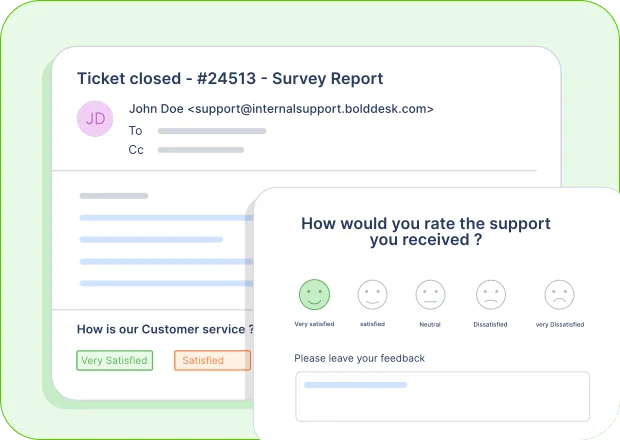
Send customer satisfaction surveys automatically once a ticket is resolved. You can also create follow-up workflows for low ratings to ensure quick recovery.
Automate reporting and performance tracking
Schedule automatic reports for key customer service metrics like first response time, resolution time, SLA compliance, backlog aging, and agent workload distribution.
This helps evaluate team productivity, uncover performance trends, and identify areas for improvement.
Offer self-service options to deflect tickets
Automate knowledge base article suggestions during ticket creation or chat interactions. By recommending relevant help content before a ticket is submitted, you can reduce repetitive queries.
To maximize ticket deflection and improve resolution speed, build a comprehensive self-service in help desk that combines searchable knowledge base content, FAQs, and customer portal resources.
Example:
When a user submits a “can’t log in” request, the system automatically tags it as an access issue, sends a secure self-service reset link, and escalates only if the issue persists. This reduces repetitive tickets and gets users back into the product faster.
Send automated status updates to customers
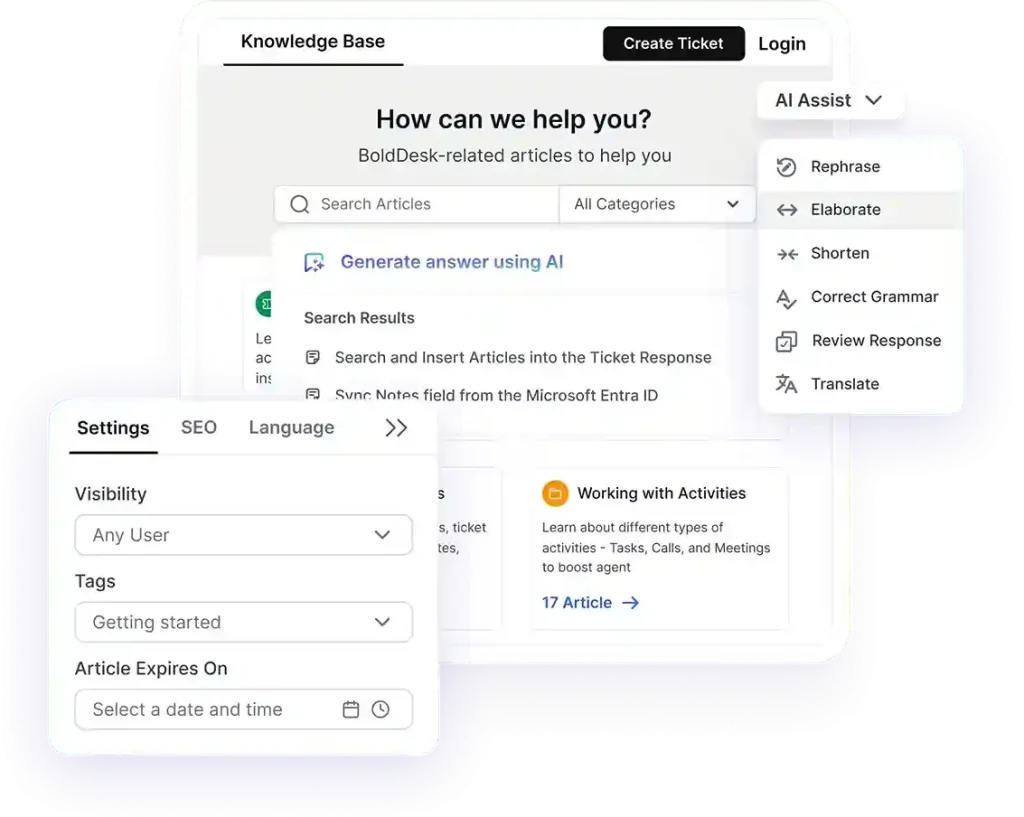
Set up automatic alerts and notifications when ticket status changes, responses are added, or resolutions are completed. You can also schedule follow-up updates for longer-running issues.
Example:
When multiple tickets mention “system down” or “error,” automation groups them under an incident tag and sends an immediate status update with an ETA. This reduces ticket duplication and reassures customers during service disruptions.
Enable smart auto-responses
Automatically acknowledge incoming tickets with confirmation messages that include estimated response times, ticket numbers, and helpful knowledge base links.
When done well, these responses can even suggest relevant articles based on keywords in the request.
Teams that handle recurring requests can also benefit from using help desk macros best practices to speed up responses and maintain consistency.
Automate field updates and data enrichment
Automatically update ticket fields based on customer information such as subscription plan, product type, or issue category. You can also enrich tickets with CRM data to give agents more context upfront.
These updates give agents more context, improve service consistency, and help build customer trust. Also, they enhance customer satisfaction and increase the chances they will leave positive feedback.
Integrate with other tools to eliminate duplicate work
Connect your help desk with CRM systems, DevOps tools, and team collaboration platforms like Slack or Microsoft Teams. Automations can integrate ticket updates, create development tasks, or notify internal teams automatically.
This streamlines help desk workflows, enhances efficiency, and boosts overall productivity.
If your goal is to redesign and refine support processes, our support workflow optimization guide explores workflow analysis, bottleneck reduction, and continuous process improvement in greater depth.
Utilize service level agreement (SLA) escalation rules
Configure automated workflows that monitor SLA deadlines and trigger actions before breaches occur. These can include reminders to agents, priority changes, or automatic escalation to team leads.
While automation can significantly improve response times and efficiency, it’s important to tailor these workflows to your industry.
For example, in the food and hospitality sector, following the right help desk do’s and don’ts for restaurants is key to ensuring a positive customer experience.
Resolve routine support requests with AI agents
AI agents can automatically handle repetitive customer inquiries such as password resets, account access requests, order status checks, subscription questions, and basic troubleshooting.
This helps reduce ticket volume, improves response times, and allows support teams to focus on more complex customer issues.
Streamline employee onboarding and offboarding workflows
Internal help desks can simplify onboarding and offboarding processes by automatically creating tasks, assigning approvals, provisioning access, and notifying stakeholders.
This improves consistency while reducing manual coordination between IT, HR, and other departments.
For broader operational strategies and support team management insights, explore our guide on help desk management.
Example:
When a new employee joins, an automated workflow can provision software licenses, create device setup tasks, assign training activities, and notify relevant teams.
During offboarding, the same workflow can revoke access permissions, recover company assets, and maintain compliance records.
What are the key features to look for in automated help desk software?
To deliver an effective and reliable customer support experience, automated help desk software should include the following key features:
- Ease of use and intuitive design: The platform should be simple for both agents and customers to navigate. A clean interface, straightforward workflows, and easy configuration reduce onboarding time and improve productivity. Customer self-service options, such as knowledge bases and ticket submission portals, should be easy for customers to access without requiring support.
- AI‑driven automation capabilities: Modern help desk systems should include advanced automation features powered by AI. These may include intelligent ticket routing, response suggestions, prioritization based on urgency, and automatic classification of requests. Strong AI automation ensures faster resolutions and reduces manual workload on support teams.
- Strong security and compliance standards: A good, automated help desk system must protect customer data at every stage. This includes spam filtering, blocking suspicious activity, and secure handling of tickets. Compliance with standards like GDPR or HIPAA is crucial, especially for IT and customer service environments handling sensitive information.
- High reliability and system performance: Consistent uptime, fast load speeds, and frequent software updates ensure that support operations stay uninterrupted. A reliable help desk platform minimizes downtime, maintains customer trust, and keeps internal workflows running smoothly.
- Customizable workflows: The software should allow teams to tailor automation rules to fit their processes, whether that means routing tickets to specific departments, setting escalation triggers, or defining service‑level rules. Customizable help desk workflows ensure the system can fully adapt to different business needs and support models.
While automation focuses on streamlining repetitive workflows, exploring AI-powered customer support tips can help teams further enhance decision-making, personalization, and response quality.
AI agent workflows for help desk automation
AI agent workflows extend traditional automation by handling tasks that normally require human decision-making. Here are 10 practical AI agent workflows that support teams can implement to streamline operations and accelerate issue resolution.
- Autonomous refund and return workflow: The AI agent verifies eligibility, generates return labels, tracks item receipt, and processes refunds automatically. This workflow highlights how AI actions can complete tasks, not just answer questions.
- Intelligent ticket triage workflow: The AI analyzes ticket content, urgency, and sentiment before assigning the request to the most appropriate specialist. Many support teams use AI email triage to reduce misrouting and speed up responses.
- Password reset and account recovery workflow: The AI verifies identity, resets credentials through connected systems, and confirms completion without agent involvement. This is a common use case for AI agents in customer service.
- Solved ticket-to-knowledge workflow: After resolving a ticket, the AI identifies reusable solutions, drafts documentation updates, and routes them for review, helping teams build an AI knowledge base.
- Proactive incident communication workflow: When similar issues spike, the AI identifies a potential outage, drafts status updates, and notifies affected customers before ticket volumes escalate.
- Agent assist workflow: The AI summarizes conversations, surfaces relevant resources, and drafts responses before agents engage. Many teams use this approach to improve agent productivity with AI.
- Support escalation workflow: When automation reaches its limits, the AI compiles customer history, summarizes prior actions, and routes the case to the right specialist. This complements strategies that balance AI vs human customer service.
- Subscription and billing management workflow: After verifying customer authorization, the AI can process plan changes, update payment details, and generate invoices without manual intervention.
- Customer engagement workflow: The AI automatically delivers onboarding guidance, follow-ups, reminders, and proactive updates based on customer activity, supporting AI for customer engagement.
- Autonomous service resolution workflow: For routine requests, the AI can determine the best action, execute approved tasks, verify the outcome, and close the ticket automatically. This reflects the capabilities of agentic AI in customer experience.
Challenges in implementing help desk workflow automation
AI service desk automation provides considerable benefits, but organizations must tackle certain obstacles to guarantee successful implementation.
It is crucial to engage experts in implementing help desk automation, considering that 88% of automation initiatives report technical complications (Camunda).
Here are some of the challenges.
| Challenge | Impact | Recommended approach |
| Balancing automation with human support | Over-automation can reduce empathy and personalization in complex cases. | Automate repetitive tasks but escalate nuanced issues to human agents using intent/sentiment triggers. |
| Technical implementation complexity | Automation projects frequently face configuration and integration errors. | Involve IT experts early and choose low-code platforms with strong documentation. |
| System integration challenges | Connecting automation with CRM, legacy systems, and multi-channel tools can disrupt workflows. | Map workflows before automation and select cross-platform-compatible tools. |
| Data security and compliance risks | Automation increases reliance on sensitive customer data. | Use encrypted, role-based systems and conduct regular security audits. |
| Managing customer expectations | Poor automation design can feel robotic and frustrate customers. | Clearly communicate automation usage and refine flows based on feedback. |
6 Best help desk automation tools for your business
To help you choose the best help desk software, we evaluated leading solutions using a structured selection framework.
Our criteria included automation depth, ease of use, integration capabilities, scalability, pricing transparency, and verified customer feedback and reviews from G2.
Let’s delve into the top six help desk solutions renowned for their outstanding automation capabilities.
| Software | Pricing starts at | Best for | G2 |
| BoldDesk | $99/month for 5 agents | AI‑powered automation with flexible, cost‑efficient scaling. | 4.5/5 |
| Salesforce Service Cloud | $25/agent/month | CRM‑driven, omni‑channel support. | 4.4/5 |
| Zendesk | $19/agent/month | Ticketing with AI and multilingual support. | 4.3/5 |
| Freshdesk | $19/agent/month | User‑friendly omnichannel support. | 4.4/5 |
| HappyFox | $24/agent/month | Automation for core ticket workflows. | 4.5/5 |
| HelpDesk | $29/agent/month | Rule‑based automation with clean workflow control. | 4.6/5 |
1. BoldDesk
Best for: AI-powered help desk automation with scalable workflows for growing support teams.
BoldDesk is a cloud-based help desk platform that helps teams automate ticket handling, reduce manual triage, and improve response consistency across support channels.
How BoldDesk automates help desk operations
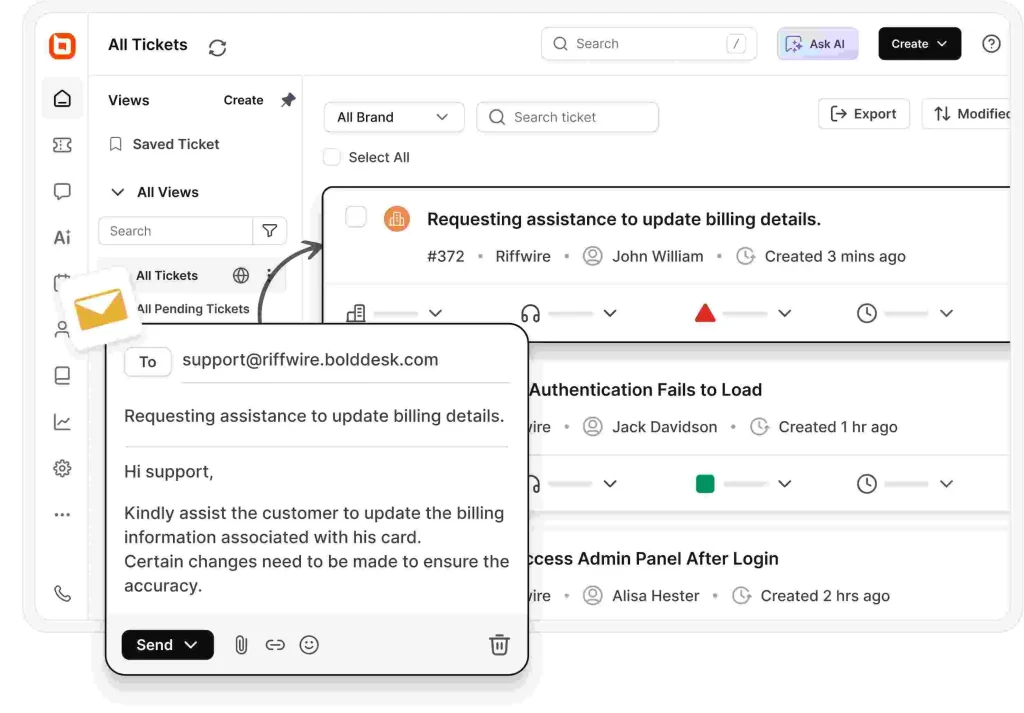
BoldDesk streamlines support by reducing repetitive tasks, allowing agents to focus on complex, high-value interactions.
With AI-powered automation, AI agents handle common queries and escalate complex ones, while AI Copilot speeds up responses with suggestions and summaries, and AI Actions trigger real-time tasks like fetching data or updating systems.
The platform also simplifies support operations through configurable rules and SLA management, enabling teams to:
- Automatically create, categorize, and route tickets
- Assign tickets based on priority, category, or custom rules
- Send SLA reminders and trigger escalations for breaches
- Automate tagging, notifications, and ticket updates
These capabilities improve response times, reduce manual work, and ensure consistent, scalable support operations.
BoldDesk’s key features
- Help desk automation
- Intelligent ticketing system
- AI-powered knowledge base software
- AI Copilot
- Ticket AI agent
Pricing
- Starts at $99/month for 5 agents
For a complete breakdown of pricing tiers, including features and AI add-ons, explore the full BoldDesk pricing details.
Need More Agents? Let’s create a tailored solution just for you — speak with our experts today. You are welcome to initiate a 15-day free trial.
2. Salesforce Service Cloud
Best for: CRM‑driven, omni‑channel support.
Salesforce Service Cloud is a customer service tool that provides AI-powered workflows and automation. It allows users to gather all interactions in one place and get real-time updates from across multiple data sources.
Features
- Omnichannel routing
- Case management
- Reporting and analytics
- Email integration
- AI-powered customer service
Pricing
Starts at $25 per agent/month
Free trial: 30 days
3. Zendesk
Best for: Ticketing with AI and multilingual support.
Zendesk is an automated service desk platform that provides businesses with tools for ticketing, issue tracking, and customer service support. It features automation tools that can manage customer interactions, ticket routing, and responses.
Features
- AI-powered automated answers
- Ticket routing
- Reporting and analytics
- AI-powered knowledge management
- Multilingual support and content
Pricing
Starts at $19 per agent/month
Free trial: 14 days
4. Freshdesk
Best for: User‑friendly omnichannel support.
Freshdesk is a cloud-based automated help desk platform that offers a range of features aimed at helping businesses manage their customer service processes more effectively.
Freshdesk is known for its user-friendly customer portal, multi-channel ticketing system, and contextual reports.
Features
- Ticket routing
- Round-robin routing
- Collision detection
- Custom reports and dashboards
- Knowledge base approval workflow
Pricing
Starts at $19 per agent/month
Free trial: 21 days
5. HappyFox
Best for: Automation for core ticket workflows.
HappyFox is a help desk automation tool that offers multiple automation features that help businesses reduce support costs and enhance team productivity.
Features
- Automatic ticket escalation
- Automatic ticket assignment
- Artificial intelligence
- Live chat
- Knowledge base software
Pricing
Starts at $24 per agent/month
Free trial: 14 days.
6. HelpDesk
Best for: Rule‑based automation with clean workflow control.
HelpDesk is a ticketing system that allows users to develop personalized automated workflows depending on specific conditions and actions. The platform also automatically distributes tickets to agents based on their department or skills.
Features
- Workflow automation
- Reporting and analytics
- Automatic ticket prioritization
- Knowledge base
- Customizable email templates
Pricing
Starts at $29 per agent/month
Free trial: 14 days
Unlock productivity gains with help desk automation
Help desk automation isn’t just a support upgrade; it’s a direct path to higher ROI, faster resolutions, and a more productive team. By automating repetitive tasks, reducing manual overhead, and improving response accuracy, your business can deliver better customer service while lowering operational costs.
When implemented through a modern service desk like BoldDesk, these automation ideas translate into measurable outcomes: shorter ticket queues, happier customers, and a support operation that scales effortlessly as your business grows.
Ready to boost productivity and unlock real ROI? Explore BoldDesk’s automation features and start transforming your support workflows today.
If you’ve tried help desk automation strategies that worked well for your team, share your insights in the comments. We’d love to hear them.
We hope you found this blog helpful. Have more help desk automation ideas? Please share in the comment section below.
Related articles
- Automated Customer Service: The Complete Details
- The Best Automated Ticketing System for Businesses (2026)
- Transform Your Help Desk: Automation for Small Businesses