



AI triage, routing, and drafted replies in every ticket
Ticket Management System That Ends Manual Triage
Every email, chat, and social message becomes a tracked ticket with an owner, a priority, and an SLA. AI classifies and routes the ticket the moment it lands, then drafts the reply.
-
No credit card required
-
30-day money-back guarantee
-
Teams switching typically save up to 70%
Trusted by Companies of all Sizes



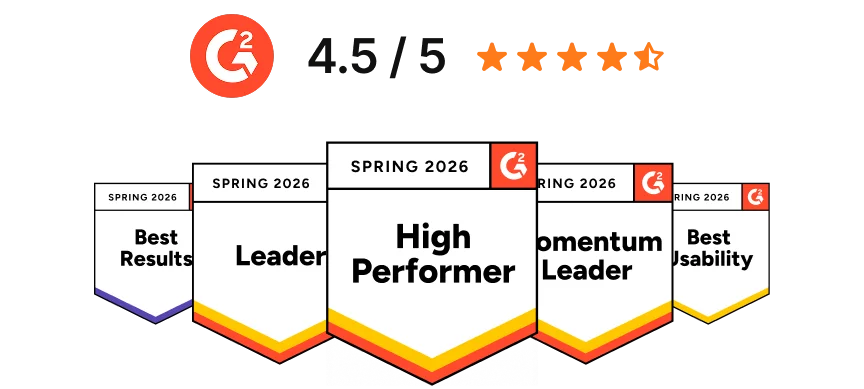
Backed by Syncfusion
41K+
Companies worldwide
25+
Years in business
80%
of the Fortune 500 use Syncfusion software
3M+
Tickets Migrated
Free
Migration & Onboarding
SOC 2, GDPR & HIPAA
Compliant · HIPAA with BAA
99.9%
Uptime SLA
The business case
What a Ticket Management System Changes for Your Team
Requests spread across inboxes are slow to answer and impossible to measure. Move them into one tracked queue and six things change straight away.
Centralized requests
Capture every customer query in one organized queue instead of scattered inboxes and forwarded threads.
Faster resolutions
Route each request automatically, prioritize by urgency, and hit SLA targets without chasing.
Smarter teamwork
Assign tasks, use private notes and mentions, and resolve issues without cc'ing half the company.
Actionable insights
Track resolution times, agent workload, and CSAT to find the bottleneck and fix it.
Better customer experience
AI-first ticketing delivers faster, more consistent replies on whichever channel the customer chooses.
Built to scale
Add agents, ticket volume, and new channels on the same flat plan, with no tier upgrade to unlock features.
Before and after
Ticket Management System vs Shared Email Inbox
Most teams outgrow a shared mailbox at the same six points. This is where the cost is hiding.
What you need
Shared Email Inbox
BoldDesk Ticket Management
Ownership
Anyone can reply, or nobody does. Duplicate replies are common.
Every ticket has one assigned owner and a visible status.
Deadlines
No response target. Old mail sinks down the list.
SLA policies set response and resolution targets, with reminders and escalation.
Routing
Manual forwarding, based on who happens to notice.
Rules pick the owner the moment a ticket arrives, so nothing needs forwarding.
Channels
Email only. Chat and social live in separate apps.
10+ channels land in the same queue with full customer history.
Reporting
No data on volume, resolution time, or satisfaction.
Dashboards for volume, SLA compliance, agent performance, and CSAT.
Self-service
The same question gets answered by hand every time.
Knowledge base and portal deflect repeat questions before they reach an agent.
Already on a help desk and comparing cost instead? See BoldDesk vs Zendesk. Running an internal IT or employee service desk? Start with our IT help desk ticketing system.
How it works
How a Ticket Management System Works, Step by Step
Four stages, each driven by rules you set once.
1. Capture and classify
The request arrives on any channel and becomes a ticket. Rules tag it, set the priority, and merge duplicates. Status: New


2. Assign
Round robin, agent load, or skill-based rules pick the owner. Nobody sorts the queue by hand. Status: Open
3. Work and resolve
Agents reply with AI-drafted or saved responses. SLA reminders and escalations fire on your schedule. Status: Open or Waiting
4. Confirm and close
Marked Solved for the customer to confirm, then Closed. A later reply reopens it automatically. Status: Solved, then Closed
Every request, one queue
10+ Support Channels, One Ticket Queue
Customers pick how they reach you. Your team works from one place with full context on every ticket, so nothing gets forwarded and nothing gets lost.
Voice arrives through native dialer integrations, so a phone call opens a ticket like any other request, with the caller's history already attached.
Your own systems can open tickets too
-
REST API. Raise a ticket straight from your own product, billing system, or internal tooling.
-
Trigger rules. Act on those tickets on arrival, on update, or on a timer, with no agent in the loop.
One Unified Platform
Manage the Full Ticket Lifecycle From One Workspace
Seven modules sharing one ticket record, one set of rules, and one bill, instead of seven separate tools your team switches between all day.

One ticketing system, built for all
Ticket Management for SaaS, Healthcare, Retail, and More
One subscription, six ready-made setups. Pick the sector you operate in and the workflows, permissions, and forms are already shaped around it.
-
SaaS & Tech
-
Healthcare & Insurance
-
E-commerce & Retail
-
Banking & Finance
-
Education & Government
-
Logistics & Transportation
Streamline Support for Rapid Growth
BoldDesk empowers SaaS businesses to scale support operations while maintaining high customer satisfaction.
-
Omnichannel support. Manage customer queries from email, chat, and social media in one place.
-
Automation. Automate ticket assignments and responses to handle high volumes efficiently.
-
Integrations. Connect with tools like Slack, Microsoft Teams, and your CRM.

Ensure Secure and Compliant Patient Support
BoldDesk helps healthcare providers manage patient interactions efficiently and securely.
-
Secure ticketing. Handle patient inquiries with enterprise-grade security.
-
Workflow automation. Streamline processes like appointment scheduling and claims handling.
-
Knowledge base. Provide self-service answers for common patient questions.
-
Compliance ready. HIPAA compliance under a signed BAA for health data, GDPR for user privacy, and a SOC 2 Type 2 report for secure operations.

Enhance Customer Experience Across Channels
BoldDesk enables e-commerce businesses to provide seamless and personalized customer support.
-
Live chat support. Offer real-time assistance during the shopping journey.
-
Automated workflows. Simplify returns, refunds, and order tracking.
-
Multilingual support. Serve a global customer base in their own language.

Deliver Trustworthy and Efficient Financial Support
BoldDesk assists financial institutions in providing secure and compliant customer service.
-
Data security. Protect sensitive financial information with AES-256 encryption and IP restrictions.
-
Compliance. Stay aligned with industry regulations through secure ticketing and audit logs.
-
Automation. Expedite processes like loan inquiries and account management.

Streamline Communication and Support Services
BoldDesk supports educational and governmental organizations in enhancing their support services.
-
Centralized ticketing. Manage student or citizen inquiries efficiently.
-
Knowledge base. Offer self-service resources for common questions.
-
Automated workflows. Simplify administrative processes and support tasks.

Optimize Support for Fast-Moving Operations
BoldDesk enables logistics providers to deliver responsive, efficient, and well-organized customer support across every delivery touchpoint.
-
Centralized ticketing. Manage student or citizen inquiries efficiently.
-
Knowledge base. Offer self-service resources for common questions.
-
Automated workflows. Simplify administrative processes and support tasks.


Ticketing Integrations for Jira, Slack, Teams, and Salesforce
Ticket updates move both ways, so engineering, sales, and finance all work from the same customer record. Nobody has to copy a status into a second tool, and nothing goes stale between systems.


-
Connect Slack, Microsoft Teams, Zoom, and Google Workspace so support work reaches the team where it already happens.
-
Build anything else on a documented REST API and webhooks with no plan upgrade required to use them.
-
Fit tickets into your existing workflow with marketplace apps rather than rebuilding around the help desk.
On the move
Manage Tickets From the iOS and Android App
Reply on the move across every channel, with the same queue, rules, and customer history your team sees on the desktop. Scan a code below to install it.

-
Mobile-ready. Tablet-friendly. Desktop-optimized.
-
Deliver fast, secure support from iOS, Android, Mac, or Windows right when your customers need it most.


Switching is covered
Migrate Tickets, Customer History, and Workflows Without Starting Over
Switching help desks is the main reason teams stay stuck on a tool they have outgrown. Here is how that risk comes off the table.
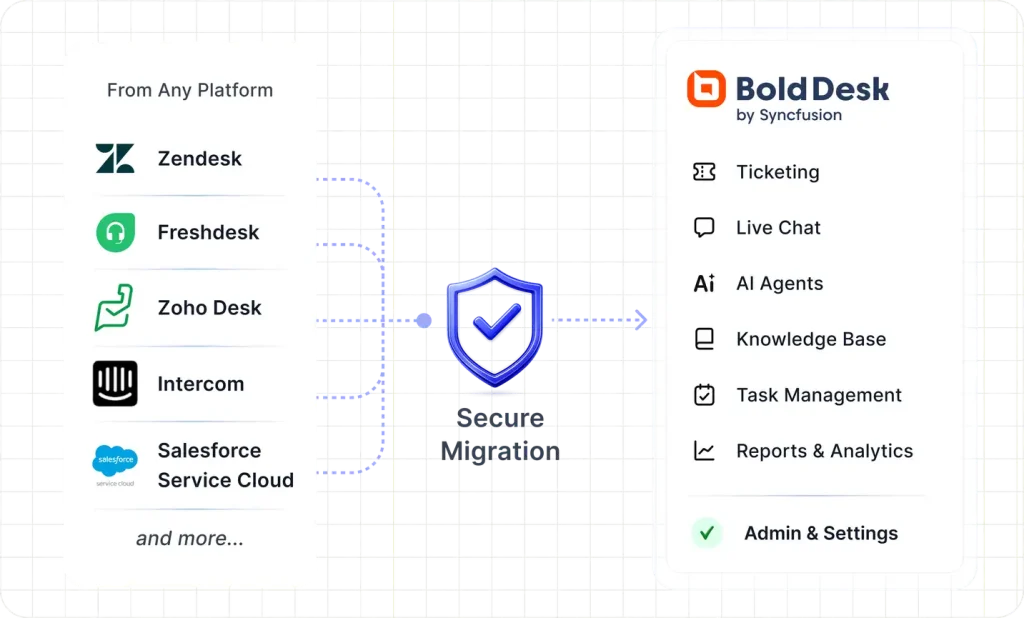
Free expert-led migration
Tickets, contacts, knowledge base, and automations, rebuilt so your rules work from day one.
Review in a live sandbox
Verify everything before your team switches over. Nothing changes until you say so.
Free until your contract ends
Switch before renewal without paying for two help desks.
Guided onboarding on every plan
Most teams are productive within hours of go-live.
 Secure, expert-led migration
|
3M+ tickets migrated
Secure, expert-led migration
|
3M+ tickets migrated
-
Up to 70% Savings vs Zendesk

-
G2 Leader Fastest Implementation
-
30 Day Money-Back Guarantee
-
Enterprise Grade Security
-
99.9% Uptime SLA
Security & Compliance
Ticket Management Built for SOC 2, GDPR, and HIPAA
Protect customer data with secure infrastructure, compliance-ready controls, and enterprise-grade access management.
-
SOC 2 Type 2 report & GDPR compliant
-
AES-256 encrypted infrastructure
-
SSO and IP restrictions
-
HIPAA compliance with a signed BAA
-
Secure cloud architecture
-
Role-based access control and audit logs

See How Support Teams Improve Ticket Management
Here are a few kind words from some of our happy customers.



Frequently Asked Questions
A ticket management system is a help desk solution that centralizes customer requests into trackable tickets and streamlines support using workflow automation, SLA tracking, a customer support portal, and service desk analytics. Every request gets an owner, a priority, and a deadline instead of sitting in a shared mailbox.
A ticketing system focuses on capturing, tracking, and resolving individual requests. Help desk software builds on that with a knowledge base, self-service portal, live chat, and performance reporting. BoldDesk includes both in the same plan, so you get the ticket queue and the surrounding tools without buying two products or upgrading a tier.
The usual signals are practical rather than numerical: requests get missed or answered twice, nobody is clearly responsible for a given issue, customers have to repeat themselves, and you cannot report on how long anything took. If a shared mailbox no longer tells you what is outstanding and who owns it, a ticket management system is the fix, whatever the size of the team.
BoldDesk is one plan priced by team size, billed yearly: $99 a month for 5 agents, $199 for 10, $499 for 25, $999 for 50, $1,399 for 75, and $1,799 for 100 agents. Published tiers continue to 250 agents, with custom pricing above that. Every tier includes the same features, with a 15-day free trial, no credit card required, and a 30-day money-back guarantee.
Ticketing, automation, SLAs, knowledge base, and reporting are all in the base plan. The AI products are included: AI Copilot and AI Agent come with every plan, and credit tiers start from $99/month for 1,000 AI credits. Rates are flat and published rather than charged per resolution, and starter credits are included in every plan.
Email, live chat, WhatsApp, Facebook, Instagram, Telegram, SMS, LINE, web forms, embedded widgets, Microsoft Teams, and Slack all create tickets in the same queue. That is 10+ support channels handled from one workspace.
Voice is delivered through native dialer integrations rather than a built-in phone system. BoldDesk connects to Twilio, Aircall, Ringover, Exotel, and Ozonetel, so calls log against the customer record and create tickets alongside every other channel.
Yes. No-code automation rules assign, tag, prioritize, and escalate tickets on creation or update. Round robin, load-based, and skill-based assignment are all supported, alongside SLA reminders, time-based automations, and ticket macros.
New is the default when a ticket is created and still unassigned. It becomes Open automatically once assigned to an agent or group. Waiting for Customer, Hold, Solved, and Closed cover the rest of the lifecycle. Statuses in the Hold and Close categories pause the SLA timer. You can add custom statuses in the Pending and Hold categories, and the default system statuses cannot be deleted.
Yes. The BoldDesk REST API lets your own applications create, update, and close tickets programmatically, including setting the status directly. Create, update, and time-based trigger rules then act on those tickets as soon as they arrive, applying priority, category, and assignment without an agent touching them.
BoldDesk adapts to SaaS and technology, healthcare and insurance, e-commerce and retail, banking and finance, education and government, and logistics and transportation. Each vertical uses the same platform with different workflows, compliance controls, and routing rules.
Yes. The same platform runs customer support and internal help desk queues, with multi-brand support, private knowledge bases, role-based permissions, and separate ticket forms per team, so you do not need a second system for internal requests.
Migration is expert-led and free. Tickets, contacts, knowledge base articles, and automation rules are rebuilt so your workflows run from day one, and you verify everything in a live sandbox before switching. Most teams go live in weeks, and BoldDesk stays free until your current contract ends.
Start Managing Tickets Without Manual Triage
We migrate you free. You don't pay until your current contract ends. And if it's not right, you get 100% back within 30 days. BoldDesk is help desk software with ticketing, AI, live chat, and omnichannel priced as one plan.
-
No Feature Paywalls
-
No Forced Upgrades
-
Free Migration
-
No Credit Card Required
-
Cancel Anytime
-
No Feature Paywalls
-
No Forced Upgrades
-
Free Migration
-
No Credit Card Required
-
Cancel Anytime