

Shopify Integration That Puts Every Order in the Ticket
For e-commerce support teams: see each customer’s orders and history on the ticket, and cancel or refund orders without opening Shopify.
- 15-day free trial
- No credit card required


Customers Ask About Orders. Agents Need the Answer. The Integration Brings It to the Ticket.
When order details sit in another tool, every “Where is my order?” takes longer to answer. Connected, agents resolve order questions in one reply.
-
Before:
Searching the Shopify adminFaster Order Answers
Customers get order answers without waiting on a lookup.
-
Before:
Hand-offs for every refundRefunds Without Hand-Offs
Agents fix order problems themselves instead of passing them on.
-
Before:
One help desk per storeEvery Store in One Place
One team supports every store from a single help desk.
Handle Every Order Question Without Leaving Your Help Desk
Answer order questions, refund and cancel from the ticket your agents already work in.
-
Order Details
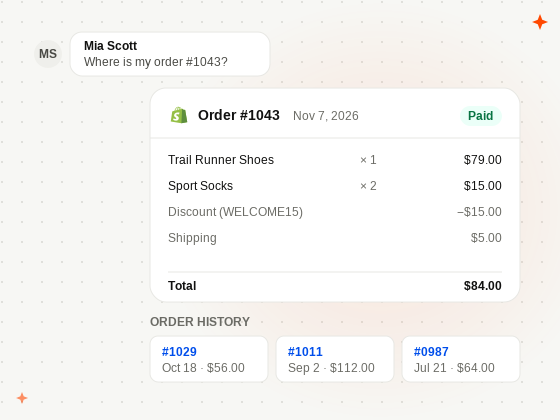
See Orders and Order History on the Ticket
The customer’s orders and order history show on the ticket, with items, pricing, shipping and discounts.
-
Refunds
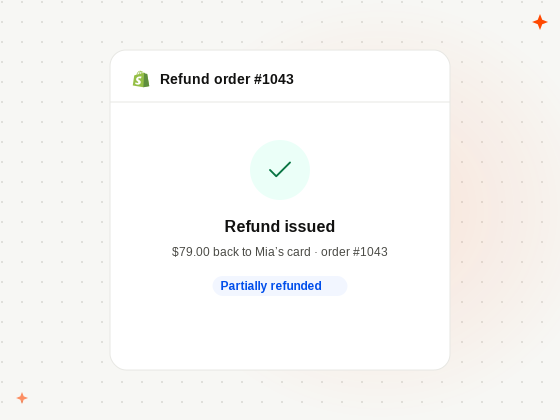
Refund Orders From the Ticket
Refund a paid Shopify order right from the customer’s ticket, with no need to sign in to the Shopify admin.
-
Cancellations
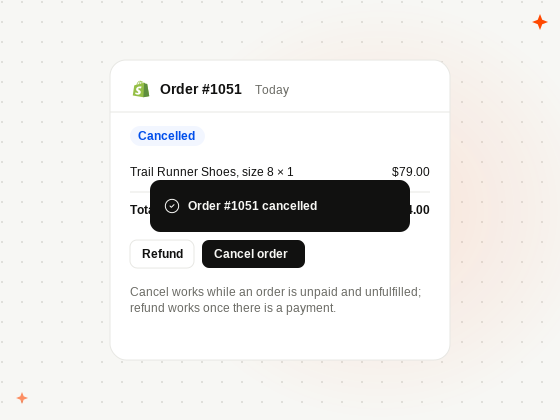
Cancel Unpaid Orders Before They Ship
Cancel an unpaid Shopify order right from the ticket before it ships, then let the customer know.
-
Multiple Stores
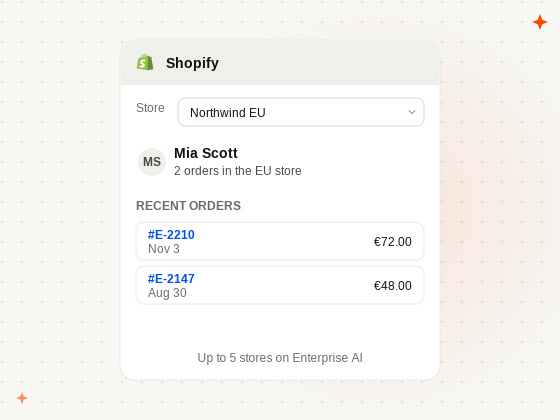
Support Several Shopify Stores in One Help Desk
Connect more than one Shopify store, then pick the store on the ticket to see the right customer and orders.
How Store Support Teams Use BoldDesk and Shopify
Real situations from stores that sell on Shopify.
-
Holiday rush
Get Through a Flood of Black Friday Order Questions
Hundreds of “where’s my order?” emails, each answered with the order in view.
- Order questions pour in after a holiday sale
- Each ticket shows the customer’s recent Shopify orders
- Agents answer from the order details, no admin login
-
Bank transfer orders
Cancel an Order a Customer Never Paid For
A shopper chose bank transfer, changed their mind and never paid.
- The shopper asks to cancel before paying
- The agent sees the order is unpaid and unfulfilled
- The agent cancels it from the ticket
-
Multi-brand retail
Support Two Shopify Stores With One Team
A retailer runs a store per brand, and one team answers for both.
- Customers of both stores write to one support team
- Each ticket shows orders from the right store
- Agents handle both without switching admins
Related Integrations
Connect BoldDesk to the other commerce and payment tools your store runs on.



Security & Compliance
Enterprise-Grade Security and Compliance
Protect customer data with secure infrastructure and enterprise-grade access controls.
- SOC 2 Type 2 report & GDPR compliant
- AES-256 encrypted infrastructure
- SSO and IP restrictions
- HIPAA compliance with a signed BAA
- Cloud only, hosted in the US, EU, India or Australia

Customers
Backed by Syncfusion, Trusted by 41K+ Companies
4.5/5 on G2 · Fall 2026 Leader, Momentum Leader, Best Est. ROI, Fastest Implementation
Recognized by Customers on G2
4.5/5 average rating on G2

-
Reelo Technologies Raj Khichi, Customer Support Executive, Reelo Technologies Pvt. Ltd.
Up to 24x
faster at solving customer queries, with 2.4x more tickets closed per day
Read the Reelo story -
GeoVerra One of Canada’s largest geomatics firms
25%+
improvement in service desk efficiency, with single sign-on via Entra ID
Read the GeoVerra story -
Eurotel Hospitality Hospitality software, Greece
~67%
more issues handled each week, from about 600 to about 1,000
Read the Eurotel story
-
"The overall application functionality is good, UI/UX and the configurations including automations all the other services are constantly working fine."
 Harsha R Support Team Lead
LTIMindtree -
"BoldDesk has everything you could imagine in a customer service platform, including many features like APIs that we are yet to explore fully."
Carlos R VP of Operations
Movisis Tecnologia Limited -
"BoldDesk provided an all-in-one solution that saves time and reduces redundancy, improving the user experience and shortening ticketing time by 50%."
 Amy Syncfusion
Frequently Asked Questions
What does the BoldDesk Shopify integration do?
It shows the customer’s Shopify details, recent orders and full order history on the ticket, matched by email, and lets agents cancel or refund orders from BoldDesk.
Can agents cancel or refund Shopify orders from BoldDesk?
Yes. Agents can cancel an order that is not paid and not yet shipped or fulfilled, and refund an order that has a payment to return.
Can I connect more than one Shopify store?
Yes. Admins add stores from Admin › My Apps › Shopify. Scale AI and Momentum AI connect one store; Enterprise AI connects up to five.
Which BoldDesk plans include the Shopify integration?
Every BoldDesk plan includes the Shopify integration: Scale AI, Momentum AI and Enterprise AI.
How do I set up the BoldDesk Shopify integration?
Create a custom app in the Shopify Dev Dashboard with the read_customers, read_orders and write_orders scopes, then install Shopify from Admin › Marketplace with its Client ID and Client Secret.
Answer Every Order Question
From One Place
Create a Shopify custom app, install Shopify from Admin › Marketplace, and see your first order in a ticket.