Small Business Help Desk Software With AI That Resolves Routine Tickets
BoldDesk is help desk software built for small business: one workspace for every customer request, AI that resolves routine tickets on its own, and enterprise-grade tools — at small-business pricing.
A customer's first simple question is also their first impression — answer it on time, and a one-time buyer becomes a long-term one.
When Your Inbox Becomes the Bottleneck
Messages get missed, duplicated, or left unanswered. BoldDesk converts every email into a tracked ticket, so nothing falls through the cracks.
When Your Agents Are Busy But Not Productive
Your team should solve problems, not repeat answers. BoldDesk AI and self-service resolve the routine questions before agents ever see them.
When Repetitive Tasks Consume Valuable Time
Assigning, updating, and following up shouldn't take a human every time. BoldDesk automation routes, prioritizes, and escalates on its own.
When You Lack Visibility Into Support Performance
Decisions built on assumptions are a risk. Real-time reports and CSAT tracking show volume, response times, and satisfaction in one place.
When Issues Go Unnoticed Until Customers Complain
A late reply can undo a good relationship fast. SLA monitoring and proactive alerts flag at-risk tickets before they breach.
Grow Support Without Growing Complexity
Ticketing, automation, AI, and integrations — everything a growing team needs, in one plan, without the cost climbing with it.
BoldDesk AI
Instant AI Support That Scales With Your Business
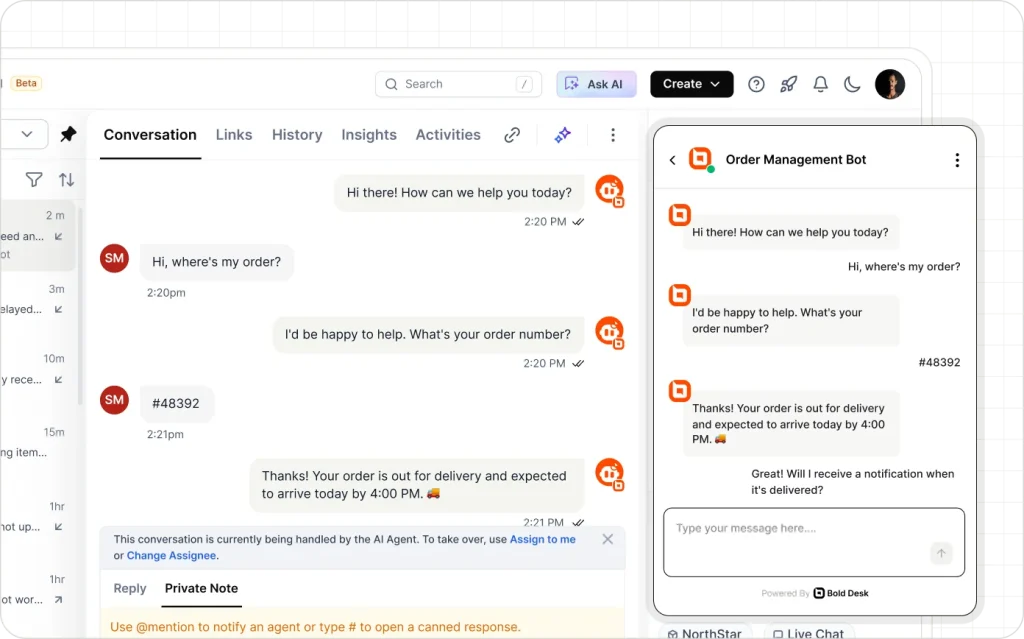
Customers expect fast, accurate answers at any hour. BoldDesk AI resolves up to 70% of routine requests automatically, assists agents in real time on the rest, and automates the repetitive work — so you can scale support without scaling headcount.
AI Agent — delivers instant answers to common questions and handles routine requests around the clock, without adding to ticket volume or agent workload.
AI Copilot — helps agents respond faster with AI-generated replies, conversation summaries, and knowledge suggestions that cut resolution time.
AI Actions — connects to your CRM, ERP, e-commerce, and other business apps to pull customer data and take action directly from a ticket, no tab switching required.
A Better Customer Experience Without a Bigger Payroll
You don't have to be an enterprise to get enterprise-grade features. Every plan ships with the complete platform, so growing your support quality never means growing your headcount or your budget.
BoldDesk AI learns from a library of files, website content, Q&A, and the knowledge base you’ve configured, then resolves routine questions on its own — with a clean handoff to a human whenever a case needs judgment.
Turn Customer Emails into Trackable Tickets
Explore Email Ticketing
Every email is automatically converted into a tracked ticket, so no customer request is ever missed. Customers can reply directly from their preferred email client while every conversation stays organized in one place.
Every Channel, One Workspace
Explore Omni Channel
WhatsApp, live chat, Facebook, Instagram, and more come together in a single workspace, so agents can manage customer conversations without constantly switching between apps.
Set It Up Once, Let It Run
Explore Automation
Route requests to the right agent, escalate issues on schedule, and keep response times on track — without constant manual oversight.
Let Customers Solve It Themselves
Explore Knowledge Base
Help customers find answers instantly with a searchable, multilingual knowledge base — reducing support volume and helping BoldDesk AI deliver better responses over time.
Dashboards Built In, Not Bolted On
Explore Reports
Ticket volume, response times, and agent workload — pre-built dashboards give you the numbers to fix bottlenecks, without exporting a single spreadsheet.
Integrations
Built to Fit Into a Small Team's Toolkit — Not Replace It
A small team can't afford to rebuild its workflow around new software. BoldDesk connects to the tools you already use — Salesforce, Jira, WhatsApp, and more — so switching means learning one new habit, not five.
Connect Salesforce, Jira, and WhatsApp so support work reaches the tools your team already uses.
Build anything else on documented REST APIs and webhooks — included on every plan, no upgrade required.
Fit tickets into your existing workflow across email, live chat, and social channels instead of rebuilding around the help desk.
A small team can't afford downtime or a failed migration. We move your tickets, contacts, and knowledge base for free, let you verify everything in a live sandbox first, and keep BoldDesk free until your current contract runs out.
Free expert-led migration
Tickets, contacts, knowledge base, and automations, rebuilt so your rules work from day one.
Review in a live sandbox
Verify everything before your team switches over. Nothing changes until you say so.
Free until your contract ends
Switch before renewal without paying for two help desks.
Guided onboarding on every plan
Most teams are productive within hours of go-live.
Enterprise-Grade Security, Without an Enterprise IT Team
A small team's customer data deserves the same protection as a Fortune 500's. SOC 2, GDPR, and HIPAA-ready controls come standard — nothing to configure yourself.
BoldDesk AI helps agents reply faster by drafting responses, summarizing conversations, and suggesting solutions. This helps your team handle more requests with less effort.
Plans start at 5 agents for $99/month billed yearly. If you are an early-stage company with under $1M ARR and under $10M raised, you may qualify for 12 months free for up to 10 agents through the BoldDesk Startup Program.
One Plan. Every Feature. Built for Small Business.
No upgrade prompts, no locked features, no fine print — just everything your team needs from day one.






 Secure, expert-led migration
|
3M+ tickets migrated
Secure, expert-led migration
|
3M+ tickets migrated


