

HubSpot Integration That Keeps Sales in the Loop
For support teams on HubSpot CRM: see each customer’s contact, company and deals on the ticket, and log every ticket in HubSpot as it opens and closes.
- 15-day free trial
- No credit card required


Sales Lives in HubSpot. Support Lives in BoldDesk. The Integration Connects the Two.
When sales can’t see support and support can’t see sales, customers get mixed messages. Connected, both teams know every customer’s full story.
-
Before:
Asking sales “who is this?”Context Before You Reply
Agents know the customer’s company and deals before they answer.
-
Before:
Support work invisible to salesSales Knows What’s Happening
Account owners see every support issue their customers raise.
-
Before:
Upsells lost in a support threadNo Upsell Missed
Buying interest that shows up in support reaches sales.
Bring HubSpot Into Every Support Conversation
Give agents the CRM context they need, and give sales a view of every ticket.
-
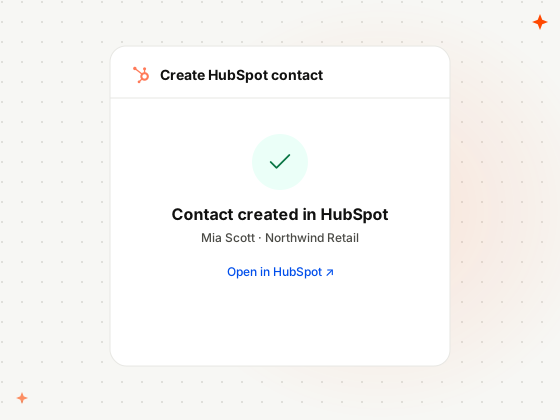
Create Records
Create HubSpot Contacts and Companies
Create HubSpot contacts and companies right from BoldDesk, without copying details between tools.
-
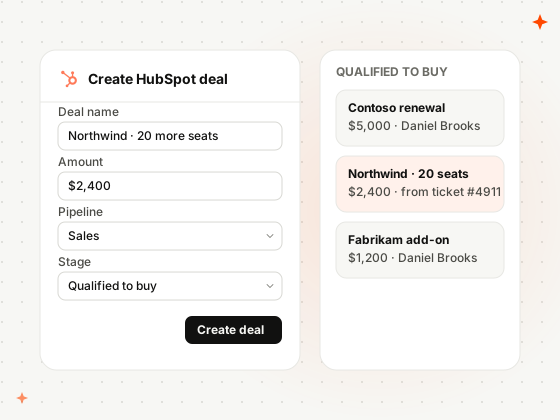
Deals
Turn Support Moments Into HubSpot Deals
Create a HubSpot deal from BoldDesk whenever a support conversation turns into a sales opportunity.
-
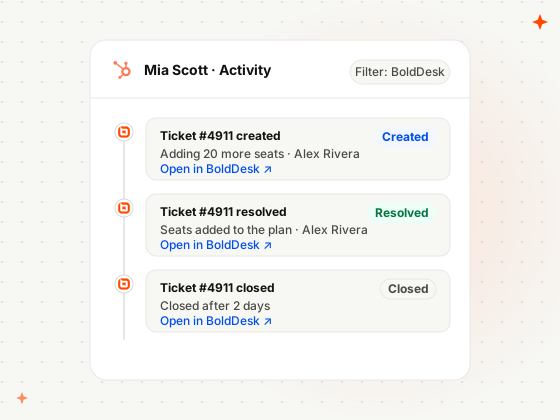
Ticket Activity
Log Tickets in HubSpot Automatically
Created, resolved and closed tickets log as HubSpot activities, with the subject, agent and a link back.
-
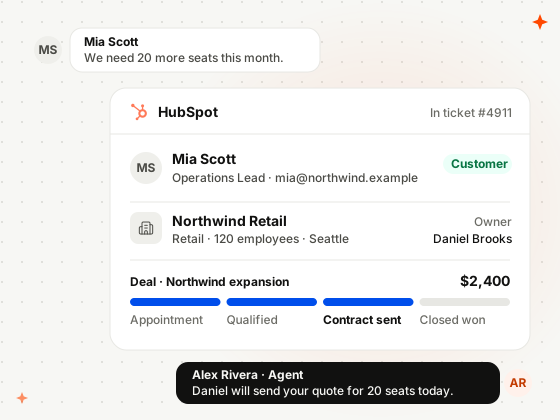
CRM Context
Contacts, Companies and Deals on the Ticket
The requester’s HubSpot contact, company and deals, with stage and amount, show right inside the ticket.
How Support and Sales Teams Use BoldDesk and HubSpot
Real situations from teams that run sales and marketing on HubSpot.
-
SaaS
Save a Deal That’s Stuck on a Support Issue
A prospect on a trial hits a bug, and the open deal tells support it’s urgent.
- A trial user reports a bug during their evaluation
- The agent sees the open HubSpot deal on the ticket
- Once resolved, the fix shows on the HubSpot timeline
-
Agencies
Brief an Account Manager Before a Client Call
Account managers see every support issue on the client’s HubSpot timeline.
- A client’s tickets are created and resolved in BoldDesk
- Each one is logged as a HubSpot activity
- The account manager reviews them before the call
-
Training providers
Turn a Support Question Into a New Sale
A company asks support about group training, and sales takes it from there.
- A company asks about training for 15 staff
- The agent adds them to HubSpot and opens a deal
- Sales follows up from their pipeline
Related Integrations
Connect BoldDesk to the other CRM and automation tools your revenue team runs on.



Security & Compliance
Enterprise-Grade Security and Compliance
Protect customer data with secure infrastructure and enterprise-grade access controls.
- SOC 2 Type 2 report & GDPR compliant
- AES-256 encrypted infrastructure
- SSO and IP restrictions
- HIPAA compliance with a signed BAA
- Secure cloud architecture

Customers
Backed by Syncfusion, Trusted by 41K+ Companies
4.5/5 on G2 · Fall 2026 Leader, Momentum Leader, Best Est. ROI, Fastest Implementation
Recognized by Customers on G2
4.5/5 average rating on G2

-
Reelo Technologies Raj Khichi, Customer Support Executive, Reelo Technologies Pvt. Ltd.
Up to 24x
faster at solving customer queries, with 2.4x more tickets closed per day
Read the Reelo story -
GeoVerra One of Canada’s largest geomatics firms
25%+
improvement in service desk efficiency, with single sign-on via Entra ID
Read the GeoVerra story -
Eurotel Hospitality Hospitality software, Greece
~67%
more issues handled each week, from about 600 to about 1,000
Read the Eurotel story
-
"The overall application functionality is good, UI/UX and the configurations including automations all the other services are constantly working fine."
 Harsha R Support Team Lead
LTIMindtree -
"BoldDesk has everything you could imagine in a customer service platform, including many features like APIs that we are yet to explore fully."
Carlos R VP of Operations
Movisis Tecnologia Limited -
"BoldDesk provided an all-in-one solution that saves time and reduces redundancy, improving the user experience and shortening ticketing time by 50%."
 Amy Syncfusion
Frequently Asked Questions
What does the BoldDesk HubSpot integration do?
It shows HubSpot contacts, companies and deals in BoldDesk, lets agents create HubSpot contacts, companies and deals from BoldDesk, and logs ticket details in HubSpot when tickets are created, resolved or closed.
Which HubSpot records can agents see in BoldDesk?
Contacts, companies and deals, in the ticket, contact and contact group pages. Admins choose up to 10 fields for each, and which roles and brands can see them.
What ticket information appears in HubSpot?
The ticket ID, subject, description, agent and requester, logged as an activity when the ticket is created, resolved or closed. In HubSpot, filter the Activity tab by BoldDesk to see them.
Which BoldDesk plans include the HubSpot integration?
Every BoldDesk plan includes the HubSpot integration: Scale AI, Momentum AI and Enterprise AI.
How do I set up the BoldDesk HubSpot integration?
An admin installs HubSpot from Admin › Marketplace, signs in to HubSpot, picks the fields to show for contacts, companies and deals, and sets who can read, modify and use the app.
Give Sales a Window
Into Every Ticket
Install HubSpot from Admin › Marketplace, sign in to HubSpot, and see your first customer’s deals in a ticket.