BoldDesk + WhatsApp Integration

Connect with WhatsApp on BoldDesk to enhance customer support.

BoldDesk and WhatsApp logos connected by flowing dotted lines to represent smooth and unified customer support integration.
Support agent at a laptop responding to WhatsApp messages, illustrating streamlined customer communication workflow.

Engage customers with WhatsApp Integration

  • Enhance your customer engagement by integrating WhatsApp into your chat support system.
  • You can connect with customers on a platform they already use and trust, ensuring that your communication is direct, convenient, and timely.

Connect your helpdesk to WhatsApp

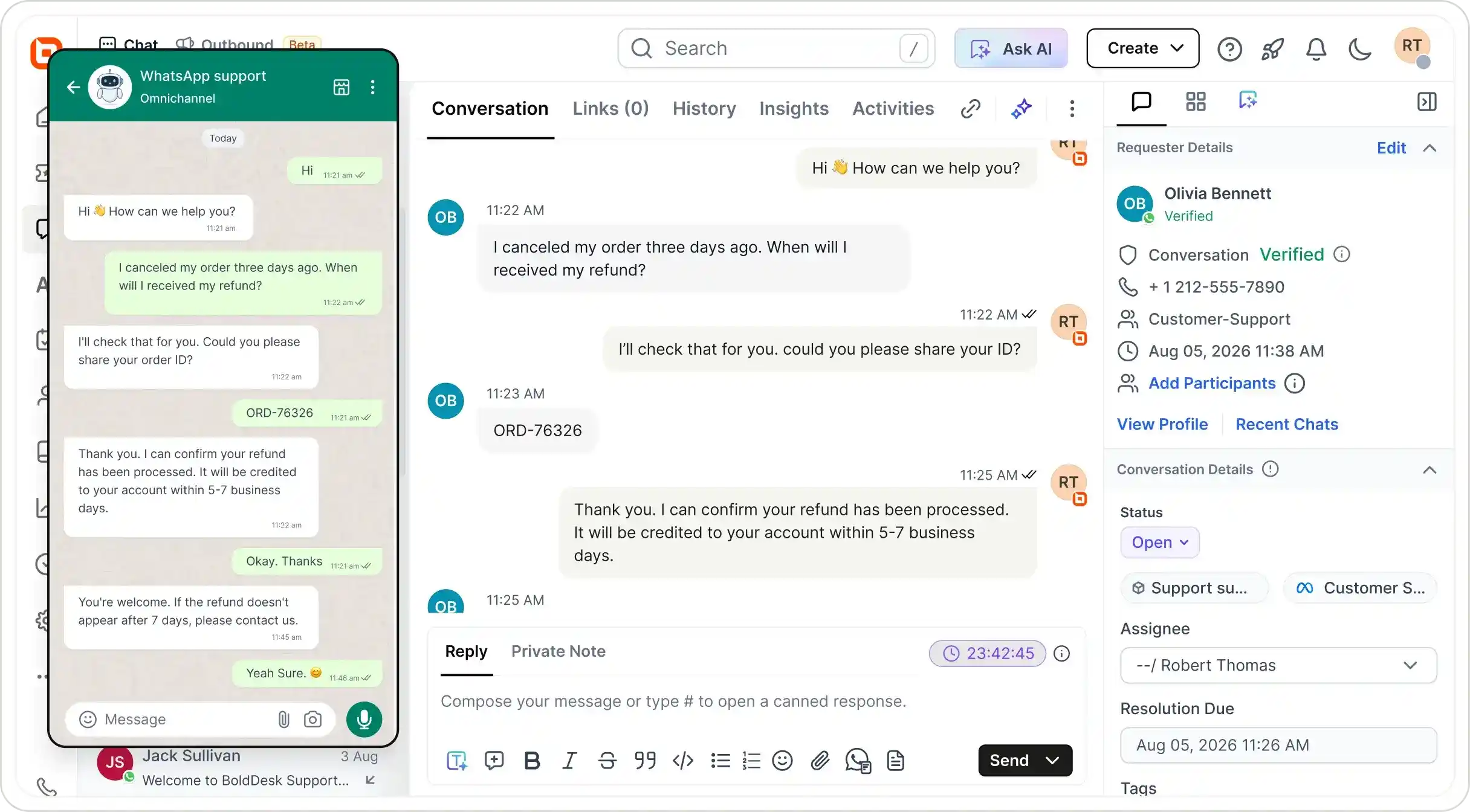
  • Every incoming WhatsApp message to your business account creates a chat in BoldDesk.
  • Your support agents can easily monitor and respond to WhatsApp inquiries without leaving BoldDesk.
Agent viewing WhatsApp conversations inside the BoldDesk chat interface, showing streamlined customer communication.
Support agent on a laptop handling multimedia messages, illustrating seamless file and media sharing in customer support.

Multimedia Support

  • Exchange all types of content for a richer and more convenient experience.
  • Seamlessly exchange texts, images, videos, documents, and other multimedia content with customers to enhance communication and enrich the customer experience.

Group Based Assignment for WhatsApp message

  • Streamline your support process by implementing group-based assignments for WhatsApp messages.
  • This targeted approach enhances efficiency, reduces response times, and ensures that customers receive accurate and personalized support from the most qualified agents.
WhatsApp message being automatically routed to the selected BoldDesk support group, illustrating group-based assignment.
BoldDesk interface showing phone number configuration popup for adding WhatsApp numbers, illustrating multi-number support.

Multi-phone number support

  • Enhance your WhatsApp integration with multi-phone number support, enabling your business to manage multiple WhatsApp numbers from a single platform.
  • Each number can be linked to a specific brand, enabling you to manage all communications efficiently and without any confusion.

Benefits:

  • Reach a global customer base
  • Build trust and demonstrate reliability
  • Improve customer satisfaction
  • Hold more engaging conversations
  • Solve problems faster
  • Connect to customers quickly & efficiently
  • Conduct asynchronous conversations with your customers

For more information on how to get started with the WhatsApp integration

Test out all the features of BoldDesk

Start your 15-day free trial with instant access

  • No credit card required
  • Easy setup
  • 80% AI Agent Automation
  • 100+ Rich Features
  • No credit card required
  • Easy setup
  • 80% AI Agent Automation
  • 100+ Rich Features
Help desk software interface showing ticket updates with multi-channel icons for Facebook, WhatsApp, and Slack.