

Pipedrive Integration That Shows the Deal Behind Every Ticket
For support teams selling with Pipedrive: see the person, organization and deal on each ticket, and create Pipedrive records without leaving BoldDesk.
- 15-day free trial
- No credit card required


Every Ticket Has a Deal Behind It. Now Support Can See It.
When agents can’t see the deal behind a ticket, key customers wait in line and sales hears about interest late. Connected, support knows what’s at stake.
-
Before:
Guessing which customers matter mostKnow What’s at Stake
Agents see which customers have deals in progress.
-
Before:
Sales hearing about interest lastHand Leads to Sales
Buying interest in support reaches sales the same day.
-
Before:
Typing the same customer twiceOne Set of Records
Customers are entered once and shared by both teams.
Give Support the Sales Context They’ve Been Missing
See who the customer is in Pipedrive and add what sales needs to know, from the ticket.
-
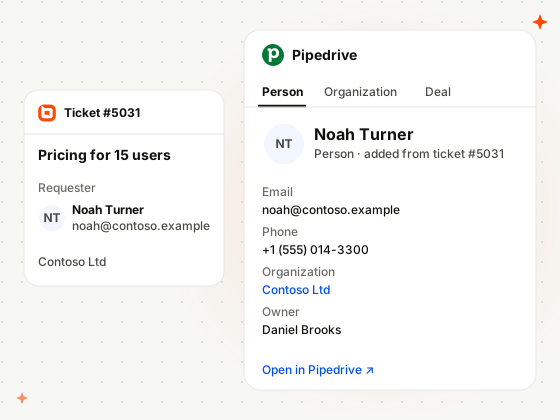
Create Person
Add New People to Pipedrive
Add a ticket’s requester to Pipedrive as a new person, with their name, email and organization filled in.
-
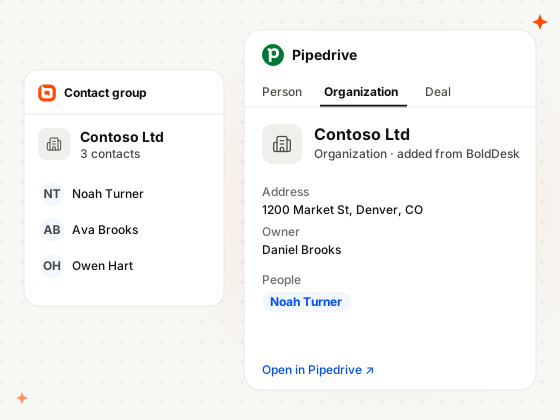
Create Organization
Create Organizations From BoldDesk
Add a customer’s company to Pipedrive as a new organization from BoldDesk, with its address and owner.
-
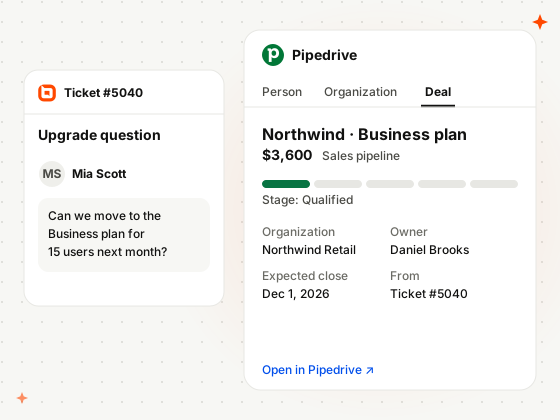
Create Deals
Create Pipedrive Deals From Support
Create a Pipedrive deal from the ticket so sales can follow up on interest that shows up in support.
-
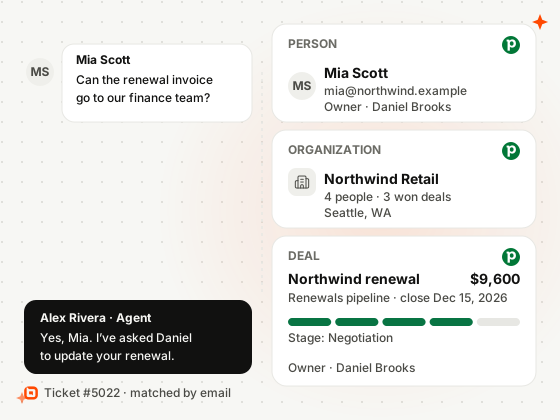
Context
People, Organizations and Deals on the Ticket
The requester’s Pipedrive person, organization and deals, with stage and owner, show right inside the ticket.
How Support and Sales Teams Use BoldDesk and Pipedrive
Real situations from teams that sell on Pipedrive.
-
Agencies
Answer a Prospect Without Derailing the Deal
A prospect writes to support in the middle of a contract negotiation.
- A prospect asks support about contract terms
- The agent sees the deal in Negotiation on the ticket
- The answer matches what sales has offered
-
Manufacturing
Treat a Distributor’s Many Contacts as One Account
Buyers, installers and accountants from one distributor all write in.
- Several people from one distributor open tickets
- Their contact group shows the Pipedrive organization
- Agents see every deal with that distributor
-
Equipment rental
Turn a Rental Extension Into Revenue
A customer asks support to keep the equipment longer, and sales gets a deal.
- A customer asks to extend their rental
- The agent creates a Pipedrive deal from the ticket
- Sales closes the extension in their pipeline
Related Integrations
Connect BoldDesk to the other CRM and automation tools your sales team uses.


Security & Compliance
Enterprise-Grade Security and Compliance
Protect customer data with secure infrastructure and enterprise-grade access controls.
- SOC 2 Type 2 report & GDPR compliant
- AES-256 encrypted infrastructure
- SSO and IP restrictions
- HIPAA compliance with a signed BAA
- Secure cloud architecture
Customers
Backed by Syncfusion, Trusted by 41K+ Companies
4.5/5 on G2 · Fall 2026 Leader, Momentum Leader, Best Est. ROI, Fastest Implementation
Recognized by Customers on G2
4.5/5 average rating on G2

-
Reelo Technologies Raj Khichi, Customer Support Executive, Reelo Technologies Pvt. Ltd.
Up to 24x
faster at solving customer queries, with 2.4x more tickets closed per day
Read the Reelo story -
GeoVerra One of Canada’s largest geomatics firms
25%+
improvement in service desk efficiency, with single sign-on via Entra ID
Read the GeoVerra story -
Eurotel Hospitality Hospitality software, Greece
~67%
more issues handled each week, from about 600 to about 1,000
Read the Eurotel story
-
"The overall application functionality is good, UI/UX and the configurations including automations all the other services are constantly working fine."
 Harsha R Support Team Lead
LTIMindtree -
"BoldDesk has everything you could imagine in a customer service platform, including many features like APIs that we are yet to explore fully."
Carlos R VP of Operations
Movisis Tecnologia Limited -
"BoldDesk provided an all-in-one solution that saves time and reduces redundancy, improving the user experience and shortening ticketing time by 50%."
 Amy Syncfusion
Frequently Asked Questions
What does the BoldDesk Pipedrive integration do?
It shows Pipedrive people, organizations and deals in BoldDesk and lets agents create new people, organizations and deals in Pipedrive from BoldDesk, so support and sales see the same customer.
Where do agents see Pipedrive data?
In the ticket, contact and contact group pages. Admins choose up to 10 fields each for people, organizations and deals.
Can agents create Pipedrive records from BoldDesk?
Yes. Agents can create Pipedrive people, organizations and deals from BoldDesk, using the customer details already in the ticket.
Which BoldDesk plans include the Pipedrive integration?
Every BoldDesk plan includes the Pipedrive integration: Scale AI, Momentum AI and Enterprise AI. Compare plans and pricing
How do I set up the BoldDesk Pipedrive integration?
Install it from the BoldDesk Marketplace or the Pipedrive Marketplace, sign in to Pipedrive, then pick the fields to show and which roles can read, modify and use the app. Read the setup guide
See the Deal Before
You Send the Reply
Install Pipedrive from the BoldDesk Marketplace, sign in, and see your first customer’s deal in a ticket.