









TL;DR: A successful help desk test is a controlled pilot, not a partial rollout. Keep the scope narrow, configure only essentials, freeze major changes, and measure a small set of outcomes (response speed, adoption, ticket clarity, and admin effort).
Testing new help desk software should make your decision easier. But many trials create confusion, agents work in multiple tools, admins keep changing rules, and leaders can’t trust the help desk metrics.
A help desk pilot plan fixes this by turning your test into a structured, measurable experiment.
You protect day-to-day support while still gathering the insights needed to make a confident decision.
This guide explains how to run a clear and predictable help desk pilot that your support team can easily manage.
What is a help desk pilot plan?
A help desk pilot plan is a small, controlled test to confirm that a core support workflow works smoothly for one team, one channel, and a limited set of ticket types.
It isn’t meant to cover every workflow, only to confirm that the basics run reliably.
By limiting variables and keeping the setup stable, a pilot makes results measurable and shows how well the workflow actually performs.
Why do help desk trials often fail without a pilot plan?
Help desk trials rarely fail because the product is bad. Most fail because teams treat the trial like a mini deployment instead of running a structured evaluation with clear help desk trial best practices.
Without a defined pilot plan, teams skip key steps such as setting evaluation goals, testing real workflows, and involving the right stakeholders.
Instead of one major mistake, the trial usually breaks down through small but recurring friction points:
- Too many channels get turned on before the core workflow is validated
- Rules, automations, and service level agreements (SLAs) change daily, so nothing has time to stabilize
- Multiple stakeholders jump in with feedback while the foundation is still shifting
- Data becomes noisy, making it impossible to tell whether issues come from the tool, the process, or yesterday’s routing tweak
- Agents lose confidence because every day feels different from the last
- Customers feel inconsistent responses as the system changes under them
- Leaders end the trial with vague, inconclusive takeaways like “it depends” instead of a clear yes or no recommendation
When a trial behaves like a partial rollout, you don’t get clarity, you get chaos disguised as progress, and the evaluation becomes unreliable.
How is a help desk pilot different from a full rollout?
A pilot is a controlled test with strict limits (users, ticket types, channels, duration) and success criteria.
A rollout expands the system to broader teams and workflows after the pilot proves the process works.
| Key Area | Pilot | Rollout |
| Purpose | Test if a basic workflow works for one team | Deploy the help desk across the business |
| Scope | Small: one team, one channel, limited ticket types | Broad: multiple teams, channels, and edge cases |
| Configuration | Minimal setup to validate workflow stability | Full build with routing, automation, SLAs, and integrations |
| Risk Level | Low issues affect a small group | High issues impact all teams and customers |
| Outcome | Clear go-or-no‑go decision for scaling | Full adaptation and operational replacement of the old system |
4 Stages of a help desk pilot for a clear maturity framework
A help desk pilot becomes more reliable as teams move from informal testing to disciplined evaluation.
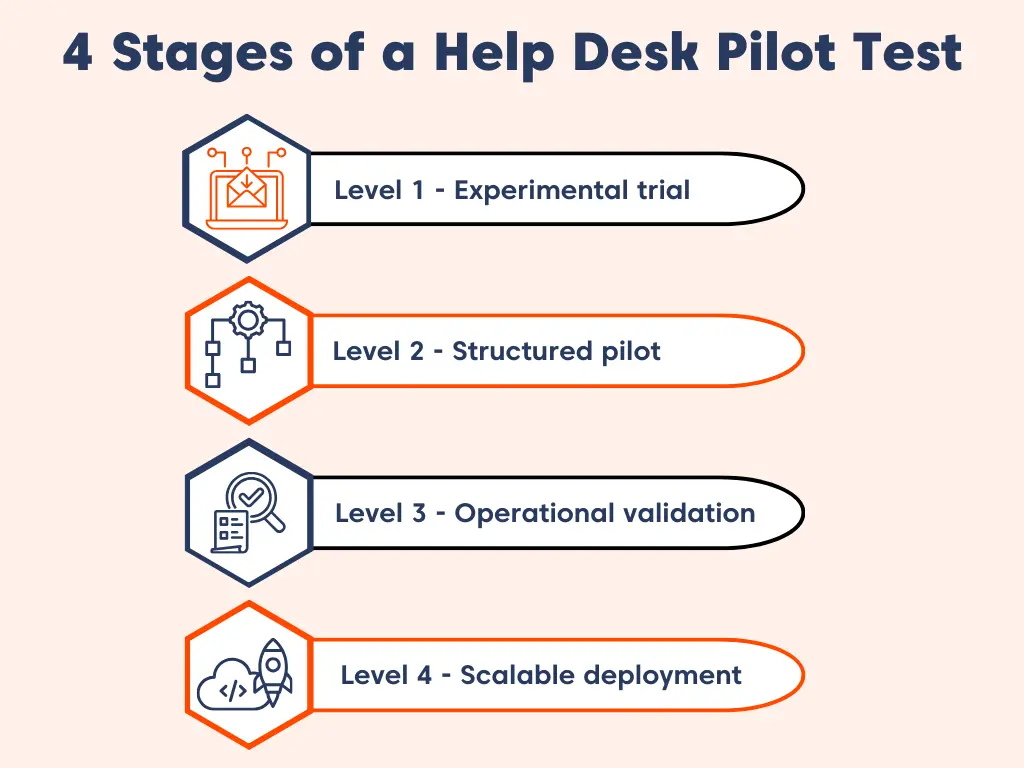
As part of a structured help desk trial, this maturity model helps organizations understand how ready they are to make a decision.
It also highlights what level of structure is still missing.
Level 1 – Experimental trial
Teams explore the help desk features informally, testing views, tweaking settings, and forming early impressions without a consistent evaluation method.
This stage builds familiarity, but it doesn’t generate dependable insights or conclusions that support a long‑term decision.
Level 2 – Structured pilot
The evaluation becomes more deliberate. Teams define a specific support scenario, stabilize the help desk environment, and run the pilot for a fixed duration.
At this stage, the goal shifts from casual experimentation to understanding whether the help desk aligns with a real, clearly chosen use case.
Level 3 – Operational validation
The help desk is tested under conditions that mirror everyday customer support operations. More agents may participate, ticket volume becomes more realistic, natural workflow variations occur, and performance patterns emerge over time.
This phase verifies whether the platform operates predictably under real customer support conditions.
Level 4 – Scalable deployment
After demonstrating consistent performance, the help desk is ready to expand to additional teams, channels, or use cases.
Once the pilot is complete, adoption becomes structured and deliberate, preventing teams from rushing too quickly from early testing into full deployment.
By progressing through each stage intentionally, teams base decisions on clear operational evidence, enabling confident scaling rather than assumptions.
Step-by-step help desk pilot plan for a successful trial
This help desk pilot plan keeps your trial focused, low risk, and easy to manage. Each step reduces confusion, prevents disruptions, and helps teams reach a clear go or no-go decision during the help desk trial.
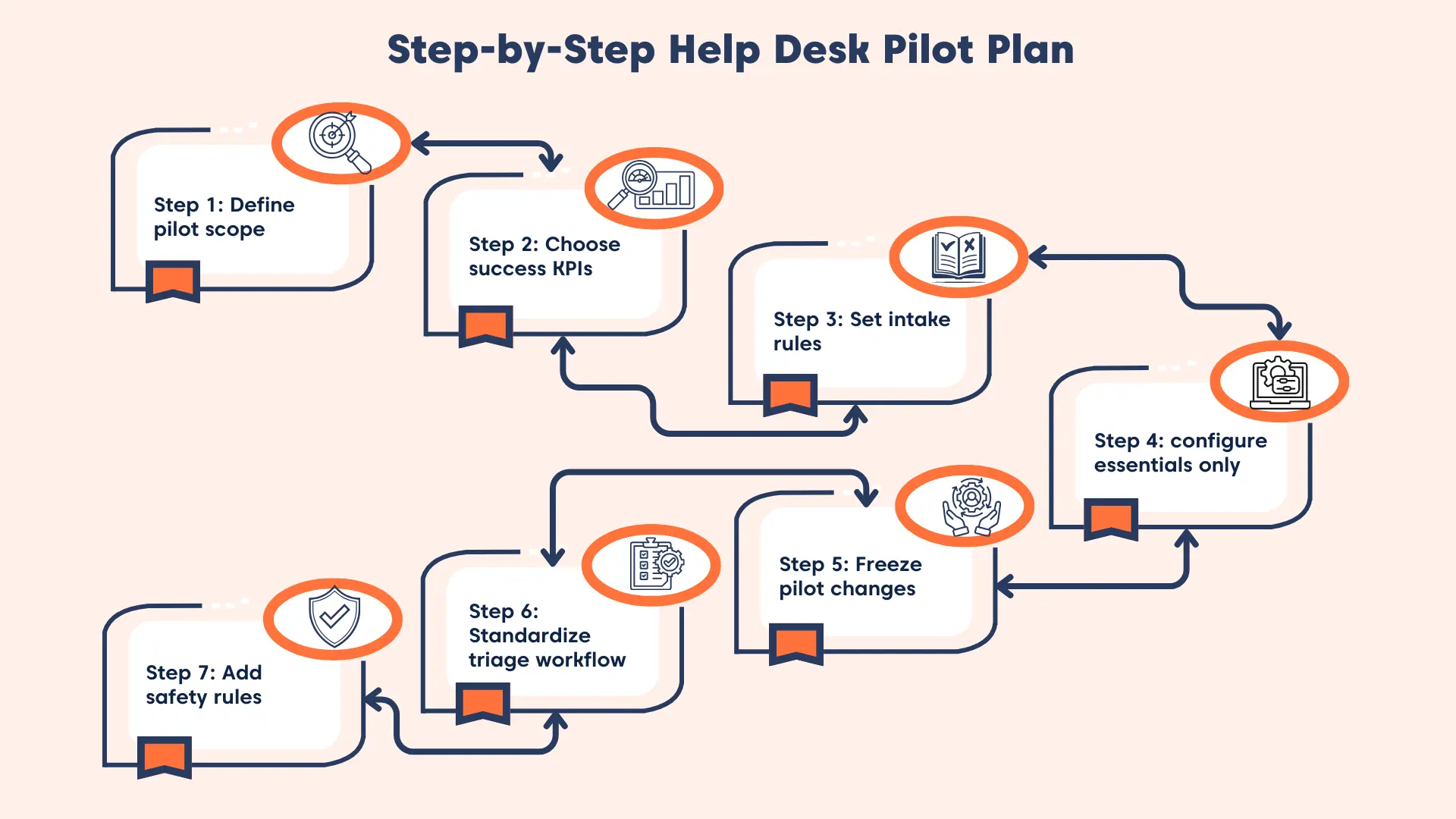
Step 1: Start with a small, clear help desk pilot scope
A small pilot plan makes it easier to understand what’s working and where issues appear.
A simple and effective scope typically includes one team or queue, a single support channel, usually a shared inbox, and a few common, repeatable ticket types.
The goal is to confirm that your core help desk workflow runs smoothly end-to-end, not to test every possible scenario.
Action plan:
- Define what’s in and out of scope (team, queue, channel, ticket types).
- Set a fixed pilot window (2–4 weeks or target ticket count).
- Assign pilot ownership (pilot lead, admin, approver).
- Align stakeholders and publish the final scope as the “source of truth.”
Step 2: Define success before you start (KPIs)
Clear KPIs prevent the pilot from becoming a debate about opinions during a help desk test.
Choose a small set of KPIs that reflect daily support operations, such as responsiveness (like first response time in customer service) and ownership clarity.
According to an SQM Group report, every 1% improvement in first contact resolution (FCR) can save a typical midsize contact center about $286,000 per year.
These can be complemented by metrics that ensure data accuracy and completeness, as well as the maintenance effort required to keep the system running.
Keep KPIs limited. You’re testing workflow stability, not building a full analytics program, so focus only on the help desk metrics that matter most.
Action plan:
- Select 3–5 KPIs with clear definitions and measurement rules.
- Set thresholds for success, risk, and follow‑up review.
- Confirm reporting owners and frequency.
- Publish a one-page pilot scorecard and review cadence.
Step 3: Create a simple ticket intake agreement
Good input leads to reliable output. A basic intake agreement ensures tickets include the minimum required information so agents can act without unnecessary back‑and‑forth.
This improves triage speed and keeps data consistent across fields, tags, and reports.
Action plan:
- Define minimum required ticket details (summary, impact, supporting evidence).
- Create a simple request template for consistent submissions.
- Document how triage handles missing info.
- Train agents and review intake quality weekly.
Step 4: Configure only the essentials (no full build)
A pilot should stay lightweight so you can test real tickets without unnecessary complexity.
Set up only the basics you need to operate smoothly, such as one support channel, simple and easy‑to‑understand statuses, and minimal required fields.
You can then add basic agent views, a small controlled tag set, and one simple SLA, usually for first response.
Action plan:
- Configure the single channel and validate with test tickets.
- Keep workflow elements minimal and easy to follow.
- Set one clear SLA with defined hours and notifications.
- Run a pre-flight test (5–10 tickets) and fix only critical blockers.
Step 5: Freeze configuration changes during the pilot
Changing fields, routing rules, or automations during the pilot makes results unreliable and difficult to compare.
A change freeze keeps the workflow stable. If you must make changes, limit them to a scheduled window and document them fully.
Action plan:
- Enforce a strict no‑change rule during week 1 to establish baseline data.
- Set up an exception workflow for any changes that must occur during the pilot.
- Maintain a change log with dates, reasons, and expected impact.
- In week 2, allow only one controlled improvement, then re‑freeze.
Step 6: Use a simple, standard triage routine
Triage decides whether your pilot stays consistent or becomes chaotic during a help desk test.
A simple triage workflow should include checking whether the required information is present and adding a single issue‑type tag.
It should also include assigning a clear owner and setting the correct status.
This keeps ticket data consistent and makes future onboarding easier as you move from help desk software evaluation into help desk rollout strategy.
Action plan:
- Document a one‑page triage checklist.
- Assign triage owners and cadence.
- Audit triage consistency during week 1.
- Collect friction points for review during week 2.
Note: If you want a deeper breakdown of how to structure prioritization, classification, and routing during your pilot, explore our detailed guide on ticket triage best practices.
Step 7: Add escalation and rollback rules for help desk pilot plan
Urgent issues must not get stuck inside a pilot. Clear escalation rules ensure high‑priority tickets receive immediate attention.
Rollback rules protect customers in the event of a problem. Common rollback responses include routing new tickets back to the original inbox and pausing the pilot.
They also involve checking for missing tickets, duplicates, or any SLAs failures.
Action plan:
- Define escalation triggers, owners, and expected response times.
- Set rules for handling urgent items outside pilot scope.
- Document rollback triggers and step-by-step actions.
- Test escalation and rollback once early, then use the final week’s results to make the go or no-go decision.
What should you do after completing a help desk pilot?
A successful pilot is only the beginning. This section outlines how to scale what worked, step by step, by gradually adding channels, automation, and agent access, so your rollout stays stable, measurable, and low risk.
- Scaling should feel like a continuation but not a reset. Once the pilot works reliably, expansion simply builds on the existing workflow foundation.
- Add more support channels gradually as confidence grows (instead of turning everything on at once).
- Introduce automated customer service in stages to improve agent productivity.
- Expand agent access incrementally without changing core workflows or retraining everyone at once.
- Keep the rollout phased and controlled so operations evolve steadily without overwhelming agents or customers.
- Aim for a smooth transition from pilot to full rollout that stays intentional, predictable, and chaos-free.
With the right help desk in place, a phased rollout does more than keep operations steady, it directly elevates customer experience at every step.
“According to Future Market Insight, 68% of consumers prefer brands that deliver efficient customer service, and more than 75% expect immediate responses.
What are the most common mistakes in help desk pilot testing?
Help desk pilots often fail when support teams try to roll out too many features at once or keep adjusting workflows and configurations while the pilot is still in progress.
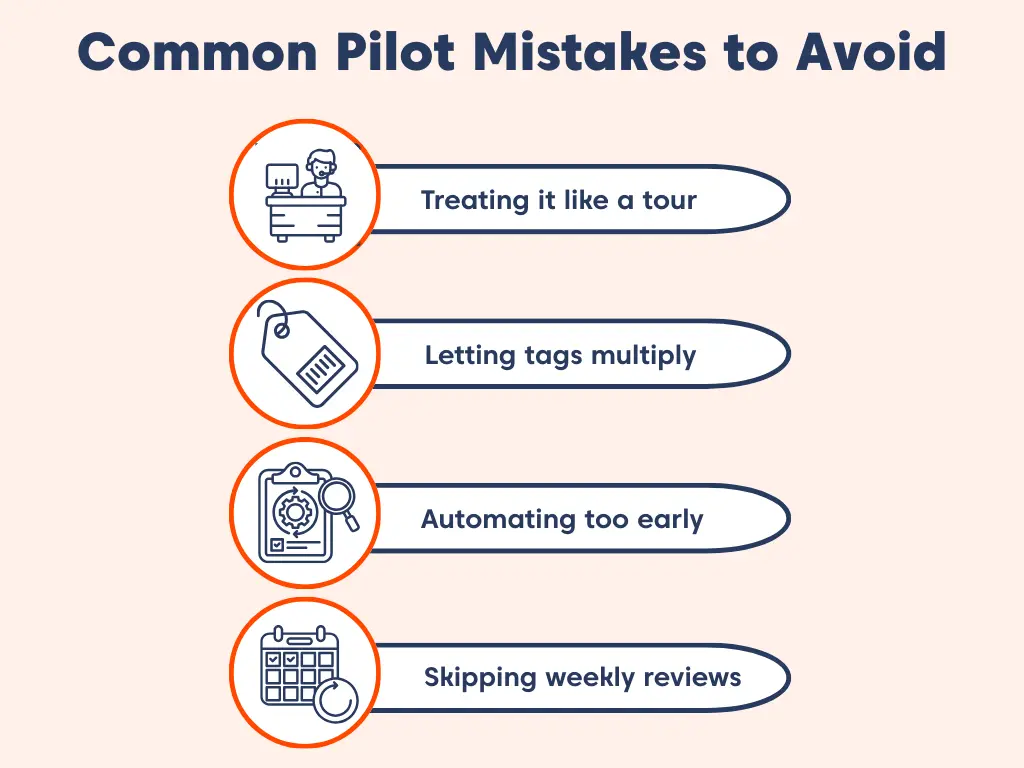
Avoiding these mistakes helps to get cleaner data, smoother teamwork, and a clear decision at the end.
Turning the pilot into a feature tour
A help desk pilot isn’t meant to show every feature your platform can offer. Its purpose is to confirm that one simple workflow can run smoothly end to end.
When the pilot turns into a feature exploration session, teams stop looking at outcomes like ticket resolution time or unclear ticket ownership.
Instead, they start debating which buttons they prefer, which leads to confusion instead of clarity.
Allowing tagging and categorization to get out of control
Tags are useful, but too many tags create messy data during a pilot.
Uncontrolled tagging often leads to:
- Incorrect routing
- Inconsistent categories
- Confusing reports
Keep your tag list intentionally small while testing. Simple ticket tagging rules help your team stay consistent and prevent you from building a complex structure you can’t maintain later.
Adding automation before the workflow is stable
Automation is great, but it multiplies whatever you already have, whether it’s well‑designed or not.
If your workflow is unclear, automation can spread confusion faster than agents can correct it.
Once your pilot is stable, you can explore help desk automation ideas, including:
- Low‑risk automations for reducing agent effort in customer service
- Automated routing once issue types are clear
- AI‑assisted replies or classification in later phases
Note: Treat automation as phase two, not phase one.
Skipping the weekly decision meeting
Pilots fail when teams collect feedback but never act on it. A short weekly review keeps the pilot under control. The goal is simple:
- One decision
- One improvement (or no change)
- One clear next step
Use a lightweight weekly scorecard to keep the conversation focused on data instead of opinions.
Why is BoldDesk a good choice for running a pilot test?
BoldDesk is built for fast, low‑complexity pilot testing. Teams can get hands‑on quickly without heavy setup, rigid workflows, or long onboarding cycles.
Customers can use the BoldDesk free trial as their pilot environment, ensuring they can test real workflows before committing.
According to NICE, 81% of customers demanding stronger self‑service capabilities, maintaining a clear tagging structure is vital for enabling precise automation and supporting dependable knowledge discovery.
BoldDesk’s clean, controlled setup makes it easier to maintain consistent tags and build automation gradually without overwhelming your pilot environment.
Key advantages that make BoldDesk ideal for pilots:
- Quick start onboarding: Self-guided trial and setup tutorials help teams reach a working baseline fast.
- Instant setup: Enable the email ticketing system simply by connecting your support inbox, allowing teams to work with live tickets from day one.
- Essentials‑only configuration: Start lean with basic fields, views, statuses, and canned responses, then expand when ready.
- Gradual structure addition: Add SLAs, macros, and automations in phases once the core workflow proves stable.
This lightweight approach keeps ticket handling predictable for agents while still allowing teams to expand workflows gradually.
With the free trial option, teams can continue experimenting and validating processes before scaling up.
BoldDesk also supports an easy and secure migration process, making it simple to bring over your data when you’re ready.
You can also request a demo to walk through your real ticket scenarios with an expert or contact us to discuss your support goals.
Real example: Apexa iQ validating BoldDesk through a rapid pilot
Apexa iQ set up a BoldDesk test environment and reached a fully working baseline within a few days, immediately noticing that recurring support issues they faced with their previous tool “went away almost overnight.”
Result: The fast, low-effort pilot confirmed BoldDesk’s stability and ease of use, leading Apexa iQ to replace their previous solution and adopt BoldDesk as their primary help desk.
Decide your next move with a help desk pilot plan
A help desk pilot doesn’t need to be chaotic. The most effective pilots keep a narrow scope, use only essential configurations, and follow a simple, controlled plan.
A short change freeze, a clear feedback loop, and defined success criteria keep everything grounded in real support operations.
Treating the pilot like an experiment gives you what support teams rarely get, such as trustworthy results, confident insights, and a workflow ready to scale.
What strategies have worked best for your help desk pilots? Drop your insights in the comments below.
Related articles
- Help Desk Workflow Made Easy: Your Complete Step-by-Step Guide
- 11 Proven Steps to Successfully Migrate Your Help Desk
Frequently asked questions
A help desk pilot typically runs for 2–4 weeks, allowing teams to process real tickets and evaluate core workflows in a controlled environment. This timeframe helps measure key support metrics and determine whether the help desk is ready for a full rollout.
Focus on a small set of KPIs such as first response time, agent adoption or errors, ticket clarity and visibility, and admin effort to evaluate how smoothly the support workflow operates. Ticket response time is commonly tracked as a core help desk metric during pilots because it directly reflects responsiveness and workflow efficiency.
Limit scope, configure only essentials, freeze changes, and define an escalation path back to your existing process. Also, set a rollback trigger so you can pause the pilot if risk increases.
Start with intake (one channel), minimal required fields, basic categories or priorities, ownership rules, and simple SLAs targets. Add automation and additional channels only after the workflow is stable.





