








TL;DR: An AI customer support agent for Shopify automates repetitive support tasks like order tracking, returns, and FAQs using your store data and knowledge base. You can set it up without coding by connecting your store, training it on your policies, and deploying it across support channels.
If you run a Shopify store, your support inbox is probably full of questions like “Where is my order?” or “Can I return this item?”
Each one is simple to answer, but responding still means opening Shopify, hunting for details, and repeating the same steps again and again.
As order volume grows, these routine requests quietly eat into your team’s time and slow down response speed, making ecommerce help desk software and AI automation increasingly important for scaling support.
This is where an AI customer support agent for Shopify makes a real difference. Using your store’s data to answer common questions automatically, it helps you scale support without adding more manual work.
In this guide, you’ll learn exactly what a Shopify AI support agent is, how it works with your store, and how to set one up without writing code.
What is an AI customer support agent for Shopify?
An AI customer support agent for Shopify is an automated, intelligent system that handles customer interactions for your online store without needing constant human involvement.
It uses technologies like natural language processing (NLP), machine learning, and integrations with your store data to understand, respond, and act on customer queries in real time.
Unlike traditional AI chatbots that follow rigid, pre-written scripts, these AI customer support agents sync directly with your Shopify store’s backend to access:
- Order history
- Tracking numbers
- Inventory levels
The AI customer support agent for Shopify works as a support assistant that answers questions, retrieves order data, and performs actions automatically.
This keeps your Shopify store responsive 24/7, providing accurate, data-driven answers tailored to each shopper’s journey.
What to look for in a Shopify AI support agent
Not all AI tools are created equal. To successfully automate a Shopify storefront, your AI agent must move beyond basic scripts and offer deep technical capabilities.
Look for these essential features:
- Natural Language Understanding (NLU): The AI support agent for Shopify has to understand context, intent, and customer sentiment rather than just matching keywords. This ensures it can handle complex phrasing and provide human-like interactions.
- Linked to your Shopify store in real time: A specialized AI agent in customer service must be connected to your Shopify store so it can use live order and inventory information to answer customer questions accurately. This allows it to handle order-related requests like “Where is my order?” while escalating unusual cases to a human agent.
- Consistent support across every customer channel: Your customers reach out wherever it’s convenient for them; website chat, email, WhatsApp, Instagram DMs, or social media. A reliable Shopify AI support agent delivers the same accurate answers across all channels, so customers don’t repeat themselves and your brand experience stays consistent everywhere.
- Automation workflows that reduce workload: Responding to messages is only half the job. A useful AI support agent automates real actions such as routing VIP customers, tagging urgent tickets, triggering workflows, or confidently escalating when issues exceed defined rules. This is how you actually reduce ticket volume and response time.
- No‑code setup and customization: If deploying or updating your AI support agent for Shopify requires an engineer, it slows your business down. A modern Shopify AI support solution should be fully no‑code, allowing you to connect your store, train it on your policies, adjust behavior, and iterate quickly as products, shipping rules, or return policies change.
- Agent assist for your human support team: A Shopify AI support solution shouldn’t only handle customer conversations; it should also assist your human agents. Look for features like “smart summaries” (to catch up on long threads) and suggested replies based on your knowledge base.
- Clear performance analytics and visibility: You cannot manage what you cannot measure. Ensure the platform provides detailed reporting and analytics dashboards for deflection rates, resolution times, and CSAT scores.
Common use cases for AI customer support agents in Shopify
With 29% of organizations leveraging AI, more Shopify stores are using AI customer support agents to automate high-intent support requests and improve the customer experience across the buying journey.
The use cases below show how Shopify AI customer support goes beyond ecommerce chatbots to deliver fast, accurate, and scalable service.
Order tracking and status updates
Order-status questions are often the largest contributors to support ticket volume in Shopify stores.
A Shopify AI customer support agent can:
- Securely collect simple identifiers such as an email address and order number.
- Fetch the latest available order.
- Respond with the current status: processing, fulfilled, shipped, or delivered.
Beyond just reporting status, the AI support agent for Shopify stores can explain what happens next, share delivery timelines, and recommend actions if an order is delayed, reducing follow‑up messages and customer anxiety.
Case scenario
Customer: “Where is my order? I placed it last week and haven’t received it yet.”
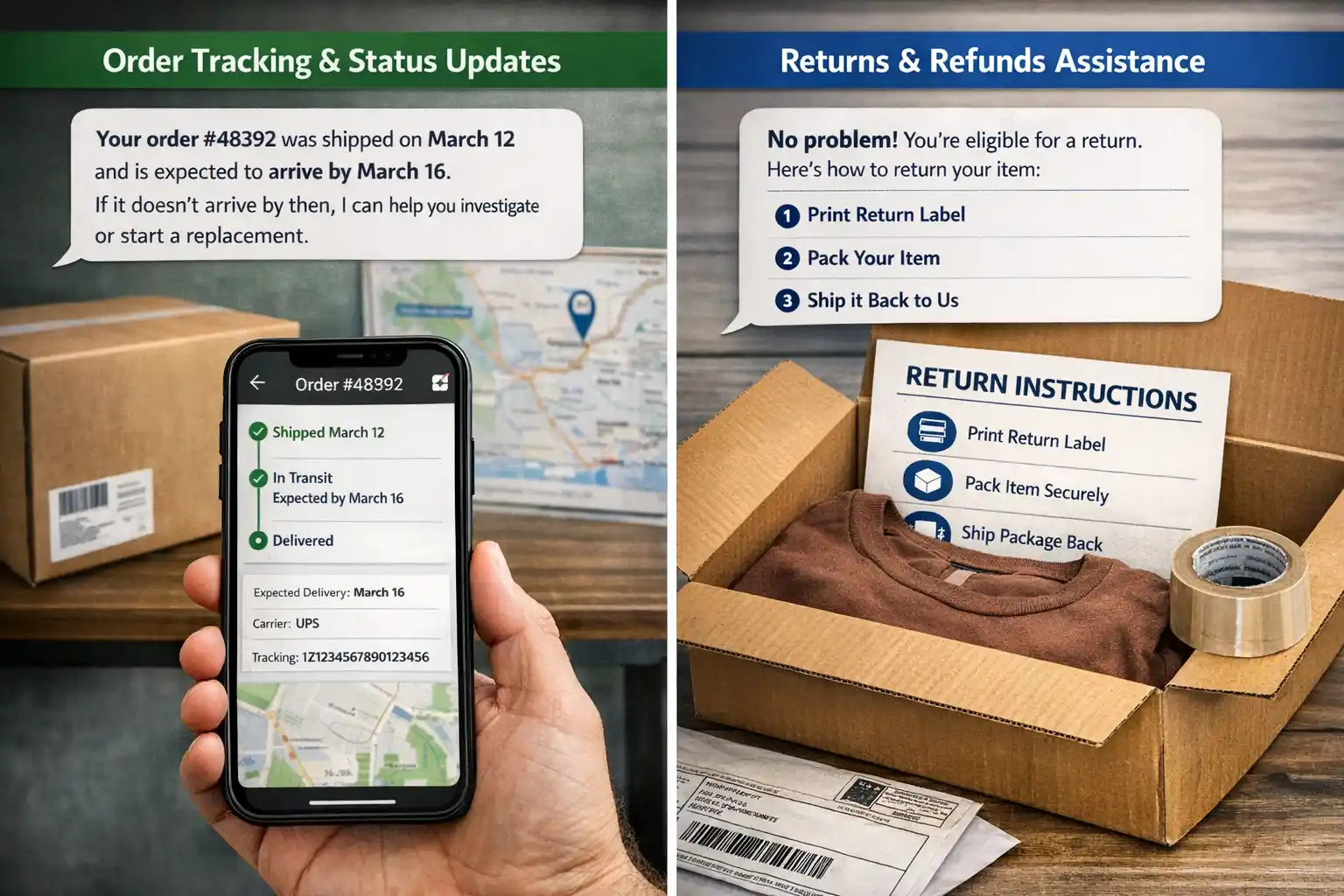
Shopify AI agent for customer support response: “Your order #48392 was shipped on March 12 and is expected to arrive by March 16. If it doesn’t arrive, I can help you investigate or start a replacement.”
Return and refund handling
Returns and refunds involve clear policies but often create confusion for customers.
AI customer service agents for Shopify can:
- Explain refund timelines in plain language
- Instantly explain return eligibility windows and product conditions
They provide step‑by‑step return instructions and required documentation if needed, while automatically routing edge cases, such as missing packages or incorrect orders, to human agents.
This ensures exceptions receive personal attention without slowing down routine requests.
Product recommendations and FAQs
Pre‑purchase questions are support conversations that directly influence revenue.
AI customer support agents for Shopify can be configured to answer common questions about sizing or usage by referencing your product pages, collections, and FAQ software.
When details are unclear, it can ask clarifying questions and suggest suitable options or alternatives based on shopper preferences, or route to a live agent for high-stakes cases, so customers get help without waiting in a queue.
Cart abandonment assistance
Many abandoned carts aren’t caused by lack of interest; they’re caused by unanswered questions.
When shoppers ask questions like “Do you ship to my country?”, fast and accurate responses can remove hesitation at the critical moment.
AI support agents for Shopify handle these time‑sensitive questions instantly, reducing drop‑off and improving conversion.
Handling repetitive, policy‑driven queries
AI support agents for Shopify work best on requests with predictable workflows and clear rules.
This includes, but is not limited to:
- Address changes
- Order cancellations within the allowed windows
- Subscription updates
- Basic account issues
- Similar policy‑based requests
By automating these repetitive interactions, AI customer support agents for Shopify keep response times consistently low, reduce agent workload, and maintain uniform policy enforcement across every customer interaction.
Case scenario
Customer question: “Can I change the delivery address for my order?”
Shopify AI agent for customer support response: “I can help with that. Your order is still within the address‑change window. Please confirm the new delivery address, and I’ll update it for you right away. If the order has already shipped, I’ll connect you with a support specialist to review next steps.”
Why Shopify stores need an AI agent for customer support
Customer expectations have shifted dramatically. Around 90% of customers say that getting a response right away is critical, and most define right away as within the first hour of reaching out.
For Shopify merchants, manual support often becomes a bottleneck during growth.
Implementing an AI agent for Shopify customer support allows you to manage these pressures effectively through four key areas:
- Automate high-volume queries: Most Shopify inquiries are repetitive, focusing on order status, shipping timelines, and return policies. By integrating directly with Shopify, the AI Agent can access order and shipping details in real time and provide instant answers, escalating to a human agent only when exceptions arise.
- Provide 24/7 instant responses: Ecommerce operates globally, but human support teams cannot be online 24/7 without significant expense. Shopify AI agents provide immediate, accurate answers regardless of the time zone or holiday schedule.
- Lower operational costs: The cost per resolution drops significantly when the Shopify AI agent for customer service handles the first line of defense. By resolving issues on the first contact, you improve your customer satisfaction scores while simultaneously reducing the financial burden on your support department.
- Scale without increasing headcount: During peak sales periods such as Black Friday or regional shopping festivals, ticket volumes can triple overnight. An AI customer service agent for Shopify scales effortlessly, handling thousands of concurrent conversations. This allows you to manage ticket surges without the need for emergency hiring or seasonal training.
How to set up an AI customer support agent for Shopify
You do not need to build a custom AI model to automate Shopify support. The key is to connect the right store data, give the AI reliable support content, and clearly define what it can and cannot do.
1. Connect your Shopify store
Connect Shopify to your customer support or AI platform so the agent can access the information it needs during a conversation.
Depending on the workflows you want to automate, this may include:
- Customer and order details
- Fulfillment and shipping status
- Product information
- Subscription or account data
Limit access to the data required for each workflow. For example, an agent answering an order-status question may only need permission to retrieve order and fulfillment information.
2. Add reliable knowledge sources
Give the AI agent access to the information customers regularly ask about, such as:
- Shipping and delivery policies
- Return and refund rules
- Product FAQs
- Sizing or usage guides
- Warranty information
- Help center articles
Use approved, up-to-date sources rather than expecting the agent to fill gaps on its own. When your policies change, update the connected content so customers continue receiving accurate answers.
3. Decide what the AI agent should handle
Start with frequent requests that have clear answers or predictable workflows.
Good starting points for a Shopify store include order tracking, delivery questions, return eligibility, refund status, address changes, and basic product questions.
Keep exceptions, disputes, or requests requiring judgment with human agents.
4. Define the actions it can take
Decide whether the AI agent should only provide information or also complete tasks.
For example, it might:
- Retrieve an order or shipping status
- Update permitted customer information
- Create or update a support ticket
- Start an approved return process
- Route an issue to the appropriate team
- Trigger a predefined workflow
Apply stricter controls to actions that affect payments, accounts, orders, or customer data.
5. Set approval and handoff rules
Make it clear when the AI customer support agent for Shopify can proceed independently and when a person should take over.
A human handoff may be appropriate when:
- The customer’s identity cannot be verified
- A request falls outside your published policy
- The AI cannot confidently determine the next step
- A refund or account change requires approval
- The customer disputes an outcome
- The issue is sensitive or requires judgment
Pass the conversation history and relevant Shopify context with the escalation so customers do not need to explain the problem again.
6. Deploy it where customers ask for help
Make the Shopify AI agents available on the channels that generate meaningful support volume, such as your Shopify storefront’s live chat software, email, or supported messaging channels.
You do not need to automate every channel immediately. Start where repetitive inquiries are highest, verify the experience, and expand gradually.
7. Test before scaling
Test the AI agent using real Shopify customer support scenarios before giving it broader responsibility.
Check whether it retrieves the correct data, follows your policies, completes actions correctly, and hands off exceptions as expected.
After launch, monitor verified resolutions, escalations, repeat contacts, failed actions, and CSAT. These signals tell you whether automation is actually reducing customer effort rather than simply increasing the number of conversations handled.
What BoldDesk connects to (for Shopify workflows)
A key advantage of BoldDesk is that it acts as a central support layer, not just a standalone tool.
For Shopify stores, this means:
- Shopify integration: Full visibility into orders, customers, and fulfillment inside tickets.
- Omnichannel support: Manage chat, email, and other channels in one place.
- Automation workflows: Route, tag, and prioritize Shopify-related tickets.
- AI-powered assistance: Automate repetitive queries and assist agents.
- Unified context: When tickets escalate, your team has complete customer and order history.
You don’t need to replace your existing processes. BoldDesk enhances them by bringing everything into a single, structured support system.
Best practices for Shopify AI customer support
You can build an AI agent for Shopify support without developing a custom model or hiring a dedicated AI team.
The best part is you don’t need to write a single line of code. Modern Shopify AI agents are designed to be plug-and-play, so setup is simple even for non‑technical teams.
Here’s how to do it effectively.
Start with high-volume, low-risk requests
Prioritize requests that occur frequently and follow clear rules, such as order tracking, shipping questions, return eligibility, and basic account updates.
These workflows give you enough volume to measure the impact while limiting the risk of incorrect or unauthorized actions.
Do not automate a request simply because it is repetitive. Consider the consequence of getting it wrong.
Keep Shopify data and support policies current
An AI agent cannot provide reliable support from outdated information.
Keep return policies, shipping timelines, product details, FAQs, and other connected knowledge updated as your store changes.
Where live information is required, such as an order or fulfillment status, retrieve it directly from the connected Shopify system rather than relying on static content.
Match permissions to the risk of the action
Give the agent only the access required to complete an approved workflow.
Reading an order status carries less risk than cancelling an order or issuing a refund. Use verification, value limits, approvals, and other guardrails as the potential impact increases.
This allows you to automate useful work without giving the AI unnecessary control.
Design handoffs around exceptions, not every request
Human agents should handle situations where judgment adds value, such as policy exceptions, disputed refunds, unusual order problems, sensitive conversations, or requests the AI cannot confidently resolve.
When a handoff occurs, preserve the customer’s conversation and Shopify context. A customer who has already explained the issue should not have to start again with the human agent.
Measure resolutions, not just conversations
High chatbot usage does not necessarily mean better support.
Track whether the AI actually resolves customer issues and watch supporting indicators such as:
- Resolution rate
- Escalation rate
- Repeat contacts
- Failed actions
- Resolution time
- CSAT rate
If conversations handled by AI increase but customers continue contacting your team about the same issues, investigate the workflow rather than treating the additional automation as success.
Improve the workflows with real support data
Review failed requests, escalations, repeat contacts, and low-CSAT conversations regularly.
These interactions reveal where the agent needs better information, clearer instructions, tighter permissions, or a different handoff rule.
Expand automation only after the existing workflows are performing reliably.
Streamline Shopify customer support with BoldDesk
BoldDesk brings Shopify customer and order information into a centralized support workspace, helping teams respond faster, automate repetitive workflows, and give agents the context they need to resolve customer requests efficiently.
While BoldDesk is a broader customer service platform rather than an ecommerce-native solution built exclusively for Shopify, its Shopify integration and AI capabilities can support growing stores that want to manage customer service alongside their wider support operations.
To learn how to connect your Shopify store and access customer and order details in BoldDesk, read our guide on configuring and installing Shopify to BoldDesk.
Build an effective AI customer support agent for Shopify
As Shopify stores grow, customer support needs to keep pace without adding unnecessary complexity.
An AI customer support agent for Shopify can help teams deliver faster, more consistent service while keeping human support available where it adds the most value.
The goal is ultimately a smoother experience for customers and a more manageable workload for support teams.
If you’re ready to explore AI-powered Shopify support, start a free trial with BoldDesk and see how AI and automation can help your team scale customer service more efficiently.
Related articles
- Best Ecommerce Help Desk Software in 2026
- Best Ecommerce Tools to Boost Sales in 2026
- 9 Top Ecommerce Customer Service Tips for 2026
FAQs on AI customer support agent for Shopify
Yes, if you configure it correctly. A well-implemented AI customer support agent for Shopify should operate within strict guardrails.
For sensitive actions like refunds, you should always use approval workflows or route the request to a human agent. This ensures automation without compromising customer trust or data security.
AI support doesn’t have to be expensive for small Shopify stores. Many modern tools offer flexible pricing and scalable features, allowing you to start small and pay only for what you use.
By handling repetitive queries and improving response efficiency, the AI support agent for Shopify often lowers support costs over time rather than adding to them.
Setup time depends on the complexity of your Shopify environment, the quality of your knowledge base, the workflows you automate, and the number of channels you deploy.
A simple integration can be configured faster than a rollout involving multiple stores, workflows, and approval rules.
The cost of an AI customer support agent for Shopify depends on the provider, support volume, included features, and whether pricing is based on agents, conversations, resolutions, or AI usage.
For example, BoldDesk plans start at $99 per month for five agents when billed annually. Every tier includes monthly AI credits, and extra credits are $40 per 1,000, allowing Shopify businesses to scale AI support based on usage.
Yes. When connected to your Shopify store, the AI agent can access real-time order information, such as order status and fulfillment updates, to accurately respond to “Where is my order?” questions.
This requires an active Shopify AI agent integration with the appropriate permissions enabled.
Yes. BoldDesk supports GDPR compliance and provides features and controls designed to help customers meet GDPR requirements.





