









TL;DR: Ticket triage is how support teams sort, prioritize, and assign requests so the most urgent and highest-impact issues are handled first. Strong triage separates urgency from priority, enforces SLA timers, and ensures clear ownership so no ticket sits unassigned.
Every support team knows the chaos of juggling tickets. One missed issue can cost a customer, a contract, or team confidence.
According to a report by Emplifi, 70% of consumers will switch brands after two negative support experiences. The ability to quickly sort, prioritize, and route incoming requests has never been more critical.
As support operations scale, many organizations combine structured ticket triage processes with AI agents in customer service to help classify requests, automate repetitive workflows, and improve response times while maintaining human oversight for complex issues.
This guide breaks down the blueprint for a modern, high‑performing ticket triage system that keeps your team confident, your customers satisfied, and your business protected from preventable churn.
What is ticket triage?
Ticket triage is the process of sorting, prioritizing, and assigning incoming support requests based on urgency, impact, and complexity.
When new support requests come in, a robust ticket triage framework helps support agents decide:
- What’s urgent
- What can wait
- Who should handle it
This way, the right person tackles the right issue at the right time. In a help desk ticketing system, triage prevents the first‑in, first‑out (FIFO) trap, where an agent might spend hours fixing a minor issue for a trial user while a critical outage for a VIP client gets overlooked.
While ticket triage helps support teams prioritize, assign, and escalate requests, it is primarily a human-led operational framework.
Teams looking to automate email classification, routing, and assignment should explore AI email triage, which focuses on using artificial intelligence to process and distribute incoming support requests automatically.
Why your business needs a ticket triage framework
Without a formal ticket triage framework, support teams often suffer from reactive fatigue. This leads to:
- Cognitive overload: Agents spend too much time deciding what to work on next rather than actually solving problems.
- Inconsistent customer experience: Two customers with the same problem might receive vastly different response times.
- Missed revenue opportunities: High-value accounts may churn if their urgent technical blockers are handled with the same treatment as low-impact inquiries.
By implementing a ticket triage process, you transition from a chaotic, manual environment to an automated, data-driven operation.
The four pillars of ticket triage: Priority, urgency, SLA, and ownership
To master support ticket prioritization, you must understand the distinction between these four interconnected concepts.
Many teams use priority and urgency interchangeably, but in a professional help desk triage system, they represent different dimensions of a request.
Priority
Priority is the order in which a ticket should be worked, relative to other tickets.
In ITIL-style (Information Technology Infrastructure Library) service management, teams typically set priority using a combination of impact (how many users or business functions are affected) and urgency (how time-sensitive the issue is).
This ensures that teams respond in the right order, based on both the size of the problem and how quickly it must be addressed.
Urgency
Urgency measures how quickly the ticket needs attention (typically the first response), regardless of how long the resolution will take.
A ticket can be high priority but low urgency (e.g., a planned server migration next month) or low priority but high urgency (e.g., a customer can’t find a receipt they need for a meeting in 10 minutes).
Below is an example of a priority policy that teams can use and customize based on their impact and urgency definitions:
| Impact | Urgency | Resulting priority | Typical use case |
| High | High | P1 – Critical | Major outage affecting many users |
| High | Medium | P2 – High | High‑impact issue with workaround |
| Medium | High | P2 – High | Time‑sensitive issue affecting a department |
| Medium | Medium | P3 – Medium | Moderate issue with moderate time pressure |
| Low | Low/Medium | P4 – Low | Minor inconvenience affecting 1 user |
SLA (Service Level Agreement)
An SLA management policy is the formal contract, either internal or external, that dictates the maximum allowable time for a response and a resolution.
SLAs act as the timer on a ticket. If a ticket is marked as “Critical,” the SLA might mandate a response within 15 minutes. If it is “Low,” the SLA might allow for 48 hours.
For organizations that rely on strict SLA commitments, downtime is more than a technical issue. Recent research estimates that outages can cost large businesses around $9,000 per minute, reinforcing the need for proactive incident management and timely resolution.
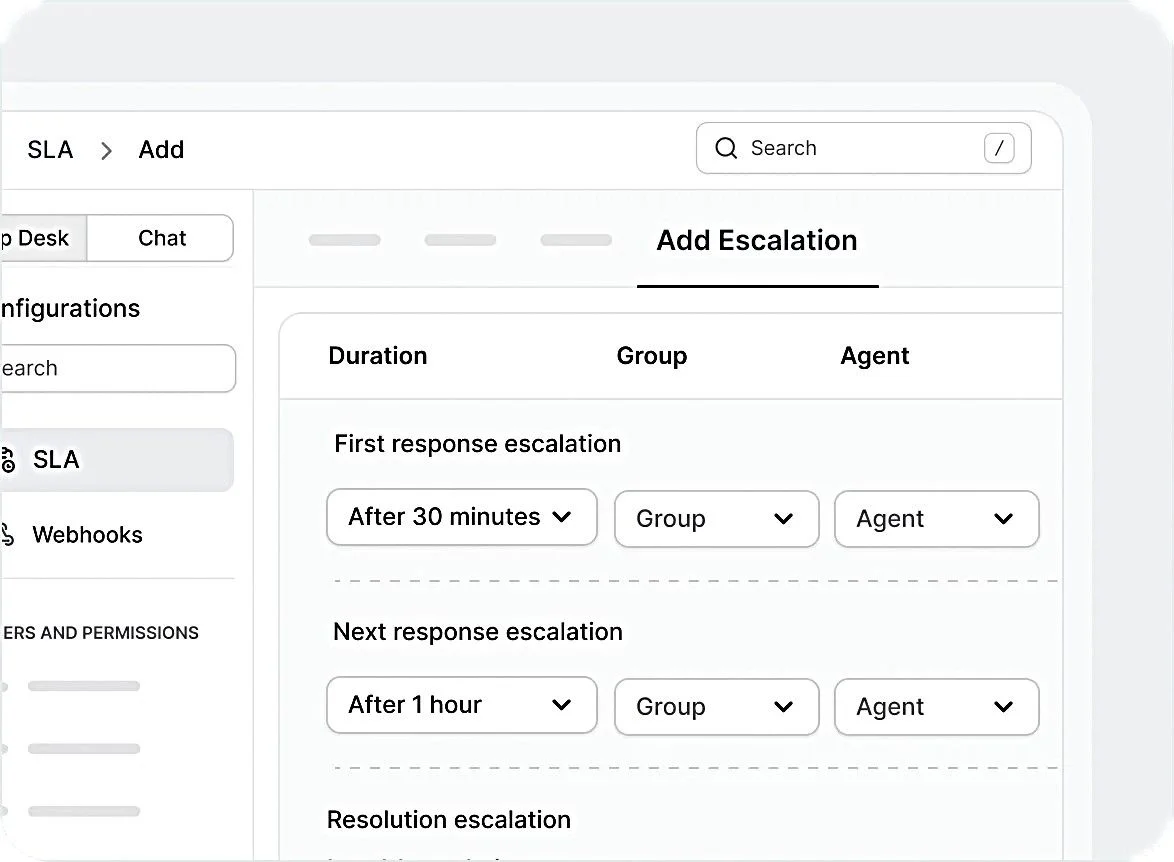
Poor triage often leads to missed SLAs because tickets are misclassified, delayed, or routed to the wrong teams, frequently resulting in ticket reopen incidents later in the support lifecycle.
Example SLA targets by priority
| Priority | First response target | Resolution target | Escalation trigger example |
| P1 – Critical | 15–30 min | 4 hours | Unassigned > 15 min |
| P2 – High | 1–2 hours | 1 business day | No update in 2 hours |
| P3 – Medium | Same business day | 3 business days | Approaching 70% of SLA |
| P4 – Low | 1–2 business days | 5 business days | Backlog age threshold |
Ownership
Ownership refers to the specific agent or team accountable for the ticket at any given moment. A common failure in ticket triage is the bystander effect, where multiple agents see a ticket, but no one claims it.
Avoid this by auto-assigning tickets or requiring explicit ownership during triage.
Misrouted tickets slow down triage and frustrate customers. If your team struggles with this, strengthening ticket assignment rules during triage can help ensure every request has clear ownership from the start.
When to redesign your ticket triage framework
A framework that worked for a team of five agents will likely break when the team grows. You should audit and redesign your ticket triage framework if you notice the following red flags:
- Excessive ticket reassignments: If more than 20% of your tickets are being reassigned more than twice, your initial routing logic is failing. This frustrates both agents and customers.
- Increasing SLA breaches: If your SLA management reports show a steady increase in breaches, it usually means the triage system is not surfacing high-priority tickets fast enough.
- Agent burnout and uneven workloads: In a manual system, the most capable agents often cherry-pick difficult tickets, or conversely, they are buried under them while newer agents handle easy but low-value requests. This leads to agent burnout and inefficiency.
- Tag sprawl: Ticket tags are useful for categorization, but when you have 500+ manual tags like Urgent-ASAP and Very-Urgent, your data becomes noise. This is a sign your categorization process requires standardized tagging, routing rules, or AI-assisted classification to improve consistency.
A huge part of accurate sorting is tagging. Establishing consistent ticket tagging conventions helps teams maintain scalable and reliable categorization as support operations grow.
Types of support requests in ticket triage
Categorizing requests accurately is the first step toward automation. Each type of request requires a different triage path:
- General inquiries: Questions regarding pricing, office hours, or basic features. These are best handled by Tier 1 support or deflected to your knowledge base.
- Product support requests: Specific “how-to” questions. These require agents with product-specific knowledge.
- Billing and payment issues: These involve sensitive financial data and should be routed to a specialized billing or finance team to ensure PCI DSS (Payment Card Industry Data Security Standard) compliance and security.
- Account management: Requests for password resets, multi-factor authentication (MFA) changes, or seat upgrades.
- Technical troubleshooting: Bugs, API errors, or integration failures. These often require escalation to Tier 2 or Tier 3 engineering teams.
- Feature requests: These should be tagged and sent to the Product Management team rather than staying in the active support queue.
- Complaints and feedback: High-priority items that may require a “Service Recovery” protocol from a manager to prevent churn.
- Subscription changes: Cancellations or downgrades. These are “At-Risk” tickets that should be routed to Customer Success Managers (CSMs).
- Service outages or downtime: These are emergency-level tickets because they stop systems or block customer access, such as a website going offline or an application crashing. They trigger “Emergency Triage” protocols, involving immediate mass communication and DevOps alerts.
The ticket triage process: A step-by-step workflow
A strong triage process is the backbone of consistent, high‑quality support delivery, ensuring every ticket flows to the right responder without delay.
By following this streamlined, step‑by‑step workflow, teams can consistently improve SLA adherence, even under heavy ticket volume.
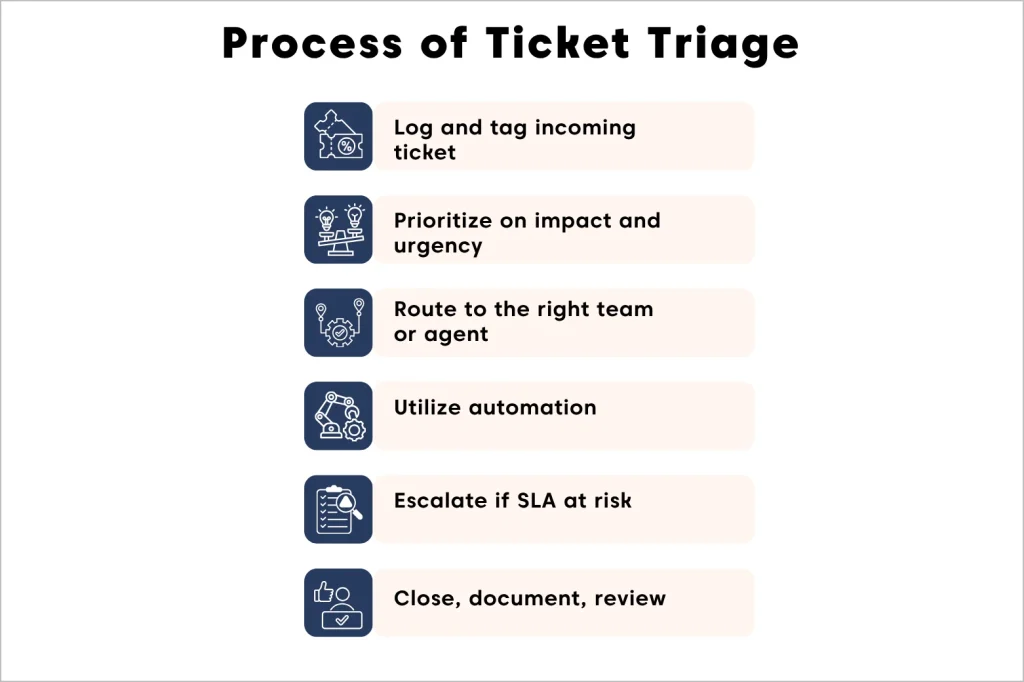
Step 1: Log and tag the incoming ticket
As soon as a ticket arrives, whether through email, live chat, or a customer portal, the system should capture it automatically.
Using AI-assisted triage and rule-based automation, ticket content can be analyzed and enriched with suggested categories or routed using predefined conditions.
This ticket tagging process ensures tickets are organized and routed correctly without manual effort.
Step 2: Prioritize based on impact and urgency
The ticket triage system factors in the customer’s tier, such as Enterprise or Free, alongside the actual content of the ticket to determine its urgency.
For example, an enterprise customer reporting a system down issue is automatically moved to the top of the queue to meet strict SLA requirements.
Step 3: Route to the right team or skill group
After prioritization, tickets are directed to the team best equipped to resolve them. Automated ticket routing ensures tickets land in the correct queue without manual handoffs.
This can include:
- Language-based routing: For example, Spanish-language tickets go directly to Spanish-speaking agents.
- Technical-based routing: Issues like database errors are sent to the DevOps team, while billing questions go to the finance or accounts team.
- Role-based routing: VIP client escalations may be routed to senior support staff or account managers.
- Skill-based routing: Complex product bugs are assigned to support agents with the right technical expertise.
By routing tickets accurately, support teams reduce delays, avoid miscommunication, and ensure customers get faster, more effective resolutions.
Step 4: Apply automation for repetitive issues
Automation reduces workload and speeds up resolution when tickets involve common problems. Instead of sending every request to an agent, the system can:
- Deflect with knowledge base articles: Automatically share solution guides, FAQs, or troubleshooting steps that address the issue.
- Send canned responses: Use pre-written replies for frequent inquiries (e.g., password resets, billing questions) to ensure consistency and save time.
- Trigger AI-based detection: Identify keywords or patterns in tickets and respond instantly with the right resource.
- Promote self-service: Direct customers to portals or chatbots where they can resolve issues independently.
Step 5: Escalate when SLA rules are at risk
Throughout triage and resolution, the system should monitor tickets against SLA timelines.
For example, if a high‑priority ticket remains unassigned beyond 30 minutes, the SLA management engine automatically triggers an alert.
This escalates the ticket to a help desk manager or the designated escalation team, ensuring that urgent cases are not overlooked and SLA commitments are protected.
Step 6: Close, document, and review
Once a ticket is resolved, the agent should formally close it and ensure all details are properly documented.
Capturing this information builds a reliable record of how tickets were handled and highlights areas for improvement.
During scheduled reviews (often monthly), support managers can analyze this data to refine ticket triage rules, strengthen automation, and improve SLA performance.
Note: If you’re looking to evaluate how well your triage workflow performs in a real environment, running a structured help desk pilot plan can give you clarity
Struggling to keep up with support requests?
BoldDesk speeds your queue by sorting tickets fast, assigning owners quickly, and moving urgent issues with automated workflows!
Best practices for ticket triage
Effective ticket triage depends on following proven practices that ensure every request is handled quickly, accurately, and consistently.
These ticket triage best practices include:
Use a decision matrix
To ensure consistent and objective prioritization, implement a clear decision matrix that removes guesswork from the triage process.
This matrix should outline the criteria agents must use when evaluating a ticket, enabling fast, accurate, and uniform decisions across the support team.
- Impact: Define impact levels (e.g., single user, department, full customer base) so agents can quickly determine the scope of the issue.
- Urgency: Clearly outline what qualifies as low, medium, high, or critical. This prevents debates such as whether a ticket is “Medium” or “High” and ensures agents follow the same standard when assigning urgency.
By establishing a well‑structured decision matrix, you eliminate subjectivity, reduce inconsistent classification, and accelerate accurate prioritization throughout the triage workflow.
Choose standardized categorization conditions
Avoid manual entry where possible. Clear and consistent categorization ensures every agent applies the same rules during triage.
Using dropdown menus for categories and sub‑categories eliminates manual guesswork, so reporting on “Most common issues” reflects real trends.
When all stakeholders understand what each tag triggers in the workflow, teams avoid confusion and maintain an omnichannel approach to ticket handling.
Align roles and skill sets
Routing shouldn’t be based on who’s simply available; it should be based on who’s equipped to solve the problem.
This approach not only protects new agents from being overwhelmed but also speeds up resolution times and improves the customer experience.
Complex technical issues shouldn’t end up in the inbox of a new hire who is still learning the system. Instead, those tickets should be directed to seasoned engineers or specialists who can diagnose and resolve them quickly.
Streamline with intelligent automation
AI and automation make triage faster and more reliable by enriching tickets with context, not just moving them.
A smart system can automatically pull in details like purchase history, plan level, and prior interactions, giving agents the full picture before they respond.
This reduces human error, saves time, and ensures customers receive accurate answers even when ticket volumes are high.
Real-life example
GeoVerra, a mapping and GIS services company, improved productivity by 25% after adopting BoldDesk’s automation features, including built-in round-robin ticket assignment.
This ensured tickets were distributed evenly or based on workload, preventing agent burnout and keeping resolution times consistent.
How to automate ticket triage at scale with BoldDesk
Growing a support team without automation means your costs rise whenever ticket volume increases.
With tools like BoldDesk, you can scale far more efficiently by using AI and smart automation rules to handle most of the triage work, so your team can focus on solving problems instead of sorting them.
As ticket volume often grows fastest through email, teams can further streamline operations by adopting structured high-volume email management practices.
Skill-based assignment
BoldDesk’s automated ticket routing ensures tickets are directed to the right agent or team based on expertise.
By configuring rules that align issues with the most qualified agents, such as technical troubleshooting, billing, or product support, teams reduce resolution time and avoid misrouted tickets.
This skill‑based approach improves accuracy, builds agent confidence, and delivers a smoother customer experience.
Configurable SLA triggers and escalations
BoldDesk enables support teams to configure custom SLA policies that go beyond simple response and resolution deadlines.
With advanced triggers, the system can automatically act when tickets approach or exceed SLA thresholds, ensuring service commitments are consistently met.
Key capabilities include:
- Automated reminders: Notify agents when a ticket is nearing its SLA deadline.
- Escalations: Route overdue or high‑risk tickets directly to managers or senior staff for immediate attention.
- Category‑specific rules: Apply different SLA policies based on ticket type, priority, or customer tier for more precise control.
By leveraging customizable SLA rules and escalations, teams maintain accountability, reduce missed deadlines, and deliver timely support even during peak workloads.
AI-assisted ticket classification
BoldDesk uses AI to enhance ticket triage by analyzing the content of customer messages and surfacing key insights like sentiment and intent.
This helps support teams quickly understand the emotional tone and purpose behind a message without reading long threads.
- Sentiment and intent detection: BoldDesk’s AI summary helps agents quickly understand the tone and intent of customer messages by condensing long conversations into actionable insights. This gives agents instant context, helping them respond with empathy and precision while reducing time spent reading through long threads.
Combining AI insights with rule‑based routing enables faster intervention, reduced churn risk, and a more proactive support experience.
Workflow automations
BoldDesk workflow automations let you build If/Then rules that handle repetitive triage steps automatically.
Using ticket triggers and conditions, teams can automate exactly how certain tickets should behave the moment they arrive.
These automations ensure high‑value or time‑sensitive requests never slip through the cracks. They also reduce manual decision‑making, helping teams respond faster while maintaining consistent service quality.
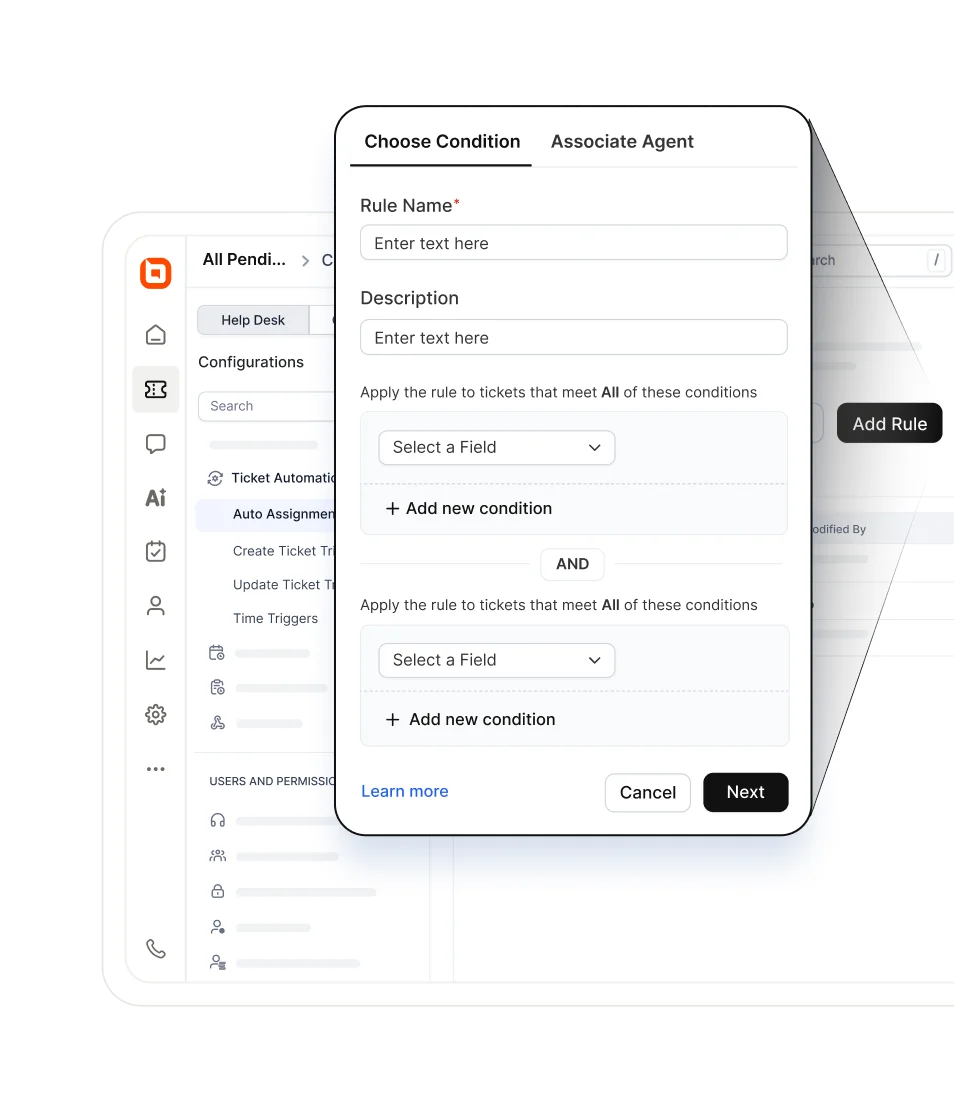
Case example of how this can work in practice:
- If a ticket comes from a Platinum‑tier customer and it contains a keyword such as “Urgent.”
- Then automatically set the priority to “Critical.”
- And notify the account manager through connected tools using integrations or webhooks.
How to measure ticket triage effectiveness
To improve triage, track a small set of operational KPIs consistently. These KPIs include:
- First response time (FRT): Effective ticket triage should drastically lower FRT for high-priority tickets.
- SLA adherence rate: This is the gold standard of triage. Aim for >95% adherence for “Critical” and “High” priority items.
- Escalation rate: If too many tickets are being escalated from Tier 1 to Tier 2, your initial documentation or Tier 1 training may need improvement.
- Reassignment rate: A high reassignment rate indicates that your ticket auto-assignment rules need to be more granular.
- Average age of tickets: Look for forgotten tickets that have been sitting in the queue without ownership. This often indicates a triage gap.
Improving triage response time often depends on choosing the right reply type, whether that’s macros, knowledge base links, or custom responses.
Building resilient support through structured ticket triage
A resilient support organization is built on a foundation of clarity. By mastering the pillars of Priority, Urgency, SLA, and Ownership, you remove the guesswork from customer support.
BoldDesk provides the enterprise-grade tools needed to automate your ticket triage process, from AI-driven classification to complex SLA management triggers.
This ensures your team stays focused on what matters most: providing exceptional support that drives customer lifetime value.
Ready to strengthen your ticket triage framework? Explore BoldDesk with a free trial or check our product tour and documentation for more information.
Related articles
- 10 Best Automated Ticketing Systems for 2026 (Compared)
- Best Email Ticketing Systems for 2026
- AI Ticketing System: A Complete Guide for 2026
FAQs
The most common mistake is processing tickets strictly in arrival order (FIFO). That approach ignores impact, urgency, and customer tier.
No. AI is used to triage (route, categorize, and prioritize), but human agents are still required to solve complex issues and provide empathetic customer service.
SLA policies should be reviewed at least annually or whenever you launch a new product or enter a new market with different customer expectations.
BoldDesk works just as well for small teams as it does for enterprises. You can start simple with core ticketing and automation, then scale into advanced workflows, SLAs, and reporting as your support operation grows.
Yes. A unified triage system like BoldDesk pulls tickets from all channels into a single unified view where the same prioritization and routing rules apply regardless of the source.





