





TL;DR: WhatsApp customer support converts informal chats into structured, trackable support requests. BoldDesk automates this end-to-end, capturing messages, assigning owners, enforcing SLAs, and centralizing reporting. This turns WhatsApp into a scalable, reliable support channel, helping teams respond faster, avoid missed messages, and maintain consistent customer experiences without added complexity.
WhatsApp has become a go-to channel for customer communication. It is fast, familiar, and convenient, which is exactly why many businesses rely on it for day-to-day support interactions.
But as message volume grows, WhatsApp Business alone starts to feel chaotic.
Research from Emplifi shows that 52% of customers expect brands to respond to inquiries within one hour, highlighting the growing pressure on support teams to respond quickly while maintaining service quality.
A WhatsApp customer support system fixes that by treating each WhatsApp conversation as a support request you can assign, track, escalate, and report on, just like email or portal tickets.
This blog explains how WhatsApp customer support transforms scattered chats into organized workflows and how BoldDesk makes the transition seamless.
WhatsApp Business vs WhatsApp Business API vs WhatsApp help desk software
Before scaling WhatsApp as a customer support channel, it’s important to understand the differences between the tools involved.
Each option serves a different purpose and fits a different stage of business growth.
Here is a quick comparison table.
| Capability | WhatsApp Business App | WhatsApp Business API | WhatsApp help desk software (BoldDesk) |
| Best for | Small teams, low message volume | Programmatic messaging and automation at scale | End‑to‑end support operations at scale |
| Multi‑agent support | Limited (single device + linked devices) | Yes (via API provider/platform) | Yes (native multi‑agent workspace) |
| Ticket ownership and assignment | No built‑in ticketing | API only, needs an external system | Yes (teams, rules, ownership workflows) |
| SLA tracking and escalation | Not supported | Not provided by API alone | Yes (SLAs, reminders, escalations) |
| Reporting and analytics | Basic message stats | Depends on the provider | Advanced (volume, FRT, resolution, SLA, CSAT) |
| Collaboration (notes, @mentions) | Not available | Not built-in | Yes (agent notes, @mentions, full audit logs) |
| Compliance with WhatsApp’s 24‑hour window | Manual | Session rules supported | Fully managed with session controls and templates |
| Automation and routing |
Not available | Possible through your backend/integration | Yes (workflow rules, categorization, routing) |
Key takeaway:
- WhatsApp Business App is ideal for very small teams that just need basic messaging.
- WhatsApp Business API unlocks automation and scalability, but it’s only a messaging pipe, not a support tool.
- A WhatsApp help desk platform like BoldDesk adds the structure needed for real support operations: ticketing, SLAs, automation, collaboration, and analytics.
How does WhatsApp customer support work with a help desk system?
WhatsApp customer support connects WhatsApp messaging with a help desk platform through the WhatsApp Business API.
Once integrated, incoming messages enter the support workflow as tickets.
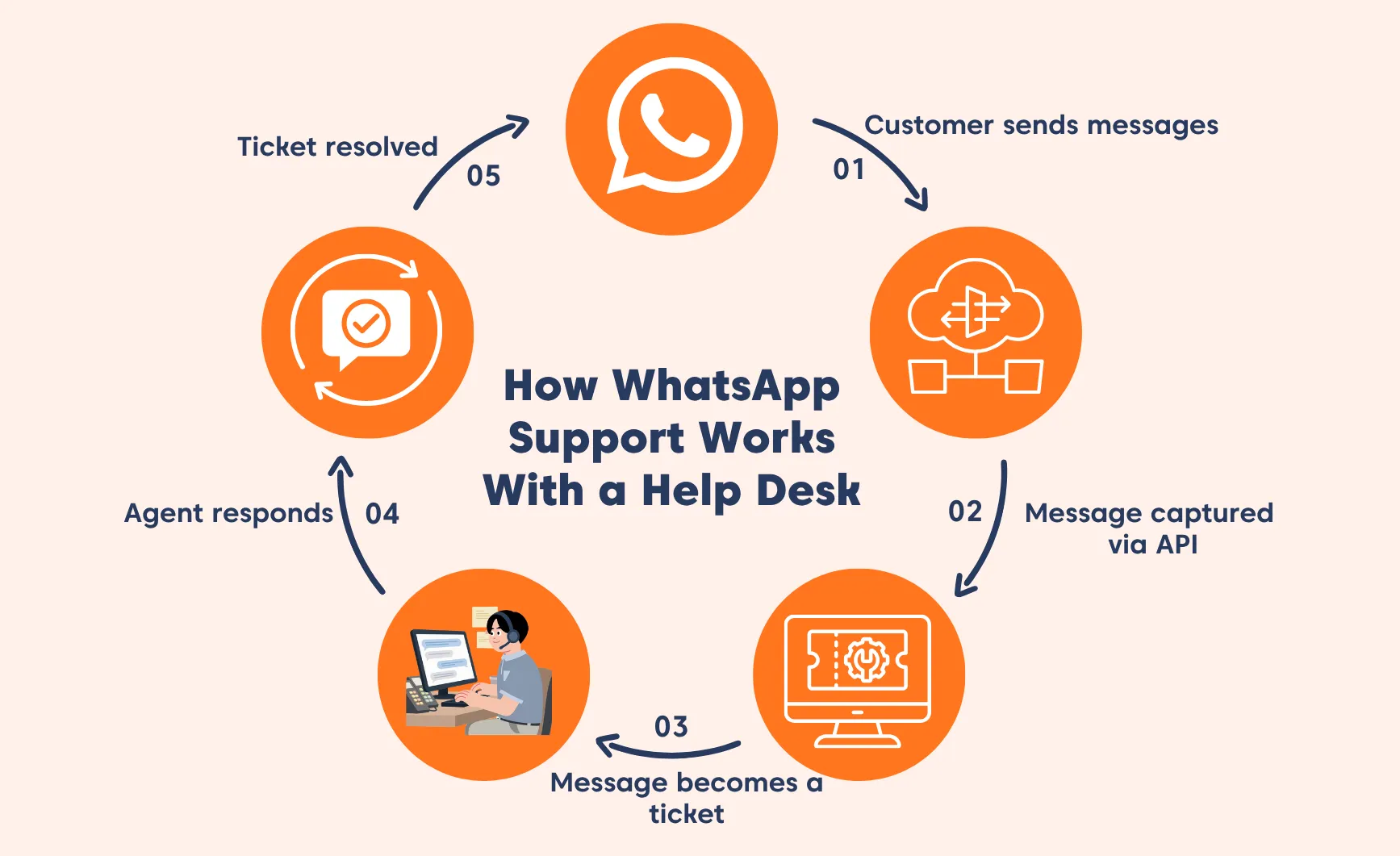
The process typically follows these steps:
- Customer sends a WhatsApp message: A customer initiates a conversation through WhatsApp to ask a question, report an issue, or request support.
- Message is captured through the API: The message is received through the WhatsApp Business platform and routed to the help desk system. Businesses often connect the API through integration platforms such as Twilio or Gupshup.
- The message becomes a support ticket: If the help desk system is configured for it, a customer’s message is automatically converted into a support ticket, which then becomes the central place where agents manage the conversation.
- Tickets are categorized and assigned: Rules and automation can categorize tickets based on keywords, issue type, or customer profile. The ticket can then be assigned to the appropriate support agent or team.
- Agents respond directly from the help desk: Support agents reply to the customer from within the help desk interface. The response is sent back to the customer through WhatsApp.
- The ticket is resolved and closed: Once the issue is resolved, the ticket is closed while maintaining a full conversation record for future reference.
This workflow allows teams to maintain the convenience of messaging while adding the structure needed for scalable support operations.
Why businesses convert WhatsApp chats into support tickets
While WhatsApp provides convenience for customers, managing customer interactions without a structured system often leads to operational inefficiencies.
Converting chats into tickets helps organizations maintain consistent and reliable customer support.
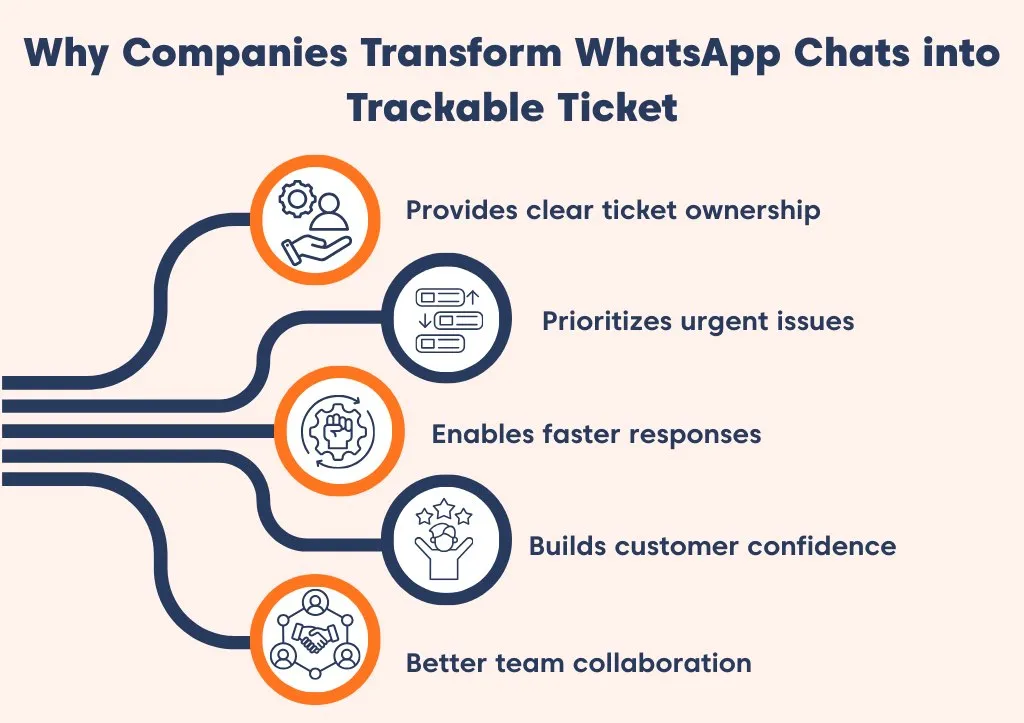
- Provides clear ticket ownership: Every WhatsApp message becomes a ticket with an assigned owner, reducing duplicates and confusion.
- Prioritizes urgent issues: Tickets are categorized and aligned with SLAs, so high‑priority requests are resolved first.
- Enables faster responses: Automation routes each ticket to the right agent or team immediately, reducing wait times.
- Builds customer confidence: Predictable updates and reliable follow‑through improve satisfaction and trust.
- Enables seamless team collaboration: Internal notes, tags, and subtasks let multiple teams work together without losing context.
How BoldDesk turns WhatsApp conversations into trackable tickets
BoldDesk’s WhatsApp integration is designed for support teams that need to manage high-volume messaging with structure, visibility, and control.
Instead of handling chats in isolation, BoldDesk helps teams capture conversations, convert them into actionable tickets, and manage the entire support workflow.
Here is how it works:
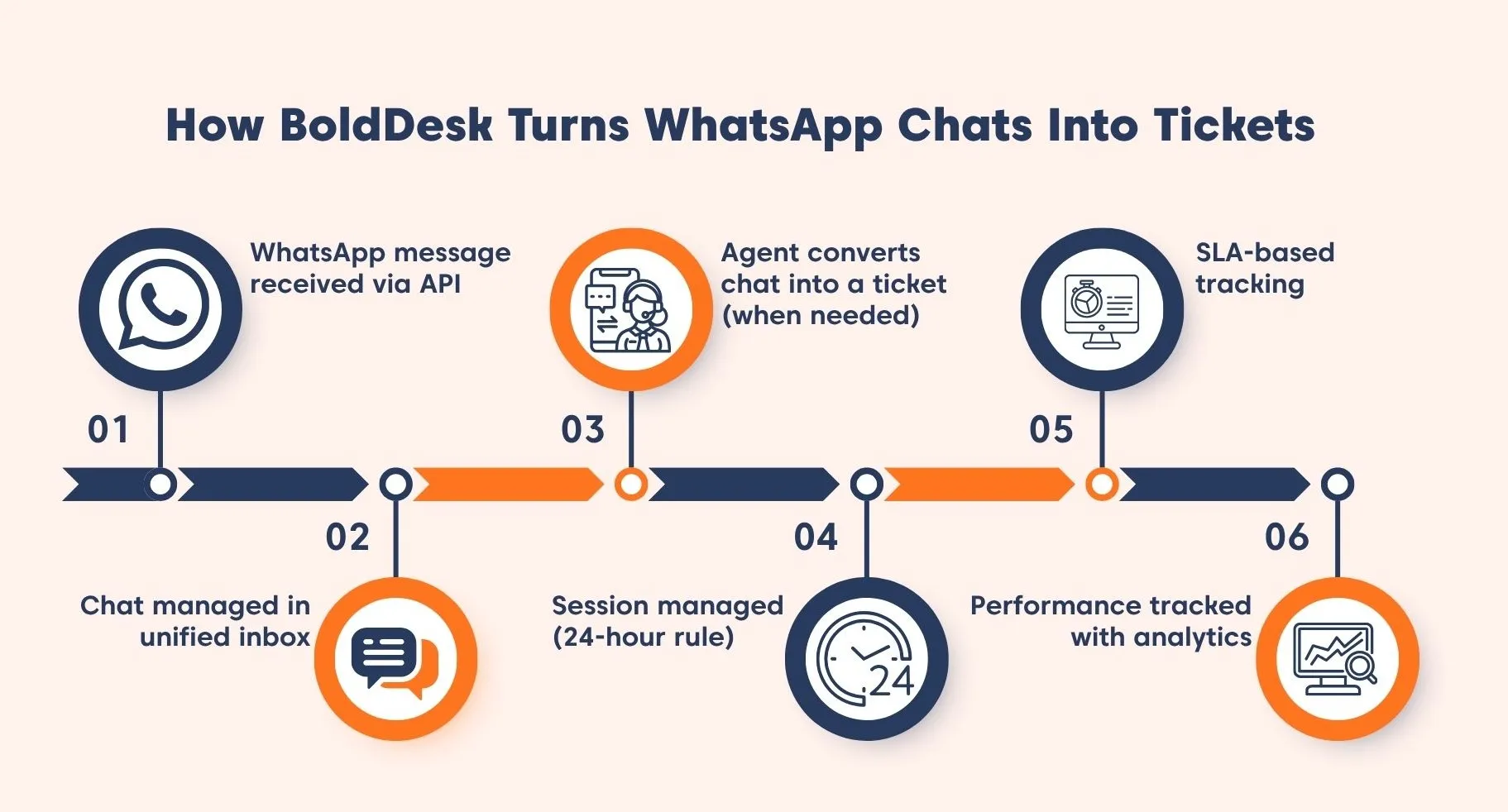
Step 1: WhatsApp messages are captured as chats
When a customer sends a message to your WhatsApp Business number, BoldDesk captures it via the WhatsApp Business API and creates a chat within the platform.
Agents can view and manage these conversations alongside email, live chat, and portal tickets, all from a unified inbox.
Step 2: Agents respond from a centralized workspace
Support agents can read, reply, and track WhatsApp messages directly from BoldDesk.
This centralization keeps communication consistent and easy to manage.
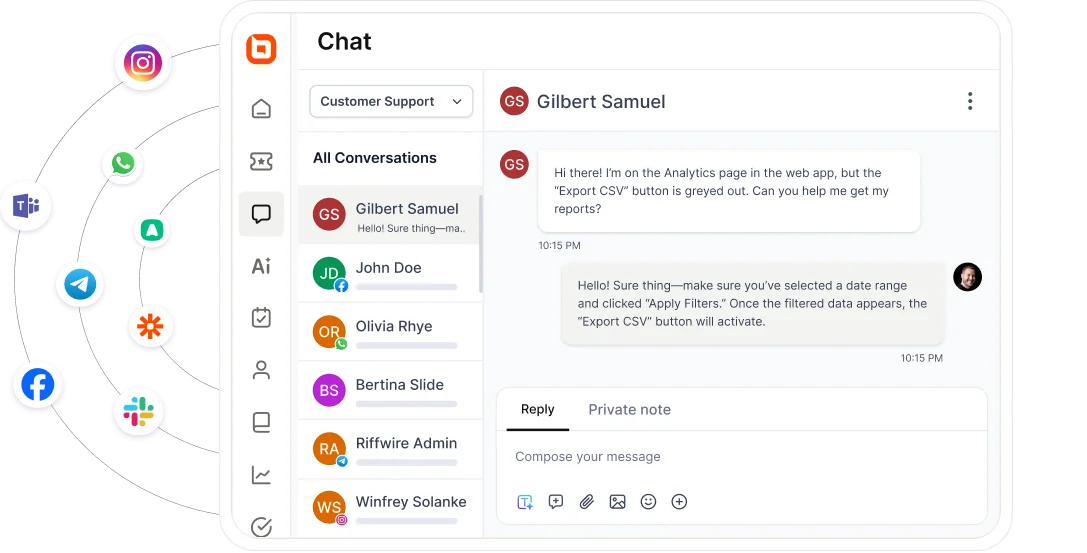
Responses are delivered instantly to customers via WhatsApp, while teams benefit from:
- Centralized communication
- Better visibility across channels
- Consistent tracking of interactions
Step 3: Convert conversations into structured tickets
When a conversation requires deeper follow‑up or formal tracking, agents can convert the WhatsApp chat into a structured ticket.
With BoldDesk AI action, teams can:
- Instantly generate a summary
- Autofill structured fields
- Attach chat context to the ticket
This reduces manual work and ensures accurate ticket creation.
Step 4: Stay compliant with WhatsApp’s 24-hour window
BoldDesk manages customer conversations within WhatsApp’s 24-hour session window.
To maintain compliance:
- Agents can freely respond within the active session
- Expired sessions can be reopened using template messages
- All communication stays compliant with WhatsApp policies
Step 5: Manage SLAs and internal collaboration
Once WhatsApp conversations are converted into tickets, teams can apply SLAs to track response and resolution times.
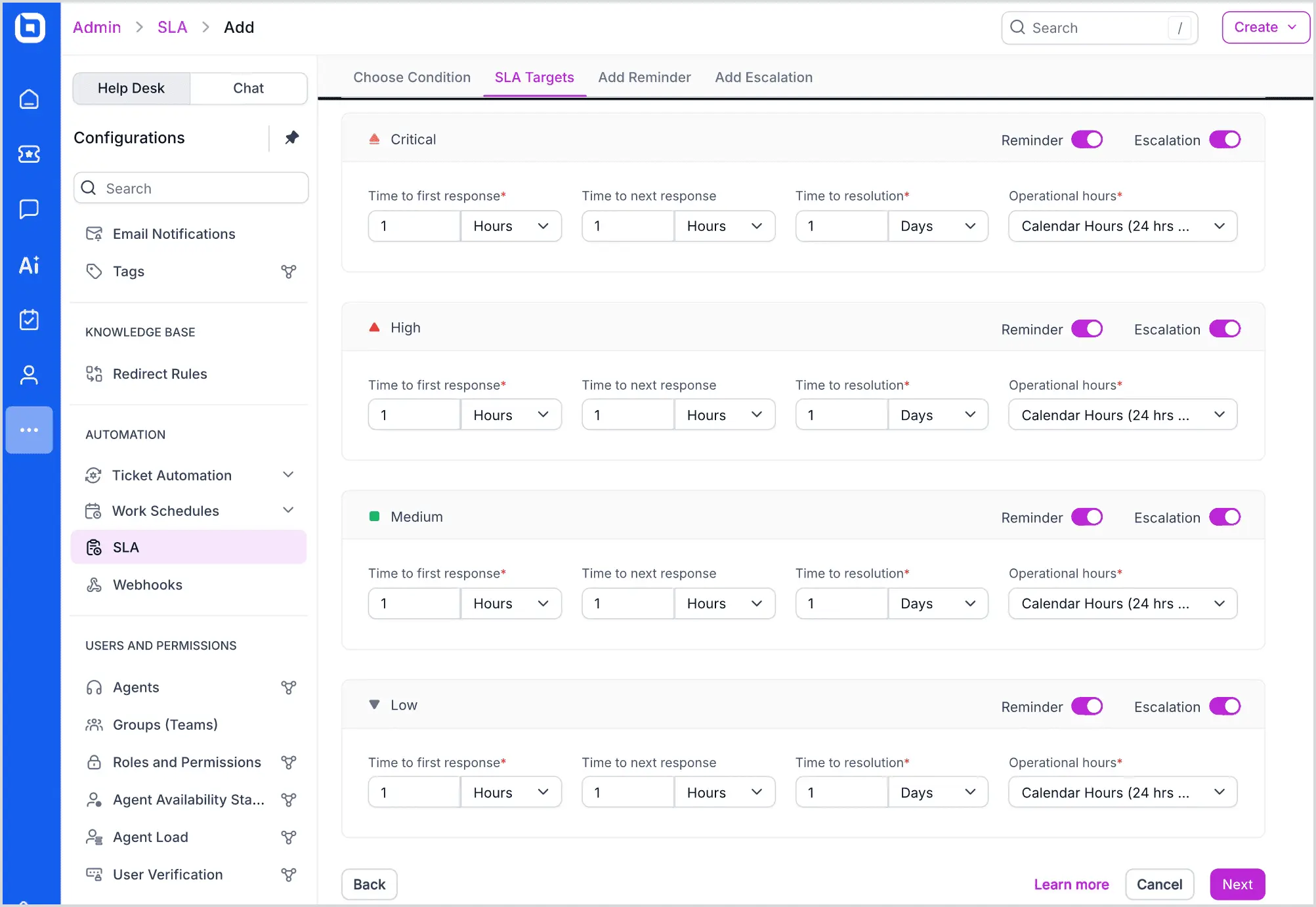
Agents can collaborate efficiently using:
- Private notes
- @mentions
- Activity tracking
This ensures faster resolutions and better coordination across teams.
Step 6: Track performance with analytics
All WhatsApp interactions and tickets are included in BoldDesk’s reporting and analytics dashboard.
Teams can monitor:
- Ticket volume
- First response time and resolution times
- SLA compliance
- Customer satisfaction (CSAT)
These insights help continuously improve support quality and operational efficiency.
WhatsApp Support Getting Messy?
Organize WhatsApp conversations instantly, streamline your workflow, and provide effortless multi‑channel support.
Key features of BoldDesk’s WhatsApp integration
BoldDesk’s WhatsApp support workflow simplifies high‑volume operations by converting every customer message into a structured, assigned request enriched with automation, collaboration features, and unified reporting.
- Full multimedia support: BoldDesk supports images, videos, voice messages, documents, location, stickers, and contact sharing. Agents can view and respond to rich media directly within tickets, improving context and resolution speed.
- Group-based message assignment: Messages are automatically routed to the correct team based on rules, reducing manual triage, ensuring inquiries reach the most qualified agent quickly.
- Multi-phone number support: Manage multiple WhatsApp numbers from a single platform with full dashboard visibility. Each number can be assigned to brands, products, or regions for organized support.
- Role-based permissions: Control which agents can view or respond to specific WhatsApp messages. This enhances security, accountability, and compliance.
- Flexible integration setup: Connect through Meta Cloud API, Gupshup, or Twilio, depending on your tech stack and regional preferences. This flexibility allows teams to integrate WhatsApp support seamlessly without disruption.
When to look for WhatsApp help desk software
As your WhatsApp support volume grows, managing conversations manually becomes overwhelming, leading to missed messages, slower responses, and inconsistent support.
This is where WhatsApp help desk software becomes essential, bringing structure, visibility, and control to your support operations.
You should consider using WhatsApp customer support software if:
- You receive a high volume of messages
- Multiple agents handle WhatsApp support
- You need SLA tracking and accountability
- Conversations require team collaboration
Use cases of WhatsApp customer support
While WhatsApp makes it easy for customers to reach out, resolving issues often requires coordination across teams, systems, and workflows.
Without structure, conversations can quickly become difficult to track and manage.
This is why businesses use WhatsApp customer support solutions, to ensure every request is organized, assigned, and resolved efficiently.
SaaS and technology companies: Handling account or onboarding issues
SaaS companies often receive WhatsApp queries related to account access, onboarding and feature usage.
Although acknowledging these requests is simple, solving them may involve:
- Adjusting user permissions
- Investigating technical issues
- Escalating to engineering teams
- Performing multi-step troubleshooting
With a structured support system, teams can turn conversations into trackable tickets, collaborate internally, and maintain full visibility throughout the resolution process.
E-commerce: Handling order and delivery inquiries
E-commerce businesses commonly receive WhatsApp messages regarding shipping updates, returns, and refunds.
These requests typically require coordination with logistics providers, inventory systems, or payment gateways.
Without a help desk system:
- Messages can get lost during high volumes
- Customers repeatedly follow up for updates
- Agents may duplicate efforts
With WhatsApp customer support software, teams can track each request, assign ownership, and provide consistent updates, ensuring a smoother customer experience.
Transform WhatsApp conversations into structured support workflows
WhatsApp is a powerful communication channel, but managing a high volume of customer inquiries requires more than simple messaging.
BoldDesk connects seamlessly with your WhatsApp Business account, via Meta Cloud API, Twilio, or Gupshup, to convert incoming conversations into organized, trackable support workflows.
With centralized conversations, automated ticketing, and enterprise‑grade routing, your team can deliver fast, reliable, and professional WhatsApp support at scale.
Ready to see how this can work for your team? Book a 30-minute live demo to walk through your WhatsApp workflow, automations, and reporting setup.
Explore our WhatsApp ticketing system to see how BoldDesk can streamline your support, or contact our team to get personalized guidance.
What WhatsApp support challenges are you facing right now? Share them in the comments. We’d love to hear from you and help.
Related articles
- Omnichannel That Doesn’t Break: Email + Chat + WhatsApp + Instagram
- 10 Best Welcome Messages for Customers [Examples and Templates]
- 10+ Essential Customer Engagement Metrics to Track
Frequently Asked Questions
WhatsApp customer support is the process of managing customer conversations on WhatsApp through a help desk system that converts messages into trackable support tickets with assignment, automation, and reporting.
No. WhatsApp Business provides messaging capabilities, while the WhatsApp ticketing system adds structured workflows such as ticket assignments, automation, and reporting.
No. WhatsApp Business API supports one-to-one messaging only, and BoldDesk follows this standard to ensure secure and traceable communication.
You can integrate WhatsApp with BoldDesk through the Meta Cloud API, Twilio, or Gupshup, depending on your regional requirements and tech stack.
Once integrated, BoldDesk captures all incoming WhatsApp messages and converts them into trackable tickets within the help desk.
BoldDesk follows WhatsApp’s 24-hour session rules. If a session expires, agents can reopen the conversation using approved WhatsApp template messages to start a new 24-hour window.


