









TL;DR: Help desk management is the process of organizing support teams, workflows, and service delivery to resolve issues efficiently. Successful help desk management relies on clear support tiers, skilled and well-trained agents, documented processes, defined escalation paths, and continuous performance tracking to improve response times, resolution rates, and customer satisfaction.
Help desk management is at the heart of modern customer support; however, the landscape has undergone significant changes.
Businesses still relying on outdated systems face several challenges: overwhelmed agents, rising ticket volumes, longer wait times, and escalating costs. These inefficiencies lead to poor customer experiences and high employee burnout.
The truth is clear: traditional help desk strategies no longer work. To stay competitive, companies need a smarter, more scalable approach, and AI-powered help desk management systems are the solution.
In this blog, we’ll explore what help desk management really means, its key benefits, and common mistakes to avoid.
What is help desk management?
Help desk management is the process of organizing, tracking, prioritizing, and resolving customer or internal support requests in a centralized ticketing system.
It ensures fast resolution, consistent service quality, SLA compliance, and measurable support performance.
What is AI help desk management?
AI help desk management is the use of artificial intelligence (AI) to automate and improve help desk workflows, including ticket classification, routing, prioritization, agent assistance, and self‑service, so teams can reduce manual effort, resolve issues faster, and scale support as ticket volume grows.
It commonly relies on natural language processing (NLP) and machine learning to understand requests and recommend the next best action.
Why is help desk management important for businesses?
Effective help desk management is more than a support function; it’s a strategic advantage.
When implemented with the right help desk features, it transforms customer service management and drives business growth.
Here’s why it matters:
- Improves customer satisfaction: A well-structured help desk ensures quick resolutions and smooth communication, creating a positive customer experience that keeps customers coming back.
- Boosts agent productivity: By streamlining help desk workflows and automating repetitive tasks, agents can focus on complex issues that require human expertise, boosting overall efficiency.
- Reduces costs: Efficient ticket handling and help desk automation optimize unnecessary escalations and operational overhead, helping businesses save money without compromising support standards.
- Builds stronger customer relationships: Consistent, reliable support builds trust. Meeting customer expectations and delivering timely solutions can create long-term customer relationships.
- Yields actionable insights: Modern help desk systems capture valuable data on customer interactions and recurring issues, giving businesses the intelligence they need to refine processes and enhance customer service standards.
Top help desk management best practices for scalable support
Managing a help desk effectively requires more than just responding to tickets; it’s about creating a structured, proactive system that scales with your business.
Here are the tips that assist in making help desk operations efficient and successful:
Build your support operation on the right technology
Effective help desk management requires technology that supports consistent processes, team collaboration, and operational visibility.
The right help desk software should help managers standardize workflows, monitor service performance, and maintain support quality as ticket volumes grow. Rather than relying on disconnected tools, organizations should use technology to create a structured and scalable support operation.
To align technology with your support goals:
- Configure ticket routing, prioritization, and escalation workflows to ensure requests reach the right team members quickly.
- Maintain centralized visibility into support queues, workloads, and customer interactions to improve coordination across teams.
- Standardize processes and reporting so managers can track performance consistently and identify operational bottlenecks.
- Use automation strategically to reduce repetitive manual work and allow agents to focus on complex customer issues.
Create a unified support operation
Support teams often struggle when customer conversations are spread across multiple channels and systems.
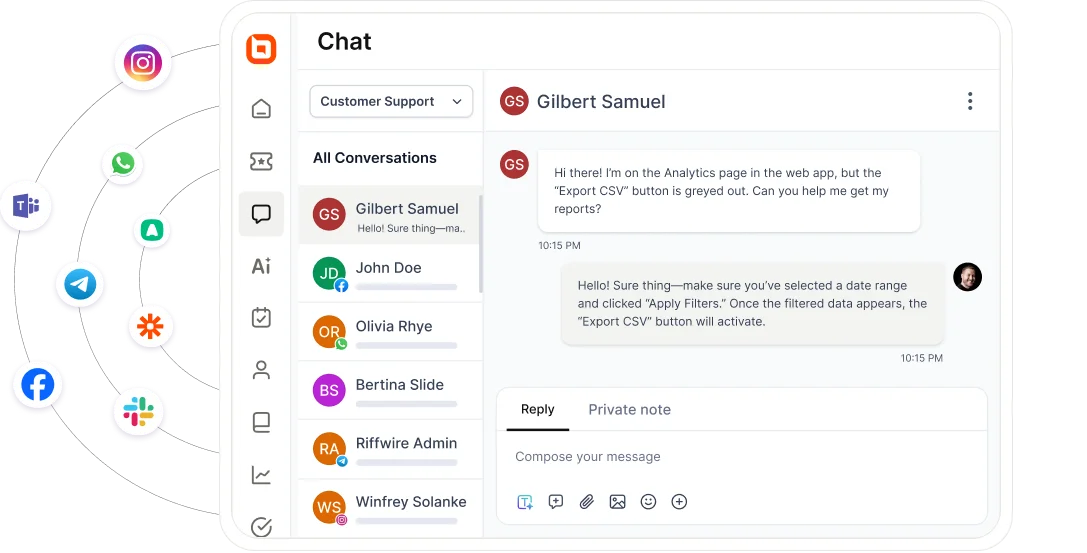
Managing support from a single, centralized operation helps eliminate communication silos, improve visibility, and ensure a consistent customer experience across every touchpoint.
A unified support operation allows managers to monitor workloads more effectively, maintain service standards, and make better decisions using complete support data.
To bring email, chat, social media, and phone interactions into one platform:
- Choose the help desk management tools offering omnichannel customer service.
- Connect each channel so every message creates a ticket automatically.
- Configure unified dashboards for agents and ensure reporting pulls data from this single source for accurate analytics.
Improve operational efficiency using automation and AI
Manual ticket handling and reactive support slow down resolution and frustrate customers.
AI streamlines help desk operations by interpreting requests, routing them accurately, and assisting agents in real time. It also supports customers around the clock, detects sentiment, and improves self‑service by recommending relevant articles.
Unlike traditional rule-based automation, AI agents can use historical ticket data and configured knowledge to improve routing decisions and resolution suggestions.
Here’s how you can implement help desk automation ideas effectively:
- Set up routing rules to classify tickets by keywords, priority, and issue type.
- Enable AI-driven routing to analyze context and past resolutions for instant assignment to the right agent.
- Add AI tools for instant responses, predictive analytics to anticipate issues, and sentiment analysis to prioritize critical cases quickly.
Example:
An ecommerce company facing seasonal order surges can automatically deflect hundreds of repetitive “Where is my order?” tickets using AI agents that provide instant order status updates and resolve routine inquiries in real time.
By handling high-volume, repetitive requests autonomously, the system prevents ticket backlogs and preserves agent capacity for complex or high-priority cases during peak demand.
Reduce support workload through self-service
Customer self-service empowers both customers and help desk management teams to find answers quickly and work more efficiently. However, providing self-service options alone is not enough.
Gartner found that while 73% of customers use self-service at some point in their support journey, only 14% of customer service issues are fully resolved through self-service channels.
For effective self-service in help desk, you need to:
- Build a searchable knowledge base with FAQs, troubleshooting guides, and product documentation for common issues.
- Integrate AI-powered search so customers and agents can instantly locate accurate information without escalating tickets.
- Prepare canned responses and automated workflows to provide quick, consistent answers for common queries and assist agents with ready-made solutions during live interactions.
Define team structure and escalation paths
As support volume grows, clearly defined roles and escalation procedures become essential. A tiered support structure helps organizations route requests efficiently while ensuring complex issues receive the appropriate expertise.
Most help desks use:
- Tier 1 for common requests and initial troubleshooting.
- Tier 2 for advanced issue resolution and investigations.
- Tier 3 for specialist and engineering support.
Documented escalation procedures ensure tickets move between tiers quickly, reduce bottlenecks, and help teams maintain SLA commitments.
Plan staffing and workload capacity
As ticket volumes grow, effective help desk management requires careful staffing and resource planning.
Understaffed teams struggle to meet service expectations, while overstaffing increases operational costs without improving efficiency.
To maintain balanced workloads and consistent service quality:
- Forecast ticket volume trends using historical support data and seasonal demand patterns.
- Assign sufficient coverage across shifts, channels, and business hours to minimize response delays.
- Monitor agent workloads regularly and redistribute tickets when queues become overloaded.
- Review staffing needs as the business grows to ensure support capacity keeps pace with customer demand and SLA standards.
A proactive staffing strategy helps prevent agent burnout, maintain productivity, and ensure customers receive timely support even during periods of increased ticket volume.
Establish clear communication standards
Poor communication frustrates customers and erodes trust. Keeping them informed builds confidence and reduces unnecessary follow-ups.
For you to maintain transparency, you can:
- Configure automated notifications for ticket status and expected resolution times.
- Use templates for common updates to ensure clarity and consistency.
- Provide clear timelines so customers know what to expect throughout the support operation process.
Example:
In the healthcare industry, timely updates are critical. A patient services team using a dedicated help desk for healthcare with automated ticket notifications and SLA tracking can ensure appointment-related inquiries or billing issues are acknowledged immediately, reducing patient anxiety while maintaining regulatory compliance.
Build and develop a high-performing support team
Even the best tools fail without skilled agents. Well-trained customer support teams ensure quality service and faster resolutions.
You can:
- Offer ongoing customer service training on tools, processes, and customer handling techniques to reduce average resolution time.
- Equip agents with collaboration tools and AI-driven suggestions to boost first-contact resolution rates.
- Encourage continuous learning so your team stays prepared as ticket volumes grow, maintaining SLA compliance and customer satisfaction scores.
Use performance insights to drive continuous improvement
Effective help desk management depends on data-driven decision-making. High-performing support teams treat help desk SLA compliance as a system outcome rather than an agent responsibility.
By combining workflow automation, predictive routing, and real-time dashboards, organizations can proactively prevent breaches instead of reacting after service levels decline.
You need to:
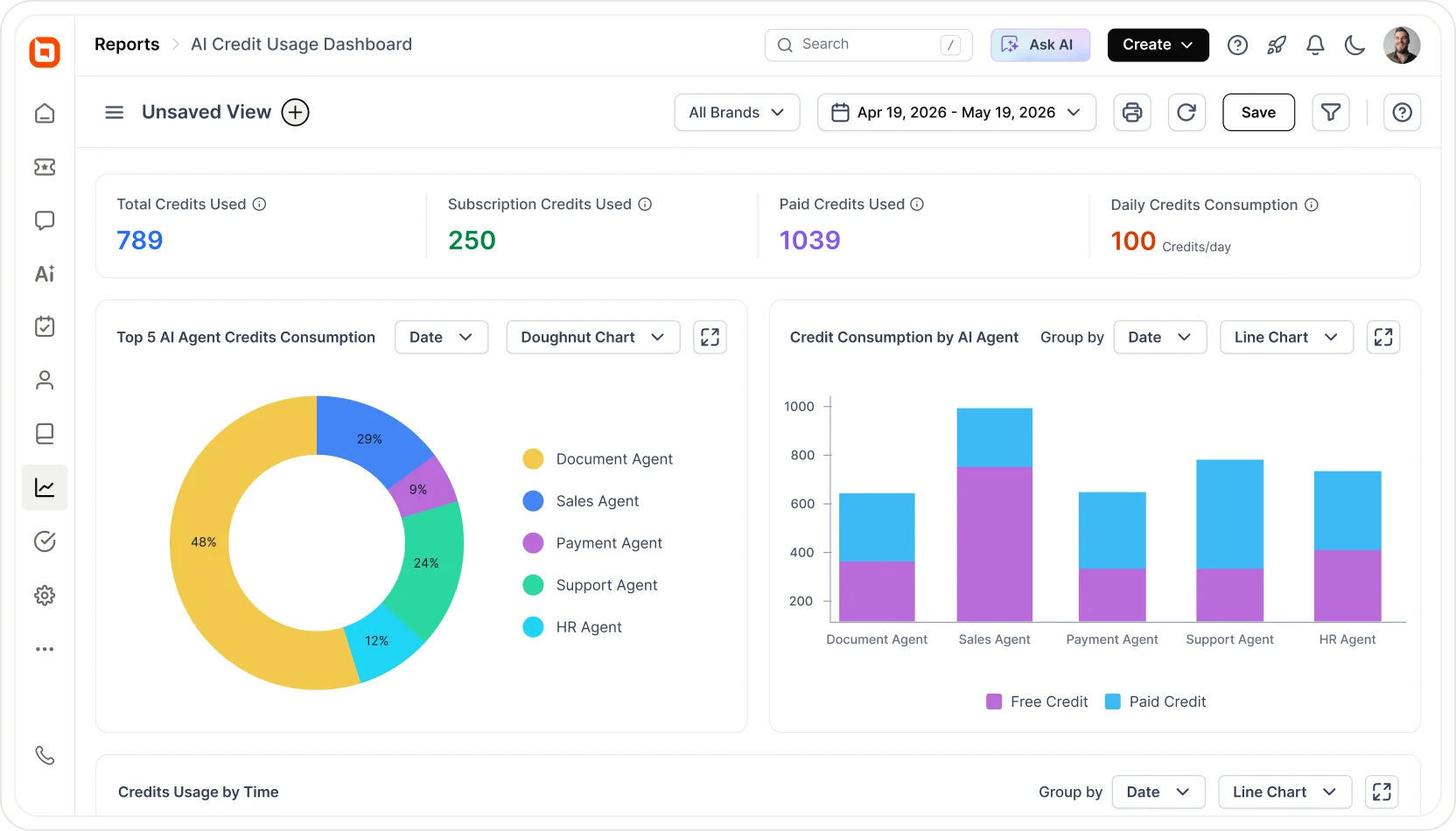
- Set up dashboards that track key help desk metrics like response time, resolution time, and SLA compliance.
- Review insights regularly to spot bottlenecks and adjust workflows.
- Use advanced reports and analytics tools to detect recurring issues and prioritize fixes that improve customer experience.
Example:
A subscription-based platform tracking churn-related tickets can use analytics to identify recurring cancellation triggers, such as billing confusion or onboarding friction.
By resolving these root causes, support becomes a retention driver rather than just a reactive function.
Common mistakes in help desk management and how to avoid them
Effective customer support infrastructure goes beyond handling tickets; it requires structured processes, consistent communication, and tools that keep teams aligned.
However, many support operations unknowingly fall into avoidable pitfalls that slow resolution times and weaken service quality.
Here are some common mistakes teams encounter and how to prevent them:
| Challenge | Impact | Solution |
| Limited visibility into performance | Teams cannot spot bottlenecks or measure service health, leading to repeated inefficiencies. | Track core metrics, response time, resolution time, workload, and satisfaction, to drive continuous improvement. |
| Ineffective collaboration | Agents work in silos, resulting in miscommunication and slower resolutions for complex issues. | Use shared views, internal notes, and team collaboration tools to coordinate across departments. |
| Lack of structured ticket workflows | Tickets get stuck, escalations are delayed, and teams lose visibility, slowing down resolution times. | Define clear workflows for ticket categorization, escalation, SLA tracking, and approvals to maintain smooth progress. |
Strengthen your support operations with effective help desk management
Modern help desk management is essential for delivering fast, consistent, and organized support.
By streamlining ticket handling, improving workflows, and ensuring clear communication across teams, businesses can resolve issues more efficiently and maintain high service standards for every customer interaction.
BoldDesk brings this transformation to life. With tools for ticket tracking, workflow automation, collaboration, and self‑service, we can make it easier to manage requests, stay organized, and deliver reliable support at scale.
Our help desk management system combines intelligent ticket routing, automated workflows, and real-time insights to boost agent productivity and empower customers with self-service options.
Ready to revolutionize your help desk? Start a 15-day free trial with BoldDesk today and see how easy it is to streamline support operations.
We’d love to hear your experience with help desk management! Share your thoughts or questions in the comments section below.
Related articles
- Customer Service Management: Benefits and Tips
- 16 Best Help Desk Software in the Market for 2026
- Effective Help Desk SLA Setup and Management
Frequently Asked Questions
Integrating AI into your management system allows you to automate repetitive tasks, intelligently route tickets, and handle multiple queries simultaneously.
This improves efficiency, reduces response times, lowers operational costs, and creates a smoother help desk support experience for both customers and agents.
Help desk management focuses on handling day-to-day support issues such as troubleshooting, ticket resolution, and responding to user requests quickly and efficiently.
Service desk management, on the other hand, oversees broader IT service delivery by managing requests, incidents, approvals, and end-to-end workflows across the entire organization.
Traditional customer support infrastructure often struggles with manual ticket routing, slow response times, and limited scalability, making it difficult to keep up with growing customer demands.
These challenges lead to overwhelmed agents, inconsistent service quality, and higher operational costs for businesses.
They typically include features such as ticket tracking, automated routing, multi-channel support, and integrated knowledge bases to streamline customer service management.
They also offer reporting tools, SLA monitoring, and collaboration capabilities to ensure efficient workflows and consistent service delivery.
Yes. Modern AI help desk automation is designed to integrate with existing workflows, ticketing systems, escalation rules, and support channels.
AI enhances current processes by automating repetitive tasks while allowing teams to maintain control over approvals, escalations, and customer communication.
Most AI-powered help desk platforms include enterprise-grade security features such as role-based access, data encryption, audit logs, and compliance controls.
These measures help ensure customer data is handled securely while automation runs in the background.





