







TL;DR: AI email automation organizes support inboxes, reduces email overload, and speeds up issue resolution. By automatically sorting, prioritizing, and responding to inquiries, teams can deliver clearer communication, faster resolutions, higher satisfaction, and scalable support without missed emails or manual workload strain.
Is your support team struggling to manage a growing volume of customer emails?
An important email gets buried, a follow-up goes unnoticed, response times stretch just a little too long.
Individually, these moments seem small, but together they define a pattern where every delayed response costs trust, retention, and revenue.
According to Email Analytics, 95% of customer service teams use email, and 98% of customers use it for contacting support.
Support teams aren’t failing; they’re doing their best under growing pressure. As customers expect quicker, more seamless support, cluttered inboxes become harder to manage.
If you’re a support leader managing thousands of emails weekly or a CX leader under pressure to reduce response times, this guide is designed for you.
This article outlines the AI email workflows, automation strategies, and tools you need to manage high support volume efficiently, without sacrificing speed or quality.
What is AI email automation for customer support?
AI email automation uses AI models to handle steps in the support email lifecycle, especially those that are predictable, repetitive, and time-consuming.
It extracts details, routes the message to the appropriate team, drafts a policy-aligned response, resolves straightforward issues automatically, and escalates complex cases with full context.
According to benchmarks published by IrisAgent, mature AI‑driven triage deployments achieve approximately 85–95% correct triage accuracy, compared with 40–50% accuracy in traditional rule‑based automation.
Traditional automation is often brittle because it relies on exact keywords and rigid rules.
In contrast, AI-driven email automation is more resilient, as it can interpret natural language, summarize long conversations, and adapt to different ways customers phrase the same request.
Why customer support teams struggle with email overload
As customer expectations grow, support teams often struggle to keep pace with the increasing volume of incoming emails.
What works at a smaller scale quickly becomes difficult to manage as inquiries multiply and workflows remain heavily manual.
Over time, these limitations create delays, inconsistencies, and operational bottlenecks that impact both agents and customers. Several factors contribute to this challenge:
- Growing email volume: Support inboxes receive a constant stream of customer inquiries, making it difficult for teams to keep up without scalable processes in place.
- Manual triage and classification: Because emails are typically unstructured, agents must manually read, interpret, and categorize each request, slowing down response times and reducing efficiency.
- Inconsistent prioritization: Without automated routing or prioritization rules, urgent issues can easily get buried, leading to inconsistent handling of high-priority requests.
- Lack of standardized workflows: When teams rely on ad hoc responses instead of defined processes or templates, handling becomes inconsistent and time-consuming.
- Inbox congestion: Since all types of requests flow into the same inbox, unrelated issues compete for attention, creating bottlenecks and making it harder for agents to focus on critical tasks.
7 ways AI email automation reduces support ticket volume
According to Forrester, 73% of customers say that valuing their time is the most important thing a company can do to provide them with a good online customer service.
AI email support automation applies intelligence across the entire email support lifecycle.
Incoming requests are interpreted, structured, and processed through predefined workflows, so email handling follows a consistent and repeatable system rather than relying on manual processes.
Automatically resolve high‑volume repetitive queries
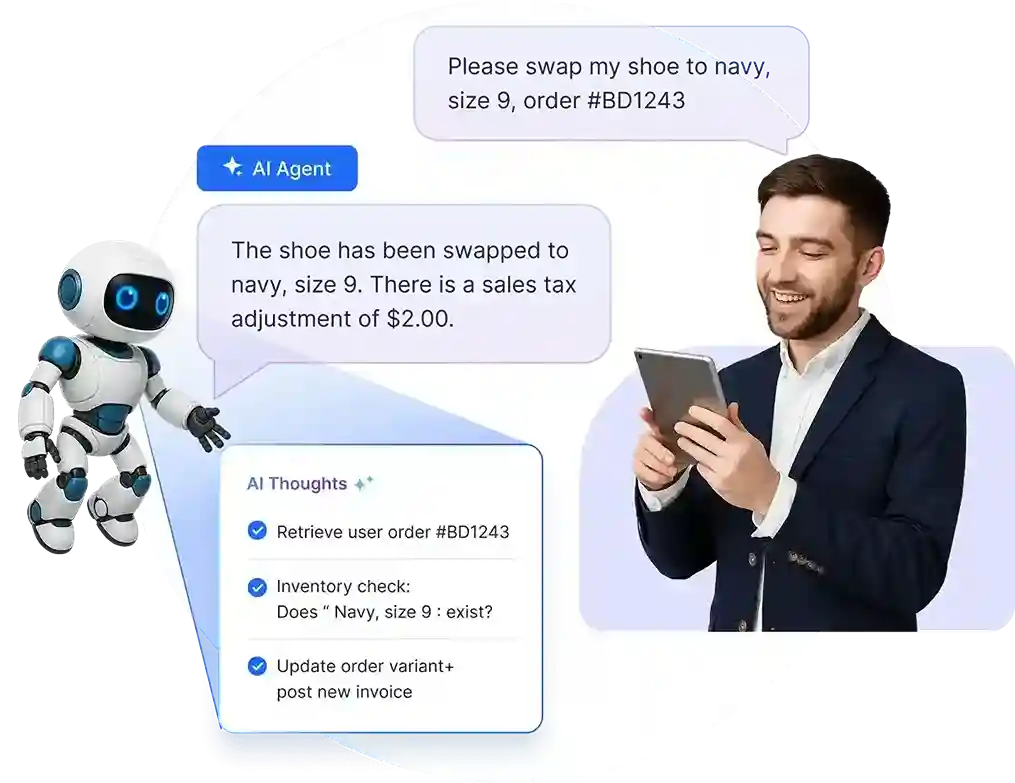
Support teams often get overwhelmed by the sheer volume of repeated customer questions. AI systems are able to identify recurring and well‑defined customer questions.
Using the trained language models and approved knowledge base content, responses are generated automatically based on detected intent.
When a customer sends a routine email such as a password reset, shipping update, or refund inquiry, the system:
- Recognizes frequently asked questions based on detected intent
- Generates responses using predefined templates or knowledge base articles
- Automatically sends responses when confidence thresholds are met
This means a large portion of repetitive emails are handled instantly and never enter the agent queue.
Route incoming emails to the right teams
Manual triage of incoming emails slows down support operations and introduces avoidable delays.
AI analyzes incoming emails to determine the nature of the issue and assigns tickets to the appropriate department, queue, or agent.
When an email is received, the system:
- Classifies the email based on intent and context
- Applies rule‑based and model‑based routing logic
- Automatically assigns the email to the correct team or workflow
Consequently, issues reach the right team on the first pass, reducing handoffs, minimizing delays, and improving overall resolution efficiency.
Intelligently prioritize and escalate high‑risk and urgent emails
Not all customer issues require the same level of attention. AI systems ensure that urgent, high‑risk, or emotionally charged email requests are identified early and prioritized correctly before entering handling queues.
When an email enters the system, it:
- Analyzes language and tone to detect sentiment
- Detects urgency indicators, risk signals, and negative sentiment
- Evaluates severity and emotional impact
- Assigns priority levels and escalation paths programmatically
As a result, critical issues are surfaced immediately, urgent cases are escalated faster, and support teams can respond proactively, reduce service failures, improve customer satisfaction, and prevent issues from being overlooked.
Accelerate responses with real‑time assistance
When issues require human involvement, agents often lose time searching for information, composing responses, or switching between tools.
AI accelerates resolution in email automation by supporting agents directly within their workflow, both before and during customer interactions.
While agents handle customer interactions, the system:
- Uses context-aware data, conversation history, and reference materials
- Generates drafts aligned with tone and content guidelines
- Surfaces relevant knowledge instantly within the agent interface
The outcome is agents spend less time searching or drafting replies, respond more consistently, and resolve cases faster while maintaining high response quality.
Ensure continuous support with AI agents beyond working hours
While email automation deflects routine requests during business hours, AI chatbots extend the same intelligent resolution capabilities beyond working hours and across live customer interactions.
When customers reach out after hours or via live channels, the system:
- Understands intent using natural language processing
- Retrieves accurate responses from approved knowledge base content
- Resolves queries or collects information for follow‑up
This ensures that customers receive consistent 24/7 help through AI agents, preventing ticket backlogs from building overnight and ensuring automation coverage extends beyond email alone.
Optimize support operations with actionable reports and insights
Managing support performance requires clear visibility into trends and bottlenecks.
AI delivers actionable insights by analyzing support data at scale.
As emails and interactions are processed, the system:
- Aggregates interaction and ticket data
- Identifies trends, recurring issues, and performance gaps
- Generates structured reports and operational insights
As a result, leaders make informed decisions, optimize workflows, and continuously improve support efficiency and outcomes.
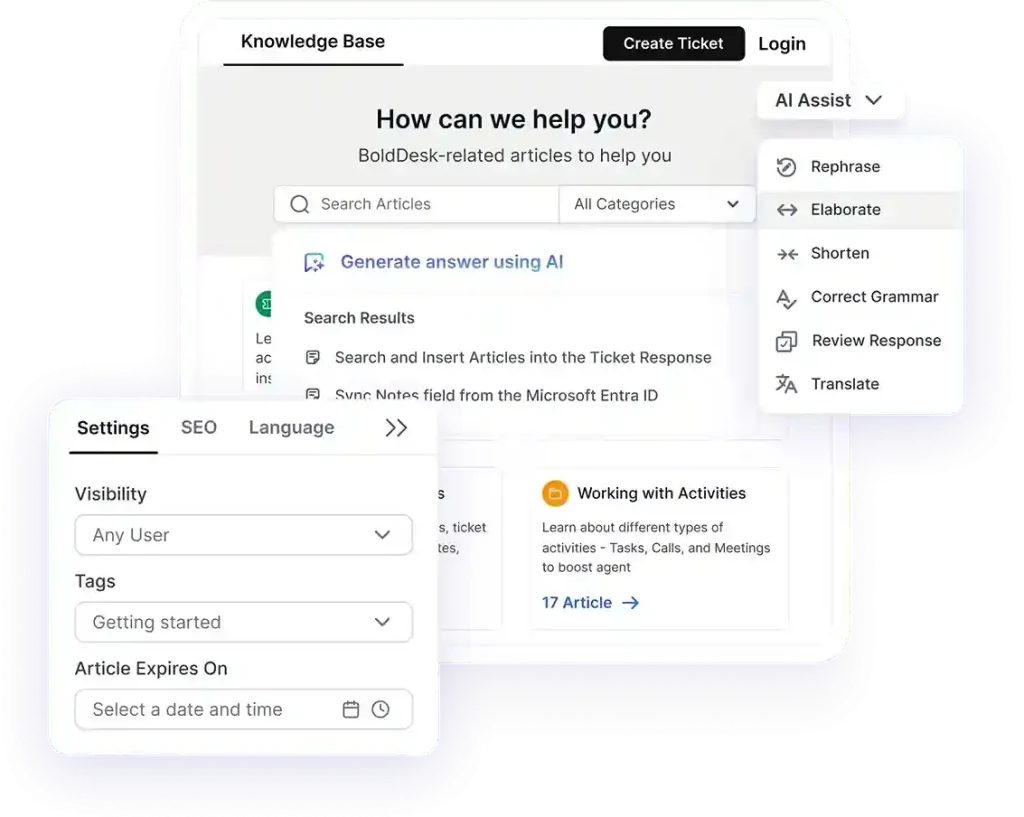
Deliver personalized self-service guidance
Many customer questions don’t require an agent; they require clear, relevant instructions.
AI enables self-service by guiding customers to resolve issues on their own, rather than sending generic replies or routing every request to support teams.
When a customer asks a question or enters a workflow, the system:
- Recognizes the user’s intent from natural language input
- Retrieves the most relevant guidance from the connected knowledge base
- Applies customer context (such as product or account details) to tailor recommendations
- Delivers clear, structured instructions directly to customers
Consequently, customers receive guidance that feels specific and actionable rather than generic.
Many issues are resolved without agent involvement, reducing ticket volume and resolution time while allowing support teams to focus on more complex, high-value interactions.
Steps to implement AI email automation in customer support
Implementing AI email automation works best when introduced gradually alongside existing support processes.
Instead of automating everything at once, teams should begin with repetitive tasks and expand automation based on performance and business needs.
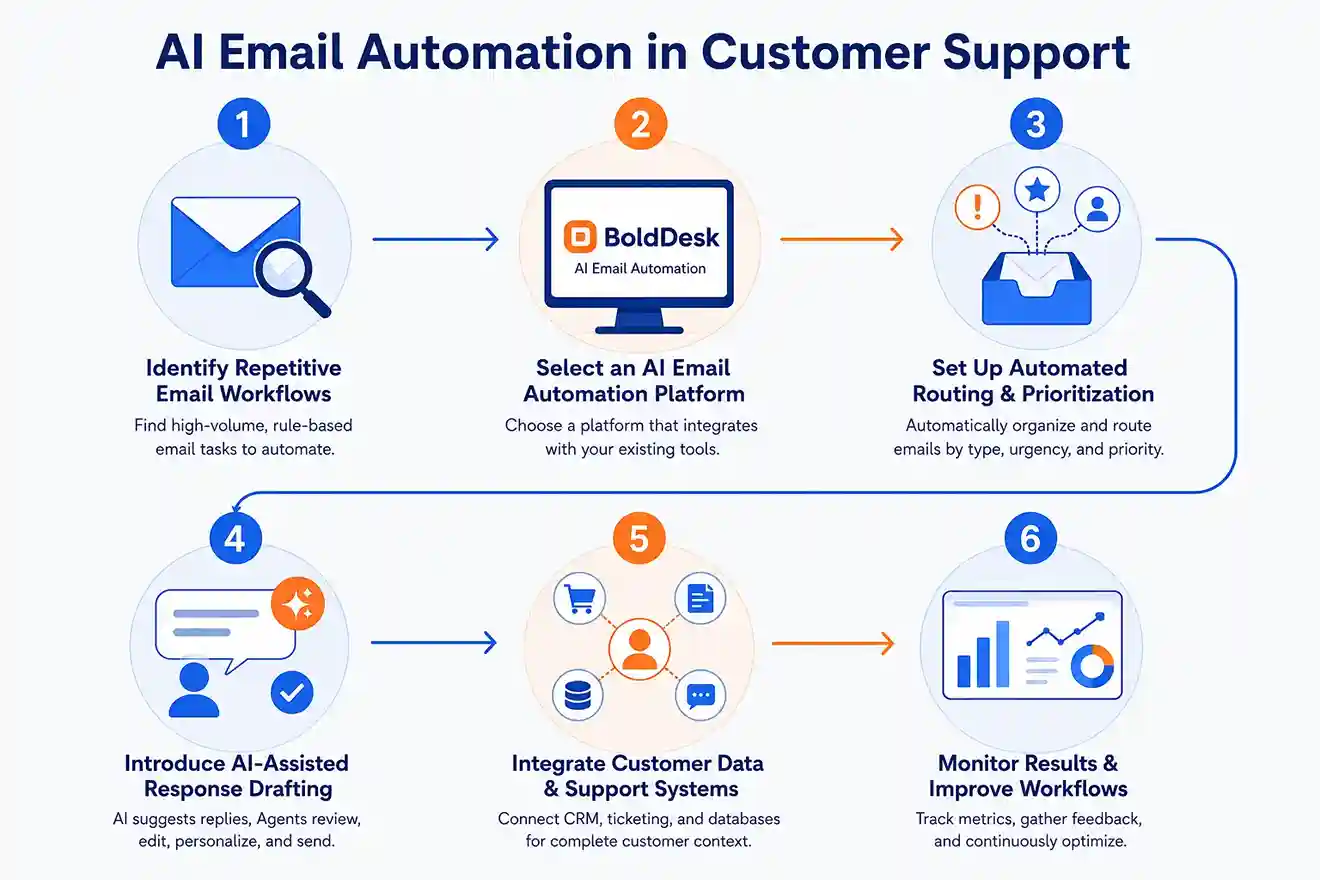
1. Identify repetitive email workflows
Start by reviewing the types of emails your support team handles most frequently.
Look for repetitive tasks such as ticket categorization, FAQs, status updates, password reset requests, or routing inquiries to the correct department.
These high-volume, rule-based tasks are usually the easiest and safest areas to automate first.
2. Select an AI email automation platform
Choose a tool that integrates well with your existing support environment, such as your help desk, CRM, or shared inbox software.
The platform should support capabilities such as email classification and routing, AI-generated response suggestions, workflow automation, agent collaboration, and reporting analytics.
The goal is to improve existing workflows, not force agents to switch between disconnected systems.
3. Set up automated routing and prioritization
Once the system is in place, configure rules to automatically organize incoming emails based on factors such as request type, urgency, customer segment, keywords, intent, and SLA priority.
This reduces manual triage and helps teams respond faster to critical requests.
4. Introduce AI‑assisted response drafting
Enable AI to generate suggested replies for common customer inquiries using previous conversations, knowledge base articles, and customer context.
Instead of fully automating responses right away, keep agents in the review loop so they can edit replies, verify accuracy, add personalization, and approve messages before sending.
This helps teams respond faster while maintaining quality, consistency, and control over customer communication.
5. Integrate customer data and support systems
Connect the email workflow automation platform with your CRM, help desk ticketing system, customer database, and internal tools.
This allows the system to access relevant customer information such as purchase history, previous tickets, account status, subscription details, and communication history.
With richer context available in one place, agents can deliver faster, more personalized responses without switching between multiple tools.
6. Monitor results and improve workflows
After implementation, track key performance metrics such as response time, resolution time, ticket backlog, routing accuracy, SLA compliance, and agent productivity.
Use real support data and agent feedback to refine workflows, improve AI suggestions, and gradually expand automation over time.
This ensures automation continues to deliver measurable improvements without disrupting support quality.
Benefits of AI email automation for customer support
AI email automation delivers value when it improves measurable email‑handling outcomes.
It organizes incoming support emails by identifying intent, setting priority, routing messages to the right team, and assisting with response drafting.
The benefits below are what teams typically experience when an AI email assistant is implemented in a controlled and thoughtful way:
- Reduces first response and resolution time: automated email sorting, prioritization, and routing remove manual triage delays, so urgent customer emails are addressed faster.
- Improves SLA compliance during email volume spikes: automatic urgency detection and escalation ensure critical emails are handled on time, even during high‑volume periods.
- Handles higher email volume without increasing workload: repetitive and routine emails are addressed automatically, allowing agents to focus on complex or sensitive customer conversations.
- Lowers cost per email interaction: faster handling, fewer manual steps, and reduced back‑and‑forth decrease the overall cost of responding to customer emails.
- Improves visibility and accountability across emails: every incoming email is tracked, prioritized, and assigned clearly, reducing missed follow‑ups and improving ownership.
How BoldDesk powers AI email automation
BoldDesk helps support teams automate high-volume email workflows with AI-powered ticketing, smart automation, and self-service tools.
Incoming emails are automatically converted into tickets, intelligently routed using workflow automation, and prioritized based on SLA rules, keywords, or ticket categories.
With features like AI Copilot, AI Agents, automation, omnichannel, and an AI-powered knowledge base, BoldDesk helps agents respond faster, reduce repetitive support requests, and deliver consistent customer support at scale.
Using BoldDesk, teams can:
- Automatically convert emails into support tickets
- Route tickets to the right agents instantly
- Generate AI-assisted replies with AI Copilot
- Reduce repetitive queries through self-service portals
- Track and manage support emails from a centralized shared inbox
- Improve SLA compliance with automated workflows and escalations
Whether you’re handling hundreds or thousands of customer emails, BoldDesk helps streamline customer email workflows operations while improving response times and customer satisfaction.
Real-life examples of AI in email support automation
Real-world deployments show that AI email automation reduces manual ticket handling, shortens response times, and helps support teams handle more requests without adding headcount.
It also keeps humans involved in complex or sensitive cases, ensuring quality and control.
Below are examples of AI email automation use cases in different industries:
Syncfusion: Streamlined CRM workflows that reduce response time
Challenge:
Syncfusion’s support team managed diverse customer emails, including support, billing, and internal queries, across multiple tools. Manual linking, repetitive actions, and frequent context switching led to errors and inconsistent workflows.
How automation helped:
With BoldDesk, Syncfusion centralized email communication into a unified workflow. Emails were converted into structured tickets, automatically categorized, and organized into custom views.
Agents could respond, update records, and manage related data without leaving the workflow, eliminating manual steps and improving consistency.
Impact:
- ~50% reduction in time spent per ticket
- Fewer errors from manual processing
- More organized inboxes at scale
- Faster, more consistent customer responses
Persistent Systems: Automation that frees teams to focus
Challenge:
Persistent Systems faced email overflow and manual ticket sorting, which was draining valuable support focus.
How automation helped:
With BoldDesk, incoming emails were converted into structured tickets and routed accurately, saving hours of manual work.
“It’s a genuine product that people are liking and loving.” — Nirbhay Kumar, Persistent Systems
Impact:
- Dramatic reduction in manual triage work, freeing support staff to focus on high-impact tasks
Transform customer support with BoldDesk AI email automation
AI email automation organizes incoming support emails by identifying intent, prioritizing requests, and generating accurate responses, helping teams reduce manual effort and respond faster.
It improves consistency, cuts down repetitive work, and keeps support operations running smoothly even during high-volume spikes.
BoldDesk brings these capabilities into a powerful, easy-to-use help desk platform designed to elevate your support experience.
AI email automation isn’t just a productivity tool; it’s a competitive advantage. Teams that adopt it early deliver faster support, build stronger trust, and scale without friction.
Start your free trial or book a live demo today to see how intelligent email automation can transform your support inbox into a streamlined, high-performing system in days, not months.
Have you started using AI email automation to streamline your support? Share your experience or questions in the comments below, we’d love to hear from you.
Related articles
- Best Email Ticketing Systems: 15 Picks for Efficient Customer Support
- High-Volume Email Management for Support Teams | BoldDesk
- Auto-Reply Email Use Cases and Templates | BoldDesk
FAQs
Yes. AI can read, understand, and reply to customer emails using trained models and predefined templates. It works best for FAQs, status updates, and routine support requests.
AI instantly handles repetitive, high-volume emails, reducing the number of tickets that require human intervention. This allows support teams to focus on complex issues, reducing their workload.
AI-powered email automation can be highly accurate, especially when trained on quality data and properly configured. It can effectively personalize content, segment audiences, and optimize send times.
However, its accuracy depends on factors such as data quality, model training, and ongoing monitoring, so regular refinement is necessary to maintain reliable results.
Emails should be escalated when they involve complex issues, emotional or frustrated customers, sensitive data, or when the AI has low confidence in its response.
No. AI email automation does not replace human agents. Human agents remain essential for decision-making, empathy, and resolving complex problems.





