


- Blogs Explore Blogs Blogs
What Is a Tiered Support Model? Support Levels Explained
-
by Lavenda Morin Atieno
- Updated on: November 23, 2026
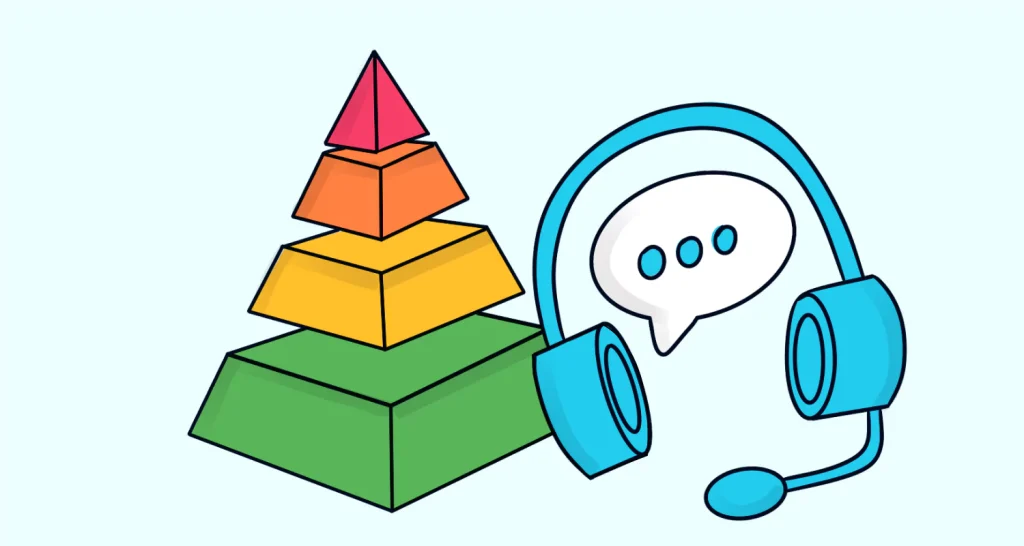
TL;DR: Struggling with growing support demands? A tiered support model routes every issue to the right level of expertise, reducing resolution times and improving customer satisfaction. Learn how Tier 0–4 support levels, automation, and clear escalation paths help teams deliver faster, more efficient customer service.
This guide explains what each support tier handles, where AI agents fit, how escalation works between tiers, and how to set up tiered support in your customer support team.
What is tiered support?
Tiered support organizes customer service into levels based on issue complexity and the expertise needed to resolve it. Tier 0 provides self-service, Tier 1 handles common requests, Tier 2 investigates technical problems, and Tier 3 addresses issues requiring specialist expertise.
AI agents can answer routine questions and complete approved tasks, while Assist Agent helps human agents handle requests. Clear escalation rules connect these levels so customers reach the right help without repeating information.
This guide focuses on Tiers 0–3. Some organizations also use Tier 4 for external vendor support.
Tiered support model at a glance
A common model uses four tiers. The table below summarizes who handles each tier, the tickets it typically receives, and where AI fits in.
| Tier | Who handles it | Typical tickets | AI’s role |
| Tier 0 | Customers (self-service) and AI agents | Password resets, billing questions, order status, how-to questions | Answers questions and completes configured tasks, or hands off to a human agent with context |
| Tier 1 | General support agents | Account issues, product questions, requests the AI agent escalated | Drafts replies, summarizes history, suggests articles |
| Tier 2 | Technical support specialists | Configuration problems, integration errors, product defects | Summarizes the conversation and the troubleshooting already tried |
| Tier 3 | Specialist teams, such as engineering, product, or security | Bugs, security incidents, custom requirements | Summarizes the ticket history and earlier fixes for specialists |
Resolution targets depend on each request’s priority and impact, and on your support commitments. Set them in your help desk SLA policies. Treat urgent incidents, such as a suspected security breach, as high priority from the first contact, and track the longer-term fix that may follow separately.
Support tiers explained
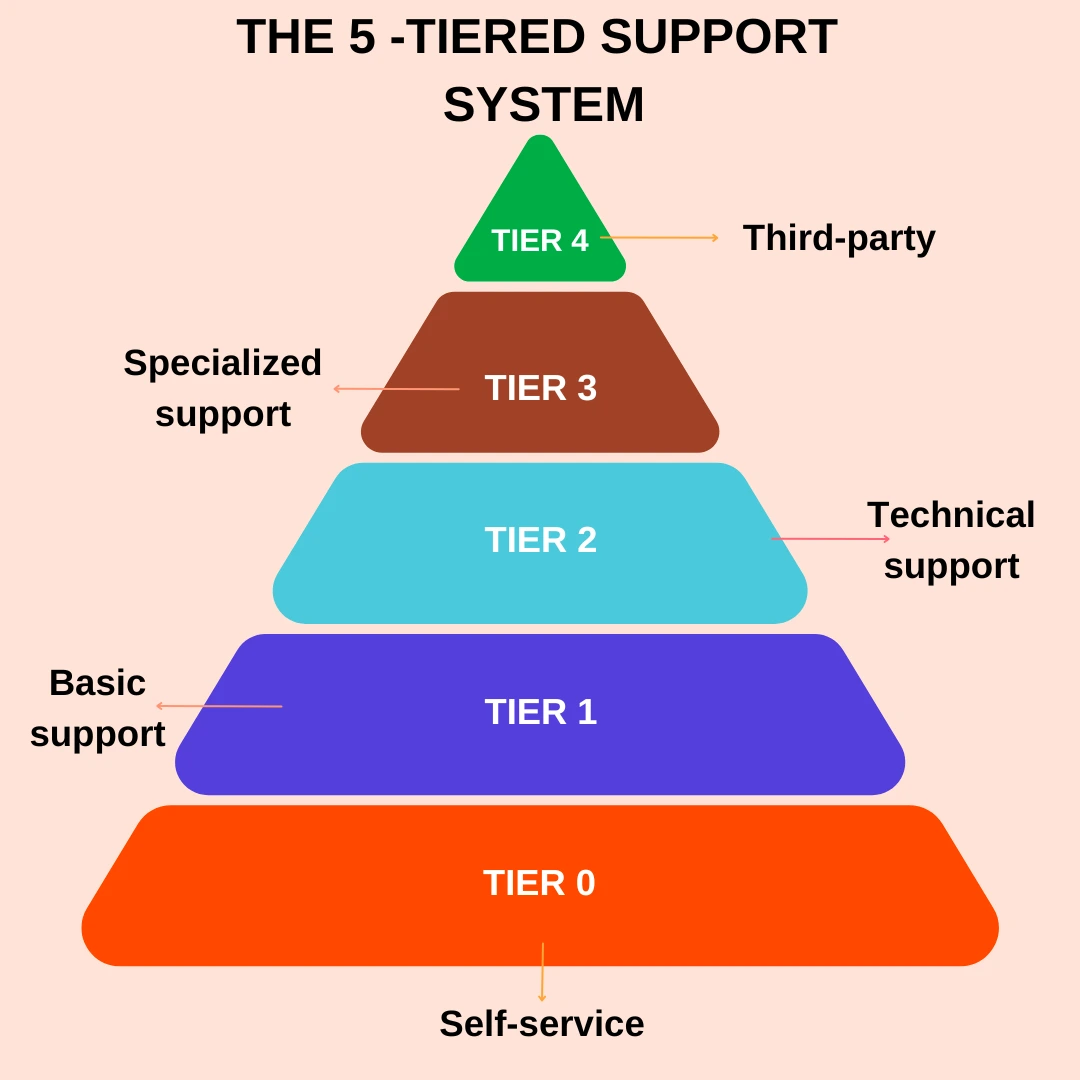
The total number of tiers in a support system depends on the complexity of service, the volume of support tickets received, and the level of specialized knowledge required to solve customer issues.
| Tier | Purpose | Typical issues |
|---|---|---|
| Tier 0 | Self-service | FAQs, knowledge base, AI agents |
| Tier 1 | Basic support | Password resets, account issues |
| Tier 2 | Technical support | Troubleshooting, configuration |
| Tier 3 | Specialist support | Bugs, security, advanced issues |
| Tier 4 | External support | Vendors, integrations, third-party issues |
Tier 0 (self-service and AI agents)
Tier 0 resolves requests without a human agent. It includes:
- Self-service tools such as FAQ pages, tutorials, and knowledge base articles.
- Automated customer service workflows that handle basic inquiries.
- AI agents that answer questions from your knowledge base and complete configured tasks.
AI agents extend Tier 0 beyond self-service articles by answering questions and completing configured tasks. They respond in chat, email, and other channels, and with BoldDesk AI actions and MCP tools, they can call your own systems.
These tasks depend on configured integrations, customer verification, permissions, and approval rules. Depending on your setup, Tier 0 can handle:
- Account access: Password resets, access requests, and login help.
- Billing questions: Invoice copies, plan details, subscription and plan updates, and refunds within your policy.
- Order and delivery questions: Order status lookups, delivery updates, and address changes.
- How-to questions: Setup steps and feature questions answered from your help articles.
You decide which actions run on their own and which need a human’s approval first. When an action can’t complete, or the customer asks for a person, the AI agent hands the conversation to a human agent.
This is why many teams now treat an AI agent as Tier 0 support: it handles routine volume at any hour, and human agents start with the requests that need judgment. For a closer look at how this changes the help desk itself, see what an AI-first help desk is.
Example:
A customer wants to reset their account password. Instead of contacting an agent, they use the Forgot Password option on the company website or app, or ask the AI agent in chat.
This automated process guides them through identity verification and password reset, resolving the issue without requiring agent intervention.
Tier 1 (basic support)
Tier 1 is the frontline help desk, handling simple, common, or routine questions that do not require specialist expertise.
When a customer is unable to resolve a common issue independently, they reach out for support. In this case, the Tier 1 agent will provide initial guidance.
However, if the issue persists or is more complex than Tier 1 can handle, it is escalated to the next support level for further resolution.
Key roles of Tier 1:
- Answering questions about products and services.
- Assisting customers with account setup.
- Providing basic solutions for common issues.
Example:
A customer contacts support because they cannot log in to their account. The Tier 1 agent verifies the customer’s identity to ensure security.
Upon investigation, the agent discovers that the issue is a locked account caused by multiple failed login attempts.
The agent then guides the customer through the necessary steps to unlock the account, ensuring they regain access.
How AI assists Tier 1:
Tier 1 agents still own these conversations, but an AI copilot does much of the preparation. Assist Agent in BoldDesk drafts replies, summarizes the ticket history, translates messages, and surfaces relevant knowledge base articles inside the agent workspace. The agent reviews every suggestion before it is sent.
Tier 2 (technical support)
When issues cannot be resolved at Tier 0 or Tier 1, they are escalated to Tier 2 support agents. These agents have greater knowledge and expertise about the product or service, enabling them to address more technical problems.
Key roles of Tier 2:
- Helping customers use specific features.
- Fixing complicated customer issues.
- Addressing complaints related to product problems.
Example:
If a customer can’t connect to the Wi-Fi, Tier 1 might attempt basic troubleshooting, such as verifying network credentials. If the issue persists, it is escalated to Tier 2, where the agent investigates deeper technical problems, such as router configurations or software compatibility.
Tier 3 (specialist support)
Tier 3 is specialist support. It handles issues that require advanced expertise to resolve and may involve engineering, product, or security teams. Some requests, such as product defects, can take days or weeks to fix fully; urgent incidents need an immediate response even when the permanent fix takes longer.
Key roles of Tier 3:
- Resolving complex, high-priority issues requiring advanced technical expertise.
- Collaborating with engineers or developers to address software bugs and hardware failures.
- Delivering tailored solutions for unique customer requirements.
Example:
If a customer reports unauthorized access to their account and suspects sensitive data might be compromised, Tier 3 investigates by analyzing logs and identifying the source of the breach. They then implement measures to secure the account and advise the customer on strategies to prevent future issues.
Tier 4 (third-party)
Not every organization has a Tier 4, as it typically involves outsourcing customer service issues to external experts or advanced equipment providers. Tier 4 addresses complex issues, such as bugs, patches, or feature requests, that exceed the capacity of internal support teams and require collaboration with third parties.
Key roles of Tier 4
- Works closely with Tier 3 to resolve critical problems or implement custom solutions.
- Provides information to improve products, services, and internal processes.
- Acts as the final point of escalation for unresolved issues.
Example:
A customer using a CRM system encounters a file upload issue when saving documents to a third-party cloud storage service like Google Drive. A Tier 3 agent investigates and identifies an authentication failure in the third-party storage API.
Since this is an external technical issue, the issue will have to be escalated to the Google Drive support team, who are the Tier 4 support.
Finally, the Google Drive support team fixes the issue or shares the solution with the Tier 3 agents who contacted them.
Escalation between tiers with AI
Escalation is where tiered support usually breaks down. A customer explains the problem to Tier 1, then explains it again to Tier 2, and the resolution time grows with every handoff.
Escalation doesn’t have to be strictly sequential. Route requests directly to the appropriate tier when their complexity, urgency, or risk requires it, and give customers who ask for a person a clear handoff path.
AI helps with the handoff in three ways:
- The AI agent passes context, not just the ticket. When it can’t resolve a request, or the customer asks for a person, the human agent receives the conversation, the customer’s details, and what the AI agent already tried. Read more about AI-to-human handoff.
- Escalation rules are explicit. Decide which topics or customers always go to a human, and which actions require approval. The AI agent autonomy levels guide explains how to set these limits.
- Higher tiers get a summary. Tier 2 and Tier 3 agents use an AI summary to review the issue quickly, with access to the full conversation and troubleshooting history.
How AI changes tier staffing
When an AI agent resolves routine Tier 0 and Tier 1 requests, the work left for human agents changes. Tier 1 receives fewer password and billing tickets, and a larger share of what remains is escalated, complex, or sensitive.
Plan staffing around that shift:
- Measure before you plan. Track how many requests the AI agent resolves, how many it escalates, and to which tier. Track handling time, reopened tickets, and CSAT alongside ticket volume before you change staffing.
- Train agents for more complex work. As routine requests move to the AI agent, Tier 1 agents handle more escalations. Whether an agent moves on to Tier 2 work depends on their skills, training, and workload.
- Give someone ownership of Tier 0. The AI agent is only as good as the knowledge base and actions behind it. Someone needs to review unresolved conversations and fill content gaps.
- Revisit the plan each quarter. As the AI agent resolves more request types, ticket volume by tier changes, and so do your hiring needs.
How to set up support tiers in your organization
Now that you understand a tiered support system, let’s look at the steps for implementing one.
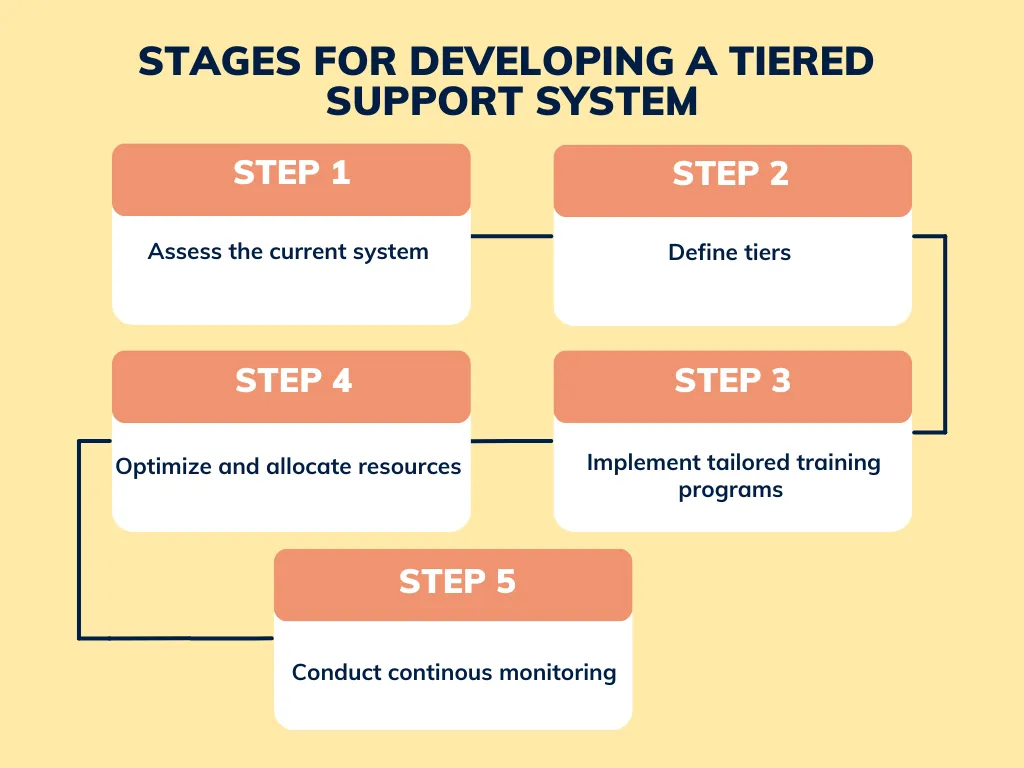
Assess the current system
To set the stage for a tiered support model, begin by reviewing your current support processes. Businesses should analyze performance metrics and customer feedback to determine which aspects of their support system are working well and which are not.
A thorough evaluation helps the transition to a tiered system be smooth and tailored to the organization’s unique needs.
Clearly define the tiered support process
First, typically received issues should be categorized by complexity, resolution time, and required expertise.
How many tiers does your company need? Do you need different groups in Tier 3 for different specialties? Group issues, define criteria for the groups, and assign them to tiers based on the expertise required. Have a place and protocol for issues that don’t match your groups.
After grouping the issues, clearly define the roles and responsibilities of each tier to set clear expectations for your agents.
Maintaining detailed documentation of each tier’s responsibilities and issue types ensures consistency and serves as a valuable reference.
See an AI Agent Handle Tier 0
Let an AI agent resolve routine requests and route the rest to the right tier, with full context.
Optimize and allocate resources accordingly
Businesses should assign support staff to different tiers based on their skills and expertise in a specific product.
However, customer service skills alone may not be sufficient for even Tier 1 agents to handle issues effectively. Each tier requires specific tools and resources to provide optimal support.
You can equip your support agents with the following essential tools:
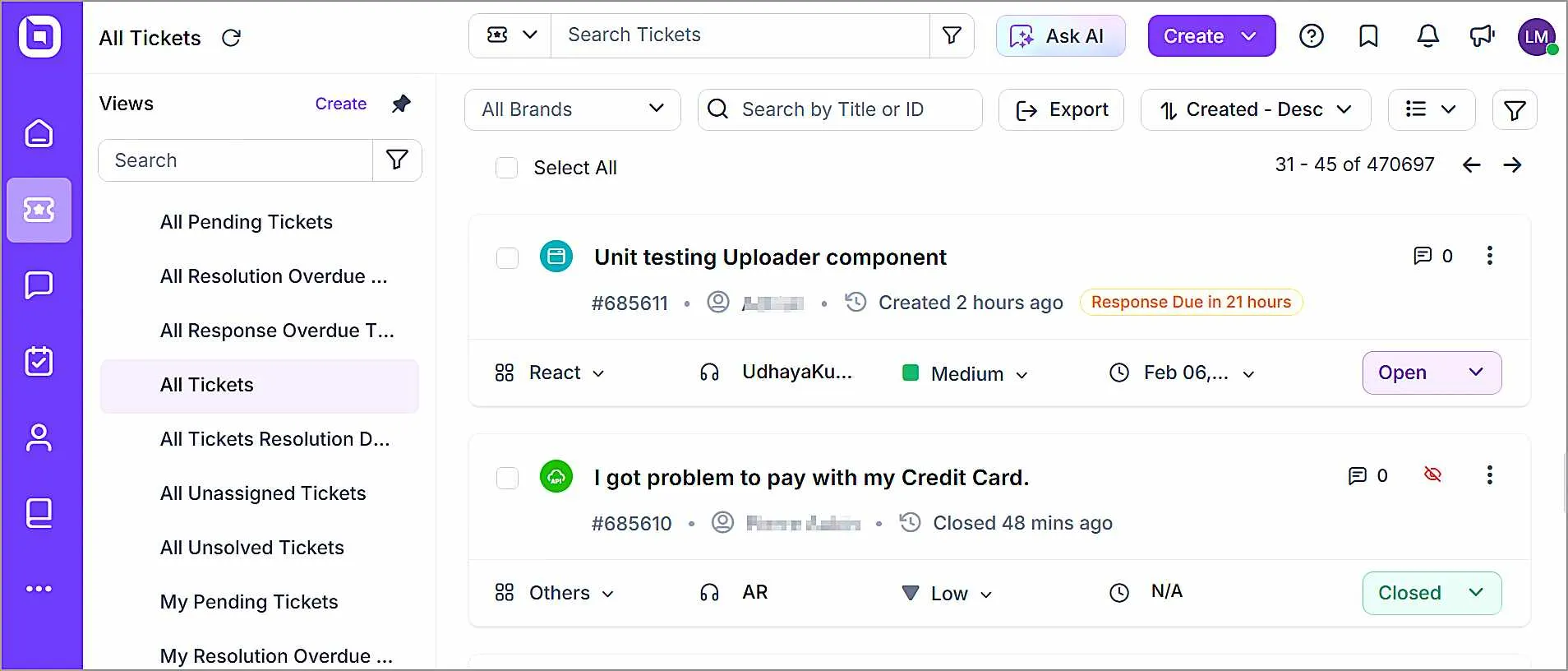
- A help desk ticketing system enables support leads to manage and track customer requests across all tiers effectively. It converts support emails into tickets, ensuring they are prioritized, categorized, and routed to the appropriate tier and agent for resolution.
- Self-service tools empower customers to resolve common issues independently through resources like FAQs and knowledge base articles. They also provide tier agents with quick access to information, enabling faster and more efficient issue resolution.
- Workflow automation tools handle repetitive tasks like sending email notifications and reminders based on SLA automation rules. This helps prevent missed follow-ups and SLA breaches and improves overall efficiency.
- Task management tools help support teams break the entire support process into smaller, manageable tasks.
Implement tailored training programs
Your company should provide adequate training to support agents at each tier, focusing on how to effectively handle customer inquiries.
Organize workshops, seminars, and online sessions to empower your team with knowledge about each tier’s specific roles and responsibilities.
To promote continuous learning, offer refresher courses and updates whenever tools, products, or services change.
Tailored training ensures agents are equipped with the necessary skills and expertise for their role, keeping them aligned with evolving customer expectations and technological advancements.
Conduct continuous monitoring
Continuous monitoring allows businesses to track the performance of each tier and identify potential issues in the support process.
By monitoring real-time metrics like resolution time and customer satisfaction, businesses can quickly adjust and improve efficiency.
This approach helps pinpoint bottlenecks or delays, perhaps when agents receive issues for which they don’t have enough training.
Support leads can choose to provide training or have similar issues redirected to a higher tier in the future.
Benefits of implementing a tiered support model
A tiered support system with clearly defined roles and responsibilities at each level provides more effective, efficient, and customer-oriented service. Here are the key benefits of a tiered support system:
- Streamlines customer support operations: Separating customer queries based on complexity or knowledge required enables support agents to address each problem efficiently.
- Increases customer satisfaction: Customers receive quicker support when difficult issues are sent immediately to the agents best equipped to handle them, leading to better experiences.
- Improves efficiency: Each tier focuses on specific issues, speeding up response times.
- Optimizes resource allocation: Allows businesses to assign resources effectively, reserving specialized experts for complex problems.
- Enhances scalability: As your business grows, a well-defined tiered support system lets leads understand more easily what expertise to look for in new hires and exactly what training they need. If Tier 2 backlogs and resolution times increase, review staffing, skills, and routing.
- Saves money: Reduces operational costs by resolving simpler issues at lower levels without involving higher-level experts.
Metrics to evaluate the effectiveness of a tiered support model
Measuring the effectiveness of your tiered support helps you meet customer expectations and company goals. The following are some of the metrics commonly used:
- First contact resolution (FCR) measures the percentage of requests resolved during the first contact. A rising FCR suggests that requests reach the right tier and that agents have what they need to resolve them.
- The average resolution time (ART) indicates the overall time taken to resolve customer tickets from start to finish. Tiered systems tend to have shorter resolution times, as they direct issues to the most appropriate agents.
- The escalation rate measures the percentage of tickets that move from lower to higher tiers. A high escalation rate can point to routing problems or knowledge gaps, but it can also reflect appropriate handling of complex or sensitive requests, so review which tickets are escalated and why.
- Customer satisfaction score (CSAT) measures the overall satisfaction of customers after each support interaction. It helps assess the effectiveness of your support teams and highlights areas for improvement.
- Ticket volume by tier tracks the number of support requests handled at each tier. It helps determine whether tiers are being staffed appropriately.
- Agent utilization rate compares the time agents spend on defined support activities with their available working time.
Modernize your tiered support system to drive success
BoldDesk® helps teams manage requests across support tiers, with Support Agent handling routine conversations and Assist Agent helping human agents prepare replies. Set clear escalation rules so requests reach the right specialists with the context they need.
Start a 15-day free trial to explore AI-assisted tiered support.
Related articles
- Customer Service Management: Tips, Benefits, and Examples
- Methods of Building and Organizing a Customer Support Team
- Customer Expectations: Best Ways to Fulfill Them
Frequently asked questions
What is tiered support?
Tiered support organizes customer service into levels by issue complexity. Tier 0 covers self-service and AI agents, Tier 1 handles common requests, Tier 2 investigates technical problems, and Tier 3 involves specialists. Requests are routed directly to the appropriate tier when their complexity, urgency, or risk requires it.
What is Level 1, Level 2, and Level 3 support?
- Level 1 (Tier 1): First-line support for common questions, password resets, and basic troubleshooting.
- Level 2 (Tier 2): Technical problems that need deeper product knowledge or investigation.
- Level 3 (Tier 3): Specialist support, such as engineering or product teams, for complex bugs and system-level issues.
What is Tier 0 support?
Tier 0 support resolves requests without a human agent. It includes self-service options such as knowledge bases and FAQs, and AI agents that answer questions and complete configured tasks such as password resets or order lookups. Tier 1 is the first human point of contact.
What is the difference between Tier 1 and Tier 2 support?
Tier 1 agents handle common requests such as account questions and basic troubleshooting. Tier 2 agents have deeper product knowledge and investigate technical problems such as configuration errors, integration failures, and product defects.
Can an AI agent handle Tier 1 support?
An AI agent can resolve many Tier 1 requests, such as account, billing, and how-to questions, when it has your knowledge base and the right actions. Requests that need judgment, involve sensitive data, or fall outside its actions should go to a human agent with the conversation context.
What are the 5 levels of support?
Support levels from Tier 0 to Tier 4 handle issues by complexity: self-service and AI agents, general support, technical support, specialist support, and third-party vendor support for advanced needs.
ABOUT THE AUTHOR

Lavenda Morin Atieno 
Lavenda is a customer service content specialist at Syncfusion, crafting documentation and resources that improve customer experience through clear communication and thoughtful research.
Read more articles by this author Connect with the author on LinkedIn.
Be the first to get updates