








TL;DR: Reopened tickets often result from unclear instructions, not technical failures. Writing a reopen-proof reply requires clear structure, simple language without jargon, and proactive guidance. Instead of leaving users guessing, this guide shows you how to write step-by-step solutions that close the loop immediately.
Nothing is more frustrating than marking a ticket as solved only to see it reappear in the queue an hour later.
While your ticket triage system might prioritize the issue correctly, the resolution fails if your reply leaves the customer confused or needing more help.
You need to craft responses that anticipate the customer’s next question before they even ask it.
In this guide, you’ll learn how to write responses that reduce ticket reopens and resolve the customer’s problem the first time.
What is ticket reopen rate?
Ticket reopen rate is the percentage of resolved tickets that return to an open status because the customer reports the issue was not fully resolved.
Ticket Reopen Rate = (Number of Reopened Tickets ÷ Total Resolved Tickets) × 100
Common reasons support tickets get reopened
When a ticket returns, it’s usually because the first response didn’t fully meet the customer’s needs. Most reopens happen when the reply is missing clarity, verification, or a complete next step.
Below are the most common issues that cause customers to reopen a ticket.
- Unclear instructions: Steps are written in a way that leaves actions unclear or open to interpretation.
- Missing troubleshooting data: The ticket reopens because the agent didn’t ask for necessary logs, screenshots, or device details in the first reply.
- No clear ownership or next steps: The customer reopens the ticket because they aren’t sure if the issue is still being worked on or if the agent is waiting for them to act.
- Vague or indirect wording: Soft or uncertain phrases create confusion about what the user is supposed to do next.
- Missing verification: An agent closes the ticket without asking for customer feedback on whether the solution worked.
- Incomplete resolutions: The response only addresses a small part of the problem or a symptom, rather than fixing the actual root cause of the issue.
Why your team should reduce ticket reopens
Ticket reopens usually occur because the customer indicates the issue remains unresolved, needs further clarification, or has encountered a new error.
High reopen rates are a major drain on operational efficiency. Here are the advantages of resolving tickets the first time:
- Improves customer satisfaction: To reduce ticket reopens, businesses must ensure customers get accurate resolutions the first time, directly boosting customer satisfaction (CSAT) scores.
- Increases operational efficiency: Fewer ticket reopens minimize repeated work for agents, allowing them to focus on new incoming requests.
- Lowers support costs: Every follow-up interaction adds to the cost per ticket. Preventing ticket reopens saves resources.
- Improves quality of service: Tracking data helps identify and address gaps in troubleshooting, communication, and documentation, which reduce ticket reopens.
- Enhances brand reputation: Providing accurate, complete solutions builds user confidence and strengthens overall trust in your customer support.
- Reduces agent burnout: Preventing ticket reopens creates a smoother workflow for agents, reducing repeated tasks and supporting higher morale.
5 Steps for writing ticket replies that work
A strong reply begins with structure, not guesswork. Think of it as the second half of your support process: while a ticket triage framework handles the initial sorting and routing of a request, your reply format determines the final resolution.
By following this pattern, you ensure customers understand your guidance easily from start to finish, preventing unnecessary ticket reopens.
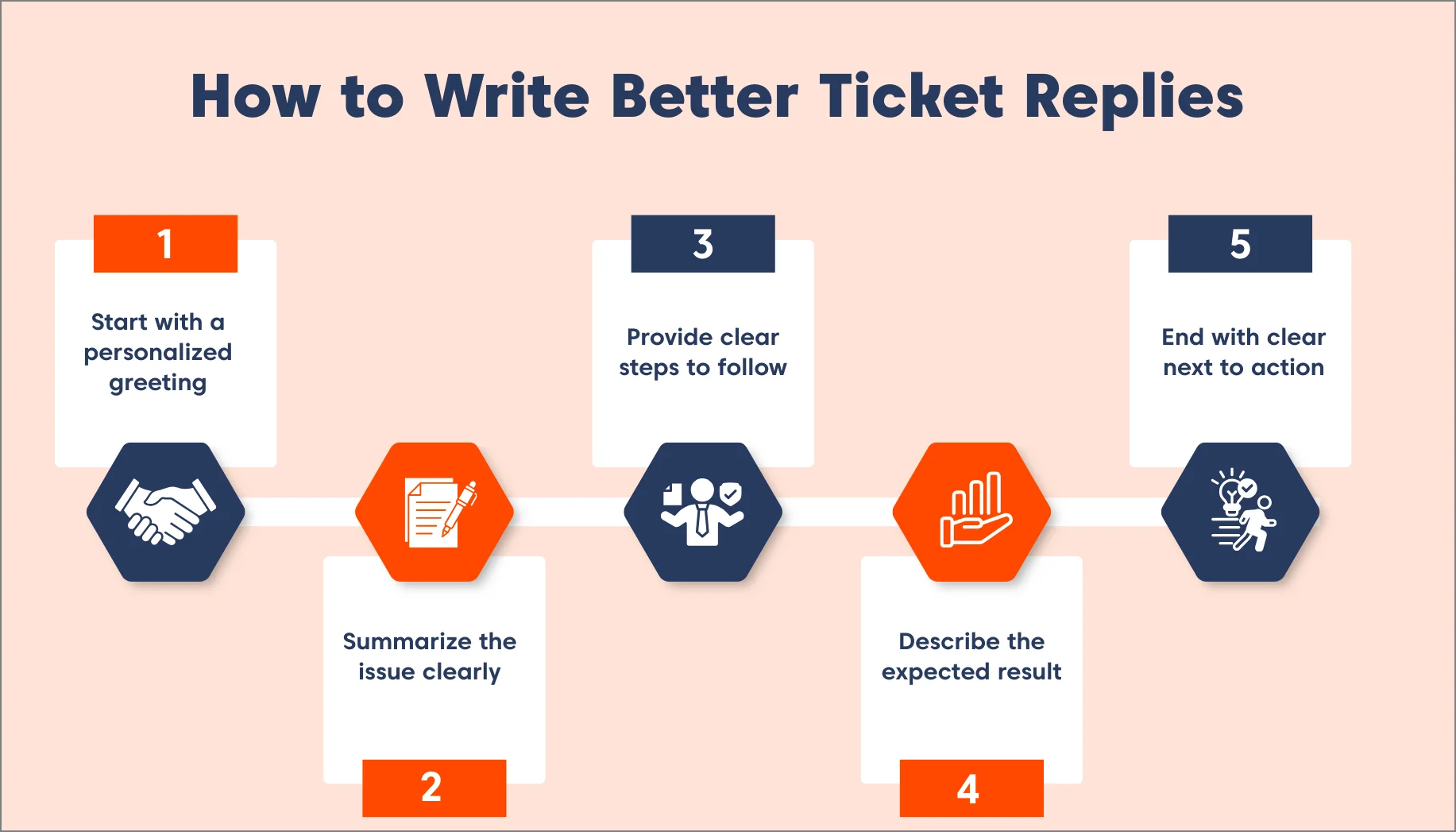
Start with a personal greeting
Start by using the customer’s name to show the message is directed specifically to them.
A short opening line sets the tone and creates an immediate sense of clarity. Personalized customer service signals that the reply is written with their situation in mind. This gentle start prepares them for the steps that follow.
Summarize the issue clearly
Begin with a one-line summary of the problem. It reassures the user you understand their situation and sets context for your solution.
This quick recap keeps both sides focused on the same issue. With the problem clearly stated, the instructions that follow feel more connected.
Provide steps in order
List the instructions using numbers or bullets so the sequence is obvious at a glance. Each step should be written as a direct action the customer can follow without guessing.
For example:
Use a simple list like: 1) Open your settings, 2) Click on the Profile tab, and 3) Select Clear Cache.
Keeping these steps short and numbered ensures the customer doesn’t skip a part of the fix.
Describe the expected result
Explain what the customer should notice once they finish the steps. A simple description gives them something concrete to look for.
For instance:
If you are helping a user update their profile, tell them: You’ll know it worked when your new photo appears in the top right corner.
Giving the user this specific “signal” prevents them from reopening the ticket just to ask if the change actually saved.
End with a clear next action
Tell the customer exactly what they should do after completing the steps. Instead of ending with a broad, open-ended question like “Is there anything else?”, ask a specific verification question.
For example, ask:
“Are you able to log in successfully now?” This guides the customer to confirm the resolution, ensuring the ticket ends with a clear result rather than unnecessary back-and-forth.
How to write replies that customers easily understand
Confusing words make instructions harder to follow and often lead to a higher ticket reopen rate.
The language you choose directly affects how quickly customers understand and act on your instructions.
Here are practical tips for writing easy-to-understand replies.
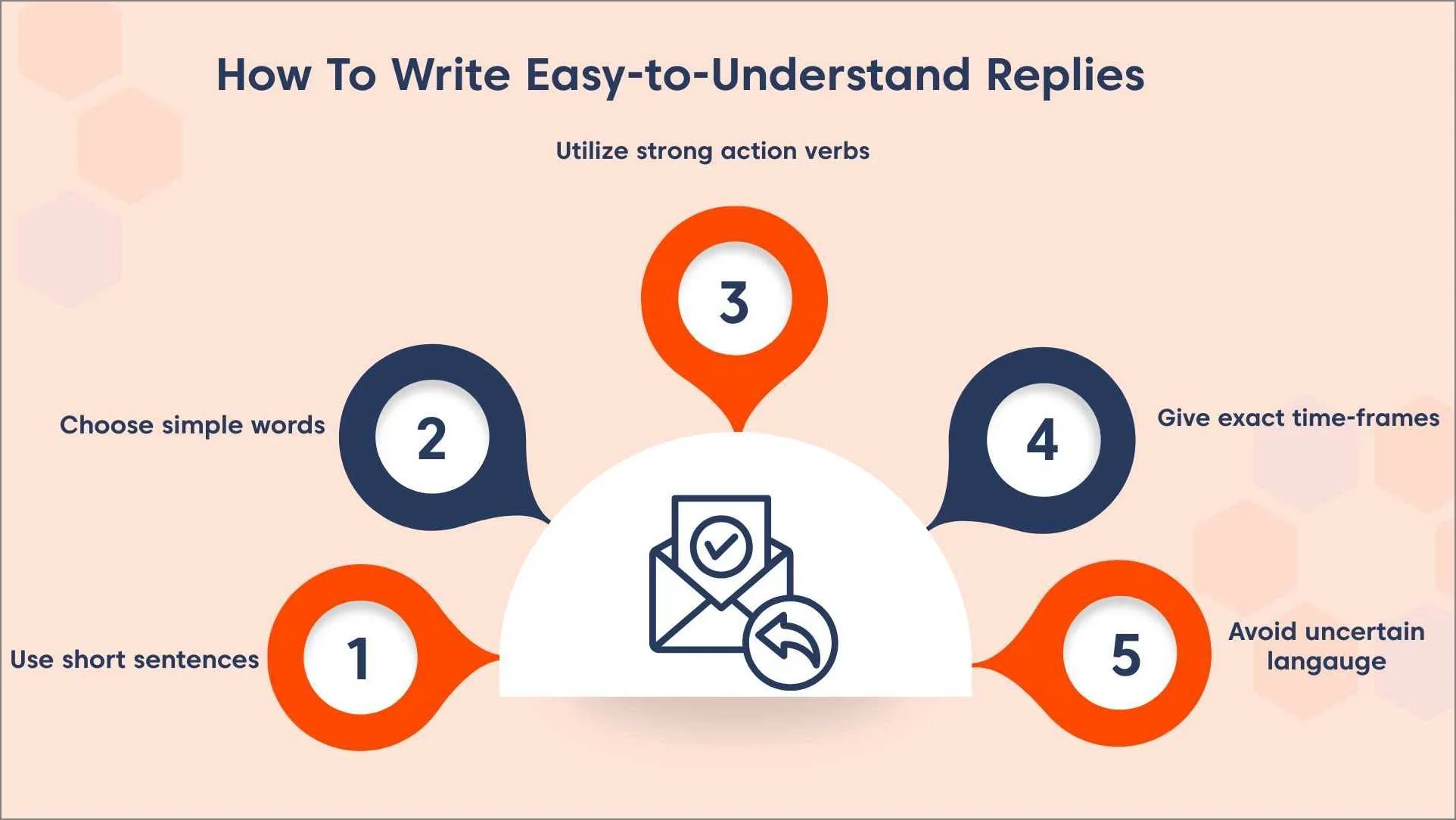
Use short direct sentences
Long sentences make instructions harder to recognize at a glance. Keeping each line short helps the customer read the message without slowing down.
With the instructions broken into smaller pieces, the overall message becomes easier to move through.
Choose simple, clear words
Technical jargon can make the customer pause and interpret what you mean. Using plain, familiar words removes that extra step.
When you replace complex terms with direct language, the message becomes easier to read immediately.
Use strong action verbs
Direct verbs show the customer exactly what action to take next. Words like click, enter, or open point to a clear instruction without room for interpretation.
This kind of wording keeps each step focused on a single task. Strong verbs also create a steady rhythm throughout your instructions.
Give exact time frames
Tell the customer the specific amount of time each step requires so they know when to expect the next update.
If the action relies on system processing or review periods, mention the specific timing that aligns with your service level agreement (SLA) standards.
Clear timing helps customers understand when the action will complete and when they should check again, which stops tickets from reopening.
Avoid uncertain language
Words like try or might leave the instruction open‑ended. Replacing them with direct statements tells the customer exactly what to do.
Clear wording removes any second‑guessing about the action. The more direct you are, the easier the message is to follow.
How to confirm resolution before closing a ticket
Closing a ticket too early often creates avoidable confusion and leads the customer right back to support.
A quick verification step ensures the outcome matches what the instructions were meant to achieve.
Example: The verification signal in action
Subject: Our apologies for your experience
Bad Reply: “I have updated your settings. Let me know if you need anything else.” (Result: Customer reopens to ask “How do I know it worked?”)
Improved Reply: “I have updated your settings. You will know this worked when the ‘Premium’ badge appears next to your username. Are you able to see that badge now?” (Result: Ticket stays closed.)
Below are the key ways to confirm the fix before officially closing a ticket.
- Ask the customer to verify the result: Request a simple confirmation so the user can indicate whether the issue is fully resolved.
- Provide a test step the user can perform: Give the customer a small action that shows the change has taken effect.
- State how long you will wait for a response: Tell the customer the exact timeframe before the ticket moves to closure.
- Explain what happens if there is no reply: Clarify whether the ticket will close automatically or move to another status after the waiting period.
- Assuming resolution invites reopens: Always guide the user to verify completion. Confirmation ensures the ticket truly resolves the issue.
How to prevent ticket reopens proactively
Many repeat tickets start from predictable mistakes that occur long before the user reaches out again.
Addressing these patterns inside your reply helps reduce confusion at the source. Below are simple ways to prevent the same issue from resurfacing later.
Share helpful guide links
Attach direct links to specific knowledge base articles or video tutorials in your customer self-service portal that provide deeper context for the solution.
Use URLs that lead to the exact section of the documentation rather than a generic homepage.
These resources should provide the visual aids or detailed explanations that a standard support reply cannot cover.
Point out common mistakes
Identify the specific parts of the process where users frequently encounter trouble or make incorrect choices.
Use clear formatting like bold text or warning icons to highlight these common pitfalls within your message.
Describe exactly what happens when a mistake is made so the customer can correct it on their own if they see a specific error message.
Explain relevant system limits or rules
List the specific technical constraints, such as browser compatibility, permission needs, or file size restrictions, that apply to the fix.
Mention these requirements at the start of your reply so the customer can verify their setup before following the steps.
Define the exact boundaries of the system to help the user navigate the process without hitting unexpected technical walls.
Suggest best practices
Share a few simple tips on the best ways to use the feature moving forward. Recommend the settings that work well for other users.
Include optional tools and helpful add-ons that make the process easier for the customer to manage.
Once your team follows these principles consistently, templates make it easier to apply them at scale.
Proven reply templates to use
Support replies follow specific patterns. Using these structured frameworks ensures users can complete steps without confusion.
Templates save time, reduce errors, and standardize quality across agents. Here are clear templates for common scenarios.
Fixing common issues with quick solutions
Everyday tasks with a clear and simple fix are best handled with this short, direct format.
Example:
Subject: Our apologies for your experience
Hello [Name], I understand you are having trouble with [issue summary]. Please follow these steps to resolve it:
- [Step one]
- [Step two]
You’ll know this worked when you see the success banner appear.
If you still see the error message, please reply with a screenshot of your specific settings page so I can investigate further.
Did these steps solve the problem for you?
Handling complex, multi-step tasks
For resolutions involving several configuration steps or system changes, a more detailed structure ensures the user doesn’t get lost in the process.
Example:
Subject: Our apologies for your experience
Hello [Name],
I reviewed your case regarding [issue]. Please follow these configuration steps to resolve it:
- Step 1: [Detailed action with example]
- Step 2: [Detailed action with screenshot reference]
- Step 3: Confirm expected results
You’ll know this is resolved when you see a verification signal, e.g., your dashboard reflects the new data.
If you encounter an error, please reply with a screenshot of your issue or exact error code shown in the red box.
Are you able to see the updated report now?
Requesting missing details from customer to move forward
When troubleshooting is stalled because you require more data from the customer, this framework clarifies exactly what is needed to proceed.
Subject: Our apologies for your experience
Hello [Name],
To continue resolving your issue, we need [requested item]. You can find it by [provide instructions on how to get it]. Once I receive this, I will [next action] to finalize the fix.
I will hold this ticket open for 48 hours awaiting that file. If we don’t hear back, the ticket will close, but you can reply at any time to reopen the conversation if you still need help.
Confirming a resolution before final closure
Check resolution before closing. Ask for yes/no confirmation. Clarify what happens next depending on the answer.
Example:
Subject: Our apologies for your experience
Hello [Name],
We completed the steps to resolve [issue].
Has this fixed the problem for you?
Please reply with a “Yes” or “No.” If yes, I will close the ticket. If no, I will continue assisting you.
These templates help agents craft replies that fully resolve issues, reduce ticket reopens, and maintain consistency across the team.
Ticket closure checklist for support teams
Consistency is the key to a low ticket reopen rate. Even the best agents can forget a step during a busy shift.
Before you click Solve or Close, run through this quick list to ensure the ticket stays resolved:
- Issue restated: Did I confirm exactly what problem I solved?
- Numbered steps: Are the instructions listed in a clear, 1-2-3 order?
- Verification signal: Did I tell the customer how to know it worked?
- Fallback path: Did I provide a next step in case the solution fails?
- Final question: Did I end with a specific question to confirm the fix?
When to keep a ticket open
Closing a ticket too early is a guaranteed way to increase your reopen rate. To maintain a great customer experience, keep a ticket in an “Open” or “Pending” status if:
- Waiting for verification: You are waiting for the customer to confirm a major system change or a new login.
- Escalation is in progress: The issue has been sent to the engineering or billing team, and they haven’t confirmed the fix yet.
- Monitoring is required: You have applied a fix but need to monitor the system for 24 hours to ensure the error doesn’t return.
- Information is missing: You have asked the customer for a log or screenshot and cannot proceed without it.
How to measure the quality of your replies
Measuring how your replies perform helps you understand whether customers can follow your instructions without confusion.
These indicators point to areas where wording, structure, or timing may need improvement. Essential customer service metrics that gauge how well your replies are working include:
- Track reopen rate: Record the percentage of tickets reopened. A declining rate shows your language and structure are effective.
- Measure first reply resolution: Count tickets resolved in the first reply. Higher numbers indicate clear guidance and complete solutions.
- Review quality scores: Internal quality reviews evaluate clarity, structure, and adherence to writing guidelines. Spot recurring issues to improve future replies.
- Count follow-up replies: Track how often customers respond after you mark a ticket as resolved. Fewer follow-ups signal stronger instructions.
To make these metrics more actionable, segment your ticket reopen rate by category, channel, and individual agent to identify specific areas for improvement.
What are the best ways of training your team to give better replies?
Training begins with setting clear expectations that guide how every reply should be written. Teams learn more effectively when writing standards are reinforced through real examples and hands-on practice.
Below are simple ways to help your team develop stronger, more consistent replies.
- Set clear reply standards: Create a checklist that outlines the required structure, tone, and wording for every message.
- Review real ticket examples: Use actual customer conversations to point out sections that were clear and areas that need adjustment.
- Share strong sample replies: Provide a library of well‑written replies that agents can reference when composing their own messages.
- Coach through live edits: Walk agents through replies in real time to show how to refine language and improve flow.
Reduce ticket reopens to enhance customer satisfaction
Every ticket reply is an opportunity to resolve the customer’s issue for good. Clear structure, direct language, and a simple confirmation step create replies that guide customers without leaving any room for uncertainty.
BoldDesk helps teams reduce ticket reopens with SLA-based workflows, structured saved replies, automation rules, and AI-assisted response suggestions.
Start a free trial or book a personalized live demo to see how BoldDesk improves first-contact resolution at scale.
Related articles
- How to Write Perfect Auto-Reply Emails: Tips and Templates
- 50+ Customer Service Email Templates and Best Practices
- Automated Ticket Routing: Benefits, Tips, and More
Frequently Asked Questions
Use a clear structure, simple language, ordered steps, and a confirmation request at the end of your message to reduce ticket reopens.
Tickets often reopen when the original reply doesn’t fully answer the customer’s question or lacks clear next steps.
Missing details, unclear instructions, or incomplete explanations often send the customer back for clarification.
Templates create consistent replies by giving agents a repeatable structure for steps, wording, and closing actions.
Anticipate the customer’s next question and include the needed details in your first reply. Add guides, expected results, and any required information upfront.





