
 In this page

We’re pleased to announce that the BoldDesk December 2025 release is live! It’s packed with powerful new features designed to elevate how your team engages with customers, responds to queries, and resolves customer issues.
From a new mobile chat SDK to real-time AI streaming, this release expands what your help desk can do, delivering smoother conversations, faster responses, and greater flexibility across every channel.
Here’s a quick snapshot of what’s included in this release:
| Feature | Release highlights |
| Agent Portal |
|
| Dashboard & Reports |
|
| Knowledge Base |
|
| Artificial Intelligence (AI) |
|
| Integration |
|
| Mobile App |
|
| Live Chat Widget |
|
| Chat Agent Portal |
|
| Omnichannel |
|
| Chat Workflow |
|
| Chat API |
|
| Billings & Subscriptions |
|
Agent portal enhancements
Managing your agents just got easier! With new tools for filtering, exporting, and organizing tickets, you’ll have full control over your team’s workflow.
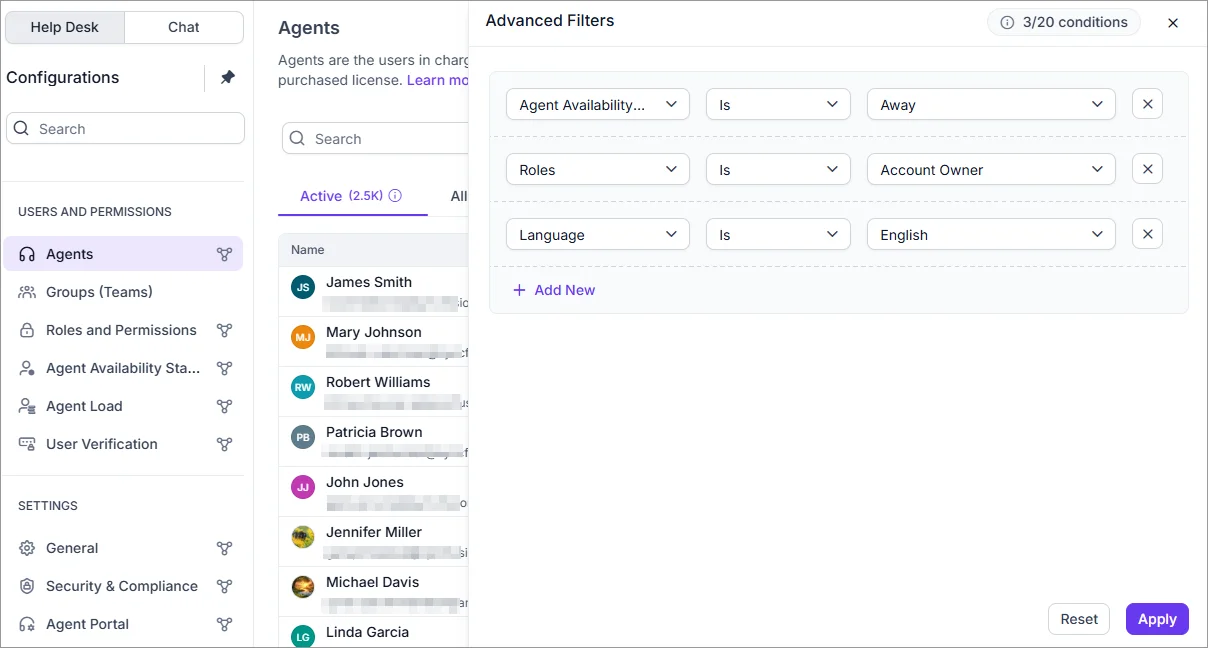
Smarter agent management with advanced filters
BoldDesk now offers advanced filtering options on the agent list page, allowing you to apply a wide range of criteria, including custom fields.
This means you can quickly find the right agents, and keep your operations organized.
Export agent data with greater flexibility
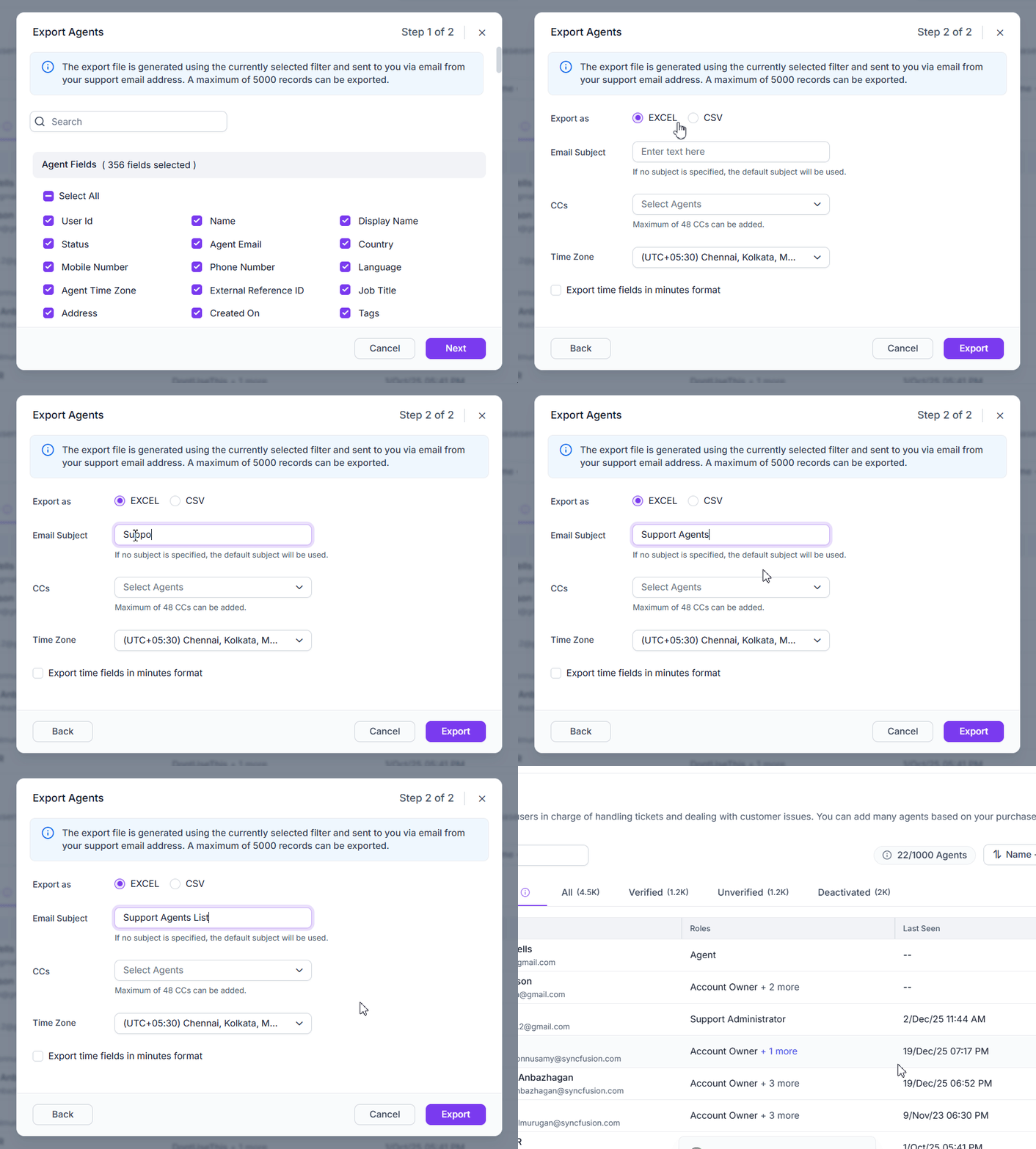
We added new capabilities to allow you to export detailed agent information with broader column selection for better reporting and analysis.
Declutter your support queue with ticket archiving
Keep your workspace clean and easy to manage. We’ve introduced a dedicated space for archived tickets—closed tickets that have been inactive for over 120 days with no pending approvals or activities.
By moving these tickets to a separate ticket archive, your active workspace stays uncluttered
Need to revisit something later? You can search and filter archived tickets anytime, so important information is always within reach.
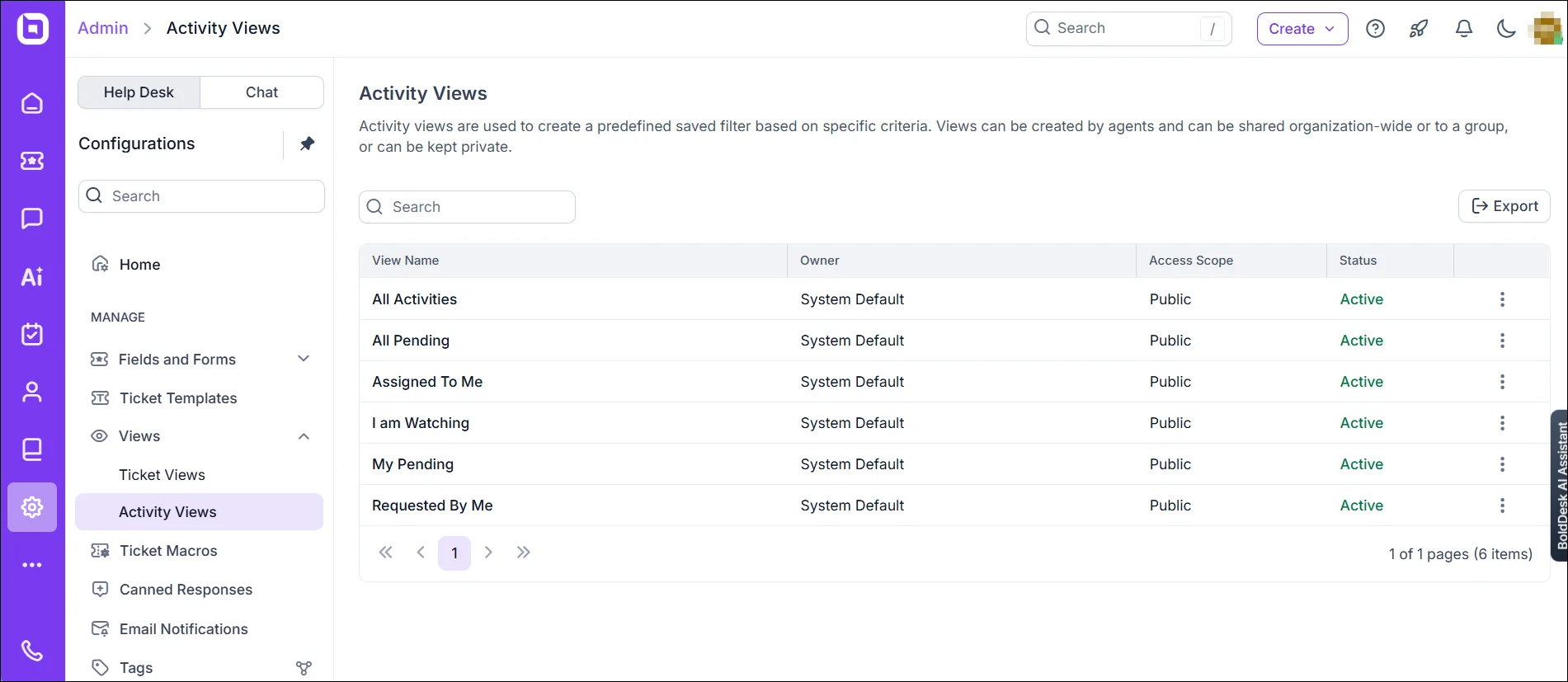
Customize activity views for better team visibility
Admins can now configure and control how Activity Views are displayed across the portal, providing a tailored experience for different teams and workflows.
Dashboard and reports
Our new dashboards and reports give you the visibility you need to optimize performance and plan ahead.
AI credits dashboard
Gain clear, real-time visibility into how both your free and purchased AI credits are consumed with the AI Credits Usage Dashboard.
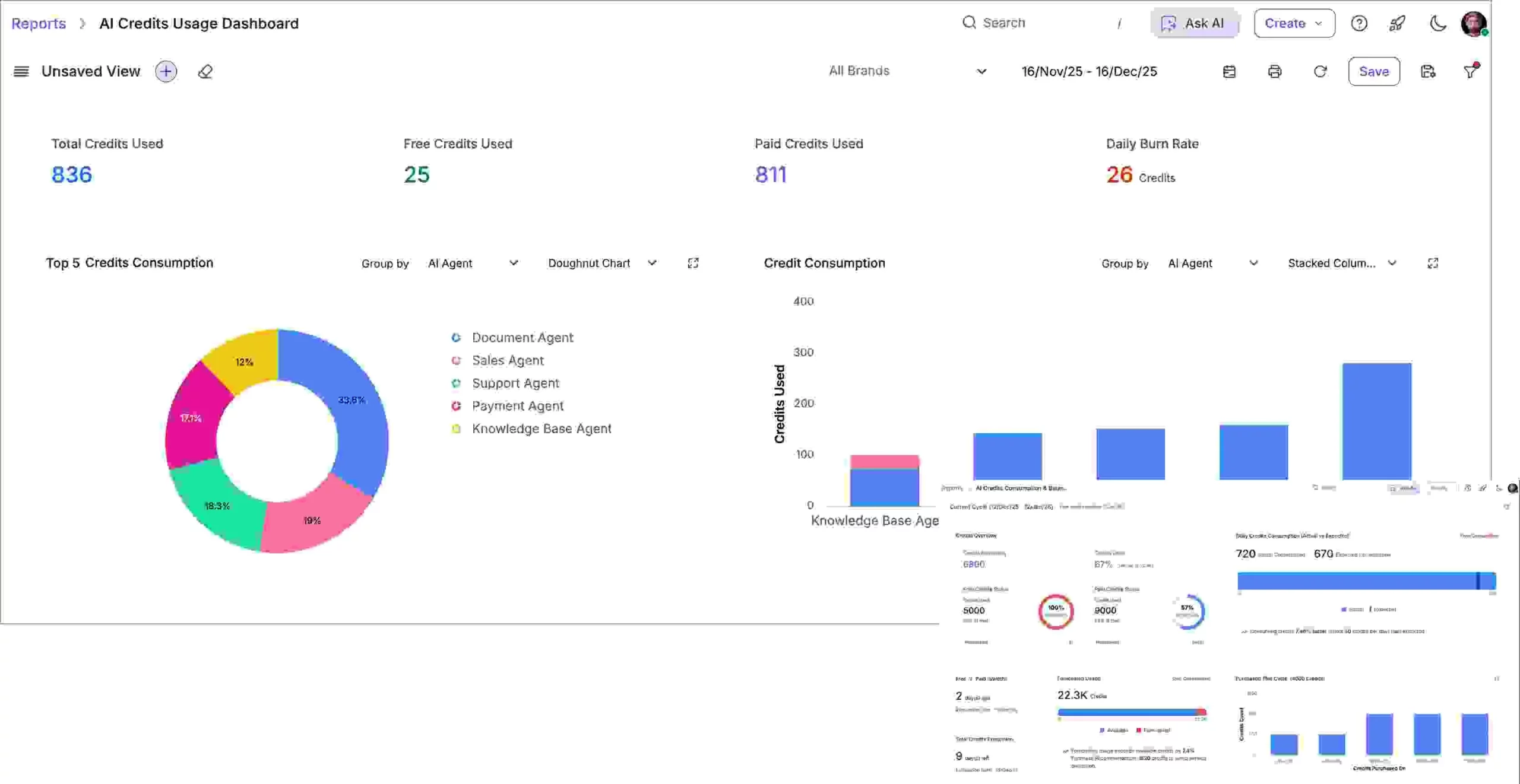
It allows you to track:
- Daily usage trends: Track high-usage periods and plan proactively.
- Top usage areas: Identify which workflows, agents, or channels consume the most credits.
- Detailed distribution: Break down usage by AI agent or chat attribute like brand, category, country, and requester or visitor.
- Remaining balance and projected usage: Monitor available credits and forecast consumption across the billing cycle.
- Free vs. paid credits: See how usage transitions from free credits to paid credits.
- Forecasting and alerts: Predict when credits might run out and take action to avoid interruptions.
By forecasting when free or paid credits might run out, you can plan ahead, optimize usage, and avoid unexpected service interruptions.
Custom dashboards
We’ve added two new modules to give you greater flexibility in tracking and analyzing customer-related activities:
- Contact module: Monitor how many contacts were created, blocked, or deleted within a selected timeframe, and view the data using your preferred grouping.
- Contact group module: See how many contact groups were created during a selected time period.
Elevate Support with an AI-Powered Help Desk
Deliver faster, smarter customer support with real-time AI, in-app mobile chat, WhatsApp engagement, and powerful reporting—all in one help desk.
Knowledge base
We’ve enhanced our knowledge base software to help customers and agents find answers faster.
Optimized for AI and LLMs
As large language models (LLMs) play a growing role in how customers find answers, keeping your documentation AI-ready means more accurate, contextual responses from tools like ChatGPT, Claude, and Copilot.
BoldDesk now makes your knowledge base easier for AI to consume with:
-
Markdown (.md) pages: Every knowledge base page has a clean Markdown version available simply by adding
.mdto the URL. This format is better for training LLMs to become faster and more accurate than an HTML file. -
llms.txt support: Automatically expose your documentation through the llms.txt standard, allowing AI tools to discover and process your content with minimal effort.
AI enhancements
We have added powerful upgrades to our AI features, for faster performance, improved flexibility, and more accurate data.
Enhanced web crawling
The web crawling module now delivers faster performance, improved crawl accuracy, and support for slow scraping on complex websites.
You also gain greater control over what data is collected with new include/exclude rules, configurable crawl depth, page limits, and support for both sitemaps and individual URLs.
With these features, your AI learns only what matters and ignores the rest.
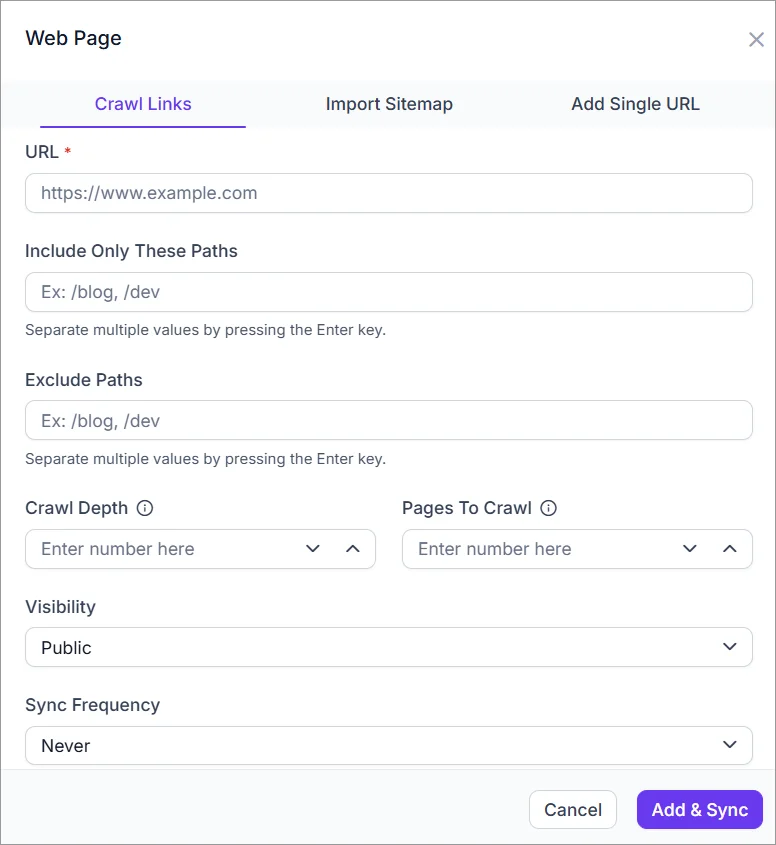
Additional enhancements include scheduled resync to keep data fresh, the ability to view and edit crawl configurations directly, and improved status reporting for clearer insights into related web pages.
Microsoft document support
This means you can leverage your existing documentation, guides, and resources to deliver smarter, more accurate responses without starting from scratch. It’s a simple way to make your AI more knowledgeable and your support more efficient.
Integration upgrades
We’ve made integration enhancements to make it easier to sync data and manage documents across platforms.
Collaborate privately with side threads
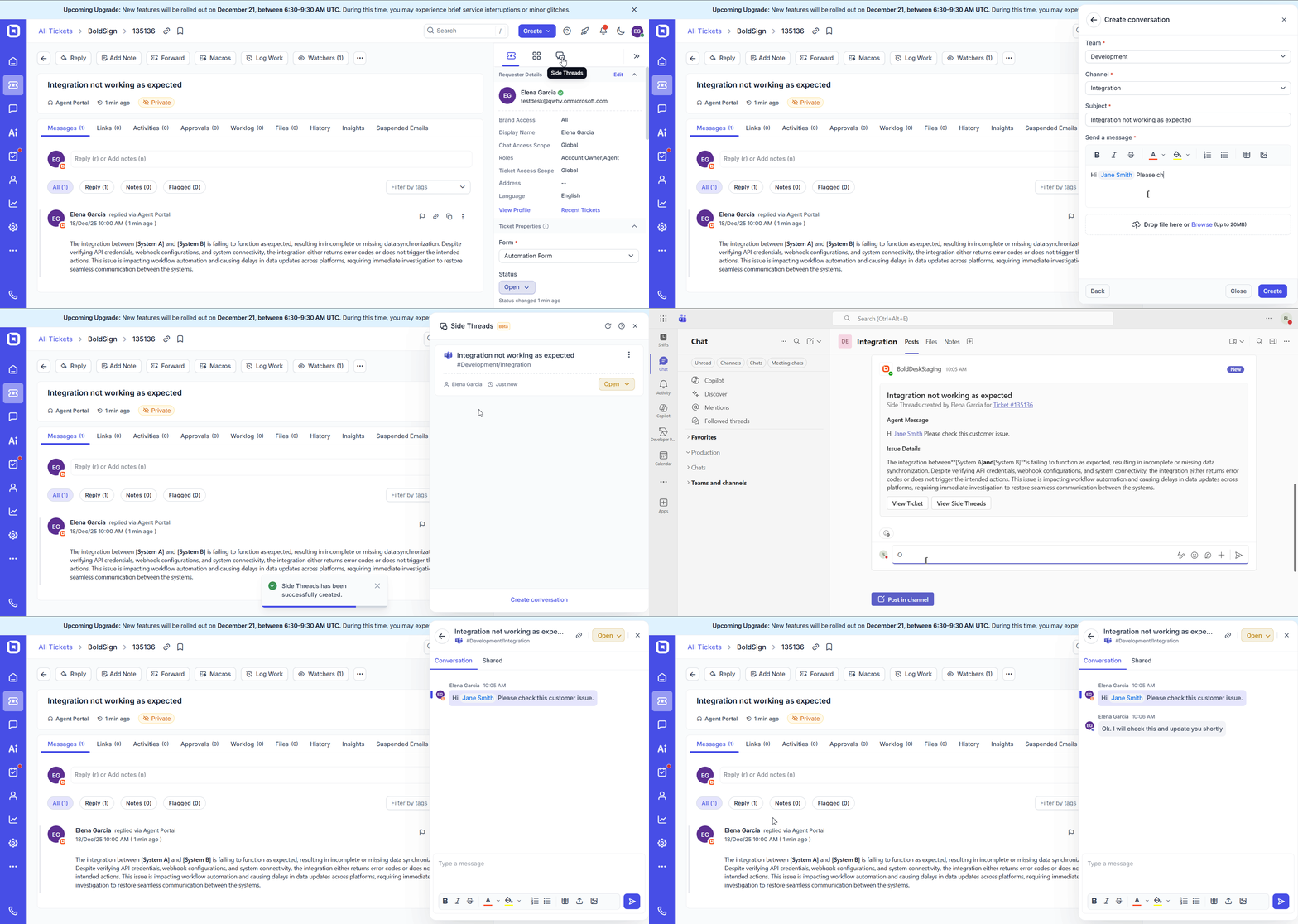
Side threads enable private discussions linked to a specific support ticket without involving the customer.
Agents can start these conversations right from the ticket details page, and every response syncs with the designated Microsoft Teams channel, keeping your team aligned and informed at all times.
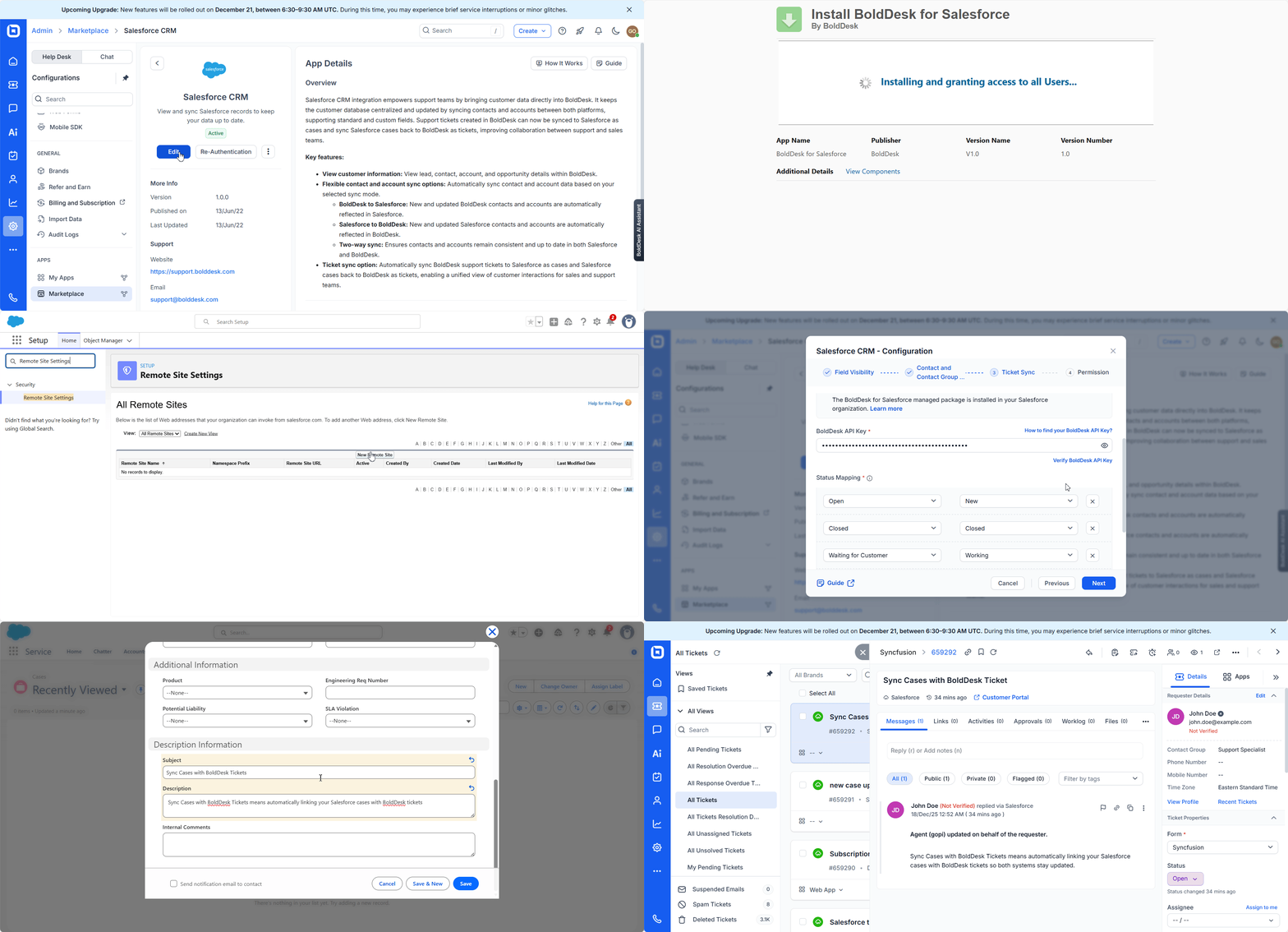
Salesforce two-way sync
Salesforce integration now supports full two-way synchronization between Salesforce cases and BoldDesk tickets, ensuring updates flow seamlessly in both directions without duplication or delays.
BoldSign integration enhancements
We have enhanced the BoldSign integration to give teams more flexibility and control over how documents are handled within BoldDesk.
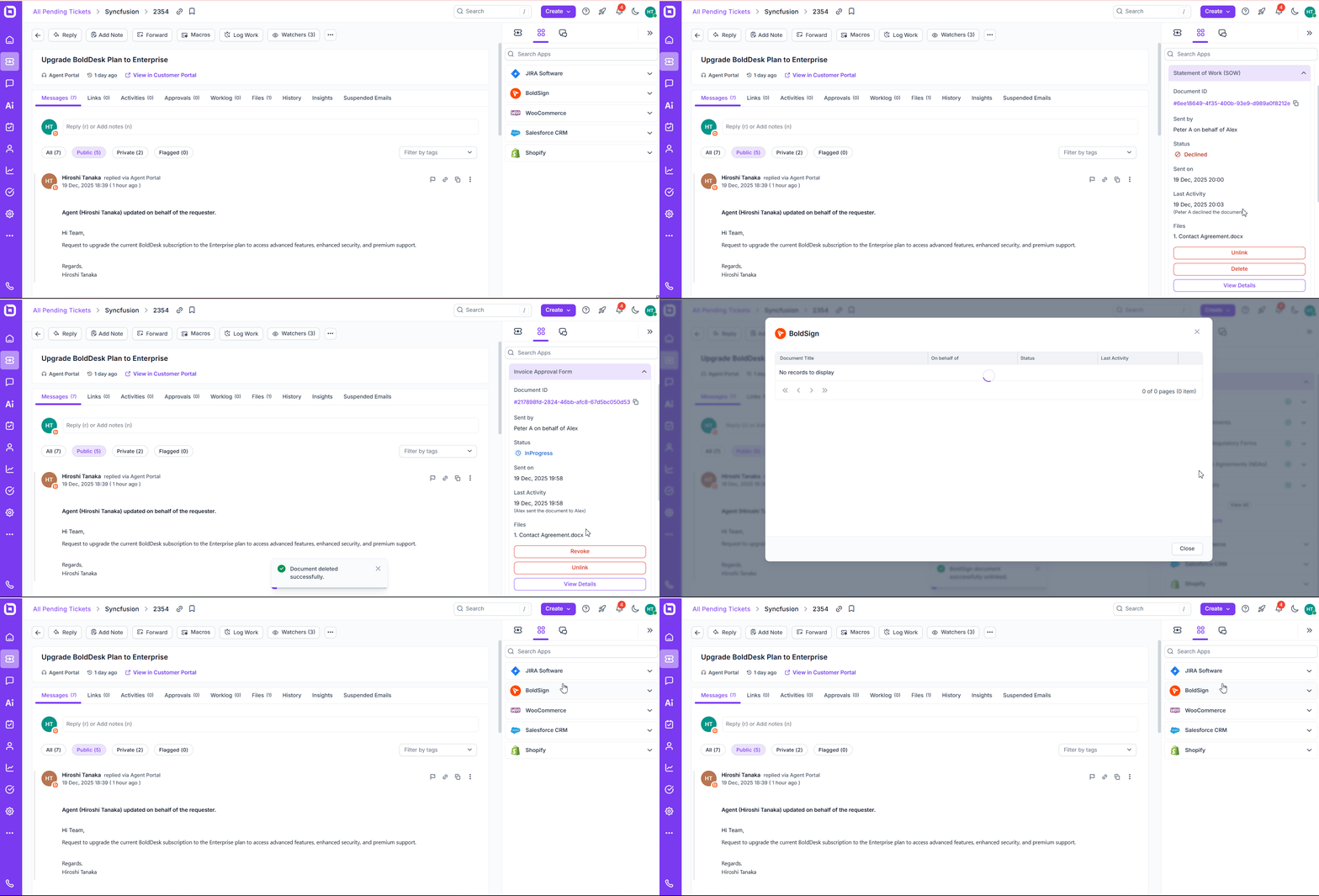
You can perform the following actions:
- Unlink documents: Remove documents from tickets when they are no longer relevant, keeping ticket timelines clean and focused.
- Delete documents: Delete documents with revoked, drafted, or declined statuses.
- View all documents: Use the Show More option to view the complete list of associated documents at once, making it easier to track and manage everything in one place.
Mobile app updates
Stay connected and productive anywhere; our latest mobile app updates bring speed, flexibility, and smarter tools:
- Dark theme support: Enjoy a sleek dark mode! Easily switch between light and dark themes in the profile settings for a more comfortable viewing experience.
- Manage Shopify marketplace: You can now access Shopify client and order details directly from tickets on the mobile app, making commerce-related support faster and more informed.
- Knowledge base and ticketing: Search for knowledge base articles and share links without leaving the ticket screen.
Live chat widget
Deliver real-time support inside your apps with a fully customizable chat experience.
BoldDesk Chat SDK for Android and iOS
We’re thrilled to unveil the BoldDesk Chat SDK, a powerful solution designed to bring live chat capabilities directly into your applications.
Included features:
- Real-time engagement: Connect users with support agents instantly. All the functionality of the BoldDesk web chat widget is built right into your app.
- Custom themes: Choose from light, dark, or system themes that match your app’s look and feel.
- Font consistency: Apply custom fonts to maintain your unique brand identity across the chat interface.
- Push notifications: Receive instant alerts for new messages so you never miss an important interaction.
You can activate your new mobile chat SDK by heading to Settings → Integrations → Mobile Chat SDK and following the setup wizard.
Trigger custom chat behaviors with JavaScript API events
BoldDesk now supports client-side JavaScript events, giving developers more control over chat behavior by triggering inline code or external functions during key chat interactions.
This enables custom actions such as validation, logging, and dynamic UI updates, including:
- beforeEmailSubmit: Validate email addresses before submission to reduce errors.
- conversationStarted and conversationClosed: Track and log chats from start to finish for better analytics.
Widget-specific bot name and avatar customization
Each chat widget can now display a unique bot name and avatar, adding a more customized touch to automated conversations.
This allows you to align bot identity with specific brands, workflows, or customer segments for a more engaging customer experience.
Real-time streaming for AI messages
AI responses in the live chat widget now stream in real time, delivering faster, more natural, and more conversational customer interactions.
Chat agent portal
The chat agent portal was enhanced to give agents clearer context and greater control over every conversation.
Enhanced chat transcript exports
Chat transcript exports now include richer, more complete data to give greater clarity teams when reviewing conversations.
Exports now capture:
-
Location details for better context
-
Omnichannel contact messages for a complete conversation history
-
Workflow block messages to ensure full visibility across automated and manual interactions
These improvements make it easier to audit conversations, maintain transparency, and improve support quality across all workflows.
Omnichannel support
We’ve elevated our omnichannel support experience to help you engage customers seamlessly across every channel.
WhatsApp catalog templates
Customers can now browse and interact with your product catalogs directly within WhatsApp.
This feature works for Meta, Gupshup, and Twilio, letting agents send catalogs and capture customer interaction.
WhatsApp media templates support via Twilio
Our enhanced Twilio integration now supports rich WhatsApp media templates, enabling agents to send images, videos, and documents across manual chats, automated workflows, and system messages.
This update aligns Twilio WhatsApp with advanced messaging standards, empowering you to deliver more engaging customer experiences.
CSAT survey messages for WhatsApp
You can now send CSAT survey messages directly within WhatsApp conversations replacing plain text links with interactive survey messages.
This makes it easier for customers to respond, increasing engagement and helping you collect more meaningful feedback with less friction.
Chat workflows
We’ve enhanced our chat workflows with new capabilities designed to enrich your automated communications and streamline how you capture and share critical information.
Inline images and attachment support
Users can include visual context and supporting files directly in automated communications, making decisions faster and clearer.
This includes:
- Pasting or uploading images directly into the message body.
- Attaching files such as JPG, PNG, GIF, and PDF.
Integrated contact forms for faster ticket creation
Workflows now have built-in contact form support, making it easier to capture the information required to process user requests.
These forms appear as part of the workflow step, and all submitted details are automatically used to create a ticket. This gives agents complete context for faster, more accurate follow-ups.
Capture structured data across channels automatically
BoldDesk now enables omnichannel text input within workflows, automatically mapping customer responses to the correct chat fields.
This ensures accurate data capture across every channel, streamlines workflow execution, and gives agents cleaner, more reliable context for faster resolution.
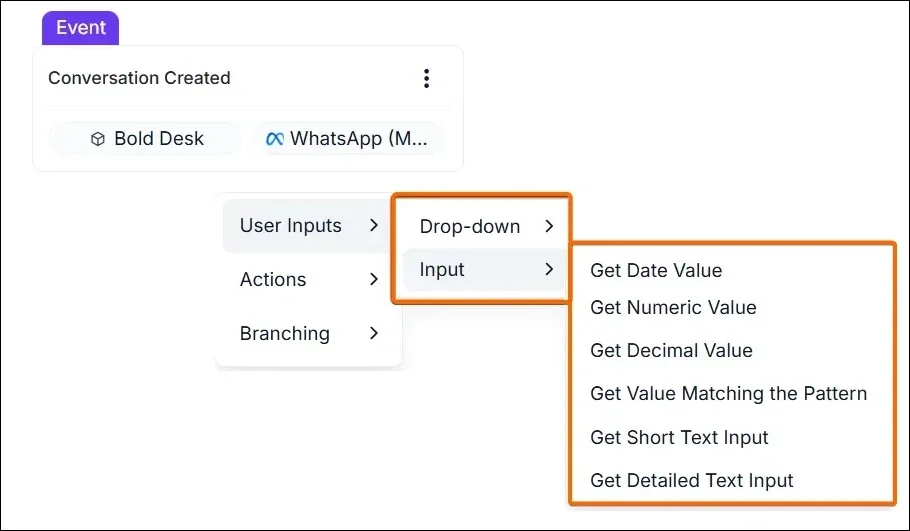
Workflows now support mapping inputs for multiple field types, including text, numeric, decimal, date, regex, single-choice, and multichoice.
By collecting structured and validated data, this update improves automation reliability and streamlines downstream processes, making your workflows more efficient and consistent.
Automate WhatsApp catalog messaging with BoldDesk workflows
BoldDesk now fully supports Meta, Gupshup, and Twilio WhatsApp catalog template messaging. This powerful addition allows support teams to deliver rich, pre-approved product catalogs and personalized recommendations to customers via automated workflows.
Benefits:
- Deliver approved WhatsApp catalog templates automatically within workflow steps.
- Share catalog updates and product details within workflow steps for timely engagement.
- Help customers make faster decisions with structured catalog content.
- All templates adhere to WhatsApp’s approved messaging standards for secure, high-quality communication.
Chat API
Give your development teams the ability to build, extend, and automate chat experiences with enhanced Chat API capabilities.
Flexible APIs for custom chat experiences
Developers can manage conversations, messages, attachments, and visitor details through flexible APIs. This makes it easy to integrate BoldDesk chat into custom workflows and external systems.
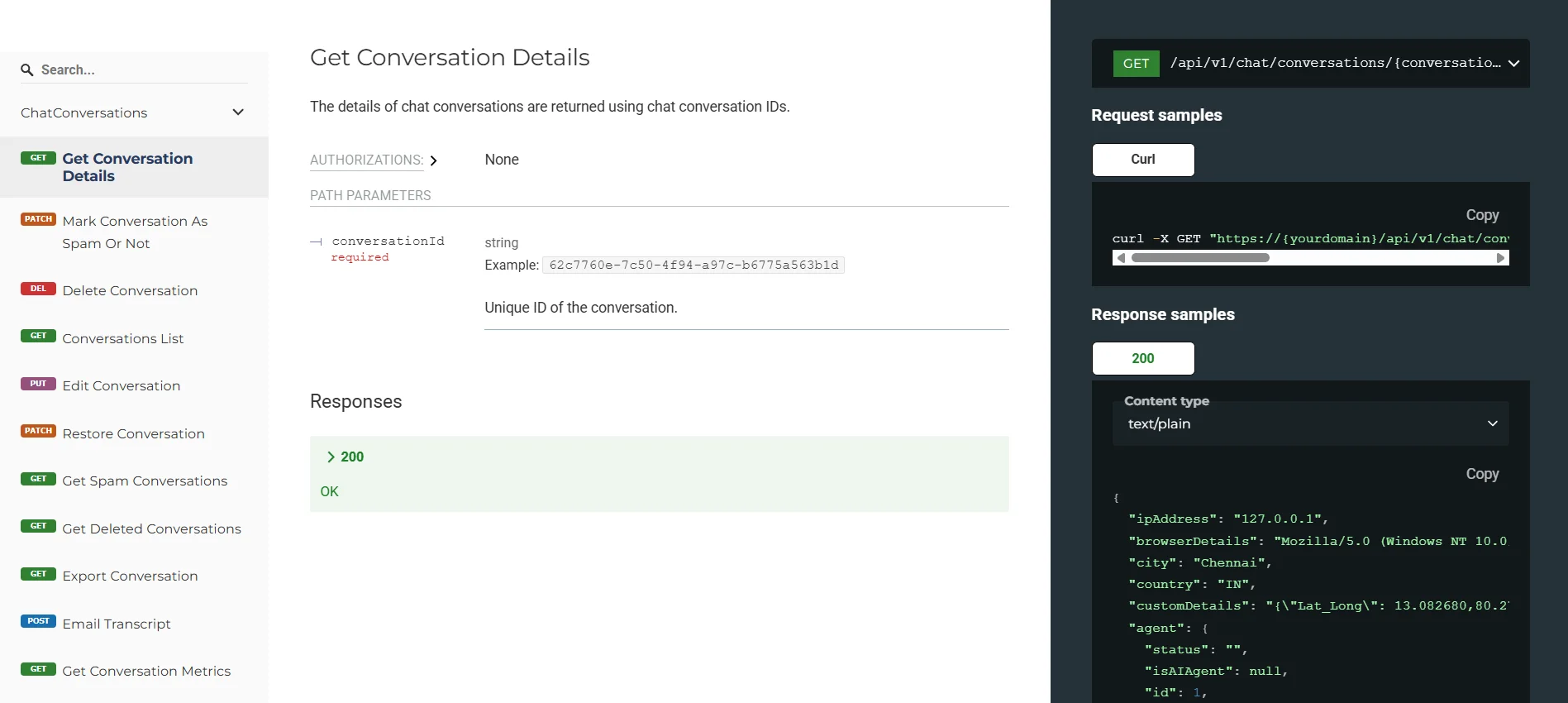
With these APIs, teams can build deeper integrations, automate routine processes, and create fully connected, scalable support experiences across channels.
AI billing and subscriptions
We’ve enhanced how you purchase and manage AI capabilities in BoldDesk.
Flexible AI Copilot and AI Agent add-ons
BoldDesk now offers flexible purchasing options for AI add-ons, available to both new and existing customers:
-
AI Copilot: Purchased on a per-agent basis, making it easy to equip specific team members with AI-powered assistance.
-
AI Agents: Purchased through credit packs, letting you scale automated resolutions as demand grows.
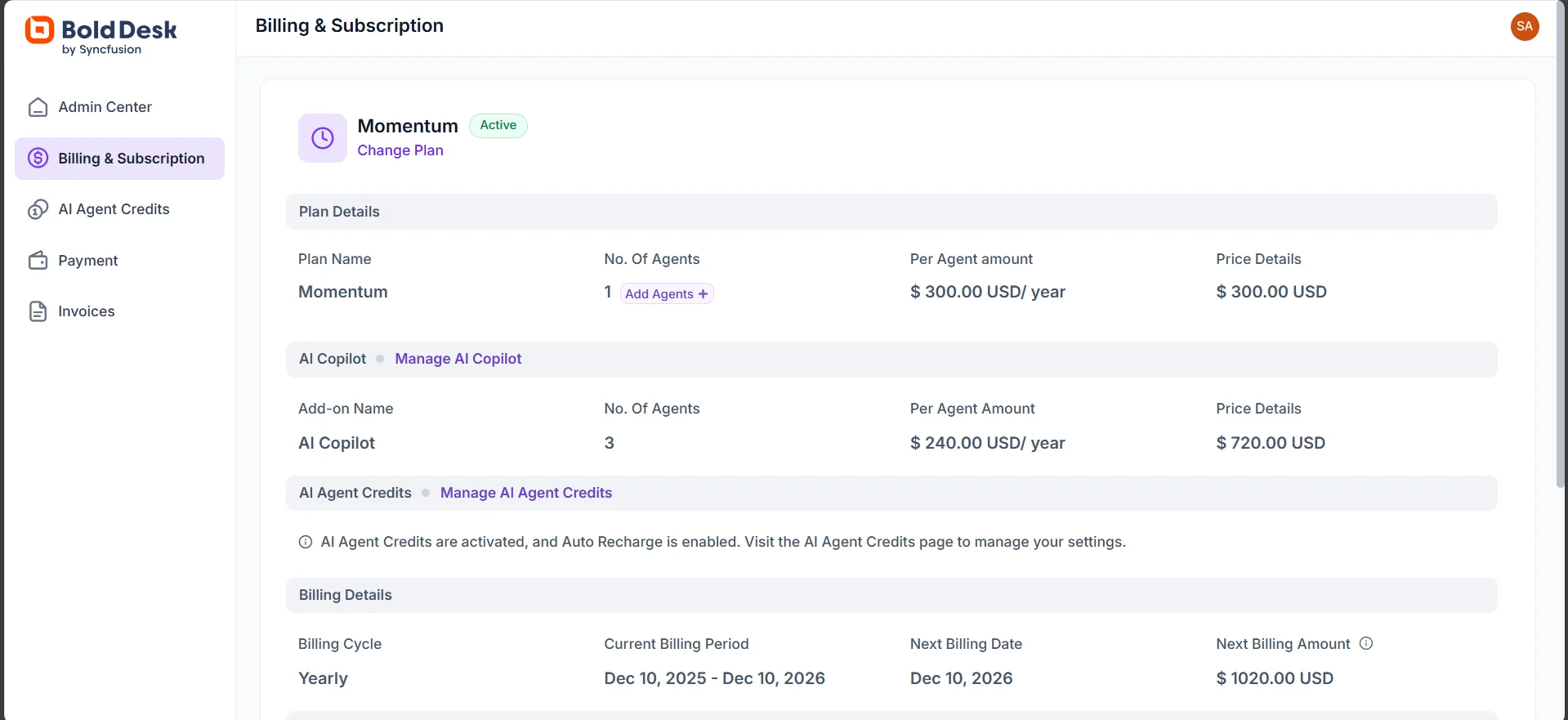
Auto-recharge for AI Agent credits
To ensure automated support continues without interruption, you can now enable auto recharge for AI Agent credits.
This feature automatically replenishes your credits when they run low, helping you avoid service pauses.
Support use cases enabled by these features
These feature updates are designed to solve real, day-to-day challenges faced by modern support teams. Here’s how they translate into measurable impact.
Turn support conversations into sales with WhatsApp catalog templates
Challenge: An e-commerce business struggles to convert product inquiries because agents rely on plain text links that customers often ignore or hesitate to open.
BoldDesk solution: Agents use WhatsApp catalog templates to share visual, browsable product collections directly within the chat, complete with images and pricing.
Impact: Customers explore products without leaving WhatsApp, creating a smoother buying experience and driving higher conversion rates.
Provide secure, in-app support with the mobile chat SDK
Challenge: A fintech startup needs to support sensitive transaction issues without forcing users to leave the security of their banking app.
BoldDesk solution: The development team integrates the BoldDesk mobile chat SDK, enabling users to start authenticated, real-time support chats directly inside the application.
Impact: Customer trust stays high, while agents resolve issues faster using in-app context and real-time communication.
Eliminate manual AI training with enhanced web crawling and Microsoft Docs
Challenge: A fast-growing SaaS company sees rising ticket volumes because its AI agent serves outdated answers that cannot be manually updated fast enough.
BoldDesk solution: Admins enable enhanced web crawling to sync the latest website content and upload Microsoft Word documents as AI content sources.
Impact: AI responses stay current automatically, improving ticket deflection and reducing the support load.
Elevate customer support with BoldDesk new updates
This release is about removing friction at every stage of the support journey. Each enhancement is designed to help your teams work more efficiently, your systems stay connected, and your customers get faster, more accurate answers.
Not a BoldDesk customer yet? Start a free trial or book a live demo to experience how these new features can elevate your customer service operations. All new features will be automatically available to users based on their current subscription level.
Want to explore further? Take a product tour or browse our documentation to learn more about what’s new. If you need any assistance with these new features, the BoldDesk support team is always here to help.
Share your thoughts and suggestions in the comment section below!
Related articles