In this page

TL;DR: Zendesk Support Team pricing starts at $19 per agent per month, but add-ons, hidden fees, and higher-tier plans can significantly increase long-term costs. Understanding the full pricing structure helps businesses estimate their total investment and determine whether Zendesk or a more cost-effective alternative is the better fit.
Zendesk pricing starts at $19 per agent per month (Support Team plan) when billed annually, but the advertised price is often only the starting point.
As support requirements grow, many businesses upgrade to higher-tier plans, purchase AI tools, add workforce management features, or incur usage-based charges that increase the total cost.
Taken alone, the headline price can therefore give an incomplete picture of Zendesk support pricing.
This is one reason many businesses end up evaluating a Zendesk alternative, looking beyond the headline price to consider the total cost of plans, add-ons, and AI usage.
In this guide, we’ll break down Zendesk’s pricing plans, add-on costs, AI pricing, hidden expenses, and customer feedback to help you determine what Zendesk really costs in 2026.
Overview of Zendesk pricing
Zendesk pricing is based on a tiered, subscription-based model that allows businesses to choose plans based on their support requirements, team size, and feature needs.
In a nutshell, here’s what Zendesk pricing really looks like:
- Its plans are charged per agent, per month, with both annual and monthly billing options available. Monthly plans typically cost 20% – 30% more per agent than annual plans.
- Additionally, it offers several products, including Zendesk for Service, Zendesk for Employee Service, and Zendesk Contact Center, each with its own pricing structure and feature set.
- Entry-level plans include basic support capabilities such as ticket management, email support, a help center, and standard reporting, while more advanced features are typically available in higher-tier plans.
- As businesses move to higher-tier plans, they gain access to more advanced Zendesk features, such as AI-powered automation, omnichannel support, advanced reporting, workflow customization, and enterprise-grade security controls.
- Beyond its standard plans, Zendesk also offers optional add-ons and premium AI features that organizations can purchase separately to extend functionality.
As a result, the total cost can vary significantly depending on the product selected, the number of agents, plan tier, add-ons, AI requirements, and usage levels.
Businesses should evaluate both their current support needs and future growth plans to determine which Zendesk pricing tier delivers the best long-term value.
Zendesk for Service pricing breakdown
Zendesk for Service is designed for businesses that need a centralized platform to manage customer support operations.
The platform includes tools for ticket management, automation, reporting, collaboration, live chat, self-service, and AI-powered customer support.
Zendesk offers four main service plans, including Support Team, Suite Team, Suite Professional, and Suite Enterprise + Copilot.
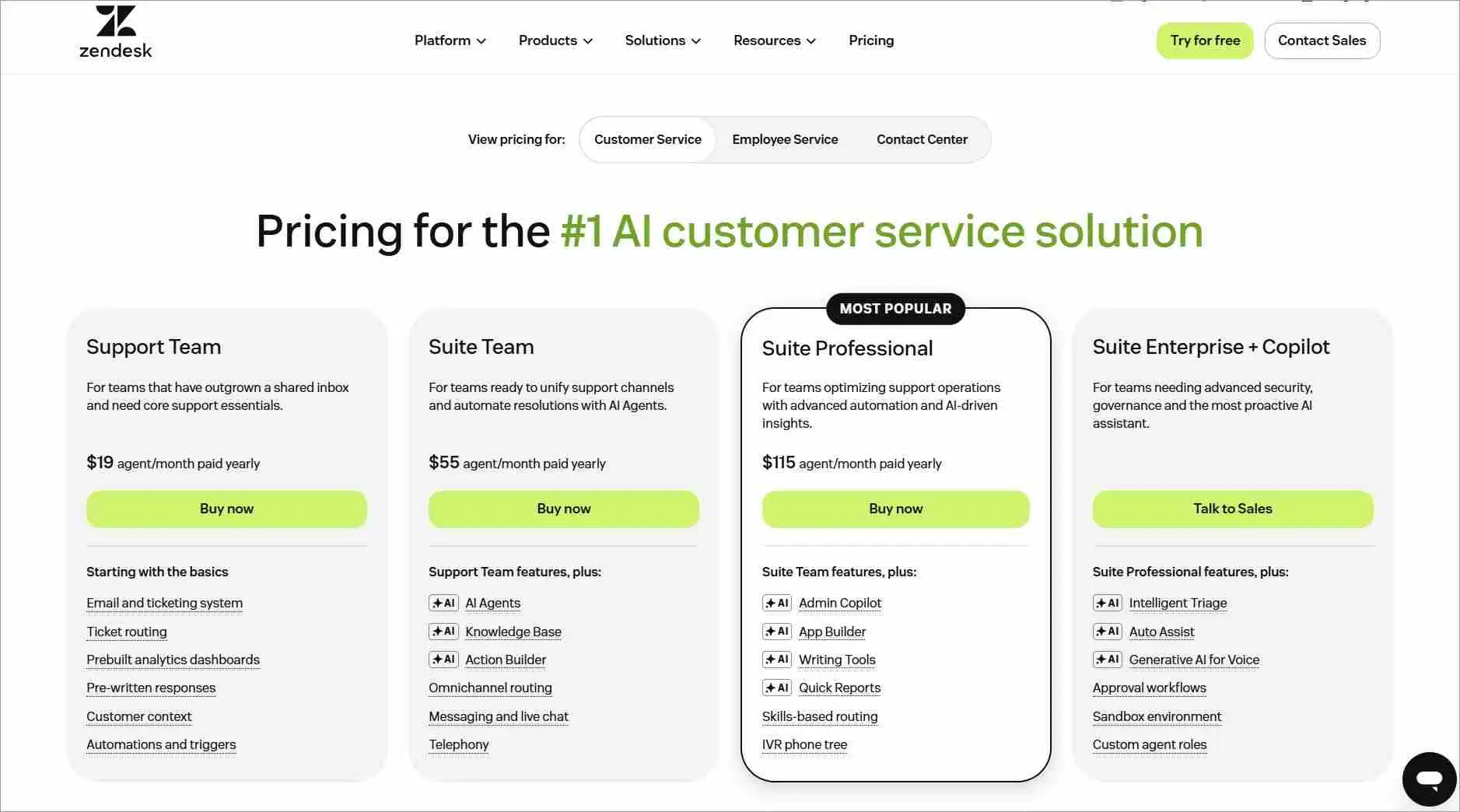
The table below compares Zendesk for Service pricing plans, highlighting their annual and monthly pricing options and ideal use cases.
Note: Zendesk Service pricing, including the monthly rates shown below, was checked against Zendesk’s official pricing information and updated on August 27, 2026. Prices and billing terms may change, so confirm the latest figures before purchase.
| Plan | Annual pricing | Monthly pricing | Best for |
| Support Team | $19/agent/month | $25/agent/month | Small businesses with basic ticketing needs |
| Suite Team | $55/agent/month | $69/agent/month | Growing teams requiring omnichannel support |
| Suite Professional | $115/agent/month | $149/agent/month | Businesses requiring advanced automation and reporting |
| Suite Enterprise + Copilot | Contact sales | Contact sales | Organizations with complex enterprise requirements |
Support Team is Zendesk’s lowest-priced plan, but it primarily covers basic ticketing needs. Teams may need to upgrade for omnichannel support, advanced automation, and reporting, increasing the base cost.
Zendesk for Employee Service plans explained
Zendesk for Employee Service helps organizations manage internal support operations, such as IT requests, HR inquiries, workplace services, and other employee-related requests from a centralized platform.
Unlike Zendesk for Service, it focuses on improving the employee experience by streamlining internal support and service delivery.
Zendesk for Employee Service offers four plans: Suite Team, Suite Growth, Suite Professional, and Suite Enterprise.
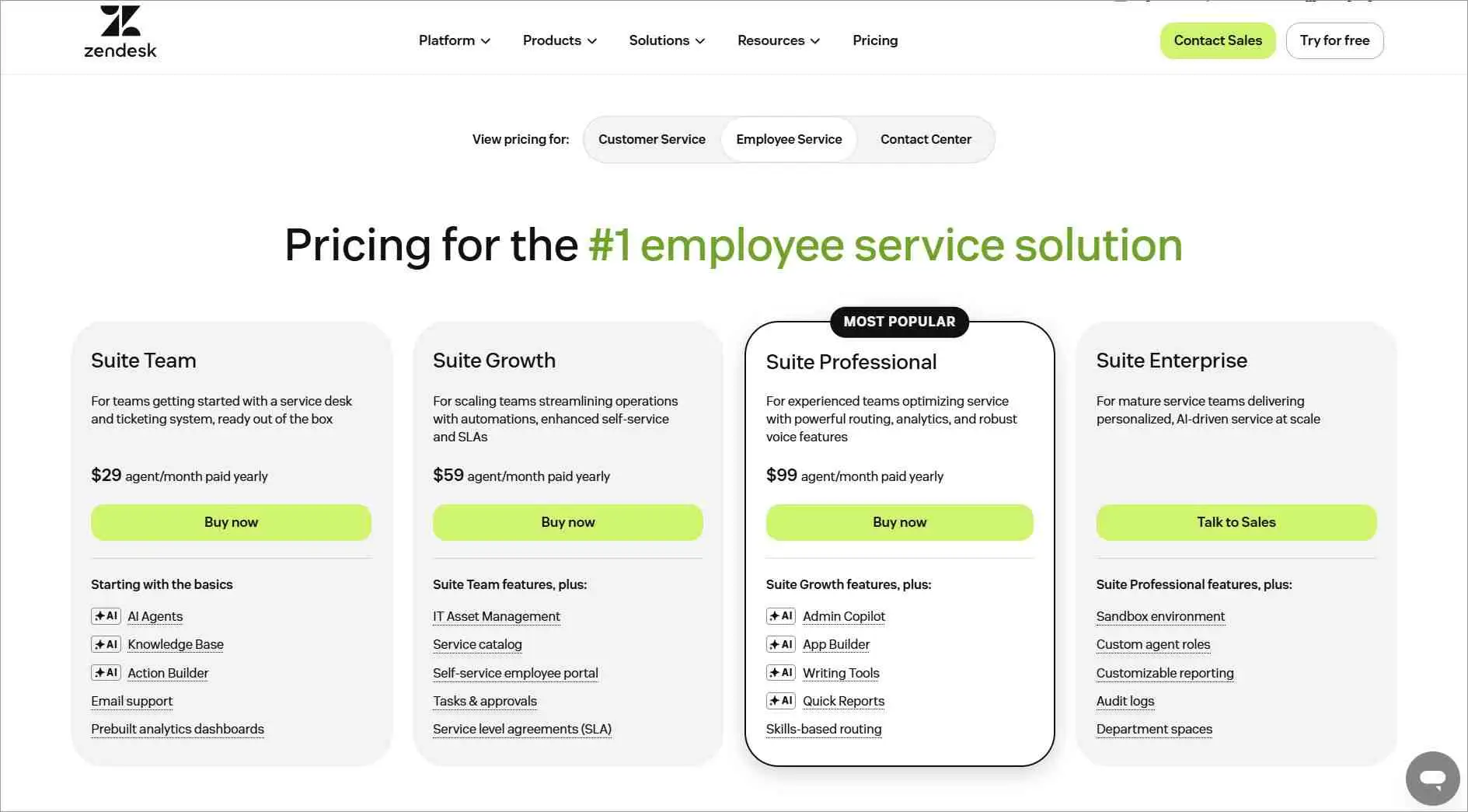
Note: Zendesk Employee Service pricing was verified against Zendesk’s official pricing page as of August 27, 2026. Additional add-ons, contract terms, and service offerings should be reviewed against Zendesk’s latest pricing and legal documentation before purchase.
The table below summarizes the annual and monthly pricing options and highlights the best fit for each plan.
| Plan | Annual pricing | Monthly pricing | Best for |
| Suite Team | $29/agent/month | $39/agent/month | Teams getting started with an employee service desk |
| Suite Growth | $59/agent/month | $79/agent/month | Scaling organizations looking to streamline internal operations |
| Suite Professional | $99/agent/month | $125/agent/month | Experienced teams optimizing service delivery and efficiency |
| Suite Enterprise | Contact Sales | Contact Sales | Enterprises managing complex internal service operations at scale |
Employee Service pricing follows a similar pattern, with costs increasing as organizations require more advanced automation, analytics, and internal service management capabilities.
Zendesk Contact Center pricing details
The Zendesk Contact Center is designed for organizations that primarily depend on phone-based customer support and need advanced voice capabilities to manage high call volumes efficiently.
Organizations that rely heavily on phone support can purchase Zendesk Contact Center alongside a Suite plan to add native voice capabilities and call management tools.
Zendesk Contact Center has a base per-agent fee and includes one Minutes Block per user. Additional minutes blocks can be purchased when teams require more call-related capacity.
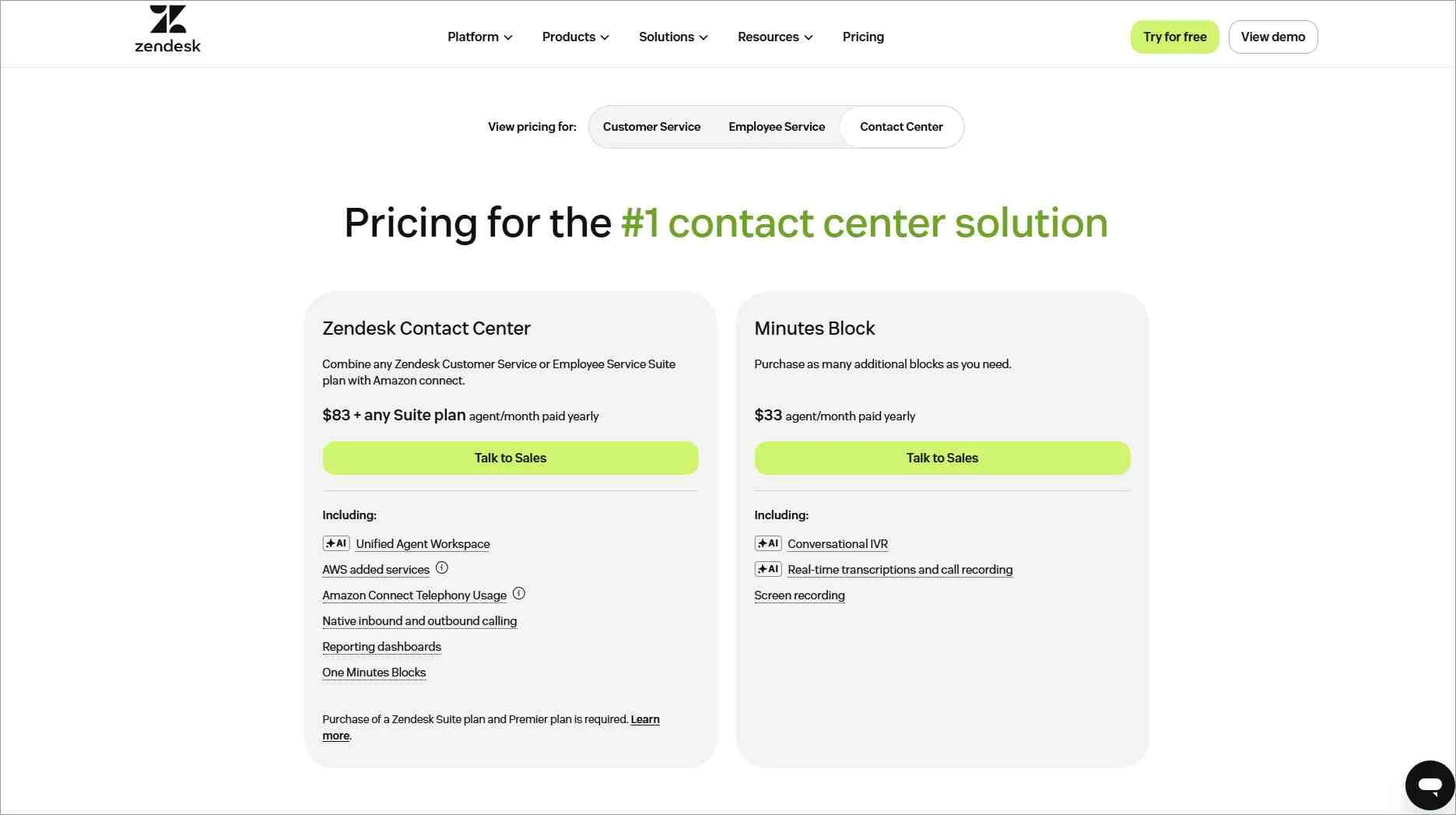
The table below provides a comparison of Zendesk Contact Center plans, highlighting their pricing options and recommended use cases for each plan.
| Pricing component | Annual pricing | Monthly pricing | Best for |
| Zendesk Contact Center | $83/agent/month + any Suite plan | Contact sales | Businesses that rely heavily on phone-based customer support and require native voice capabilities. |
| Minutes Block | $33/agent/month(includes 1,000 minutes) | Contact sales | Additional call-related usage beyond the included Minutes Block. |
Organizations with high call volumes should also factor in telephony, voice usage, and other consumption-based charges when estimating total costs.
Understanding Zendesk AI costs
Zendesk offers two main AI products: Copilot and AI agents. Copilot helps agents draft replies, summarize conversations, and work more efficiently. It costs $50 per agent per month.
AI agents can automate customer interactions and resolve requests without agent involvement. Zendesk’s pricing page lists the AI agent builder across Support Team, Suite Team, and Suite Professional plans.
The included automated-resolution allowance is:
- Support Team: 5 automated resolutions per agent per month
- Suite Team: 5 automated resolutions per agent per month
- Suite Professional: 10 automated resolutions per agent per month
When the included allowance is used, committed automated resolutions cost $1.50 per resolution. Pay-as-you-go resolutions cost $2.00 per resolution.
Your total AI cost depends on your plan, number of agents, and monthly resolution volume. Reviewing these figures before choosing a plan can help you estimate your likely Zendesk investment more accurately.
Zendesk add-on pricing overview
Although Zendesk’s entry-level plans may appear affordable, costs can increase significantly as teams grow or require additional functionality through add-ons.
These add-ons improve functionality, but they are priced separately and can significantly increase the total cost of ownership as customer support teams scale.
Here are the most common Zendesk add-ons and their pricing:
- Copilot: $50/agent/month (paid yearly)
- Zendesk Quality Assurance: $35/agent/month (paid yearly)
- Workforce Engagement Bundle: $50/agent/month (paid yearly)
- Advanced Data Privacy and Protection: $50/agent/month
While not every business requires these add-ons, organizations with larger support teams, stricter compliance requirements, or more advanced AI and workforce management needs often purchase one or more of them, increasing the total cost.
Note: The Workforce Engagement Bundle combines Zendesk WFM and Zendesk QA. Businesses purchasing the bundle should not add the standalone QA price again unless it is sold or configured separately.
Hidden Zendesk costs to consider before buying
While Zendesk’s advertised pricing provides a useful starting point, the total cost can be significantly higher than the base subscription price.
Understanding these costs can help businesses estimate Zendesk’s true total cost of ownership and avoid unexpected expenses as support requirements grow.
- Monthly billing premium: Monthly plans cost more than annual subscriptions. For example, Support Team costs $19/agent/month annually versus $25/agent/month monthly.
- Annual commitment limitations: Annual billing lowers the effective monthly rate but requires a longer commitment, which may limit a business’s ability to reduce licenses or downgrade before renewal.
- Plan upgrade costs: Features such as AI agents, live chat, omnichannel support, knowledge management, and advanced reporting are distributed across different pricing tiers, often requiring upgrades from $19 to $55 or $115 per agent/month.
- Add-on fees: Features such as Copilot ($50/agent/month), Quality Assurance ($35/agent/month), Workforce Engagement ($50/agent/month), and Advanced Data Privacy and Protection ($50/agent/month) priced separately.
- License allocation: Suite Professional includes up to 100 light-agent seats for people who only need to view tickets or add private notes. If five occasional collaborators are assigned full $115 seats instead, those licenses cost $575 per month, or $6,900 per year. Review user roles regularly and move suitable managers, developers, and subject matter experts to light-agent access.
- AI overage charges: Zendesk AI Agents use an Automated Resolution (AR) model. Depending on the account’s pricing model, organizations may need to purchase additional resolution allowance or incur overage charges as AI usage grows.
- Usage-based costs: Zendesk contact center may include additional charges for increased voice capacity and prorated billing adjustments if your subscription start date falls mid‑month, increasing the total subscription price over time.
- Contract and renewal considerations: If you plan to reduce licenses or downgrade at renewal, Zendesk’s agreement requires at least 30 days’ written notice. Missing the deadline may result in renewal at your current subscription, leading to higher costs than expected.
- Non-refundable subscription charges: Zendesk’s subscription charges are generally non-cancellable and non-refundable, making it difficult to recover costs if your support requirements decrease during the subscription term.
Note: Larger teams and enterprise customers may be able to negotiate pricing, bundled services, or contract terms before signing an agreement.
Real-world Zendesk pricing examples: What businesses actually pay
The following examples use Zendesk’s publicly listed pricing to illustrate how the total monthly cost can change once common add-ons and estimated AI usage are included.
Note: All pricing examples below use annual-billing rates. Monthly billing is generally higher. These scenarios are illustrative estimates created for this article and are not based on customer survey data.
They are intended to help businesses estimate a more realistic monthly investment based on their team size and support requirements.
Small business or startup with five agents
A five-agent team using Zendesk Suite Team would start with a base subscription of $275 per month. Adding Copilot and additional automated resolutions could more than double that monthly investment.
Here is how the estimated cost breaks down:
- Suite Team: 5 agents × $55 per agent = $275 per month
- Copilot: 5 agents × $50 per agent = $250 per month
- Additional AI usage: Approximately 50 automated resolutions × $1.50 = $75 per month
Estimated total: $600 per month, or $120 per agent.
This is more than six times Zendesk’s advertised $19-per-agent starting price.
The $19 Support Team plan does not include the same live chat and omnichannel capabilities as Suite Team. AI-agent access is available across Support and Suite plans, but the allowance and billing model may vary by account.
This makes the lowest advertised price an incomplete comparison for businesses that need live chat and support across multiple channels.
Growing business with 15 agents
A growing support team may choose Zendesk Suite Professional to access more advanced reporting, automation, routing, and operational controls. For 15 agents, the base subscription alone would cost $1,725 per month.
Here is an example of how common additions could affect the total:
- Suite Professional: 15 agents × $115 per agent = $1,725 per month
- Copilot: 15 agents × $50 per agent = $750 per month
- Workforce Engagement Bundle: 15 agents × $50 per agent = $750 per month
- Additional AI usage: Approximately 300 automated resolutions × $1.50 = $450 per month
Estimated total: $3,675 per month, or $245 per agent.
That is more than twice the advertised $115-per-agent Suite Professional price. The example also excludes potential telephony, implementation, training, and tax-related expenses.
Enterprise organization with 50 agents
Enterprise support teams often require advanced workforce management, AI assistance, quality monitoring, privacy controls, and governance features.
These requirements can create several additional per-agent charges beyond the core Zendesk subscription.
An estimated monthly cost for a 50-agent team could include:
- Suite Professional: 50 agents × $115 per agent = $5,750 per month
- Copilot: 50 agents × $50 per agent = $2,500 per month
- Workforce Engagement Bundle: 50 agents × $50 per agent = $2,500 per month
- Advanced Data Privacy and Protection: 50 agents × $50 per agent = $2,500 per month
- Additional AI usage: Approximately 1,000 automated resolutions × $1.50 = $1,500 per month
Estimated total: $14,750 per month, or $295 per agent.
This is approximately 2.6 times the $115-per-agent Suite Professional price. The estimate does not include Zendesk Contact Center, additional voice usage, implementation services, taxes, or other negotiated enterprise costs.
Warning signs Zendesk costs are becoming unsustainable
Zendesk’s per-agent model makes some cost growth unavoidable. The real concern is when your bill rises faster than the value your team receives. Look for these warning signs:
- Add-ons are approaching the cost of your main plan. At annual-billing rates, Suite Professional costs $1,725 per month for 15 agents. Adding Copilot and the Workforce Engagement Bundle costs another $1,500. If add-ons nearly double your bill, review whether your team uses them enough to justify the expense.
- You upgraded for one or two features. Moving from Suite Team at $55 to Suite Professional at $115 adds $60 per agent each month. For 15 agents, that is an extra $900. The upgrade may offer poor value if you only need one Professional-level feature, such as skills-based routing.
- Your AI costs keep changing. Zendesk plans include an automated-resolution allowance, but additional resolutions cost extra. Compare your monthly resolution volume with the included allowance to understand how AI usage affects your bill.
- You are paying for unused seats. Former agents, occasional collaborators, and employees who no longer need full access can remain on the invoice. Review your licenses before renewal and confirm how much notice Zendesk requires to reduce them.
If several of these warning signs apply, calculate your total cost of ownership and compare the best Zendesk alternatives based on the features, seats, and usage your team actually needs.
What real Zendesk users say about pricing and experience
Understanding Zendesk’s published pricing is only part of the evaluation. To understand the platform’s long-term value, it’s also helpful to look at how actual customers describe their experience.
Here are the most common pricing and usability concerns reported by Zendesk users:
Rising costs as teams grow
A common concern among Zendesk users is that costs can rise quickly as their teams and support needs grow.
While the entry-level plans may appear affordable, many users feel that pricing becomes harder to justify as support volume increases and additional features are needed.
As businesses expand, the per-agent pricing model and reliance on paid add-ons can lead to higher overall Zendesk costs, making long-term budgeting more challenging.
This concern is reflected in user discussions online, where some customers have expressed frustration over pricing increases and changes to plan structures.

Missing and limited features
Several verified G2 reviewers found certain Zendesk features limiting, particularly when it comes to reporting, customization, and usability.
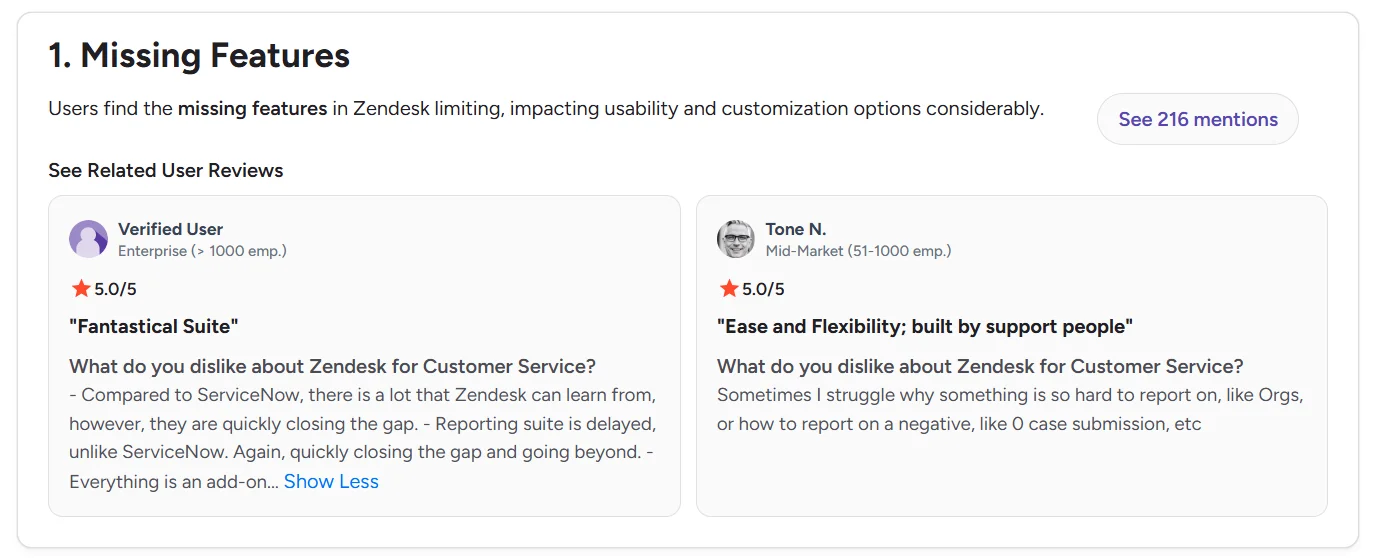
Reviewers noted that capabilities they expected were either unavailable, available only through add-ons, or required workarounds to achieve their desired outcomes.
As a result, some users feel that Zendesk support pricing is higher than expected, as they need to pay extra to access the features required to support their operations effectively.
Poor customer support
Another recurring concern among users is the quality and responsiveness of customer support.
One Reddit user, Mammoth-Door2511 shared:
“Zendesk is not solving anything. They’re just merging and solving my requests for support. Impossible to find any way to escalate or reach someone.”
The user also described difficulties escalating the issue after their account representative left the company, citing delays in receiving assistance and finding the right support contacts.
For support teams that rely heavily on their help desk software, prolonged response times and support delays can disrupt operations, reduce productivity, and impact overall customer service performance.
Complex setup and learning curve
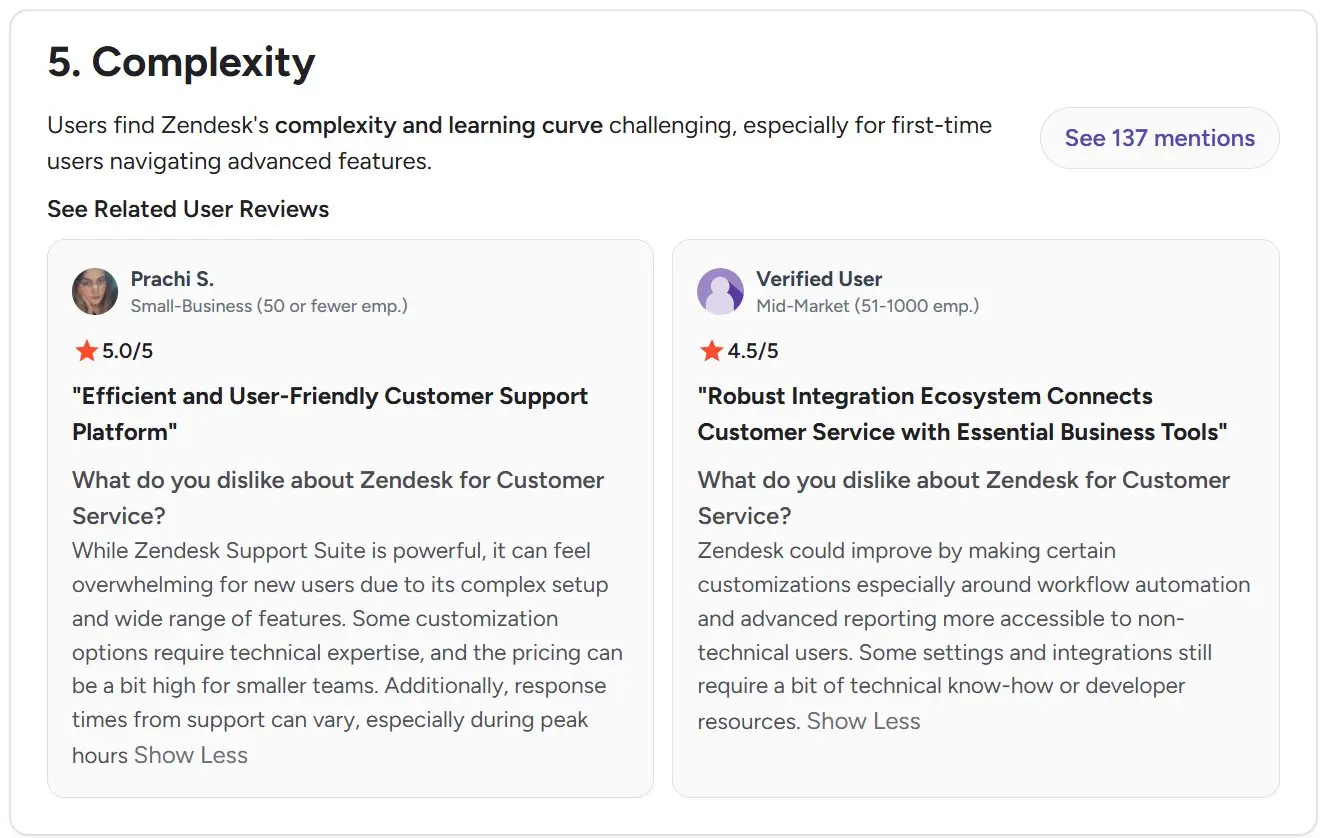
Some G2 reviewers describe Zendesk as an effective customer service platform but note that its extensive features and configuration options can make it challenging for new users to learn and navigate.
Here’s what David A., one verified G2 reviewer updated:
“While Zendesk Support Suite is powerful, it can feel overwhelming for new users due to its complex setup and wide range of features. Some customization options require technical expertise, and the pricing can be a bit high for smaller teams.”
For organizations with limited resources, the learning curve can extend onboarding and make it more challenging to fully utilize the platform’s capabilities.
Zendesk pricing comparison: BoldDesk vs. Zendesk
Zendesk’s entry-level plan, Support Team, starts at $19 per agent per month, but many commonly used features are available only in higher-tier plans.
By comparison, BoldDesk’s entry plan costs $99 per month for five agents (about $19.80 per agent) and includes all core customer support capabilities.
To access similar functionality in Zendesk, businesses typically need Suite Professional, which costs $115 per agent per month or $575 per month for five agents.
Zendesk’s advertised starting price of $19 per agent per month applies only to its most basic plan.
It does not include the same live chat and omnichannel support capabilities as Zendesk Suite plans. AI-agent availability depends on the plan and account pricing model.
Businesses looking for functionality comparable to BoldDesk’s entry plan typically need Zendesk Suite Professional at $115 per agent per month, which is nearly six times the advertised starting price.
In comparison, BoldDesk includes these core capabilities across all plans without requiring customers to upgrade to higher tiers to access essential features.
Below is a breakdown of BoldDesk pricing across different team sizes, including annual and monthly billing options and the AI credits included during the first three months.
| Agents | Monthly price, billed annually | Monthly price, billed monthly | AI credits (first 3 months) |
| 5 | $99 | $124 | 500 |
| 10 | $199 | $249 | 1,000 |
| 25 | $349 | $436 | 1,500 |
| 50 | $499 | $624 | 2,000 |
| 75 | $749 | $936 | 2,500 |
| 100 | $999 | $1,249 | 3,000 |
Unlike Zendesk, which offers several paid add-ons across different product areas, BoldDesk’s additional purchases are primarily limited to AI Agent credits starting at $20 per 1,000 credits and AI Copilot at $20/agent per month.
This helps businesses maintain more predictable costs as their support operations grow.
Businesses looking to estimate potential savings from AI-powered support automation can also use BoldDesk’s AI ROI Calculator.
Subscription flexibility is another key difference. Zendesk requires advance notice for certain downgrades before renewal, while BoldDesk allows businesses to adjust their plan or agent count as needed, making it easier to scale costs up or down.
Its transparent pricing, startup program, and predictable cost structure make BoldDesk an attractive alternative for businesses seeking long-term value.
BoldDesk also offers free migration from Zendesk, and customers have praised the migration experience.
One verified user on G2 who switched from Zendesk shared:
“We were able to migrate from Zendesk very easily. Their migration team was great to work with and helped move everything over to meet our regulatory needs.”
Here’s a pricing comparison slider showing how BoldDesk compares to Zendesk plans:
Is Zendesk pricing worth it for your business?
Zendesk is a well-known customer service platform that offers a broad range of support capabilities for businesses of all sizes.
However, costs can increase significantly as teams grow, support requirements become more complex, and additional features or add-ons are needed.
Ultimately, the right Zendesk plan depends on balancing the features you need today with the total cost of ownership as your team grows.
Evaluating both the subscription price and potential add-on costs can help you make a more informed decision.
If you’re evaluating customer service platforms, consider comparing features, pricing, long-term costs, and top Zendesk alternatives to determine which solution best aligns with your business requirements.
BoldDesk provides an AI-powered customer service platform with transparent pricing, free migration, startup-friendly programs, and core support capabilities included across plans.
Start a free trial or schedule a live demo to see how BoldDesk can help your team streamline support operations while keeping costs under control.
Related articles
FAQs on Zendesk pricing
Zendesk pricing starts at $19 per agent per month for the Support Team plan when billed annually. Higher-tier plans include Suite Team ($55/agent/month) and Suite Professional ($115/agent/month).
Total costs can increase further based on add-ons, AI usage, workforce management tools, and contact center requirements.
Migration timelines depend on the size and complexity of the support environment. Small teams can often complete migration within a few days, while mid-sized organizations may require several weeks.
Large enterprises with extensive customizations and integrations may need several months.
While Zendesk’s base pricing is transparent, overall costs can vary depending on team growth, plan upgrades, add-ons, and AI usage.
This can make long-term budgeting more challenging for organizations that expect to scale.
Zendesk offers a 14-day free trial for its customer service platform but does not provide a free plan, requiring businesses to subscribe to a paid plan after the trial ends.
Yes. Eligible startups may receive Zendesk Professional Suite and Copilot free for up to two years. The offer duration and number of agents depend on eligibility, funding profile, and partner referral status.
Add-ons are not mandatory, but many businesses find that features such as workforce management, quality assurance, advanced AI capabilities, and contact center tools become important as support operations mature.
These features may require additional investments beyond the base subscription.
Many organizations delay switching because of concerns about data migration, employee training, integration requirements, contract-renewal timing, and potential business disruption.
However, businesses often evaluate alternatives when costs continue to rise or required features become too expensive.