








TL;DR: Help desks and CRM serve different purposes: help desks manage support tickets with structured workflows, while CRMs focus on customer relationships and sales activities. Growing businesses need both to deliver fast support, maintain clean customer data, and scale service without confusion or delays.
As customer interactions increase across email, chat, in-app messaging, and self-service channels, support leaders often face a critical operational question:
Where should customer conversations live?
Should incoming issues be handled inside a CRM that already stores customer data, or does a dedicated help desk provide better structure, clarity, and speed for support teams?
While help desk and CRM tools share some overlapping capabilities, they are built with very different goals in mind. Choosing the wrong system or forcing one tool to do the job of the other can lead to workflow bottlenecks, unclear ownership, and inconsistent customer experiences.
This guide explains the difference between a help desk vs CRM, clarifies when to use each, and helps growing teams choose the right setup for today, without limiting tomorrow’s scale.
Why are CRM vs help desk tools often confused?
Customer-facing teams rarely operate in a single system. Support, sales, marketing, and customer success teams all rely on shared customer data and communication history.
Both help desks and CRMs can:
-
Store customer contact information
-
Log emails and conversations
-
Provide visibility into past customer interactions
This overlap creates confusion, especially for growing teams that want a single place to manage customer conversations.
The key difference is not the interface, but the intent of the workflow each system supports.
Understanding the tools: Help desk vs CRM explained
Help desk and CRM systems support different roles. Knowing the strengths of each platform helps support and revenue teams determine which system should own customer communication, resolution workflows, and lifecycle clarity.
With digital interactions rising, 44% of companies now prioritize a digital‑first customer service strategy, highlighting the need for structured help desk workflows over general CRM communication tools.
Help desk vs CRM: Quick definition
A help desk is a support operations system designed to manage, track, and resolve customer issues. Its primary focus is issue resolution, ensuring every request is routed correctly, handled on time, and closed with accountability.
A CRM (Customer Relationship Management system) is designed to store customer data and manage relationships across sales, marketing, and customer success.
Its primary focus is relationship growth, tracking engagement, identifying opportunities, and building long‑term customer value.
Overview of help desk software
Generally, a help desk is the main point of contact between users and support teams, ensuring questions and technical customer service problems are handled quickly to maintain productivity.
By organizing requests into structured workflows, IT help desk software improves team coordination, accelerates resolution times, and supports consistent service delivery.
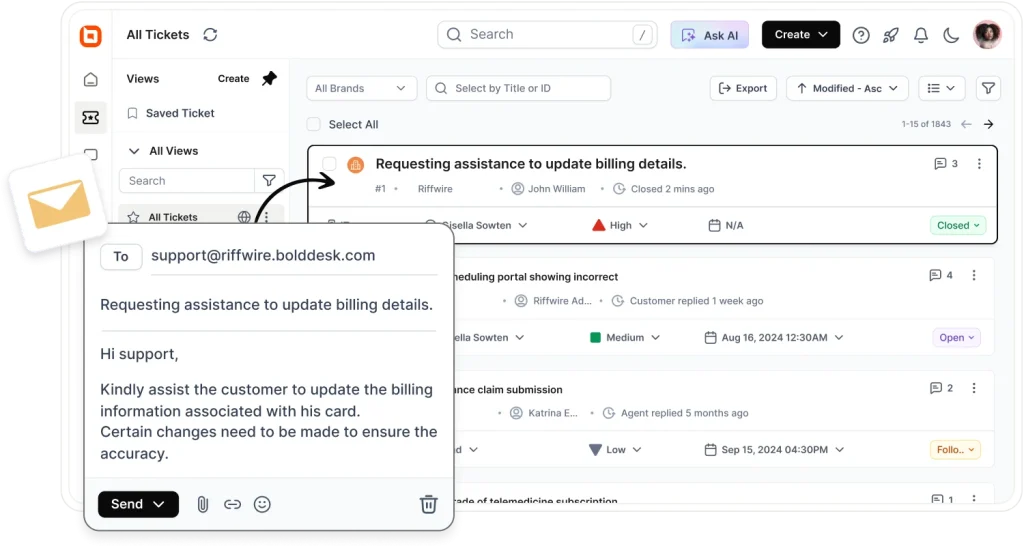
Modern help desks typically include features such as ticket management, an AI agent, live chat, knowledge base, automation workflows, omnichannel inbox (email, chat, in-app), and reporting dashboards.
Overview of a CRM system
A customer relationship management (CRM) system stores customer history, preferences, contact details, and interactions across various touchpoints, giving teams a full picture of each relationship.
The CRM system’s main features include contact and account management, lead, deal, and pipeline tracking, sales and marketing automation, email and communication logging, customer segmentation, and activity management.
Key differences between help desk and CRM
Although help desk and CRM systems can appear similar at first, they serve very different but complementary purposes in how organizations manage customer support, internal operations, and long‑term customer connections.
In fact, 22% of sales professionals are unsure about what a CRM even is, which shows how easily these tools can be misunderstood.
Let’s look at the breakdown by purpose, data ownership, and team usage, to help in deciding where each workflow belongs, between help desk or CRM systems.
| Aspect | Help desk | CRM |
| Primary purpose | Resolve customer issues efficiently | Manage customer relationships and revenue |
| Approach | Support operations and service delivery | Relationship building and lifecycle management |
| Data focus | Tickets, issues, SLAs, response times | Contacts, deals, interactions, customer value |
| Primary users | Support teams, IT, operations | Sales, marketing, customer success |
| Typical features | Ticketing, automation, knowledge base, omnichannel support | Contact management, automation, and forecasting |
| Success metrics |
Resolution time, ticket backlog, SLA compliance | Pipeline value, deal progression, retention |
While CRMs provide customer context, they often lack the operational workflows needed to manage support at scale. That’s why many organizations use a help desk for ticket execution and a CRM for customer relationship management.
When should you use a help desk, a CRM, or both
The decision isn’t about choosing one tool over the other; it’s about assigning clear ownership to each workflow.
When every team knows which system owns support execution and which owns customer relationships, operations stay efficient, and customer experiences remain reliable as the business scales.
Ask yourself: What is this workflow trying to achieve?
The table below compares the capabilities of a help desk, a CRM, and a combined approach to help you determine when to use each solution based on your business goals and operational needs.
| Capability | Help desk | CRM | Together |
| Ticket management | ✅ | Limited | ✅ |
| Contact management | Limited | ✅ | ✅ |
| Sales tracking | ❌ | ✅ | ✅ |
| SLA management | ✅ | ❌ | ✅ |
| Customer history | ✅ | ✅ | ✅ |
| Cross-team visibility | Limited | Limited | ✅ |
When a CRM makes more sense
Customer-facing teams can use CRMs when they want to perform any of the following functionalities:
- Track customer information and communication history
- Manage leads, deals, and long-term accounts
- Understand customer behavior across marketing, sales, and service
- Store records of conversations across multiple channels
- Coordinate internal teams around customer context
When a help desk makes more sense
Customer service teams, on the other hand, can use help desk software to perform the following tasks effectively.
- Seamless ticket management
- Maintain service-level expectations
- Improve agent productivity
- Deliver seamless customer support
See how an HR help desk helps organizations streamline employee support and manage HR requests more efficiently.
When can you use both help desk and CRM tools?
Customer-facing teams operate with far greater context and coordination when help desk and CRM systems work together.
While a CRM helps teams understand the customer relationship, a help desk ensures support requests are tracked, prioritized, and resolved efficiently.
For smaller teams, a help desk with built-in contact management can often cover both functions, providing customer context alongside support operations without the need for a separate CRM.
This approach is especially effective when:
- Your organization clearly separates revenue operations from support execution
- Customer data and support history need to be visible across multiple teams
- You require both operational efficiency and shared customer context
- Sales, customer success, and support teams regularly collaborate on customer accounts
The cost of keeping help desk and CRM data separate
When support and customer data live in disconnected systems, teams often spend time searching for information, manually updating records, or switching between tools to understand customer history.
This can lead to duplicated work, slower response times, inconsistent communication, and missed opportunities to proactively support key accounts.
Example: How help desk and CRM integrations work in practice
A customer submits a support ticket through the help desk. The support agent can immediately view CRM information such as account status, previous purchases, subscription tier, and recent interactions. Once the issue is resolved, the support activity is visible to sales and customer success teams, ensuring everyone works from the same customer context.
When help desk and CRM systems work together, teams reduce duplication, improve collaboration, eliminate visibility gaps, and provide faster, more personalized customer experiences across every touchpoint.
How BoldDesk bridges the gap between help desk and CRM
Many growing businesses need more customer context than a basic ticketing system provides. While the best ticketing systems excel at managing support requests, they may not deliver the relationship management capabilities of a full enterprise CRM.
Organizations evaluating new support platforms or planning a help desk migration often look for solutions that balance customer visibility with operational simplicity.
BoldDesk helps bridge that gap by combining structured support workflows with customer visibility features that help teams better understand the people behind every ticket.
With BoldDesk, teams can:
- Maintain centralized customer contact information
- View ticket and conversation history in one place
- Track customer interactions across support channels
- Access customer context without switching between multiple tools
- Deliver more personalized and efficient support experiences
For small and mid-sized businesses, this approach provides the operational benefits of a dedicated help desk while preserving the customer visibility needed to build stronger relationships.
Building a unified CX with the right help desk and CRM
Choosing between a help desk and a CRM isn’t about feature checklists, it’s about aligning tools with how your teams actually work.
As organizations scale, most modern SaaS support stacks rely on both systems:
-
A help desk to own issue resolution
-
A CRM to own customer relationships
With clear boundaries and proper integration, teams gain speed, visibility, and confidence, while customers experience faster, high-quality support.
If structured ticket workflows are slowing your team or creating confusion, a dedicated help desk can restore clarity without disrupting your existing CRM strategy.
Solutions like BoldDesk are built specifically to help growing teams scale support operations without unnecessary complexity.
Was this article helpful? Share your thoughts or experiences in the comments section. We’d love to hear from you.
Related articles
- Help Desk vs Service Desk: What’s the Difference?
- Best Free Help Desk Software for Startups (2026)
- Top Help Desk Software for Small Businesses in 2026
FAQs
A help desk is used to manage and resolve customer support issues, while a CRM is used to store customer information and manage relationships. In short, a help desk improves service delivery, and a CRM improves relationship growth.
Startups should prioritize a help desk if their main goal is to handle customer inquiries efficiently. As sales and lifecycle processes mature, adding a CRM helps support long-term growth.
Yes. Help desks store operational support data like tickets, SLAs, and resolutions. CRMs store relationship data such as interactions, opportunities, and customer lifetime value.
A CRM cannot effectively replace a help desk. Most CRMs do not provide structured ticket routing, SLA tracking, omnichannel support, or resolution workflows required for dedicated support operations.
Integrating a help desk with a CRM gives teams a complete view of customer interactions, enabling support, sales, and customer success teams to work from the same customer data.
This shared visibility improves collaboration, reduces duplicate effort, and helps organizations deliver faster, more consistent, and personalized customer experiences.





