






 In this page

TL;DR: Cutting support costs the wrong way can actually make support more expensive. When workflows remain fragmented, automation, self-service, and process changes often create more rework, escalations, and friction behind each resolution. You can control support costs by eliminating unnecessary effort, improving routing, preserving customer context, and preventing avoidable support demand.
You’ve optimized workflows, added automation, downsized teams, and kept ticket volume under control, yet your customer support costs keep increasing. Response times become harder to maintain, escalations increase, and agents spend more time on follow-ups, coordination, and repeated conversations just to resolve a single issue.
Customers expect fast, personalized support across chat, email, messaging apps, and self-service channels without repeating themselves. At the same time, support teams are managing more tools, workflows, and channels than ever before. This increases the effort required to resolve each issue, quietly pushing customer support costs higher.
As organizations scale, every new tool, channel, and process adds layers of coordination, maintenance, and overhead. Instead of reducing costs, optimization often shifts where the work happens.
Research cited by ITPro shows employees lose nearly seven hours every week dealing with fragmented tools and complex workflows, adding coordination overhead across support teams.
In this blog, we will explore why support costs keep increasing even after optimization and how modern teams reduce unnecessary effort without sacrificing the customer experience.
The support cost paradox: Why optimization does not always reduce costs
Many support leads invest in automation, self-service, AI, and workflow improvements expecting support costs to fall. In theory, reducing manual work should make support less expensive.
Yet many organizations find that costs continue rising even as efficiency improves.
This is the support cost paradox: support teams become more efficient, but the total effort required to resolve customer issues does not necessarily decrease.
Instead, work often shifts elsewhere in the support process. For example:
- Self‑service removes repetitive questions, leaving more time-consuming cases behind
- Automation reduces manual tasks but introduces monitoring, exception handling, and oversight
- AI speeds up responses but requires governance, training, and quality control
As a result, teams may handle fewer tickets or resolve them faster without seeing a proportional reduction in support spending.
What’s really causing support costs to increase?
If support teams are becoming more efficient, why do costs continue to rise? The answer often lies outside ticket volume and response times.
As organizations expand, new demands, responsibilities, and operational complexities can increase the cost of supporting customers.
The most common drivers of rising customer support costs include the following:

Customer expectations keep increasing
Today’s customers expect fast, personalized, and seamless support across every channel they use. They want quick answers, consistent experiences, and easy access to help whenever they need it.
Salesforce’s State of Service report found that 82% of service agents say customers ask for more than they used to, indicating that support teams are dealing with increasingly demanding service expectations.
Meeting these customer expectations often requires additional investments in support technology, staffing, training, and customer experience improvements.
Even highly optimized customer service teams may see costs rise as they work to meet these growing demands.
Automation still needs human oversight
Automation helps teams handle repetitive tasks more efficiently, including ticket routing, categorization, and responses to common questions. However, automation rarely removes all manual effort from the support process.
Agents often need to review automated actions, handle exceptions, manage escalations, and resolve issues that automation cannot address.
Gartner reports that 42% of organizations are hiring specialized AI-focused roles, such as AI strategists, conversational AI designers and automation analysts to support AI deployment and management.
As a result, automation reduces some workloads while creating new responsibilities that still require human judgment and continuous optimization.
Support teams handle more complex issues
Self-service portals and knowledge bases are highly effective at helping customers resolve simple issues on their own, such as password resets, account updates, or invoice downloads.
As these routine requests are resolved without agent involvement, support teams spend more time handling complex issues that require deeper troubleshooting, investigation, and expertise.
Support leaders often discover that ticket volume has fallen while average handling time continues increasing.
A SaaS company may successfully deflect password resets and account updates through self-service, leaving support agents to focus on failed integrations, billing disputes, and product-specific troubleshooting that require significantly more investigation.
Too many handoffs make customer issues harder to resolve
As organizations grow, resolving customer issues often requires cross-team collaboration across support, billing, product, and engineering.
Without clear ownership, tickets may move between departments several times before reaching the right person.
Each handoff requires additional explanations, context sharing, and investigation, increasing the total workload needed to resolve the issue.
Even when response times remain fast, excessive handoffs can quietly increase support spending and slow down resolutions.
Disconnected tools create extra work for support agents
Support agents often rely on multiple systems to resolve a single customer issue, including help desk software, CRM platforms, billing systems, documentation tools, analytics dashboards, and internal communication platforms.
While each tool serves a valuable purpose, switching between disconnected systems can create additional work.
Agents spend time searching for information, updating multiple platforms, and piecing together customer context instead of focusing on resolution.
An agent may need to review account history in a CRM, verify billing information in another system, check previous tickets, and search internal conversations before helping the customer.
Product issues keep generating support requests
Not all support costs originate within the support department. Product and customer experience issues often create ongoing support demand regardless of how efficient the support team becomes.
Common product‑related issues that drive support requests include:
- Confusing onboarding steps
- Recurring bugs or broken features
- Unclear pricing or billing rules
- Complicated product workflows
Organizations may become faster at handling these requests, but unless the underlying issues are resolved, the same questions and problems continue generating new support contacts over time.
Rising labor costs outweigh operational savings
Customer support remains a people-driven function. Even as automation and self-service improve efficiency, organizations still rely on skilled agents to handle sensitive and high-value customer interactions.
Common labor-related cost drivers include:
- Higher wages and richer benefits packages
- Ongoing training and upskilling costs
- Competition for experienced support talent
- Employee turnover and attrition
- Recruiting, onboarding, and ramp time for new hires
Even when support teams become more efficient, rising labor expenses can offset many of the savings gained through optimization efforts.
These drivers show why support costs can rise even when teams are becoming more efficient. The issue is not always ticket volume; it is the amount of work, coordination, and expertise required behind each resolution.
Common mistakes that create unnecessary support work
Many support costs are unavoidable, but others are created by inefficient processes and decisions. Here are some common mistakes that can increase support costs and complexity over time:
- Reducing costs without solving the underlying issue: Reducing tools, staff, or support capacity may lower expenses on paper, but it can leave the real problems untouched. If customers still struggle with onboarding, product issues, or unclear information, the same support demand will return.
- Adding channels without connecting them: Offering chat, email, social media, and self-service gives customers more ways to reach you. But when those channels are not connected, customers repeat themselves and agents spend more time rebuilding context before resolving issues.
- Deploying AI without proper oversight: AI improves efficiency, but only when it has access to accurate information and clear escalation paths. When AI provides incorrect answers or fails to hand off conversations properly, agents end up spending extra time correcting mistakes and rebuilding trust.
- Focusing on speed instead of resolution: Measuring success mainly by response times or tickets closed can encourage rushed interactions. Customers often come back with the same issue, creating repeat contacts that increase support effort and costs over time.
- Failing to maintain self-service resources: Self-service works best when help articles, FAQs, and knowledge bases are accurate and up to date. Outdated or incomplete resources often push customers back to support channels, creating tickets that could have been avoided.
- Failing to prevent avoidable support requests: Many support teams focus on resolving issues after customers report them. A more proactive approach, such as addressing common pain points, reduces support demand before it reaches the queue.
Rising support costs are not always a sign that optimization has failed. Often, they show that customer needs, service operations, and business costs are evolving.
Key takeaway: Sustainable cost reduction comes from eliminating unnecessary work, reducing complexity, and preventing avoidable support demand.
How modern support teams control rising support costs
Modern teams are moving beyond basic cost-cutting and surface-level automation. Instead of simply handling more tickets faster, they focus on reducing time and effort behind each resolution.
Here are some cost reduction strategies that high-performing teams use.
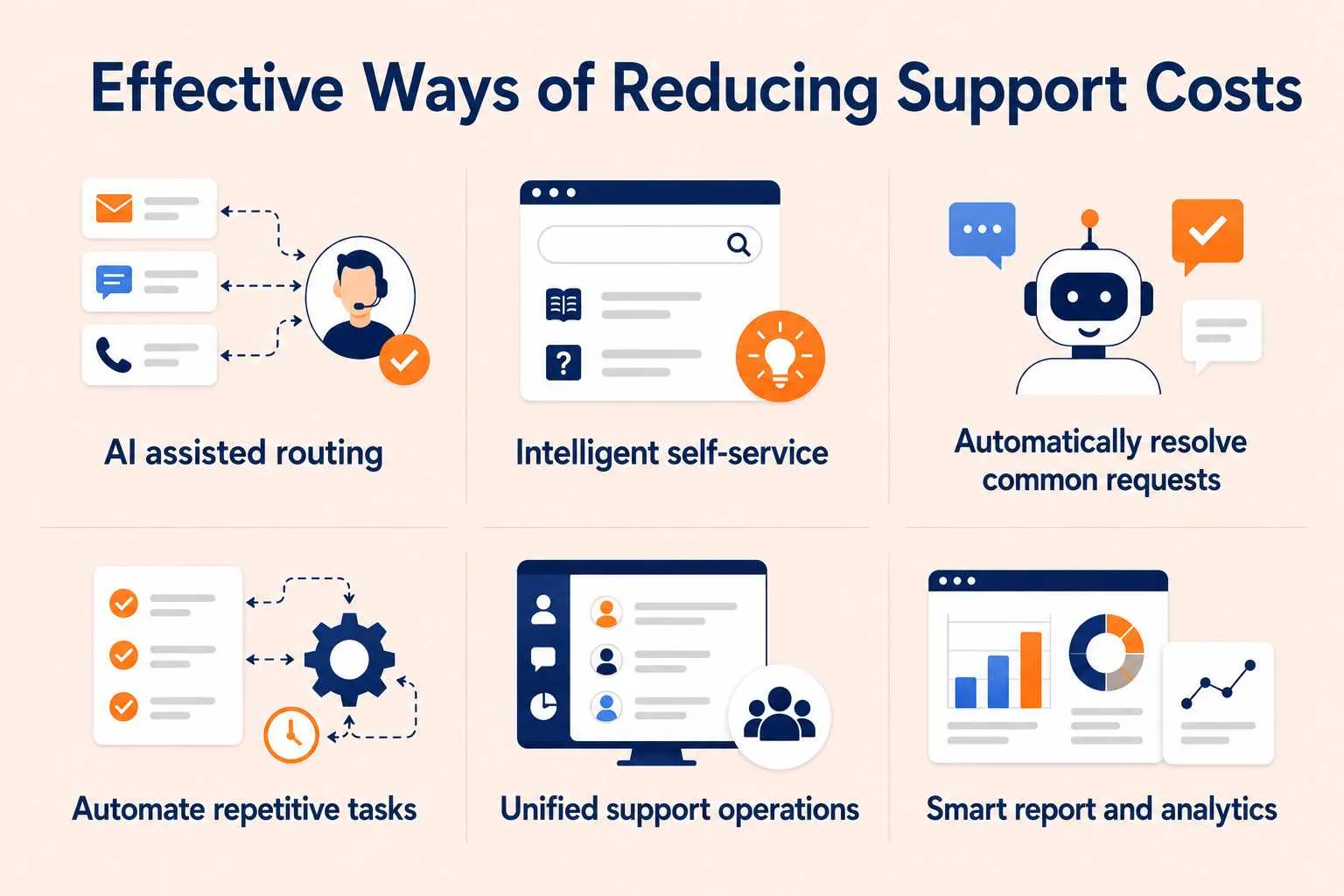
Assign tickets to the right team faster
Support tickets become expensive when they start in the wrong queue. One agent reviews the issue, forwards it to another team, and the same investigation happens again.
Modern teams use automated ticket routing and prioritization to understand ticket intent, urgency, and past patterns before assigning tickets automatically. This reduces unnecessary handoffs, escalations, and repeated triage.
Persistent Systems uses BoldDesk’s workflow automation and customized ticket processes to improve how support requests are routed and managed. This saves time, minimizes unnecessary ticket movement between teams, and helps the organization handle large volumes of requests more efficiently.
Tip: Regularly review misrouted tickets, escalation patterns, and repeat transfers to train your routing rules over time. Use tags, categories, and past resolutions to improve accuracy so tickets land with the right team the first time, even as volume and complexity grow.
Reduce ticket volume with intelligent self‑service
Self-service is no longer just a static help center filled with articles.
High-performing teams use AI-powered knowledge bases, in-app support, contextual article recommendations, and smart search tools that help customers resolve issues without creating tickets.
Industry research consistently shows that self-service interactions cost significantly less than agent-assisted support.
Research cited by NICE reports that Gartner estimated the average live agent interaction costs approximately $8, compared to around $0.10 for a self-service interaction.
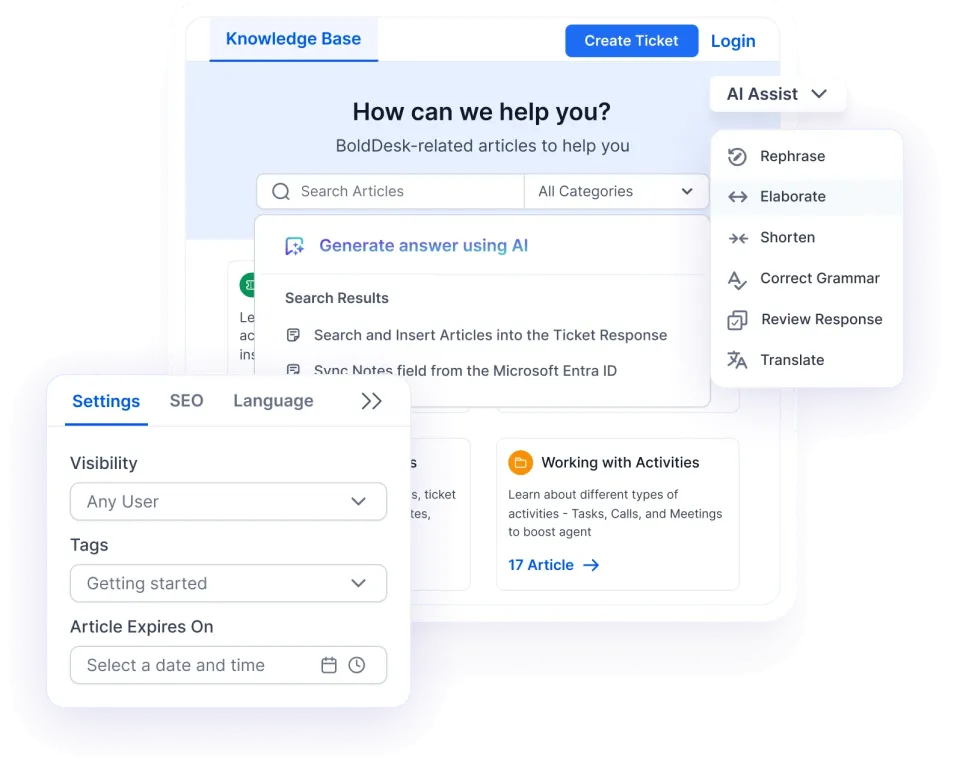
To maintain these cost savings, leading teams continuously monitor self-service performance to improve knowledge quality and identify gaps creating avoidable support demand.
For example:
KAMI Workforce uses BoldDesk’s AI-powered knowledge base to help customers find relevant answers faster. This reduces routine ticket volume and lowers the cost of handling common customer requests.
Tip: Treat your knowledge base as a living resource. Regularly review failed searches, repeated questions, and tickets created after self-service interactions to identify content gaps. Keep articles up to date so both customers and AI agents can find accurate answers quickly.
Handle common customer requests automatically
AI agents and chatbots are designed to resolve repetitive, common requests without creating additional friction for customers or agents.
Instead of functioning as isolated bots, they operate with knowledge-grounded responses, reliable escalation paths, human handoffs, and access to conversation history.
This allows simple issues to be resolved end‑to‑end, while ensuring complex cases move smoothly to human agents with full customer history.
Tip: Review AI conversations regularly to identify questions that frequently cause escalations or repeat contacts. Keep AI grounded in verified knowledge sources and ensure sensitive or complex requests are automatically escalated to a human agent.
Eliminate repetitive work that slows agents down
Modern support automation focuses less on replacing agents and more on removing repetitive administrative tasks around ticket resolution.
Teams automate tasks such as:
- SLA escalations
- Follow-ups
- Ticket prioritization
- Customer data collection
- Status updates
- Approval workflows
This reduces manual coordination and helps agents spend more time focusing on resolving issues instead of managing workflow administration.
Instead of an agent manually checking open tickets and sending reminders, automated workflows handle those actions in the background. This reduces repetitive coordination work without removing human support in complex or sensitive customer interactions.
Tip: Review automation rules regularly and remove outdated workflows, duplicate actions, and unnecessary approvals. Over time, these can create extra work instead of reducing it.
Preserve customer context across channels
Support becomes more expensive when conversations restart every time customers switch channels.
Modern teams utilize omnichannel support tools and unified platforms to centralize conversations, customer history, internal notes, workflow activity, and ticket ownership.
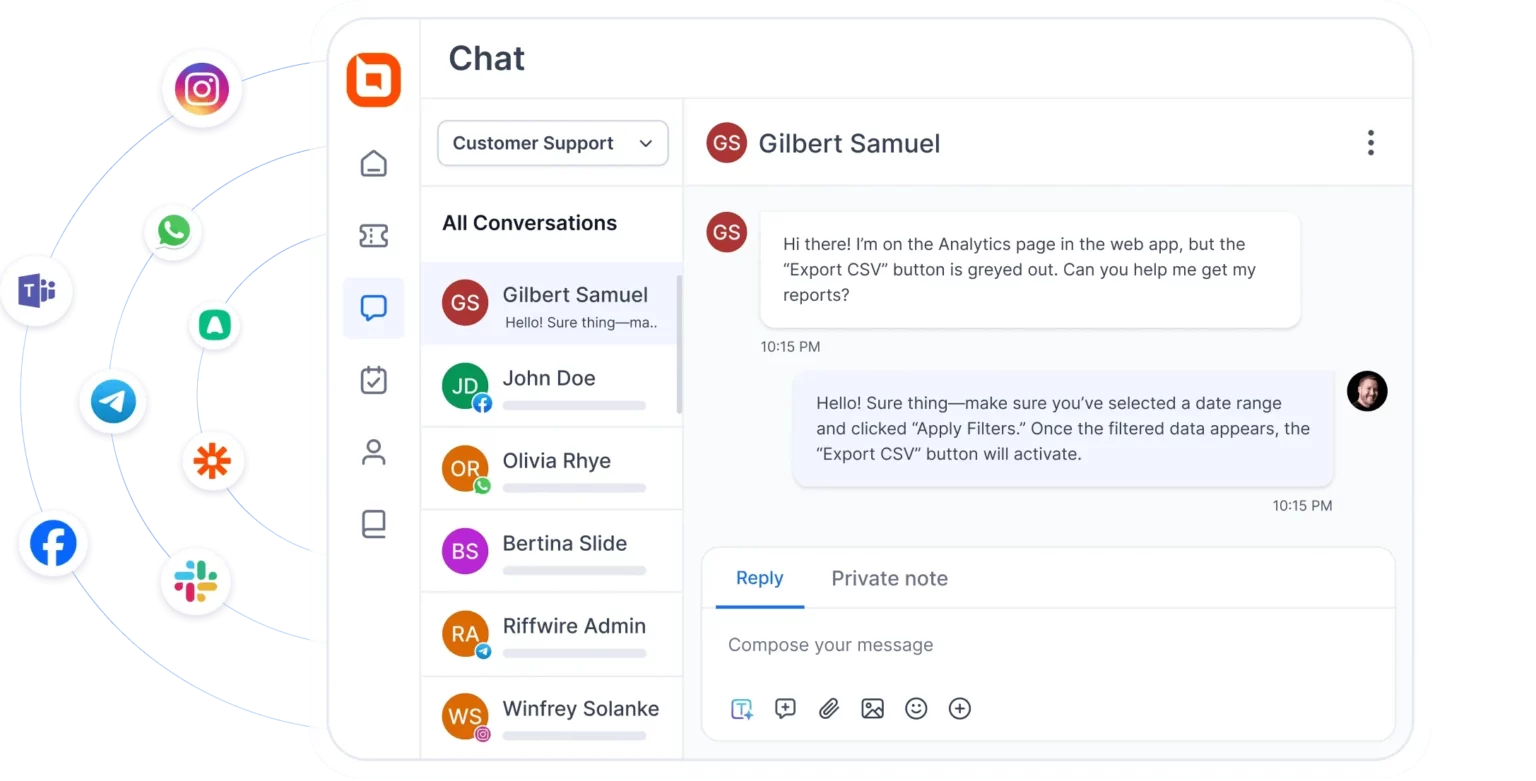
Agents can see the full interaction history across chat, email, messaging apps, and self-service channels.
This unified customer experience approach reduces repeated questions, duplicate troubleshooting, and unnecessary escalations.
Tip: Make it easy for agents to access previous conversations, customer details, and support history in one place. Keeping customer data synchronized across systems helps prevent customers from repeating themselves and speeds up resolutions.
Tracking the right KPIs to control support costs
Leading organizations measure more than ticket volume and response time to calculate support ROI. They track help desk metrics that reveal where operational inefficiencies are increasing customer support costs.
These include:
- Repeat contact rates
- Cost per resolution
- AI deflection rates
- Ticket bounce rates
- Self-service containment rate
- Average effort per case
This visibility helps teams identify recurring sources of inefficiency before they increase customer support costs further.
Tip: Track reassignment rates, repeat contacts, reopened tickets, and handling times regularly. Small increases in these metrics often reveal inefficiencies before they become costly problems.
The biggest shift is that support teams are no longer measuring success by ticket volume alone. They focus on removing friction, simplifying resolution processes, and making it easier for both customers and agents to get issues resolved.
Customer support efficiency framework: What to fix first
Leading support teams do not try to fix everything at once. They identify where effort is accumulating and prioritize the sources of friction creating the largest operational impact.
Use the framework below to identify common sources of inefficiency, the metrics that reveal them, and the areas where improvements can have the greatest impact.
| Support cost driver | What to measure | Priority improvement |
| Multiple team handoffs | Reassignment rate | Route issues to the right team sooner |
| Repeat contacts | Reopen rate | Resolve issues correctly the first time |
| Disconnected support tools | Context-switching time | Keep customer history in one place |
| Ineffective self-service | Failed searches | Improve knowledge quality and discoverability |
| Poorly managed AI automation | Escalations after bot responses | Strengthen AI guardrails and escalation paths |
How BoldDesk helps teams reduce rising support costs
Reducing support costs isn’t about handling more tickets with fewer agents. It’s about eliminating the inefficiencies that make every ticket more expensive to resolve.
BoldDesk reduces manual effort, improves resolution efficiency, and prevents avoidable tickets from reaching agents, helping teams cut rising support costs.
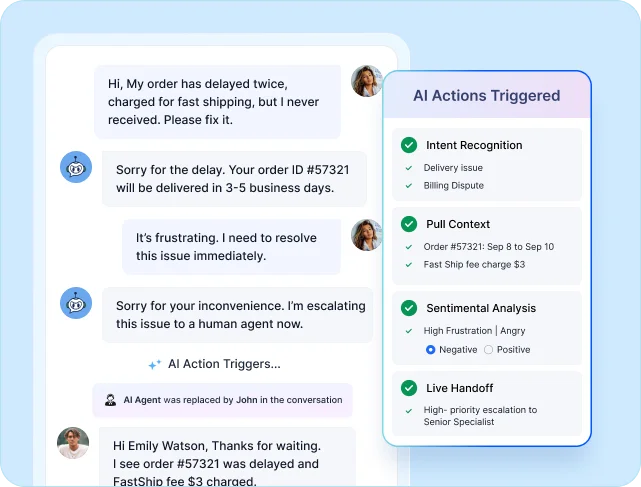
Here’s how that improves day-to-day support operations:
- Keeps customer context in one place: A unified omnichannel inbox brings together conversations, customer history, and ticket activity, reducing context switching and repeated customer questions.
- Reduces manual ticket handling: Automated routing directs tickets to the appropriate team from the start, reducing manual triage, reassignment loops, and unnecessary investigations.
- Improves agent productivity with AI: AI Copilot summarizes conversations, drafts responses, and surfaces relevant knowledge, allowing agents to spend less time on repetitive tasks and more time solving customer problems.
- Deflects repetitive requests through self-service: AI agents and knowledge bases help customers find answers independently, while ensuring more complex issues are escalated to the right human agents when necessary.
- Identifies costly bottlenecks: SLA tracking, reporting, and analytics help teams uncover delays, reopen rates, and workflow inefficiencies before they become larger operational problems.
- Keeps support software costs predictable: By combining ticketing, live chat, AI capabilities, automation, knowledge management, and reporting in a single platform, BoldDesk helps teams reduce tool sprawl and keep software costs predictable.
As support operations become more complex, controlling costs requires more than hiring fewer agents or working faster.
By reducing unnecessary effort and streamlining support workflows, BoldDesk enables teams to scale support operations more efficiently while maintaining service quality.
Unlike point solutions that require multiple integrations, BoldDesk combines ticketing, omnichannel support, AI, automation, knowledge management, and reporting within a single platform.
Controlling customer support costs requires a different approach
Rising customer support costs are no longer primarily a staffing problem. They’re an operational complexity problem.
The most efficient teams focus on removing duplicate work, preventing avoidable support demand, and making issues easier to resolve from the start.
Instead of measuring success by ticket volume alone, they simplify support processes, improve resolution quality, and remove friction across the customer journey.
Looking for ways to streamline support operations and control rising costs? Start a free trial or book a demo to see how BoldDesk helps reduce support effort and control support costs.
What strategies have helped your team manage rising customer support costs more effectively? Share your thoughts in the comments below.
Related articles
- Fast Replies and Slow Fixes: Solving the Support Resolution Gap
- Ticket Ownership Problems That Slow Support Teams
- High-Volume Email Management: 10 Tips to Scale Support and Meet SLAs
Frequently Asked Questions
Common hidden customer support cost drivers include poor ticket routing, repeated work, disconnected support channels, manual workflows, tool fragmentation, and excessive handoffs between teams. These inefficiencies gradually increase handling time and cost per resolution.
Customer support costs can continue to rise even after teams optimize tools, workflows, and automation because each ticket still requires more time to resolve.
More channels, disconnected workflows, escalations, repeated follow-ups, and higher customer expectations increase the effort behind every case, pushing costs up despite optimization.
Automation often requires workflow redesign, training, monitoring, and escalation management before efficiency gains appear. Poorly planned automation can also create repeated interactions and unlinked customer experiences, increasing operational overhead temporarily.
Teams can reduce cost per resolution by minimizing unnecessary work through smarter routing, self-service, automation, unified workflows, and better visibility into operational bottlenecks. The goal is to reduce repeated effort while maintaining fast, consistent support.
A unified support platform centralizes conversations, workflows, reporting, and automation in one place. This reduces context switching, duplicate work, siloed customer interactions, and manual coordination across multiple tools and channels.





