

 In this page

TL;DR: Discover how the Shopify and BoldDesk integration unifies customer and order data, streamlines ticket resolution, supports multiple stores, and empowers agents with secure, mobile‑ready access, helping eCommerce teams boost efficiency and deliver faster, more consistent customer support.
Running a Shopify store means juggling customer support and order workflows, and without the right eCommerce customer support tools, it quickly becomes overwhelming.
Instead of switching between Shopify and your help desk to piece together customer details, you need a unified view that keeps everything in one place.
The Shopify + BoldDesk integration delivers exactly that. By pulling customer profiles, order history, and shipping details directly into your help desk, agents can respond faster and with complete context.
In this blog, you’ll discover how the integration works, explore key features like multi‑store support and agent permissions, and see how it helps your team deliver smoother, more efficient customer experiences.
Why should you integrate Shopify with BoldDesk?
Integrating Shopify with BoldDesk isn’t just about connecting two platforms; it’s about transforming how your customer support team works every day.
Here’s why this integration is a game-changer for your customer service:
- Boosted agent productivity: By eliminating the need to switch between Shopify and support tools, your team spends more time solving problems and less time toggling tabs.
- Faster ticket resolution: Agents make decisions using Shopify data without extra lookups or delays, speeding up the entire support process.
- Improved customer satisfaction: When agents have full order context, they resolve issues on the first contact more often, leaving customers happier and more loyal.
- Consistent cross-brand support: If you manage multiple storefronts, this integration unifies all customer data into one platform, giving your team clear, accurate information every time.
Who should use the Shopify and BoldDesk integration?
The Shopify + BoldDesk integration is best suited for eCommerce teams that manage growing support volumes and rely on a dedicated help desk solution for Shopify stores to stay fast and accurate.
This integration is ideal for:
- High-volume Shopify merchants handling frequent order, delivery, and refund inquiries.
- Multi-store or multi-brand businesses that need centralized visibility across multiple Shopify storefronts.
- Support teams focused on faster response times and first-contact resolution.
- Operations-driven teams looking to eliminate manual workflows and tool switching.
- Distributed or remote support teams that require secure mobile access to Shopify data.
If your team regularly answers questions like “Where is my order?”, “Can I change or cancel this purchase?”, or “Which store did this order come from?” This integration is designed to simplify those workflows and keep support efficient at scale.
What does the Shopify and BoldDesk integration do?
The Shopify + BoldDesk integration syncs customer profiles, order details, and purchase history directly into support tickets, allowing agents to view and act on Shopify data without switching tools.
Below are the core capabilities that make this Shopify help desk integration essential for modern eCommerce teams.
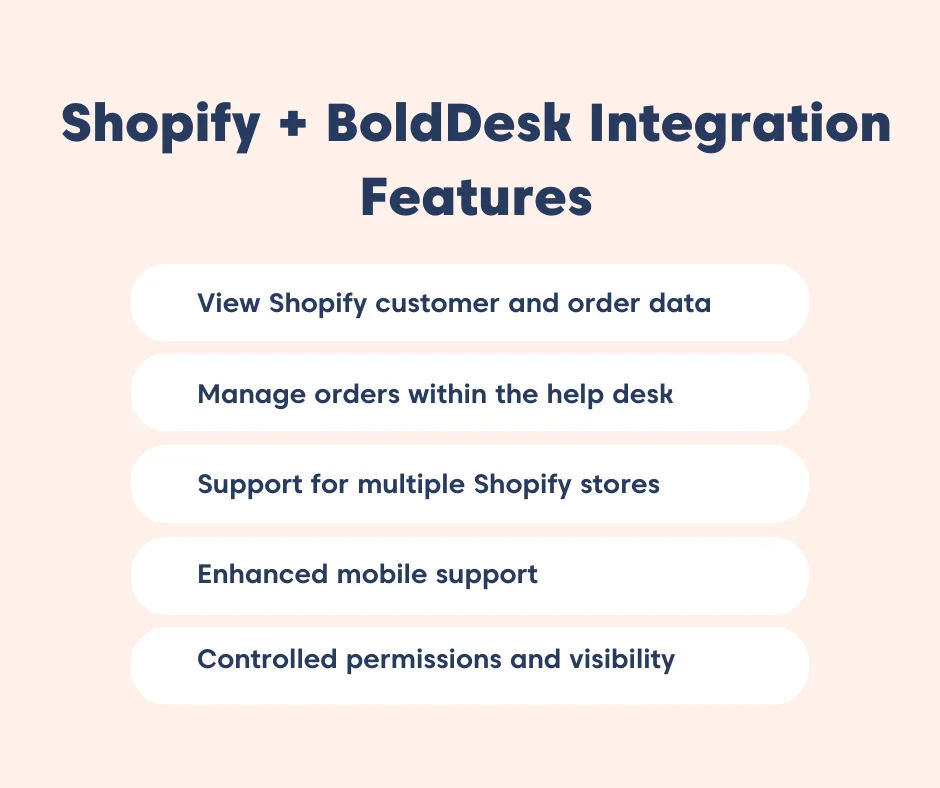
Instant access to Shopify customer and order data
Agents often waste valuable time switching between Shopify and their help desk just to gather basic customer information. This slows first‑response times and increases the chances of incomplete or inaccurate answers.
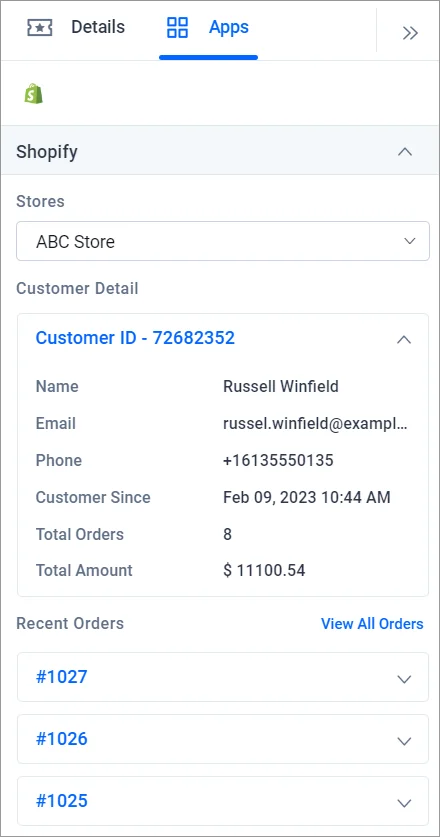
Through the Shopify integration, BoldDesk brings all essential customer and order details directly into the ticket view, giving agents instant clarity from the moment they open a request.
Inside BoldDesk, agents can instantly see:
- Customer profiles: Contact details, preferences, and account history.
- Recent order details: Current purchases, shipping status, and payment info.
- Full order history: Past transactions, product activity, and repeat purchase patterns.
Manage cancellations and refunds without leaving BoldDesk
Processing order updates often forces agents to switch between systems and repeat manual steps, slowing response times and frustrating customers.
With the Shopify help desk integration, agents can handle critical order actions directly inside BoldDesk, keeping workflows fast and efficient.
Here’s what support teams can do directly in BoldDesk:
- Cancel orders instantly from the ticket view.
- Issue full or partial refunds with just a few clicks.
- Restock returned or cancelled items automatically.
- Send customer notifications to confirm updates in real time.
Use case: Reducing first‑response time for order issues
A lifestyle apparel store receives daily inquiries like “Where is my order?” or “Can I change the size before it ships?”
With Shopify data appearing instantly inside the BoldDesk ticket, the agent sees:
- The customer’s last 3 orders
- Shipping status
- Stock Keeping Units (SKU) purchased
This eliminates the 2–3 minutes normally spent switching between platforms. Agents respond faster, and customers get immediate answers without back‑and‑forth emails.
Support for multiple Shopify stores
Multi‑store merchants struggle with scattered data, forcing agents to guess which store the order came from or switch between accounts.
BoldDesk connects multiple Shopify stores under a single help desk. Agents simply choose the correct store within the ticket to load the right order context.
Your support team stays organized and accurate, even when handling tickets across brands, regions, or product lines.
Use case: Multi‑brand retailer handling store‑specific inquiries
A company managing three Shopify stores, each for a different product line, receives mixed customer tickets daily.
Within BoldDesk, agents select the correct store from the drop‑down and instantly load the right order details.
This prevents:
- Refunds issued to the wrong store
- Confusion about brand‑specific Stock Keeping Units (SKU)
- Missed context when customers switch between storefronts
Support teams stay organized and accurate across all stores.
Shopify insights on mobile
When agents step away from their desks, order‑related questions get delayed, leaving customers waiting longer than necessary.
Through the BoldDesk mobile help desk, Shopify customer data and order history remain accessible on Android and iOS.
Agents stay responsive on the go, keeping support consistent even for distributed or hybrid teams.
Use case: On‑the‑go support for distributed teams
A small jewellery eCommerce store uses a remote support team. Customers frequently ask about delivery dates or order edits after hours.
Agents use the BoldDesk mobile app to:
- Check order history
- View shipping information
- Reply to inquiries with full context
This keeps support responsive even without a desk setup, improving weekend and evening service quality.
Controlled permissions and data visibility
Not every agent should have full access to sensitive order information, but restricting access manually creates bottlenecks.
Admins define role-based and brand-based permissions, ensuring each team only sees the Shopify data relevant to their responsibilities.
Clear access controls protect data, reduce operational risk, and keep workflows clean, without slowing agents down or requiring additional oversight.
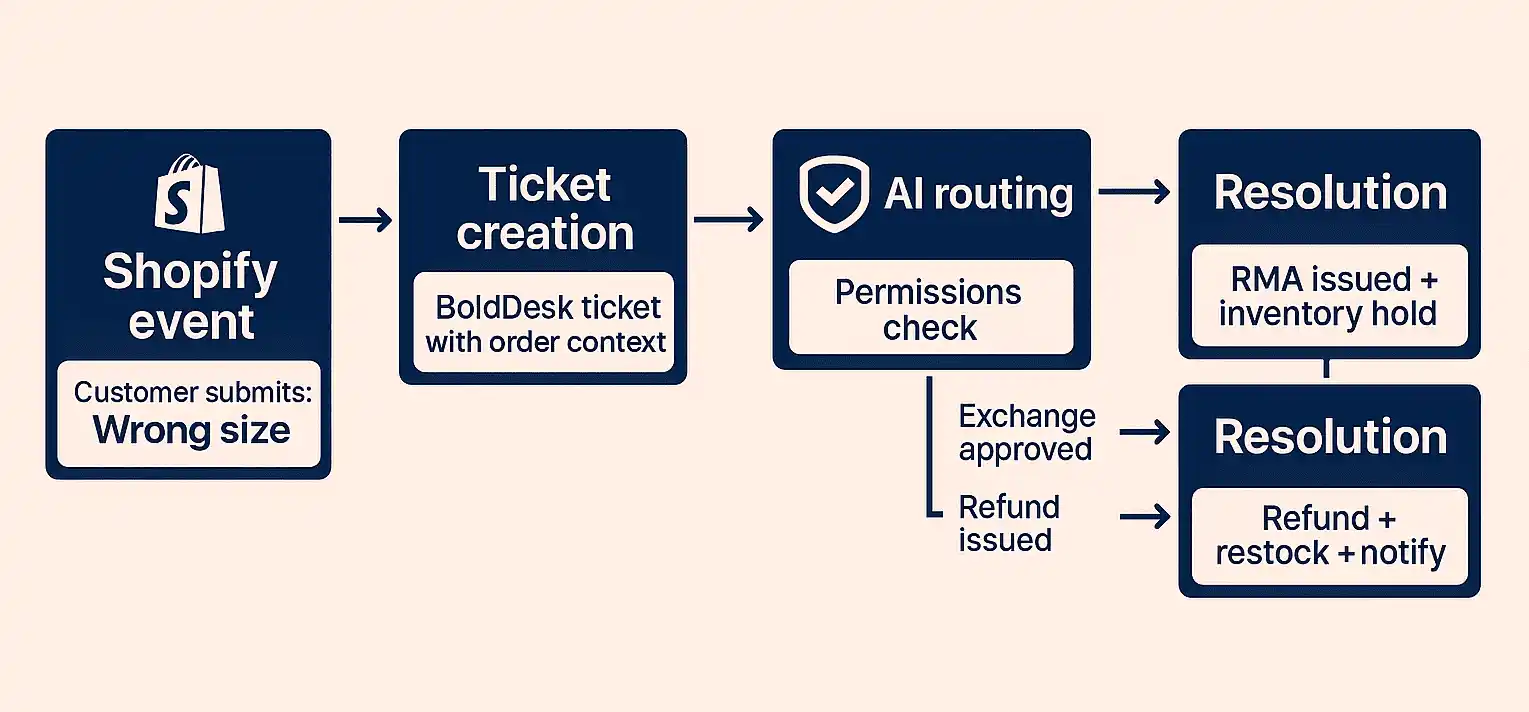
How to implement and set up Shopify integration in BoldDesk
Setting up the Shopify + BoldDesk integration is quick and flexible, designed to help support teams start working with unified order and customer data without a complex setup process.
Below is a high-level overview of how the integration works, so you can understand what’s involved before getting started. Most teams complete this setup in minutes and begin handling Shopify-related tickets right away.
Step 1: Create a custom app in Shopify
To enable secure data sharing between Shopify and BoldDesk, start by creating a custom app in your Shopify Admin.
What you’ll do:
- Go to Settings → Apps and Sales Channels → Develop Apps
- Click Create App and name it (e.g., BoldDesk Connector)
- Assign the required Admin API permissions and generate the Admin API access token.
Why this matters: These permissions ensure BoldDesk can fetch order data, display customer history, and if allowed, process refunds or cancellations.
Step 2: Install and connect the Shopify app in BoldDesk
Now it’s time to link your custom Shopify app with BoldDesk. Just follow these steps to complete the connection.
- Open BoldDesk Admin → Marketplace
- Search for Shopify and click Install App
- Enter your Shopify store URL and paste the API token
- Save the configuration to complete the connection
What happens now: BoldDesk begins syncing customer and order data automatically. Agents can immediately view Shopify information directly within support tickets.
Step 3: Connect additional Shopify stores
If you manage multiple Shopify stores across brands, regions, or product lines, you can connect them all to the same BoldDesk account.
What you’ll do:
- Repeat the connection process for each Shopify store
- Generate separate API keys and tokens per store
- Allow agents to switch store contexts directly within tickets
Why this matters: Support team always sees the correct order data without logging into multiple Shopify accounts, reducing errors and keeping multi-store support organized.
Step 4: Configure agent permissions
BoldDesk lets you control exactly who can view or act on Shopify data based on roles and responsibilities.
Common permission setups:
- Full access: Senior agents or supervisors handling refunds and cancellations
- View-only access: Agents who need order visibility but don’t perform actions
- Restricted access: Roles that don’t require Shopify data access
Why this matters: Role-based permissions protect sensitive order information while ensuring agents have the access they need to resolve tickets efficiently.
With the integration in place, teams can also take advantage of Shopify support automation inside BoldDesk—reducing manual work, improving response times, and delivering more consistent customer support at scale.
Ready to automate your Shopify support? Explore BoldDesk plans to find the one that best fits your team’s support volume and workflow needs.
Elevate support efficiency with Shopify + BoldDesk integration
The Shopify and BoldDesk integration gives support teams the unified customer and order data they need to work faster and with greater precision.
By bringing Shopify insights directly into BoldDesk, along with the ability to take actions like cancelling or refunding orders, agents can resolve issues quickly and confidently.
For eCommerce businesses focused on improving customer experience and operational efficiency, this integration offers a clear, strategic path to stronger, more reliable support performance.
Want to learn more about boosting your support efficiency with the Shopify + BoldDesk integration? Schedule a live demo or reach out to the BoldDesk support team and get your questions answered by our experts.
Related articles
- WhatsApp Integration in Ticketing Systems
- Integrating BoldDesk With Zapier: A 2025 Guide
- Integrating BoldDesk with Firmao via Zapier
Frequently Asked Questions
The Shopify + BoldDesk integration connects your Shopify store directly with your BoldDesk help desk.
It automatically pulls customer information, order history, shipping details, and product data into support tickets, allowing your team to resolve order‑related inquiries faster and with complete context.
Yes. Data is synced via Shopify’s secure API, and BoldDesk offers role-based permissions so only authorized team members can access sensitive order information or perform actions like refunds.
Yes. Shopify customer and order information is available in the BoldDesk mobile app on both iOS and Android. This keeps distributed or on-the-go teams responsive at all times.
No. The Shopify and BoldDesk integration is API based and does not inject any scripts into your storefront. It does not affect page speed, customer experience, or checkout performance.