


- Blogs Explore Blogs Blogs
AI vs Human Customer Service in 2026: When to Use AI, Humans, or Both
-
by Susan Wairimu Mwangi
- Updated on: November 13, 2026

TL;DR: AI vs human customer service is about balance. AI drives speed, scalability, and cost efficiency for routine tasks, while humans manage complex, emotional cases. Hybrid models combine AI efficiency and human expertise to deliver faster support, better customer experiences, and more effective outcomes.
Customer support teams face growing pressure as ticket volumes increase, and customers expect faster responses. To keep up, businesses are turning to AI-powered support to automate repetitive requests and improve efficiency.
However, AI isn’t a perfect solution. Customers can become frustrated when AI support agents fail to understand complex issues, lack empathy, or make it difficult to reach a human agent.
This raises an important question: When should businesses use AI agents in customer service, and when is human support the better choice?
For most businesses, the answer isn’t AI or human support alone. A hybrid customer service model combines the strengths of both to deliver the best customer outcomes.
This guide compares AI and human customer service in 2026, showing when to use each and how hybrid support improves efficiency and satisfaction.
What is the difference between AI and human customer service?
AI customer service uses artificial intelligence to answer questions, route requests, assist agents, and resolve routine customer issues.
These systems include AI agents such as BoldDesk’s Support Agent and Assist Agent, plus AI-driven actions. They handle interactions, assist human teams, and manage customer service tasks.
Human customer service, on the other hand, involves assistance provided by trained agents who engage directly with customers to address their issues.
It remains a critical part of support operations, helping businesses build trust, maintain customer relationships, and deliver experiences that align with customer expectations.
AI vs human customer support: A side-by-side comparison
Comparing AI and human customer support shows where each approach works best. The table below summarizes their strengths across common customer service scenarios.
| Aspect | AI customer service | Human customer service |
| Speed and response time | Provides near-instant responses | Slower due to queues but improves with experience |
| Availability | Available 24/7, handles many queries at once | Limited by working hours and staffing |
| Empathy and emotional intelligence | Limited empathy, can feel robotic | Strong empathy and human connection |
| Complexity handling | Can struggle with complex or sensitive issues | Strong at handling complex, high-stakes situations |
| Personalization | Data-driven personalization | Context-rich, human-driven personalization |
| Cost efficiency | Lower cost per interaction once deployed | Higher cost, depends on workforce |
| Scalability | Scales instantly to support increasing ticket volumes | Requires additional hiring and training to scale |
| Customer preference | Preferred for speed and convenience | Preferred for quality and trust |
| Use case fit | Best for FAQs, password resets, order tracking, and account updates | Best for escalations, billing disputes, and customer complaints |
AI vs human customer support: Where each excels
AI and human support each bring distinct strengths to the customer experience, shaping how businesses balance efficiency with customer satisfaction.
Here's where AI does best and where people are still essential.
When AI customer service works best
AI is widely used to handle customer interactions at scale, often through AI support agents that manage high volumes of support requests efficiently across channels.
AI support excels in the following areas:
- Speed and availability: AI provides instant responses and remains available 24/7, even during peak periods.
- Consistency: With AI providing standardized responses, interactions remain aligned with policies and maintain a consistent level of quality across customer support operations.
- Cost efficiency: By automating repetitive and high-volume queries, AI lowers operational costs and allows support teams to scale without proportionally increasing resources.
- Ticket routing: Automated ticket routing reduces manual triage and sends tickets to the right agent faster.
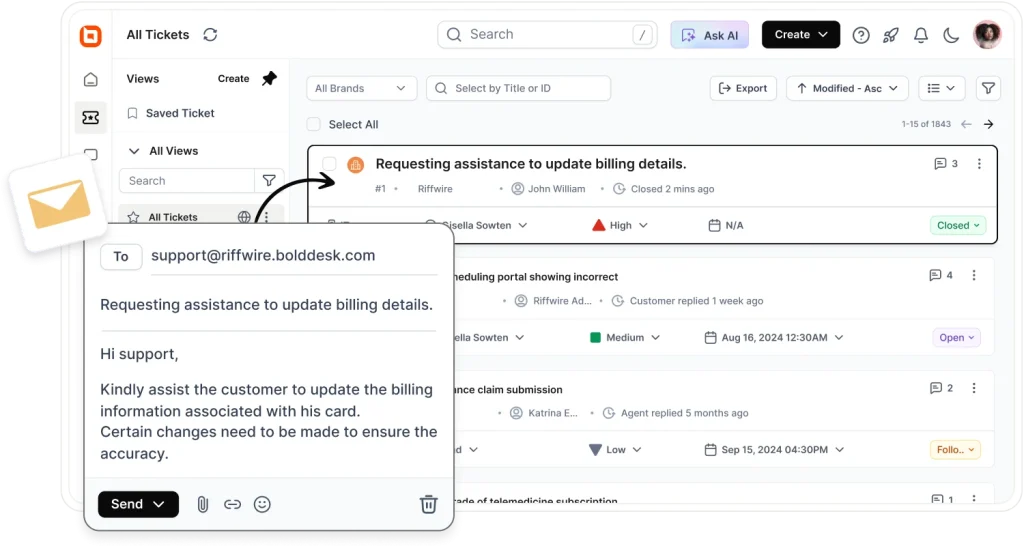
As AI evolves, innovations like agentic AI in customer experience let support systems act before customers ask and complete multi-step tasks.
AI customer service example: Shopify
In an ecommerce business using Shopify, AI customer service can handle routine inquiries about order status, deliveries, returns, product availability, and basic store-related FAQs.
When a customer asks, “Where is my order?”, AI pulls the order details. It shares the shipping status and tracking link without involving an agent.
For missing packages, refunds, or payment problems, AI can collect details and transfer the conversation to a human with full context.
When human customer service is better
While AI brings speed and efficiency, human support remains essential in situations that require judgment, empathy, and flexibility.
Human agents perform best in the following areas:
- Complex or unclear issues: Human agents are best suited for problems requiring investigation, troubleshooting, or judgment. Examples include software bugs, unusual account issues, and cross-department support requests.
- Emotionally sensitive conversations: Refund disputes, service disruptions, customer complaints, and negative experiences often require empathy and reassurance that AI cannot consistently provide.
- Billing, legal, or compliance-related issues: Financial disputes, privacy concerns, contractual obligations, and regulated interactions require accountability and careful decision-making.
- High-value or at-risk customers: When a customer relationship has significant revenue impact or churn risk, personalized engagement can preserve trust and strengthen long-term customer loyalty.
Human customer service example: Amazon
Amazon relies on human support for complex issues such as refund disputes, missing or damaged orders, account security concerns, and delivery problems.
In these situations, a customer service representative reviews the issue, investigates the details, and provides a personalized resolution that automation alone cannot deliver.
How hybrid customer service improves speed and quality
Strong customer support does not depend on choosing AI or humans alone. It depends on assigning each to the work they handle best.
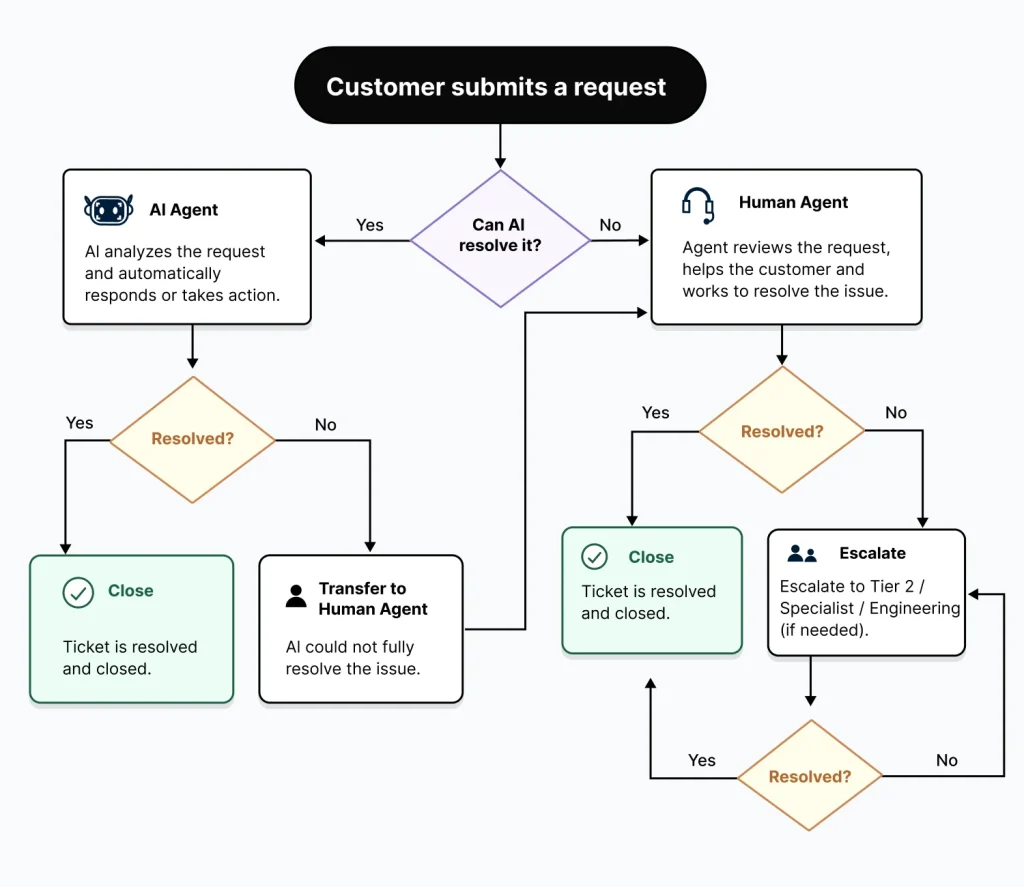
Many support leaders now formalize this split. Natterbox’s 2026 contact center benchmarks found that 76% of leaders let AI handle routing and availability, while agents take complex and emotional cases.
Seamless AI-to-human handoffs
AI enhances efficiency by performing initial ticket triage, including sorting and prioritizing requests, so support agents receive the right information at the right time.
It should hand off interactions when complexity increases, when emotional sensitivity is detected, or when issues require human judgment and contextual understanding.
Continuous learning and feedback loop
A hybrid model improves over time through feedback from customer interactions. Every interaction generates data that improves routing accuracy, intent detection, and future customer support outcomes.
The same insights can also power AI for customer engagement, helping businesses better understand customer preferences and deliver more relevant interactions over time.
Efficiency with a seamless customer experience
A hybrid model combines AI speed with human understanding to deliver both efficiency and quality.
Shared customer data gives support teams the context they need to resolve issues efficiently, ensuring fast, consistent support without losing continuity across interactions.
Hybrid customer service example: Microsoft
Microsoft uses automated support for routine issues such as password resets, account access, subscription updates, and basic troubleshooting.
When customers need help with complex errors, billing disputes, security concerns, or product configuration issues, they can connect with a live support specialist.
This helps Microsoft resolve simple requests faster while keeping human support available for issues that need expertise or judgment.
Measuring success in a hybrid customer service model
Evaluating a hybrid customer service model requires looking beyond individual metrics to understand how AI and human agents work together throughout the customer journey.
Use these customer service KPIs to check how well your hybrid model works:
| Metric | Healthy sign | Warning sign |
| Average handle time (AHT) | Agents spend time solving, not gathering details | High AHT: agents are hunting for context |
| First contact resolution (FCR) | Most issues are solved in one contact | Low FCR: poor intent detection or misrouting |
| Customer satisfaction (CSAT) | Stays steady as AI takes more volume | Drops: weak handoffs or too much automation |
| Cost per ticket | Falls as AI handles routine work | Stays high: automation is underused |
| Escalation rate | Escalations match truly complex cases | Too high: AI misses easy cases. Too low: AI holds tickets it shouldn’t |
Learn how to improve average handle time and your customer satisfaction score.
Best practices for integrating AI and human support
Building an effective hybrid support model requires more than just adding automation.
The following best practices help organizations design how AI and human agents work together while balancing efficiency and empathy across the entire customer experience.
Map the customer journey before automating
Before implementing automation, identify the points in the customer journey where customers encounter delays, confusion, or unnecessary effort.
Focus automation efforts on removing these sources of friction at every stage of the customer journey rather than simply targeting high-volume interactions.
Regularly evaluate customer feedback and support data to ensure automation continues to deliver meaningful improvements.
Outcome: More effective automation, fewer customer pain points, and quality support.
Align support with customer and issue complexity
Not every interaction needs the same level of support.
Segment requests by complexity. Use automation for simple tasks, AI with escalation for moderate queries, and human agents for complex situations. This ensures each interaction is handled appropriately without delays.
Outcome: Faster resolutions, efficient resource use, and a more personalized experience.
Use data to continuously improve AI-human collaboration
Effective hybrid service models continuously improve through data-driven optimization.
Track key metrics such as first contact resolution (FCR) across AI and human interactions, then identify patterns that reveal gaps.
Use insights to refine workflows, enable AI to assist agents with summaries, and let agents improve AI through feedback and corrections.
Outcome: Fewer misrouted tickets, faster resolutions, and continuously improving AI performance.
Establish clear escalation paths
Define clear triggers for escalation, such as failed intents, negative sentiment, or sensitive requests.
Use tiered routing to direct issues appropriately and provide support agents with conversation context during handoff while informing customers of next steps. This helps maintain continuity and avoid repetition.
Outcome: Faster resolutions and smoother handoffs.
Focus on customer intent, not support channels
Customers expect consistent support across all support channels. Prioritize understanding and resolving customer intent over channel optimization.
Use AI to identify customer needs and route requests within a unified system backed by shared knowledge and customer data. This helps maintain consistency and reduce unnecessary transfers.
Outcome: More consistent experiences and fewer channel-related gaps.
Introduce AI gradually and scale based on results
Many AI initiatives fail by trying to automate too much too quickly.
Start with targeted use cases, measure results, and expand based on performance. Use pilots to identify where AI adds value and where human support is needed, then scale accordingly.
Outcome: Lower risk, higher adoption, and a scalable, sustainable support model.
AI vs human customer service: Which should handle each issue?
The best customer service model depends on the type of support you provide, the complexity of customer requests, and your operational goals.
Choosing between AI and human support is not simply about ticket volume. Teams should also consider how predictable the request is, the impact of an incorrect response, and whether it requires empathy or a policy exception.
A practical framework for splitting the support queue
Use three routing paths to determine whether AI should resolve the request, provide initial support before escalation, or route it directly to a human.
| Routing path | Suitable conditions | Examples | Handoff rule |
| AI owns the request | Predictable intent, approved answer, low risk, and a verifiable outcome | Order status, appointment booking, password resets | Hand off if confidence is low or the customer asks for a person |
| AI starts, human completes | AI can gather details or do a first step; judgment may be needed | Product troubleshooting, cancellations, account changes | Pass on history, details, checks done, and the escalation reason |
| Human owns the request | High emotional, financial, legal, safety, privacy, security, or relationship risk | Billing disputes, complaints, suspected fraud | Route straight to an agent, with no automated loops |
Even requests assigned to AI need clear limits. Transfer conversations when intent is unclear, automation has failed, or a discretionary decision is required.
The same general topic may also require different routing paths. For example, AI can handle a routine password reset, while suspected account takeovers should be routed directly to a human customer service specialist.
How BoldDesk helps teams build a balanced AI-human support model
For support teams, the challenge is not choosing between AI and human agents but creating a workflow where both work together effectively.
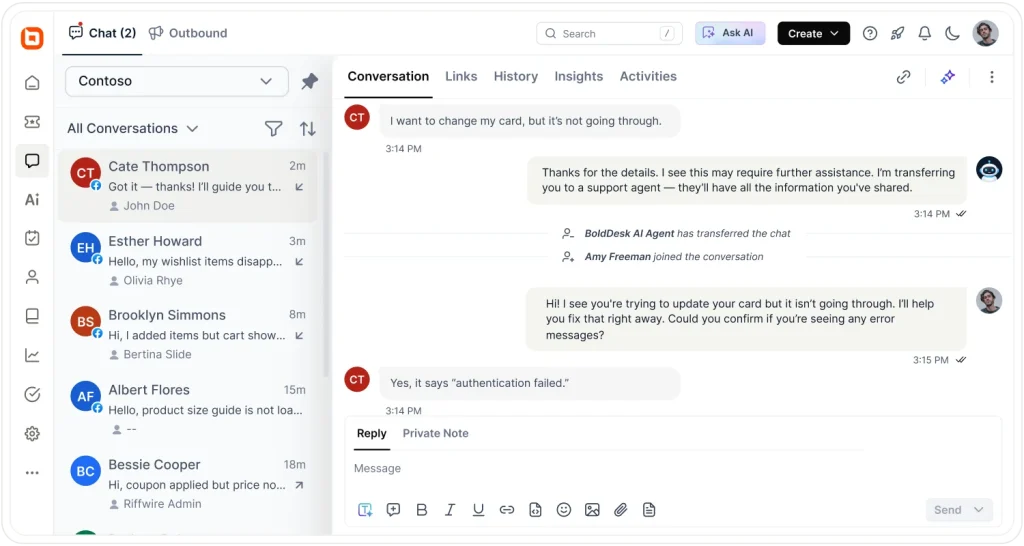
BoldDesk helps automate repetitive work with AI while ensuring human agents stay focused on complex, sensitive, and high-value customer conversations.
Instead of replacing agents, AI is used to enhance their productivity and improve response quality in the following ways:
- Automates routine requests with Support Agent: Handles FAQs, order updates, ticket categorization, and repetitive customer inquiries automatically. Build and tune agents in the agent builder.
- Assists agents with AI-powered summaries and replies: Provides human agents with conversation summaries, suggested responses, and contextual recommendations.
- Escalates complex issues with full context: Transfers conversations seamlessly from AI to human agents while preserving ticket history and customer information.
- Tracks performance: Reports show deflection, escalation, unanswered questions, and AI credit usage.
By combining autonomous agents in customer support with human expertise, BoldDesk enables teams to scale efficiently while delivering personalized, high-quality support.
Drive better customer outcomes with a balanced AI vs human support model
The goal is to route each issue based on predictability, risk, emotional sensitivity, and required judgment.
Let AI own routine requests with clear, verifiable outcomes. Use human agents for complex, sensitive, or high-impact situations, and design handoffs that preserve the customer’s context.
The result is faster support, improved agent productivity, higher customer satisfaction, and better control over support costs.
Ready to combine automation with human support? Start your 15-day free trial of BoldDesk.
Was this blog helpful? Please let us know in the comments section below.
Related articles
- How to Build AI Agents with BoldDesk for Smarter Support
- AI-Powered Customer Support: Tips for Scalable Business Growth
- How Agentic AI Is Transforming Customer Experience in 2026
FAQs on AI vs human customer service
Should customers be allowed to bypass AI and contact a human?
Yes. Customers should have a clear option to reach a human agent, especially for urgent, complex, or sensitive issues. Providing an easy escalation path helps prevent frustration and improves the overall support experience.
What information should be transferred during an AI-to-human handoff?
The handoff should include the customer’s details, conversation history, actions already taken, and the reason for escalation. This gives agents the context they need to continue the conversation without making customers repeat themselves.
Do customers prefer AI or human customer service?
Customer preference depends on the situation. In most cases, customers prefer AI for speed but humans for quality and trust.
Many customers are comfortable using AI for routine tasks. However, 84% believe humans provide more accurate answers, according to SurveyMonkey research.
This shows that AI is effective for efficiency, but human support remains essential for complex or high-stakes interactions.
How should teams review tickets that AI routed incorrectly?
Teams should regularly analyze misrouted tickets to identify patterns, update routing rules and knowledge sources, and reduce future routing errors.
What should happen when an AI action only completes part of a request?
The AI should complete the tasks it can handle and then transfer the remaining work to a human agent with all relevant context. This ensures the issue is resolved efficiently without disrupting the customer journey.
ABOUT THE AUTHOR

Susan Wairimu Mwangi 
Susan is a creative content strategist at Syncfusion, crafting engaging stories that connect brands with audiences. She blends insight, clarity, and creativity to bring ideas to life while elevating content that enhances customer support and overall customer experience.
Read more articles by this author Be the first to get updates