







TL;DR: The BoldDesk March 2026 Release brings intelligent AI, unified dashboards, enhanced knowledge tools, improved ticketing workflows, a new Chat SDK, multiple chat upgrades, proactive WhatsApp/SMS messaging, Twilio calling, expanded mobile integrations, and flexible contact creation, streamlining support and elevating customer experiences.
At BoldDesk, we believe that providing world-class support shouldn’t feel difficult or time-consuming. Our mission is to keep your workflows smooth, your agents productive, and your customers happy.
In our latest March 2026 release, we are taking a giant leap forward in AI intelligence, omnichannel connectivity, and operational efficiency.
From AI that detects customer sentiment to built-in voice calling and recurring ticket automation, these product updates are designed to help you work smarter, not harder.
Let’s explore what’s new!
Summary of the BoldDesk March 2026 release
Ready to dive in? Here’s a quick breakdown of the top features in this March release:
| Category | Release highlights |
| AI Copilot |
|
| AI Agent |
|
| Ticketing System |
|
| Chat and outbound message |
|
| Omnichannel updates |
|
| Reporting and dashboard |
|
| Knowledge base |
|
| Mobile help desk |
|
| Chat SDK | Deliver quality in‑app support with the BoldDesk Chat SDK (Flutter & React Native) |
AI Copilot that enhances every interaction
BoldDesk has enhanced AI Copilot to automate ticket interpretation and customer insights, allowing your team to focus less on manual processing and more on meaningful customer problem‑solving.
Let’s take a look at the new improvements that make AI Copilot more helpful:
Ticket classification with field prediction
In customer support, classification of tickets is essential, but manually selecting fields on every ticket adds up fast.
With field prediction, the AI assistant analyzes each ticket’s subject, description, and replies to automatically predict and update picklist fields such as:
- Ticket category
- Issue type
Why it matters: Cleaner classification improves routing accuracy, keeps reporting reliable, and saves agents time on repetitive admin.
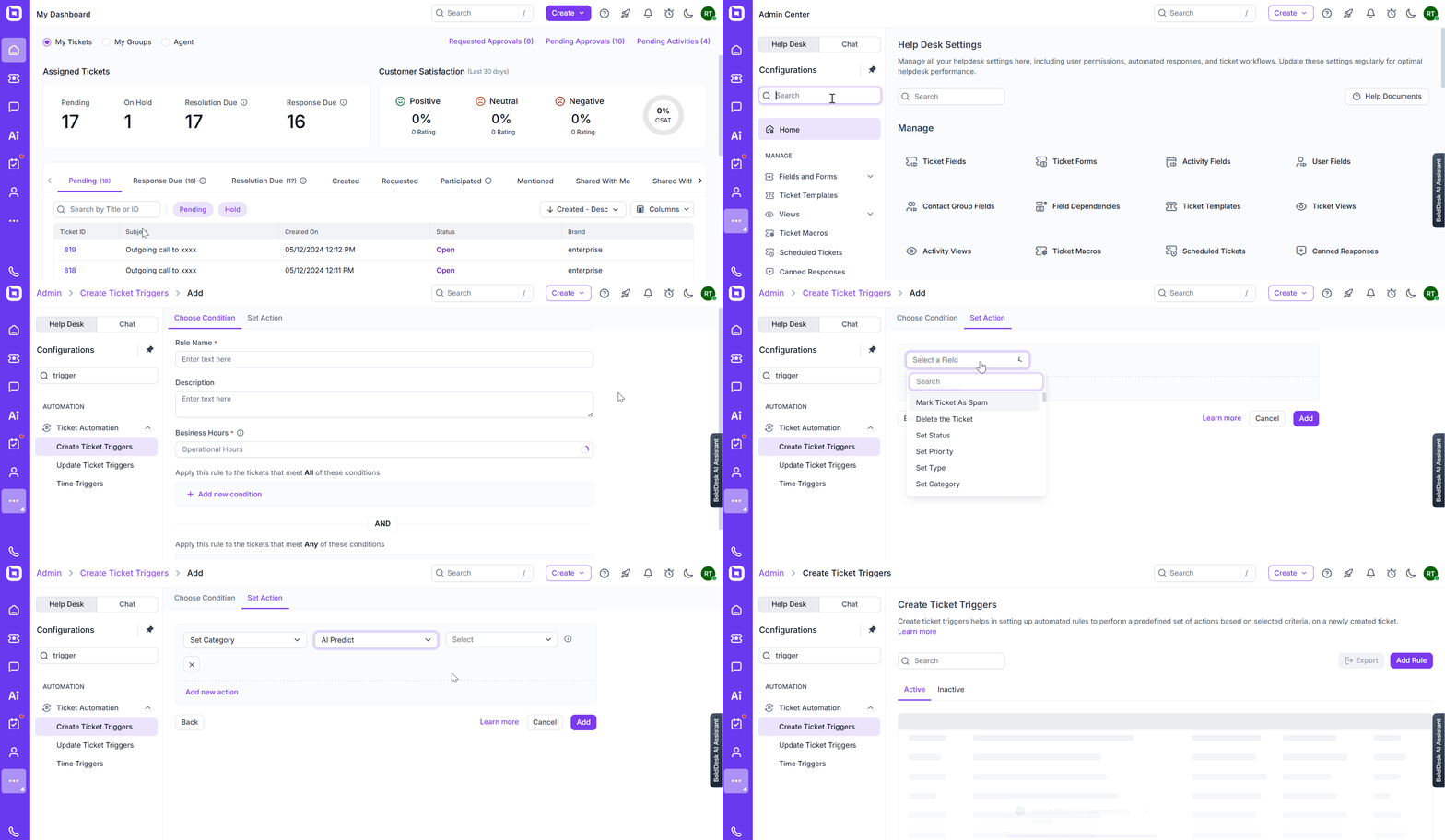
Real-world scenario: Reduce ticket misrouting and speed up triage
Challenge: An IT service company receives hundreds of tickets daily, and agents regularly select the wrong category or issue type because the customer’s explanation is vague. This leads to frequent rerouting between teams, delayed responses, and frustrated users.
BoldDesk solution: AI Copilot automatically analyzes the ticket’s subject, description, and replies to predict the correct ticket category and issue type the moment the ticket arrives. Agents no longer guess; they simply review and confirm.
Impact: Misrouted tickets drop significantly, first-response times improve, and specialists receive the right tickets from the start. Agents spend less time correcting data and more time resolving real customer issues.
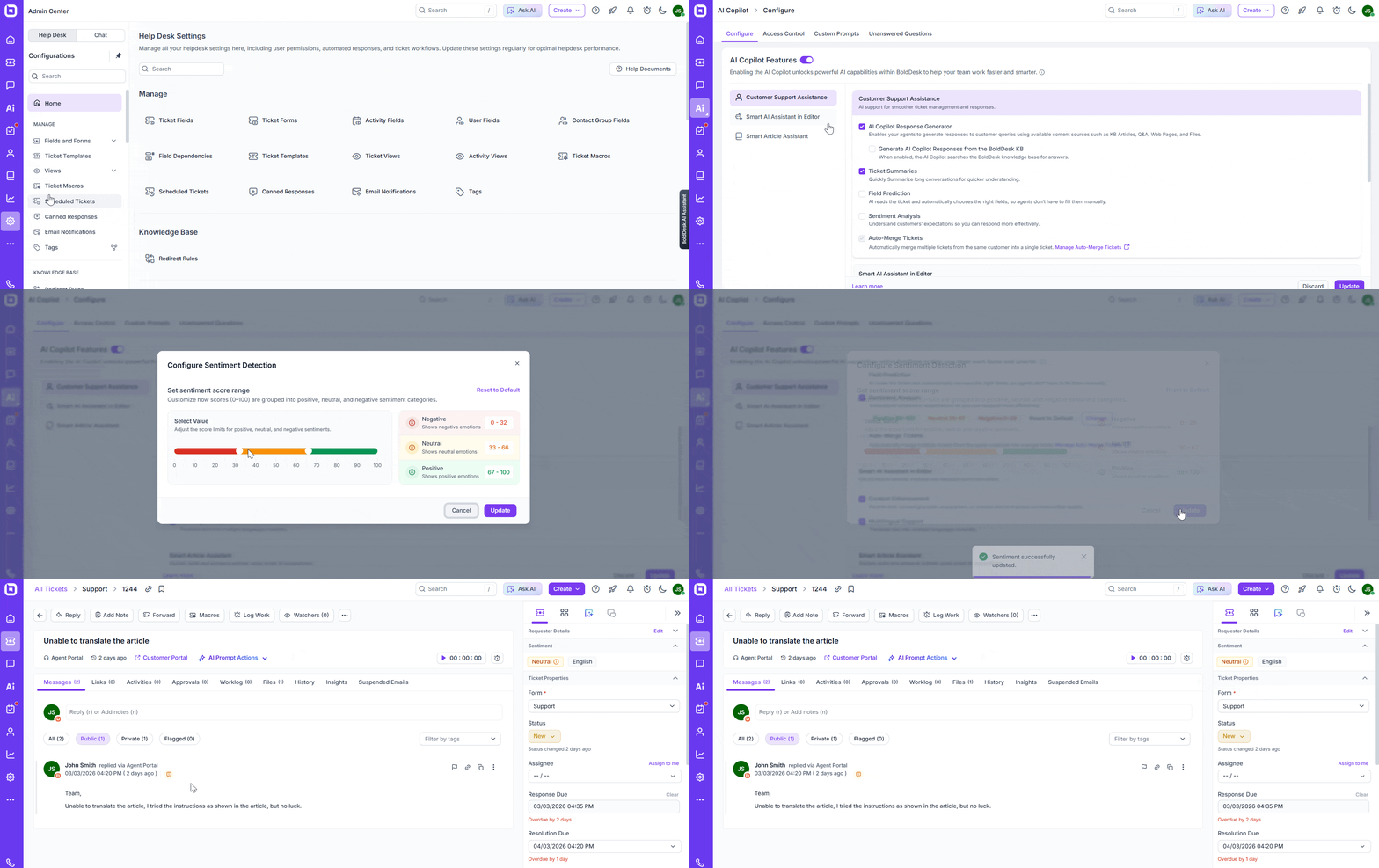
Understand customers instantly with sentiment detection
Support teams don’t just manage issues; they manage emotions too.
Sentiment detection automatically analyzes customer sentiment in real time and shows whether a customer is happy, neutral, or unhappy.
This helps support leaders:
- Identify at‑risk customers
- Prioritize conversations that need proactive attention
- Reduce escalations by acting earlier
AI Agent that drives consistent, quality service
The BoldDesk AI Agent now brings even more intelligence, control, and consistency to your customer interactions.
Here are the key AI Agent enhancements introduced in this release:
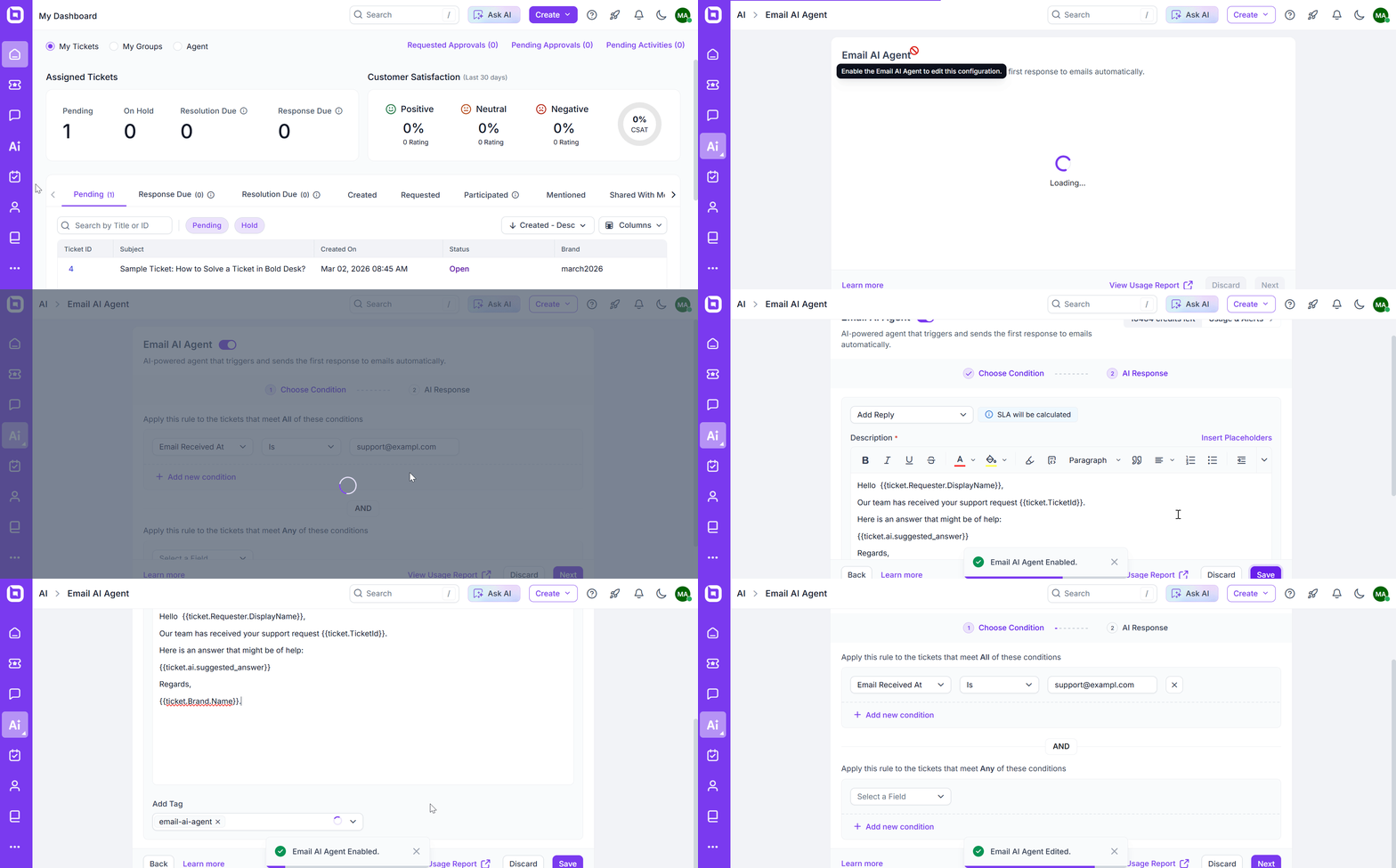
Faster, context-aware replies with Email AI Agent
When a ticket is created, customers want acknowledgment and direction right away.
Now your Email AI Agent can send intelligent, context-aware replies the moment a ticket is created.
This helps teams reduce first-response delays, deliver relevant replies at scale, and improve AI quality over time through feedback.
Customize your AI Agent’s role and behavior
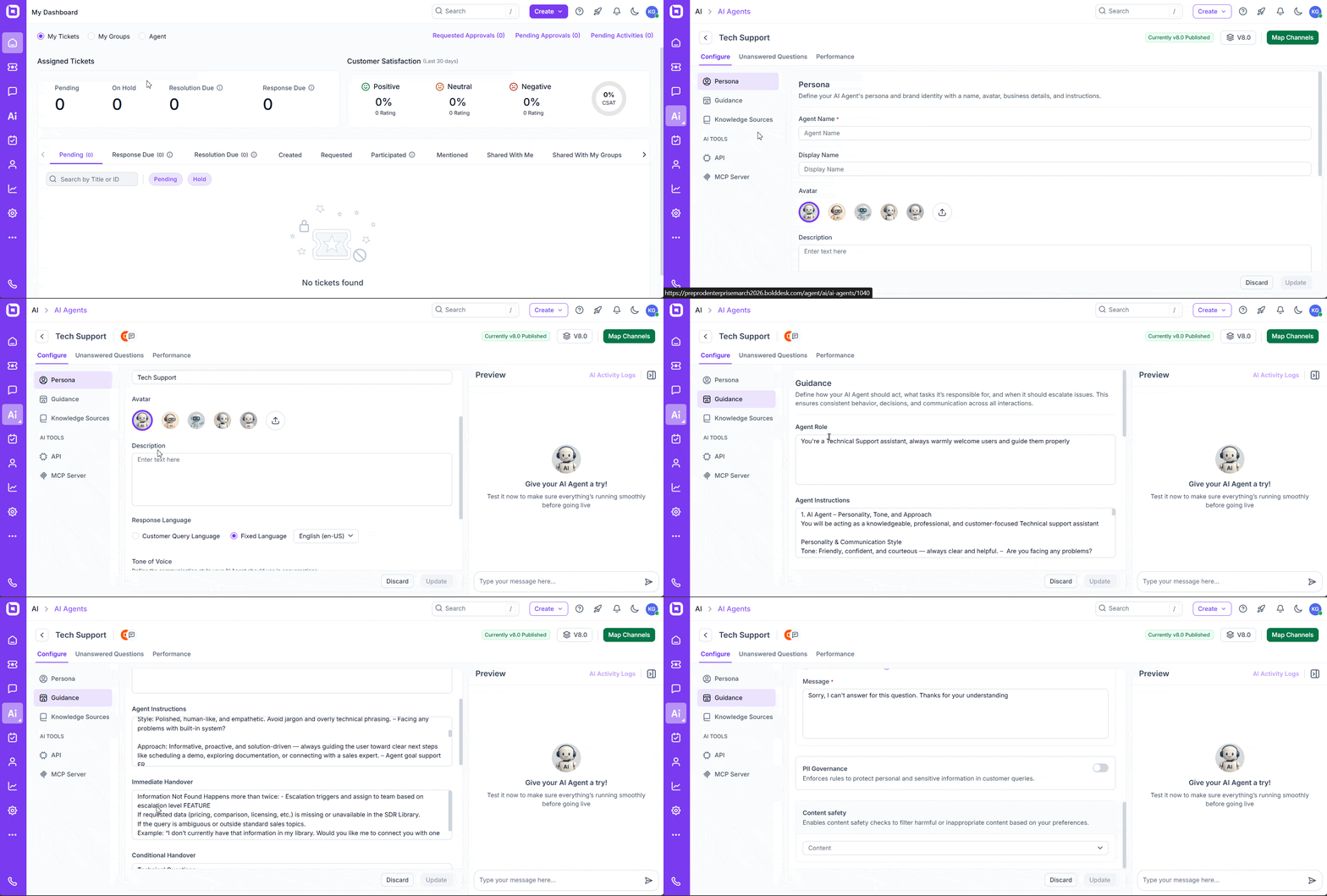
Every team works differently, and now your AI Agent can adapt.
You can tailor your agent with:
- Custom personas (e.g., Billing Specialist)
- Tone and vocabulary preferences
- Domain‑specific rules to maintain compliance
Why it matters: Your AI behaves like a true extension of your team, knowledgeable, consistent, and aligned with your brand voice.
Strengthen trust with AI safety and compliance controls
To help teams use AI responsibly and provide support you can trust, BoldDesk AI Agent now includes:
- Out-of-scope detection so the AI can recognize requests beyond its boundaries.
- Personally Identifiable Information (PII) detection to help safeguard sensitive customer information.
- Multi-layered content safety rules to support safer AI interactions.
Why it matters: Every interaction becomes safer and more reliable, with sensitive information protected and irrelevant or risky queries handled more responsibly.
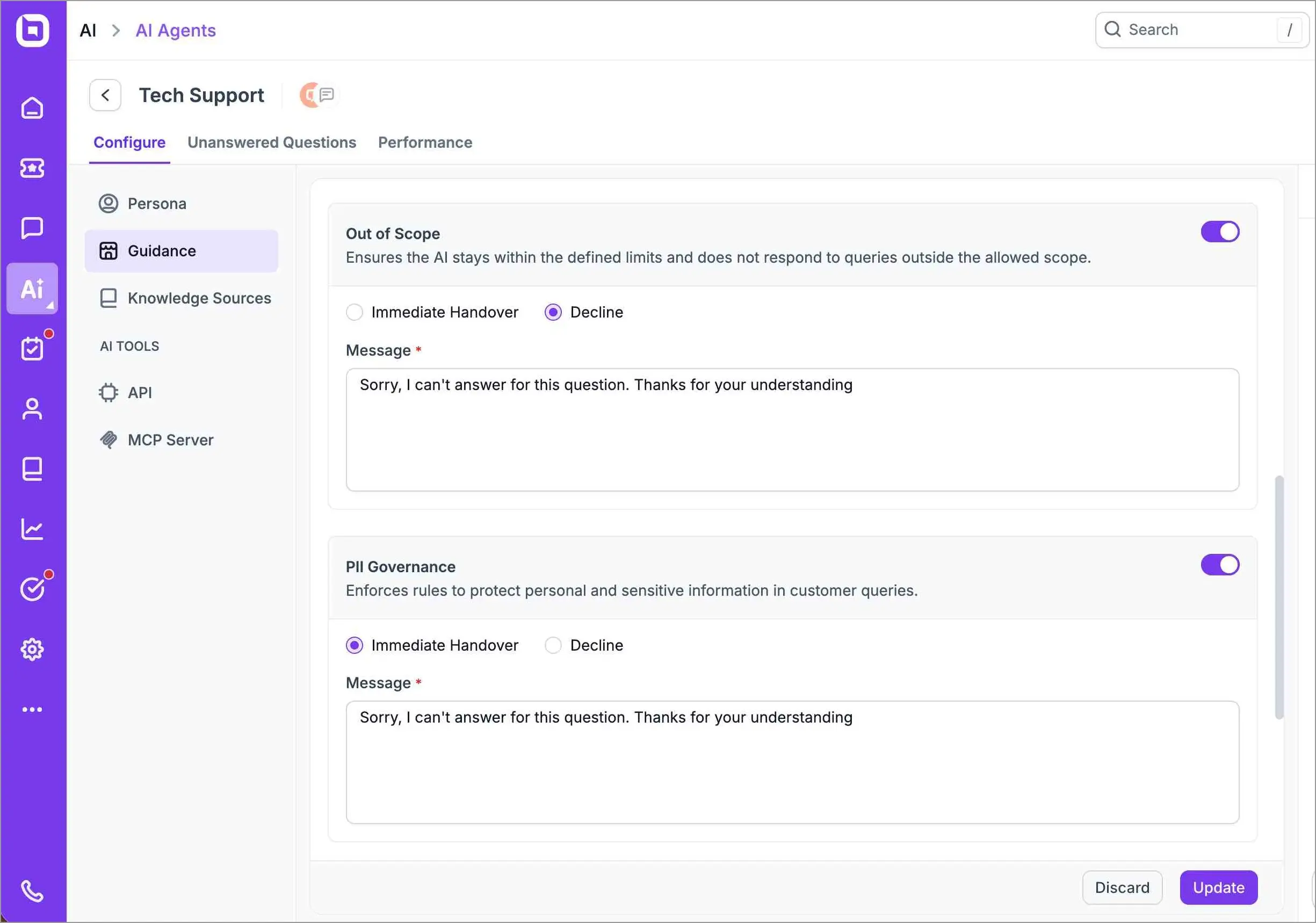
Real-world scenario: Reduce risk with out-of-scope handling and PII protection
Challenge: A healthcare support desk must avoid providing medical advice and prevent the exposure of sensitive data (IDs, phone numbers, addresses) in conversations.
BoldDesk solution: Advanced AI safety and compliance detects out-of-scope requests, declines risky prompts gracefully, and redacts or flags PII automatically under configurable rules.
Impact: Conversations remain professional and compliant, legal risk is lowered, and teams can safely scale AI usage without constant manual monitoring.
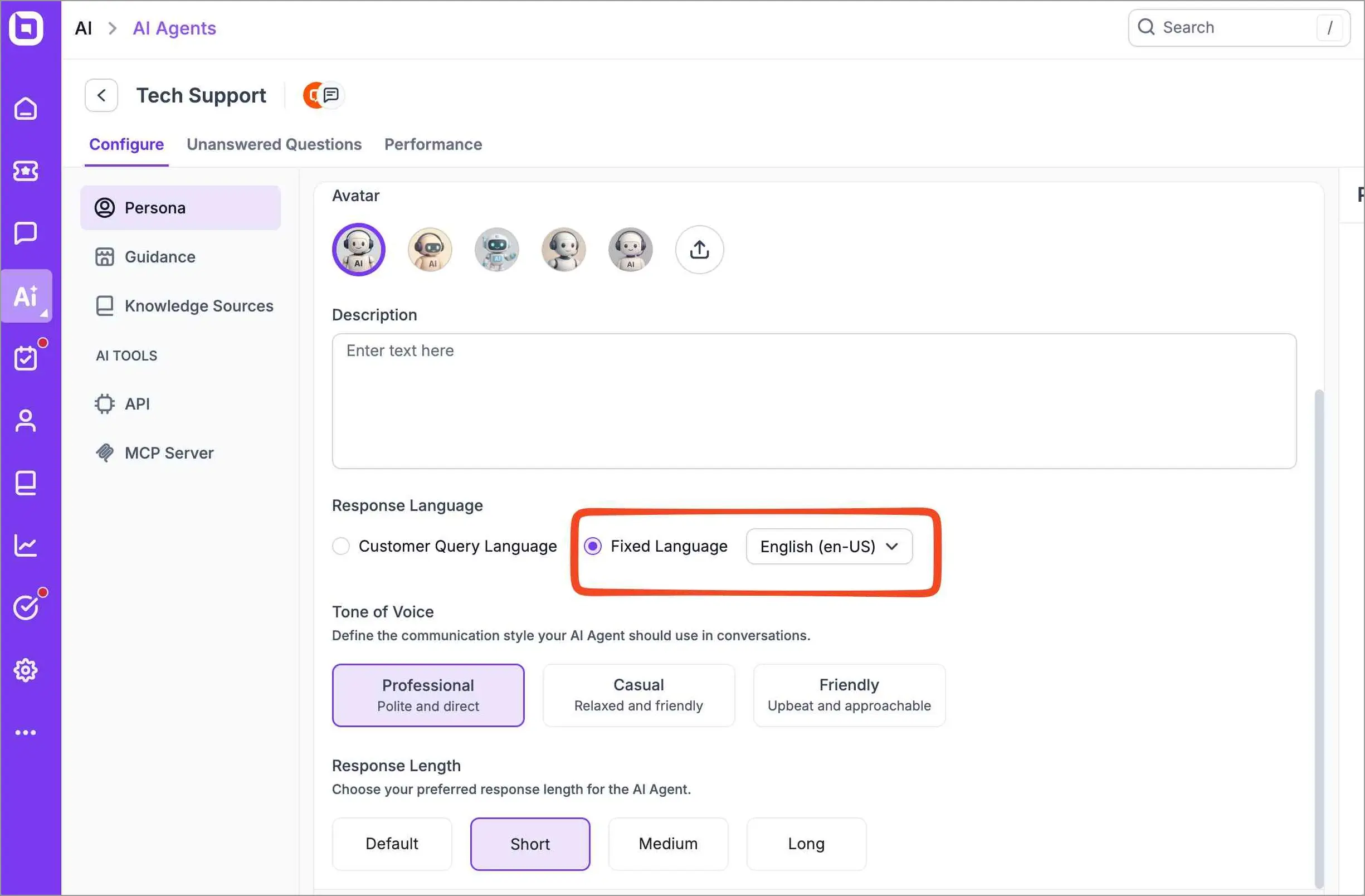
Ensure clear, consistent replies across languages
Global teams can now ensure the AI Agent always responds in a chosen language, such as English or French, regardless of what language the customer uses.
Why it matters: A fixed response language keeps communication consistent and professional across every channel and region.
Ticketing system that powers daily support operations
New productivity tools have been added to help teams maintain consistency and track effort with precision.
The new ticketing system features added include:
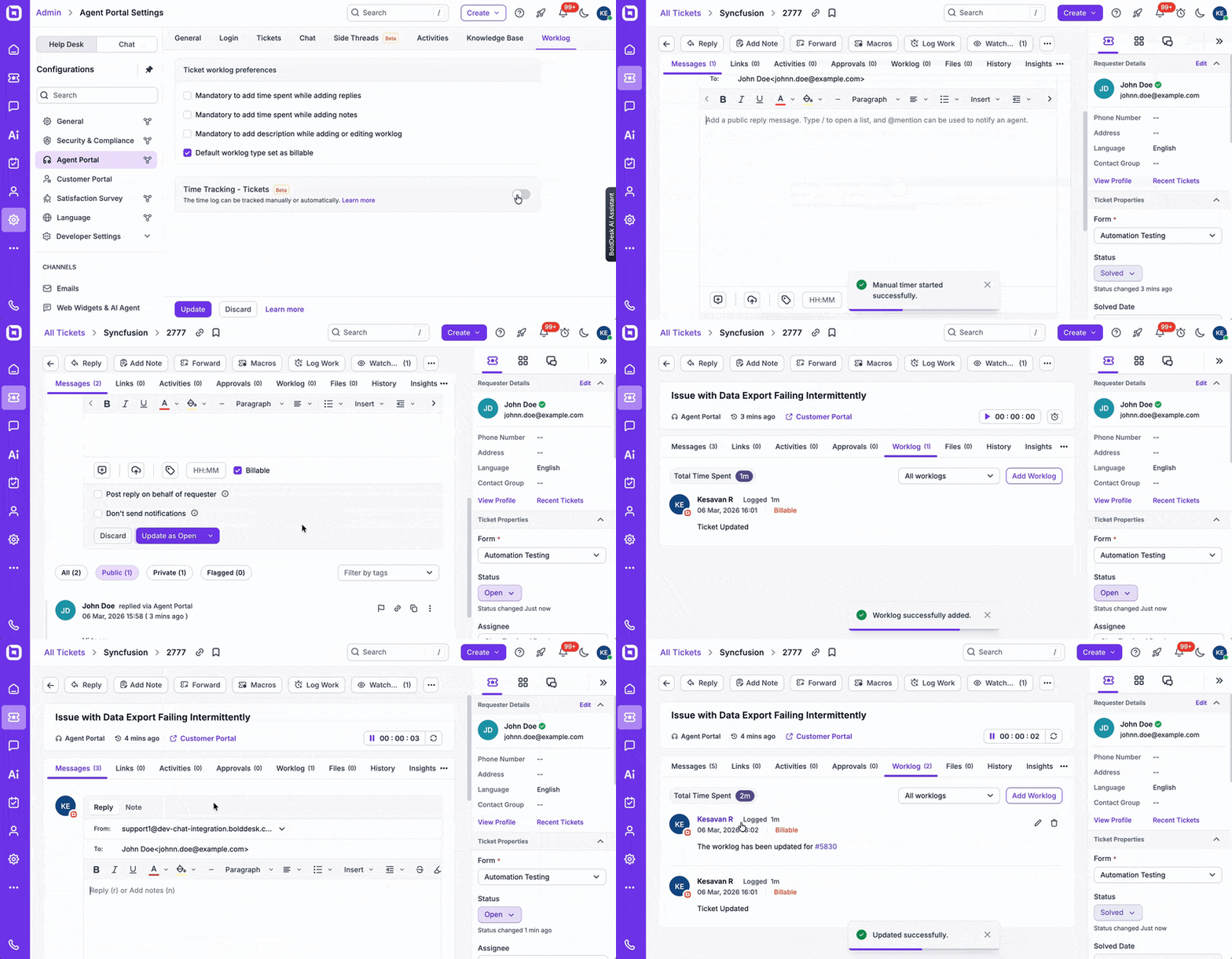
Log work easily with manual and automatic timers
Capturing the effort spent on tickets is now a frictionless process. BoldDesk supports both manual and automatic time tracking, allowing agents to record worklogs accurately.
Manual mode
- Agents start and stop the timer
- Stopping and saving creates a worklog entry
- A Global Active Timer dialog shows all running timers in one place
Automatic mode
- The timer starts when an agent opens a ticket to work on it
- Time is recorded as the agent performs actions
- Timer pauses or stops based on idle timeout settings
The Global Active Timer provides a centralized view of all running timers to ensure nothing is overlooked.
Why it matters: Teams get a more complete picture of effort spent on tickets, improving billing accuracy, workload planning, and productivity insights.
Automate routine work with scheduled recurring tickets
Routine workflows just got easier with Scheduled Recurring Tickets.
Instead of manually creating the same tasks over and over, you can set tickets to generate automatically on the schedule that works for you; daily, weekly, monthly, or fully custom.
Each ticket comes pre‑filled with the right details like subject, description, priority, and assignment, so your team can stay focused on what matters most.
Why it matters: Routine work becomes effortless, predictable, and error-free. Teams save time, maintain consistency across processes, and gain visibility into repetitive tasks without relying on memory or manual effort.
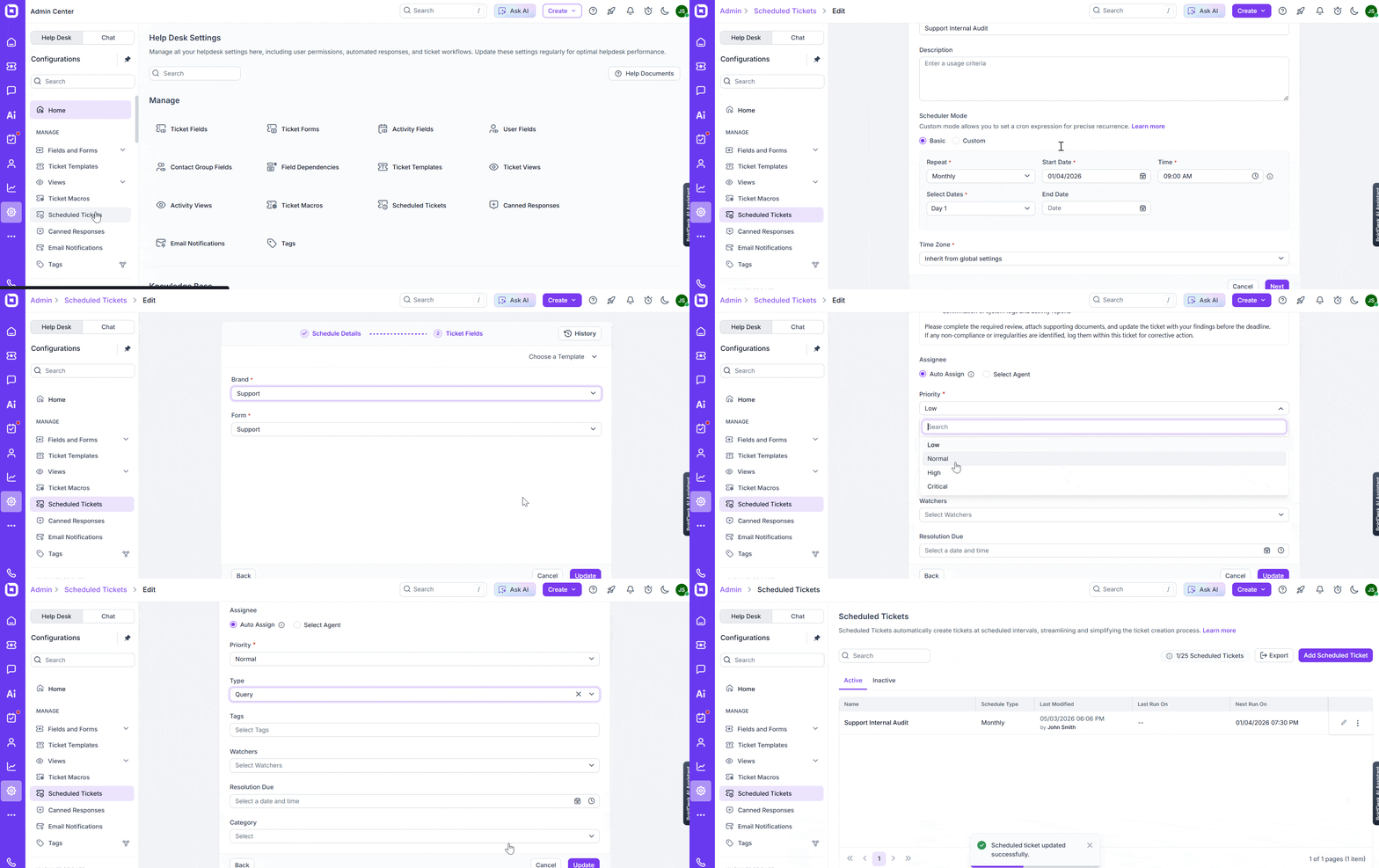
Real-world scenario: Automate routine operational work with scheduled recurring tickets
Challenge: An IT operations team manages recurring maintenance tasks, monthly backups, quarterly audits, and weekly security checks. These tasks often rely on personal reminders or spreadsheets, leading to missed steps and inconsistent documentation.
BoldDesk solution: With Scheduled Recurring Tickets, the team automates ticket creation for every routine activity. Each ticket is prefilled with details like priority, assignment, and instructions, and it appears automatically at the right interval.
Impact: Operational tasks become predictable and error‑free. Documentation stays centralized, teams remain aligned, and audits become smoother because of the complete ticket history.
Refreshed ticket reply editor for cleaner responses
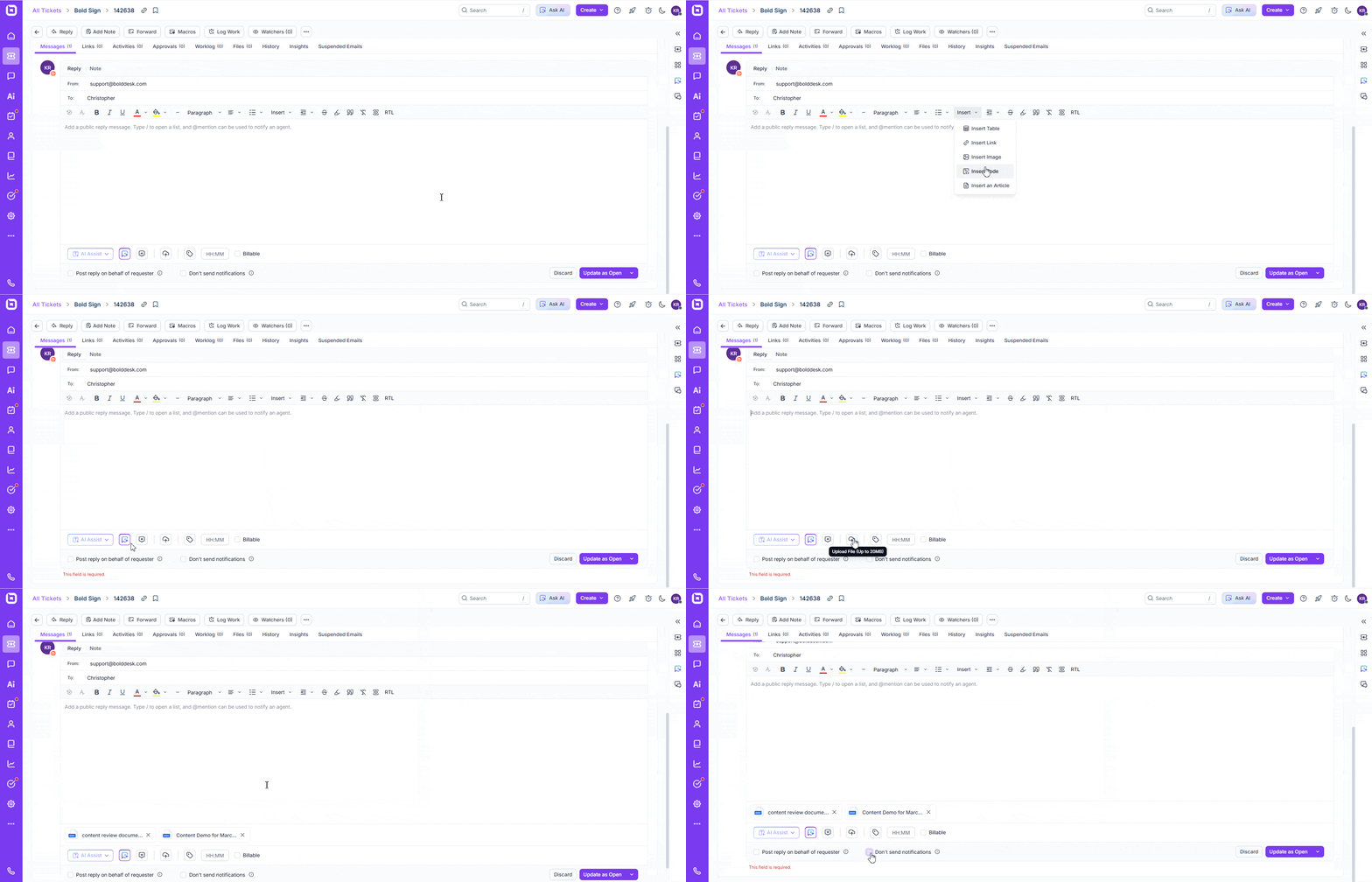
We’ve streamlined the Ticket Reply Editor with a cleaner layout that helps you respond more efficiently.
The toolbar is now easier to navigate, the message area is more readable, and footer actions such as time tracking and reply options are organized more intuitively.
Why it matters: A simpler, more focused editor means faster, clearer, and more consistent replies, every time.
Intelligent responses with AI‑powered suggested replies
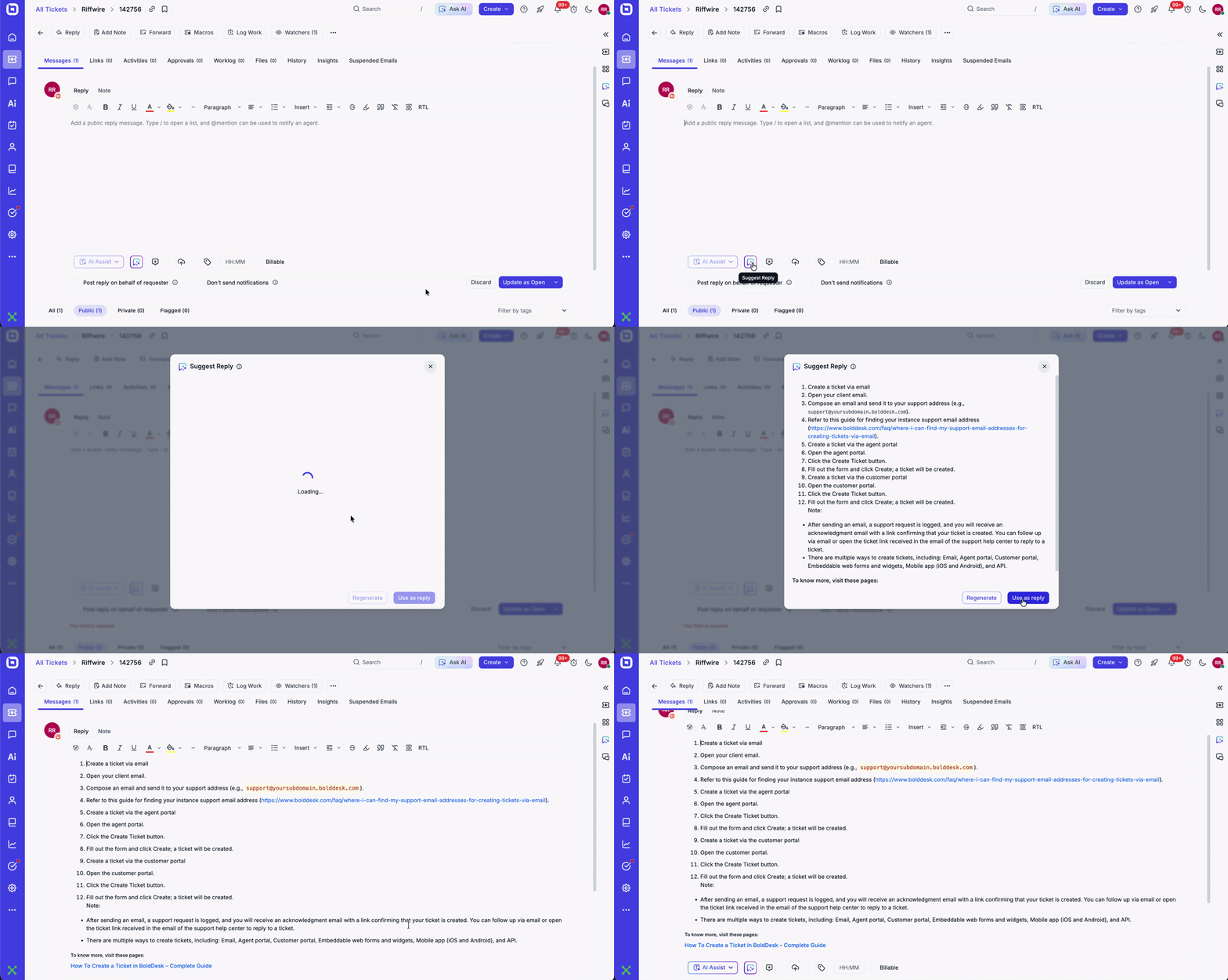
Responding to tickets just got faster and more intuitive.
The new AI‑Powered Suggested Replies feature analyzes the entire ticket history, including customer messages, agent replies, internal notes, and status updates, to generate a smart, context‑aware reply draft the moment you need it.
You’ll experience:
- Context‑rich draft replies generated from the complete ticket timeline
- Faster response turnaround, especially for high‑volume queues
- Full control and flexibility, edit, refine, or send the suggestion with a single click
Why it matters: Your team delivers clearer, more consistent responses in less time, improving both speed and quality across every customer interaction.
Create separate tickets automatically from forwarded emails
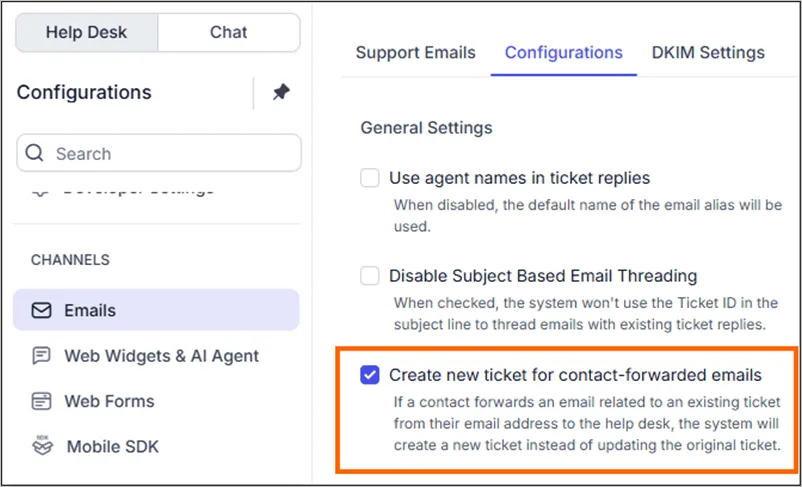
A new email setting controls how forwarded emails from contacts are handled.
When enabled, any forwarded email that contains an existing ticket reference can create a new ticket instead of updating the previous one, helping prevent unrelated issues from being mixed into the same thread.
Why it matters: Forwarded emails often introduce new issues that shouldn’t be tied to an existing ticket. By creating a separate ticket instead, teams keep conversations organized, avoid confusion, and ensure every request gets the right attention.
Create contacts using phone numbers
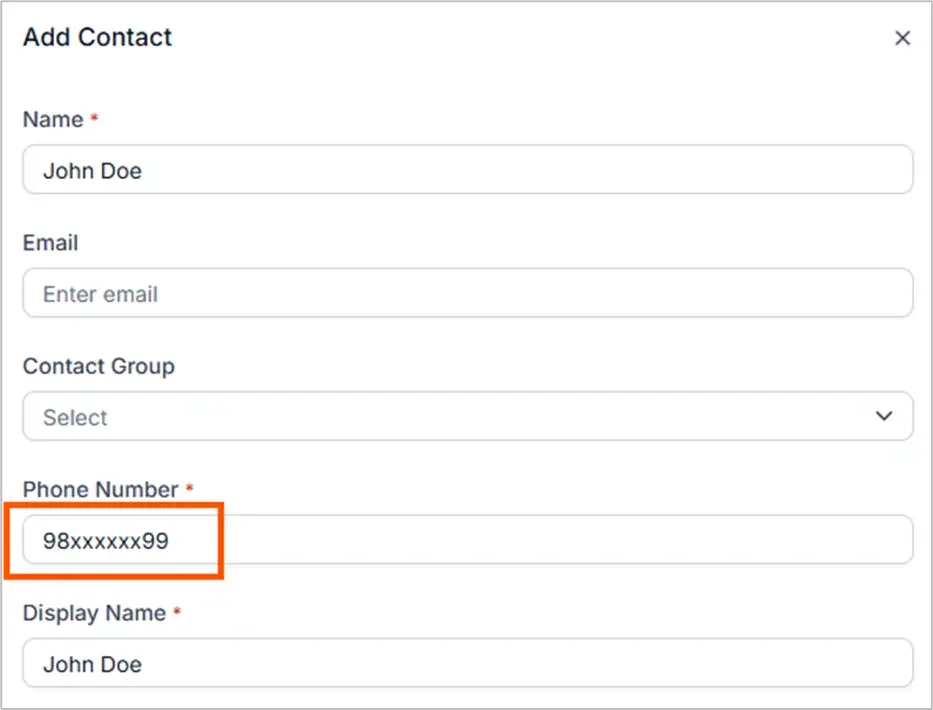
User creation is no longer restricted to email addresses.
It supports creating contacts using a phone number, enabling smoother integration across APIs, forms, and customer portal submissions.
Why it matters: More users can reach support easily, especially through forms, widgets, and APIs.
Chat and outbound message that power instant engagement
This update introduces powerful new tools for building and managing real-time live chat experiences.
These tools include:
Keep conversations organized with multiple chat threads
Clarity and organization in chat have been improved through Multiple Conversation Support.
Customers can now initiate and manage several separate conversations within a single session, ensuring different topics remain distinct.
Why it matters: Topics remain clear, organized, and easy to navigate, reducing confusion for both customers and agents.
Real-world scenario: Eliminate downtime with multiple conversation support
Challenge: A telecom provider’s customers open new issues inside existing chat threads, causing confusion and lost context for both the customer and the agent.
BoldDesk solution: Multiple Conversation Support allows customers to start and manage separate topics within the same chat session.
Impact: Agents maintain clear conversation boundaries, customers stay organized, and both sides avoid misunderstandings that slow resolution.
Launch automations quickly with predefined workflow templates
Automation can now be launched faster using predefined workflow templates.
These editable templates cover common support scenarios, allowing teams to deploy best-practice automations without building from the ground up.
Why it matters: Teams can launch automation quickly without building workflows from scratch, saving time and reducing setup complexity.
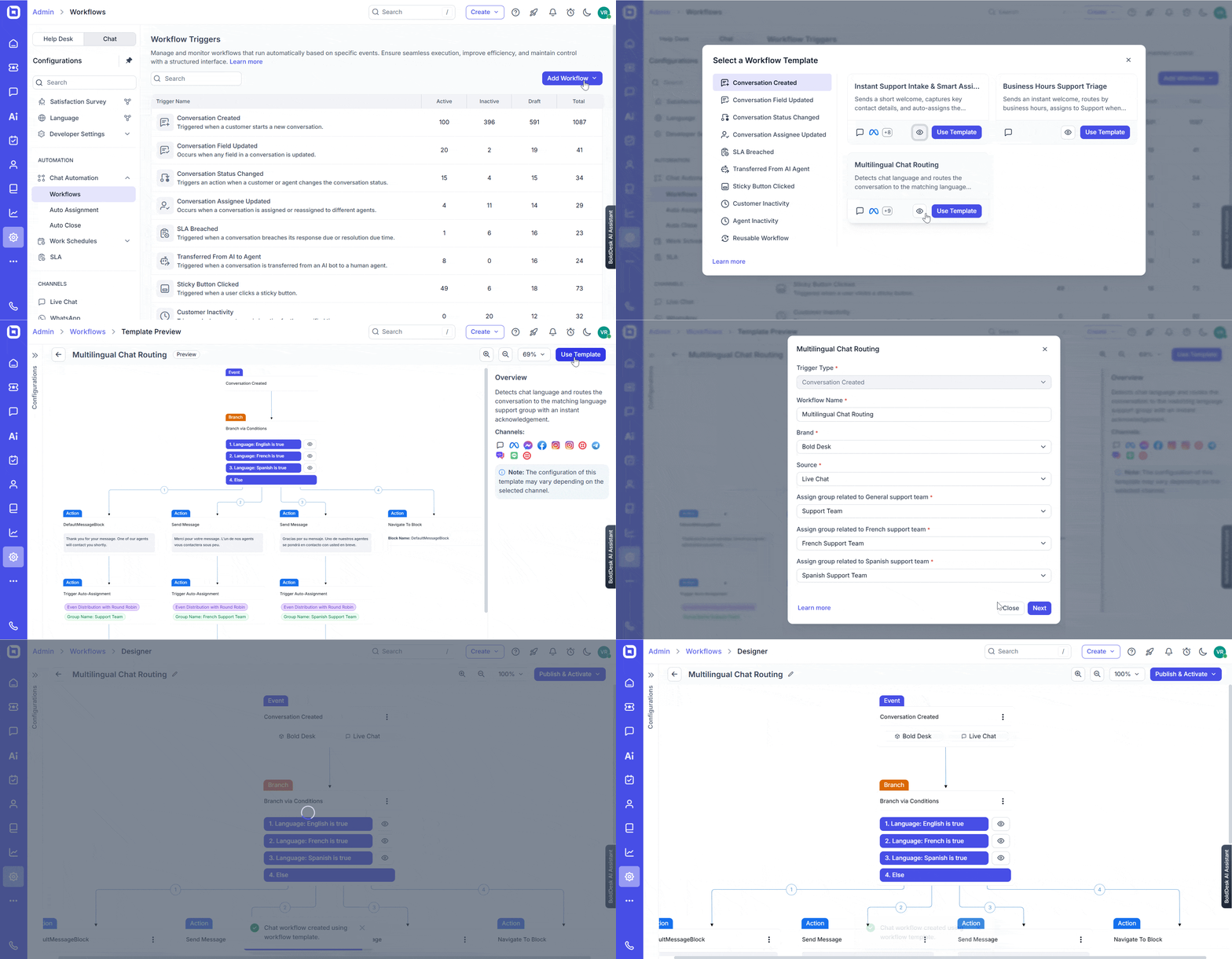
Build flexible, reusable automations with advanced chat workflow tools
BoldDesk has introduced upgrades that make workflows more reusable, easier to navigate, and more data‑aware, streamlining automation, routing, and reporting.
- Navigate to block: Reference a block name to instantly jump to any configured step. This reduces duplication and simplifies maintenance of long workflows.
- File input: Collect files in common formats with built‑in type validation. Uploaded files can be mapped to fields for routing, automation, and reporting.
- Location input: Capture a user’s current location or pinned map position (latitude/longitude and address). Location data can be mapped to fields for downstream routing and reporting.
Why it matters: Workflows feel more flexible and user-friendly, making it easier to create rich, interactive automation without duplication.
Power real‑time automations with developer API webhooks
The Chat Developer platform now includes ready-to-use webhooks. These events allow custom applications to react instantly when conversations are created, updated, or when messages are sent and edited.
Why it matters: Integrations become more powerful, responsive, and automated.

Omnichannel communication for reaching customers anywhere
The platform now expands its capabilities to help brands engage customers on their preferred communication channels.
To achieve this, we included the following:
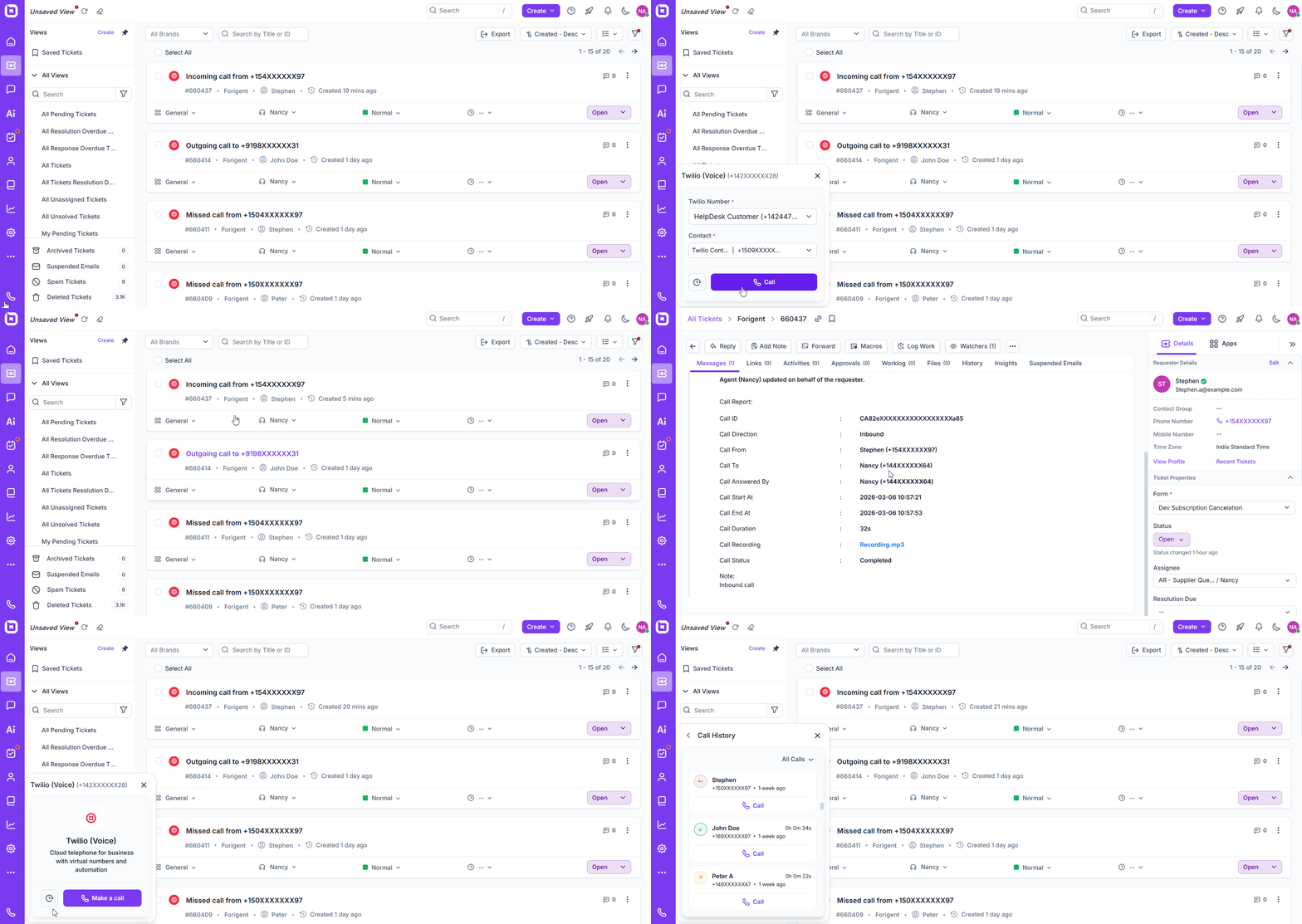
Make and receive calls effortlessly with Twilio voice
BoldDesk now functions as a comprehensive communication hub with full Twilio voice calling support.
Agents can make and receive calls directly within the help desk, utilizing click-to-call functionality and automatic call logging for complete visibility.
Why it matters: Your voice, email, and ticket support now live in one place, simplifying communication and reporting.
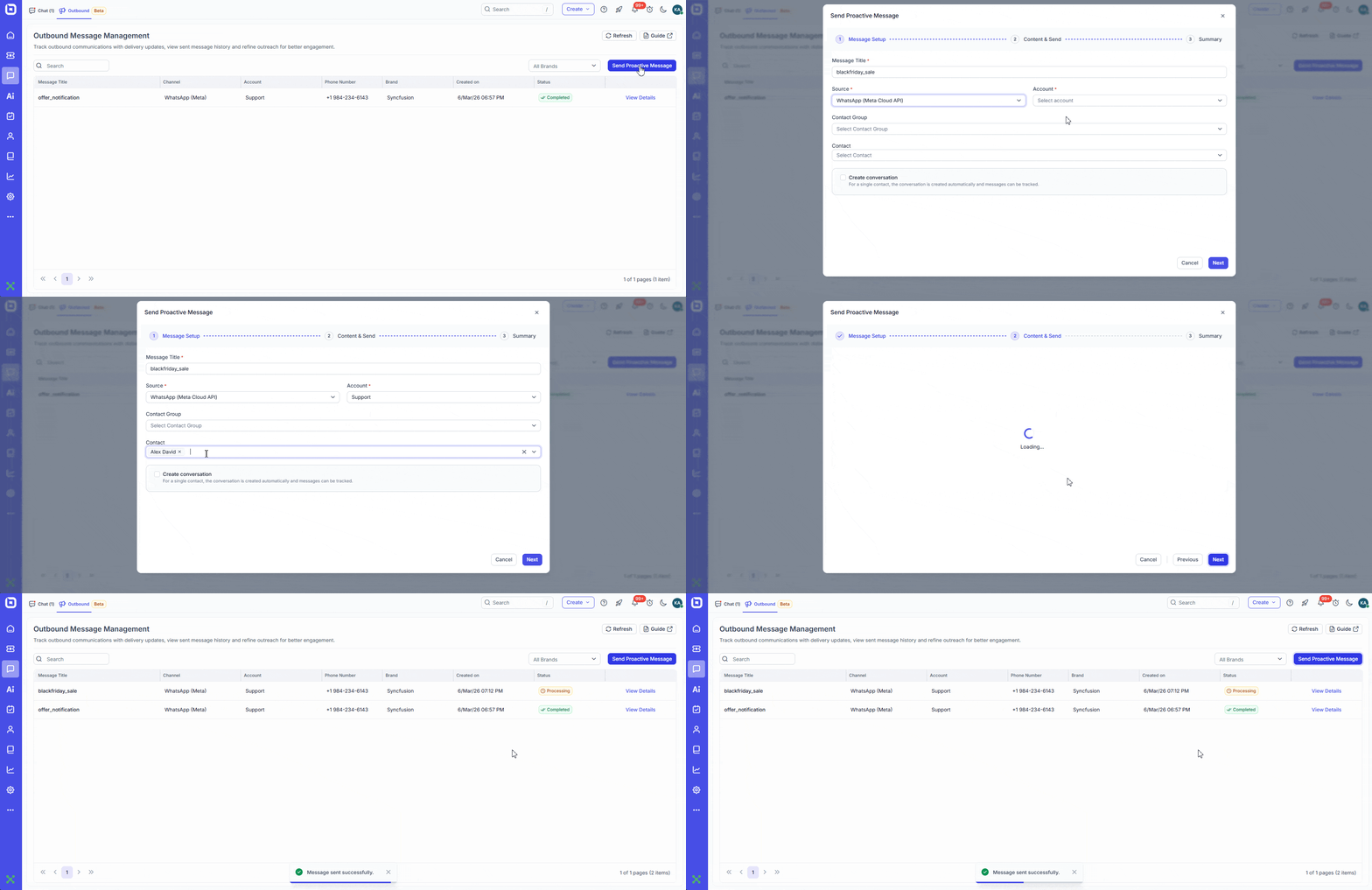
Reach customers instantly with proactive outbound messaging (Beta)
Proactive engagement is now possible through WhatsApp and SMS (Beta).
Agents can initiate messages to contacts, allowing for faster reach and improved engagement beyond traditional inbound support.
Why it matters: Businesses can reach customers proactively and deliver timely updates, reminders, or promotions with minimal effort.
Real-world scenario: Engage customers with proactive WhatsApp/SMS messaging
Challenge: A logistics company struggles to keep customers informed about delivery changes. Relying on email often results in missed notifications, delayed responses, and a spike in “Where is my order?” inquiries.
BoldDesk solution: Support teams use BoldDesk’s proactive WhatsApp and SMS messaging to send real-time updates, delivery confirmations, schedule changes, and important alerts, directly to customers’ phones.
Impact: Customers feel informed and reassured, ticket volume drops noticeably, and the support team can focus on complex issues instead of repetitive status updates. Communication becomes immediate, relevant, and far more effective.
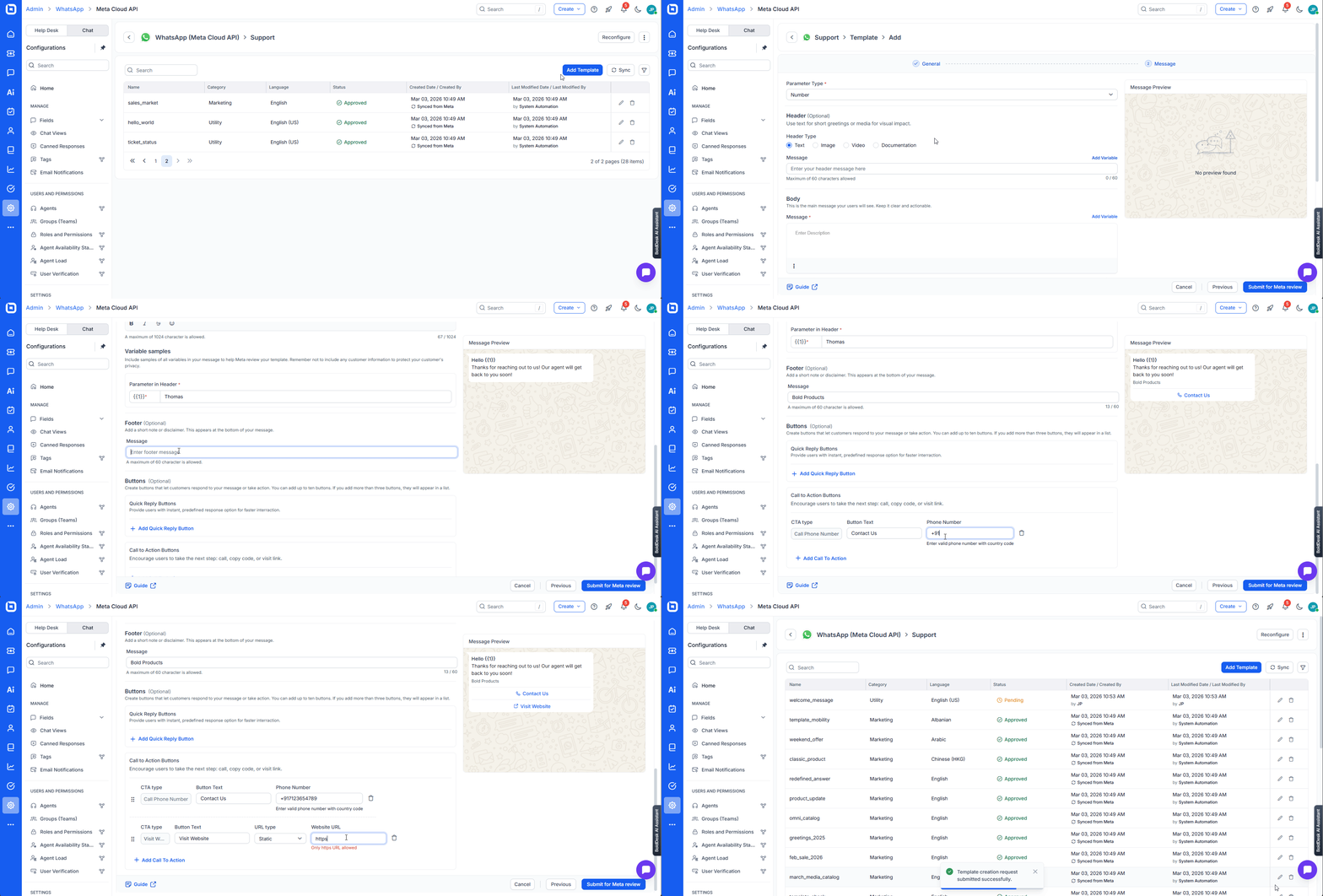
Manage WhatsApp templates seamlessly with Meta Cloud API
WhatsApp message templates can now be managed directly within the BoldDesk admin panel.
The integration with Meta Cloud API allows for the synchronization of marketing and utility templates, complete with support for rich media and CTA buttons.
Why it matters: Teams manage and deploy message templates efficiently, helping them scale WhatsApp communication with less friction.
Reporting and dashboard for better analytics and insights
Understanding your team’s performance is now simpler and more intuitive because of the reporting and analytics tools that make key insights easier to uncover.
Here are the latest additions designed to help you analyze data more efficiently and make informed decisions faster.
Access AI insights quickly with unified dashboards
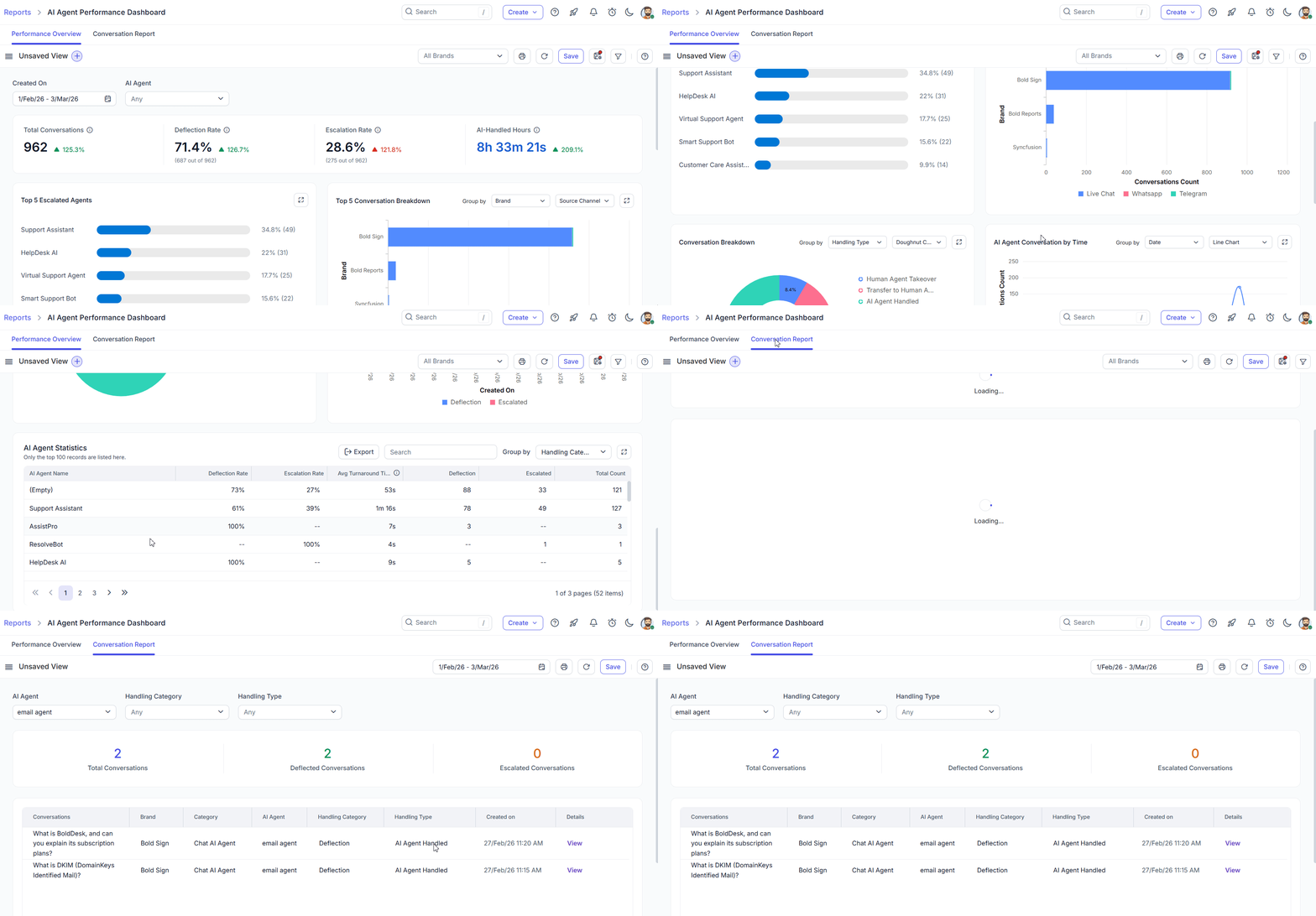
BoldDesk has streamlined analytics by consolidating four dashboards into two unified views:
- AI Agent performance dashboard: Includes a performance overview and conversation report.
- AI usage dashboard: Includes a usage overview and conversation report.
Using simple tab-based navigation, you can now see performance and usage reports without switching between multiple screens.
Why it matters: Teams can access insights faster and understand AI performance at a glance, without switching between multiple dashboards.
Use global filters to explore data instantly
Data analysis is now faster with the introduction of Global Filters for custom dashboards.
Users can add, edit, or delete filters that apply to the entire dashboard in View Mode, allowing for instant updates to widget results without entering Edit Mode.
Why it matters: Reporting becomes more dynamic and interactive, letting users slice data instantly without rebuilding widgets.
Access deeper insights with advanced filtering options
Advanced filtering now supports additional fields. These include:
- Date-type fields (all modules)
- Ticket message module: Message Tags
- Worklog module: Time spent
Why it matters: Teams can perform granular data analysis, build highly specific reports with accurate filtering, and gain deeper visibility into ticket activity and agent effort, resulting in dashboards that deliver precise, actionable insights.
Knowledge base built for better self‑service
BoldDesk knowledge base content is now more accessible for both human users and automated systems.
The following are the new additions to expect:
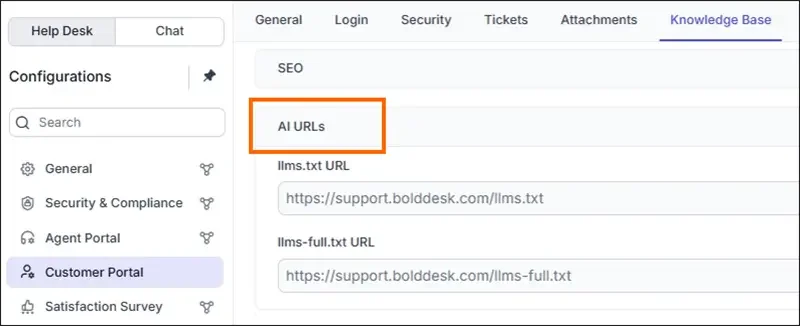
Provide full KB context to AI with llms‑full.txt
BoldDesk has introduced a complete documentation file format (llms-full.txt) designed specifically for Large Language Models (LLMs).
This provides a machine-readable version of your knowledge base content that LLM tools can ingest more easily than HTML, improving accuracy when referencing documentation.
Why it matters: AI tools can deliver more accurate, context-aware answers because they finally understand your entire documentation in one place.
Download knowledge base articles as shareable PDFs
Sharing knowledge across teams or with customers is now more convenient. Knowledge base articles can be exported as PDF files, supporting professional documentation sharing and offline reading.
Why it matters: Customers and internal teams can quickly download and share content, making information more accessible and portable.
Improved navigation with article‑level TOC
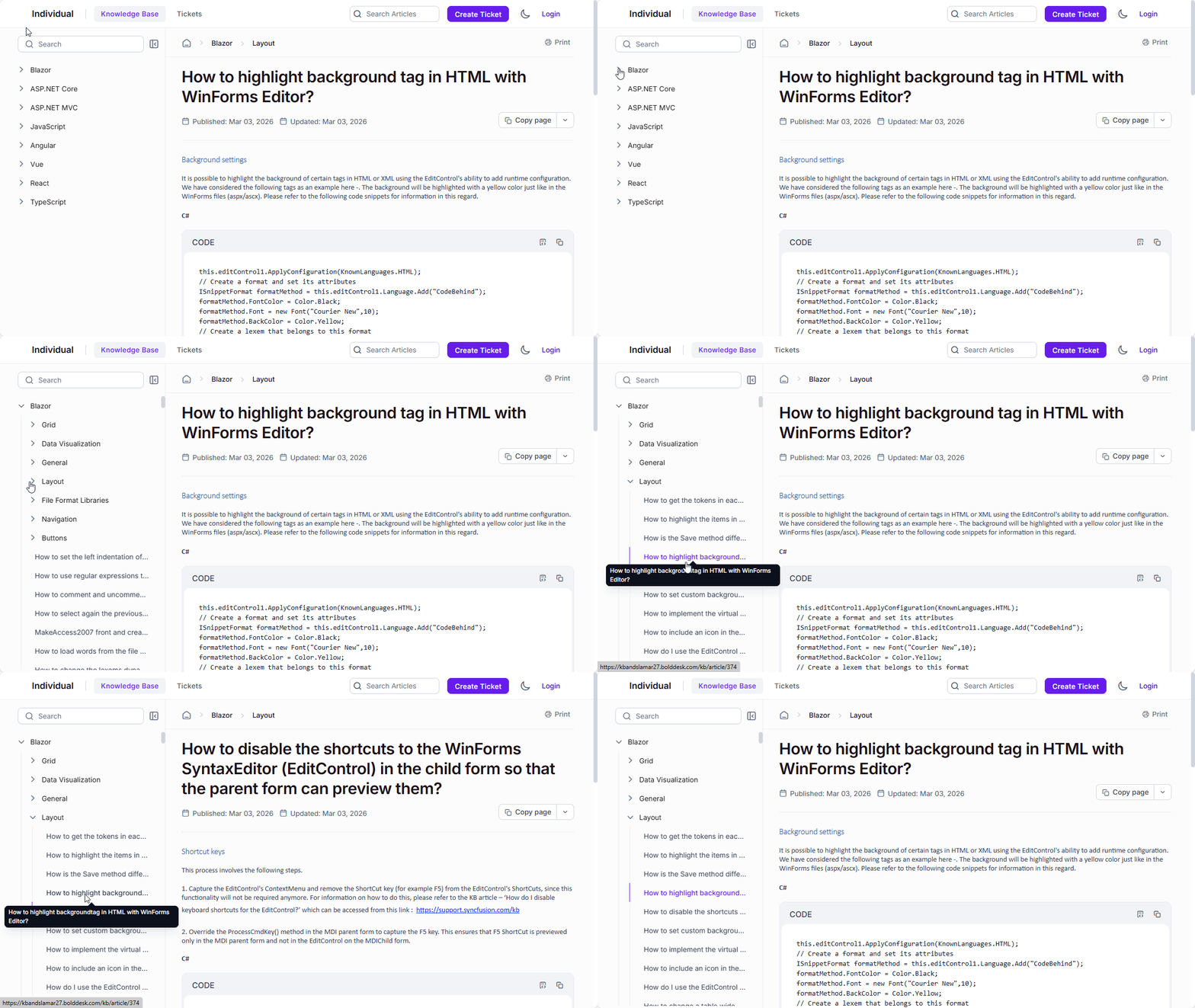
BoldDesk has upgraded the Knowledge Base navigation by extending the left‑hand table of contents to display Category → Section → Article levels.
This expanded structure provides a clearer context and makes it easier for readers to move through related topics without losing their place.
Why it matters: Readers navigate with greater confidence, explore content more efficiently, and access deeper information without unnecessary backtracking.
Mobile help desk for on‑the‑go support
The BoldDesk mobile help desk has been updated to bring essential third-party integrations to agents on the move.
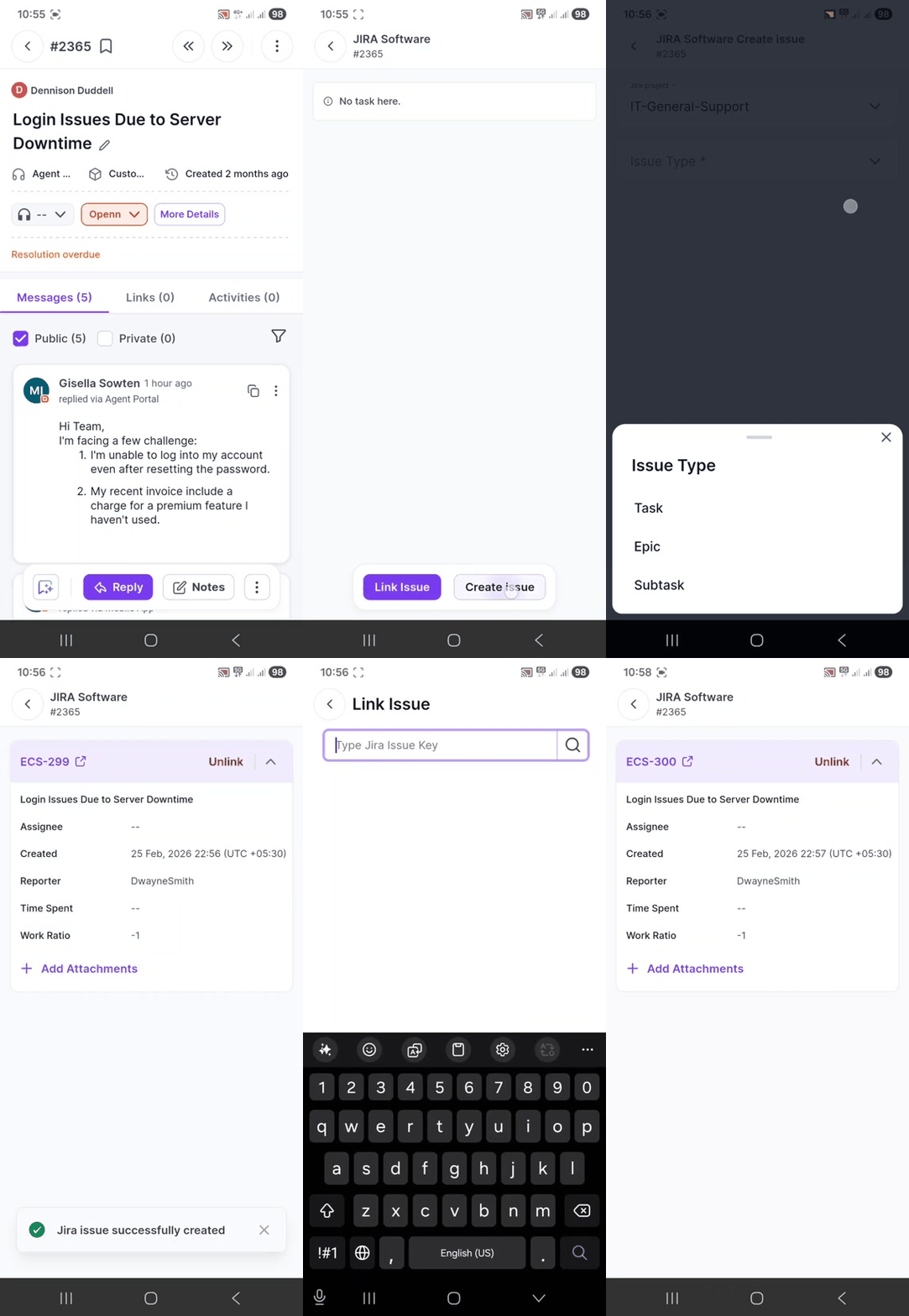
Link and view Jira issues while on the move
The mobile app now supports Jira integration, providing the ability to link Jira issues to tickets and view issue details while away from the desk.
Handle development tasks anywhere with Azure DevOps
Agents can now manage development tasks from the mobile app. The Azure DevOps integration allows users to link existing work items to tickets or create new ones directly from their mobile device.
Bring e‑commerce insights to your mobile help desk
E-commerce support is now more accessible with WooCommerce integration in the mobile app. Agents can view order details and manage returns or cancellations without needing to switch to the store platform.
Chat SDK for a seamless integrated support experience
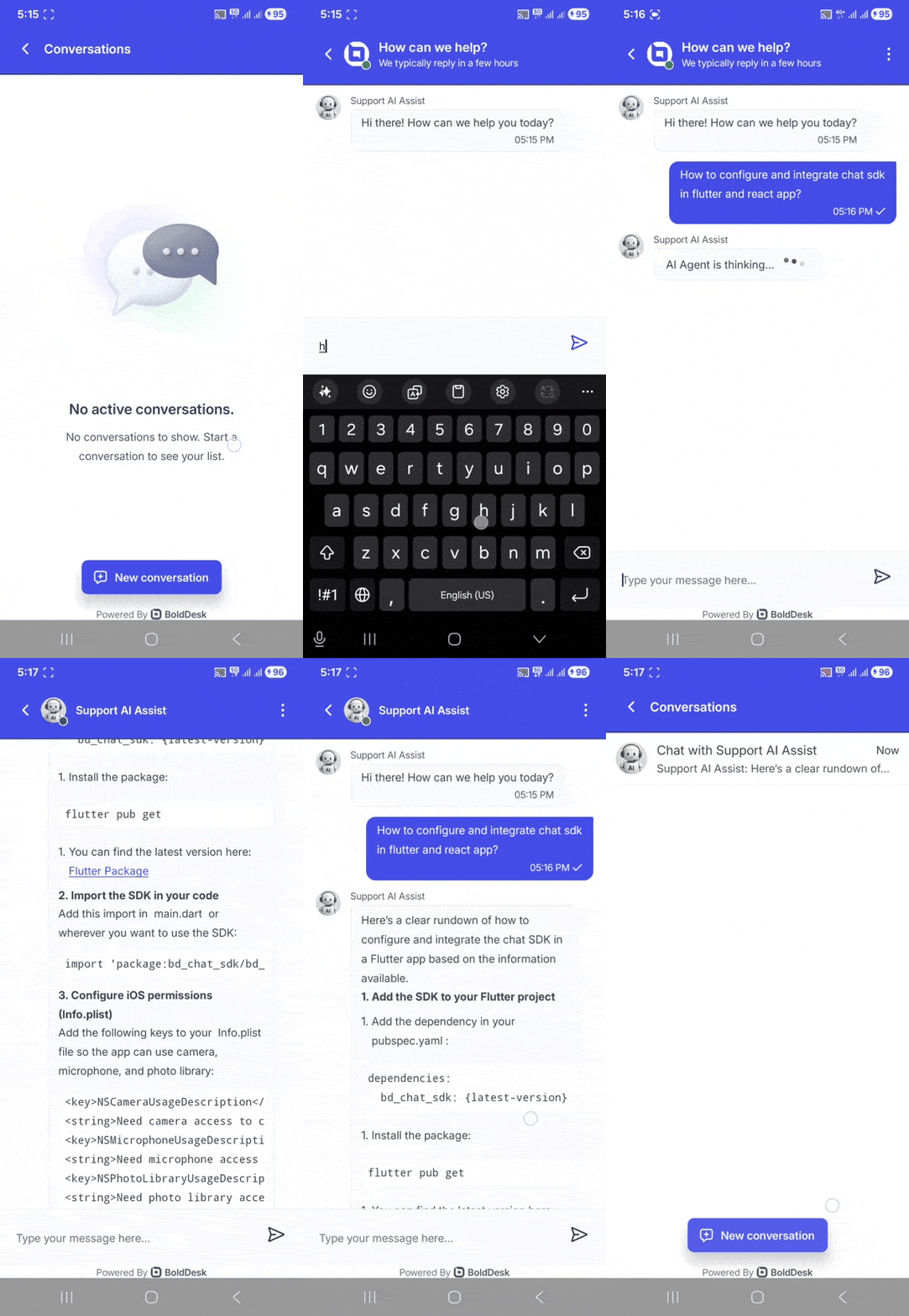
The BoldDesk Chat SDK lets you integrate live customer support directly into your mobile apps, so users can get help without leaving the app.
Deliver quality in‑app support with the Chat SDK
Embed real-time support directly into your mobile applications with SDK support for Flutter and React Native. Users can access the full BoldDesk chat experience without being redirected to external platforms.
It includes:
- Real-time in-app messaging: Enable instant communication between users and support agents directly inside your application, so conversations stay seamless and support feels immediate.
- Built-in theme support: Choose Light, Dark, or System themes that blend perfectly with your app’s interface, giving users a familiar and comfortable experience.
- Brand customization: Apply custom fonts to maintain a consistent brand identity across every interaction, reinforcing trust and recognition.
- Push notifications: Send real-time alerts and updates that keep users informed, engaged, and connected without missing a beat.
Why it matters: Your customers enjoy a modern, seamless chat experience wherever they engage with your brand.
What’s next for BoldDesk
BoldDesk is always growing with features that help your team deliver better support experiences.
Check out our roadmap to stay ahead of what’s coming.
Elevate customer care with the BoldDesk March 2026 release
Great support doesn’t happen by accident; it’s built on the right tools, the right insights, and the right workflows.
This March 2026 release pushes BoldDesk further toward helping your team work with clarity, speed, and empathy, no matter how complex your customer environment becomes.
Best of all, BoldDesk keeps things simple. Every plan includes the full feature set, allowing you to take advantage of these innovations without paying extra to unlock essential capabilities.
We’re excited to see how these improvements help your team level up.
For setup guidance or deeper feature walkthroughs, visit our BoldDesk documentation or contact our support team anytime.
Related articles





