In this page

Smarter AI. Faster Support. Deeper Automation.
This release marks a major step forward in BoldDesk’s AI-first journey. From intelligent ticket classification to proactive AI email replies and advanced safety controls, we’re making customer support faster, more consistent, and more scalable.
AI Copilot
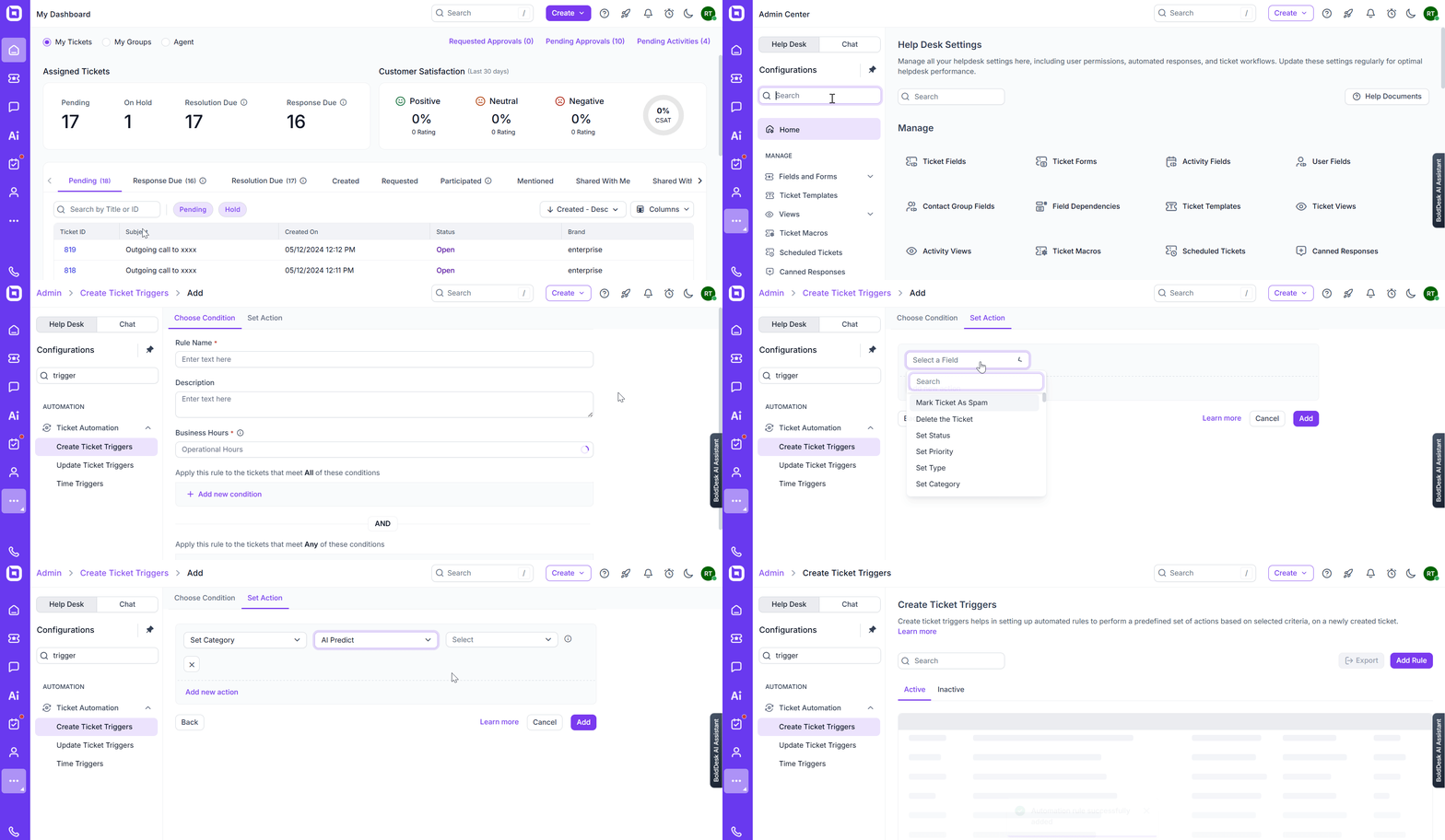
Field Prediction support
AI now analyzes subject, description, and replies to automatically predict and update picklist fields such as:
- Ticket category
- Issue type
This improves routing accuracy and reduces manual effort for agents.
Result: Better triage. Less manual work. Faster resolution.
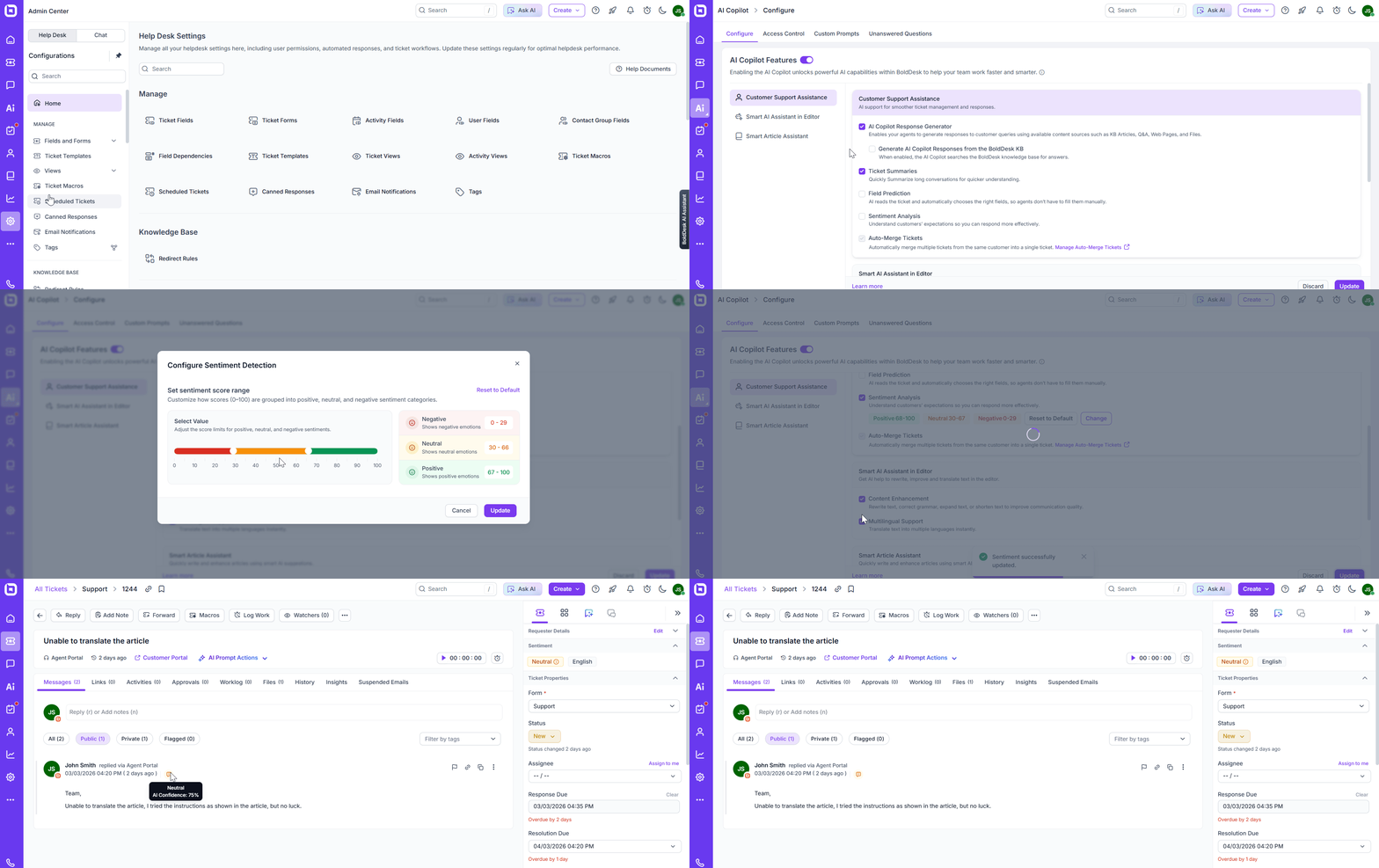
Sentiment Detection – Real-Time Customer Insight
Understand how customers feel — instantly.
- Detects happy, neutral, or unhappy sentiment
- Identifies at-risk customers
- Helps managers prioritize and prevent escalations
Result: Improved retention and proactive service recovery.
AI Agent
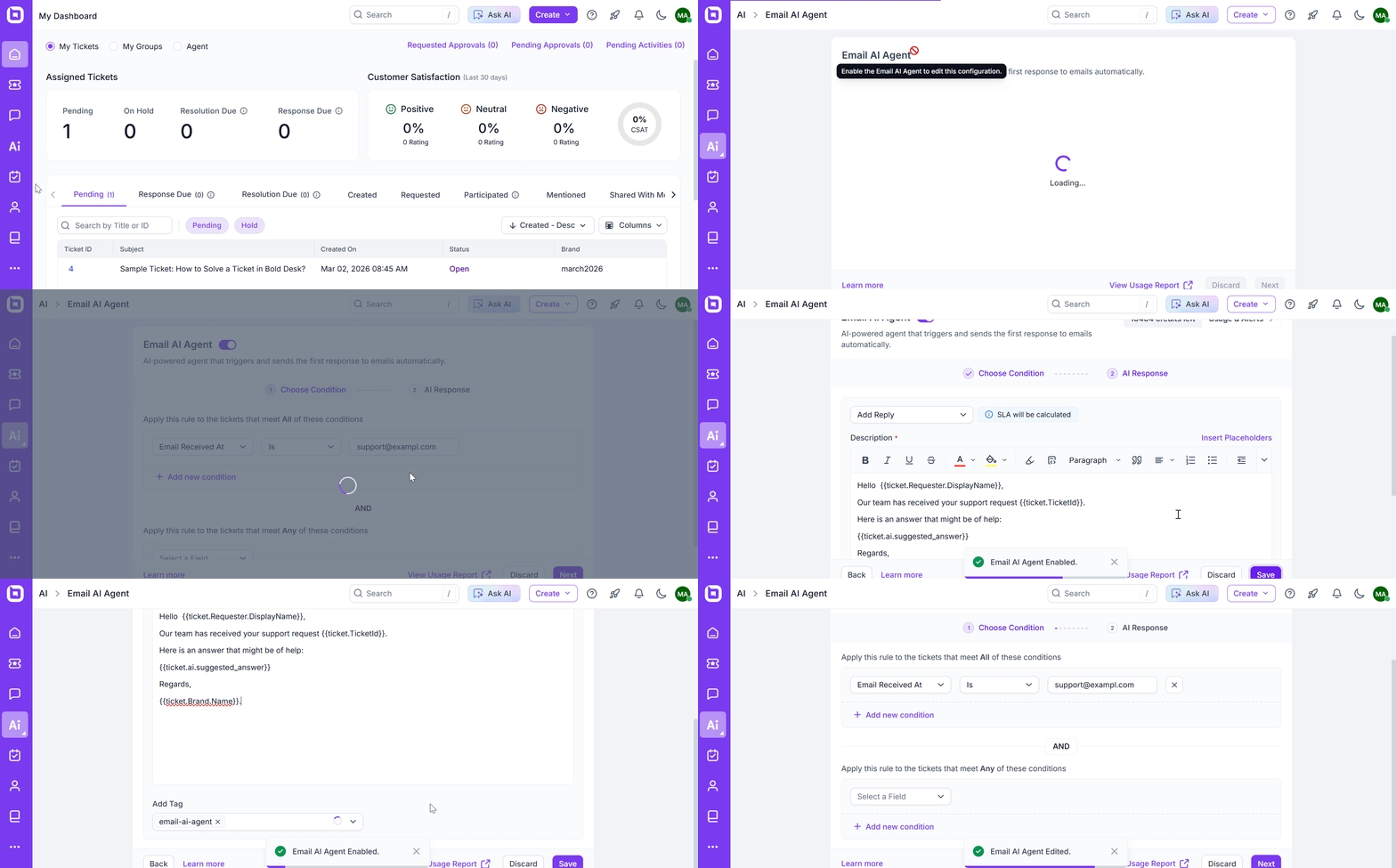
Email AI Agent — Instant First Responses
Your AI Agent can now send intelligent, context-aware replies the moment a ticket is created.
- Reduces First Response Time instantly
- Delivers relevant, high-quality replies at scale
- Learns continuously through feedback
Result: Faster resolutions. Happier customers. Lower support workload.
AI Agent Role and Instruction Control
Customize how your AI Agent behaves.
- Create AI Agent personas like “Billing Specialist” or “Policy-Compliant Responder”
- Define tone, compliance rules, and behavioral instructions
- Embed domain-specific constraints
Result: AI Agent that aligns with your brand and compliance standards.
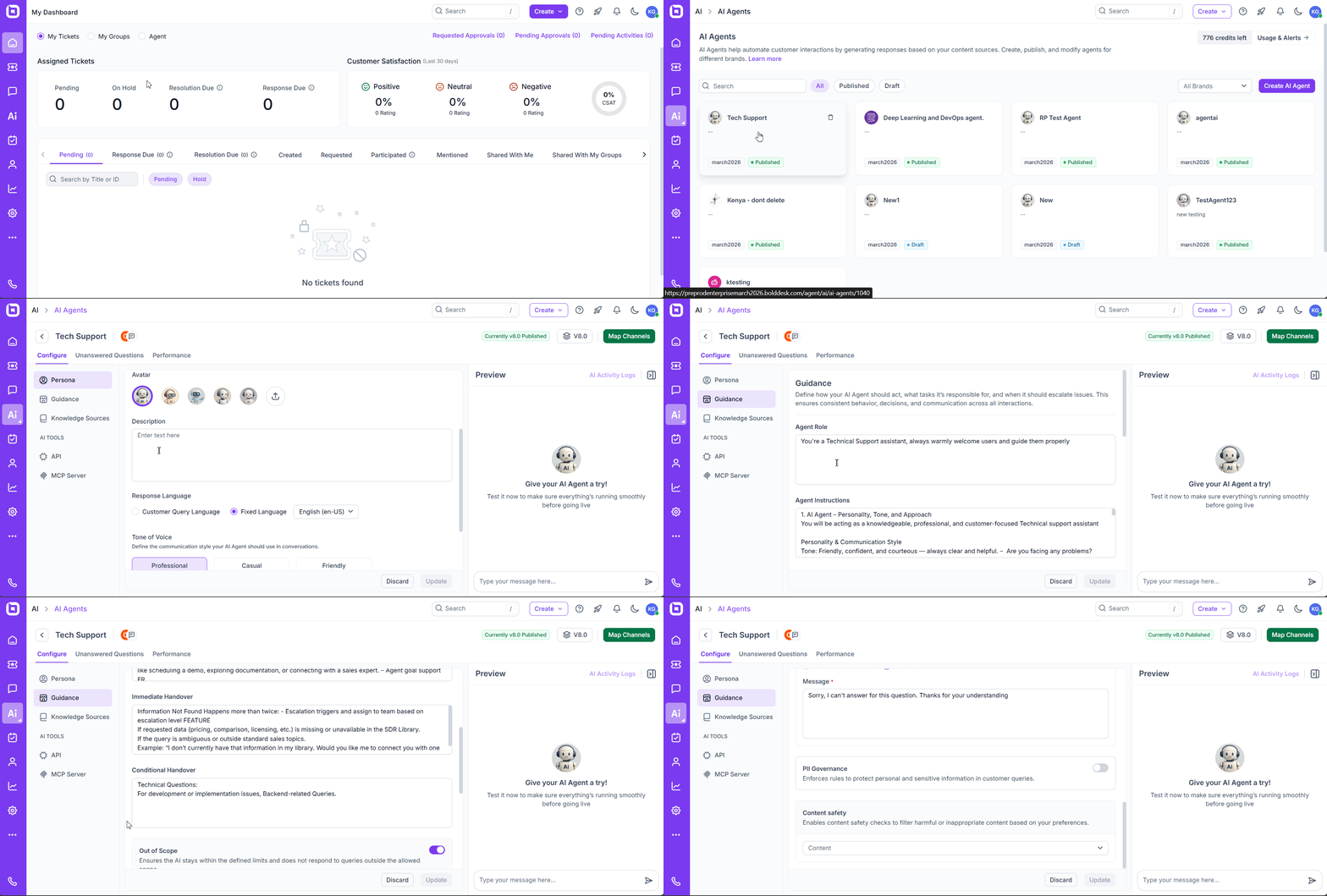
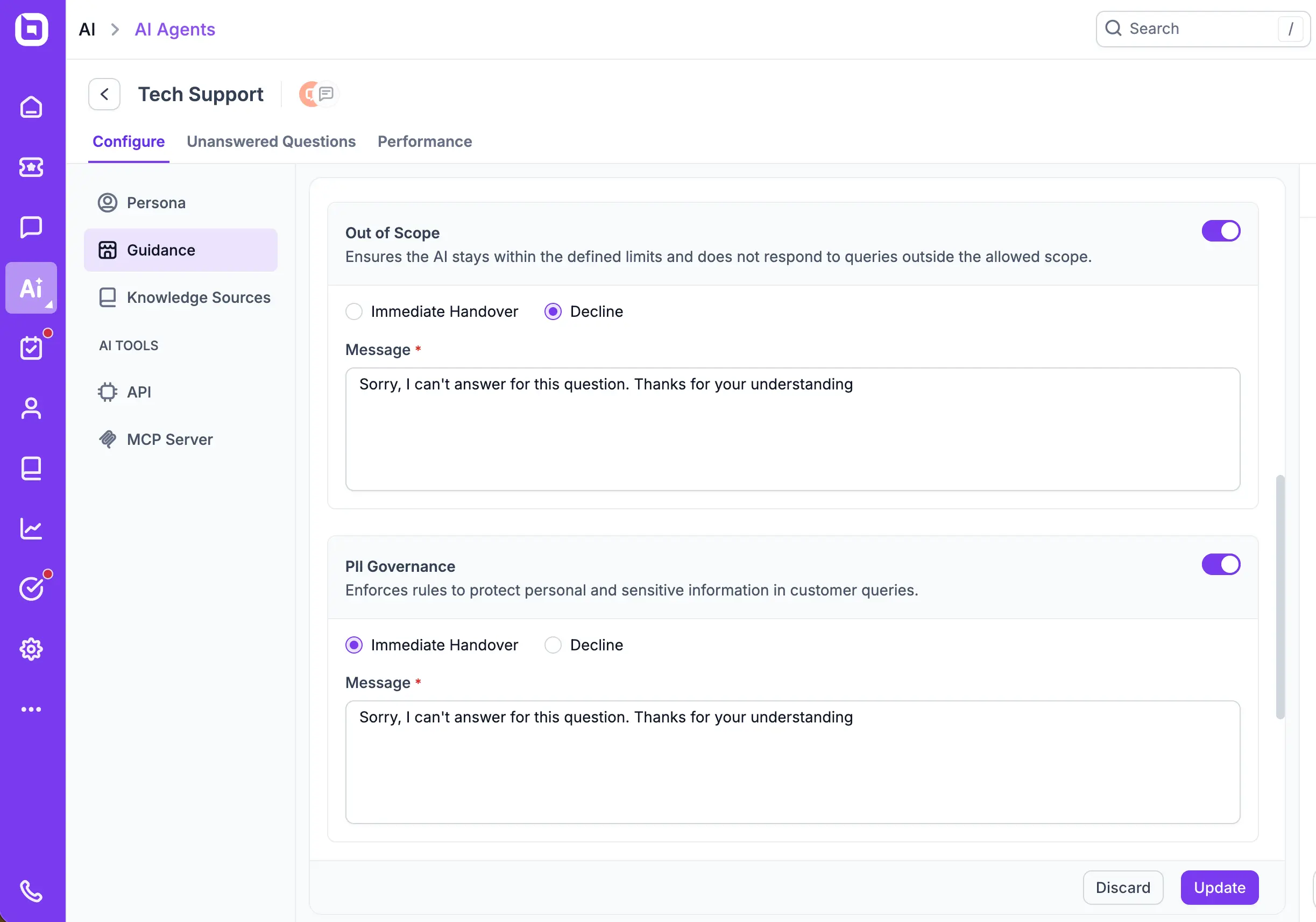
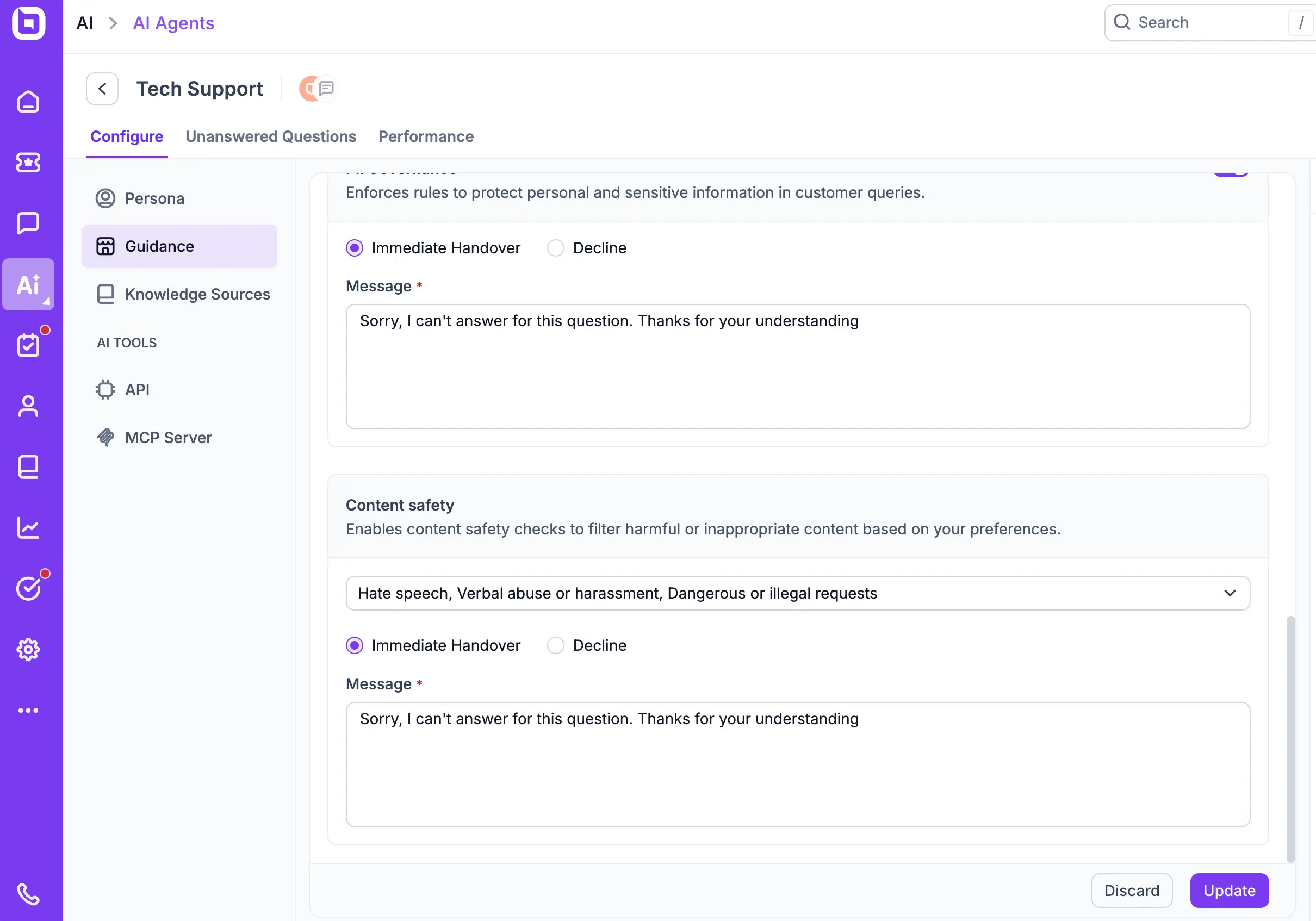
Advanced AI Safety & Compliance Controls
The AI Agent can now intelligently identify requests that fall outside its predefined capabilities or knowledge boundaries.
- Out-of-scope detection
- Built-in PII protection
- Multi-layered content safety rules
Your AI Agent now identifies requests beyond its capability and protects sensitive data automatically.
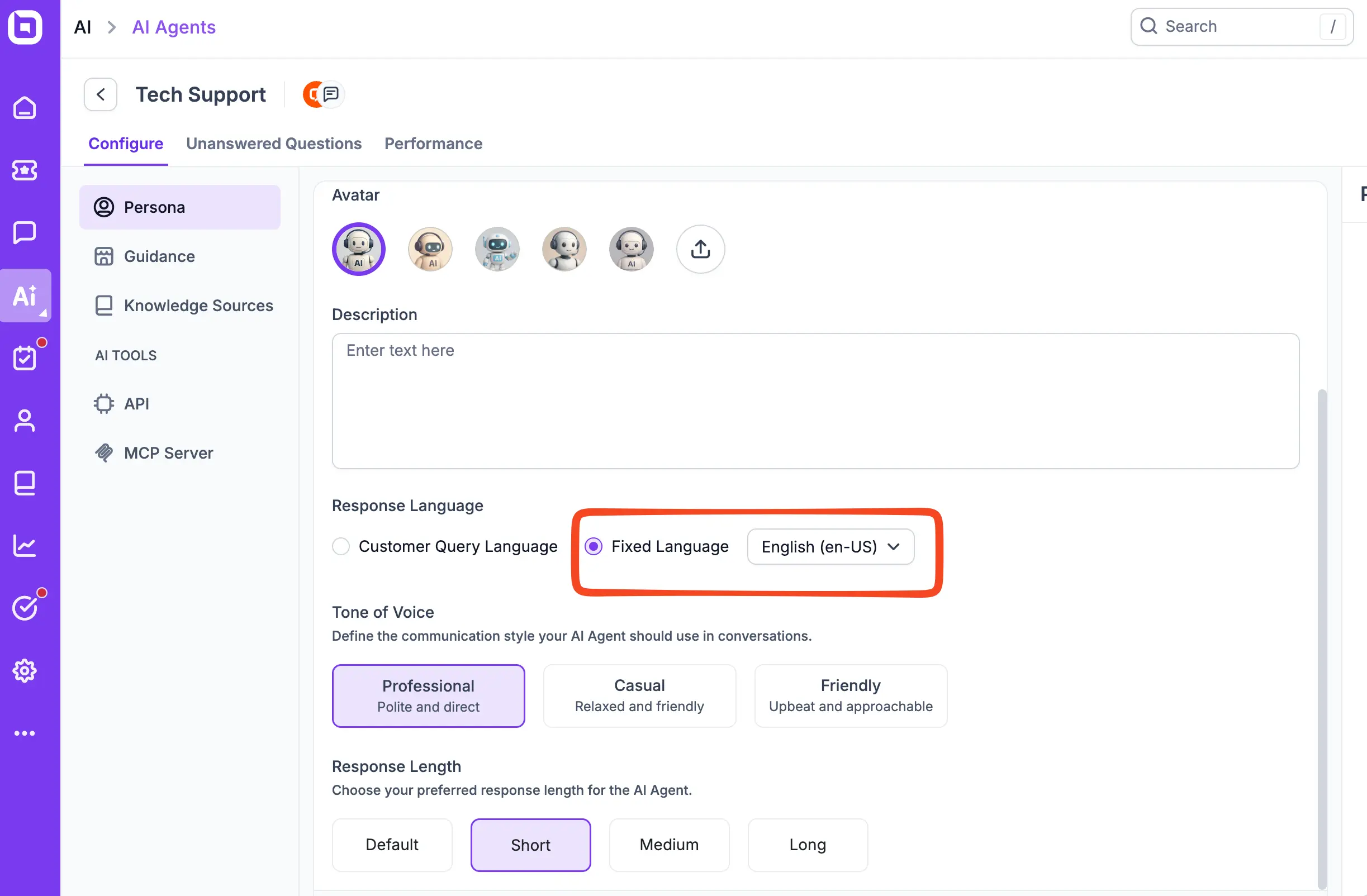
Fixed AI Response Language
Administrators can now lock the AI Agent’s response language to a specific language, regardless of the customer’s input language or ticket content.
- Enforce a single response language (e.g., English-only, French-only) for all AI‑generated replies.
- Override automatic language detection for greater control and consistency.
Result: Consistent communication across global teams.
Ticketing System
Time Tracking (Manual & Automatic)
Time Tracking
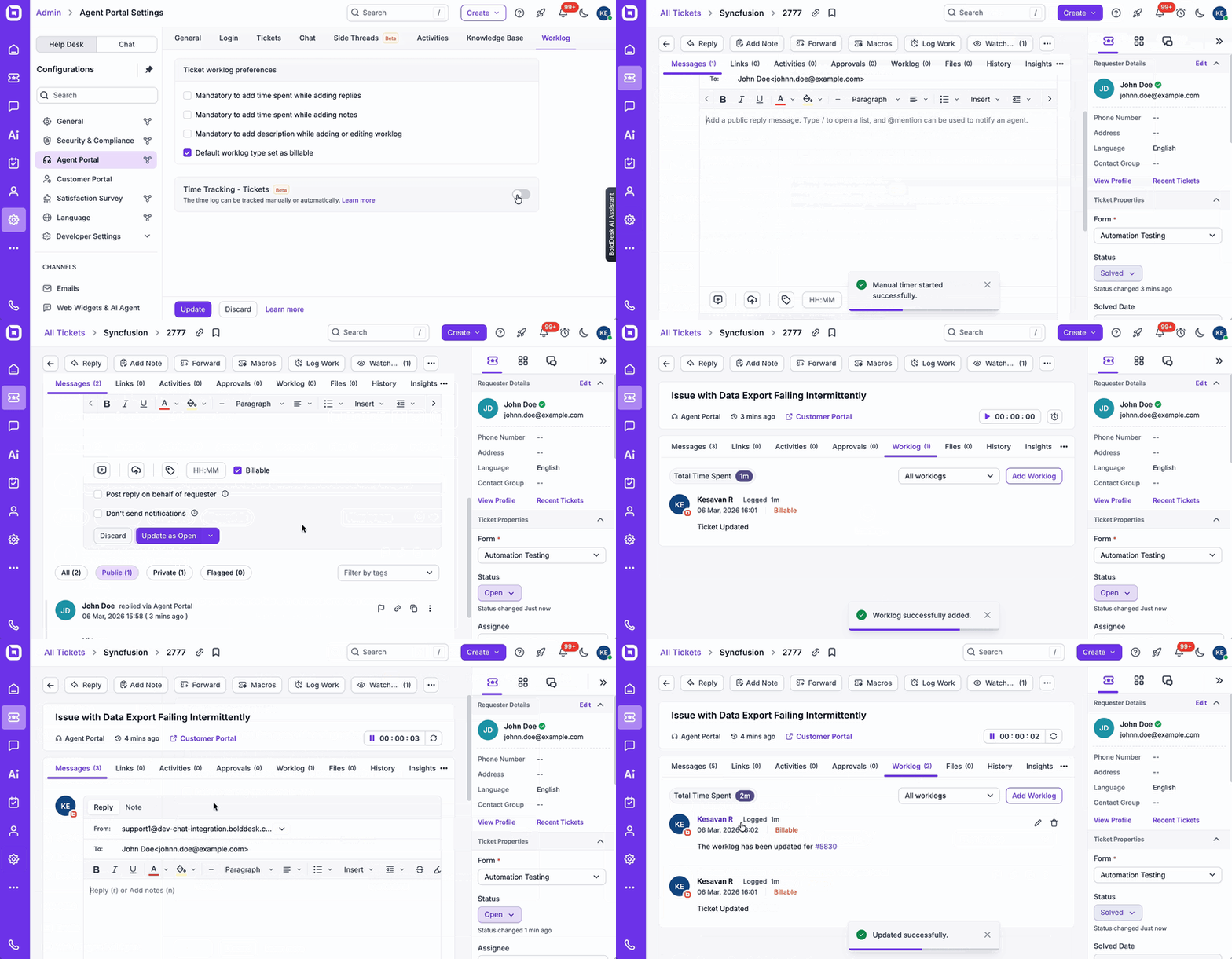
The Time Tracking feature enables agents to accurately record the effort spent on each ticket with minimal disruption to their workflow. With both manual and automatic tracking modes, teams can ensure consistent, transparent, and reliable worklog reporting.
Manual Mode
- Agents can start and stop the timer as needed.
- When the timer is stopped and saved, a worklog entry is automatically created.
- The Global Active Timer dialog provides a centralized view of all running timers, making it easy to manage multiple tickets efficiently.
Automatic Mode
- The timer starts automatically when an agent opens a ticket and begins working on it.
- Time is recorded seamlessly in the background as the agent performs actions.
- The timer pauses or stops automatically based on configured idle timeout settings.
Result: Improved time visibility, accurate billing or effort tracking, and better performance insights — without adding extra steps for agents.
Scheduled Recurring Tickets
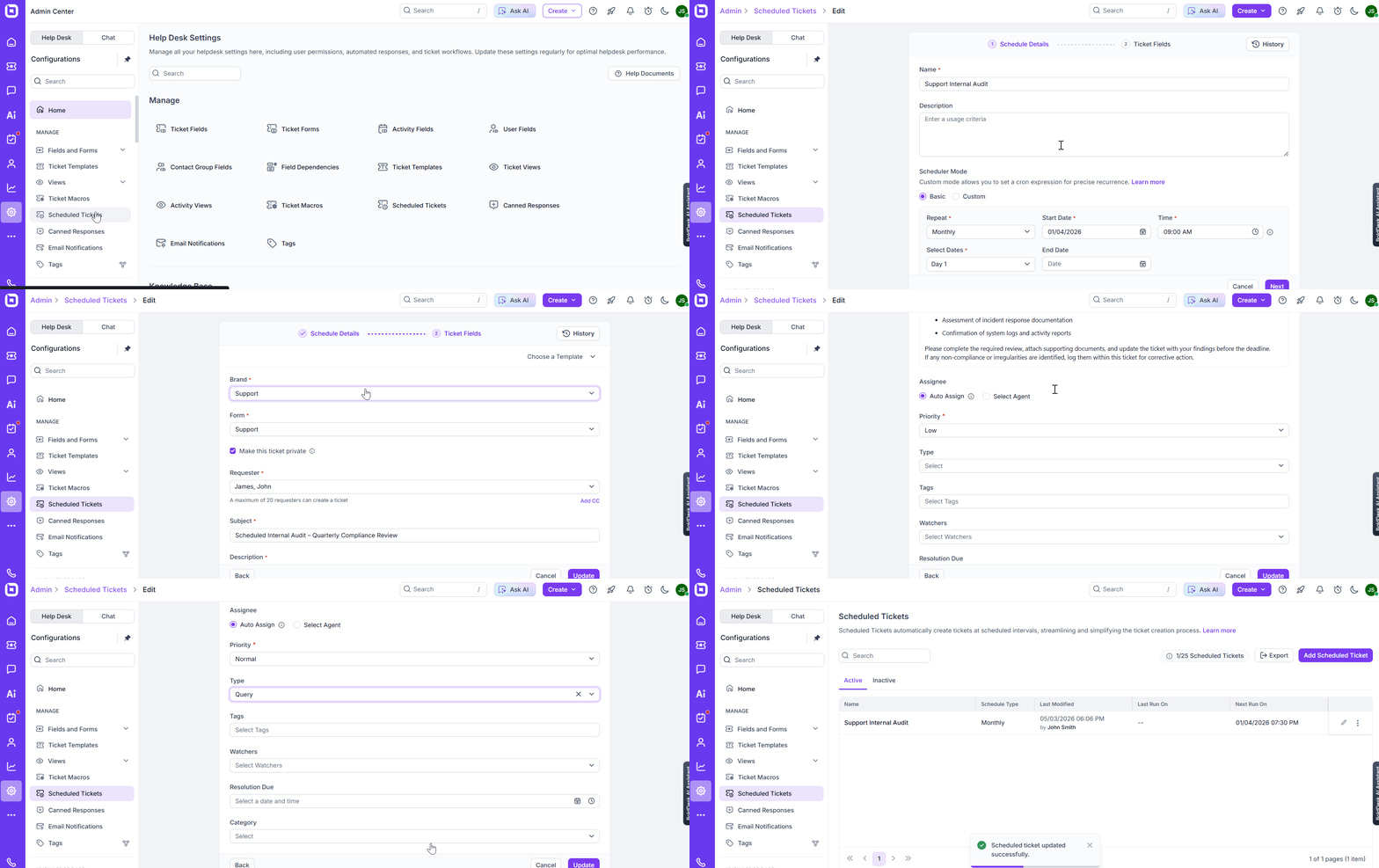
The Scheduled Recurring Tickets feature automates the creation of repetitive tickets based on custom intervals you define. Once scheduled, tickets are generated automatically with the required details—ensuring consistency across routine workflows.
Key Capabilities
- Create tickets automatically at daily, weekly, monthly, or custom intervals
- Predefine ticket details such as subject, description, priority, and assignment
- Maintain consistency across recurring operational tasks
- Reduce manual effort and eliminate missed follow-ups
- Preserve ticket history for better tracking and reporting
Ideal for: Maintenance tasks, compliance reviews, periodic follow-ups, subscription checks, and scheduled service activities.
Result: Improved operational efficiency, reliable execution of recurring processes, and reduced administrative workload.
Ticket reply editor design enhancement
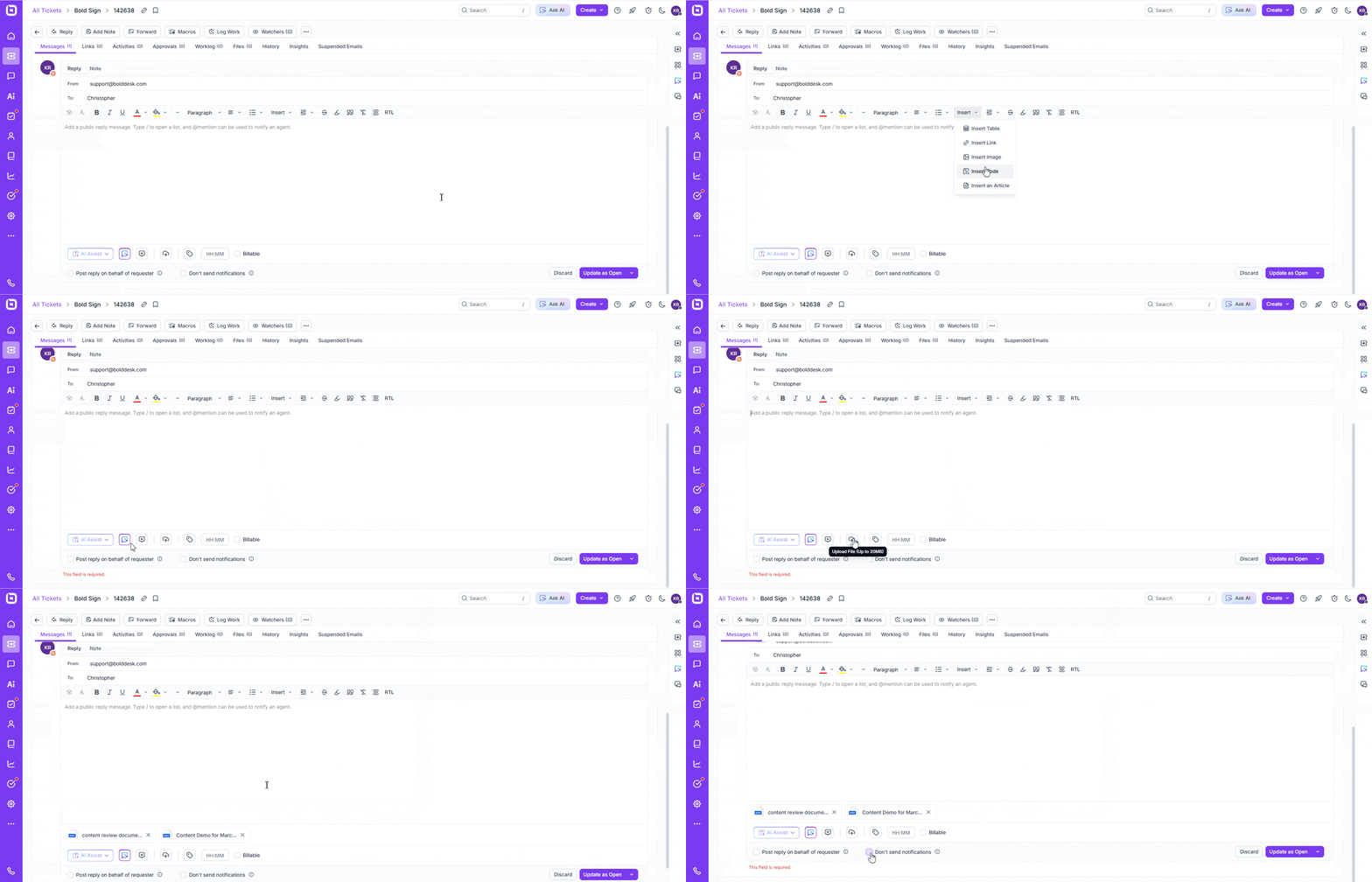
We have updated the Ticket Reply Editor with a cleaner and more organized layout to make replying easier. The toolbar has been rearranged so you can access formatting options more quickly, and the message area now offers better spacing for improved readability. Footer actions—like time tracking, billable settings, and reply options—are now grouped more logically. These improvements help you compose, and format replies faster and more consistently.
AI‑Powered Suggested Replies
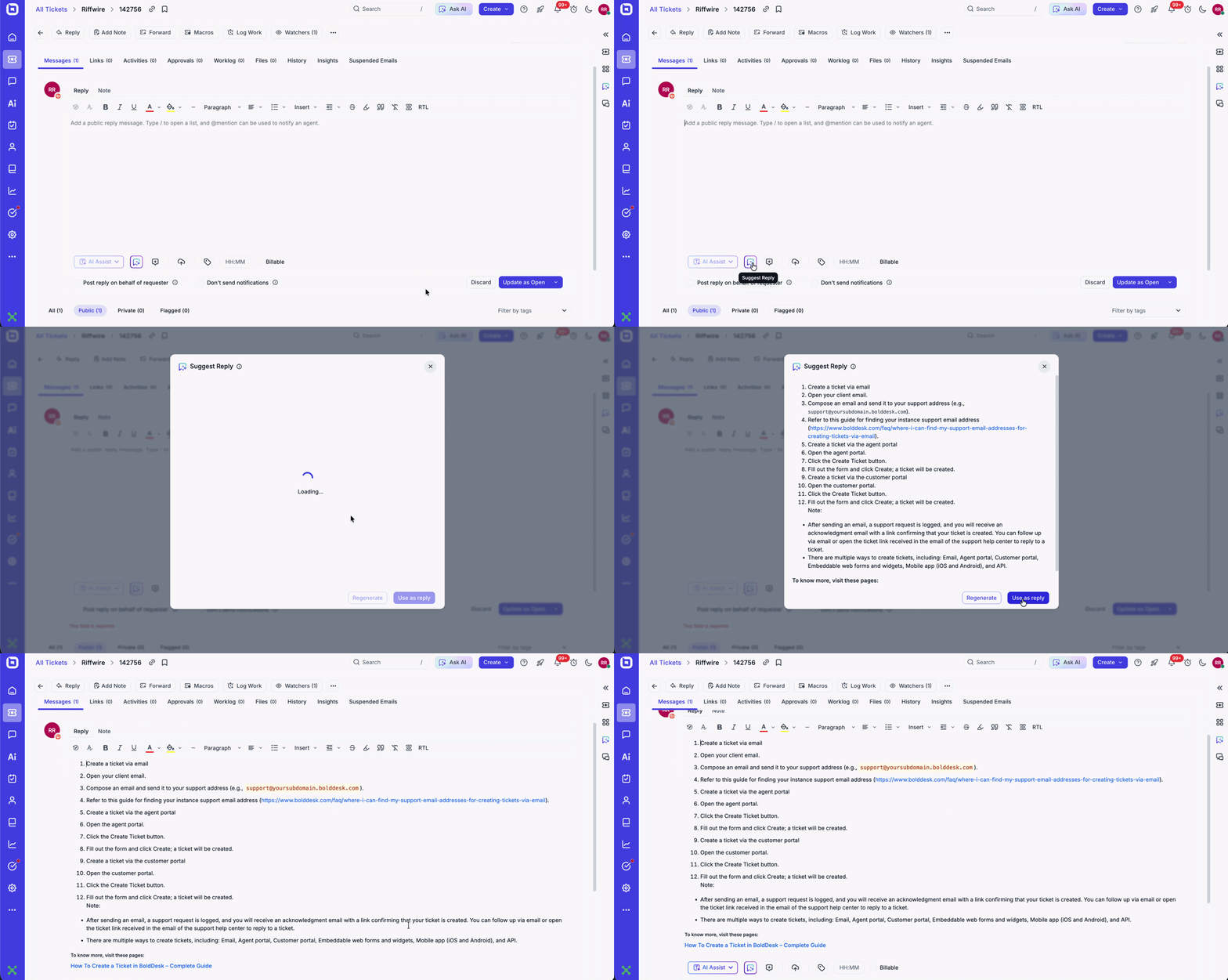
We’ve added a new Suggest Reply feature to help you respond to tickets more quickly and accurately. This enhancement uses AI to review all updates within a ticket—including customer messages, agent replies, internal notes, and status changes—to generate a contextual reply for you.
What this means for you:
- AI‑generated draft replies based on the complete ticket history
- Faster responses
- Full control—you can edit or send the suggested reply as needed
This feature improves your reply process by providing quick, context‑aware suggestions.
Create New Ticket from Forwarded Emails
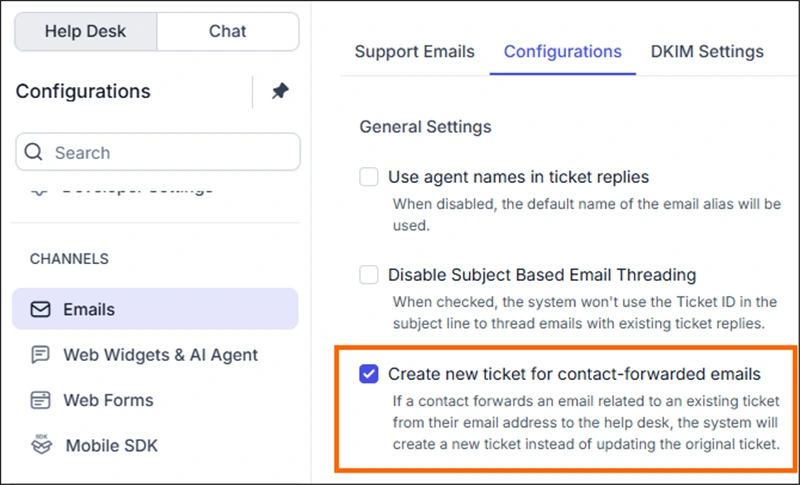
A new setting allows you to control how forwarded emails from contacts are handled. When enabled, any forwarded email that contains an existing ticket reference will create a new ticket instead of updating the original one.
This ensures unrelated issues are not accidentally merged into existing conversations. Admins can enable this option under Email Settings.
Result: Better ticket hygiene, clearer conversations, and improved support efficiency.
Phone number based contact
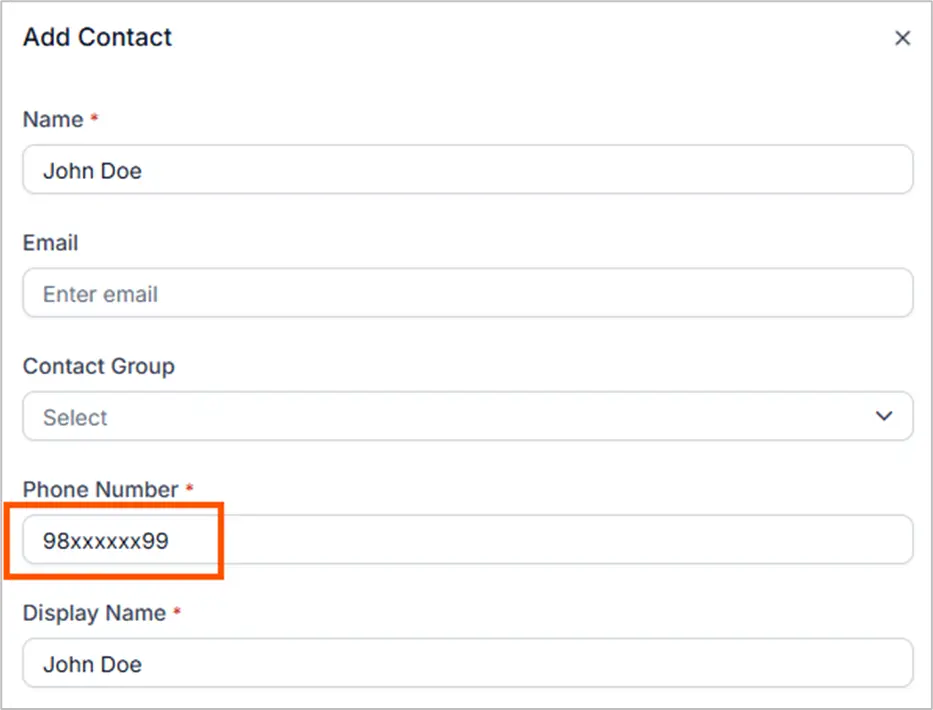
BoldDesk now allows contacts to be created using either a phone number or an email address, removing the previous email-only restriction.
This enhancement supports more flexible user creation across APIs, web forms, chat widgets, and customer portal ticket submissions — even when users are not logged in.
By enabling phone-based contact identification, teams can better support omnichannel interactions, especially for SMS and WhatsApp conversations.
Result: More flexible contact management, improved omnichannel support, and smoother customer onboarding across touchpoints.
Chat and Outbound Message
Multiple Conversation Support
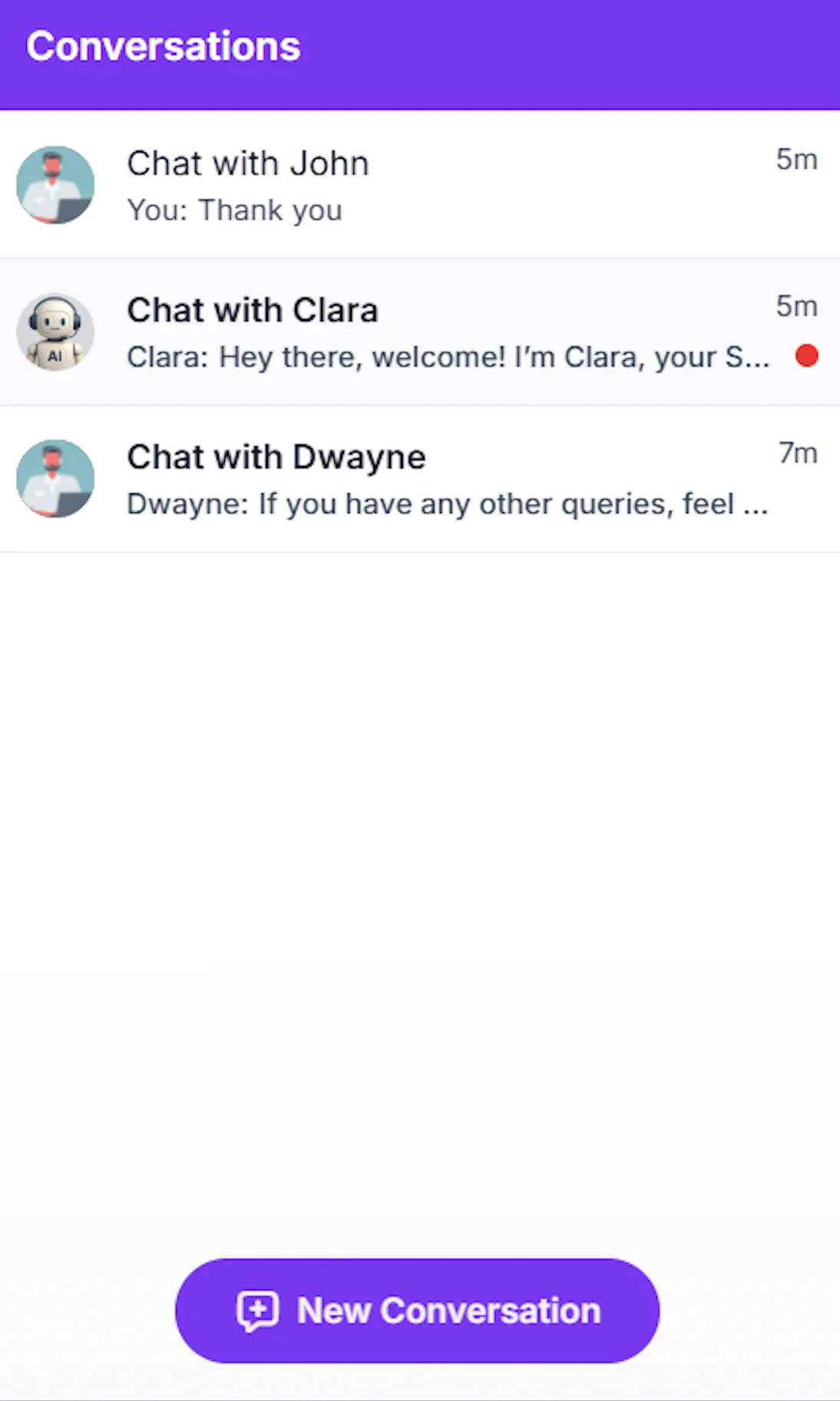
You can now enable customers to initiate multiple conversations within the same chat session. This allows different topics to be handled separately, improving clarity and reducing message overlap.
Each conversation is clearly distinguished in the interface, making it easier to track discussions and maintain proper context. Messages are accurately routed to their respective threads, ensuring conversations remain organized and focused.
Key Features
- Initiate multiple conversations within a single chat session
- Clear UI separation between different discussion threads
- Accurate message routing to the correct conversation
- Unread indicators to highlight pending responses
Result: Cleaner chat experiences, better context management, and improved conversation clarity for both customers and agents.
Predefined Workflow Support
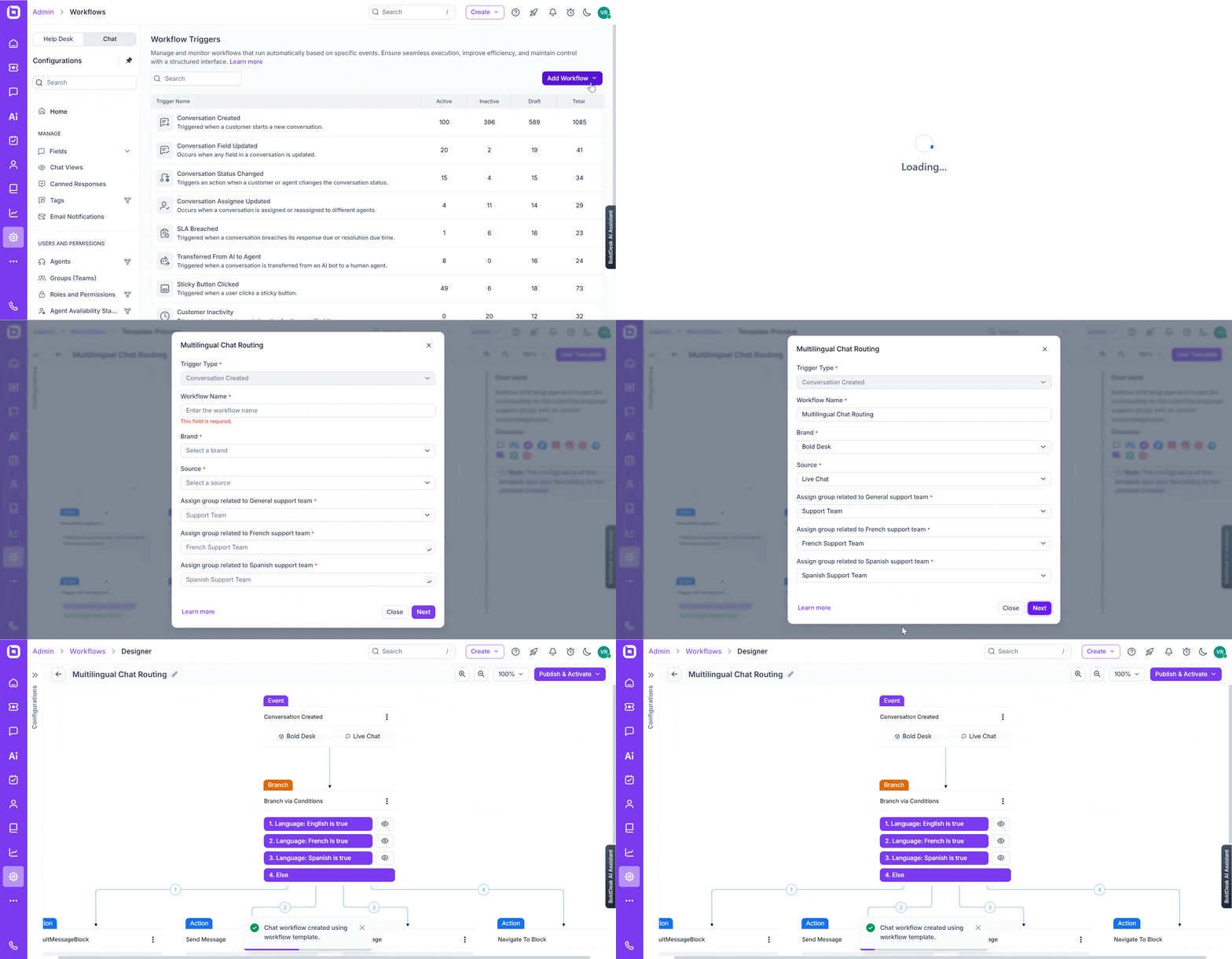
BoldDesk now introduces ready-to-use workflow templates that help you launch automation faster using proven, editable flows. Start with best-practice templates, apply them instantly, and customize them to match your exact business needs — without building workflows from scratch.
These templates are designed to reduce setup time while maintaining flexibility and control.
Key Features
- Apply workflow templates for common scenarios with a single click
- Preview steps, branches, and field mappings before activation
- Use templates as a starting point and customize messages, inputs, and logic
- Edit and adapt workflows without rebuilding from scratch
Result: Faster automation deployment, reduced configuration effort, and consistent workflow execution across teams.
Chat Workflow Improvements
We’ve introduced powerful improvements that make workflows more reusable, easier to navigate, and more data-aware — helping you streamline automation, routing, and reporting with greater efficiency.
Navigate To Block
Reuse existing blocks by referencing a block name within the workflow. Instantly jump to any configured step without scrolling through the entire flow. The workflow resumes from the referenced block path, reducing duplication and simplifying long-flow maintenance.
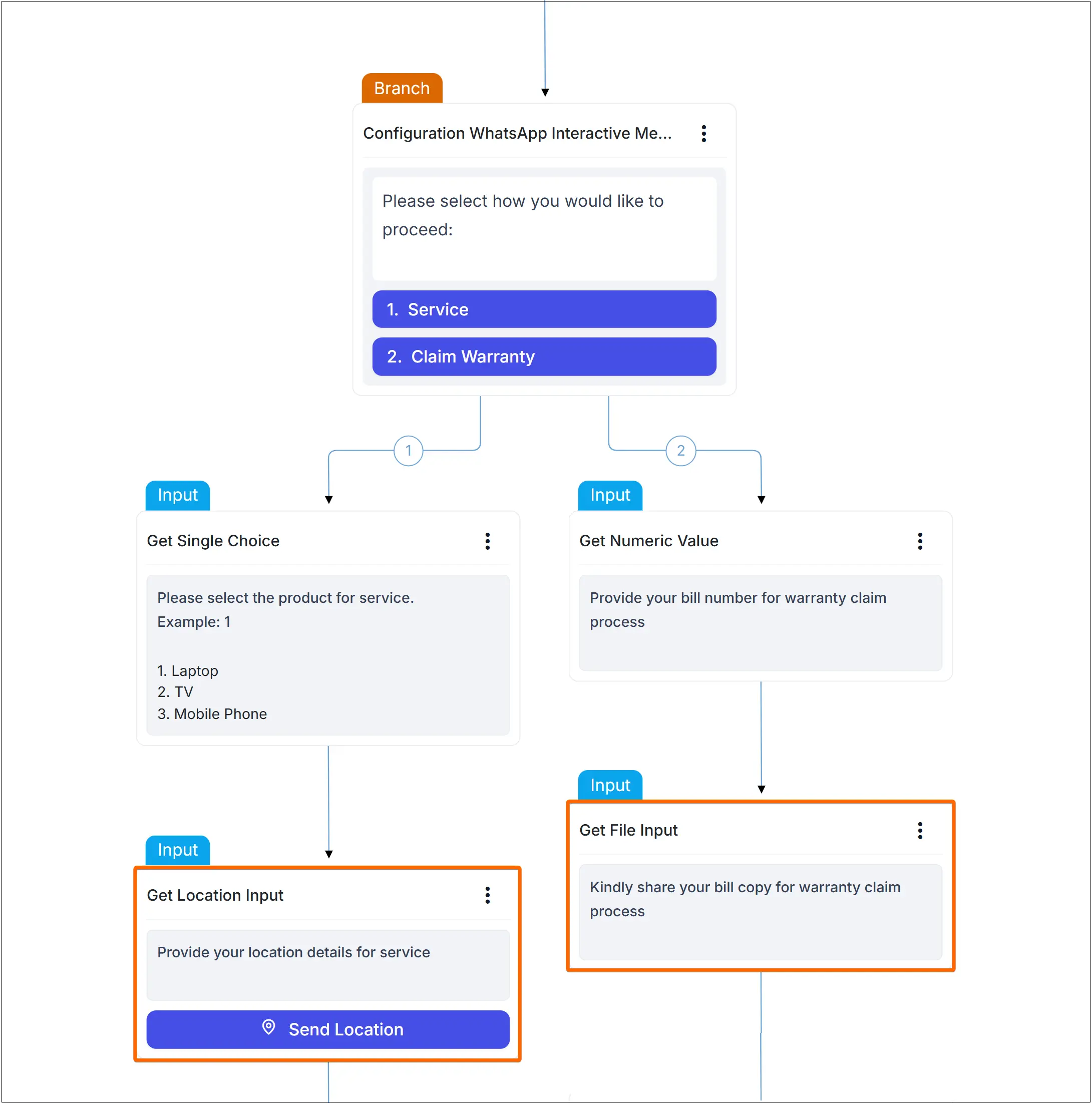
Get File Input
Collect files in commonly used formats with built-in type validation. Uploaded files can be mapped to fields for use in routing, automation logic, and reporting across supported channels.
Get Location Input
Capture a user’s current location or a pinned map position (latitude/longitude and address). Location data can be mapped to fields for downstream routing, automation, and reporting workflows.
Result: More modular workflows, cleaner automation logic, and richer data capture — without increasing configuration complexity.
Developer API Webhooks
The BoldDesk Chat Developer platform now includes ready-to-use webhook events that allow you to integrate real-time chat activity into your custom applications.
These webhooks trigger instantly when conversations are created or updated, enabling you to automate workflows, synchronize systems, and build responsive integrations tailored to your support processes.
New Webhook Events
- Conversation Created — Trigger actions when a new conversation starts
- Conversation Updated — Track status changes, assignments, or metadata updates
- Conversation Deleted — Automatically synchronize conversation clean-up
- Message Sent — Capture messages sent by users or agents in real time
- Message Edited — Stay aligned with updated message content
- Message Deleted — Maintain data consistency across systems
You can customize payload handling, routing rules, and downstream actions to ensure consistent and real-time behavior across your chat applications.
Result: Real-time integration capabilities that power automation, analytics, and seamless cross-system communication.

Omnichannel
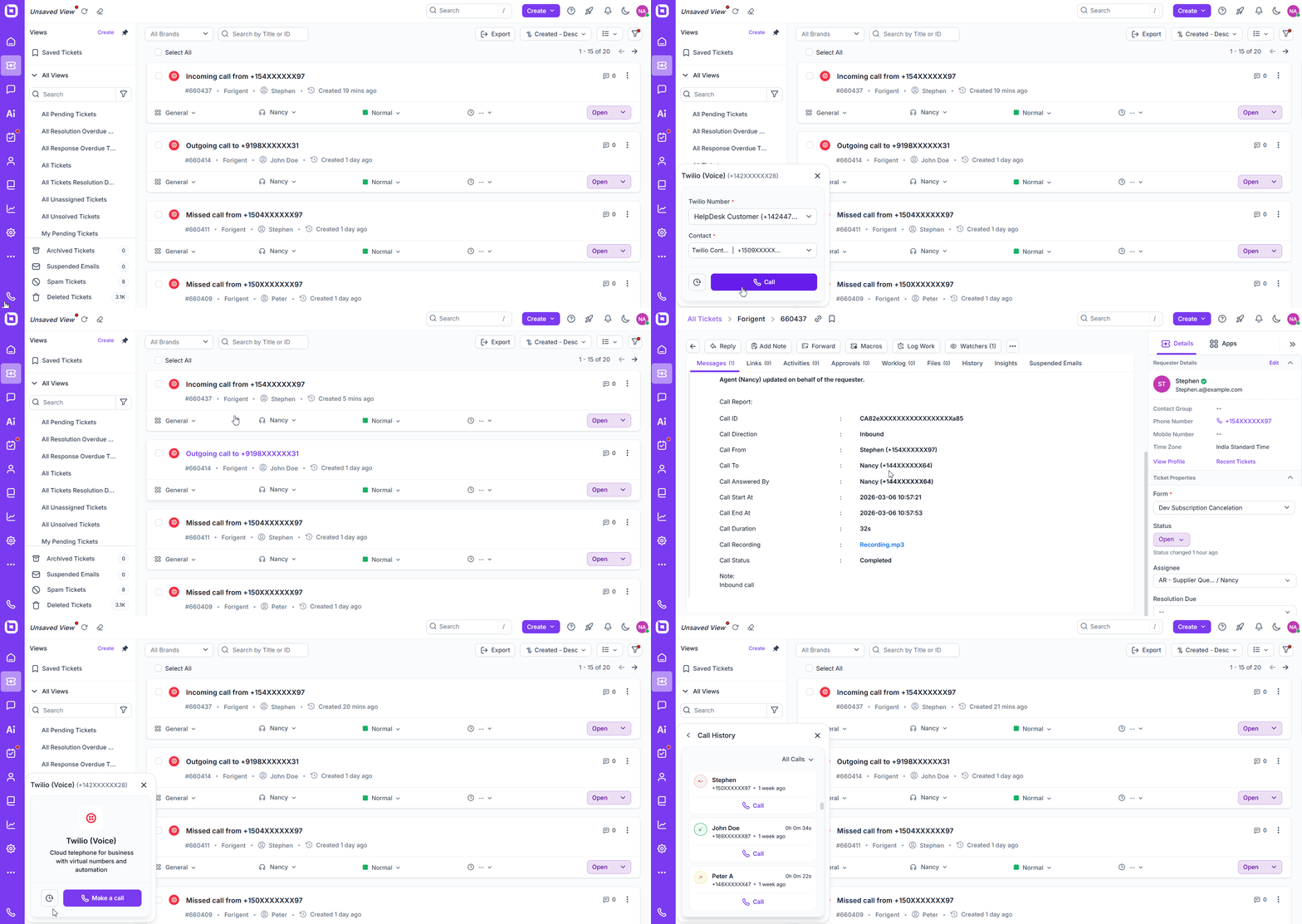
Twilio Voice Calling
BoldDesk now supports full Twilio voice calling, allowing agents to make and receive calls directly within the helpdesk — without switching platforms.
Key Capabilities
- Click-to-Call: Instantly initiate calls from tickets or contact profiles
- Organized Number Assignment: Manage and assign Twilio numbers efficiently
- Automatic Call Logging: Automatically record call details for complete visibility
Key Benefits
- Centralize voice and ticket interactions in one platform
- Improve agent productivity with seamless call handling
- Maintain a complete communication history for every customer
Result: Unified voice support, better visibility, and a more streamlined customer experience.
Proactive Outbound Messaging (Beta)
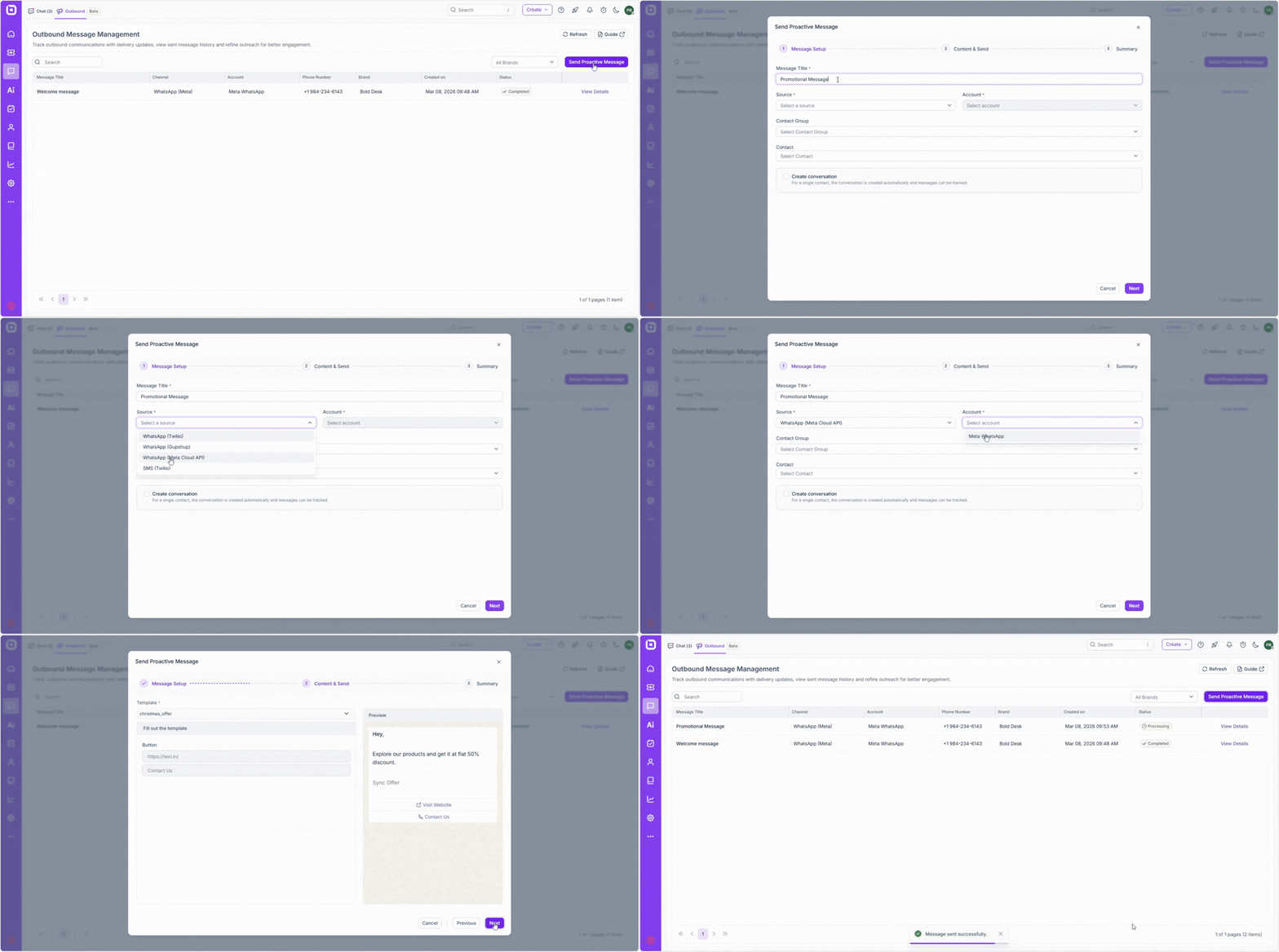
BoldDesk now supports proactive outbound messaging across WhatsApp and SMS channels, enabling teams to initiate conversations directly with customers.
With this enhancement, agents can send marketing, promotional, or important service updates beyond regular support interactions.
Key Capabilities
- Initiate outbound messages directly from BoldDesk
- Send marketing and promotional content
- Reach customers via WhatsApp and SMS
- Engage contacts outside traditional support conversations
Key Benefits
- Faster customer outreach
- Improved engagement and response rates
- Expand support into proactive communication
- Strengthen omnichannel customer relationships
Result: Move from reactive support to proactive engagement — all within BoldDesk.
WhatsApp Template Management via Meta Cloud API
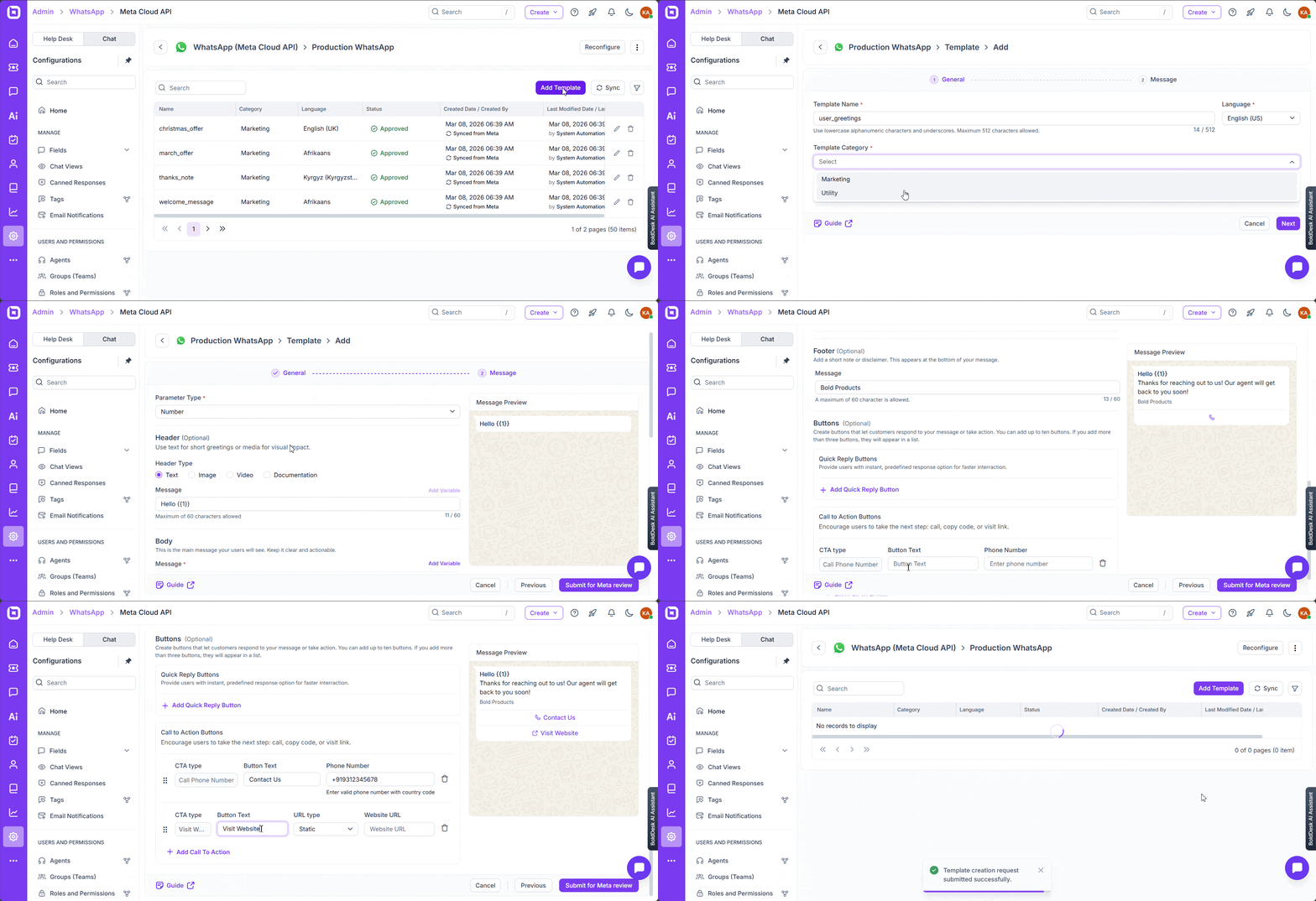
You can now manage WhatsApp message templates directly within BoldDesk using the Meta Cloud API, giving you complete control over template creation, approvals, and usage — without switching platforms.
From
Admin → Chat → WhatsApp (Meta Cloud API) → Manage Accounts → Manage Templates,
you can view, sync, and manage both Marketing and Utility templates directly inside BoldDesk.
Templates support rich components such as images, videos, quick replies, CTA buttons, and product catalogs, allowing you to create engaging and interactive WhatsApp experiences.
You can also monitor approvals, rejections, and usage metrics to refine your messaging strategy and ensure compliance.
Result: Centralized template management, faster campaign execution, and improved visibility into WhatsApp performance — all from within BoldDesk.
Dashboard & Reports
Revamped AI Dashboards
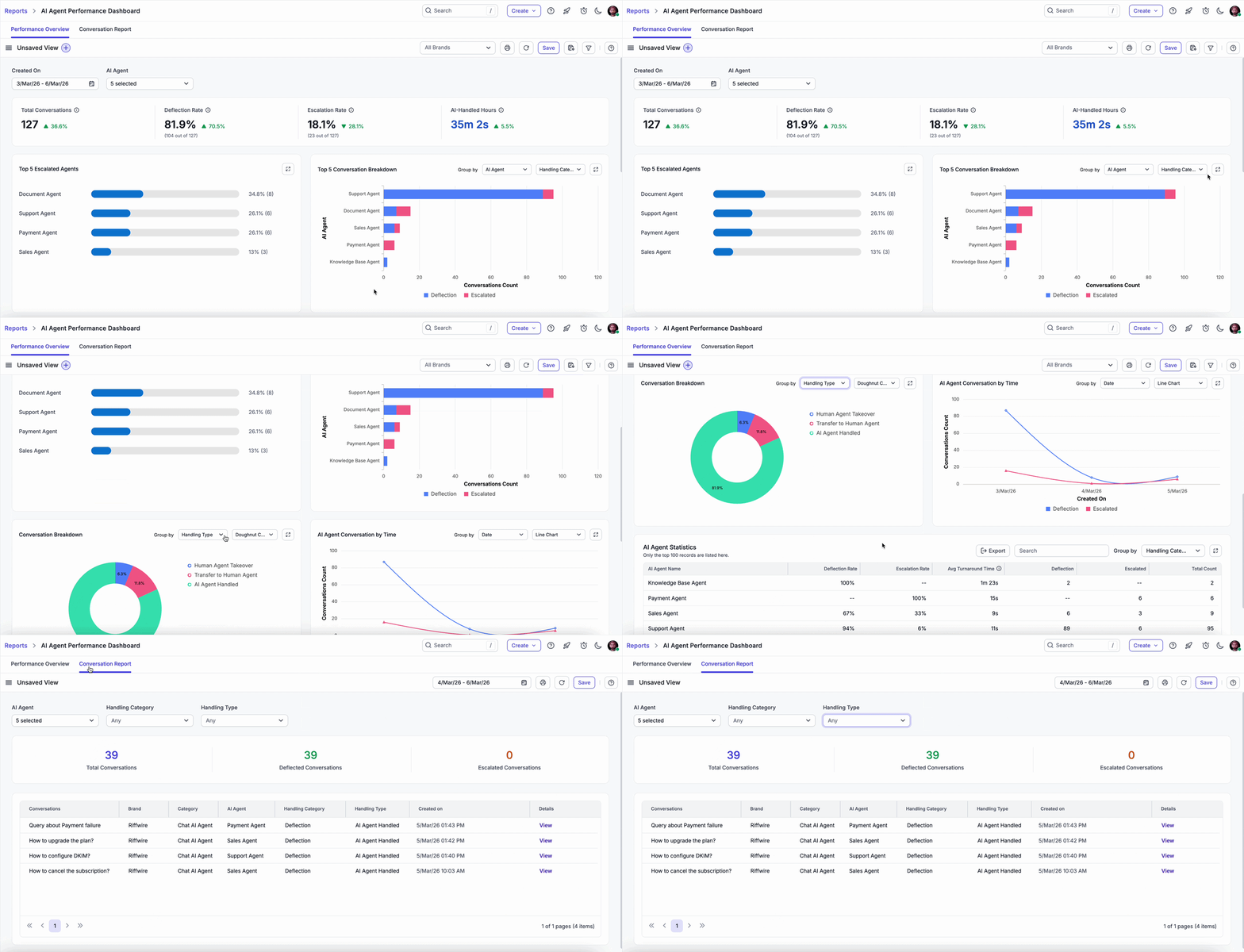
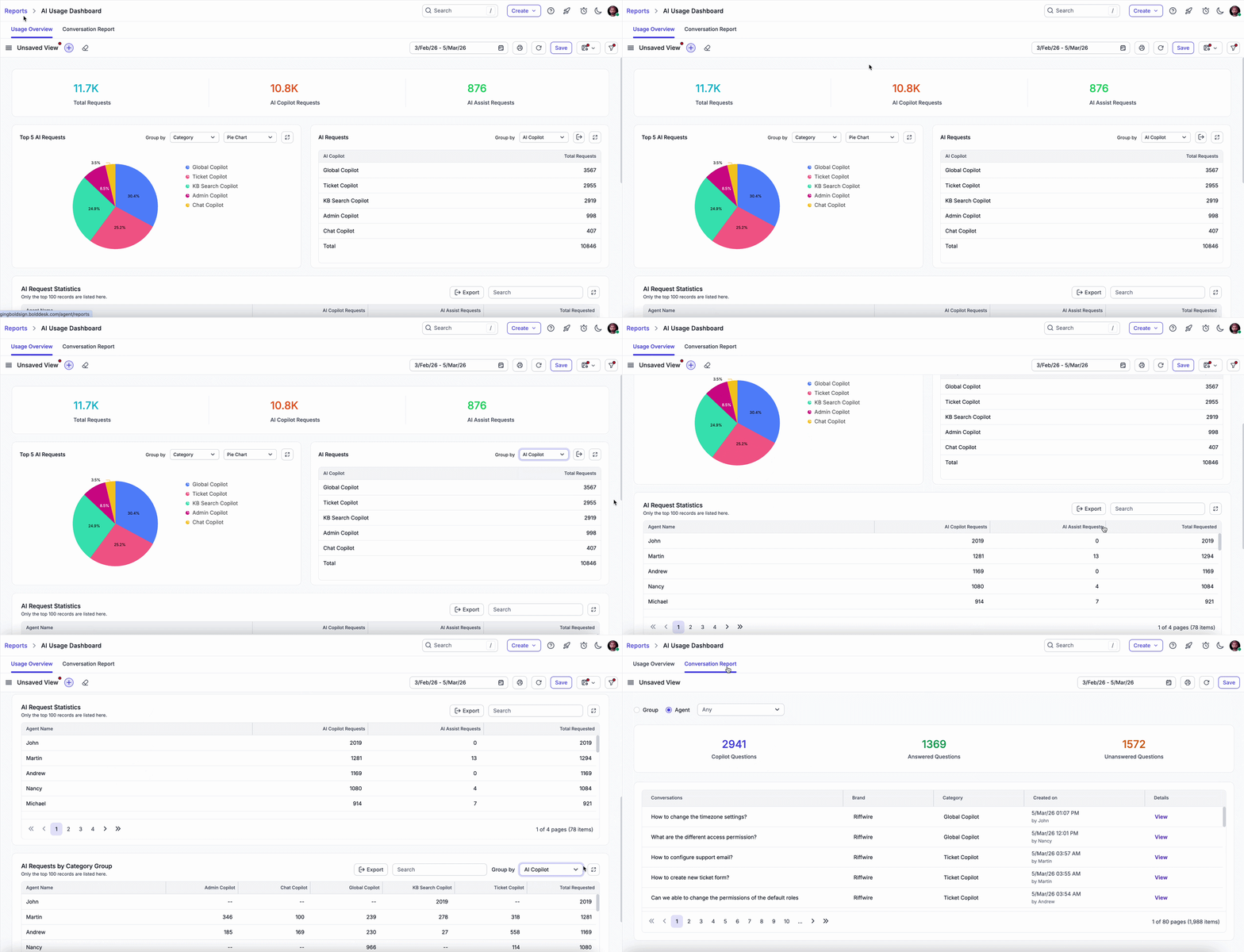
We’ve streamlined analytics into two unified dashboards:
AI Agent Performance Dashboard
- Performance Overview
- Conversation Report
AI Usage Dashboard
- Usage Overview
- Conversation Report
Result: Clear visibility into performance, usage, and impact — without dashboard clutter.
Global Filter Support in Custom Dashboards
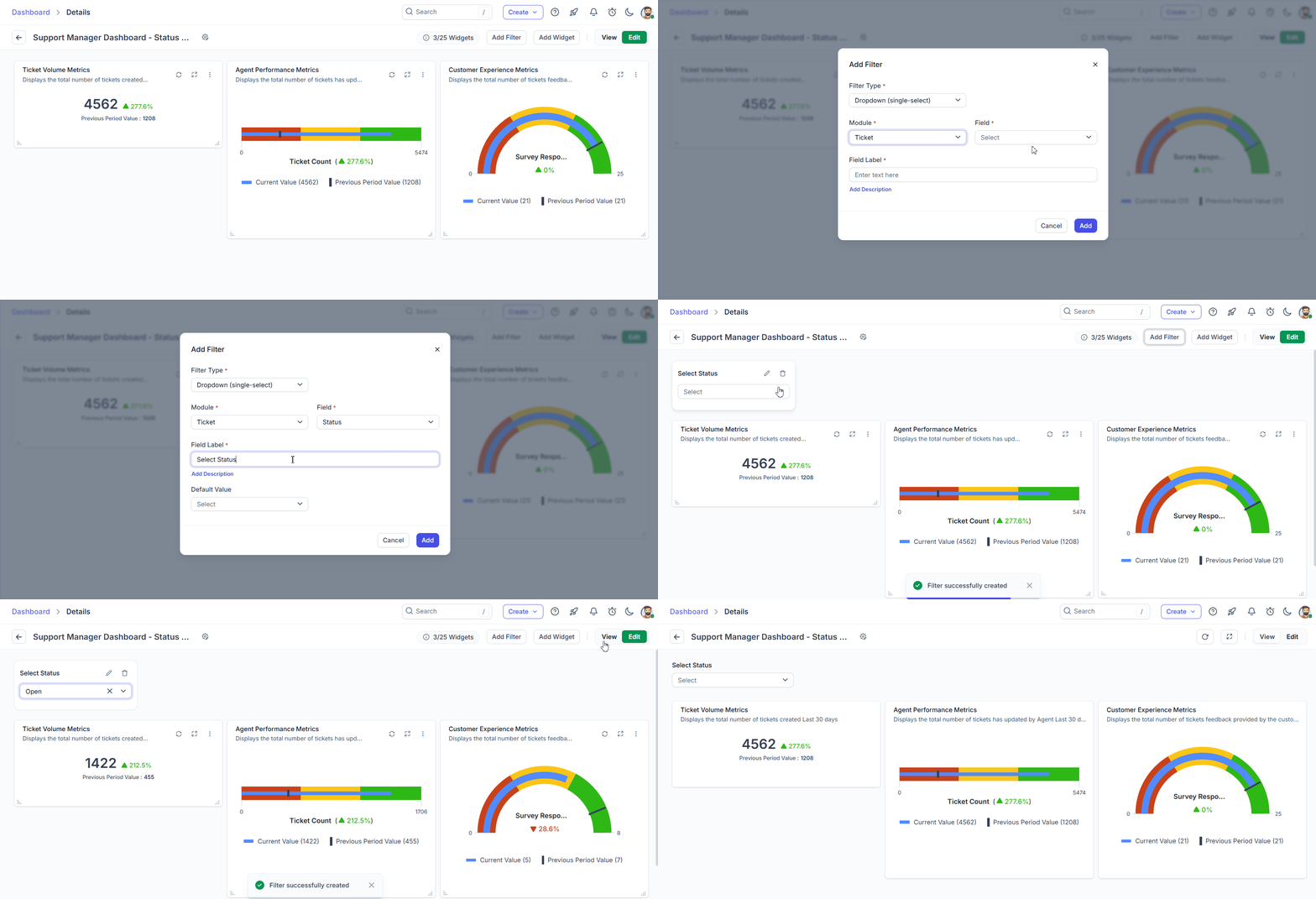
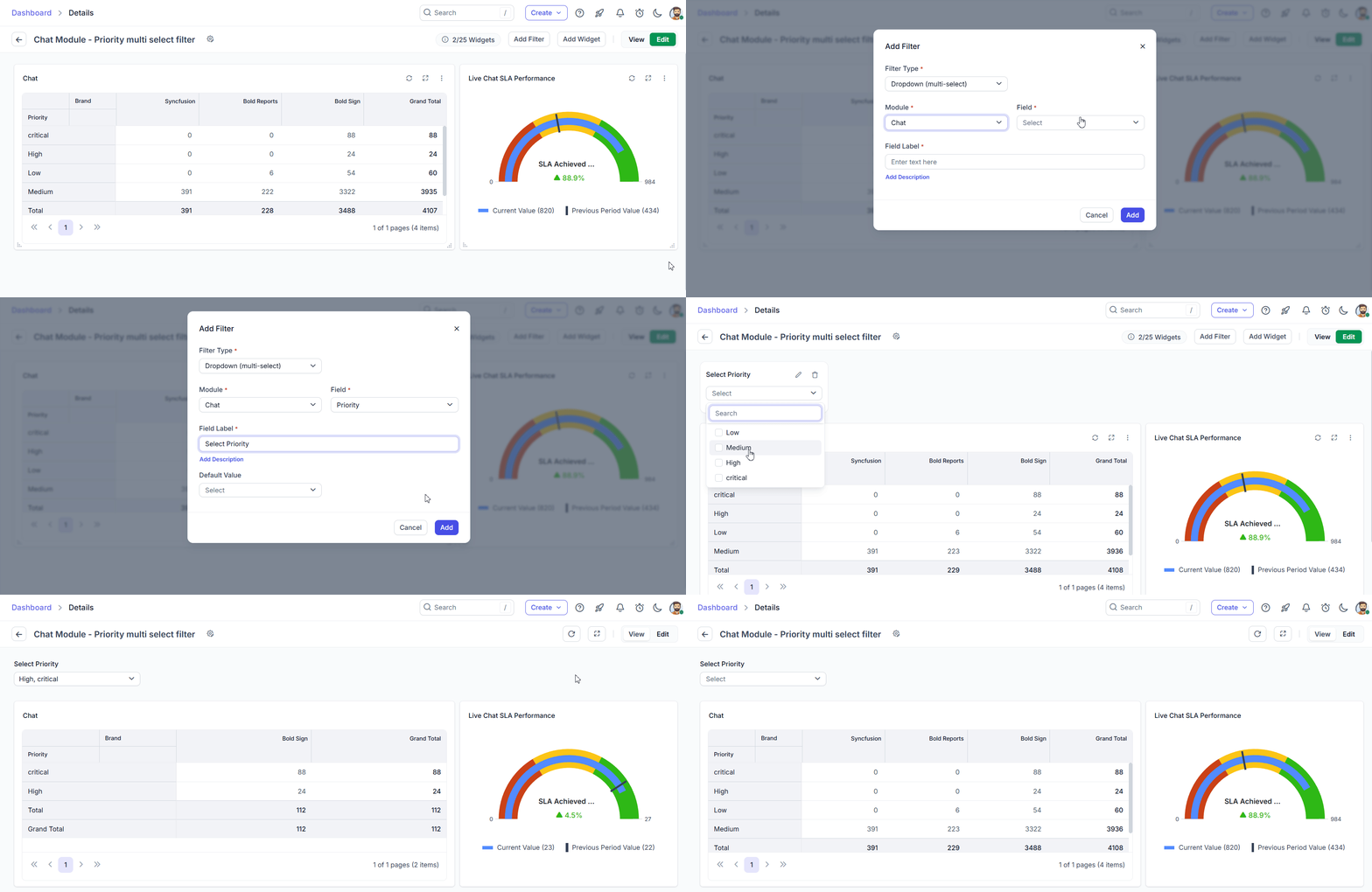
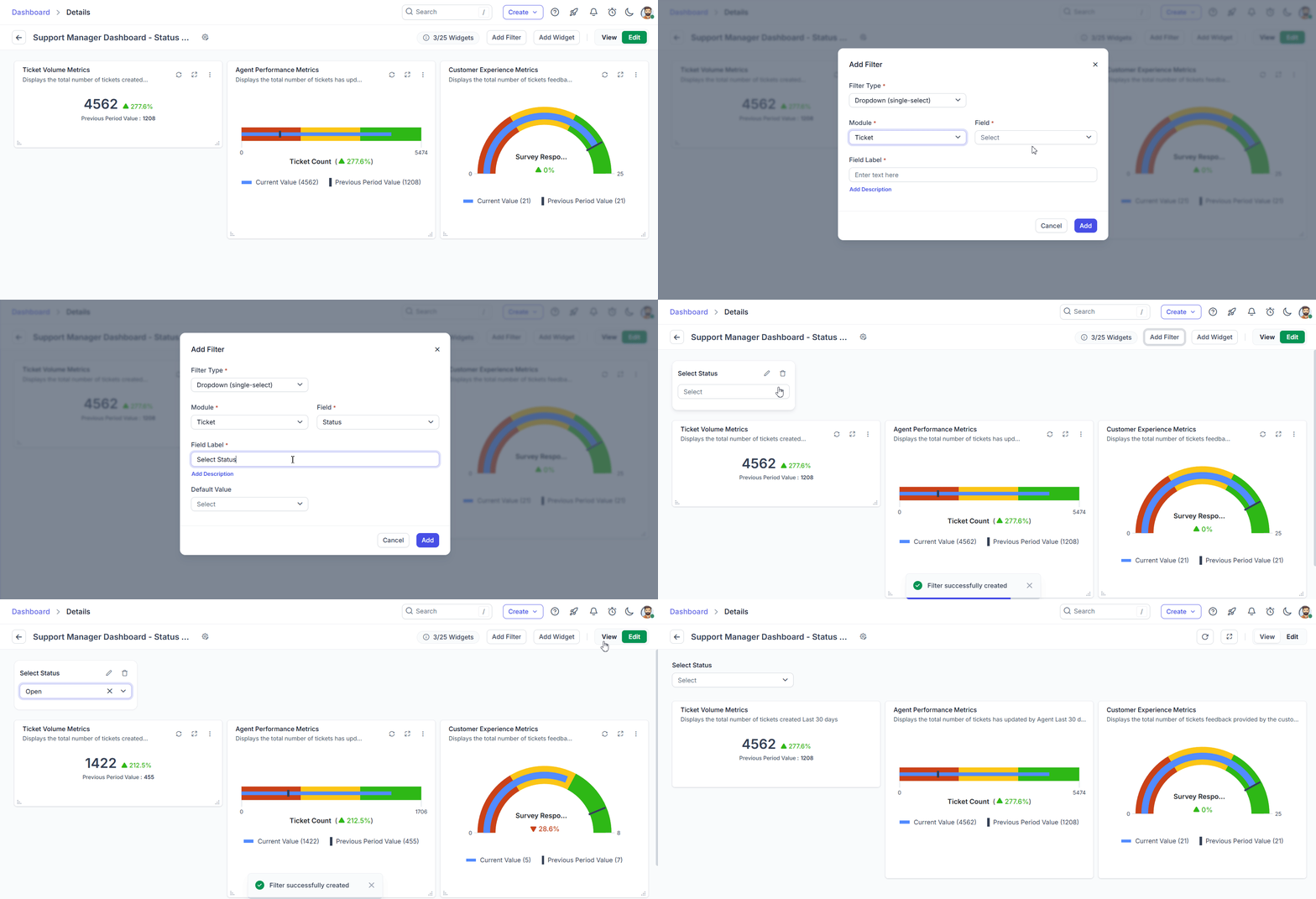
You can now add, edit, or delete Global Filters directly within a dashboard. This allows you to instantly filter widget data in View Mode, without needing to switch to Edit Mode or redefine individual widget conditions.
How It Works
- Create global filters by selecting a module and its corresponding fields.
- The filter applies only when the selected module matches the widget’s module.
- If the same field exists in both widget conditions and the global filter, the global filter overrides the widget condition.
Supported Filter Types
- Dropdown (Single Select)
- Dropdown (Multi Select)
- Date Range
Key Benefits
- Instantly refine dashboard insights
- Reduce repetitive configuration work
- Maintain consistent filtering across multiple widgets
- Enable faster and more dynamic data analysis
Result: More flexible dashboards, quicker insights, and streamlined reporting workflows.
Enhanced Advanced Filtering in Custom Dashboards
Custom dashboards now support additional fields in Advanced Filtering, allowing you to refine data with greater precision and retrieve results tailored to your exact requirements.
Newly Supported Fields
- All Modules – Date-type fields
- Ticket Message Module – Message Tags
- Worklog Module – Time Spent
Key Benefits
- Perform more granular data analysis
- Build highly specific reports with accurate filtering
- Gain deeper visibility into ticket activity and agent effort
- Improve decision-making with refined insights
Result: More powerful dashboards that deliver precise, actionable analytics.
Knowledge Base
Supercharged LLM Documentation Support!
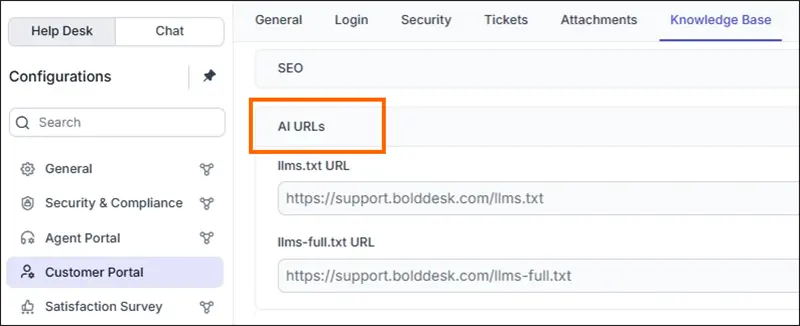
We’ve introduced llms-full.txt — a complete documentation file designed for large language models.
- Provides full KB context in one file
- Improves AI referencing accuracy
- Eliminates HTML parsing dependency
Result: Better AI performance powered by your knowledge base.
Knowledge Base Article PDF Export
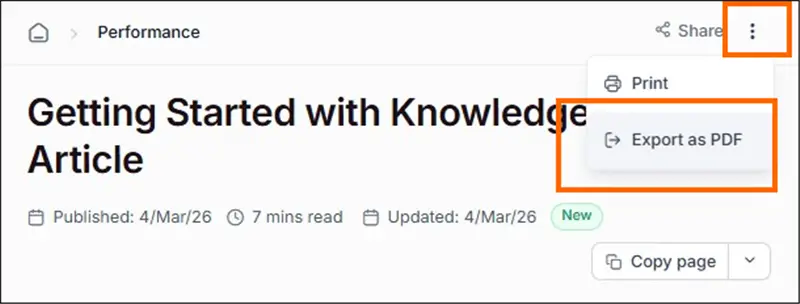
Knowledge Base articles can now be exported as PDF files for convenient download and distribution.
This makes it easier to share documentation across teams, distribute content externally, and maintain structured records when needed.
PDF export also supports offline access, enabling users to reference documentation anytime without relying on an internet connection.
Result: Improved content portability, simplified sharing, and better accessibility for internal and external stakeholders.
Enhanced Navigation Experience: Articles Now Visible in the TOC
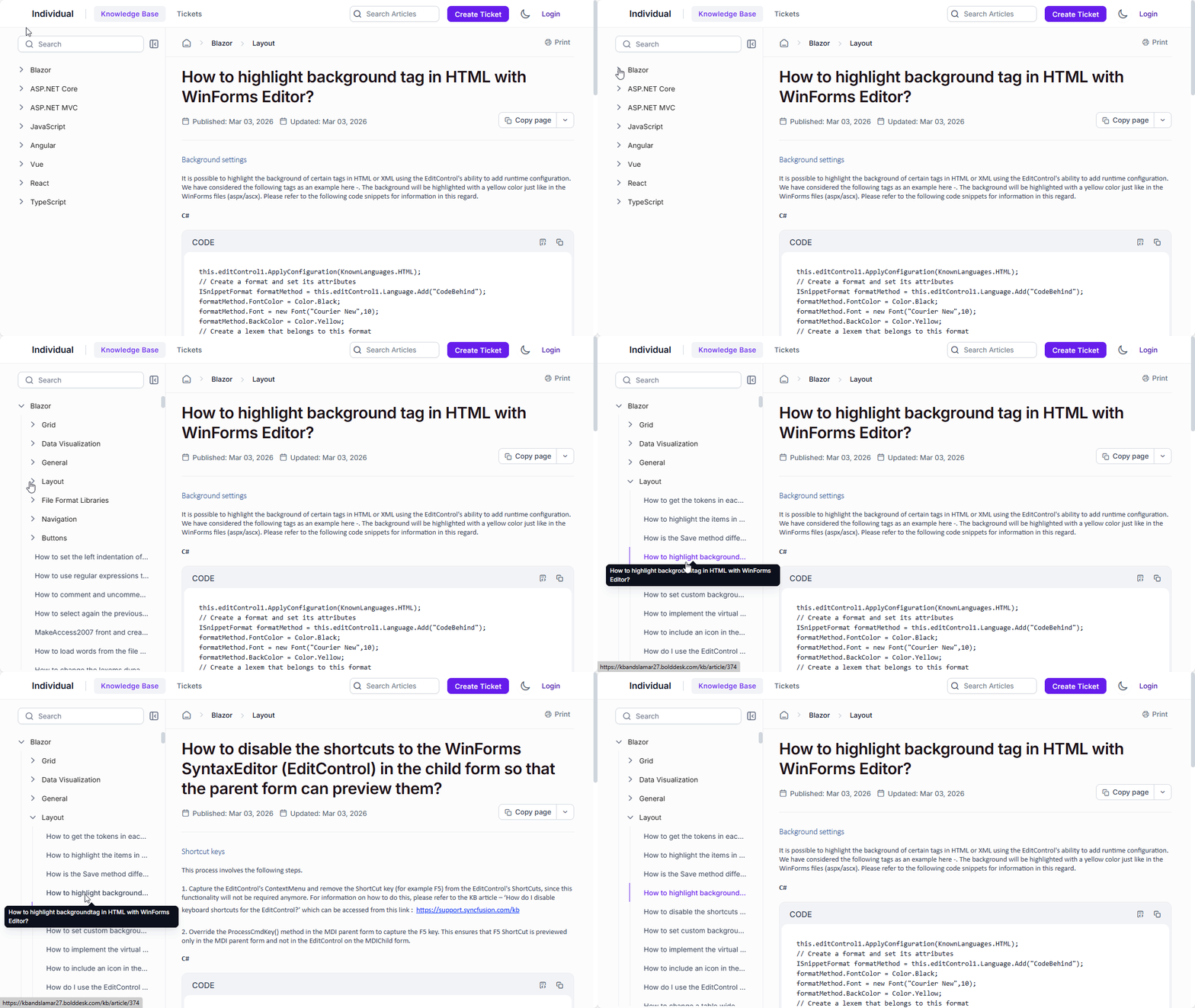
We’ve improved the Knowledge Base navigation experience by extending the left-hand table of contents (TOC) to include Category → Section → Article levels.
This enhancement helps readers:
- Understand where an article sits within the overall knowledge structure
- Navigate between related articles more easily
- Explore deeper levels of content without needing to return to the full category view
This update provides clearer context, smoother browsing, and a more intuitive reading experience across the Knowledge Base.
Mobile App
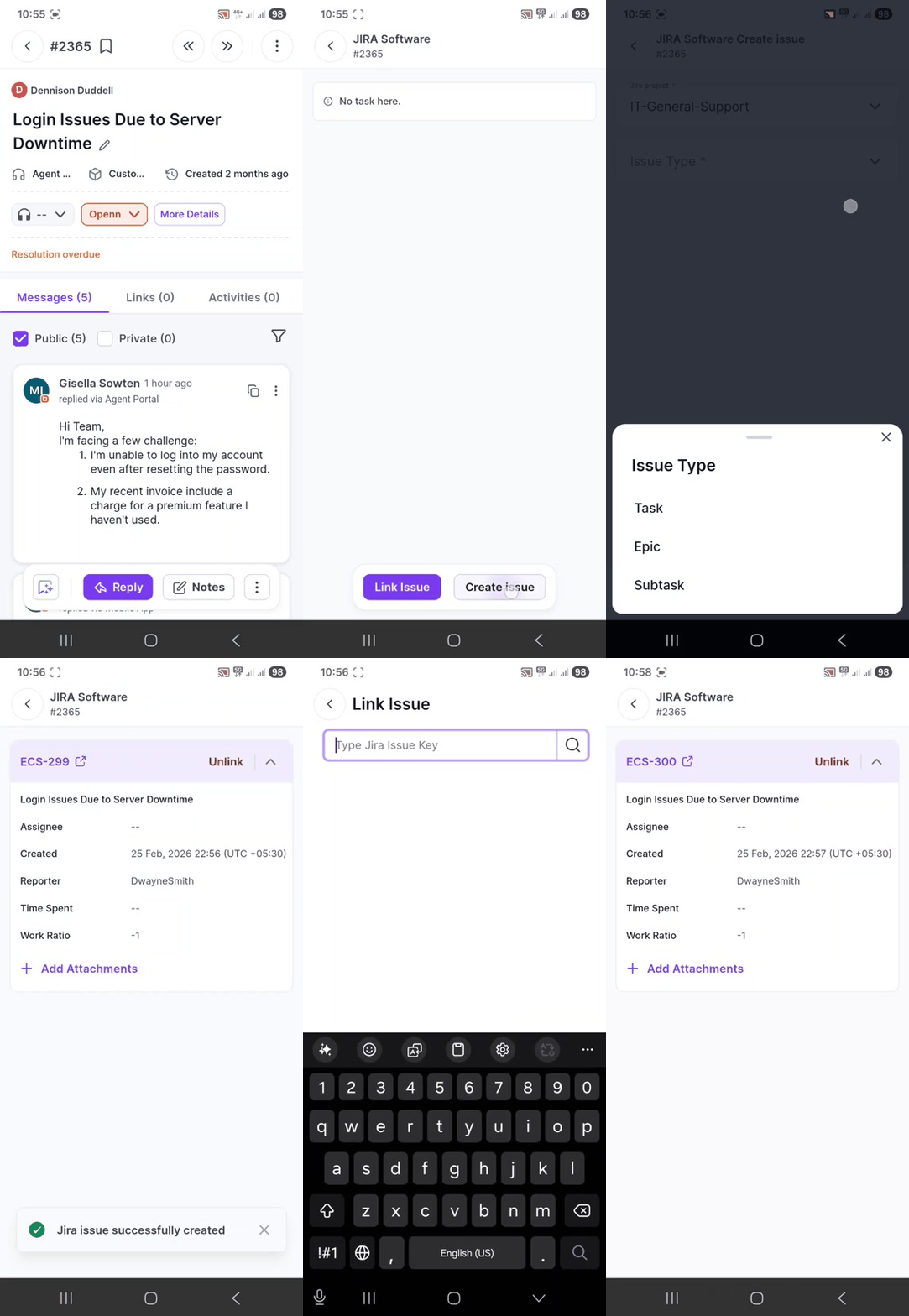
JIRA Software Integration
Jira integration is now available in the BoldDesk mobile app, enabling agents to connect support tickets with engineering tasks directly from their mobile devices.
Agents can link existing Jira issues or create new ones without leaving the app, ensuring faster collaboration between support and development teams.
Key Features
- Link or unlink existing Jira issues with tickets
- Create new Jira issues directly from the mobile app
- View linked Jira issue details within the ticket page
Result: Improved cross-team visibility, reduced context switching, and faster issue resolution — even while working on the go.
Azure DevOps Integration
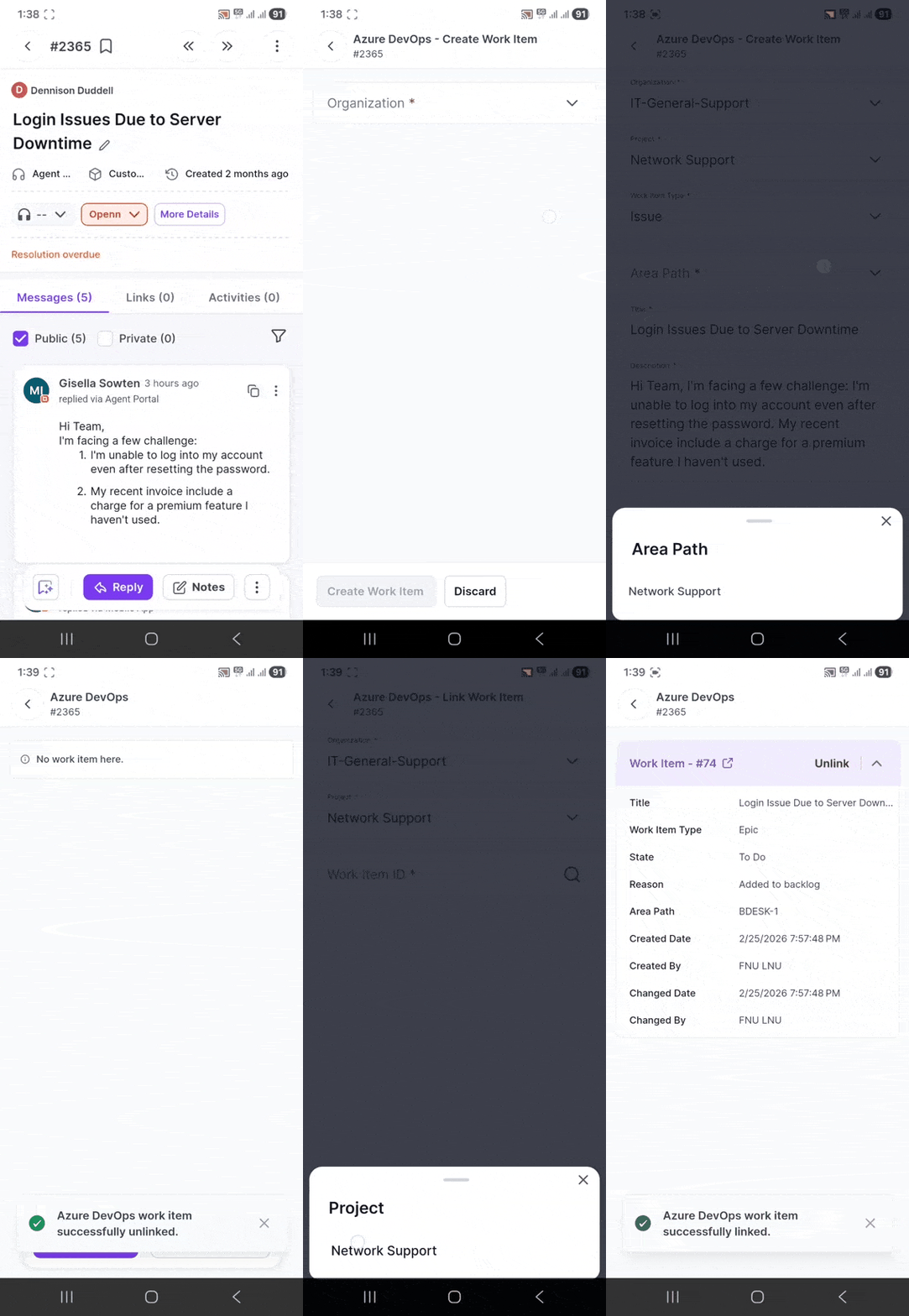
Azure DevOps integration is now available in the BoldDesk mobile app, enabling agents to connect development work items with support tickets directly from their mobile devices.
Agents can seamlessly link existing Azure DevOps work items to tickets or create new work items without leaving the app, improving coordination between support and engineering teams.
Key Features
- Link or unlink existing Azure DevOps work items with tickets
- Create new Azure DevOps work items directly from the mobile app
- View linked work item details within the ticket page
Result: Faster collaboration between support and development teams, reduced context switching, and improved issue resolution workflows — even while on the go.
WooCommerce Integration
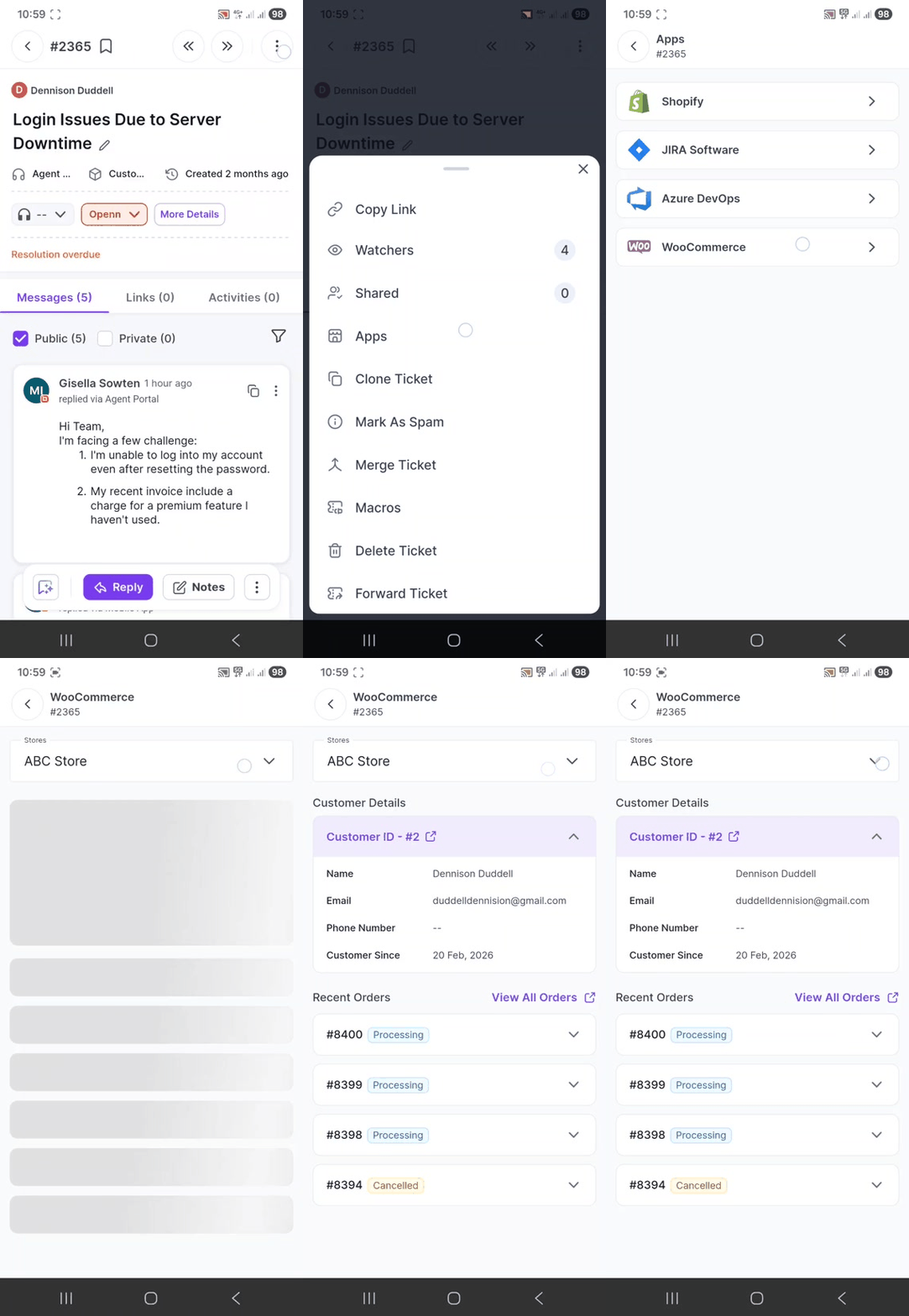
WooCommerce integration is now available in the BoldDesk mobile app, allowing agents to access customer order information directly from their mobile devices.
Agents can view order details and manage returns or cancellations within BoldDesk — without switching to the WooCommerce store interface.
Key Capabilities
- View customer order details linked to tickets
- Process returns and cancellations directly from the app
- Access store information without leaving BoldDesk
Result: Faster order-related support, reduced context switching, and a more seamless support experience for eCommerce teams.
Chat SDK
Chat SDK for Flutter & React Native
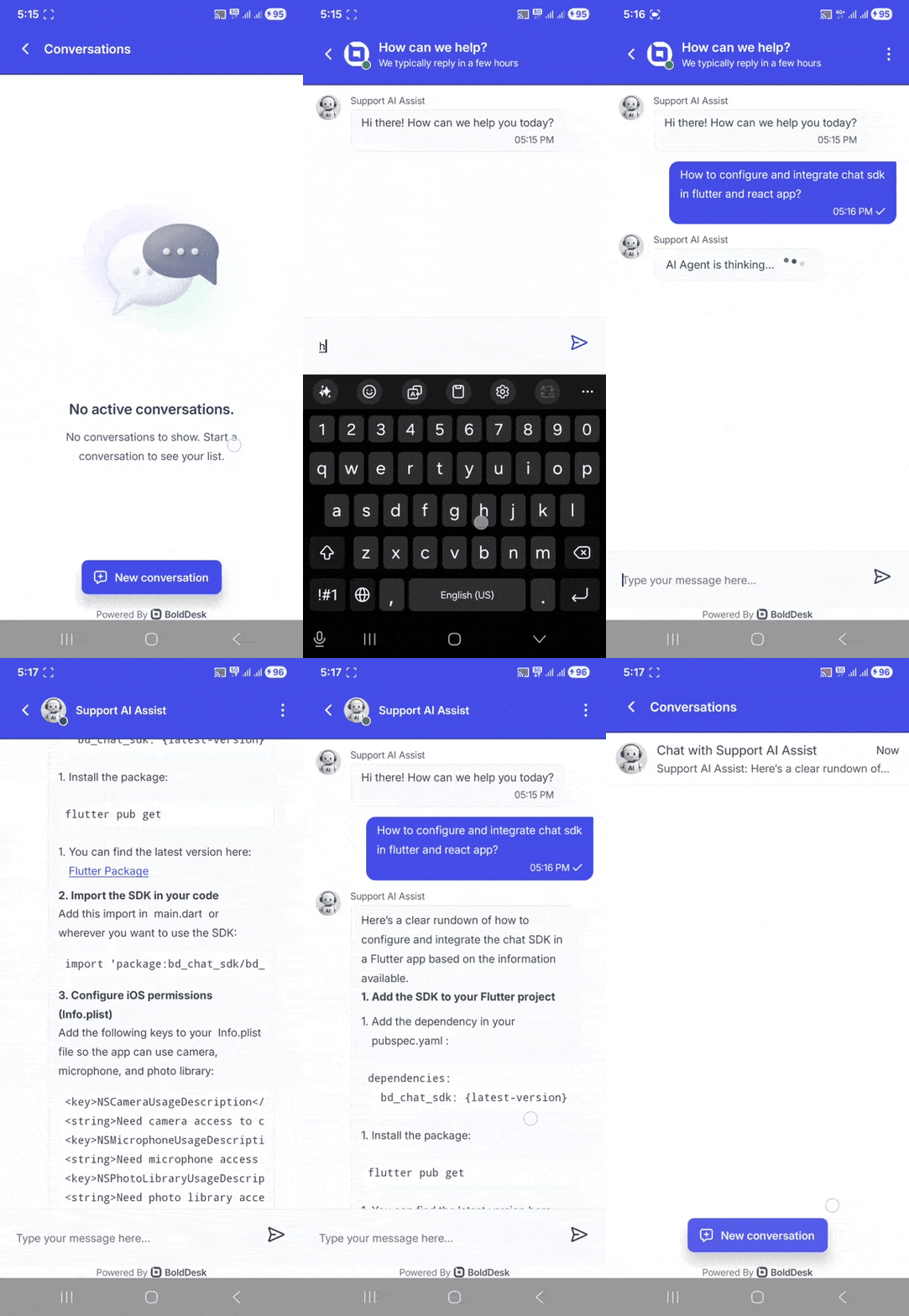
BoldDesk now offers an In-App Chat SDK for Flutter and React Native, enabling you to seamlessly embed live customer support directly inside your mobile applications.
With this SDK, you can deliver the full BoldDesk chat experience within your app — keeping users engaged without redirecting them to external browsers or platforms.
Real-Time In-App Messaging
Enable instant communication between users and support agents directly within your application.
Built-In Theme Support
Support for Light, Dark, and System themes to match your app’s UI seamlessly.
Brand Customization
Apply custom fonts to maintain a consistent brand identity.
Push Notifications
Send real-time alerts and message updates to keep users informed and engaged.
Result: A seamless in-app support experience that improves engagement, reduces friction, and keeps conversations where your users already are — inside your app.