

 In this page
  In this page

TL;DR: Creating macros is only the first step toward building an efficient support system. Real impact comes from organizing them with clear naming rules, thoughtful taxonomy, and consistent review cycles. Well‑designed macros improve speed, accuracy, and team consistency while preventing outdated replies.
When your support team is handling a high volume of repetitive questions, even simple tickets start to take more time than they should. This pressure builds quickly.
Research by Salesforce shows 78% of service agents struggle to balance speed and quality because so much time is lost to repetitive replies and manual ticket updates.
Learning how to create and use macros in a help desk helps your team break that cycle by turning everyday tasks into quick, consistent, one-click actions.
This guide walks you through a smart, scalable approach to building and organizing macros, so support becomes faster, lighter, and far more consistent for every customer.
What are macros in customer support?
A customer support macro is a predefined set of actions and responses that an agent can apply to a ticket with a single click.
Unlike a simple text snippet, help desk macros can update fields (status, tags, assignee) and insert a templated message, speeding up repeatable workflows with consistent, policy-approved language.
Macros vs canned responses: How they differ
While people often use these terms interchangeably, they serve different functions. A canned response is strictly a text template used to answer common questions.
A help desk macro includes a text template but also executes backend actions, such as moving a ticket from “Open” to “Pending” or updating a custom field.
Practical rule:
- Canned responses contain text only.
- Macros include both text and ticket actions.
- Use macros when both message and metadata must change.
Difference between triggers (automations) and support macros
What truly sets triggers apart from macros is how each one is activated. Agents apply help desk macros while the system runs triggers.
Help desk macros are manual, meaning an agent decides exactly when and if to apply them to a conversation.
Practical rule:
- Use macros when a human needs to choose the right response at the right moment.
- Use triggers or automations when the system can reliably decide based on event/time rules.
Why help desk macros matter for support teams
Effective macros do more than streamline tasks. They also bring stability and consistency to your customer support operations.
Moreover, 27% of customers say they’re more inclined to make a purchase when a company replies quicker than they anticipated, making fast, reliable responses a direct driver of customer loyalty and revenue.
These are some of the reasons why help desk macros are important:
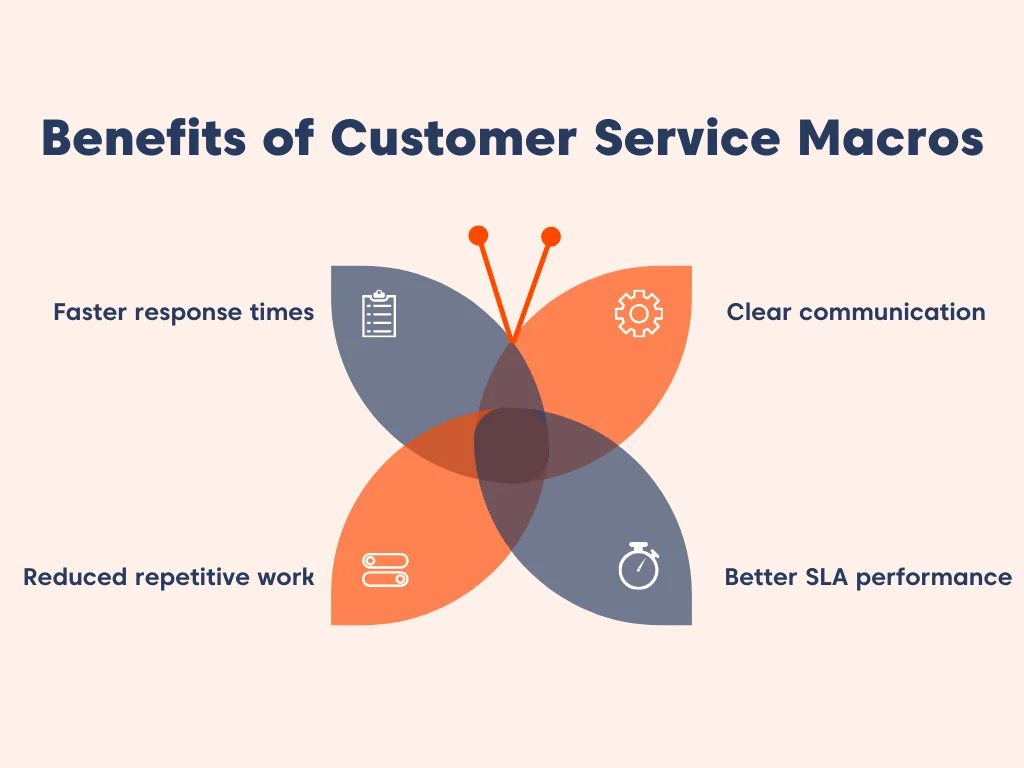
- Faster response times: Agents can resolve common inquiries in seconds rather than minutes.
- Reduced repetitive work: Automating support with a single click frees customer service teams from tedious tasks, helping agents focus on higher-value conversations.
- Consistent communication: Every customer receives the same verified, high-quality information regardless of which agent handles the ticket.
- Improved SLA performance: Even when macros don’t fully resolve a ticket, they help keep work moving, ensuring the right status, queue, priority, and clear next action.
When to use (and avoid) help desk macros
Macros can be powerful tools for support teams, but their impact depends on how they’re used.
Customer service macros are most effective in the following scenarios:
Best-fit use cases of help desk macros
Macros are most effective in scenarios that require a standardized workflow, especially when inquiries are frequent, responses must stay consistent, and ticket updates follow predictable patterns.
Typical help desk macro use cases include:
- Password resets: Providing secure, step-by-step instructions.
- Status updates: Informing customers about shipping or ticket progress.
- Routing and escalations: Moving a ticket to a Tier 2 team with the correct tags.
- Common feature requests: Explaining how to use a specific tool.
Common help desk macros failure modes
Without a proper macro management system, they can quickly shift from helpful shortcuts to harmful habits that erode the customer experience.
These are the common pitfalls to watch out for when managing macros, mistakes that quickly turn efficiency gains into customer frustration:
- Macro overload: Having hundreds of unsorted help desk macros makes it harder for agents to find the right one.
- Outdated steps: Sending customers to dead links or referencing old UI layouts.
- Robotic tone: Failing to personalize the macro, making the customer feel like a number.
7 Best practices to create and use help desk macros for faster support
Creating macros is easy, but keeping a macro library organized and reliable as support grows requires structure.
The following help desk macros best practices ensure teams build macros that remain useful, consistent, and easy for agents to use.
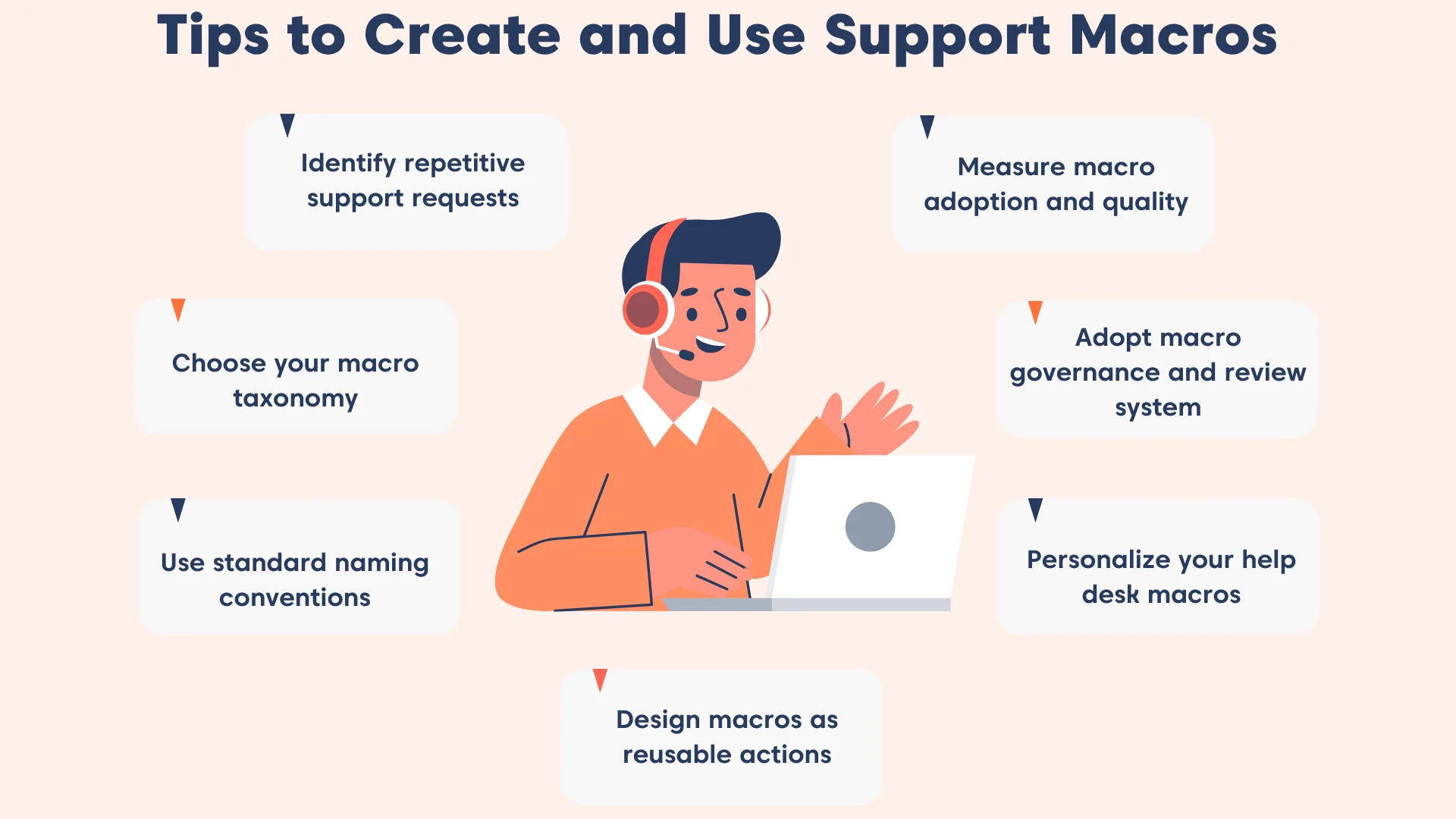
1. Identify repetitive support requests
When the same requests repeatedly appear in your support queue, such as password resets, billing questions, or order updates, it’s a strong signal that a macro can help.
Instead of typing the same response repeatedly, a customer service macro helps agents handle routine cases in seconds with the right message and ticket actions already built in.
Begin with the most common scenarios and gradually expand your macro library as new patterns emerge.
Key takeaway: Macros turn repetitive support tasks into quick, effortless wins for both agents and customers.
2. Choose your macro taxonomy
Start by selecting a primary structure for grouping your macros. The goal is to organize your support macro library to match how your team thinks and works.
Some of the most common ways to structure a help desk macro library include:
- By Issue Type: (e.g., Billing, Technical, General Inquiry)
- By Workflow: (e.g., Escalation, Onboarding, Closing)
- By Team: (e.g., Tier 1, Sales, DevOps)
Choose one structure and apply it consistently so your macro library remains intuitive and easy to navigate as it grows.
3. Use standard naming conventions that make search effortless
Even with a good taxonomy, inconsistent naming can make macros difficult to locate. Establish a consistent naming convention so agents immediately understand what each macro does.
A strong convention typically includes:
- Consistent prefixes to group related macros
- Clear intent in the first few words
- Optional suffixes for channel, language, or version details
For even greater clarity, structure names in a nested format (Category > Action > Detail) so your help desk macro library feels intuitive and easy to navigate.
For example:
| Bad name | Better name | Why it works |
| Refund1 | Billing Refund Processed | Uses clear categories and tiers |
| PW_Reset | Security Password Reset | Group security-related macros together |
| Help_User | General Troubleshooting Steps | Clearly describes the macro purpose |
A consistent naming pattern helps agents quickly scan and locate the right macro without relying entirely on search.
4. Structure macros as repeatable action bundles
A well-designed macro should function as a complete action bundle, not just a message template.
This ensures that both the customer communication and the ticket workflow remain consistent.
Most macros include three core components:
- The reply: The customer-facing message explaining the next step or solution
- The actions: Ticket updates such as status changes, tags, or priority adjustments
- The assignment: Routing the ticket to the correct group when escalation or collaboration is required
By combining these elements into a single support macro, agents can perform multiple tasks instantly while maintaining standardized workflows.
In BoldDesk, for example, ticket macros are preconfigured action templates that can add replies or notes and update ticket fields such as status, tags, assignee, and priority.
5. Tailor help desk macros for better support
Macros improve speed, but they should never make customer interactions feel robotic. Personalization helps maintain a human tone while preserving efficiency.
Modern help desks allow placeholders such as {{customer.first_name}} or {{agent.name}}, which automatically insert relevant information into responses.
This ensures messages remain personalized even when applied at scale.
At the same time, the following guardrails help reduce mistakes and keep help desk macros trustworthy:
- Never include sensitive data directly in a macro.
- Avoid guarantee language like “This will fix it.” Instead, use “next steps” phrasing that sets the right customer expectation.
- Add a short internal checklist for agents, such as “Confirm plan, region, and last login timestamp before sending.”
Key takeaway: Always personalize but do it with care. Add a brief sentence at the top to make the customer feel seen, and double-check that placeholders are formatted correctly, as even a small error can prevent a macro from saving or sending.
6. Adopt governance and reviews for support macros
Macros need regular oversight to remain accurate and trustworthy. Without clear ownership, macro libraries often accumulate outdated responses, duplicate templates, and inconsistent messaging.
Over time, this creates macro debt, an overloaded library filled with unused or outdated macros that make it harder for agents to find the right response.
A simple governance model helps prevent this:
- Owner: A person or small group responsible for maintaining macro quality
- Contributors: Agents who can suggest improvements or new macros
- Permissions: Controlled publishing access for shared macros
Schedule regular reviews to archive unused macros, update outdated instructions, and merge duplicates. This keeps the library clean, reliable, and easy for agents to use
7. Measure support macro adoption and quality
Tracking usage isn’t just about customer service KPIs; it’s about understanding whether macros are actually helping customers and agents.
A strong help desk macro measurement routine should include:
- Usage reports: Identify your most‑used macros. High adoption signals value, but it’s only half the story.
- CSAT correlation: If a macro is used often but consistently tied to low customer satisfaction scores, it’s a red flag that the wording may feel cold, confusing, or unhelpful. Rewrite with more empathy or clarity.
- Agent feedback: Encourage agents to flag macros that feel outdated or awkward. Their frontline perspective often reveals issues that metrics alone can’t.
- Resolution impact: Compare ticket resolution times before and after macro use. A good macro should reduce the average handle time without sacrificing quality.
- Lifecycle reviews: Pair measurement with your governance cadence, monthly checks for top macros, quarterly audits for the full macro library, and targeted reviews after product or policy changes.
- Macro search time: Track how long agents spend locating the right macro. Longer search times slow responses and often indicate issues with naming conventions or macro organization.
Key takeaway: Don’t just track how often macros are used; measure how well they perform. Adoption plus quality ensures your macro library drives both efficiency and customer satisfaction.
Sample customer service macro templates you can copy
These are intentionally generic, so they work across many help desk platforms. Customize tone, policy language, and steps to match your product.
The following customer service macros examples can help you build your first help desk macro library:
Ticket acknowledgment macro
Use this macro to quickly confirm receipt of a new inquiry so customers know their issue is in the queue and being reviewed.
Macro name: General – Ticket acknowledgment
Purpose: Confirm receipt of a new request.
Actions
- Status → Open
- Tag → acknowledged
Message
“Hi {{customer.first_name}}, thanks for contacting us. We’ve received your request about {{ticket.subject}}, and our team is reviewing it now.”
Internal note (optional)
“Confirm category + priority before sending follow‑up.”
Status update macro
Ideal for situations where progress is stalled, this macro keeps customers informed while you wait for internal updates.
Macro name: General – Status update pending
Purpose: Provide a timely update when progress is pending.
Actions
- Status → Pending
Message
“Hi {{customer.first_name}}, I’m still waiting for an update from our technical team. I’ll follow up as soon as I have an update. If I don’t have news by tomorrow, I’ll message you again.”
Internal note
“Verify blocker + ETA before applying.”
Escalation macro
Apply this when a ticket requires deeper technical expertise or higher‑tier intervention beyond frontline support.
Macro name: Technical – Escalate to Tier 2
Purpose: Route the issue to a higher‑tier team with clear urgency.
Actions
- Priority → High
- Group → Tier 2 Support
Message
“Thanks for your patience. I’m escalating this to our senior engineering team for deeper investigation. Our Tier 2 team will review this next. I’ll keep an eye on it and update you as soon as they share findings.”
Internal note
“Attach relevant logs/screenshots before escalating.”
Refund or billing response macro
Designed for straightforward billing inquiries, this macro provides customers with timely confirmation of refund processing details.
Macro name: Billing – Refund processed
Purpose: Handle straightforward refund or billing inquiries.
Actions
- Tag → billing_inquiry
Message
“We’ve processed your refund for {{ticket.order_id}}. You should see the amount reflected within 5–7 business days (timing can vary by bank).”
Internal note
“Verify refund policy eligibility before applying.”
SLA delay apology macro
Use this to acknowledge delays during peak volume or backlog periods, helping reset expectations and restore confidence.
Macro name: General – SLA delay apology
Purpose: Acknowledge slow replies and reset expectations.
Actions
- Priority → Urgent
Message
“We’re sorry for the delay in getting back to you. Our team is experiencing higher‑than‑usual volume, but we’re prioritizing your request now.”
Internal note
“Check SLA policy; mark follow‑up time.”
First response troubleshooting macro
This macro helps gather essential diagnostic details upfront, reducing back‑and‑forth and speeding up issue resolution.
Macro name: Technical – Initial troubleshooting request
Purpose: Gather essential details upfront.
Actions
- Status → Open
- Tag → needs_info
Message
“To help us investigate, could you share the steps you took before the issue appeared, any error messages, and your device/browser details? Once I have this, I can guide you through the next steps.”
Internal note
“Attach troubleshooting checklist if needed.”
Feature not supported macro
Best for politely declining unavailable functionality while still offering next steps or alternatives to the customer.
Macro name: Product – Feature not available
Purpose: Politely decline unsupported requests while offering alternatives.
Actions
- Tag → feature_request
- Status → Open
Message
“Thanks for your question! At the moment, this feature isn’t available, but I’ve logged your request for our product team. If you can share your use case, I can also suggest a possible workaround.”
Login or password reset macro
A quick way to assist users with account access issues is by directing them to the correct recovery steps.
Macro name: Account – Password reset instructions
Purpose: Provide fast assistance for account access issues.
Actions
- Tag → account_access
- Status → Open
Message
“If you’re unable to log in, please try resetting your password using the link below. If you still can’t access your account, let me know, and I’ll help you further.”
Outage or incident broadcast macro
Use during active system incidents to provide consistent, accurate updates to all affected customers.
Macro name: Incident – Active service outage
Purpose: Provide a consistent message for many similar tickets.
Actions
- Status → On Hold
- Tag → incident_active
Message
“We’re currently experiencing a service interruption affecting some customers. Our engineering team is actively working on a fix. I’ll update you as soon as we have more information.”
Issue resolved confirmation macro
Send this once an incident or bug fix is completed to notify users that the service should now be functioning normally.
Macro name: Incident – Issue resolved
Purpose: Notify users after an incident is resolved.
Actions
- Status → Solved
- Tag → incident_resolved
Message
“Our team has resolved the issue that was affecting the service. Everything should now be working normally. Please let me know if you’re still experiencing any problems.”
Tip: Treat templates as a combination of message (for customers) and actions (for ticket updates).
How BoldDesk simplifies customer service macro management
By streamlining how macros are created and applied, BoldDesk helps support teams work smarter and reduce repetitive effort.
These features illustrate how BoldDesk simplifies help desk macro management:
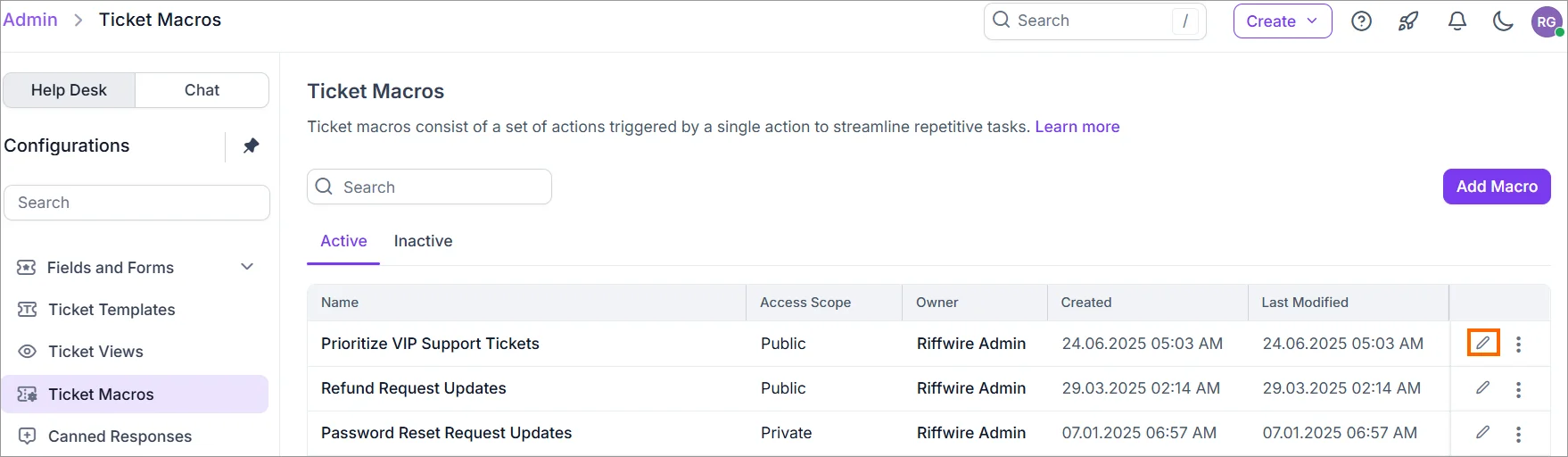
Unified macro library
BoldDesk makes it easy to standardize responses by keeping ticket macros in one place, so admins can create, maintain, and improve macros without chasing down scattered templates.
With centralized management, your team can keep messaging consistent and reduce repetitive work as your support operation scales.
Combined ticket actions
Ticket Macros in BoldDesk aren’t limited to canned text.
They’re pre-configured action templates that can apply common updates, like adding a reply in ticket macros or updating ticket fields (including status), in a single click.
Additionally, bulk‑updating multiple tickets is a powerful way to clear ticket queues, but it requires strict governance.
Therefore, limit bulk‑impact macros to a small admin group, and always preview and test them before publishing changes.
Controlled access and permissions
As your macro library grows, governance matters.
BoldDesk supports controlled macro usage through access scope options, so you can keep sensitive macros limited to specific agents or groups while still enabling shared macros for everyday support.
Pair that with BoldDesk permissions and roles, and you can maintain structure without slowing teams down.
Usage reporting and insights
Improvement is easier when you can measure what’s happening. BoldDesk includes a reports module with dashboards and reporting views designed to help teams track performance and spot trends over time.
You can also create custom dashboards and manage report views to keep the metrics that matter most visible to the right stakeholders.
Streamline support operations with macros in customer support
Building an organized support macro library is one of the most practical ways to scale support operations without forcing agents to rewrite the same responses repeatedly.
If you take only one thing from this guide, make it this: macros need a system; cleanup, taxonomy, naming, components, personalization rules, governance, and measurement.
Ready to implement macros in your support workflow? Explore how BoldDesk, a ticket macros software, supports consistent, repeatable ticket handling.
To learn more, start a free trial to build your first shared macros, book a live demo to map them to your workflows, or contact support for help.
Related articles
- Macro vs KB Link vs Custom Reply: When to Use Each
- 13 Best Cloud-Based Ticketing Systems for 2026
- 10 Best Free Help Desk Software for Startups
Frequently Asked Questions
Help desk macros are predefined responses and ticket actions that agents apply to support tickets to handle common requests faster.
The exact number depends on team size and ticket complexity. Any more than your business’s needs creates “macro-overload,” where agents spend more time searching for a macro than it would take to type a response.
Yes. You can create macros that add an internal private note and tag a specific department without the customer ever seeing the communication.
A quarterly audit is recommended, though high‑growth SaaS companies should review their library monthly to stay aligned with product updates.
Start with 10–20 macros covering your highest‑volume, low‑variance workflows (password resets, status updates, common troubleshooting, escalations).
This keeps the help desk macro library manageable while you refine naming, taxonomy, and governance. Scale only after usage data shows clear demand patterns.