



TL;DR: An AI action is a predefined task an AI agent performs in a connected system, such as retrieving order information, updating a ticket, resetting a password, or processing an approved refund. While AI answers provide information, AI actions complete work that moves customer issues toward resolution.
Most AI support tools stop at answering questions, but customers ultimately want their issues resolved. AI Actions bridge this gap by enabling AI Agents to take real action instantly.
From processing refunds and modifying account details to retrieving live data and triggering workflows, these actions enable AI to deliver outcomes, not just answers.
This shift eliminates delays caused by manual handoffs, reduces operational overhead, and creates faster, more seamless support experiences.
In help desk software, AI Actions act as the operational layer that connects conversations to execution, allowing support teams to automate workflows securely and at scale.
In this article, we’ll explore what AI Actions are, how they work, and why they are becoming essential for modern customer support.
What are AI Actions in customer support?
AI Actions are predefined operations or automated workflows that enable AI agents in customer service to execute tasks, trigger workflows, and interact with connected systems directly within customer conversations.
AI agents without connected action tools can understand requests and generate responses, but they cannot directly update external systems or execute supported workflows.
AI Actions extend these capabilities by allowing agents to retrieve information, update records, trigger workflows, and complete tasks within connected systems.
In simple terms, AI actions enable AI agents to move beyond answering questions and execute real work. They form the operational layer that converts conversational AI for customer service into measurable, outcome-driven support.
How AI Actions work in customer support
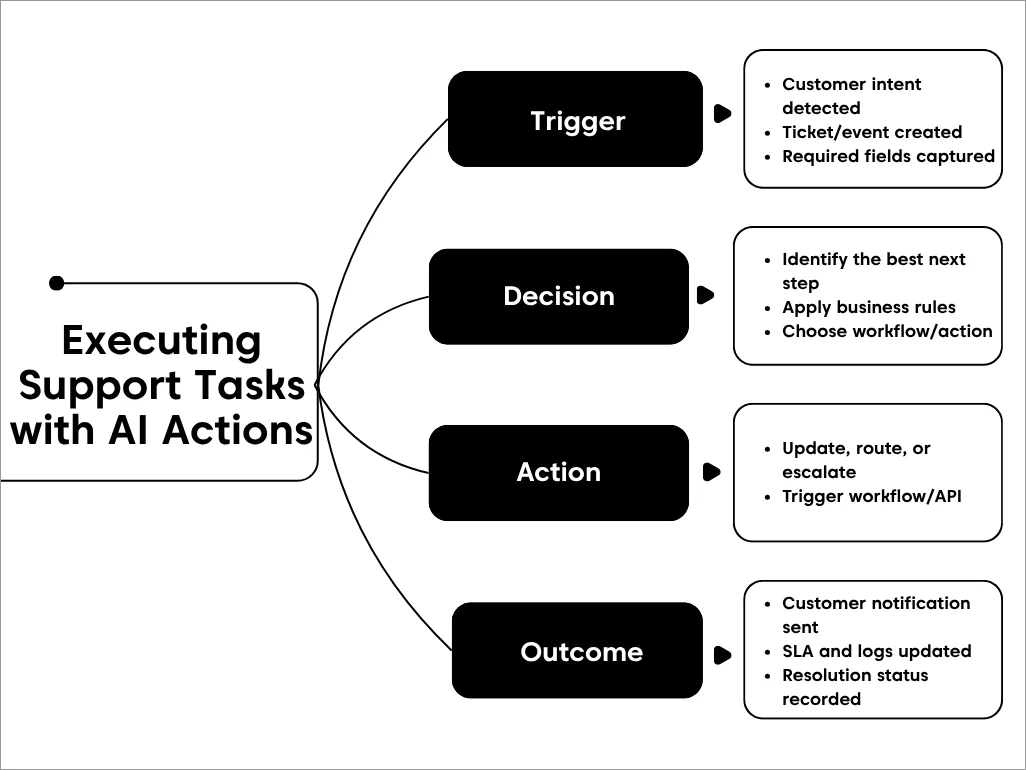
At a high level, these automated actions follow a simple flow: understand what the customer wants, decide what needs to happen, and act instantly, all within a single conversation.
Here are five steps that show how AI Actions work.
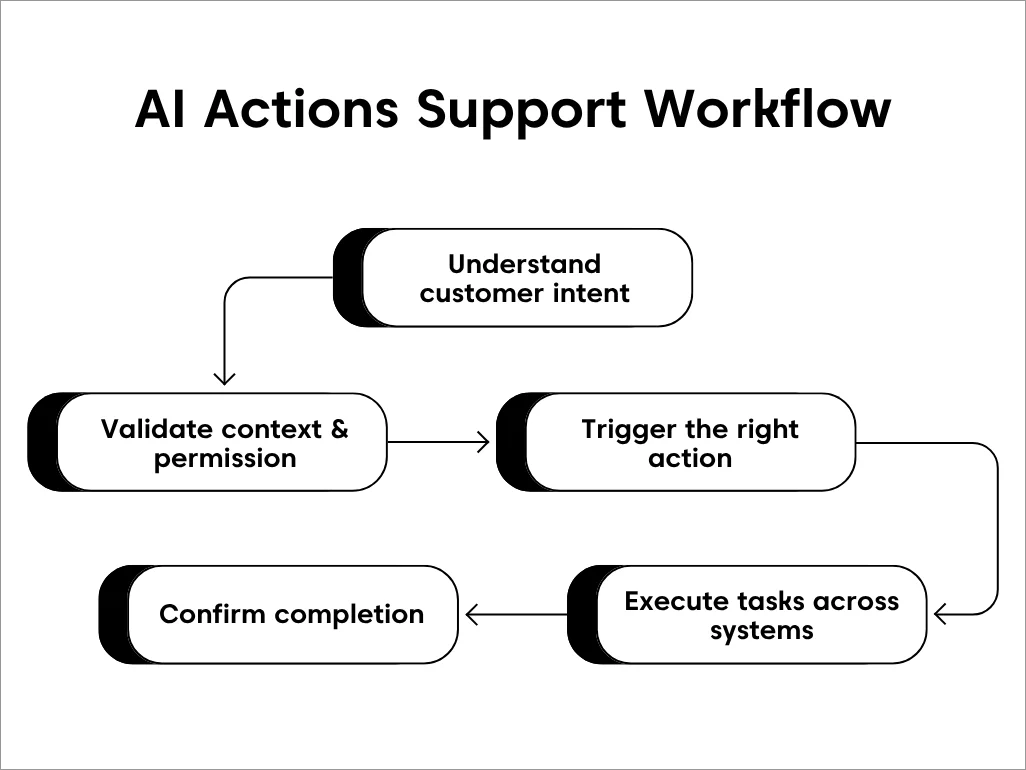
Understand customer intent
The customer service AI agent analyzes the customer’s message using natural language processing (NLP) to identify intent, context, and required outcomes.
Instead of matching keywords, it understands what the customer is trying to accomplish, such as requesting a refund, updating account details, or checking an order status.
Validate context and permissions
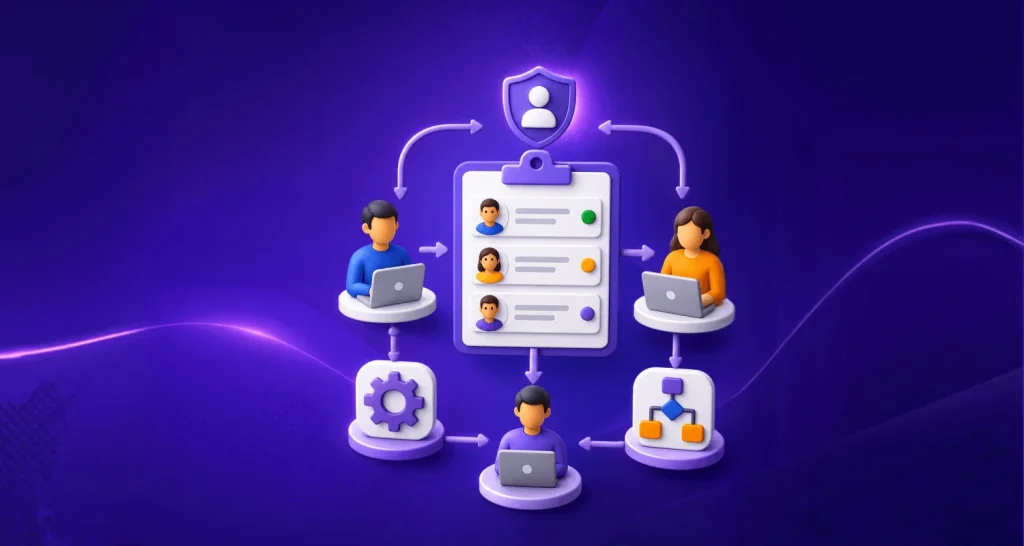
Before taking action, AI Actions verify critical context such as customer identity, account eligibility, policy rules, and role-based permissions. Guardrails ensure that sensitive operations run only when conditions are met, maintaining security, compliance, and accuracy.
Each tool runs only when its usage criteria are met, such as required fields being present, the right channel being allowed, the user having the necessary role or permissions, and workflow conditions matching the defined rules.
Trigger the appropriate AI Action
Once validated, the AI agent invokes the relevant AI Action, a predefined, secure workflow designed to execute a specific task. This could involve calling an external API, updating a ticket, modifying customer data, or initiating a billing process.
For API-based actions, authentication is set up in advance by admins, so AI agents can securely access connected systems without exposing sensitive credentials.
Execute tasks across systems in real time
The AI Action sends the request to the connected system and waits for a confirmed response. Tasks are completed during the live conversation, eliminating manual follow-ups and tool switching.
Confirm completion and log activity
After execution, the AI agent confirms the outcome to the customer and records the action in logs or audit trails. This ensures transparency, traceability, and easy monitoring for support teams while delivering a clear resolution to the customer.
Types of AI Actions in customer support
AI actions can be grouped by the type of task they perform and the level of oversight they typically require.
The table below outlines the main categories of AI actions used in customer support, along with their purpose, common use cases, and associated risk levels.
| Action type | What it does | Customer support example | Typical risk |
| Data retrieval | Reads information from a connected system | Check an order, subscription, or ticket status | Low |
| Validation | Confirms identity, eligibility, or policy conditions | Verify whether an order qualifies for a refund | Low to medium |
| Record update | Changes information in a system | Update an address or ticket field | Medium |
| Transactional action | Completes an operation with financial or account impact | Issue a refund or cancel a subscription | High |
| Workflow action | Starts another process or assigns work | Request approval, notify a team, or escalate a ticket | Varies |
| Communication action | Sends an update through an approved channel | Send a confirmation email or status notification | Low to medium |
Organizations often apply permissions and approval rules based on the action type, with transactional actions typically requiring more oversight than retrieval or communication actions.
Worked examples of AI actions in customer support
The following examples show how AI agents use different types of actions to retrieve information, update records, and complete tasks that move customer issues toward resolution.
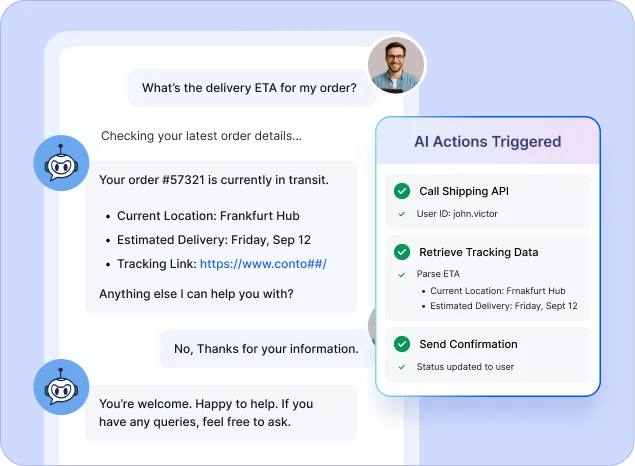
Example 1: Retrieve an order status
A customer asks, “Where is my order?” through chat. The AI agent identifies the order-tracking intent and requests or verifies the customer’s order number.
An AI Action retrieves the latest shipping information from the order management system and checks the expected delivery date. The agent then shares the current status with the customer and records the interaction for future reference.
Because this is a read-only action that does not modify any data, it is typically considered low risk and does not require approval.
Example 2: Update a customer’s address
A customer requests a delivery address change before an order is shipped. The AI agent verifies the customer’s identity and checks whether the order is still eligible for modification.
An AI Action updates the address in the order management system, validates the new information, and confirms the change. If the order has already been shipped or verification requirements are not met, the request can be escalated to a support agent for review.
The customer receives confirmation of the update, and the action is logged for auditing and tracking purposes.
Example 3: Process an eligible refund
A customer requests a refund for a recent purchase through chat. The AI agent identifies the intent and collects the required inputs, such as the order ID and reason for refund.
An AI Action verifies eligibility, initiates the refund in the billing system, and, if required, triggers an approval step.
The customer receives confirmation of the refund status, and the action is logged for compliance and tracking.
How to control AI Action permissions and approvals
Not every AI action should have the same level of autonomy. Permissions and approval requirements should be based on the potential impact of the action to help balance efficiency, security, and compliance.
The table below shows how different types of AI actions can be governed through permissions, verification requirements, approval workflows, and human oversight.
| Control level | Appropriate actions | Recommended control |
| Read-only | Order status, ticket status, account details | Run automatically after identity checks |
| Limited updates | Contact details, ticket fields, preferences | Validate inputs and restrict editable fields |
| Sensitive changes | Password resets, account access, cancellations | Require stronger identity verification |
| Financial actions | Refunds, credits, payment changes | Set value thresholds and approval rules |
| Irreversible actions | Account deletion or permanent data changes | Require human approval and confirmation |
For every action, define:
- Which users and channels can trigger it?
- Which systems, records, and fields can it access?
- Required customer information and verification steps.
- Conditions that block the action.
- Financial or operational approval thresholds.
- What should be recorded in the audit log?
- When the request must be transferred to a human agent.
How AI Actions turn understanding into action
A Gartner survey found that 91% of customer service and support leaders were under executive pressure to implement AI, not only to improve efficiency but also to improve customer satisfaction.
This pressure makes it increasingly important to connect AI adoption with workflows that produce measurable customer outcomes.
AI agents are highly effective at understanding intent and context, but without execution capabilities, they still rely on human intervention to complete most support tasks.
In real-world support environments, this creates a gap between identifying an issue and resolving it.
AI Actions help close that gap by enabling AI agents to retrieve information, update records, trigger workflows, and complete tasks directly within the conversation.
Here’s how AI Actions turn understanding into action and power many of the workflows featured in modern help desk automation ideas.
Enable decisions based on customer context
AI Actions help AI agents use customer context to determine and execute the appropriate next step.
Instead of stopping at an answer, the agent can retrieve information, update records, or trigger workflows that help resolve the issue.
Allow execution of support tasks in real-time
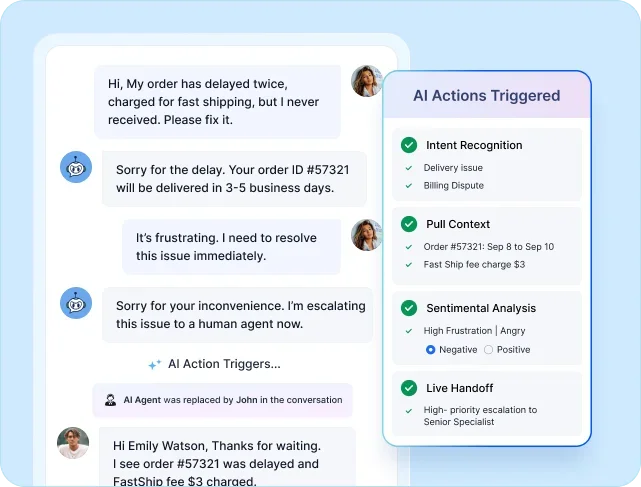
With AI Actions, an AI agent doesn’t just suggest what should happen next. It carries out the task during the conversation itself.
For example, during a live chat support session, the agent can validate order details, retrieve information from connected systems, process an approved refund, or update a record and confirm completion instantly.
This reduces manual handoffs and helps customers resolve issues more efficiently.
Reduce unnecessary interactions in support
Many customer issues require multiple interactions because information must be verified, retrieved, and updated across different systems.
AI Actions streamline this process by completing these tasks within the same conversation, helping reduce handoffs, customer effort, and time to resolution.
Instead of directing customers to complete steps elsewhere, AI Actions help AI agents perform the work needed to move the request forward and deliver a faster support experience.
Ensure accuracy with guardrails and audit trails
AI Actions can be configured with guardrails such as permissions, controlled access, and validation checks to ensure tasks are executed safely and correctly.
These safeguards help prevent unintended actions, enforce compliance policies, and maintain consistency across support operations, particularly when handling billing changes, account updates, or sensitive customer data.
Connect seamlessly with your support stack
Resolving customer issues often requires access to data stored across multiple systems.
AI Actions help you build AI agents that can securely connect with tools such as ticketing platforms, billing systems, CRMs, and shipping services through integrations and APIs.
This access to real-time data across systems enables AI agents to:
- Retrieve accurate customer and order information
- Update records instantly
- Execute tasks without manual lookups or tool switching
By connecting systems and workflows, AI Actions help support teams deliver faster resolutions and a more efficient customer experience.
Why AI agents work better with AI Actions
AI Actions are what transform a customer service AI agent from a passive responder into an active problem solver.
AI agents bring understanding and decision-making to customer support, while AI Actions provide the ability to act on that understanding.
Together, AI agents automate support workflows and enable teams to:
- Automate repetitive work intelligently.
- Deliver consistent, personalized customer experiences.
- Reduce resolution times without increasing headcount.
- Free human agents to focus on complex, high-impact issues.
This combination allows customer support operations to scale efficiently without sacrificing quality or control.
AI agents can understand requests and generate answers, but they need connected action tools to update systems, trigger workflows, and complete operational tasks.
| Capability | AI agent without connected action tools | AI agent with connected action tools |
| Primary role | Understands and responds to customer queries | Understands and executes real support tasks |
| Conversation handling | Provides answers, guidance, and recommendations | Can complete supported workflows end-to-end |
| System integrations | Limited or read-only access | Real-time integration with CRMs, billing, ticketing, and external APIs |
| Task automation | Suggests next steps for human agents | Automates workflows like refunds, updates, and validations |
| Human dependency | High; frequent handoffs and escalations | Lower for approved, predictable actions |
| Operational efficiency | Reduces response volume | Reduces resolution time and operational cost |
| Auditability and control | Minimal logging of actions | Audit logs for traceability, plus approvals and permission controls |
The difference is simple: AI agents without connected action tools can guide users, while agents with appropriately configured tools can complete supported tasks.
Practical use cases of AI Actions in customer support
McKinsey estimates that applying generative AI to customer care could create productivity value equal to 30% to 45% of current customer-care function costs.
AI Actions allow AI agents to handle common customer support scenarios directly within conversations. These actions can be applied across common customer support workflows, including:
- Live data retrieval: Fetch real-time delivery updates, order status, or account information from connected systems.
- Customer data updates: Verify identity and update customer details, such as address or contact information, securely.
- Subscription and license-related checks: Retrieve license information from connected systems through API or MCP-based actions and use it to support ticket workflows.
- Ticket creation and updates: Create new support tickets, update ticket status, or add internal notes based on the conversation.
- Order management: Validate order details, cancel orders, or calculate refunds during a customer interaction.
- Password and access requests: Trigger password resets or access-related actions through connected identity systems.
- Notifications and follow-ups: Send confirmation messages, trigger follow-up tasks, or notify customers of status changes.
- Account verification workflows: Validate user information before allowing sensitive actions to proceed.
These examples illustrate how AI Actions enable AI agents to carry out operational support tasks as part of the conversation, rather than relying on manual execution or separate workflows.
Redefining customer support automation with AI Actions for AI agents
AI Actions mark a shift from conversational AI to operational AI in customer support. Instead of relying on human handoffs to complete tasks, AI agents can now execute workflows, update systems, and resolve issues within the conversation.
This reduces resolution time, improves consistency, and allows support teams to scale without increasing workload.
For support leaders, this means faster outcomes and lower operational overhead. For teams, it means fewer repetitive tasks and more focus on complex, high-value interactions.
With BoldDesk, AI Actions bring this capability into a secure, controlled environment, combining real-time execution with approvals, audit trails, and seamless integrations across your support stack.
See AI Actions in action; start your free trial or book a demo to experience how BoldDesk AI Actions can automate your support workflows end-to-end.
Related articles
- From AI to Personalization: Customer Service Trends to Watch in 2026
- AI Agent Examples: 21 Real-World Use Cases Across Industries (2026)
- Understanding Multi-Agent AI Systems: Definition, Benefits, and Use Cases
FAQs about AI Actions
When an AI action cannot be completed due to missing information, failed validation, permission restrictions, or an unavailable system, the action stops and returns a clear status rather than making assumptions or unauthorized changes.
The failure is logged for auditing, and the request can be escalated to a human agent or follow a predefined fallback workflow to help ensure the issue is resolved.
AI Actions can run fully autonomously or require human approval, depending on how they are configured.
Support teams can define approval checkpoints for high-risk actions while allowing low-risk tasks to execute automatically.
AI Actions connect with external systems using secure APIs and protocols such as MCP, allowing both direct integrations and scalable tool-based connections across systems.
AI Actions operate within predefined guardrails such as role-based permissions, usage criteria, approval workflows for sensitive tasks, and audit logging to help maintain security, compliance, and operational control.
These intelligent actions adapt to diverse support environments by executing tasks tailored to specific industry requirements.
For example, they can support customer service workflows in telecommunications, SaaS, finance, and insurance.
AI agents without AI Actions can understand and respond to queries, but rely on humans to complete tasks.
AI agents with AI Actions can execute tasks directly within the conversation, updating records, triggering workflows, and interacting with connected systems, resulting in faster, end-to-end resolution.