
 In this page

TL;DR: As support teams grow, inconsistent tagging can lead to duplicate tags, misrouted tickets, and unreliable reporting. Structured ticket tagging conventions use a three-layer model based on category, intent, and context to maintain consistent tagging, improve automation, and scale support operations effectively.
Most support teams adopt tags early, and initially, the system works well. Everyone shares the same understanding, and tickets are easy to organize and find.
As more agents, products, and workflows are added, maintaining consistent tagging becomes increasingly difficult.
Small differences in how agents apply tags can quickly create duplicate tags, inconsistent reporting, and inefficient workflows.
If your team already uses ticket tags, the next challenge isn’t deciding whether tags are useful. It’s creating a standardized system that remains organized and effective as your support operations grow.
Without clear ticket tagging conventions, even a well-designed tagging strategy can become difficult to maintain as teams and ticket volumes grow.
This guide explains how to create scalable tagging conventions, establish a consistent tagging framework, and avoid the common issues that reduce reporting accuracy and automation effectiveness.
New to support ticket categorization? Start with our complete guide to ticket tagging before creating organization-wide tagging conventions.
What are ticket tagging conventions?
Ticket tagging conventions are a standardized set of rules that define how support teams create, name, and apply ticket tags across customer requests.
They ensure tickets are categorized the same way regardless of the agent, channel, or workflow, supporting automated ticket routing, SLA management, analytics, and reporting.
Characteristics of effective ticket tagging conventions
Effective tagging conventions share several key characteristics that help keep tags accurate, scalable, and easy to manage as support operations grow.
- Clear: Agents know exactly which tags to apply in common scenarios.
- Consistent: The same type of request receives the same tags, regardless of the agent or support channel.
- Actionable: Tags support workflows such as automation, routing, reporting, and SLA policies.
- Minimal but complete: Only the tags needed to classify requests accurately are used, avoiding unnecessary duplicates.
- Governed: A documented process exists for creating, approving, merging, and retiring tags.
Why tagging breaks when support teams grow beyond five agents
Tagging works smoothly when a small team handles all tickets.
As support teams grow beyond five agents, maintaining that consistency becomes more difficult.
Common reasons tagging becomes difficult to manage include:
- More agents: Different people interpret similar issues differently and may apply different tags.
- More products and services: New offerings require additional tags, increasing the risk of duplicate or overlapping labels.
- More support channels: Requests arriving from email, live chat, social media, and other channels introduce greater variation in how tickets are categorized.
- More workflows and automation: As routing rules, SLAs, and automations expand, inconsistent tagging has a greater impact on operational efficiency.
- Less visibility and oversight: Without clear ownership, tags are created, modified, or left unused over time, making the taxonomy harder to manage.
This is why support teams need standardized ticket tagging conventions that keep classification consistent as operations scale.
The three-layer ticket tagging model for scalable support teams
As support organizations invest more heavily in automation, consistent ticket classification becomes increasingly important.
According to Salesforce, 83% of customer service decision-makers plan to increase investments in automation over the next year, making structured tagging frameworks essential for accurate routing, reporting, and workflow execution.
One of the most effective ways to maintain consistency at scale is to separate what the issue is, why the customer is contacting you, and the context that affects how the request should be handled.
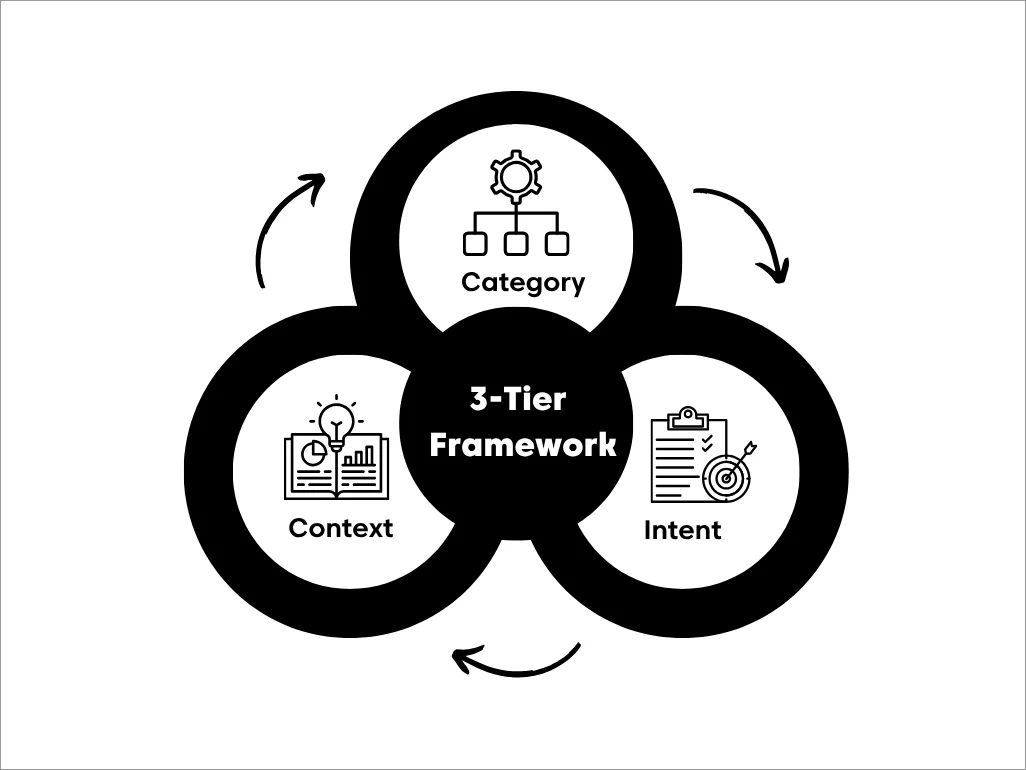
Quick rules for three-layer ticket grouping
- Every ticket gets exactly one category tag.
- Add one intent tag only when it affects routing or workflow.
- Add up to two context tags for handling modifiers.
Layer 1: Category tags (Issue type or domain)
Category tags are the foundation of your reporting structure. Every ticket should have one primary category.
Examples:
- account_access
- login_auth
- product_bug
Category tags form the backbone of reporting and are commonly used to trigger routing rules and analytics.
Layer 2: Intent tags (Why the customer contacted support)
Intent tags capture what the customer is trying to accomplish.
They help support teams route requests, trigger workflows, and understand the reason behind each conversation.
Examples:
- cancel_subscription
- invoice_request
- reset_password
- troubleshoot_error
- how_to_setup
Utilizing intent tags enhances the ticket categorization framework and improves the accuracy of request routing.
Layer 3: Context tags (Additional operational information)
Context tags provide situational details that influence handling but do not redefine the issue. They often represent urgency, customer tier, or risk signals, helping refine routing accuracy and SLA management.
Examples:
- vip_customer
- new_customer
- security_risk
- reproducible_issue
- at_risk_churn
Context tags help teams apply the right SLA, routing rules, or handling process without changing the ticket’s primary classification.
Use the table below as a quick reference for each layer’s purpose, ideal tag count, and naming pattern.
| Layer | Purpose | Number of tags | Naming pattern | Examples |
| Category | Issue type or domain (reporting backbone) | 5–10 | singular_noun | billing, account_access, integrations |
| Intent | Customer goal or workflow trigger | 15–25 | verb_noun | request_refund, report_bug, upgrade_plan |
| Context | Handling modifier (priority, tier, risk) | 10–15 | descriptor_noun | vip_customer, trial_user, urgent, at_risk_churn |
How to apply the three‑layer tagging model in real support scenarios
The best way to understand the three-layer model is to see it applied to real support requests.
Each example below shows how a single ticket can drive consistent routing, SLA management, automation, reporting, and analytics.
Billing refund request from a high‑value customer
Billing‑related tickets often require precise handling because they affect payments and customer trust.
Even when agents respond quickly, proper resolution depends on correct routing and SLA triggers. For example, a long-term customer reports a billing error and requests a refund.
Tags applied:
- Category: billing_payment
- Intent: request_refund
- Context: vip_customer
What happens with correct tagging:
- Ticket routing sends the ticket straight to the billing or accounts receivable queue.
- SLA or priority and escalation rules apply automatically.
- Reporting tracks refund volume while keeping VIP cases separate from general billing trends (so one large account doesn’t distort analytics).
Login issue during customer onboarding
Access issues receive fast replies but often require coordination between onboarding, support, and sometimes engineering.
Without clear tagging, these cases can remain unresolved longer than expected. For example, a new customer cannot log in during their onboarding week.
Tags applied:
- Category: account_access
- Intent: reset_password
- Context: onboarding_week
What happens with correct tagging:
- Routing sends the ticket to onboarding‑trained agents or the onboarding pod.
- SLA or priority triggers the time‑sensitive onboarding SLA automatically, even if the customer is not VIP.
- Reporting includes the case in onboarding friction analytics (login blockers, time‑to‑first‑value risks).
Tags vs custom fields vs categories: When should you use each?
Not every piece of ticket information should be stored as a tag.
One of the most common mistakes support teams make is using tags for everything, which often leads to duplicate tags, inconsistent reporting, and difficult-to-manage taxonomies.
A scalable ticketing system assigns each type of information to the tool best suited for it.
Categories provide the primary classification for reporting, tags add flexibility for workflows and automation, and custom fields capture structured information that must remain consistent.
The table below can help you decide which option to use.
| Tool | Best used for | Why |
| Category (or category tag layer) | Primary issue or support domain | Forms the backbone of reporting, routing, and analytics. |
| Intent tag | Customer goal or workflow trigger | Enables automation and helps route requests based on what the customer wants to achieve. |
| Context tag | Additional handling information, such as customer tier, urgency, or risk | Refines routing and SLA rules without changing the ticket’s primary classification. |
| Required custom field | Information every ticket must include | Ensures essential information is never omitted. |
| Custom field | Information with a fixed set of values (for example, product, region, or subscription plan) | Prevents duplicate values and keeps reporting consistent. |
| Temporary tag | Short-term campaigns, migrations, or testing | Easy to add, review, and remove without affecting the long-term taxonomy. |
| Custom field or hierarchical taxonomy | Large product catalogs or detailed classifications | Prevents hundreds of similar tags from cluttering the tagging system. |
Simple rule of thumb:
- Use categories as the primary classification that every ticket should have.
- Use intent and context tags to support routing, automation, and operational workflows.
- Use custom fields when information must be standardized, validated, or mandatory across every ticket.
A well-structured tagging framework doesn’t stay organized on its own. As teams expand and workflows become more complex, even small inconsistencies can gradually reduce the effectiveness of routing, automation, and reporting.
Signs that your ticket tagging conventions need attention
A tagging system rarely becomes disorganized overnight.
As support teams grow, inconsistent tagging habits can gradually reduce routing accuracy, reporting quality, and automation reliability if left unchecked.
Over time, these inconsistencies slowly disrupt triage, routing accuracy, and reporting reliability across your customer support operations.
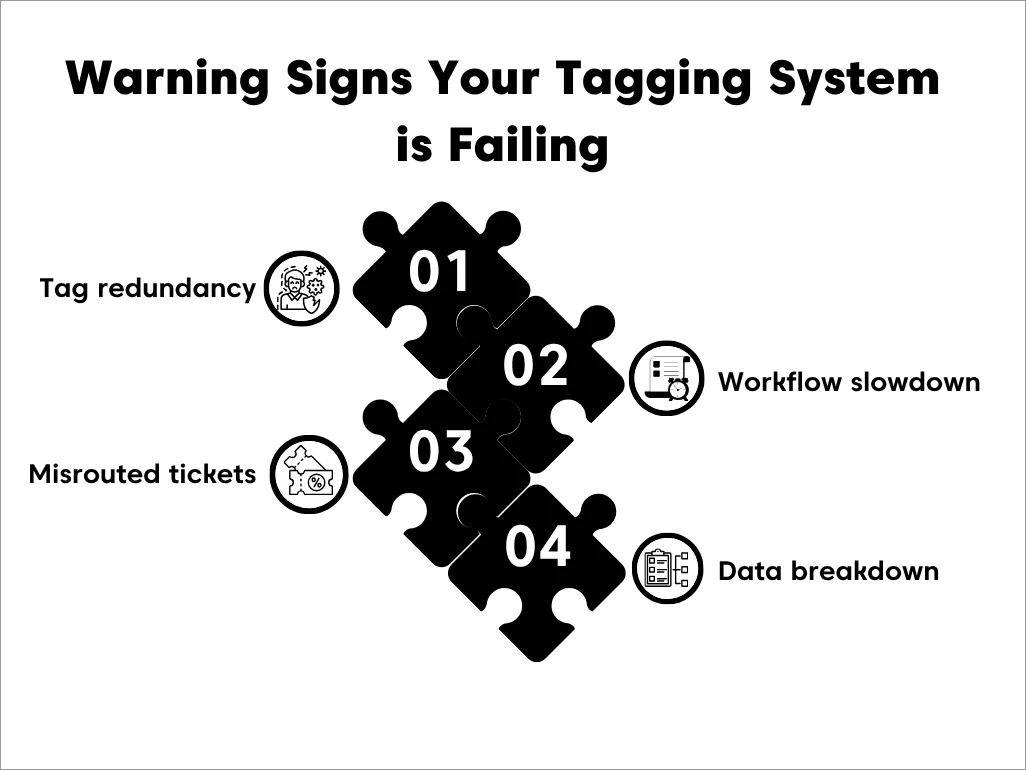
Duplicate tags reduce classification accuracy
Multiple tags often describe the same issue in different ways. This data inconsistency makes it challenging to accurately analyze trends.
The most common failure mode is accidental duplication.
- refund_request
- request_refund
- customer_refund
Over time, when similar tags exist, filtering tickets and routing become unreliable.
Tickets reach the wrong support teams
Without established standards, agents create tags based on their personal preferences for phrasing.
While each tag may seem appropriate on its own, together they create a lack of consistency.
The result is a tagging system that reflects individual preferences instead of a standardized operational process. Inconsistent tags hinder automation rules from properly assigning tickets.
Support data becomes difficult to trust
Help desk automation only works when similar tickets use the same tags. If agents tag things differently, the system can’t trigger the right actions.
If your workflow says:
If tag = refund_request, route to billing queue
But half of the refund tickets are tagged refund, refunds, or cancel_and_refund, you’ve just turned routing into a manual process again.
What breaks next:
- SLA handling becomes inconsistent
- Escalations get missed
- Ticket triage speed slows because managers must intervene
Support reports no longer reflect reality
When tagging becomes inconsistent, reporting becomes difficult to trust.
Support leaders begin asking questions such as:
- “Are refund requests actually increasing, or are agents simply using different tags?”
- “Why did billing tickets decrease while payment issues increased?”
- “Is this a genuine trend or a tagging inconsistency?”
When reports can no longer answer these questions confidently, it becomes harder to identify recurring problems, prioritize product improvements, and make informed staffing decisions.
Common challenges with ticket tagging conventions
Implementing a tagging framework is only the first step. As support teams grow, maintaining those standards requires ongoing governance and consistent oversight.
Some of the most common obstacles include:
- Gaining team-wide adoption: Even well-designed conventions fail if agents don’t follow them consistently. Regular training and clear documentation help ensure everyone applies tags the same way.
- Managing taxonomy changes: As products, services, and workflows evolve, existing conventions need to evolve too. Without periodic reviews, the tagging structure can become outdated and harder to maintain.
- Assigning ownership: Someone should be responsible for reviewing new tag requests, approving naming standards, and removing outdated tags. Without clear ownership, conventions gradually lose consistency.
- Balancing flexibility with standardization: Support teams need enough flexibility to classify new issues while avoiding unnecessary tags. Establishing clear naming rules and reviewing new tags regularly helps maintain this balance.
Keeping tagging standards effective over time requires deliberate governance rather than one-time implementation.
Key ways governance and audits keep ticket tagging consistent
Strong governance and regular audits work together to keep your ticket categorization system accurate, predictable, and easy for support teams to use.
Without these guidelines, tags quickly drift, multiply, or become inconsistent, leading to routing issues, unreliable reports, and slower triage.
Clear rules prevent tagging drift
Governance starts with setting simple rules for how tags are created, named, and used. Assigning ownership ensures new tags are added intentionally rather than randomly.
Documented standards help agents know which tags exist, when to use them, and what each one means.
This keeps your tagging structure organized and prevents duplicate or unnecessary tags from slipping in.
Merging or removing tags improves clarity
When multiple tags describe the same issue, merging them into one clear label reduces confusion for agents and improves the accuracy of automation rules. Removing outdated or unused tags keeps your system focused and easier to navigate.
Audits keep your system clean and up to date
Regular customer service audits help you confirm that your tags still support your current metrics, workflows, and priorities. As your products, services, or support processes evolve, your tagging structure should evolve with them.
Start by looking at how tags are actually used and where inconsistencies may be affecting triage, routing, automation, or reporting.
What to check during an audit:
- Duplicate or rarely used tags.
- Inconsistent naming patterns.
- Tags that no longer match your workflows or product structure.
Quarterly reviews keep your tagging system clean, accurate, and aligned with your operations.
Together, these governance practices help keep your tagging system consistent, accurate, and easy to manage as your support team grows.
How standardized ticket tagging improves operational efficiency
When ticket tags are applied consistently, support teams can rely on automation, reporting, and workflows to perform as intended.
Predictable tagging reduces manual intervention and helps support operations scale more efficiently.
- More reliable automated routing: Standardized category, intent, and context tags enable automation rules to route tickets consistently to the right team without manual intervention.
- Consistent prioritization and SLA management: Uniform tagging ensures priority rules and SLA policies are applied consistently, helping high-impact requests receive timely attention.
- Scalable triage and inbox management: A governed tagging system keeps ticket queues organized as teams and ticket volumes grow, reducing manager intervention and improving triage efficiency.
- More trustworthy reporting and planning: Consistent classification produces reliable support data, helping leaders identify trends, allocate resources, and make informed operational decisions.
Build tagging conventions before growth breaks your support system
Ticket tagging may seem manageable when support teams are small, but maintaining consistency becomes increasingly difficult as ticket volumes, products, channels, and agents grow.
By implementing a structured tagging framework, defining ownership, and regularly reviewing tag usage, organizations can build a system that scales alongside their support operations.
With the right help desk platform, such as BoldDesk, businesses can transform ticket tagging conventions into a scalable triage engine that grows with your team.
Ready to build a scalable ticket tagging system? Start a 15-day free trial of BoldDesk, or contact our support team to set up a governed tagging system before growth breaks your triage process.
Was this article helpful? Share your thoughts or experiences in the comments section. We’d love to hear from you.
Related articles
- Time to Resolution: A Key Metric for Support Success
- 10 Help Desk Automation Ideas to Improve Team Productivity
- Top 7 SLA Best Practices to Improve Customer Service
FAQs on ticket tagging conventions
Categories provide a controlled top-level classification, while tags add flexibility for routing, automation, and organization.
Keep it constrained. A practical rule is one category tag, one intent tag when needed, and up to two context tags for additional handling context.
Yes. Automation rules can apply tags based on predefined conditions, but automation is only reliable when teams follow consistent tagging conventions and naming standards.
Use fields when you need controlled values, reporting reliability, or required inputs such as product area and plan type. Tags are better for lightweight labels and routing triggers.
Review your tagging conventions at least quarterly, or whenever you introduce new products, services, workflows, or support teams.
Regular audits help identify duplicate tags, remove outdated ones, and keep automation and reporting accurate.
Tag overload is caused by unrestricted tag creation, unclear definitions, and the absence of regular audits.
As teams grow, the tagging structure becomes harder to manage, leading to duplicate tags, inconsistent naming, and overlapping classifications.