






TL; DR: AI chatbot pricing can be hard to compare because vendors bill for different units: seats, sessions, credits, actions, outcomes, or resolutions. Normalize the same workload across vendors, add implementation and operating costs, and calculate both total cost of ownership and cost per quality-approved AI resolution before you buy.
AI chatbot pricing for customer service can look straightforward at first, but the advertised price rarely tells you what support will actually cost at scale. Similar starting prices can lead to very different monthly spending as conversation volume, automation, and AI usage grow.
That matters because support teams are being pushed to adopt AI faster.
Gartner found that 91% of customer service leaders are under executive pressure to implement AI in 2026. But before investing, support teams need to know more than the advertised monthly price.
They need to understand what triggers a charge, how costs change as usage grows, and what the chatbot will cost to operate over time.
In this guide, we’ll break down the main AI chatbot pricing models, compare current AI charges across major platforms, and show you how to estimate total cost of ownership using the support workload your team actually handles.
AI customer service costs vs. human agent costs
AI customer service can cost substantially less per interaction than human support.
Industry benchmarks estimate an AI-handled interaction at around $0.50–$0.70, compared with around $6.00 for a human agent.
| Resolution method | Estimated cost per interaction | Source |
|---|---|---|
| AI chatbot | $0.50–$0.70 | |
| Human agent | $6 | Forrester Consulting commissioned by IBM |
The gap becomes significant at scale. For 10,000 monthly support interactions, industry estimates put fully loaded human support at roughly $60,000, compared with around $5,000–$7,000 for AI.
Forrester estimates that an automated interaction generally costs about one-tenth of a human-handled conversation.
AI reduces costs by handling routine interactions, but complex or sensitive issues still require human agents, and many customers simply prefer human support.
Metrigy’s 2026 consumer research found that 84.9% of consumers prefer a human agent over an AI agent, even as AI adoption continues to grow. Conversations that escalate to an agent therefore still add to your cost to serve.
The potential savings are significant, but they do not automatically translate into a lower support bill. How your AI provider charges can materially change what you save as automation increases.
AI chatbot pricing models for customer service
AI chatbot pricing is moving beyond the traditional per-seat SaaS model.
A report by Gartner revealed that SaaS providers are moving beyond traditional user-based pricing toward credit- and usage-based models as AI use cases grow.
As AI takes on more customer service work, the key question is not just how much a plan costs, but what triggers an additional charge.
That billing trigger determines how quickly your costs rise as usage and automation increase. Here is how the main pricing models work and what to watch with each one.
| Pricing model | You pay for | Often fits | What to watch |
| Flat-rate or hybrid | Fixed monthly or annual subscription. | Teams that prioritize predictable costs. | What is included, and when overages begin. |
| Per-seat | Number of support agents. | Teams where human agent access remains central. | Whether AI usage is billed separately. |
| Usage-based | Sessions, conversations, messages, actions, or credits. | Teams with variable demand. | What exactly consumes one unit. |
| Resolution-based | Resolved issue or defined outcome. | Teams that want spend tied to completed work. | How the vendor defines a billable outcome. |
Flat-rate and hybrid pricing
Flat-rate pricing gives you a fixed monthly or annual subscription. Hybrid pricing keeps that predictable base but adds a variable charge for AI usage, such as credits, actions, or conversations.
For example, Chatbase’s Standard plan costs $120/month when billed annually and includes 4,000 message credits. If you need more, additional credits cost $40 per 1,000 credits.
This model works well if you want a predictable platform cost while allowing AI usage to scale.
The catch is that fixed pricing does not always mean unlimited usage. Check what is included, what consumes credits or usage, and what happens when you reach the limit.
Per-seat pricing
Per-seat pricing charges according to the number of agents using the platform. Since this pricing model grows with the number of support users who need access, it is relatively easy to forecast when team size is stable.
The complication is that AI usage may be billed separately, so adding the agent price alone can underestimate what you will actually spend.
A more useful calculation is:
Usage-based pricing
Usage-based pricing sounds simple: you pay for what you use. The catch is that “usage” means different things across vendors. It could mean sessions, messages, tokens, actions, requests, or credits.
Freshworks, for example, charges $49 per 100 additional Freddy AI Agent sessions. A session represents a defined period of interaction between a customer and the AI Agent, so the cost grows as more sessions are consumed.
This model can work well when demand fluctuates because you are not necessarily paying for unused capacity. But costs are harder to predict during seasonal peaks, product launches, or support spikes.
Resolution or outcome-based pricing
Resolution-based pricing charges when AI successfully completes a defined outcome, such as resolving a customer issue.
The appeal is straightforward: instead of paying for every message or interaction, your spend is tied to work the AI completes.
Outcome-based pricing is gaining traction in AI customer service.
HubSpot changed its Customer Agent pricing from $1 per conversation to $0.50 per resolved conversation in April 2026 (Constellation Research), while Zendesk has also moved toward pricing tied to verified AI resolutions (TechRadar).
This model makes it easy to connect AI spending with completed work. The catch is that as AI becomes more accurate and resolves a larger share of conversations, your variable cost can rise too.
The same support volume can generate more billable outcomes even when customer demand stays unchanged.
Before comparing rates, check what the vendor counts as a resolution, whether a conversation that later reaches an agent can still be billable, and whether repeat contacts create another charge.
What happens as AI chatbot resolution rates improve?
Consider a support team handling 5,000 customer conversations per month.
At a 30% AI resolution rate, the chatbot resolves 1,500 issues. If better knowledge, workflows, and AI performance increase that rate to 60%, the same 5,000 conversations now produce 3,000 billable resolutions.
| Platform | 30% resolution rate (1,500 issues) | 60% resolution rate (3,000 issues) | Monthly cost increase |
| Intercom Fin ($0.99/outcome) | $1,485 | $2,970 | +$1,485 |
| Help Scout AI Answers ($0.75/resolution) | $1,125 | $2,250 | +$1,125 |
In this example, doubling the AI resolution rate also doubles the variable fee. And AI resolution rates are rising.
SaaStr reports that Intercom Fin’s average resolution rate rose from about 27% to 66–67% in under two years.
That creates a chatbot pricing paradox: as the chatbot gets better at resolving issues, it can generate more billable outcomes even when conversation volume stays the same.
AI chatbot pricing for customer service comparison in 2026
The table below shows how AI customer service software currently structure their AI pricing. Focus on both the price and billing unit, since sessions, credits, outcomes, and resolutions do not represent the same amount of work.
Note: G2 ratings and vendor pricing were verified in August 2026 using G2 and official vendor pricing or documentation pages. Both may change, so confirm the latest details before making a purchase decision.
| Platform | AI pricing | Billing unit | What to know | G2 rating |
|---|---|---|---|---|
| BoldDesk AI agent | $20 per 1,000 AI credits | AI credits | Subscription plans include monthly AI credits for the first 3 months. Additional credits can be purchased as usage grows. | 4.5 |
| Intercom Fin | $0.99 per outcome | Outcome | Outcome charges can increase with volume. | 4.5 |
| Zendesk AI Agents | $1.50 per committed automated resolution; $2.00 per pay-as-you-go resolution. | Automated resolutions | Include 5–10 automated resolutions per agent/month, depending on the plan. | 4.3 |
| Freshworks (Freddy AI Agent) | Eligible new customers receive 500 one-time complimentary sessions. Additional sessions cost $49 per 100. | Sessions | A session covers interactions with one end user within a 24-hour window. Unused purchased sessions do not roll over. | 4.4 |
| Yellow.ai | Free includes 500 chat sessions per month, then $0.99 per resolution. | Chat sessions + resolutions | Enterprise pricing is custom. | 4.4 |
| Chatbase | Hobby plan includes 500 message credits. Auto-recharge credits cost $40 per 1,000. | Message credits | Different models and AI actions can consume credits differently. | 4.8 |
| Lindy AI | From $49.99/month. Usage is credit-based. | AI credits | Credit consumption varies by task and AI action, so more complex workflows can use more credits. | 4.9 |
| Help Scout AI Answers | $0.75 per resolution | Resolutions | Available on paid plans. New customers receive a 3-month AI Answers trial before resolution charges begin. | 4.4 |
| HubSpot Customer Agent | $0.50 per resolved conversation (50 credits) | Credits/ resolutions | Available with Professional and Enterprise subscriptions. A resolution consumes 50 HubSpot Credits and costs $0.50. | 4.4 |
| Salesforce Agentforce | $500 per 100,000 Flex Credits; $2 per conversation also available. | Actions/ credits/ conversations | A standard action consumes 20 Flex Credits ($0.10). Salesforce offers several consumption models, so costs depend on how Agentforce is deployed. | 4.3 |
What AI chatbot pricing looks like as support volume grows
The real difference between AI chatbot pricing models becomes clearer as more customer conversations are handled by AI.
To compare them more consistently, the estimates below apply the same workload to each platform while calculating costs according to each vendor’s actual billing unit.
Scenario assumptions: AI handles 500 or 2,500 customer conversations per month, resolves 60% of them, and generates an average of two responses per conversation. Estimates show AI usage costs only and exclude platform subscriptions, agent seats, included allowances, trials, and other add-ons.
| Platform | AI chatbot billing rate | 500 conversations | 2,500 conversations |
| BoldDesk | $20 per 1,000 AI credits | ~$20–$60 | ~$100–$300 |
| Chatbase | $40 per 1,000 auto-recharge message credits | ~$40–$120 | ~$200–$600 |
| Freshworks Freddy AI | $49 per 100 AI Agent sessions | ~$245 | ~$1,225 |
| HubSpot Customer Agent | $0.50 per resolved conversation | $150 | $750 |
| Intercom Fin | $0.99 per outcome | $297 | $1,485 |
| Zendesk AI Agents | $1.50 committed or $2.00 pay-as-you-go per automated resolution. | $450–$600 | $2,250–$3,000 |
Note:
- BoldDesk estimates assume two AI responses per conversation at approximately 1–3 credits per response and $20 per 1,000 additional credits.
- Chatbase estimates use the same two-response assumption at 1–3 message credits per response and its $40 per 1,000 auto-recharge rate.
- Freshworks assumes each customer conversation represents one separate 24-hour session.
- Outcome-based estimates apply the assumed 60% AI resolution rate to determine the number of billable resolutions or outcomes.
In this scenario, different pricing models produce significantly different costs even when the support workload remains the same.
Comparing billing units, total cost of ownership, and cost per resolution is often more useful than comparing headline pricing alone.
As AI usage and automation rates increase, the impact of the underlying pricing model becomes more pronounced. Understanding how vendors measure and bill AI activity can help you estimate costs more accurately as support volume grows.
No pricing model is universally cheapest. The most cost-effective option depends on support volume, automation rates, workflow complexity, and how the vendor measures AI usage.
Hidden costs that can increase AI chatbot pricing
Your pricing model determines how you are billed, but your support operation determines what that bill is really worth.
In practice, the chatbot implementation costs can matter just as much as the subscription itself.
Knowledge maintenance
AI can only work with the knowledge and business context you give it. When return policies, product details, workflows, or troubleshooting steps change, someone still needs to update and validate that source content.
That ongoing work includes reviewing support content, fixing knowledge gaps, monitoring inaccurate responses, and creating new information as products and policies change.
An AI knowledge base can make knowledge retrieval and content management more efficient, but the information powering AI still needs to remain accurate and current.
Implementation and integrations
Many organizations need to configure workflows, establish escalation paths, connect business systems, and test customer journeys before deployment.
Think about what it takes to connect your help desk, CRM, order system, identity provider, knowledge sources, and escalation workflows.
A low monthly AI chatbot price can lose its appeal quickly if deployment needs extensive custom integrations or paid onboarding.
Human escalation and repeat-contact cost
An AI interaction that ends in a human handoff still uses support capacity. Track escalation rate, reopened issues, repeat contacts, and the agent time needed to recover from an incorrect or incomplete answer.
Those costs are part of your real cost to serve, even when the vendor does not charge for them directly.
Usage overages and traffic spikes
Seasonal demand, product launches, outages, or other sudden increases in customer inquiries can push usage-based pricing beyond your included allowance and trigger overage charges.
Check what happens when included sessions, credits, actions, or resolutions run out. Does the AI chatbot pause, auto-recharge, move into a higher tier, or bill overage automatically?
Ongoing administration and quality assurance
Plan for ongoing work too. Someone needs to review AI performance, investigate weak answers, optimize support workflows, maintain support content, monitor usage, and report results.
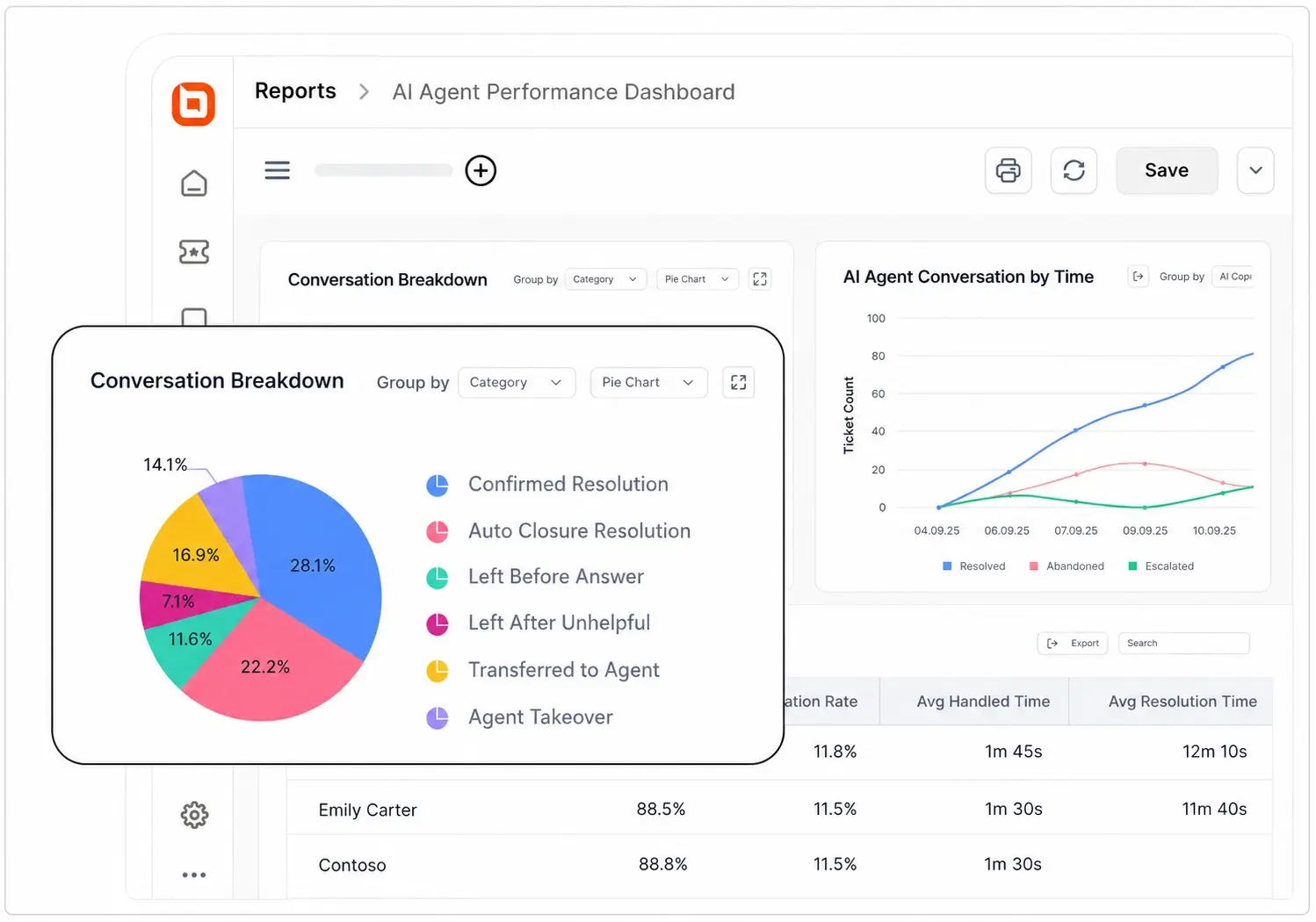
As the chatbot handles more customer interactions, this ongoing oversight becomes increasingly important. The time your team spends on these activities is an operational cost that should be included in your total cost of ownership.
How to calculate AI chatbot total cost of ownership
The subscription price is only one part of what an AI chatbot costs to run. Total cost of ownership (TCO) includes the platform fee plus the additional expenses required to deploy, use, and maintain it.
A simple monthly TCO calculation is:
For example, suppose your chatbot costs $300 per month before additional operating expenses:
| Cost component | Example monthly cost |
| Platform subscription | $300 |
| AI usage charges | $150 |
| Integrations | $100 |
| Knowledge maintenance | $200 |
| Internal administration | $250 |
| Total | $1,000 |
In this example, the chatbot’s estimated monthly TCO is $1,000, not the $300 subscription price shown on the pricing page.
Now suppose the chatbot successfully resolves 500 customer issues per month:
Cost per AI resolution = $1,000 ÷ 500 = $2
That $2 cost per resolution gives you a more useful benchmark for evaluating chatbot ROI. You can compare it with what your organization currently spends to resolve similar issues through human support.
Want to test different support volumes and automation assumptions? Use the free AI chatbot ROI calculator to estimate your savings, calculate expected ROI, and understand how automation could affect your support costs over time.
Which AI chatbot pricing model is right for your team?
The best AI chatbot pricing model depends on what makes your costs move. Think about your support volume, expected AI usage, team size, and how much cost variability you are comfortable with.
| Support scenario | Pricing model to consider | Why it fits | What to watch |
| Stable or growing support volume | Flat-rate or hybrid | Gives you a predictable base while allowing AI usage to scale. | Usage limits, credits, and overage costs. |
| Low volume or early AI pilot | Usage-based | You pay closer to what you actually use. | Costs can become less predictable as volume grows. |
| Want spending tied to successful automation | Resolution-based | Costs are linked directly to issues AI resolves. | Your bill can rise as resolution rates improve. |
| AI supports a human-led service team | Per-seat + AI | Easy to budget when agent numbers are stable. | AI charges may sit on top of seat costs. |
| Complex enterprise workflows | Credits or action-based | Lets you pay for different AI activities and workflows. | Credit consumption can be difficult to forecast. |
| Already using a CRM or help desk ecosystem | Native AI add-on | Easier integration with your existing support stack. | Convenience may come with higher platform or AI costs. |
A plan that looks inexpensive at low volume can become costly as usage or resolution rates increase, while a higher starting price may offer more predictable costs at scale.
If your bigger goal is reducing your overall cost to serve, not just finding the cheapest chatbot, our customer support costs guide covers the workflow, self-service, routing, and operational costs that sit around AI pricing.
Choose AI chatbot pricing that scales with your support
The right AI chatbot should remain cost-effective as support volume and automation grow. Compare vendors using the same workload, factor in ongoing costs, and understand exactly what drives your bill before making a decision.
With BoldDesk, you can combine predictable team-based pricing with transparent AI credit usage, making it easier to estimate and manage the cost of AI-powered support as you scale.
Sign up for a free trial or schedule a demo to see how the pricing fits your support needs.
Have questions or comments about AI chatbot pricing? Share them in the comments below.
Related articles
- Why Your Support Costs Keep Increasing (And How to Fix Them in 2026)
- Intercom Pricing in 2026: Complete Breakdown of Plans and AI Costs
- Zendesk Pricing 2026: Plans & Hidden Costs
FAQs on AI chatbot pricing for customer support
Resolution- or outcome-based pricing is one of the most common models among major AI customer support platforms. Vendors such as Intercom, HubSpot, Zendesk, and Yellow.ai all use resolutions or outcomes as part of their AI billing model. Intercom charges $0.99 per outcome, while HubSpot charges $0.50 per resolved conversation.
AI chatbot pricing currently ranges from around $7/agent/month for basic live chat with limited AI to $500 or more per 100,000 credits on enterprise platforms, with per-resolution models charging $0.50–$2 for each issue the AI handles.
Usage-based pricing works well for organizations that want costs tied to activity, while resolution-based pricing aligns spending more closely with outcomes. The best choice depends on how your team measures value and expects support demand to grow.
Free plans are useful for testing setup, response quality, and basic workflow fit. Most production support teams eventually need higher usage limits, stronger integrations, analytics, governance, and predictable escalation behavior.
Start by understanding how each vendor measures usage and what costs are included in the base price. Then compare solutions based on total cost of ownership, scalability, implementation requirements, and estimated cost per resolved issue rather than headline pricing alone.
Before signing a contract, ask vendors how they define billable usage, what happens when limits are exceeded, which features require additional fees, and what ongoing maintenance is needed. Understanding these details upfront can help prevent costly surprises later.


