

- Blogs Explore Blogs Blogs
SLAs for AI Agents: How to Set Response and Resolution Targets
-
by Flavian Atieno Odongo
- Updated on: October 27, 2026
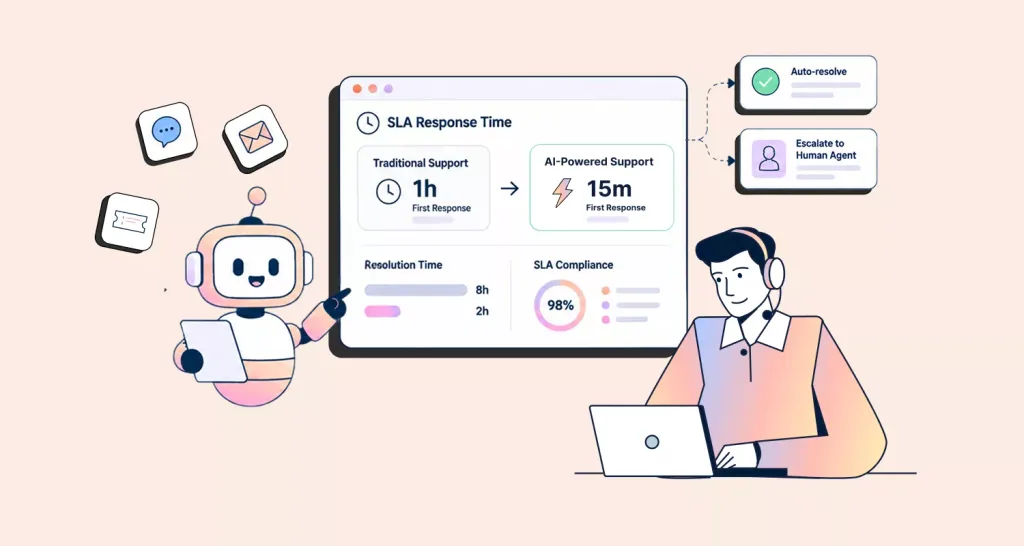
TL;DR: AI agents can improve response times, but speed alone does not prove that support improved. Update SLAs to count meaningful responses, keep clocks running through handoffs, verify resolutions, and compare AI-resolved, AI-assisted, escalated, and human-only tickets separately.
Consider a ticket submitted at 10:00 a.m. Five seconds later, an AI agent replies, and the Service Level Agreement dashboard marks the target as met. Yet the AI only acknowledges the request. A human does not respond until 10:45. Was the response time five seconds or 45 minutes?
As automation takes on more support work, traditional response targets no longer tell the full story. Teams need SLAs for AI agents that measure meaningful responses, resolution quality, and human handoffs.
Without clear rules, teams may meet help desk SLA targets while customers still face delays or unresolved issues.
In this guide, you’ll learn how automation changes response targets, which metrics matter, and how to build AI customer support SLAs that reflect customer outcomes.
What is an SLA for AI agents in customer support?
SLAs for AI agents set response and resolution commitments for customer requests handled partly or fully by AI. They measure how long customers wait for useful help, including when an issue passes to a human agent.
These targets concern customer responses and resolutions. AI vendor SLAs address uptime, latency, and availability.
Why traditional support SLAs break when AI agents join the workflow
In March 2025, Gartner predicted that agentic AI would autonomously resolve 80% of common customer service issues by 2029.
In Salesforce’s 2025 State of Service report, service professionals estimated that AI resolved 30% of cases in 2025. They expected that share to reach 50% by 2027.
If AI resolves more common issues, SLA reports designed for human-only teams can give a misleading picture of service quality.
Traditional SLAs were built for human-only queues. Three of their assumptions stop working once AI agents in customer service join the workflow:
- Static targets: A single first-response time treats an instant AI acknowledgment and a detailed human answer as the same event.
- Hidden handoff delays: The wait between AI escalation and human engagement disappears into general handling time, so reports look healthy while customers wait.
- Closure treated as resolution: An AI can close a ticket quickly, but a closed ticket may still be unresolved.
The table below compares what teams measured before AI with the response, handoff, and resolution measures they need now.
| Area | Traditional approach | When AI is involved |
| First response | The first reply comes from a person | Count only a meaningful AI or human response |
| Handoff | Handoff time is often hidden in general handling time | Track time from AI escalation to human engagement |
| Resolution | Ticket closure usually indicates completion | Verify that the answer or action solved the issue |
| SLA clock | The workflow is mostly human-led | Keep the end-to-end clock running through escalation |
| Reporting | Teams report one overall SLA result | Compare AI-resolved, AI-assisted, escalated, and human-only paths |
What counts as a response or resolution when AI is involved?
If teams do not agree on what counts as a response or resolution, SLA reports can show success while customers continue waiting for meaningful help.
- Automated acknowledgment: Confirms receipt. It does not count as a meaningful response or resolution.
- Meaningful AI response: Provides an answer based on approved knowledge or verified information. It may also give a useful next step or request information needed to move the issue forward.
- AI-to-human escalation: Does not count as a customer response by itself. Start tracking the handoff and keep the original resolution clock running.
- Initial AI resolution: Record when AI answers the request or completes the requested action. Verify the outcome separately.
Internal drafts and summaries are not customer-facing responses. An AI action that starts but fails is not a completed resolution.
Verify resolution through customer confirmation or, where available, evidence that the requested action succeeded.
Resolution-focused feedback and reopens can reveal problems later. A 72-hour reopen window is an example; choose one that fits the issue.
The example below shows which clocks keep running when AI acknowledges a ticket and then escalates it.
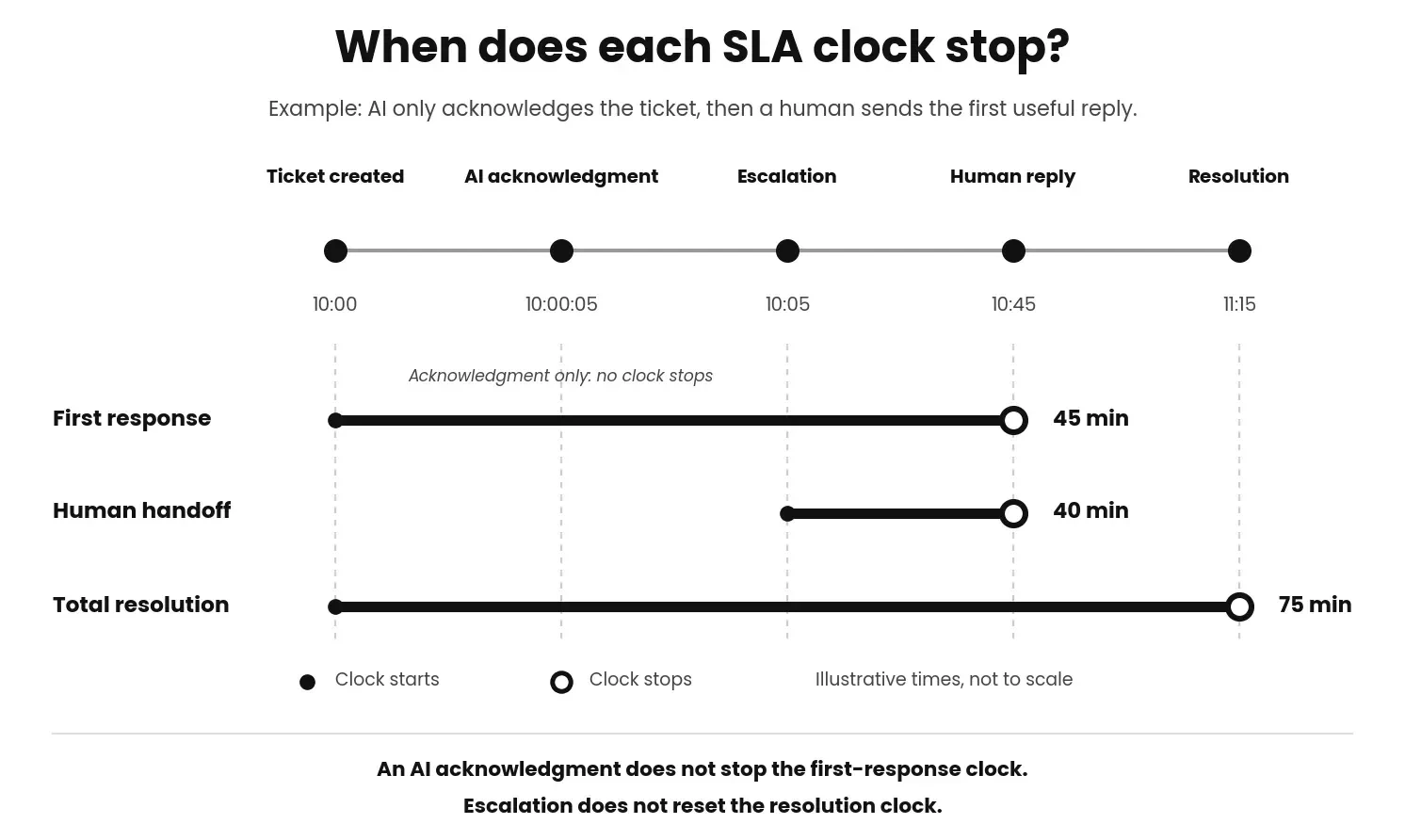
Once these event rules are defined, teams can set SLA targets for each support path.
SLA targets by support path
Not every support request follows the same path. Some are fully resolved by AI, while others require human involvement.
Because these journeys differ, they should not be measured the same way. Set separate SLA targets and metrics for each support path so the results are easier to compare.
High-priority incidents, regulated requests, and VIP customers may require stricter response targets or faster escalation paths. BoldDesk supports priority-based SLA policies to help teams apply different targets where needed.
AI-resolved tickets
AI-resolved tickets are handled entirely by an AI agent.
Track ticket resolution time, whether the answer or action is accurate, and whether the customer returns with the same issue.
Example: An AI agent checks an order system and gives the customer a confirmed delivery date. The response can count because it uses verified data and answers the request.
AI-assisted tickets
AI-assisted tickets involve both AI and human agents. AI may summarize conversations, suggest responses, or surface knowledge base content.
However, the first-response clock should stop only when the human agent sends a meaningful reply.
Track whether assistance reduces handling time without lowering accuracy or customer satisfaction.
Example: A customer submits a billing question at 2:00 p.m. AI summarizes the account history and recommends a response. The first-response clock stops at 2:20 p.m., when the human agent sends a meaningful reply within the 30-minute target.
AI-to-human escalations
Some requests need human judgment. In these cases, escalation is the right outcome, but the customer should not disappear into an unmeasured queue.
Track AI-to-human handoff time from escalation to human engagement. Keep the end-to-end resolution clock running throughout the handoff.
Example: An AI agent escalates a disputed charge at 2:00 p.m. A specialist responds at 2:40 p.m. The 40-minute gap exceeds a 15-minute handoff target and should be reported rather than hidden inside overall handling time.
Human-only tickets
Keep sensitive, complex, or high-risk requests in human-led workflows. These tickets provide a baseline for judging whether AI-supported paths improve speed without reducing quality.
Continue tracking ticket resolution time, response time, CSAT, and reopen rates for this group.
Illustrative SLA targets by support path
The table below shows illustrative response and resolution targets for each support path.
| Support path | Qualifying response | Illustrative target | Quality guardrail |
| AI-resolved | First substantive AI response that answers the question or completes the requested action | AI resolves within 10 minutes | Check the completed action or customer feedback; monitor reopens separately |
| AI-assisted human | First human response supported by AI-generated drafts, summaries, or recommendations | First human response within 30 minutes | CSAT equal to or higher than the human-only baseline |
| AI-to-human escalation | First useful AI reply; otherwise, first human reply | Human engagement within 15 minutes of escalation | Resolution clock continues through the handoff |
| Human-only | First human response | First response within 1 hour | Standard quality and resolution targets |
These targets are examples, not industry benchmarks. Adjust them to your priorities, customer tiers, business hours, issue complexity, and historical performance.
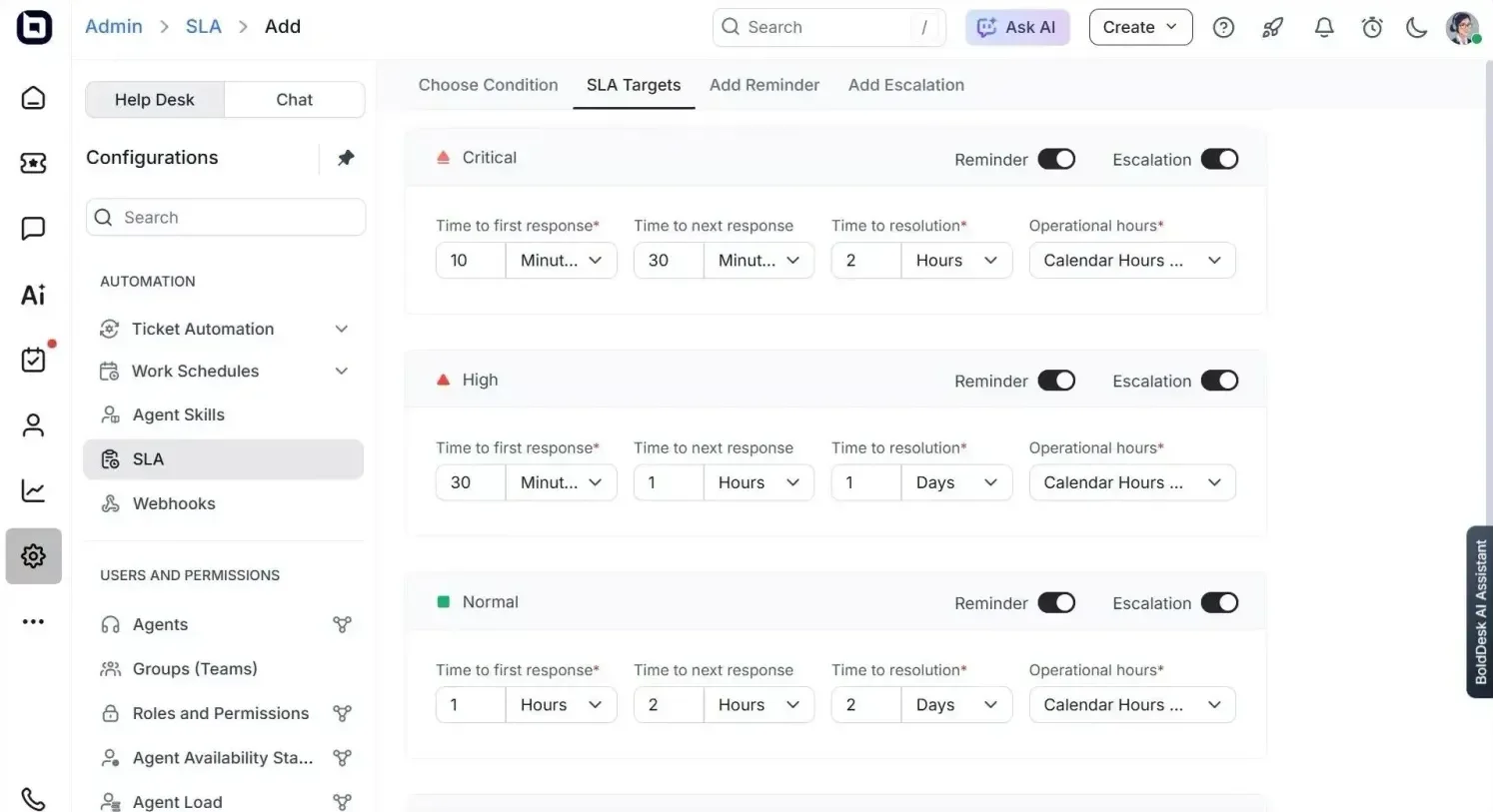
Two more rules keep the targets reliable:
- Set clock rules up front: Define whether clocks pause while waiting for the customer, outside business hours, or during an approved third-party hold. Continue reporting the customer’s total wait separately, even when an operational clock pauses.
- Include update commitments: For a complex case, a policy might require a status update every 24 hours until resolution. This gives the customer useful information while the final resolution target remains open.
AI SLA metrics to track
Meeting a response deadline does not prove that the reply helped. Effective AI SLA management requires teams to combine SLA compliance metrics with quality and customer outcome measures.
For a deeper look at support KPIs, see our guide on customer service metrics.
| Metric | What it shows | Calculation or treatment |
| Time to useful response | How long the customer waits for meaningful help. | First meaningful response time – ticket creation time |
| AI-to-human handoff time | How long an escalated request waits for a person. | Human engagement time – escalation time |
| End-to-end resolution time | The customer’s total wait across AI and human steps. | Resolution time – ticket creation time |
| AI resolution rate | The share of AI-handled requests closed without human help. | AI-resolved requests / all AI-handled requests x 100 |
| Verified AI resolution rate | How many AI-claimed resolutions pass verification. | Verified AI resolutions / AI-claimed resolutions x 100 |
| Reopen rate | How often a resolved ticket returns. | Reopened tickets / resolved tickets x 100 |
| CSAT by support path | Whether customer satisfaction differs by journey. | Report AI-resolved, assisted, escalated, and human-only results separately |
Review AI resolution rate together with verified resolution and reopen rate. A fast AI reply has little value if the issue remains open or the customer returns.
Govern AI decisions with an audit trail
When AI escalates, reroutes, or closes a ticket, teams need enough information to understand what happened and check the effect on SLA performance.
Review or record these details where relevant:
- Escalation reason: Why the request was handed to a person, if recorded, and when the handoff occurred.
- Routing changes: Which group or agent received the ticket and when the assignment changed.
- Closure decisions: What answer or action led to closure, and what evidence supports the resolution.
- Timer events: The SLA deadline and any ticket status changes that affect whether the clock runs or pauses.
Supervisors can review a sample of these tickets, correct mistakes, and reopen requests closed too early. Repeated corrections may point to an automation rule or knowledge source that needs updating.
For regulated workflows, confirm what records must be retained with your compliance team.
How to reset response and resolution targets after introducing AI agents
Automation does not automatically justify stricter customer-facing commitments. Successful AI SLA management depends on validating quality, accuracy, and customer satisfaction before changing targets.
Establish the pre-AI baseline
Before introducing AI, record customer service response times, resolution times, escalation and reopen rates, and CSAT by priority and channel.
Use this baseline to set achievable targets and compare each support path after rollout. Tighten targets only when resolution quality and CSAT remain stable.
Apply the event rules consistently
Apply the response, escalation, and resolution rules defined earlier across reports, dashboards, and FAQs.
Start with low-risk AI workflows
Begin with predictable, low-risk requests such as FAQs and order-status inquiries. Expand to password resets and account updates only when appropriate identity verification and security controls are in place.
A controlled rollout makes it easier to evaluate performance, identify issues, and refine processes before expanding AI coverage.
Compare each support path separately
Report AI-resolved, AI-assisted, escalated, and human-only tickets separately so simple cases do not hide delays in complex or escalated cases.
Validate quality before tightening targets
Before shortening SLA commitments, review answer accuracy, CSAT, reopens, and escalation trends.
Use the audit trail to review a sample of AI replies and actions and correct any outcome that does not hold up. Tighten targets only when faster service does not increase incorrect resolutions or repeat contacts.
Review targets regularly
AI capabilities evolve over time. Review targets when AI coverage, knowledge sources, workflows, or customer expectations change. Scheduled reviews keep SLA promises aligned with current performance.
Align AI support targets with customer outcomes
AI can shorten response times, but an instant reply does not always represent progress. Well-designed SLAs for AI agents focus on meaningful responses, verified resolutions, and customer outcomes rather than speed alone.
The goal is not simply to make every target shorter. It is to set targets that reflect what customers experience from the first request through final resolution.
BoldDesk supports configurable SLA policies, priority-based response and resolution targets, business hours, reminders, and escalations. These controls help teams manage deadlines across AI-supported and human-led workflows.
Ready to build smarter AI-powered SLA workflows? Sign up for a 15-day free trial of BoldDesk today to configure SLA targets, reminders, and escalations. No credit card is required.
Related articles
- 10 SLA Best Practices to Improve Customer Service
- AI Agent for IT Support and Service Desks: What’s Different from CX?
- Human-in-the-Loop AI for Customer Service: When to Use It
FAQs about SLAs for AI agents
Should an AI response count toward a first response SLA?
Yes, but only when it provides useful information or moves the issue toward resolution. A simple acknowledgment should not satisfy the first-response target.
Does the SLA clock reset when an AI agent escalates to a human?
No. The end-to-end resolution clock should continue running when an AI agent escalates a request to a human. Resetting the clock can hide delays that customers experience after escalation.
Should AI-resolved and human-resolved tickets have the same SLA?
Not always. Set targets by issue complexity, customer impact, risk, and required human involvement. Compare results separately so faster AI-resolved tickets do not distort human-workflow performance.
Who is accountable for AI decisions in SLA reporting?
Support leaders remain accountable. Review AI activity and ticket history to see which rule ran, what action followed, and what changed.
Record reasons and supporting evidence for sensitive escalations or closures where needed, and correct mistakes found during regular reviews.
How should teams measure AI resolution time?
Teams should measure AI resolution time from ticket creation until the AI provides the resolving answer or successfully completes the requested action.
Verification should be tracked separately through customer confirmation, successful action checks, resolution-specific survey feedback, or reopen monitoring.
ABOUT THE AUTHOR

Flavian Atieno Odongo 
Flavian is a passionate content strategist at Syncfusion, dedicated to creating resources that empower customers and deliver exceptional experiences. She specializes in crafting clear, user-friendly content and developing strategies that simplify complex concepts, enabling users to achieve their goals with confidence and ease.
Read more articles by this author Connect with the author on LinkedIn.
Be the first to get updates