
 In this page

TL;DR: Freshdesk uses tiered, per agent pricing, with key features, such as automation, analytics, and AI, unlocked only at higher plans, leading to rising costs as teams expand. This guide breaks down each plan’s capabilities and compares pricing structures to help you assess scalability, feature access, and long term value.
Choosing the right help desk starts with understanding what you’re actually paying for.
Freshdesk is widely recognized for its ease of use and strong feature set, but its tiered pricing, add-ons, and plan limitations can make it difficult to determine whether you’re getting real value or paying for upgrades you did not anticipate.
With more competitive alternatives emerging, it’s worth comparing Freshdesk plans closely, especially when essential features are locked behind higher tiers or sold as separate subscriptions.
Before committing to a long-term plan, upgrading just to unlock one missing feature, or exploring other Freshdesk alternatives, you should know what each pricing level includes and where hidden costs may arise.
This guide breaks down Freshdesk pricing for 2026, what each plan includes, and the add-ons to evaluate, so you can choose the best-fit option with confidence.
What is Freshdesk, and how does its pricing work?
Freshdesk is a help desk platform that follows a tiered, per‑agent pricing model, where your total cost depends on the plan you choose and the number of agents who require access.
Most teams begin with the essentials, such as ticketing and basic reporting, and then upgrade as they require more automation, advanced analytics, stronger controls, or AI capabilities like Freddy.
As teams scale, expenses often increase significantly because many high‑value features are restricted to higher tiers or sold as separate add‑ons.
Understanding the Freshdesk pricing plan
The Freshdesk pricing model is not set in stone; it’s subject to change as management sees fit. To remain updated at all times, always check their website for the latest Freshdesk pricing information.
Freshdesk pricing follows a per-agent tier model, meaning businesses pay a fixed fee for each agent account regardless of ticket volume. The Freshdesk pricing only changes with an increase or decrease in the number of agents.
Freshdesk pricing also includes two billing options: monthly and annual plans.
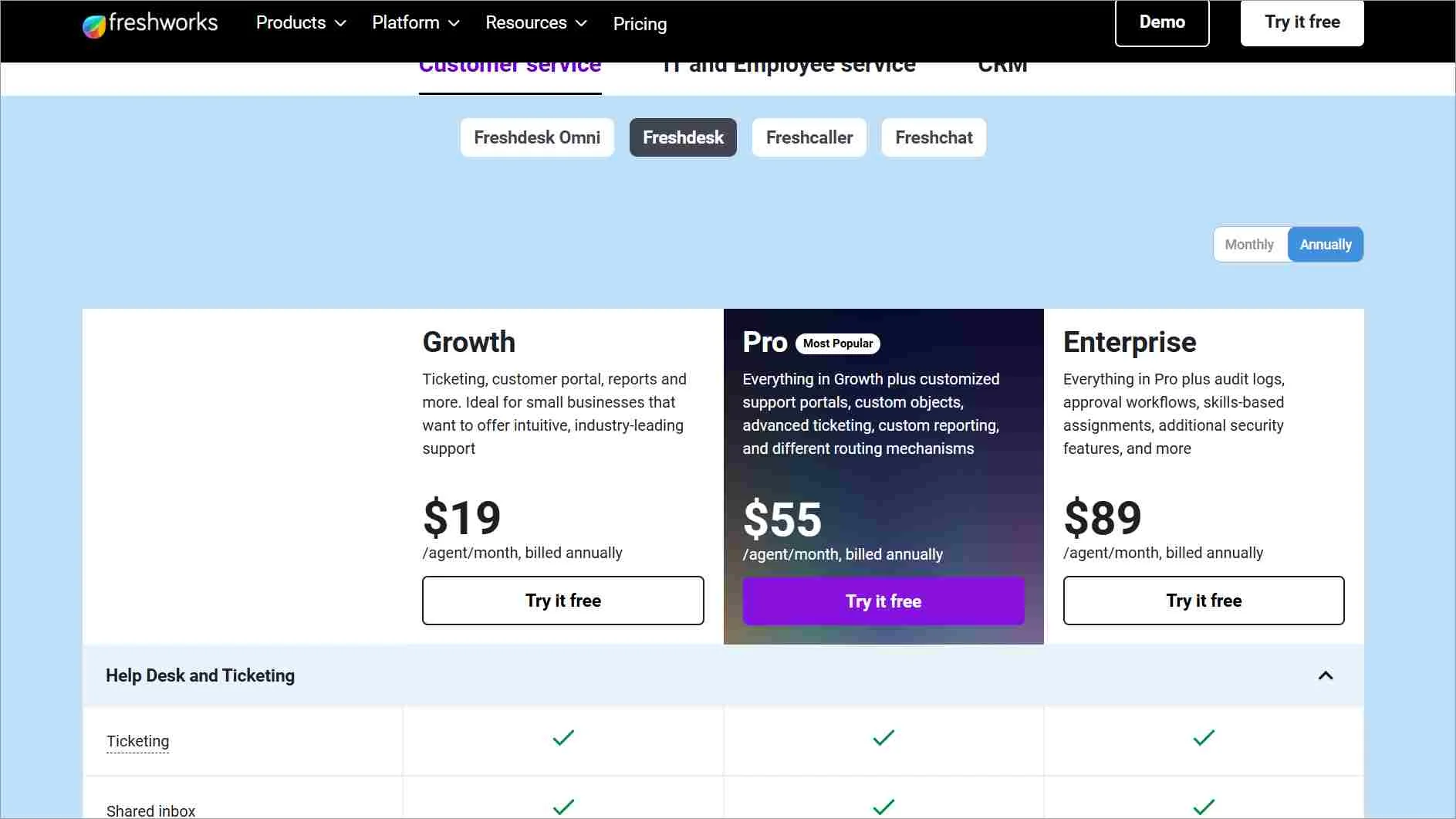
Here’s a clear breakdown of what each plan actually includes and how the capabilities expand as you move up the tiers.
Free plan
Best for: Small teams of up to 2 agents and startups evaluating Freshdesk’s core workflows.
The free plan provides the basics to small teams need to start handling customer inquiries.
It includes:
- Shared inbox for managing incoming tickets
- Integrated knowledge base for publishing help articles
- Team collaboration tools that let agents discuss issues internally
Small businesses can upgrade to a growth plan when they need reporting, dashboards, workflow automation, or a branded customer portal.
Growth plan
Best For: Small businesses with growing ticket volume and teams ready for basic analytics and automation.
The plan expands Freshdesk from a simple inbox into a more structured support system.
Their paid plan starts at $19/agent/month (annual billing)
In addition to everything included in the Free tier, you get:
- Built‑in reports with real‑time dashboards to track ticket volume and agent performance
- A branded customer portal where users can submit and monitor requests
- Automated workflows that help teams reduce manual tasks.
These additions make daily operations smoother and give managers better visibility into performance.
Businesses that require custom objects, advanced routing, deeper customization, or stronger reporting capabilities can move this pricing tier.
Pro plan
Best For: Medium‑sized teams with support operations that need customization, structured data, and advanced routing
This is where Freshdesk becomes more customizable, with pricing starting at $55/agent/month (annual billing).
It includes:
- Everything in Growth
- Custom objects
- Customized support portals
- Advanced ticketing
- Custom reporting
- Additional routing mechanisms
Users who need compliance‑grade controls such as audit logs, security enhancements, or skill‑based assignment can step up to this plan.
Enterprise plan
Best For: Large organizations with strict security, compliance, or governance needs.
This plan starts at $89/agent/month (annual billing), including the following capabilities:
- Everything in Pro
- Audit logs
- Additional security features
- Approval‑based workflows
- Skill‑based assignment
When scalability, compliance, advanced workflows, or granular security become essential, transitioning to this tier is recommended.
These capabilities support larger teams that must maintain compliance and manage complex processes at scale.
Freddy AI add‑ons
Freshdesk offers two main AI add‑ons, Freddy AI Copilot and Freddy AI Agent, each priced separately from all plans.
These tools extend automation and agent‑assist capabilities but are billed independently of Growth, Pro, or Enterprise tiers.
Freddy AI Copilot
Best For: Teams that want writing assistance, faster responses, and improved consistency
Freddy AI Copilot costs $29/agent/month (annual billing). It includes the following capabilities:
- Reply suggestions
- Summaries
- Tone refinement
- Article/content drafting
- Access to Freddy Insights (beta)
It integrates directly into the Freshdesk workspace and can be purchased for all agents or only a selected group that requires AI‑powered efficiency without upgrading plan tiers.
Freddy AI Agent
Best For: Teams that want to automate repetitive queries and reduce ticket volume.
Freddy AI Agent is a customer‑facing bot that automates responses across chat or email.
Each automated interaction counts as a session, and usage is billed on a session‑based model, $49 per 100 sessions (after the first 500 free sessions in Pro/Enterprise).
Its capabilities include:
- Automated chat or email responses
- Self‑service answers
- Intent detection
- Autonomous conversation handling with human handoff
When you need scalable, bot‑driven support without expanding agent headcount, stepping up to this add-on provides the necessary functionality.
Here’s a summary of Freshdesk pricing:
| Plans | Pricing (Annual billing) | Key features | Best for |
| Free | $0 for up to 2 agents for 6 months |
|
|
| Growth | $19/agent/month |
|
|
| Pro | $55/agent/month |
|
|
| Enterprise | $79/agent/month |
|
|
| Freddy AI Copilot | $29/agent/month |
|
|
| Freddy AI agent | $49/100 sessions |
|
|
Pay Less, Do More with BoldDesk
Simplify and streamline support operations with powerful yet affordable customer service software.
Switch to BoldDesk today!
What are the main challenges of using Freshdesk?
While Freshdesk provides a comprehensive help desk solution, several commonly reported limitations may impact cost efficiency and operational flexibility.
These are some of the reasons that may make you avoid Freshdesk as your help desk of choice.
- High costs of advanced features: Many essential capabilities, including advanced automation, reporting, and AI tools, are available only in higher-tier plans. Teams often need to upgrade to more expensive plans to access a single critical feature, increasing overall spend as requirements grow.
- Feature gaps in lower plans: Lower-tier plans lack several advanced functionalities, which may require businesses to scale plans sooner than anticipated. Additionally, some users report that the mobile app does not offer the same depth of functionality as the desktop version.
- Performance and reliability concerns: Some users have reported occasional system issues such as slower loading times or ticket inconsistencies, which may affect response times and service efficiency.
- Separate pricing for chat and omnichannel: Live chat and omnichannel capabilities are offered as separate products with independent pricing structures. These features are not included in base help desk plans, which can increase total platform costs.
- Hidden and unpredictable costs: Beyond tiered pricing, add-ons, AI session fees, and separate omnichannel billing can make total costs significantly higher than base per-agent rates.
- Limited migration support: Migration tools are limited compared to some competitors, making data transfer from other platforms more complex. Some users have also cited constraints within the reporting functionality.
Why BoldDesk can be a strong value alternative to Freshdesk
BoldDesk is a help desk platform with an agent‑based pricing model that offers a predictable cost structure for teams comparing long‑term support expenses.
Every plan includes full access to all features, ticketing, live chat, omnichannel workflows, and more, without forcing upgrades for incremental needs. This ensures teams can scale steadily without unexpected pricing hikes or locked functionality.
Unlike platforms where advanced capabilities automatically push users into higher tiers, BoldDesk keeps AI optional through usage‑based credits. This helps organizations adopt automation at their own pace while maintaining clearer budget control.
In addition, the platform’s straightforward entry pricing and flexible add‑on model make it easier for teams to forecast costs, evaluate adoption timelines, and reduce friction when transitioning from another help desk.
Below is a breakdown of BoldDesk pricing options.
- Paid plans: Charged based on the number of agents with full access to all features.
- Free options: BoldDesk provides a free trial, eligibility‑based programs for startups and non‑profits, plus free migration support, all with full access to every feature from day one.
Here’s how BoldDesk’s plan structure and AI costs compare to Freshdesk’s tiering and add-ons, so you can estimate total cost as you scale.
Paid plans
BoldDesk gives your team full access to every feature in every plan, with free AI credits included at every tier and no hidden costs or surprise upgrades.
| No. of Agents | Monthly Price (USD) | Free AI Credits/Month |
| 5 | $99 | 500 |
| 10 | $199 | 1,000 |
| 25 | $349 | 1,500 |
| 50 | $499 | 2,000 |
| 75 | $749 | 2,500 |
| 100 | $999 | 3,000 |
Need more agents or want to explore full pricing details? Visit our pricing page to learn more.
BoldDesk add-ons
For teams that want to expand AI usage or enhance agent productivity further, BoldDesk also offers flexible AI add-ons that scale with your support operations.
AI Agent credits:
- $20 per 1,000 AI credits.
- Free monthly AI credits included with every plan, increasing as the number of agents grows.
- $20/month add‑on that supports human agents with tasks like summarizing tickets, drafting responses, refining tone, and assisting with content creation.
Because AI is usage‑based in BoldDesk, teams can estimate cost by looking at their expected monthly ticket volume and how frequently agents rely on AI Actions.
This offers clearer budgeting than models where AI is bundled into higher pricing tiers, even when only a portion of the team may actually use those features.
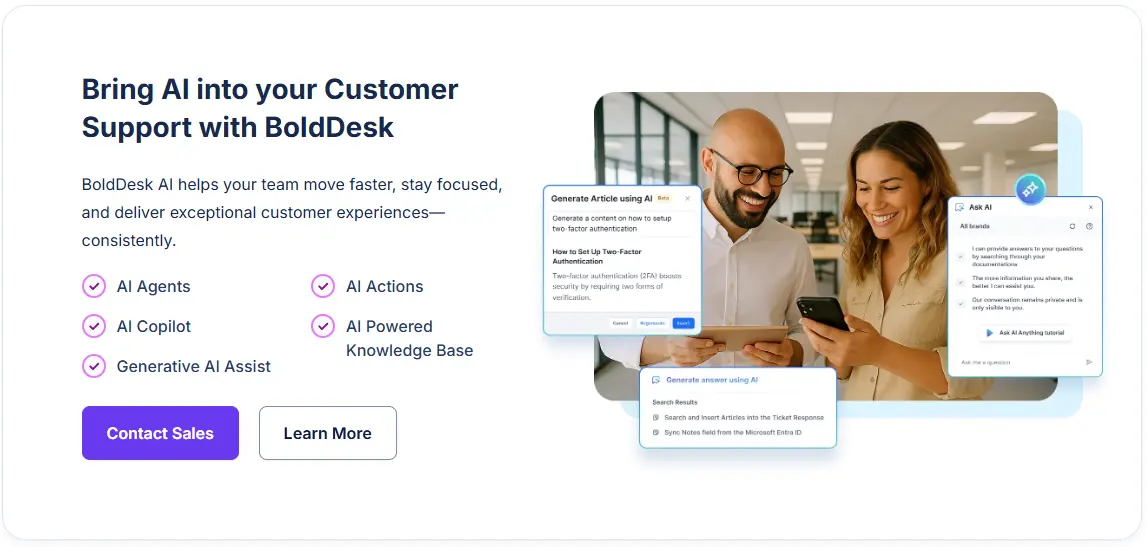
Both AI Agent and AI Copilot include helpful generative tools, such as ticket and article summarization and SEO‑friendly title and description suggestions, to support operational efficiency without requiring a plan upgrade.
Whether you want to increase the online visibility of your business, optimize your support operations, or improve agent productivity, these AI tools offer flexible ways to improve efficiency without requiring a plan upgrade.
Free BoldDesk plans and platforms
BoldDesk offers businesses the opportunity to grow and get to learn the product in-depth before making a long‑term commitment.
These programs also reduce onboarding friction and switching costs, making it easier for teams transitioning from other help desk tools to get started smoothly.
Available free programs include:
- Startup program: Eligible startups receive free access for 12 months, with all features included from day one, allowing them to focus resources on growth instead of customer support costs.
- Non-profit program: BoldDesk’s help desk software for non-profits is free for eligible NGOs, covering up to 10 agents with unrestricted access to all features.
- Free migration: Transfer all your data to BoldDesk through our migration services for free, regardless of your subscription.
- Syncfusion customer offer: Syncfusion® offers BoldDesk for free to its customers for 90 days — with all features unlocked to help businesses achieve more without breaking the bank.
Comparison between BoldDesk and Freshdesk
There are many alternatives for Freshdesk to choose from, with the choice dependent on various factors such as business size, pricing, and features offered.
Below is a summary table of Freshdesk vs. BoldDesk that can guide your decision in choosing the right customer service software for your business needs.
| Software | Freshdesk | BoldDesk |
| Pricing | Paid plan starts at $19/agent/month | Starts at $99 for 5 agents per month |
| AI Copilot pricing | Freddy AI Copilot is a per-agent add-on (approximately $29/agent/month). | An AI Copilot add-on is available for $20 per month. |
| AI automation pricing | Freddy AI Agent uses session-based pricing. A limited number of sessions may be included with additional sessions purchased in bundles (e.g., $49 per 100 sessions). | AI Agent uses credit-based pricing at $20 per 1000 AI credits.
Monthly free credits are included for every plan. |
| Best for | Small and medium-sized businesses that need easy-to-use software | Small and medium-sized businesses looking for an affordable help desk with a strong focus on support |
| Ease of use | User-friendly interface | Easy to set up with an intuitive and user-friendly interface |
| Customization | Customizable workflows | High levels of customization for tickets, fields, and workflows |
| Customer support | 24/7 customer support | 24/7 customer support |
| Free trial | Available for 14 days | Available for 15 days |
Is Freshdesk the best fit for your business?
Evaluating Freshdesk’s pricing structure and the features included at each tier can help you avoid unexpected upgrades and select a plan that aligns with your operational needs.
If you are comparing help desk platforms, assessing alternatives alongside Freshdesk provides better visibility into scalability, AI costs, and long-term value.
Platforms such as BoldDesk follow a different pricing structure that some teams may find more predictable as they grow.
You can explore BoldDesk through a 15-day free trial or request a live demo to evaluate how it fits your workflows before making a final decision.
For additional details, contact our support team for more information.
If you have insights or experiences with Freshdesk pricing, feel free to share them in the comments below.
Related articles
- Breaking Down the Zendesk Pricing! How Much Does It Really Cost?
- Chatbot ROI: How to Calculate It and Track the Right Metrics
- Freshdesk vs Zendesk: A Comparison Guide for 2026
FAQs on Freshdesk pricing
The best alternative depends on what you’re optimizing for: total cost as you add agents, access to automation or AI, omnichannel support, and reporting depth.
If you want a platform with simpler pricing and predictable costs, BoldDesk is one option to compare.
It offers comprehensive yet easy-to-use features at affordable and transparent pricing plans.
BoldDesk may offer better value when you are looking for a lower per-agent starting price and prefer AI as a usage-based add-on rather than upgrading to higher tiers primarily to unlock a single feature.
It can also be suitable for teams prioritizing predictable scaling costs and bundled omnichannel functionality.
Depending on the Freshdesk pricing plan and setup, they may charge extra for certain capabilities or usage-based components.
Common add-ons and related products include:
- Freddy AI (AI Copilot and AI Agent usage)
- Day Passes (temporary agent access)
- Connector app tasks (integration usage)
- Freshcaller / Freshdesk Contact Center (voice support)
- Freshchat and Freshdesk Omni (chat and omnichannel features)