



TL;DR: AI customer service by industry means adapting AI support to each industry’s requests, rules, and customer needs. Healthcare, finance, insurance, SaaS, retail, telecom, HR, and logistics all have different needs. AI is best suited to routine requests. People should handle complex or high-risk decisions.
Not long ago, “AI customer service” meant a chatbot that misread your question, gave a generic answer, and pushed you toward a human anyway.
That ceiling is gone. The harder question now isn’t whether AI belongs in your support operation; it’s where.
Technology is often the same across industries, but the goals, regulations, and stakes rarely are.
Automating order tracking for a retailer is far easier than protecting patient data in healthcare or verifying identity before touching a bank account. Expectations around accuracy vary just as much.
That’s why AI customer service by industry can’t follow a single playbook. Copying what worked for one industry is often the fastest way to get it wrong.
Before you automate anything, map your most common ticket types and understand the compliance requirements for your customer data. Then be clear about what AI can handle without adding risk.
This guide explains how healthcare, financial services, insurance, SaaS, retail, telecom, HR, and transport and logistics teams can prioritize AI customer service initiatives.
Those priorities are shaped by ticket volume, compliance requirements, and business risk.
Why AI customer service looks different across industries
Many organizations start their AI customer service journey by asking what tasks they can automate. A better question is what responsibility comes with each customer interaction.
Several factors determine where customer service automation by industry makes sense, including:
- Customer requests: Some interactions simply require information, while others require recommendations, exceptions, approvals, or dispute resolution.
- Compliance obligations: Privacy, security, recordkeeping, and disclosure requirements influence how customer data can be accessed, processed, and shared.
- Business risk: The effects of an inaccurate response vary significantly by industry. An incorrect delivery update carries a different level of risk than an incorrect healthcare recommendation, lending decision, or coverage explanation.
- Human expertise: Some situations require investigation, negotiation, or professional judgment that cannot be standardized.
Across major sectors, the same pattern appears repeatedly: organizations automate access to information before automating decisions.
That’s why healthcare teams focus on administrative support, while financial institutions prioritize servicing and verification.
Insurers streamline claims and policy communications, SaaS companies invest heavily in customer self-service and onboarding, and retailers automate post-purchase support.
Designing AI-to-human handoffs
While the AI customer service use cases by industry differ, one principle stays constant. The greater the consequence of being wrong, the greater the need for human oversight.
That risk is not theoretical. In 2024, Air Canada was held liable after its chatbot provided incorrect bereavement fare information to a customer.
The case illustrates why customer-facing AI should operate within clearly defined guardrails and escalation workflows.
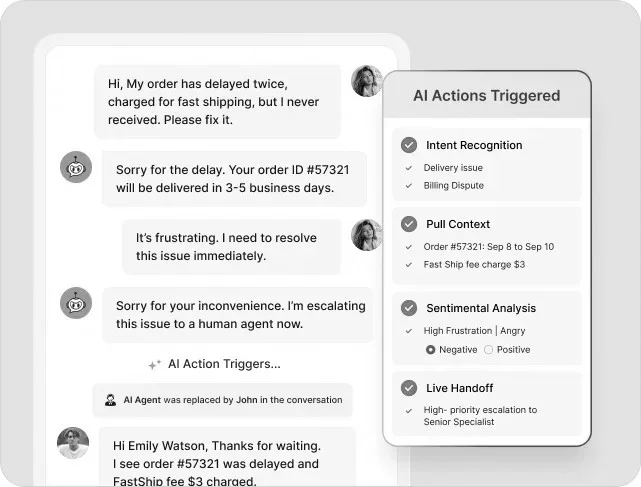
Escalation works best when the AI passes relevant context to the agent. This includes conversation history, customer details, verification status, and any actions already attempted.
Agents should not have to ask customers to repeat information. Well-designed AI-to-human handoffs reduce customer effort, speed up resolution, and maintain continuity across support channels.
Note: Examples in this guide reference widely used U.S. regulations and standards, such as:
- HIPAA (Health Insurance Portability and Accountability Act)
- PCI DSS (Payment Card Industry Data Security Standard)
- CPNI (Customer Proprietary Network Information)
- FMLA (Family and Medical Leave Act)
- ADA (Americans with Disabilities Act)
- CCPA (California Consumer Privacy Act)
Organizations operating internationally should also consider:
- GDPR (General Data Protection Regulation)
- Local privacy laws
- The EU AI Act, which sets risk-based rules for AI systems.
When using AI with customers, ensure compliance with the regulations that apply to your region and industry.
AI customer service in healthcare
In healthcare, the support challenge is not simply responding faster. It’s improving access to care without compromising patient privacy, trust, or clinical accuracy.
According to McKinsey & Company, 62% of healthcare leaders identified consumer engagement and experience as the area where generative AI has the greatest potential.
This indicates growing interest in AI-powered patient service and customer support operations.
| Common ticket types | Why patients contact support |
| Appointment scheduling and rescheduling | Book, change, cancel, or confirm appointments |
| Patient portal access | Resolve login, password, or account access issues |
| Billing and payment inquiries | Understand charges, balances, or payment options |
| Insurance verification | Confirm coverage, eligibility, or authorization requirements |
| Prescription refill requests | Request medication renewals or status updates |
| Medical records requests | Obtain, transfer, or access health records |
| General service inquiries | Ask about office hours, locations, providers, or available services |
Compliance considerations: AI systems handling patient data must comply with HIPAA’s privacy and security rules. This includes sharing only the information needed for the task. It also involves checking who the customer is before disclosing protected health information (PHI).
If a vendor accesses PHI on your behalf, a signed Business Associate Agreement (BAA) is required.
What to automate first: Portal access, appointment scheduling, and billing or insurance-verification status checks are good for automation. These requests are typically routine, repetitive, and low risk.
Anything involving clinical guidance, care decisions, or vulnerable patients should remain with clinical and support staff.
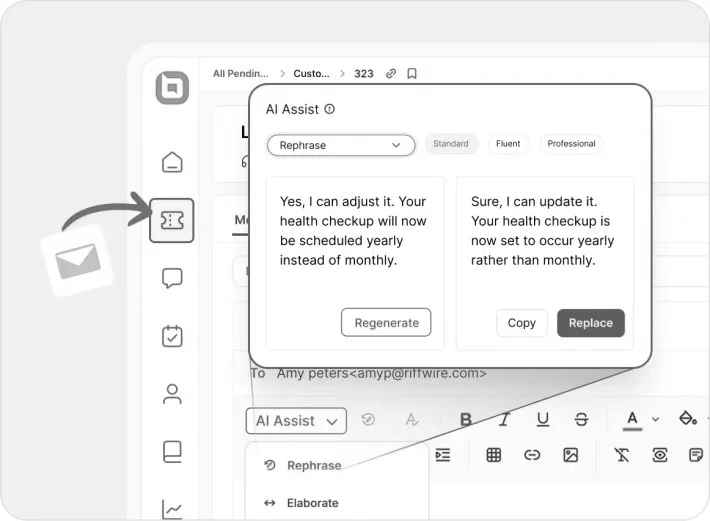
A dedicated help desk for healthcare can route these automatically while keeping sensitive interactions with your team.
The business impact is becoming increasingly clear. NVIDIA’s 2026 State of AI in Healthcare and Life Sciences found that 80% of organizations reported lower annual costs from AI initiatives. The same study found that 85% reported increased annual revenue.
Real-world example: MediBuddy
MediBuddy used AI-powered chat and self-service tools to automate routine inquiries. According to the company’s Verloop case study, this helped increase its customer satisfaction score to more than 90%.
AI customer service in financial services
For customer service in banking, customers expect fast support for account access, transactions, and fraud-related concerns while maintaining trust and security.
AI customer service helps banks meet these expectations while lowering support costs and scaling service delivery.
This creates business value while improving the customer experience. NVIDIA’s 2026 State of AI in Financial Services found that 89% of respondents said AI is helping increase annual revenue and decrease annual costs.
This highlights AI’s growing impact across customer service and day-to-day operations.
| Common ticket types | Why customers contact support |
| Account balances and transaction inquiries | Review balances, pending transactions, or account activity |
| Online and mobile banking support | Resolve login issues, authentication failures, or account lockouts |
| Card management requests | Activate, replace, freeze, or report lost and stolen cards |
| Payment and transfer inquiries | Check the status of transfers, bill payments, or wire transactions |
| Fraud and suspicious activity reports | Report unauthorized transactions or potential account compromise |
| Loan and credit application updates | Track application progress and review next steps |
| Disputes and chargebacks | Challenge transactions or request investigations |
| Product and account inquiries | Understand fees, rates, eligibility requirements, and account features |
Compliance considerations: AI customer service in the finance industry must protect cardholder data under PCI DSS. It must also support KYC/AML (Know Your Customer/Anti-Money Laundering) identity and activity checks before account actions proceed.
What to automate first: Balance inquiries, card management, and transfer status checks are ideal for automation because they’re common and low risk. However, these interactions should only proceed after appropriate customer authentication and identity verification controls are completed.
Fraud reports, disputes, and lending decisions should be handled by humans because mistakes can have immediate financial outcomes.
A finance help desk can automatically route these requests to the right channel while maintaining the appropriate level of human oversight.
Real-world example: Bank of America (Erica)
Bank of America’s Erica helps customers check balances, review transactions, manage cards, and track spending directly through the mobile app. It also answers common banking questions on demand.
AI customer service in insurance
Most insurance interactions begin with uncertainty, as customers seek quick answers about coverage, claims, and policy changes.
According to an EY survey, insurers are increasingly shifting from back-office AI initiatives to customer-facing applications.
Common examples include customer service chatbots and automated onboarding.
McKinsey & Company estimates that generative AI could unlock $50 billion to $70 billion in annual value for the insurance industry. Customer operations are among the largest opportunity areas.
| Common ticket types | Why policyholders contact support |
| Coverage and policy questions | Questions about policy limits, exclusions, deductibles, and covered events |
| Claims status updates | Checking claim progress, required documents, settlement timelines, or next steps |
| Policy changes | Updating beneficiaries, personal details, coverage levels, or insured assets |
| Billing and renewals | Premium payments, billing questions, renewal notices, and payment confirmations |
| Claims initiation (FNOL: First Notice of Loss) | Reporting an incident and receiving guidance on the claims process |
| Document submission and retrieval | Uploading, verifying, retrieving, or submitting policy and claims documentation |
Compliance considerations: Insurance interactions often become part of a claim file or audit trail, so policyholder data privacy, identity verification, and accurate recordkeeping are non-negotiable. Fraud detection and investigation processes add another layer of review to how AI can be used.
What to automate first: Claims status updates, billing inquiries, document retrieval, policy changes, and routine FNOL intake are good places to start with automation. FNOL should be escalated when injuries, safety concerns, emergencies, or high-severity losses are reported.
A dedicated help desk software for insurance companies can automatically route each request to the right team without manual triage.
Real-world example: Lemonade
Lemonade uses AI to handle parts of the claims journey, including claim intake, status updates, and claims processing for eligible cases. When higher-risk situations arise, claims are escalated to human teams, demonstrating how insurers balance automation with oversight.
AI customer service in SaaS
As SaaS companies scale, AI is increasingly being used to help customers find answers faster and stay productive without disrupting their workflow.
According to Salesforce’s Seventh Edition State of Service, 95% of organizations using AI report cost and time savings. This shows how AI is becoming a practical tool for improving customer service efficiency at scale.
| Common ticket types | Why users contact support |
| Account access and authentication | Login failures, password resets, SSO (Single Sign-On) issues, and multi-factor authentication problems |
| Product troubleshooting | Features not working as expected, performance issues, bugs, or unexpected behavior |
| Onboarding and implementation support | Help with setup, configuration, data migration, and initial product rollout |
| Billing and subscription management | Questions about invoices, renewals, upgrades, usage limits, or cancellations |
| Feature adoption and product guidance | Help understanding how to use specific features and workflows effectively |
| Integration and API support | Connecting the platform with third-party applications, tools, and data sources |
| User and permission management | Managing roles, access controls, team settings, and user permissions |
Compliance considerations: Customer data in SaaS support must be handled under GDPR, CCPA, and any data-processing agreements with vendors. Role-based access controls should limit who can access that data and what they can see.
Enterprise customers often expect SOC 2 (an independent audit of security controls) or ISO 27001 (an international information security standard) compliance. Audit logging should also be in place to record key account and system activity.
What to automate first: Password resets, billing questions, and common feature how-to requests are great candidates for automation because they’re straightforward and follow predictable workflows.
More complex technical issues, security incidents, and unique enterprise requirements should be escalated to experienced support teams. This helps support teams reduce repetitive work.
A help desk for SaaS ensures complex technical issues stay in the hands of the right experts. Learn how to scale customer support effectively with our guide on AI support for B2B SaaS.
Real-world example: GitHub
GitHub introduced an AI-powered assistant in its support portal to help customers resolve routine product and support inquiries. According to GitHub, the assistant resolved 60% of cases presented to it, with most completed in under seven minutes.
AI customer service in retail and ecommerce
Retail and ecommerce customers often contact support because information exists but is difficult to access, making visibility a larger issue than resolution.
These questions create a constant stream of customer questions after checkout, making retail and ecommerce some of the earliest adopters of customer service automation.
| Common ticket types | Why customers contact support |
| Order tracking (WISMO: Where Is My Order?) | Checking order status, shipment progress, delivery dates, or tracking updates |
| Delivery support | Address changes, delivery delays, missing packages, or proof of delivery requests |
| Returns and exchanges | Return eligibility, exchange requests, return instructions, and return status updates |
| Refund inquiries | Refund approval status, processing timelines, and reimbursement confirmations |
| Product questions | Stock availability, sizing guidance, product specifications, and compatibility checks |
| Payment and checkout support | Failed payments, billing issues, discount application problems, or payment verification |
| Loyalty and rewards support | Reward balances, points redemption, promotional offers, and discount code issues |
Compliance considerations: Retail and ecommerce AI support must protect payment data under PCI DSS and handle customer data per GDPR/CCPA, including consent rules for marketing communications. Order and account changes typically require identity verification first.
What to automate first: Order tracking, delivery updates, and standard returns are ideal for automation because they’re common and straightforward. Support agents should handle high-value refunds, disputed claims, and fraud-related cases.
This allows teams to speed up everyday support while using an ecommerce help desk software to handle exceptions more effectively.
Real-world example: Alibaba
Alibaba uses AI chatbots to handle more than two million customer service sessions each day across its ecommerce platforms. The company reports that the chatbots handle about 75% of online consultations and increased customer satisfaction by 25%.
AI customer service in telecom
Telecom support volume is driven by two factors. The first is billing questions from a large subscriber base.
The second is connectivity issues that customers often view as urgent, even when the underlying problem is minor. That mix is what makes ticket triage harder here than in most industries.
NVIDIA’s 2026 State of AI in Telecommunications report found that 90% of telecom operators said AI is helping increase annual revenue and reduce costs. The report also found that customer service was the second-most cited source of AI ROI (41%), behind network automation.
| Common ticket types | Why customers contact support |
| Billing and plan inquiries | Understand charges, dispute fees, or compare plan options |
| Network and service issues | Report outages, dead zones, slow speeds, or dropped connections |
| Device and technical support | Troubleshoot handset, router, SIM, or eSIM setup issues |
| Account and number management | Port numbers, activate or cancel lines, update account details |
| Upgrades and plan changes | Add lines, change plans, or upgrade devices |
| Fraud and security concerns | Report SIM swaps, unauthorized charges, or account takeover attempts |
Compliance considerations: Telecom accounts and call data are protected under CPNI rules, requiring identity verification before disclosure. Number porting and service changes also carry regulatory timelines that AI workflows need to respect.
What to automate first: Bill explanations, outage status updates, plan changes, and common troubleshooting requests are good candidates for automation because they follow established workflows. Persistent connectivity issues, fraud reports, SIM-swap concerns, and account changes involving protected customer data should be escalated to support agents.
Getting this balance right is easier with help desk software for telecom that can help distinguish between routine service requests and higher-risk account issues.
Real-world example: Elisa
Telecommunications provider Elisa worked with MindTitan to deploy an AI customer service bot called Annika. According to the company’s case study, the bot handles up to 70% of inbound contacts and automatically resolves 34% of all customer inquiries. This helps customers receive faster support while reducing pressure on service teams.
AI customer service in HR and employee support
A large share of HR support requests are routine, from checking leave balances and benefits eligibility to finding policy information or onboarding resources.
AI helps employees get answers when they need them instead of waiting for HR to respond. This allows HR teams to focus on issues that require context, confidentiality, or personal guidance.
| Common HR request types | Why employees contact HR |
| Benefits and enrollment questions | Understand health insurance options, enrollment windows, or plan changes |
| PTO and leave requests | Check leave balances, request time off, or ask about FMLA and parental leave |
| Payroll and compensation inquiries | Resolve paycheck discrepancies, tax withholding, or direct deposit changes |
| Onboarding and offboarding support | Complete new-hire paperwork, request equipment and system access, or process an exit |
| Policy and compliance questions | Clarify company policy, code of conduct, or workplace procedures |
| IT and systems access requests | Reset passwords or request software, hardware, or access changes |
Compliance considerations: Leave requests touching FMLA or ADA, and any employee data handling must meet applicable labor and privacy regulations, including GDPR/CCPA where relevant. AI should never make or influence decisions involving compensation, discipline, or accommodations without human review.
What to automate first: Benefits questions, PTO balance checks, and standard onboarding tasks are the best starting points for automation. They’re common and follow established processes.
HR professionals should handle leave requests involving FMLA or ADA accommodations, harassment or discrimination complaints, and compensation disputes. These situations are sensitive and may involve legal considerations.
Explore our guide on AI agents for HR and employee support for a closer look at how organizations are using AI to improve HR support.
Real-world example: IBM AskHR
IBM uses AskHR, an AI-powered HR assistant, to provide employees with 24/7 support for common questions and routine HR transactions.
The platform helps employees quickly access information and complete tasks through self-service, allowing HR teams to spend more time on strategic and complex employee issues.
AI customer service in transport and logistics
Most logistics support requests happen because customers want to know where a shipment is and when it will arrive. Visibility and responsive service have become key priorities in logistics.
A BCG survey of more than 180 logistics providers and shippers found that over 40% of shippers now factor a provider’s AI capabilities into partner selection.
Yet fewer than 10% treat AI as a mandatory requirement, and only about one in ten providers have scaled AI across core operations.
| Common transport and logistics ticket types | Why customers contact support |
| Shipment tracking and status | Checking current location, transit progress, or estimated arrival |
| Delivery exceptions | Delays, missed delivery windows, or damaged-goods reports |
| Customs and documentation | Requesting commercial invoices, certificates of origin, or resolving customs holds |
| Booking and rate inquiries | Requesting quotes or checking capacity availability |
| Claims for lost or damaged freight | Filing and tracking claims for missing or damaged shipments |
| Proof of delivery requests | Retrieving signed delivery confirmation or shipment documentation |
Compliance considerations: Customs documents and hazardous-material shipments have strict accuracy requirements. A human should review AI-generated responses before decisions are finalized.
Shipment and recipient data must also be handled under privacy laws such as GDPR and CCPA.
What to automate first: Shipment tracking, delivery updates, estimated arrival times, and document requests are easy to automate. They rely on information that is easy to find and follow predictable next steps.
Customs delays, damaged shipments, and requests involving hazardous goods should be handled by a person.
The impact of getting them wrong can extend beyond customer support. Not every shipment issue needs the same level of support.
Many teams use a help desk software for logistics and transport to handle routine inquiries efficiently while escalating more complex cases.
Real-world example: DHL
DHL Global Forwarding added a generative AI virtual assistant to its myDHLi customer portal. It gives customers 24/7 access to shipment status, customs declaration visibility, and support resources. The platform serves more than 20,000 customers and tracks over 450,000 shipments each month.
AI customer service priorities by industry
Customer expectations, regulatory requirements, and the cost of errors vary widely across industries. As a result, automation priorities differ from one sector to another.
The table below summarizes these differences.
| Industry | What drives customer service demand? | Biggest risk of over-automation | Where AI customer service delivers value |
| Healthcare | Helping patients access care and navigate administrative tasks. | Inaccurate handling of protected health information or interactions that drift into clinical guidance. | Reducing administrative workload through scheduling, intake, reminders, and patient self-service. |
| Financial services | Maintaining account access and supporting transaction-related activities. | Security failures, fraud exposure, and incorrect handling of sensitive financial information. | Speeding up routine account servicing while maintaining strong verification controls. |
| Insurance | Supporting policyholders through claims, policy servicing, and coverage-related inquiries. | Incorrect policy interpretation, claims handling errors, or disputes arising from inaccurate information. | Providing visibility into claim progress and reducing friction throughout the policy lifecycle. |
| SaaS | Helping users successfully adopt and use software products. | Poor guidance that slows adoption, increases frustration, or contributes to customer churn. | Accelerating onboarding, product adoption, and user self-service throughout the customer lifecycle. |
| Retail and ecommerce | Managing high volumes of post-purchase inquiries. | Frustrating customers with poor issue resolution during returns, refunds, or delivery exceptions. | Handling repetitive requests such as order tracking, returns, refunds, and delivery updates at scale. |
| Telecom | Resolving billing, service, and connectivity issues across large subscriber bases. | Mishandling CPNI-protected account or call data or disclosing details without identity verification. | Reducing wait times for high-volume billing, plan-change, and troubleshooting requests. |
| HR and employee support | Answering internal employee questions about benefits, leave, payroll, and policy. | Mishandling FMLA/ADA accommodation requests, harassment complaints, or compensation disputes without human review. | Automating benefits, PTO, and onboarding questions so HR can focus on higher-judgment work. |
| Transport and logistics | Providing visibility into shipment status and resolving delivery exceptions. | Errors in customs documentation or hazardous-materials handling that create regulatory or safety exposure. | Automating shipment tracking, ETAs, and document recovery at scale. |
Create effective AI customer service for your industry
The industries discussed in this guide are adopting many of the same AI customer service technologies.
However, they’re solving very different problems. Healthcare organizations focus on access and administration.
Financial institutions prioritize verification and security. Insurers streamline policy and claims communications. SaaS companies accelerate onboarding and product adoption. Retailers reduce problems after a purchase.
Telecom providers manage high volumes of billing and connectivity requests. HR teams automate routine employee support. Logistics organizations help customers know where their shipments are and when they’ll arrive.
Understanding those differences is often the deciding factor in a successful AI customer service launch.
Without that understanding, automation initiatives can become costly and fail to deliver meaningful value. BoldDesk combines AI, self-service, ticket management, and human support in one platform.
It also includes the security controls and audit trails regulated industries need to support compliance programs. Start your free trial today and build an AI customer service strategy that matches the needs of your industry.
Related articles
- 12 Best AI Customer Service Software for Support Teams in 2026
- AI Agent for IT Support: What’s Different from CX?
- AI Agents for Ecommerce: Increase Revenue in 6 Months
FAQs
Industries with high volumes of repetitive, information‑based requests benefit the most. Examples include retail, telecom, SaaS, and transport and logistics, where AI can automate routine inquiries while human agents focus on complex issues.
It means tailoring AI‑powered support to an industry’s ticket types, compliance requirements, customer expectations, and daily challenges. This avoids a one‑size‑fits‑all approach.
AI lowers costs by automating repetitive requests, boosting self‑service adoption, and enabling support teams to handle more inquiries without adding staff. Common examples include appointment scheduling, order tracking, account access support, and claims status inquiries.
Compliance determines what customer data AI can access and which tasks it can automate. Healthcare, financial services, insurance, SaaS, retail, telecom, HR, and logistics each have unique privacy, security, and verification requirements.
Start by analyzing your most common ticket types, identifying repetitive workflows, evaluating compliance obligations, and assessing the impact of potential errors. The strongest use cases are high‑volume requests with clear resolution paths and low operational risk.
AI customer service can support HIPAA and PCI compliance when organizations implement proper security controls, access restrictions, encryption, audit trails, and vendor agreements. Compliance depends on how the AI system is configured and governed.