
TL;DR: Internal knowledge base software centralizes policies, standard operating procedures, troubleshooting steps, and onboarding materials in a searchable, structured repository. When properly maintained, it can improve knowledge sharing, support employee onboarding, reduce repetitive questions, and preserve institutional knowledge as organizations grow.
It’s late in the afternoon, and a support agent is still searching for critical information needed to resolve a customer issue raised hours earlier.
What should have been a quick interaction has escalated into delays, mounting frustration, and a workflow bottleneck that now affects the entire team.
Situations like this are often the result of information being scattered across emails, chat threads, documents, and individual team members rather than being stored in a centralized location.
This is where internal knowledge base software can make a meaningful difference.
By centralizing processes, policies, troubleshooting guides, and company knowledge into a structured, searchable hub, it helps reduce the daily friction of searching for answers and enables teams to work more confidently.
In this article, we’ll explore what internal knowledge base software is, its key benefits, and practical tips for building a centralized knowledge repository that supports teams at scale.
What is an internal knowledge base?
An internal knowledge base is a private, centralized system that stores and organizes company information, such as policies, procedures, onboarding materials, troubleshooting guides, and standard operating procedures (SOPs), so employees can quickly find accurate answers in one secure location.
Unlike public-facing knowledge bases designed for customers, an internal knowledge base is restricted to employees or specific teams and helps organizations preserve institutional knowledge while eliminating reliance on tribal knowledge or constant peer support.
It often works alongside internal help desk software, enabling employees to find answers, submit requests, and resolve internal issues more efficiently.
Internal vs. customer-facing knowledge bases: Key differences
While both types of knowledge bases help organize and share information, they serve different audiences, contain different content, and require different governance processes to stay accurate and useful.
The table below highlights the key differences.
| Area | Internal knowledge base | Customer-facing knowledge base |
| Audience | Employees, agents, and internal teams. | Customers and end users. |
| Purpose | Knowledge sharing, employee onboarding, process documentation, and internal troubleshooting. | Self-service support, customer education, and issue resolution. |
| Access | Restricted to authorized employees. | Public or customer-accessible. |
| Ownership and governance | Typically managed by IT, operations, support leaders, or subject matter experts responsible for creating, reviewing, and updating content. | Usually managed by customer support teams, technical writers, product teams, or knowledge managers responsible for maintaining customer-facing content. |
| Success metrics | Employee productivity, onboarding efficiency, knowledge adoption, and resolution speed. | Ticket deflection, self-service success rate, customer satisfaction, and search effectiveness. |
| Content examples | Standard operating procedures (SOPs), policies, training materials, troubleshooting guides, and technical documentation. | FAQs, help articles, product documentation, tutorials, and troubleshooting resources. |
What are the benefits of using internal knowledge base software?
An internal knowledge base can help organizations improve onboarding, knowledge sharing, and information accessibility when content is properly maintained and governed.
Maintaining accurate documentation remains a challenge for many organizations.
Gartner found that 61% of customer service leaders have a backlog of articles to edit, while more than one-third lack a formal process for revising outdated content, highlighting the importance of centralized knowledge management.
The following are some of the most common benefits organizations may experience:
- Facilitates smoother onboarding: A well-organized internal knowledge base can provide training resources and reduce reliance on experienced team members, helping new employees learn processes, find information, and become productive more quickly.
- Supports better decision-making and productivity: By providing quick access to policies, procedures, and organizational knowledge, an internal knowledge base can help employees make informed decisions and complete tasks more efficiently.
- Encourages knowledge sharing and collaboration: An internal knowledge base can provide a central location for teams to share best practices, reference materials, and operational knowledge, helping improve consistency across the organization.
- Helps resolve technical issues more efficiently: When troubleshooting guides and technical documentation are stored in a centralized location, employees can find relevant information more easily instead of searching across multiple tools or relying on colleagues for assistance.
- Promotes knowledge retention: An internal knowledge base can help preserve institutional knowledge by documenting processes, experiences, and best practices. This can reduce knowledge loss when employees change roles or leave the organization.
What resources should your internal knowledge base have?
A well-organized internal knowledge base system is essential for empowering your team, improving efficiency, and fostering a culture of continuous learning.
Here are the core resources you can include to ensure employees can find the information they need quickly and confidently.
- Company information: Includes key details such as your mission, vision, and values, office locations, contact information, company policies and procedures, code of conduct and ethics, and communication guidelines.
- Training resources: Offer learning modules covering technical skills, compliance, and personal development. Some organizations use AI-powered tools to personalize training resources based on employee roles and learning objectives.
- Onboarding resources: Introduce your company’s customer service culture, policies, tools, and expectations to help new hires understand their responsibilities, foster connections, and get started smoothly.
- Standard operating procedures (SOPs): Provide detailed, step-by-step guides, enhanced with visuals like screenshots, so employees can perform tasks accurately and confidently.
- How-to videos: Use engaging self-help demos to explain complex procedures, demonstrate soft skills, or share leadership messages—catering to different learning styles.
- Audio recordings: Include podcasts, recorded meetings, or important announcements that employees can listen to during breaks, ensuring knowledge sharing is accessible anytime, anywhere.
- Troubleshooting manuals: Offer systematic guides for resolving common issues independently, reducing downtime. Include clear escalation paths for unresolved issues.
- FAQs: Maintain an up-to-date FAQ section that addresses common questions clearly and efficiently.
- Legal and compliance resources: Provide contracts and agreement templates, regulatory compliance guidelines, and data privacy policies to help teams operate within legal boundaries, protect sensitive information, and stay aligned with industry standards.
How to set up and structure an internal knowledge base
An effective internal knowledge management software requires planning, governance, and a structure that makes information easy to discover, maintain, and trust.
The following steps can help you build an employee knowledge base that reduces operational friction and scales with your needs.

1. Define your goals and implementation timeline
Creating a company’s internal knowledge base requires knowing why you need the tool and what success should look like.
You need to:
- Identify the biggest problems your teams face, such as slow onboarding, repeated questions, or time wasted searching for information.
- Translate these issues into measurable goals, including reducing internal search time, improving first‑contact resolution, or increasing knowledge reuse.
- Build a realistic timeline that includes content planning, writing, review cycles, knowledge base architecture setup, and quality assurance.
- Plan for periodic audits, content refreshes, and functionality improvements.
2. Build a cross‑functional knowledge base team
Form a team with representatives from major functional areas like support, HR, IT, operations, product, and leadership.
Assign clear responsibilities, including:
- Content owners who write and update information
- Editors who ensure accuracy, formatting, and consistency
- Administrators who manage the internal knowledge base structure, permissions, and taxonomy
These team members should also serve as knowledge champions, collecting feedback from their departments and promoting adoption across the organization.
3. Select internal knowledge base software that fits your organization
Your choice of platform determines how easily your team can create, maintain, and discover information.
Look for a system that supports:
- Strong search capabilities (AI‑powered, semantic, or federated search)
- Easy integrations with the tools your team already uses (Slack, Teams, CRM, HR systems)
- Scalability as your content and user base expand
- Version control to preserve accuracy
- Secure access management and role‑based permissions
- Support for multiple content formats (text, images, embedded videos, step‑by‑step guides)
- Analytics to monitor content performance and identify improvement opportunities
4. Use AI to identify knowledge gaps and strengthen content
Knowledge-based AI tools can streamline how your information ecosystem grows by:
- Analyzing employee search patterns to uncover unanswered questions, outdated documentation, or missing process steps.
- Identifying recurring pain points where new articles or clarifications would reduce internal support requests.
- Generating draft articles or suggesting improvements based on patterns in similar content.
By incorporating AI, your knowledge base evolves from a static library into an adaptive, insight‑driven resource that improves relevance and reduces operational inefficiency.
5. Standardize your content style and information structure
Create a unified content style guide and define standards for tone and writing style, formatting, visual elements, and terminology and naming conventions.
Choose a clear organizational knowledge structure and follow one or more of these models:
- By department: HR, IT, customer service, or operations.
- By role: new hires, managers, support agents, and engineers.
- By topic or FAQ: common issues like device setup, benefits inquiries, or process questions.
How do you choose the best internal knowledge base software?
Choosing the right internal knowledge base system is essential for successful knowledge sharing and management. During your selection process, bear the following points in mind.
- Check for seamless integration options: Ensure the knowledge management system smoothly integrates with your existing tools and workflows, like CRMs, project management tools, and communication platforms.
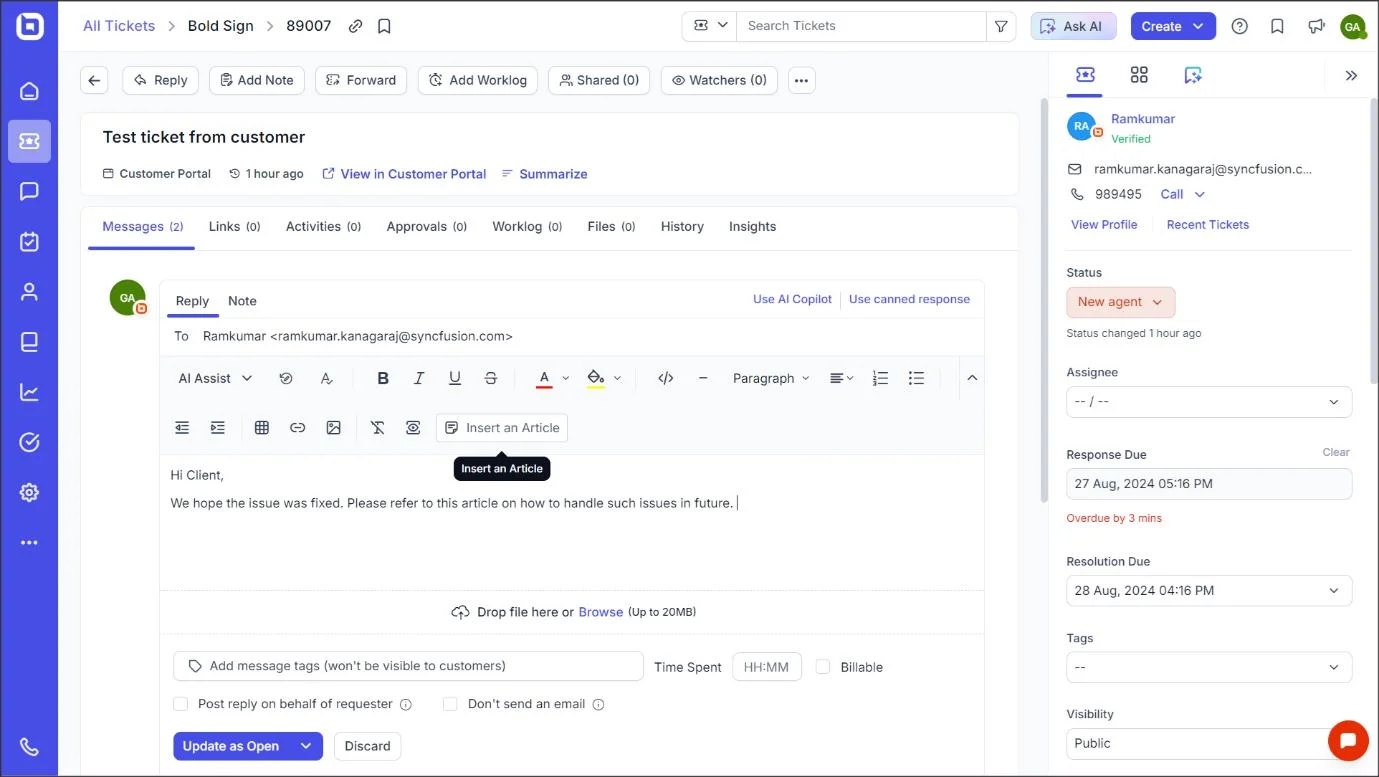
- Evaluate ease of use and search capabilities: Choose a platform with a user-friendly interface and intuitive navigation that includes advanced search features like tags, filters, predictive suggestions, autofill, and AI-powered search.
- Examine security and compliance measures: Choose help desk software that offers robust security controls, access management, and compliance options to safeguard sensitive data.
- Prioritize ready-to-use templates: Select a platform that provides pre-designed knowledge base article templates to facilitate quick content creation and ensure consistency across your knowledge base.
- Consider built-in reports and analytics: Prioritize software that offers comprehensive reporting and analytics tools, enabling you to monitor knowledge base metrics, identify improvement areas, and make data-driven decisions.
- Assess AI capabilities: Look for platforms that incorporate AI knowledge base capabilities to offer smart suggestions or content summarization and have automated tagging to enhance efficiency and user experience.
- Consider scalability: Your software must grow with your business to accommodate an expanding staff and rising content requirements.
If you’re evaluating platforms, see our guide to the best knowledge base software for a detailed comparison of features, pricing, and use cases.
Best practices for an effective internal knowledge base
Creating a high‑performing knowledge base requires more than storing information; it depends on intentional design, continuous optimization, and employee‑focused practices.
Here are the tips to ensure the platform stays accessible, accurate, and actively used across the organization.
- Tailor content appearance: Present information using consistent formatting, clear headings, visuals, and templates so employees can easily scan, understand, and use internal content across departments and regions.
- Integrate AI: Use AI‑powered search and content assistance to speed up article creation, surface relevant answers, detect outdated information, and support distributed teams with quick, accurate knowledge retrieval.
- Collect and utilize employee feedback: Enable article ratings, comments, and request forms to understand what employees need, then update or expand content based on their insights to keep the knowledge base accurate and valuable.
- Continuously refine content: Review articles regularly, update outdated instructions, remove duplicates, and adjust content based on analytics and search patterns to keep your internal knowledge base current and dependable.
- Ensure secure access controls: Use role‑based permissions to protect sensitive internal information and ensure employees only access content relevant to their roles, improving security and reducing information overload.
- Promote organization-wide adoption:
- Encourage teams to rely on the knowledge base by integrating it into daily tools, onboarding processes, workflows, and self-service in help desk experiences, ensuring it becomes the default source for accurate, up-to-date information.
Unlock efficiency with an internal knowledge base
Choosing the best software is key to unlocking your team’s full productivity. It empowers employees to efficiently create and share knowledge, leading to faster issue resolution and smarter collaboration.
BoldDesk helps teams build and manage internal knowledge bases using templates, permissions, and AI-assisted drafting.
Ready to reduce repetitive support requests and help new employees get up to speed faster?
Start your 15-day free trial and build an internal knowledge base with BoldDesk using templates, permissions, and AI-assisted drafting.
Do you have any additional feedback? Please feel free to leave a comment below.
Related articles
- How to Create a Knowledge Base in 7 Easy Steps
- 7 Techniques to Improve Knowledge Base Design
- Self-Service in Help Desk: Benefits and Best Practices
Frequently Asked Questions
Important controls include role-based access, private content groups, and permission management.
Platforms like BoldDesk support these security measures to ensure sensitive internal information is accessible only to authorized users.
An external knowledge base is designed for customers and end users, giving them quick access to product guidance, troubleshooting steps, and answers to common questions so they can resolve issues without reaching out to support.
An internal knowledge base, on the other hand, serves employees inside the organization. It acts as a centralized workspace where teams can search for reliable information, document processes, collaborate on shared knowledge, and maintain consistent workflows.
You can track knowledge base metrics such as search success rates, article views, and user feedback to assess how well it supports employee needs.
Additionally, monitor reductions in support tickets and onboarding time to assess their impact on productivity and efficiency.
If you’re looking for free knowledge base software, Zoho Desk and Document360 are good options that offer limited features.
Additionally, help desk solutions like BoldDesk offer free plans for startups and NGOs, allowing early-stage businesses to access the SaaS KB feature at no cost, for a limited period.
Internal knowledge base content should be reviewed regularly, typically quarterly or whenever processes, tools, or policies change.
Regular reviews prevent outdated information, maintain trust in the system, and ensure employees always rely on accurate internal documentation.