


- Blogs Explore Blogs Blogs
AI Governance in Customer Service: Framework and Template
-
by Maxwel Odhiambo
- Updated on: November 24, 2026
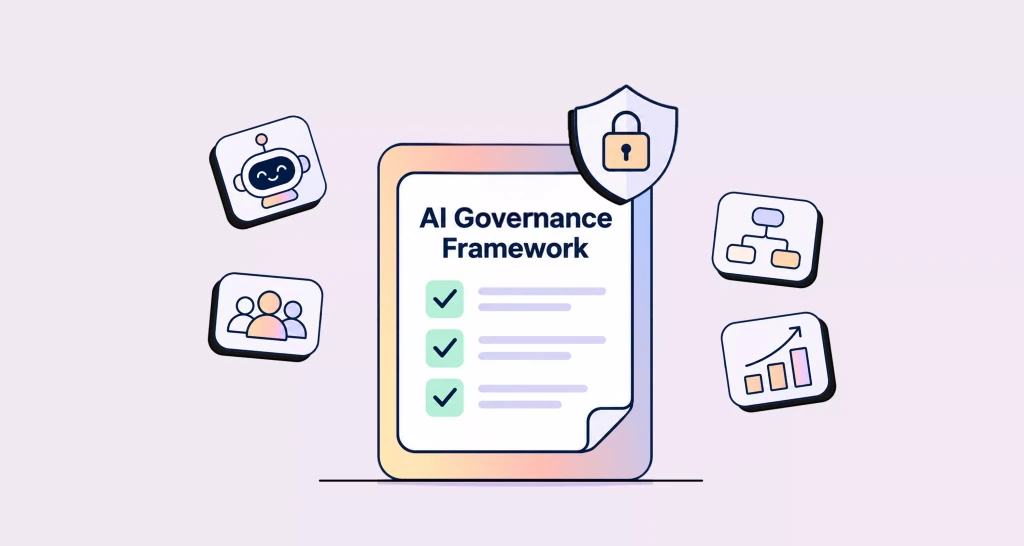
TL;DR: AI governance in customer service brings ownership, risk checks, data rules, human oversight, and monitoring into one clear framework. Support teams use it to manage AI safely, protect customer trust, and make sound decisions before scaling each use case.
Bringing AI into customer support is often the easy part. Governing it effectively is where the real challenge begins. Even a simple AI rollout can quickly become hard to manage without clear rules, owners, and oversight.
That is where AI governance in customer service comes in. It brings together the policies, roles, and controls needed to govern AI consistently across support operations.
Written policies alone rarely hold up once AI goes live across live chat, email, and web self-service. Without clear ownership, approved knowledge sources, and reliable human handoffs built into daily workflows, routine mistakes turn into loss of customer trust and compliance issues.
This guide shows how AI governance applies to customer support. You’ll get the key components of an AI governance framework, a risk-level guide, a 30-day roadmap, and a free template for scaling responsibly.
What is AI governance in customer service?
AI governance in customer service is the set of policies and controls that manage support AI from approval to removal, with clear ownership.
It defines what customer data and knowledge AI can access, which actions it can take alone, and when a human agent takes over. It also sets how AI answers are reviewed and monitored.
In practice, this means limits on customer data, approved knowledge sources, hallucination checks, a fast AI incident response plan, and oversight of third-party AI vendors. Prompt updates and system changes are controlled through user permissions, approval workflows, activity logs, and audit trails.
AI governance risks in customer service: what can go wrong?
Common AI governance risks in customer service fall into six areas, each controlled by specific parts of your governance framework:
| Risk | Plain example | Component that controls it |
| Wrong answers | AI invents a refund policy or quotes an outdated help article. | Knowledge base governance for AI answers; Controls for AI models, prompts, and updates |
| Data exposure | An agent pastes customer ticket details into an unapproved public AI tool. | Customer data governance |
| Unsafe actions | AI issues an unauthorized refund or changes account settings on its own. | Support AI inventory and risk levels; Human oversight and agent handoffs |
| Bias | AI routes or prioritizes requests differently across customer groups. | Monitoring support AI and handling incidents; Controls for AI models, prompts, and updates |
| No disclosure | Customers are not told they are chatting with an AI bot instead of a person. | Human oversight and agent handoffs |
| Performance drift | New products, updated policies, seasonal demand, changing customer phrasing, or model updates gradually reduce answer accuracy. | Monitoring support AI and handling incidents; Change control and review for support AI |
Real-world example: Moffatt v. Air Canada
In Moffatt v. Air Canada (2024 BCCRT 149), decided in February 2024, a customer relied on incorrect bereavement-fare information from the airline's support chatbot.
Air Canada argued it was not responsible for the chatbot's statements. The tribunal rejected that argument and held the airline accountable for the misleading information. It ordered Air Canada to pay about CAD $812 in total: CAD $650.88 in damages, plus interest and tribunal fees.
Why should support teams set up AI governance before they scale AI?
Support teams need AI governance before scaling because each new AI use case adds risk. It is also much easier to set owners, limits, and checks now than to fix problems after customers see them.
In ICMI’s April 2025 State of AI survey of 113 contact center professionals, 54% reported some AI functionality, though 33% had only just started. Among obstacles, 42% cited privacy or compliance concerns, 41% bad or inaccurate data, and 33% a lack of AI-specific strategy or policies. Meanwhile, 97% see AI as ongoing iteration and refinement, not a one-time launch.
Putting governance in place early gives you:
- A shared record of where AI is used and which customer data it handles
- A named owner for each use case
- Review that matches each task’s effect on customers
- Clearer data, recordkeeping, and AI disclosure duties
- Consistent replies, brand voice, and AI-to-human handoffs across channels
With ownership, review requirements, and escalation paths already defined, support teams can expand AI use cases faster.
Which laws and standards shape AI governance in customer service?
Support teams do not have to start building AI governance frameworks from scratch. They can base their AI governance on well-known standards, guidelines, and laws, including:
- NIST AI Risk Management Framework: A voluntary guide for finding, assessing, and managing AI risks. It organizes this work around four functions: Govern, Map, Measure, and Manage.
- ISO/IEC 42001: An international standard for setting up and improving an AI management system. Companies can use it to manage AI policies, risks, roles, work steps, and reviews.
- OECD AI Principles: Broad principles for AI that is fair, safe, transparent, and accountable. They also cover privacy, human rights, security, and human oversight.
- EU AI Act: A binding law that sets obligations based on the level of risk an AI system presents. Under Article 50, providers must design chatbots so customers know they are talking to AI. Support teams should make sure that notice appears. These transparency duties took effect on August 2, 2026. Fines can reach €15 million or 3% of global annual turnover, whichever is higher (the lower amount applies to small and medium-sized businesses).
Additionally, support teams must follow privacy and industry laws. These include the General Data Protection Regulation (GDPR) in the EU and the California Consumer Privacy Act (CCPA) in California.
In the US, state privacy and AI laws are adding specific rules for automated support and decision-making:
- California (CCPA ADMT): Finalized automated decision-making technology (ADMT) regulations under the CCPA took effect on January 1, 2026. Businesses using ADMT for significant decisions, such as lending, housing, employment, or healthcare, must comply by January 1, 2027.
- Colorado (SB 26-189 and HB 26-1263): SB 26-189 replaced the original Colorado AI Act and covers automated decisions in areas like lending, insurance, and healthcare. Its main duties start on January 1, 2027, and the attorney general must adopt related rules by then. HB 26-1263, also effective January 1, 2027, covers publicly accessible conversational AI services and requires AI disclosure. It may apply to customer-facing chatbots.
- Healthcare (HIPAA): The Health Insurance Portability and Accountability Act (HIPAA) can also apply when AI handles customer service in healthcare.
Note: This guide is for informational purposes only and does not constitute legal advice. Consult your legal or compliance team to confirm which regulations apply to your support operations.
8 key components of an AI governance framework for customer support
A good AI governance framework gives support teams clear rules for choosing, testing, running, and changing AI. The table below shows each component, what it decides, and who owns it.
| Component | What it decides | Owner |
| Ownership and accountability | Who is responsible for each AI use case, its results, and its problems | Support leader, business owner, technical owner |
| AI inventory and risk levels | Which AI uses are allowed and how much oversight each needs | AI governance lead or support operations lead |
| Customer data governance | What customer data AI can access, and how it’s used, stored, shared, and deleted | Privacy, security, and data governance teams |
| Knowledge base governance | Which sources AI can use for answers and how they’re kept current | Knowledge management or content owners |
| Model, prompt, and update controls | Which models, prompts, and settings are approved for live use | AI platform owner, IT, or engineering team |
| Human oversight and handoffs | When AI works alone, when a person reviews, and how cases move to agents | Support operations and team managers |
| Monitoring and incident handling | What to track, how to spot problems, and how to respond | Support operations, quality assurance, and incident owners |
| Change control and review | How AI changes are approved, reviewed, reversed, or retired | Governance committee, AI owner, or change management team |
Ownership and accountability for support AI
Every AI tool needs a named owner who is responsible for its results. Your company stays responsible to customers even when a vendor runs the AI.
Best practices:
- Name one owner each for business results, technical setup, and service quality.
- Pick one internal contact for vendor, security, and compliance checks.
- Write these roles into your AI governance policy.
Support AI inventory and risk levels
An inventory lists every place AI is used in support, including features built into AI customer service software, CRM platforms, and reporting tools.
Best practices:
- For each use, record what it does, what data it uses, who owns it, and when it is next reviewed.
- Give each use a risk level based on how much it could affect customers:
- Low (drafting replies, summarizing tickets): Check it from time to time.
- Medium (updating ticket fields, suggesting account changes): A person reviews its work.
- High (processing refunds, changing account settings): Needs formal approval, tight access limits, and a record of every action.
- Not allowed (banned by the EU AI Act or too risky to control): Don’t use it.
- The more AI does on its own, the higher the risk level. See AI agent autonomy levels for how much oversight each step needs.
Customer data governance
AI should see only the customer data it needs for the task.
Best practices:
- For each use, write down what customer data AI sees, why, where it goes, how long it’s kept, and who can see it.
- Share a list of approved AI tools. Agents should never paste tickets, customer details, or internal documents into tools that aren’t on it (called shadow AI).
- Update your privacy, data retention, and vendor policies to say whether customer data can train AI and how it is deleted.
- Run a security review of the AI in your customer service software.
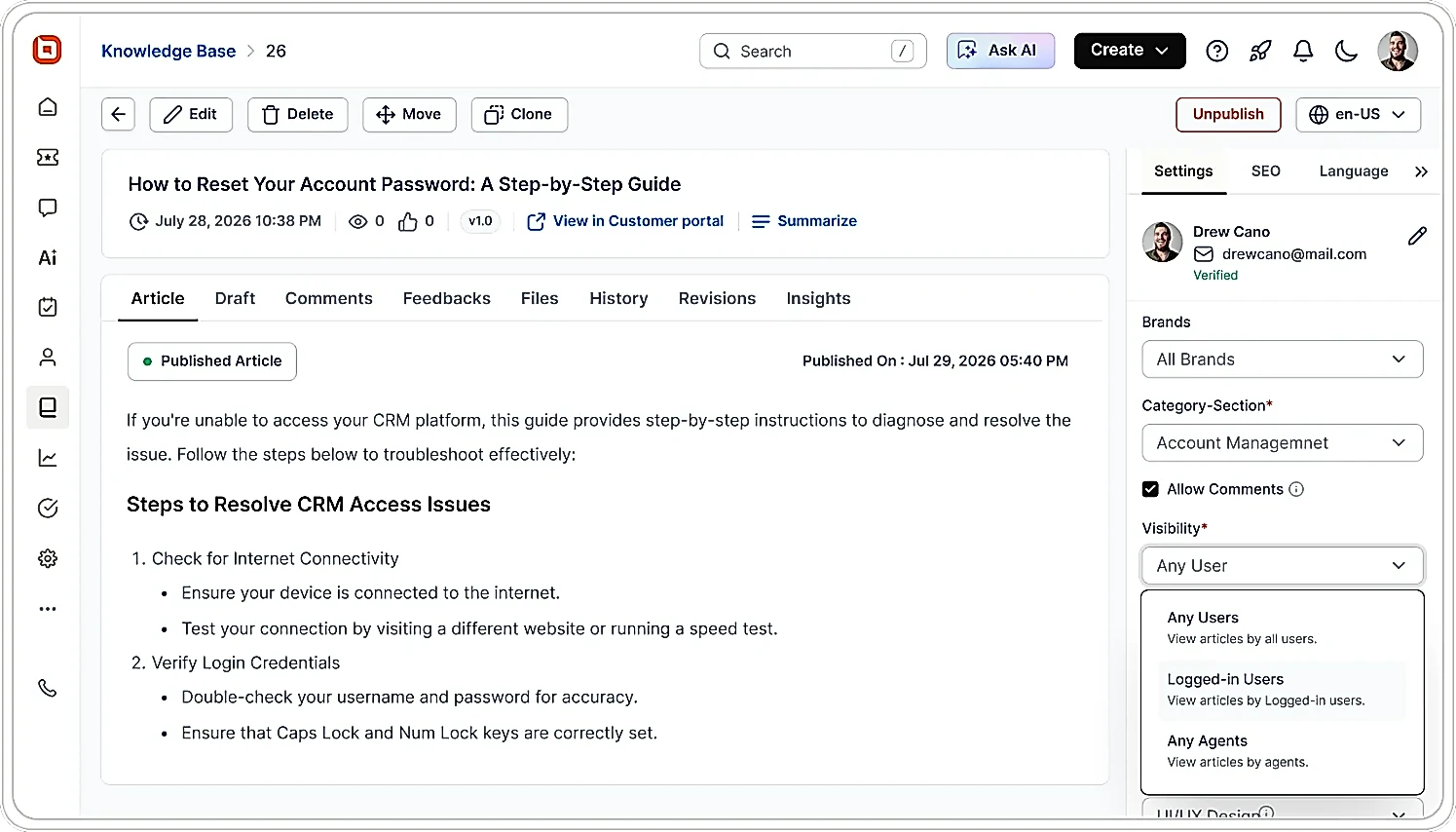
Knowledge base governance for AI answers
AI answers are only as good as the content behind them.
Best practices:
- Keep a list of approved sources, each with an owner and a review date.
- Decide which source wins when two disagree. For example, a customer’s current contract overrides a general help article.
Controls for AI models, prompts, and updates
The model is the AI engine, and the prompt is the instruction it follows. Together with the tools and access it has, they decide what customers get.
Best practices:
- Test before each release with everyday tickets, missing information, odd requests, and actions AI must never take.
- Keep a record of each version’s settings, test results, and known limits.
- Link each AI answer to the version that produced it, so you can find the cause of a problem fast.
- Give AI access only to the tools it needs. That limits the harm if someone tricks it with a malicious message. Follow the Open Worldwide Application Security Project (OWASP) AI security guidance.
These controls help prevent made-up answers, known as AI hallucinations in customer service.
Human oversight and agent handoffs
Issues involving money, identity, complaints, or account access need a person’s judgment.
Best practices:
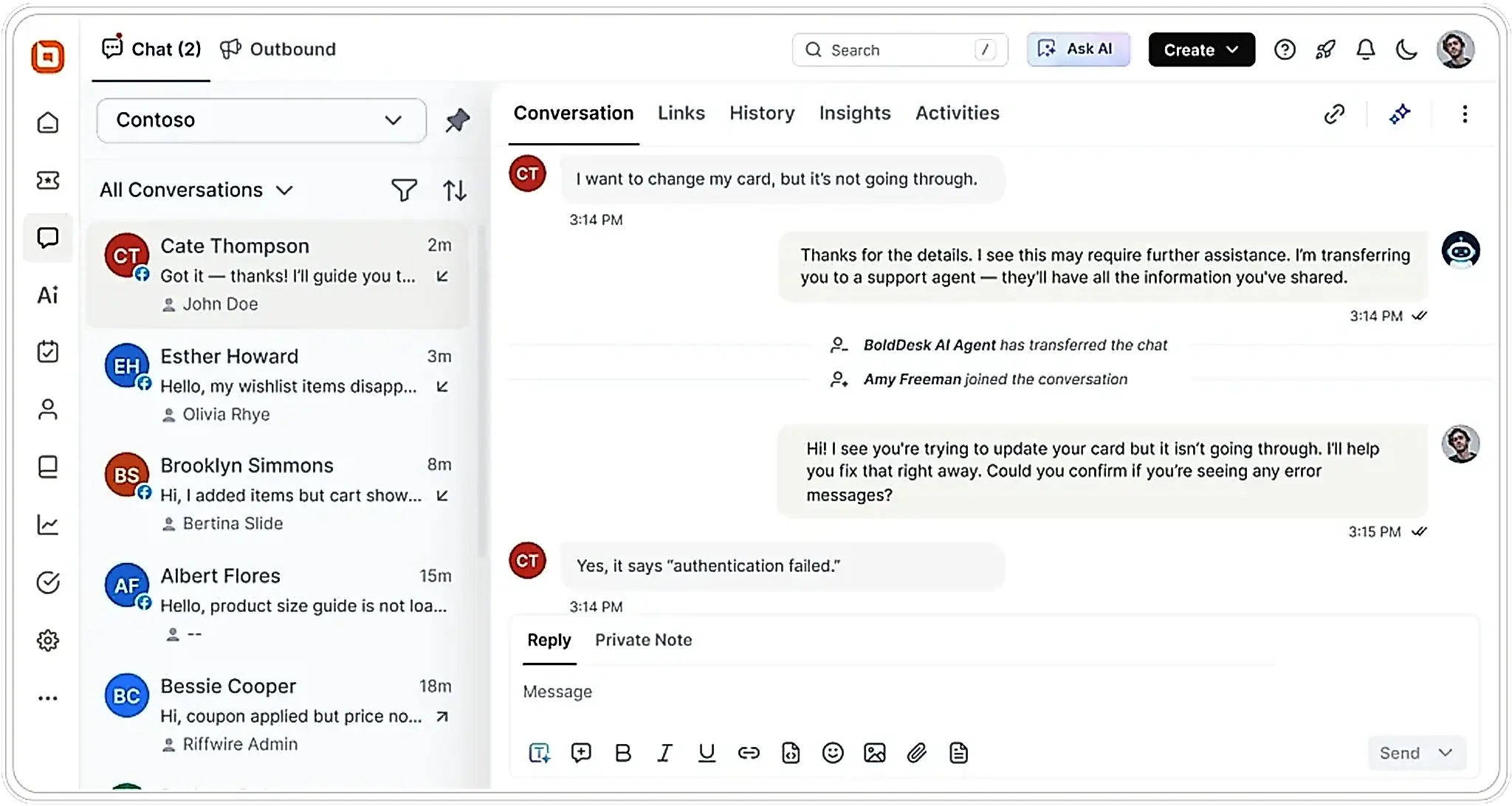
- Decide which cases AI handles alone, which need a person’s approval, and which go straight to an agent. This is called a human-in-the-loop approach.
- Set how sure AI must be before it answers, based on the topic. Billing, refunds, and account access need more certainty than product FAQs. If AI isn’t sure enough, it sends the case to an agent.
- Let customers reach a person at any time, and pass the full conversation to the agent so customers don’t have to repeat themselves.
- Tell customers when they’re talking to AI. Article 50 of the EU AI Act has required this since August 2, 2026.
Monitoring support AI and handling incidents
Once AI is live, monitoring shows whether it gives correct answers, passes cases on well, and stays within its limits. It also helps you catch common AI support implementation mistakes early.
Best practices:
- Track these measures:
- Answer accuracy and answers with no approved source
- Handoff quality and how often agents overrule AI
- Reopened tickets and repeat contacts
- Customer satisfaction (CSAT) scores and complaints for AI-handled tickets
- Rule breaches and failed actions
- Whether every AI action is logged, and how fast incidents are resolved
- Decide in advance what happens at each alert level: review, pause the AI, investigate, or contact affected customers.
- When something goes wrong, find every affected case and fix the cause before it spreads.
Change control and review for support AI
AI changes after launch as models, instructions, data sources, and vendors are updated. Any change can add risk.
Best practices:
- Record what changed, why, what was tested, who approved it, and how to undo it.
- Review high-risk uses every quarter and all others every six months. Review sooner after a big change or an incident.
- Pause or retire AI that has no purpose, no owner, serious ongoing faults, or that new rules restrict.
Practical examples of AI governance in customer service
Here are five common examples of AI governance in customer service, mapped to the risk levels above:
| Example | Controls in place | Risk level |
| Human-reviewed replies from an assist agent | Drafts use approved sources, sensitive details stay hidden, and agents check every reply before it is sent. | Low |
| Self-service chatbot | Answers come from approved articles. The bot says it is AI in its first message, avoids restricted topics, and hands unsure chats to an agent with the full context. | Low to medium |
| AI ticket routing | AI sorts and routes tickets by topic, language, sentiment, and urgency. The logic is written down, supervisors can see why tickets move, and the team checks accuracy across languages and groups for bias. | Medium |
| Sensitive requests, such as refunds or account restrictions | Identity is checked automatically, AI follows approved scripts, a person approves the final action, and every step is logged. | High |
| Weekly quality reviews | A quality team reviews a sample of AI conversations, flags old content, missed handoffs, and repeat failures, and fixes them through change control. | All levels |
A common first step is human-reviewed replies. In a Gartner survey of 246 customer service leaders (2023), 94% of those planning GenAI investments were at least exploring employee-facing virtual assistants. They saw them as a safe way to learn GenAI risks with a person in the loop before moving to customer-facing AI.
AI governance framework template for customer support
Managing support AI is easier when its roles, use cases, risks, and checks sit in one place.
This editable template has 14 sections:
- Purpose: Why the framework exists and what outcomes it protects.
- Scope: Covered support channels, AI tools, vendors, and teams.
- Key principles: Core rules for transparency, safety, and accountability.
- Ownership and accountability: Named business, technical, and support owners.
- Support AI inventory and risk levels: Use case register and 4-tier risk ratings.
- Customer data governance: Allowed data, retention, shadow AI bans, and vendor rules.
- Knowledge base governance: Approved sources, priority rules, and review cycles.
- Controls for AI models, prompts, and updates: Testing, permissions, and rollback readiness.
- Human oversight and agent handoffs: Confidence thresholds, escalations, and disclosures.
- Monitoring and incident handling: Live metrics, alert limits, and response playbooks.
- Change control and review: Approval logs, review cadence, and retirement triggers.
- Team training plan: Agent guidelines, escalation drills, and reporting steps.
- 30-day implementation checklist: Step-by-step rollout tracker for your first pilot.
- Governance sign-off: Formal approval record across support, security, and legal.
How to implement AI governance in customer service (30-day roadmap)
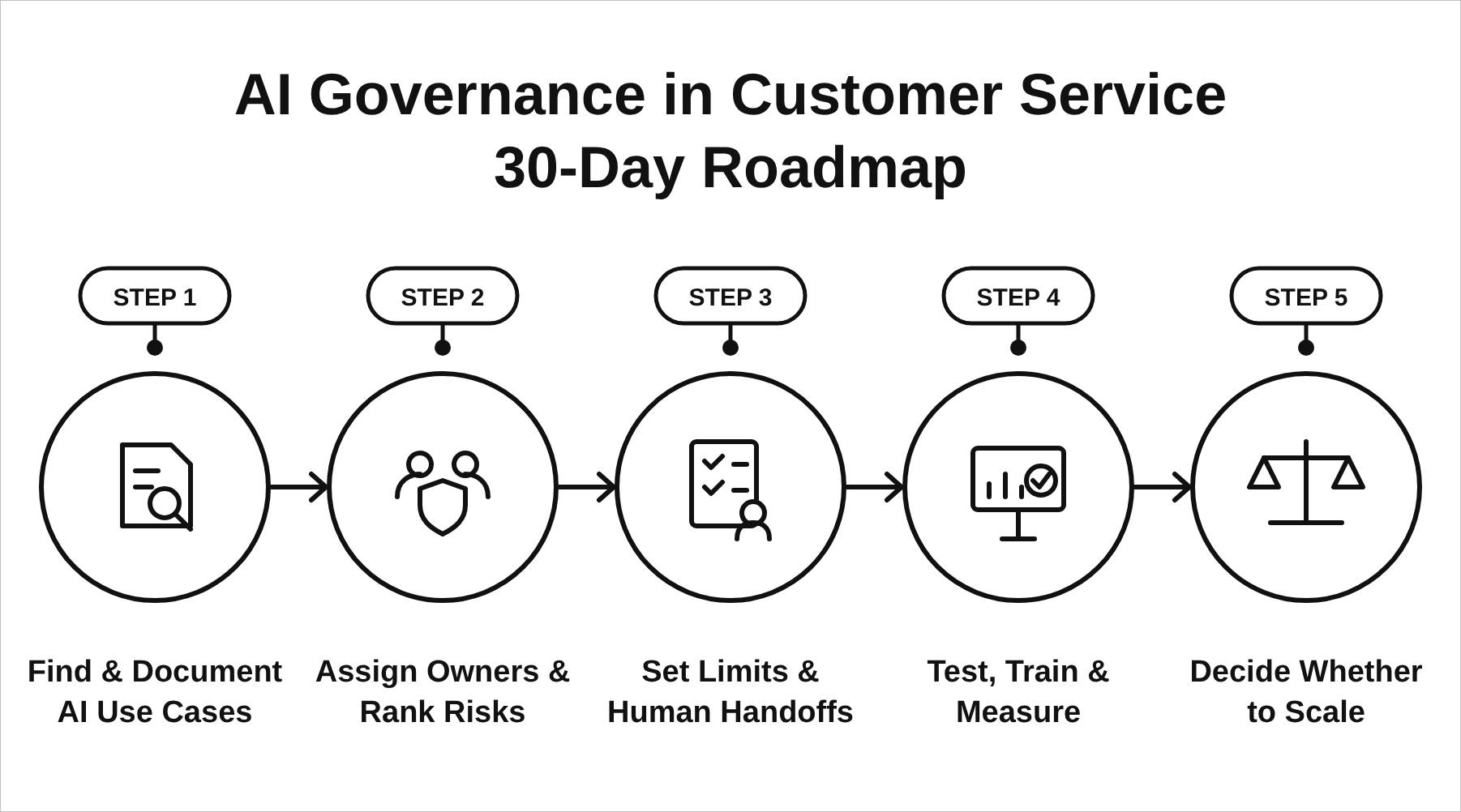
Roll out the framework components in five steps, starting with one pilot such as AI-suggested replies, ticket routing, or an AI chatbot.
Limiting its channel, audience, and actions makes failures easier to trace. Plan about a week for each of the first four steps.
Step 1: Find and document every AI use case
Look for AI features in your help desk, CRM, live chat software, AI knowledge base, and reporting tools. Include vendor add-ons, trials, and tools agents started using on their own. Pause any that touch sensitive data, payments, or automated actions, then pick one pilot.
Output: A list of AI use cases and one pilot with a clear scope.
Step 2: Assign owners and rank the risks
Name who owns the pilot: the business, technical, support, and incident owners, plus the final approver. Check what the vendor does with your data, then set the pilot’s risk level.
Output: Named owners, vendor findings, and a risk level with reasons.
Step 3: Set limits and human handoffs
Turn the risk level into rules for what AI does alone, what only people do, and when AI hands off to an agent. Set how customers learn they are talking to AI, and decide who can pause the pilot.
Output: Clear limits, handoff rules, disclosure wording, and pause steps.
Step 4: Test, train, and measure
Try the pilot with a few agents or a small share of conversations. Test everyday and unusual tickets, show agents when to step in, and set alert limits for the monitoring metrics above.
Output: Test results, trained staff, alert limits, and the next review date.
Step 5: Decide whether to scale your AI pilot
At the end of week four, hold a review and decide using the results from the first four steps.
- Ready to scale: Key controls passed, and the team can monitor, pause, investigate, and undo the pilot.
- Scale with limits: Small gaps remain. Add temporary safeguards, named owners, and firm deadlines.
- Not ready to scale: A major gap remains in ownership, data, testing, approval, human review, or incident response.
How BoldDesk supports AI governance in customer service
Putting an AI governance framework into practice is easier when your customer service software supports key controls. BoldDesk supports your framework in the following areas:
- Knowledge base controls: Set who can approve and publish articles, and who can see them (any users, logged-in users, agents only, or specific groups).
- AI-to-human handoff with context: The AI support agent can hand off conversations to your team when confidence is low, a topic is excluded, or a person is requested. The handoff includes a summary and the actions taken.
- Role-based access and permissions: Use roles and permissions to control which features and settings each agent can access, including who can manage admin settings.
- Activity and audit logs: Review audit logs of admin setting changes, logins, and system events to support monitoring and investigations.
BoldDesk also supports enterprise security and privacy requirements: it is SOC 2 Type 2 certified and GDPR compliant. For healthcare teams, HIPAA enablement with a signed Business Associate Agreement (BAA) is available on eligible plans, with AI features disabled.
Scale support confidently with AI governance frameworks
A clear framework gives support teams the control to use AI without losing sight of customer trust, service quality, or accountability.
BoldDesk helps teams put that approach into practice with controlled AI support, current knowledge, and full-context handoffs to human agents.
Start your 15-day free trial and see AI support with clear controls and human handoffs.
Related articles
- 7 AI Customer Support Challenges (and Proven Fixes for 2026)
- AI vs Human Customer Service in 2026: When to Use AI, Humans, or Both
- Webinar: AI Governance and Data Security for Support Teams
FAQs about AI governance in customer service
Who is responsible when AI gives a customer wrong information?
Your company is, even with a vendor. Moffatt v. Air Canada shows tribunals can hold businesses to chatbot answers. Name an internal owner per use case and keep traceable logs. Legal outcomes vary by country and case.
Does the EU AI Act require chatbots to say they are AI?
Yes. Article 50 requires providers to design AI systems that interact directly with people so users know they are talking to AI. The exception is when that is obvious from the context. This duty has applied since August 2, 2026. Support teams should make sure the notice appears, ideally in the chatbot's first message.
Is an AI governance framework the same as an AI policy?
No. An AI policy states the rules, while the framework connects those rules with owners, risk checks, approval routes, monitoring, and incident response. The policy forms one part of the wider framework.
Who should own the AI governance framework for customer support?
Support, IT, security, privacy, and legal teams should help shape the framework. However, each AI use case needs one accountable owner with authority to approve changes, limit its scope, or stop it.
What is the difference between AI governance, AI security, and data governance?
AI governance sets the rules for how support AI is used, including owners, risk levels, human handoffs, and monitoring. AI security protects AI models, prompts, and connected tools from threats. Data governance controls how customer data is collected, stored, shared, and deleted.
How should support teams rank AI use cases by risk?
Rate the customer support task, not only the tool or model. Consider its customer data, possible harm, actions, human review, affected customers, and how easily mistakes can be reversed.
Do small support teams need an AI governance framework?
Yes, but a simple version is enough. Assign one owner to each AI task, keep an AI use case list, and follow the 30-day roadmap above.
What metrics show AI governance is working?
Governance is working when audit logs are complete, wrong answers and policy breaches are rare, and humans step in when they should. You also see few compliance incidents and quick fixes when something goes wrong.
ABOUT THE AUTHOR

Maxwel Odhiambo 
Maxwel Odhiambo is a customer service specialist who enhances client experiences through clear, effective documentation. Combining strong communication skills with a passion for service excellence, he empowers organizations to build trust and improve customer satisfaction.
Read more articles by this author Connect with the author on LinkedIn.
Be the first to get updates