



TL;DR: The BoldDesk August 2026 release introduces AI agent assignment, AI trigger orchestration, enhanced AI field prediction, MCP server authentication improvements, and a new AI answers experience.
We’re excited to introduce the BoldDesk August 2026 release, with new AI capabilities to help support teams work more efficiently and automate routine tasks with greater control.
From specialized AI Agents and trigger-based automation to more accurate field prediction, these product updates help reduce repetitive work and make everyday support workflows easier to manage.
Here’s what’s new:
| Area | Release highlights |
| AI Agents |
|
| AI Automation |
|
| BoldDesk MCP |
|
| AI Field Prediction |
|
| AI Answers |
|
These updates work together to help teams reduce manual effort, improve consistency, and make AI a more active part of everyday support operations.
AI agents for different support tasks
Support teams use AI for different tasks, from drafting responses to analyzing tickets and assisting agents with context.
BoldDesk now supports three types of AI Agents for different ticket tasks. Through AI agent assignment, the appropriate agent can be automatically assigned to a support ticket when predefined events and conditions are met.
This works separately from existing ticket routing, so teams can add AI assistance without changing how tickets are assigned to support agents.
Quick guide: What does each AI Agent do?
| Agent type | Best for | What it produces |
| Response agent | Drafting communications | Replies, drafts, public notes, and private notes |
| Background agent | Silent analysis and enrichment | Analysis and structured insights for downstream automation |
| Ticket copilot agent | Agent productivity | Summaries, contextual assistance, and draft suggestions |
Response agents generate replies and notes directly in tickets
Response agents handle both customer-facing and internal communication within tickets. They can generate replies, drafts, public notes, and private notes, giving support agents a useful starting point instead of writing every response from scratch.
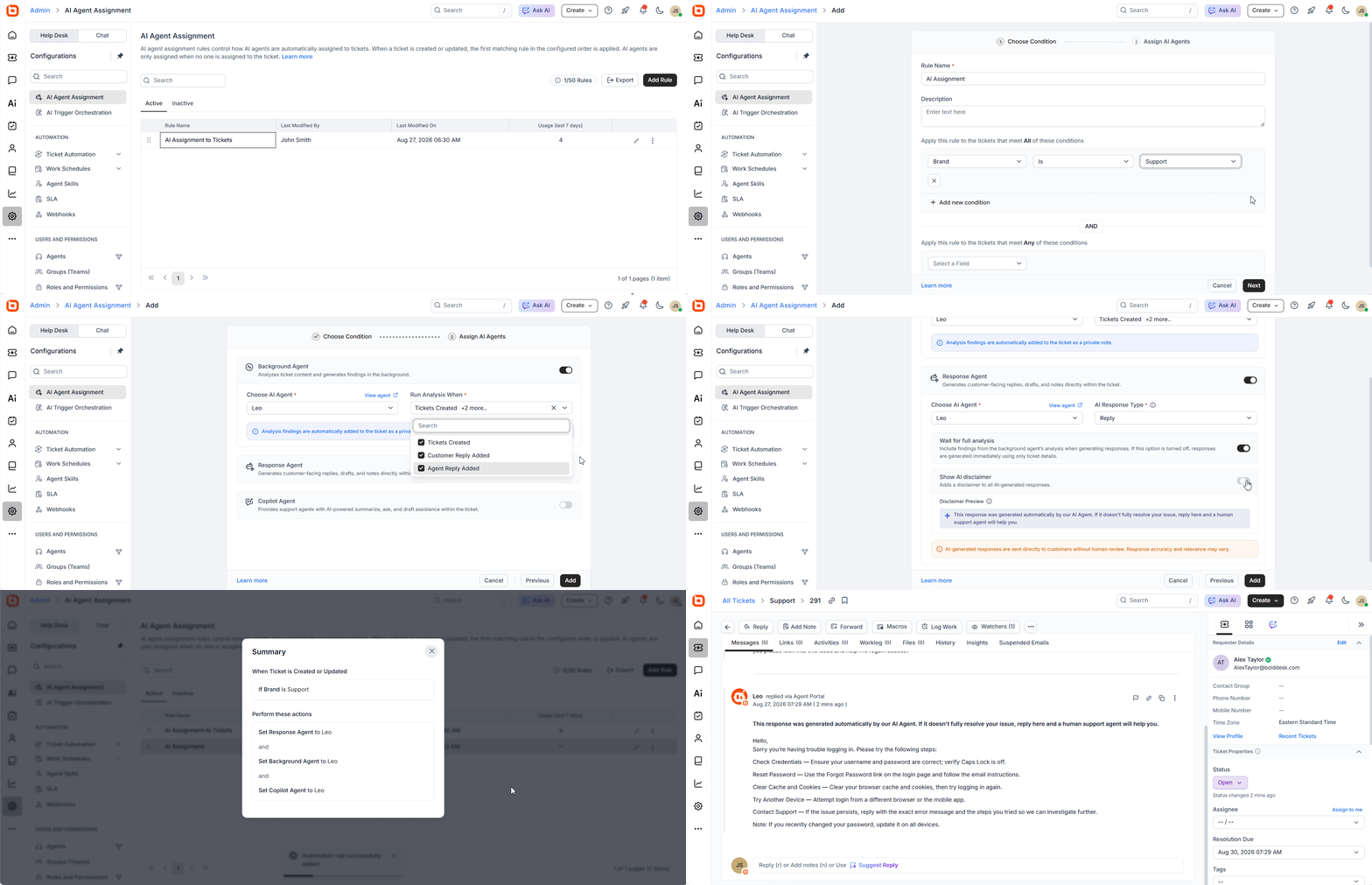
Support agents can review and refine the content before sending it to the customer.
Real-world scenario: Maintain response quality during high ticket volumes
Challenge: A SaaS company releases a major dashboard update and receives a spike in tickets about navigation changes, access issues, and new settings. Agents repeatedly draft similar explanations while trying to keep up with more complex cases.
BoldDesk solution: Response agents generate contextual replies and internal notes based on each ticket, giving agents a useful starting point instead of requiring them to draft every response from scratch.
Impact: Agents respond more quickly to repetitive requests while maintaining control over final responses and save time for issues that require deeper investigation.
Background agents analyze tickets to support automation
Not every AI task needs a visible response. Some workflows simply need ticket information to be analyzed in the background.
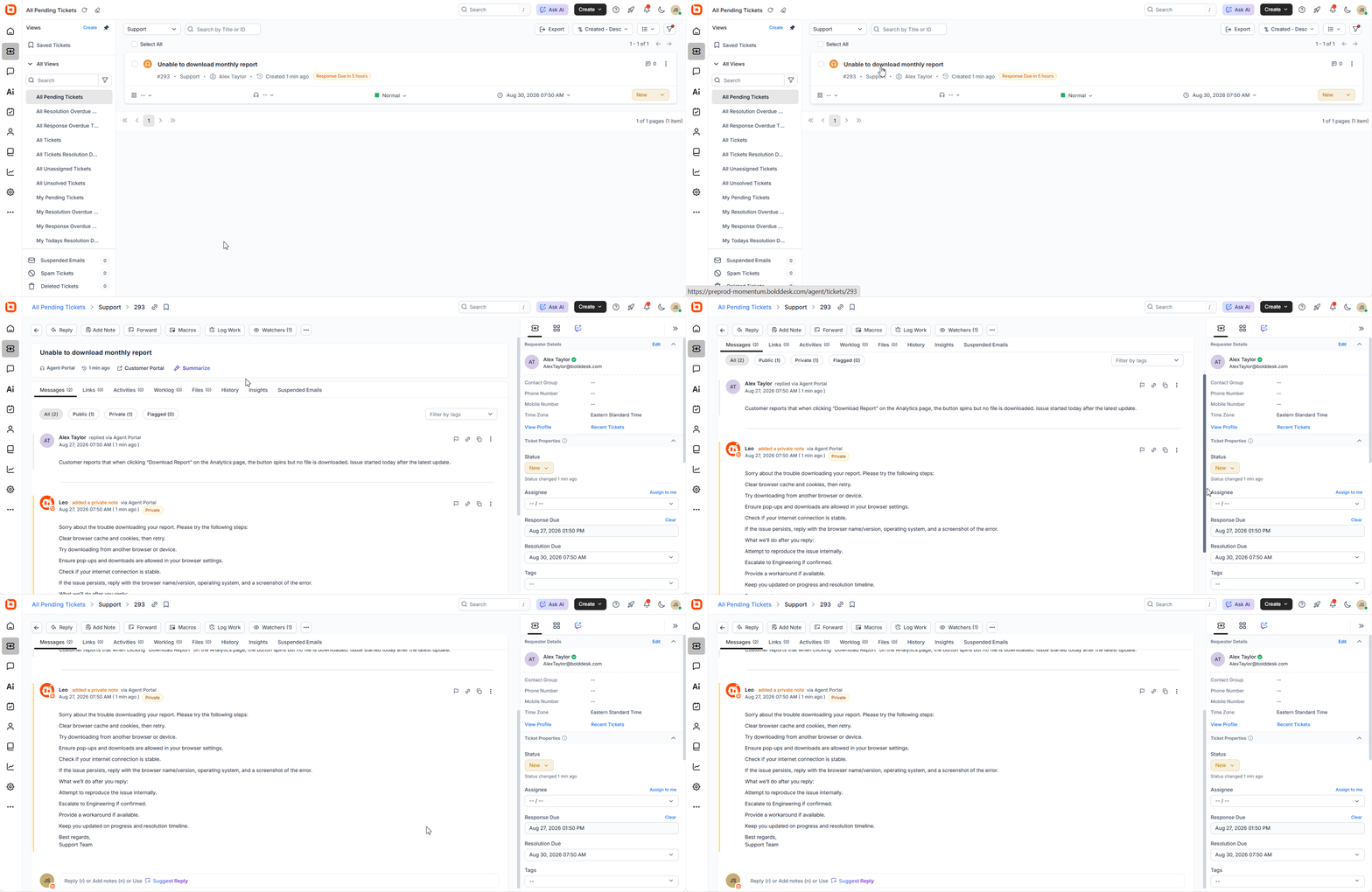
Background agents analyze ticket content when tickets are created or updated and generate insights that can support AI actions and other automated workflows.
This lets teams use AI-driven analysis without adding unnecessary messages to customer conversations.
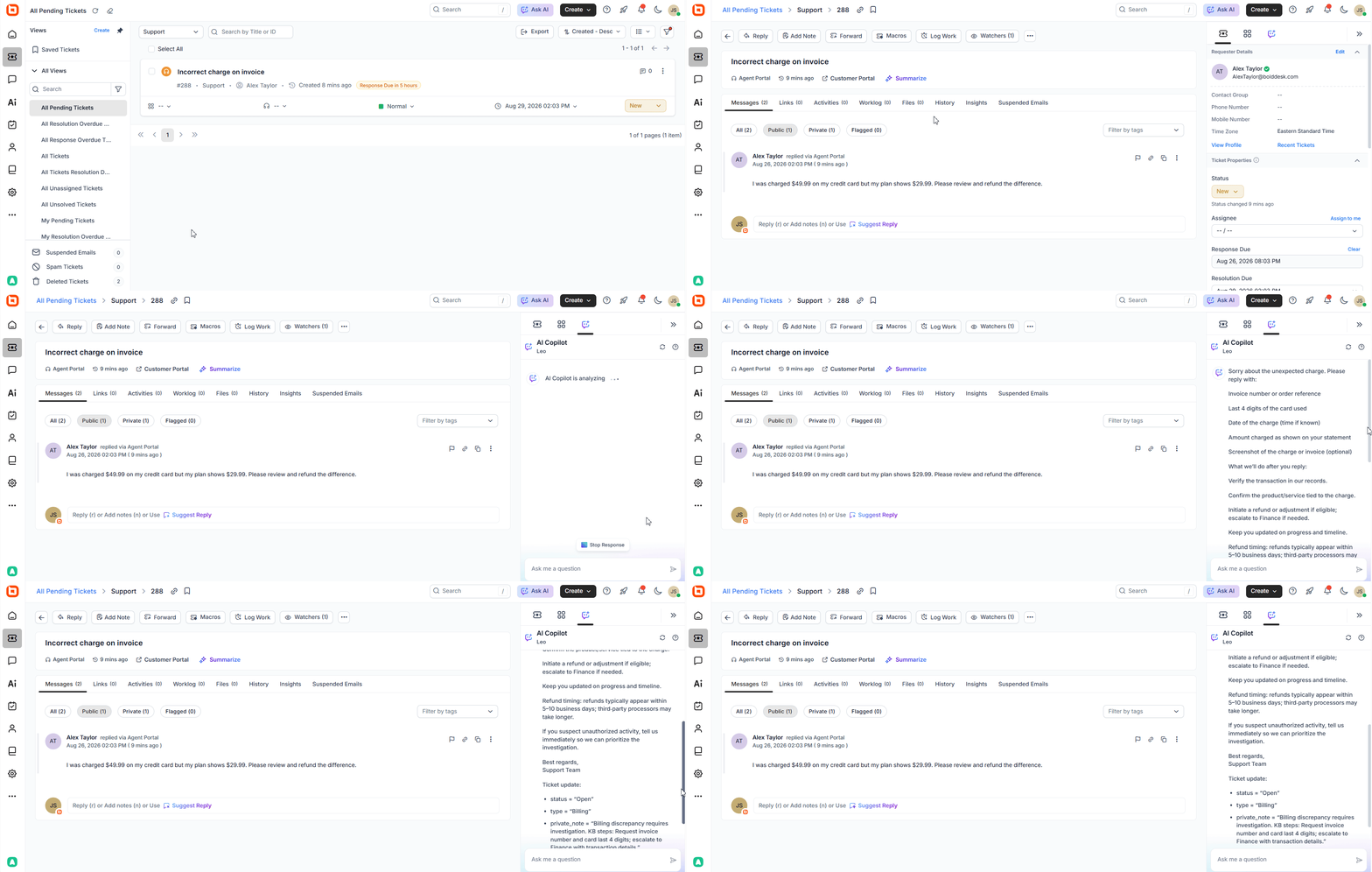
Ticket copilot agents summarize tickets and suggest responses
Ticket copilot agents assist support agents directly within the ticket workspace. They summarize long conversations, provide contextual guidance, and suggest drafts that agents can review and refine.
This helps support agents understand an issue faster and move toward resolution without spending as much time reviewing the full ticket history.
AI automation that turns insights into action
AI insights become more valuable when they can drive consistent actions across support workflows.
These automation updates help teams reduce repetitive ticket processing and apply AI-generated insights more effectively.
AI trigger orchestration automates ticket actions
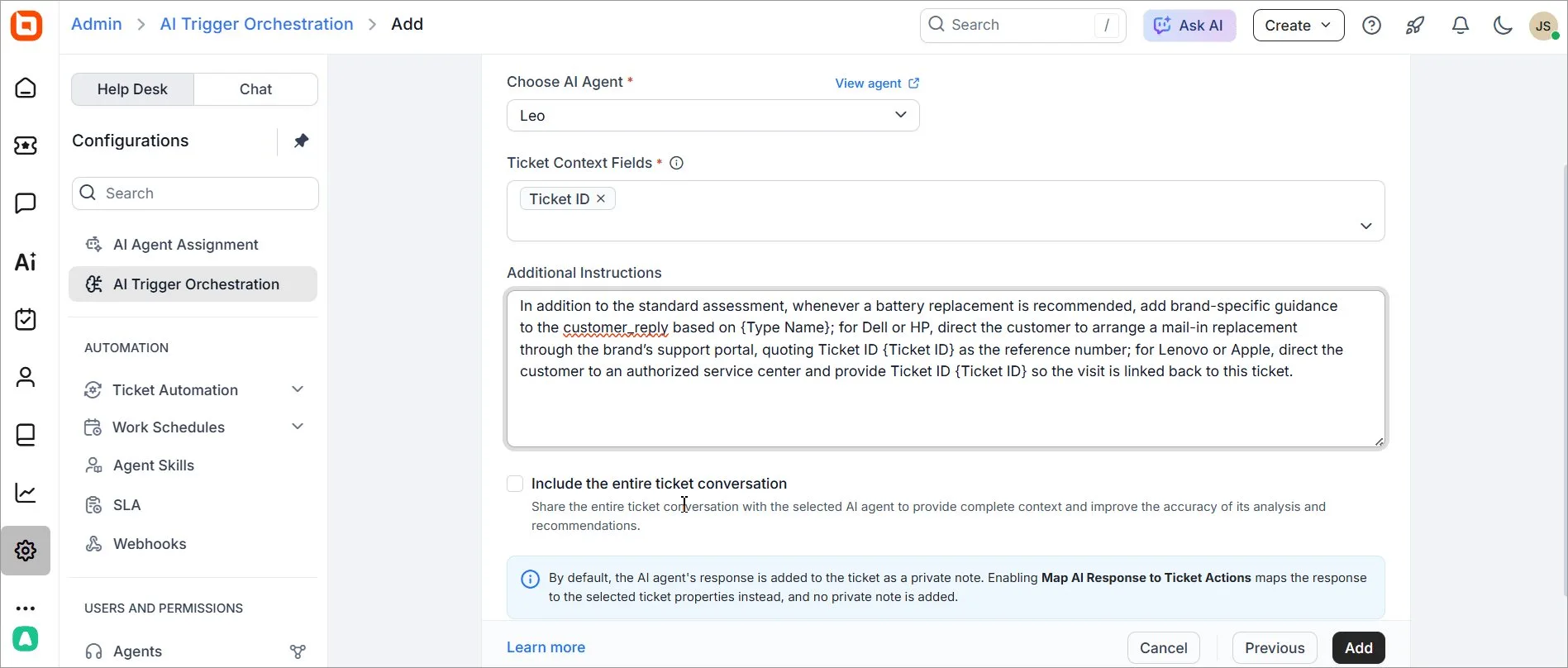
We’ve introduced the AI trigger orchestration feature which invokes AI Agents when predefined ticket conditions are met.
An agent analyzes selected ticket information and generates an output based on the instructions you configure.
That output can then be mapped to ticket actions, such as changing the category, priority, or other supported fields.
Administrators can:
- Trigger AI Agents automatically when ticket conditions match
- Control the ticket context supplied to the agent
- Post AI output as a private note by default
- Map AI responses to ticket actions such as category, priority, and other supported field updates
This gives teams visibility into the AI’s analysis and recommendations while automating routine ticket processing.
Real-world scenario: Reduce manual ticket triage and improve consistency
Challenge: An IT services provider receives requests ranging from password resets and access issues to critical system outages. Agents must read each new ticket and manually determine its category and priority before work can begin.
BoldDesk solution: AI trigger orchestration analyzes selected ticket context when a new request arrives. Based on configured instructions, its output can be used to update supported fields such as category and priority while retaining the AI analysis in a private note.
Impact: Routine triage requires less manual effort, ticket handling becomes more consistent, and urgent requests can enter the appropriate workflow sooner.
Pro tip: Start small when introducing AI automation. Many teams begin with a single queue or ticket category, review AI-generated private notes, and gradually expand automation rules as they gain confidence in the results.
BoldDesk MCP updates for more secure AI connections
As AI becomes more deeply embedded in support workflows, organizations need stronger control over how external tools connect to their systems.
These updates give teams more secure and manageable ways to govern AI integrations.
OAuth 2.0 authentication provides more secure MCP access (beta)
The latest BoldDesk MCP server enhancement adds OAuth 2.0 authentication (beta) to existing API key authentication.
OAuth 2.0 provides secure, scoped, token-based access for AI Copilots, IDE extensions, and third-party integrations. API key authentication remains available for existing integrations and automation.
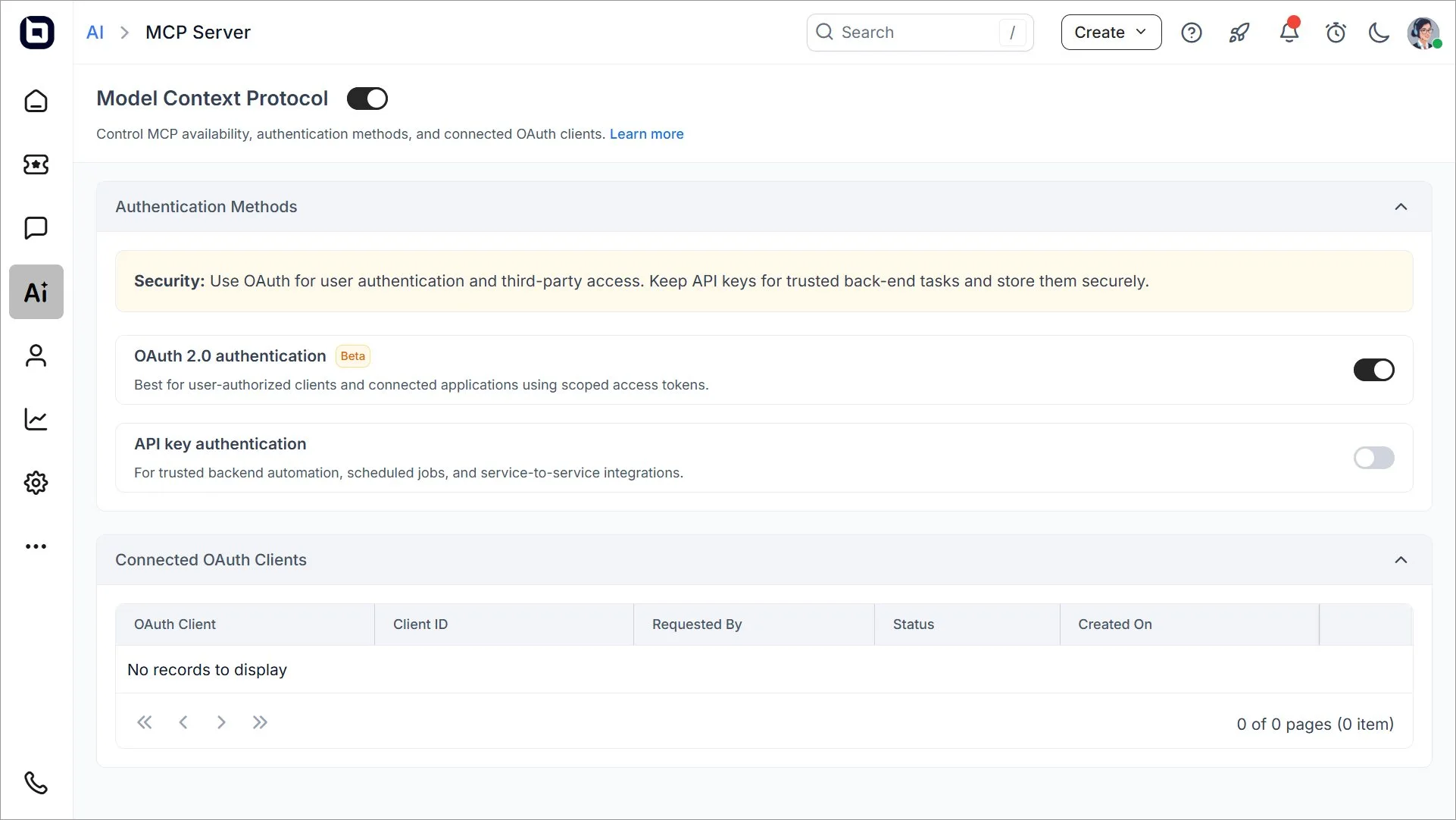
Existing API key integrations continue to work without changes. Therefore, teams can adopt OAuth 2.0 where appropriate without disrupting current connections.
MCP admin controls simplify access management
New MCP admin controls give administrators greater visibility into how AI tools connect to BoldDesk and how those connections are managed.
Administrators can now:
- Enable or disable an MCP server
- Enable or disable OAuth 2.0 and API key authentication independently
- View and revoke connected OAuth clients
These controls give organizations greater visibility and governance as they expand AI-powered workflows.
AI field prediction for more accurate ticket classification
AI predictions are only as useful as the context behind them. Ticket subjects and descriptions provide useful signals, but business-specific rules often require more information.
The latest prediction enhancements give administrators more control over the information and guidance AI uses when classifying tickets.
Additional instructions improve prediction accuracy
AI field prediction now supports additional instructions, allowing administrators to provide extra ticket context and plain-language guidance for each prediction using:
- Ticket context fields: Pass additional ticket data to the AI so predictions are based on more than the subject and description.
- AI instructions: Add plain-language guidance explaining how specific values should be predicted.
Additional instructions can be configured separately for each AI prediction action, giving teams different context and guidance for different field predictions within the same rule.
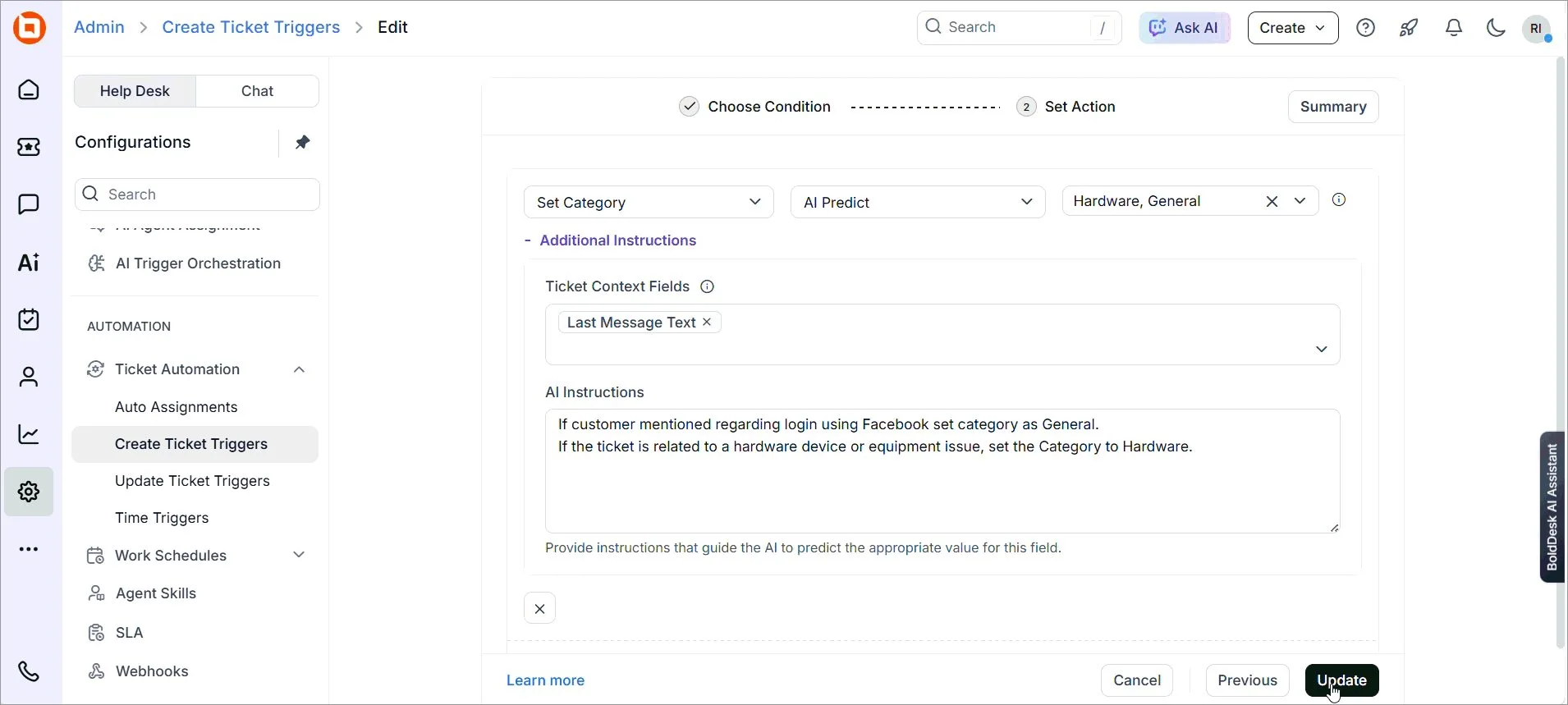
For example, teams can use existing ticket data as additional context or provide instructions such as categorizing invoices, refunds, and payment-related issues under Billing.
The result is more accurate predictions and greater control over automation outcomes.
AI answers that make self-service more accessible
Customers often want to find answers without waiting for a support response. These self-service updates make it easier to create a more accessible, guided experience directly from the customer portal.
AI answers creates a tailored self-service experience for each brand
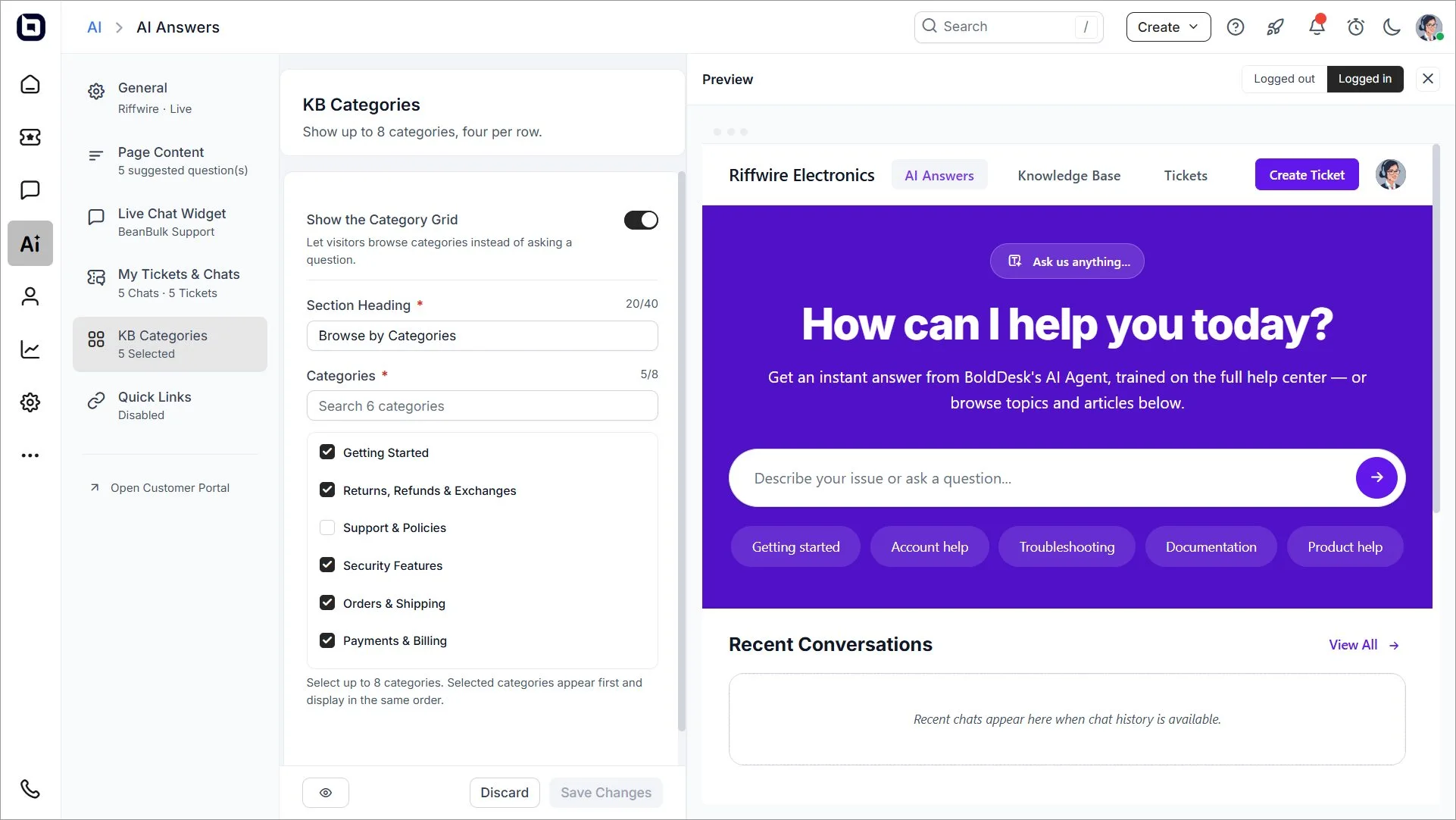
AI answers lets organizations create a dedicated AI-powered self-service page for each brand.
Administrators can now configure the experience through the AI center, including:
- Brand-specific AI answers pages
- Custom titles, descriptions, and placeholder text
- Suggested questions to help users get started
- Knowledge base categories and quick links
- Recent chats and tickets
- Access and visibility settings
These options help teams tailor self-service to each brand and make relevant information easier for customers to find.
AI answers helps customers find answers from the portal
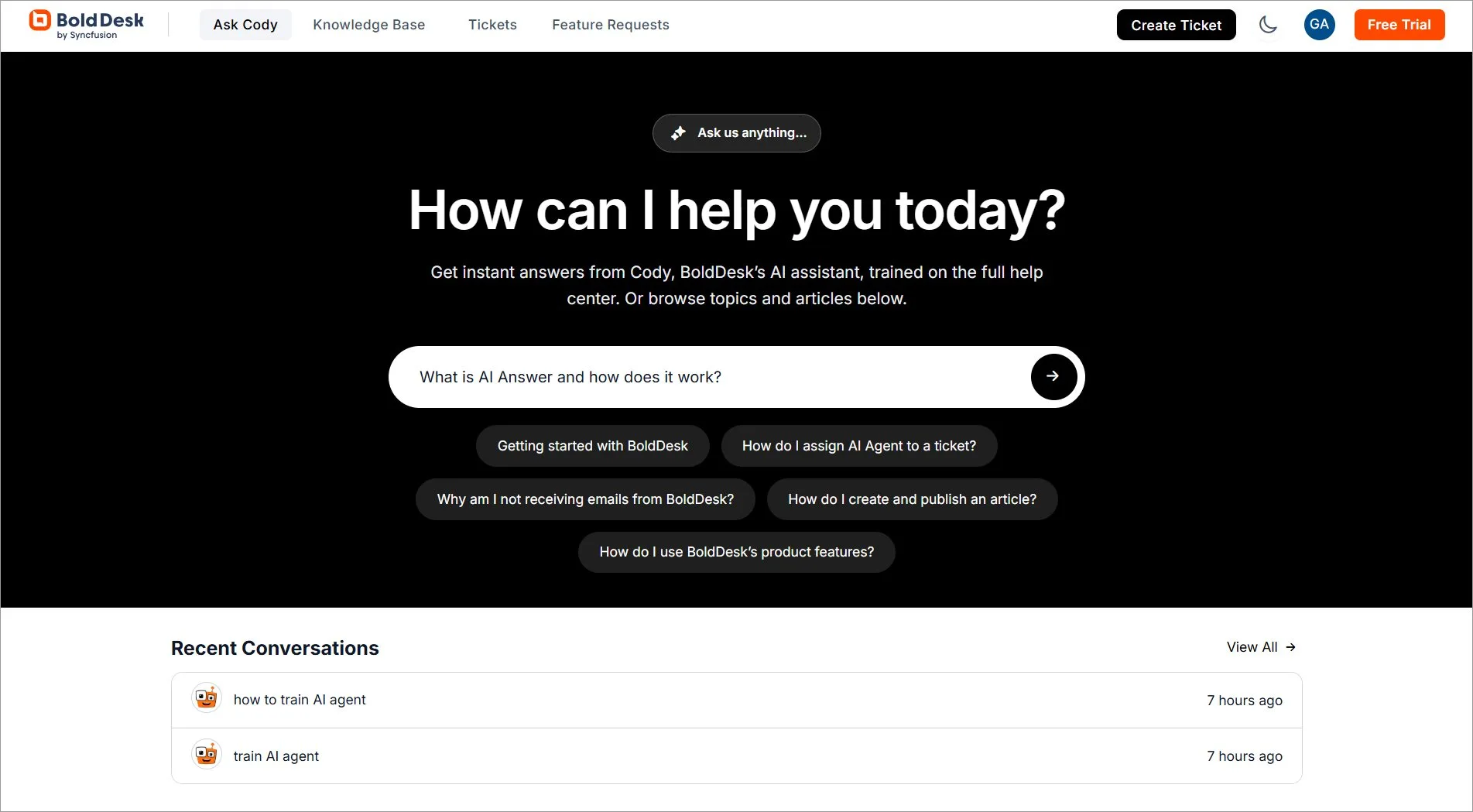
On the customer side, AI answers provides a dedicated self-service experience directly from the customer self-service portal.
Customers can:
- Ask questions through an AI-powered interface
- Access a full-page chat experience
- Continue previous conversations through conversation history
- View recent chats
- View recent tickets when signed in
- Discover relevant knowledge base content
- Access helpful resources through quick links
AI answers uses the AI Agent mapped to the selected live chat widget, so teams can maintain the same AI configuration across live chat and portal self-service without setting up a separate agent.
Real-world scenario: Support customers after business hours
Challenge: A software company serves customers across several time zones. After the support team signs off, users still need help with account setup, billing questions, and common product issues.
BoldDesk solution: The company configures an AI answers page with suggested questions, relevant knowledge base categories, and an AI-powered ask box so customers can search for help and continue previous conversations from the customer portal.
Impact: Customers can find relevant information without waiting for the next support shift, while agents return to fewer repetitive requests.
See what’s coming next for BoldDesk
We’re continuously investing in new capabilities that help teams automate support workflows, improve productivity, and deliver better customer experiences.
Soon, we will launch the following features:
- Microsoft Dynamics 365 integration
- NetSuite integration
- Ticket AI Agent performance dashboard
- Real-time agent collision detection
- Out of office configuration
Explore our product roadmap to discover more upcoming features.
Deliver more efficient support with BoldDesk’s latest updates
The BoldDesk August 2026 release gives support teams more flexibility to automate repetitive work, make better use of ticket context, and extend intelligent assistance across both agent and customer experiences.
Together, these improvements help teams spend less time on routine processing and more time resolving the issues that need human expertise.
Ready to explore the latest capabilities? Sign up for a 15-day free trial and see how BoldDesk can help your team deliver smarter, more efficient support.
Related articles