

- Blogs Explore Blogs Blogs
BoldDesk November 2026 Release: AI Oversight and Channel Updates
-
by Cherine Apondi Okumu
- Updated on: November 16, 2026
TL;DR: BoldDesk’s November 2026 release shows you what AI agents are doing and lets you approve replies before they’re sent. You can also create knowledge content with Claude and ChatGPT, and support customers in Slack and Microsoft Teams. It also adds a full-page Ask AI workspace, real-time ticket updates, and new live chat features.
We’re excited to introduce the BoldDesk November 2026 release. These product updates help teams monitor AI performance, review AI-generated responses, create and organize knowledge content more efficiently, and support customers across more channels.
Here’s what’s new:
| Area | Release highlights |
| AI |
|
| Automation |
|
| BoldDesk MCP |
|
| Ticketing System |
|
| Live Chat |
|
| Dashboard |
|
| Integration |
|
| Mobile App |
|
AI updates for more productive support
Support teams often need additional context when researching customer issues and troubleshooting complex requests.
These AI updates provide a more productive workspace for working with AI-generated answers and maintaining conversation history.
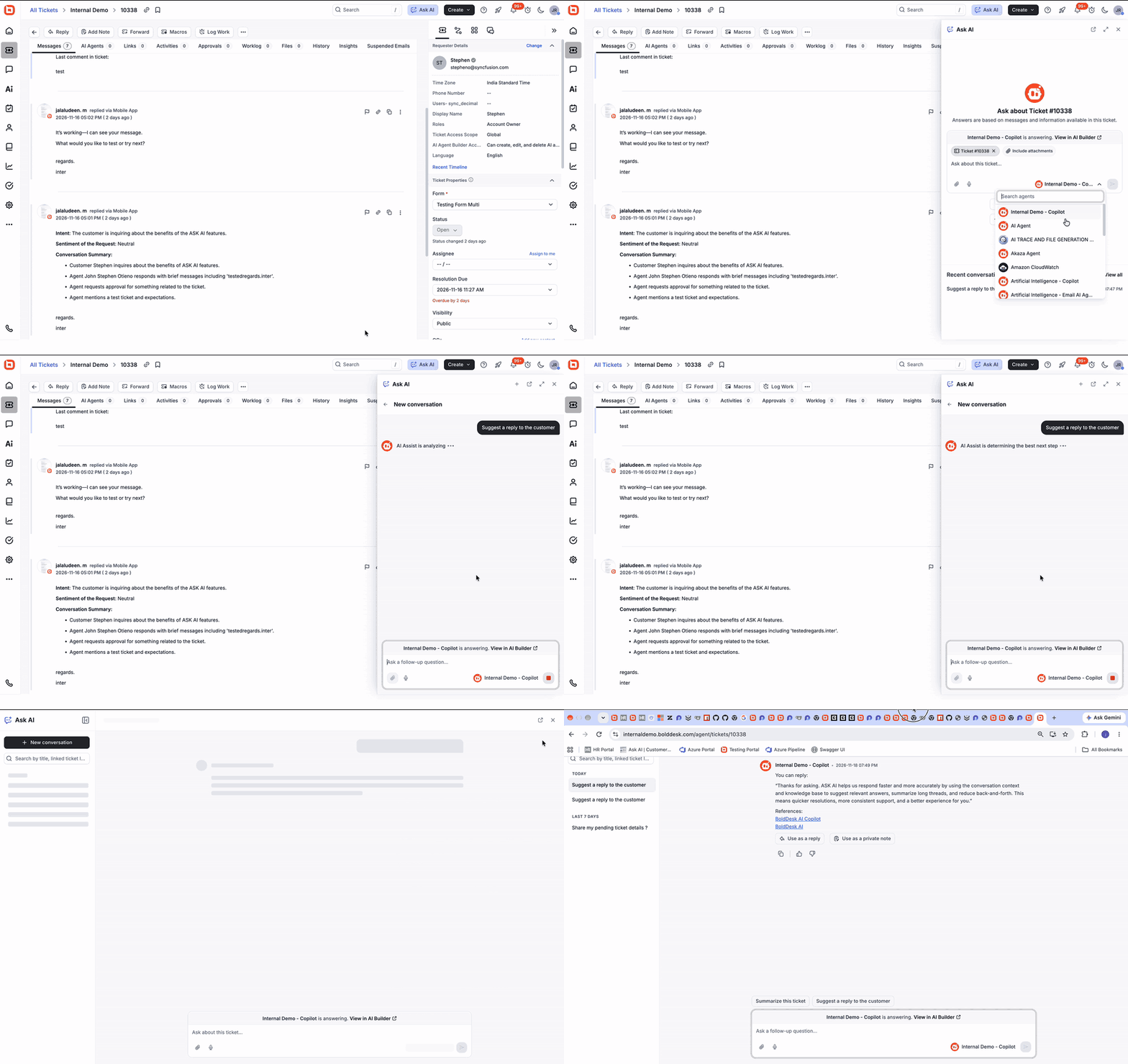
Get deeper context quickly with Ask AI in full-page view
Ask AI is now available in a full-page view, providing more space to work with AI-generated answers and review previous conversations.
Agents can add a ticket or chat as context, including its attachments, so AI can generate more relevant answers. They can also revisit earlier conversations and continue discussions without repeating context.
For example, an agent troubleshooting a multi-step integration issue can add the ticket and ask follow-up questions as the investigation progresses. The next day, they can return to the same conversation without starting over.
Automation updates for more control and less manual work
AI is playing a bigger role in support operations. Teams need control over AI-assisted customer interactions.
These updates add a human review step to AI-generated responses and take the manual work out of keeping holiday calendars current.
Review response AI agent replies with HITL approvals
AI-generated responses are becoming more common. Teams need a balance between automation and human review.
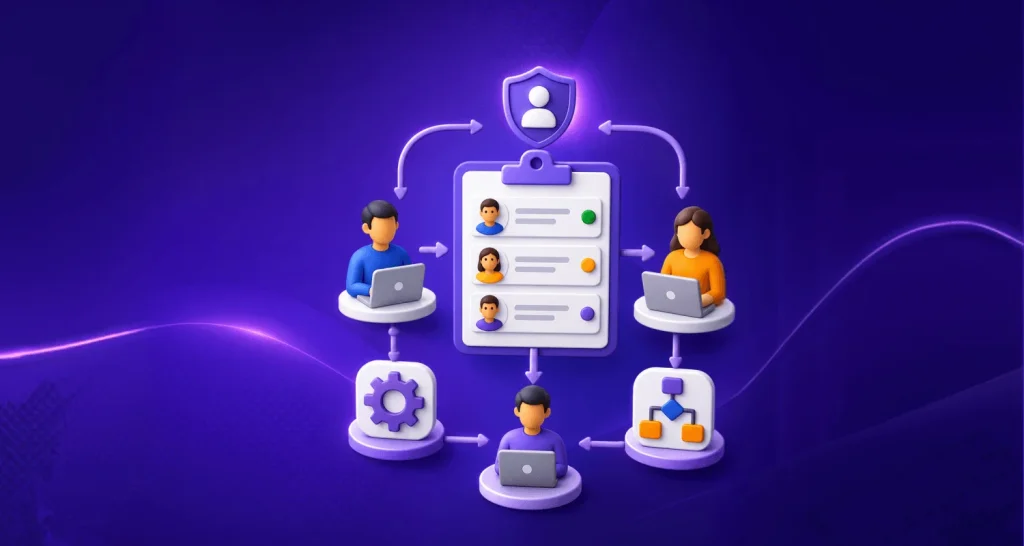
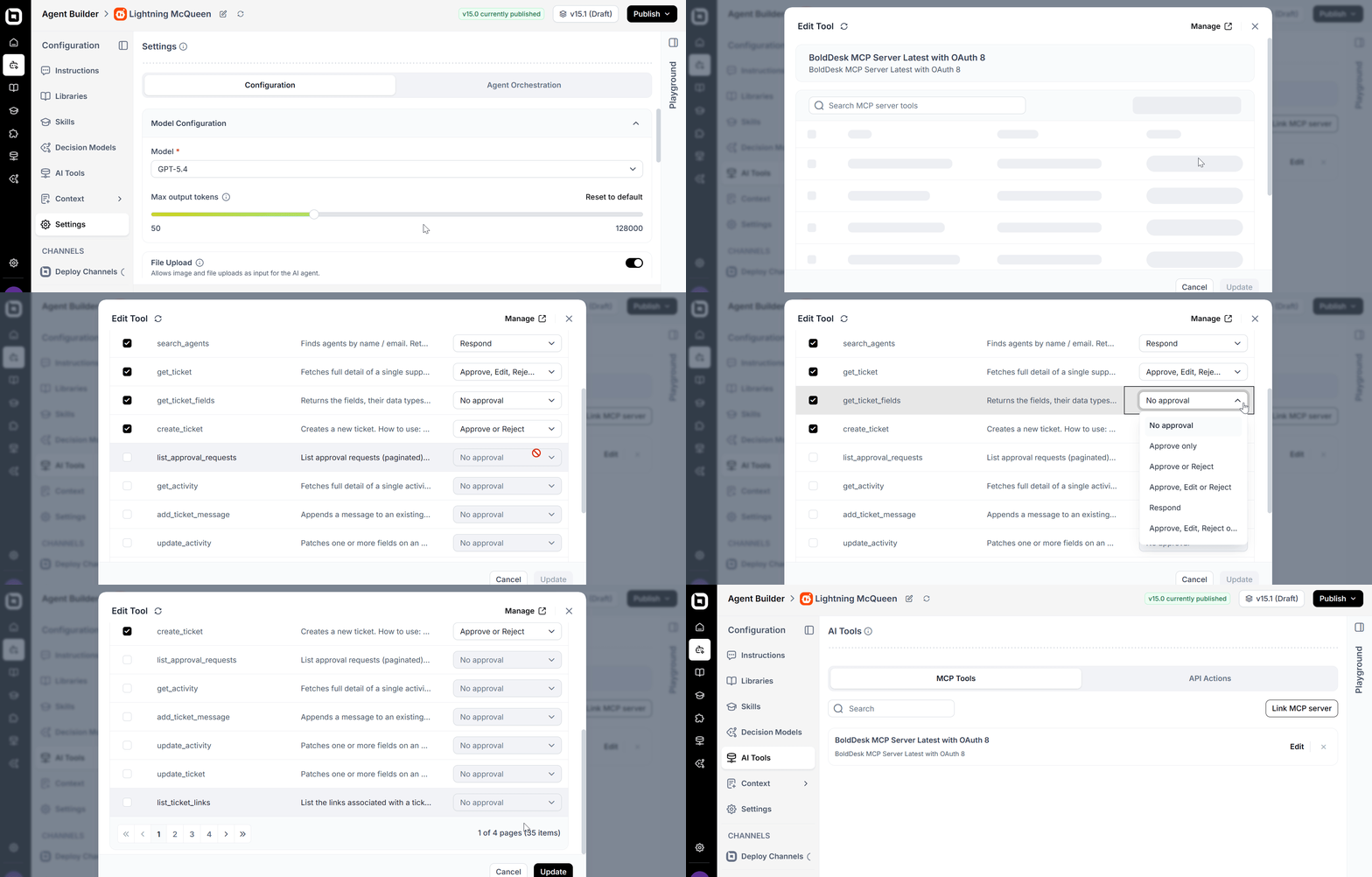
Response AI agents now support human-in-the-loop (HITL) approvals that allow AI-generated responses to be reviewed before delivery.
Designated reviewers can approve, reject, or edit each response before it reaches the customer.
This adds a human check where it matters most. Teams can maintain response quality and accuracy, and meet compliance and governance requirements, as they expand their use of AI.
Real-world scenario: Keep sensitive replies in check
Challenge: A fintech support team wants AI to draft replies, but answers about refunds and account changes must be checked before they reach customers.
BoldDesk solution: The team turns on HITL approvals for its response AI agent. Every AI-drafted reply goes to a designated reviewer, who approves, edits, or rejects it, even from the BoldDesk mobile app.
Impact: The team gets faster first drafts from AI, and a person still signs off on every reply before a customer sees it.
Manage holiday calendars more efficiently with import holiday lists
Managing holiday calendars manually can take time, especially for teams that support multiple schedules and regions.
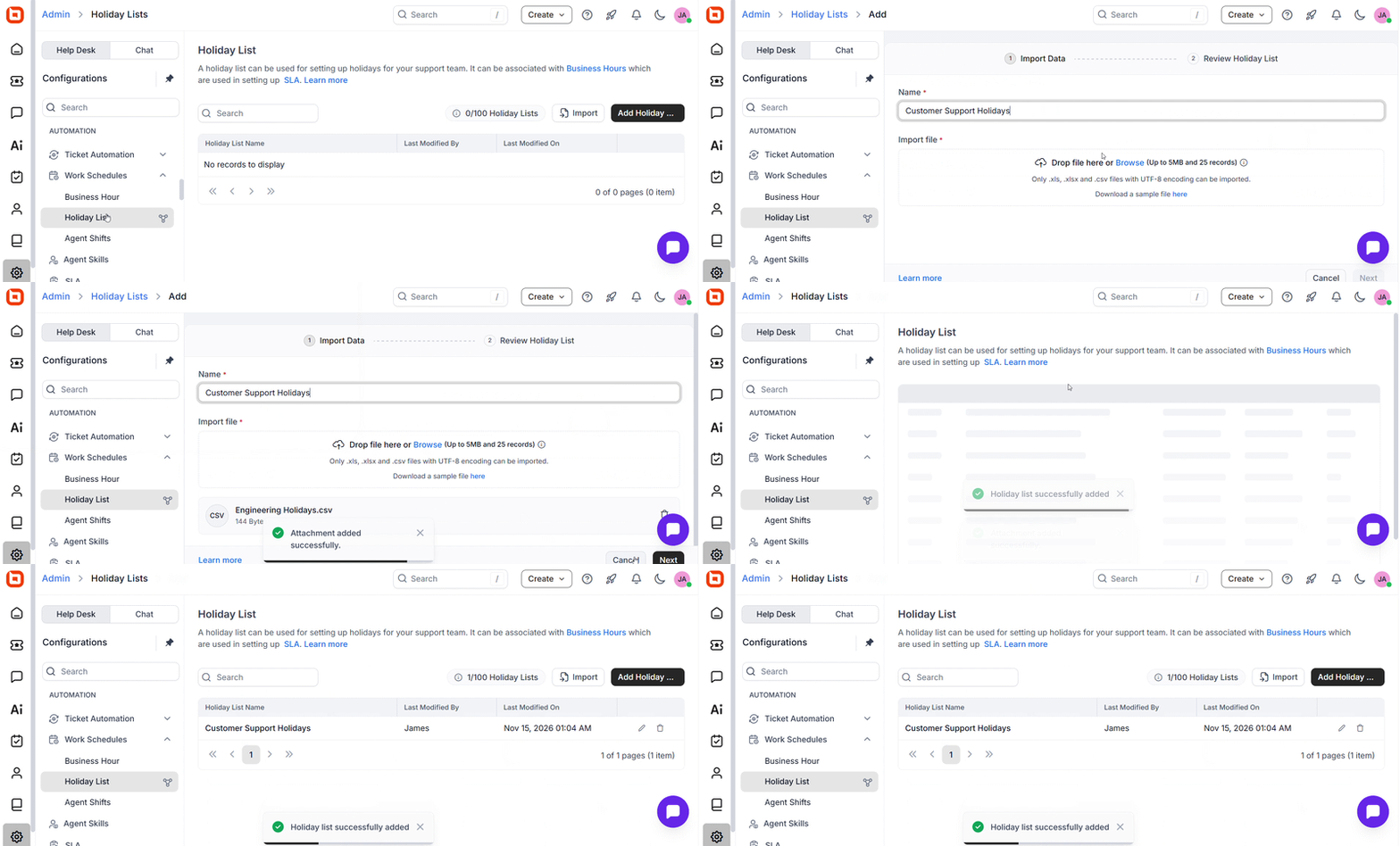
With import holiday lists, administrators can import holidays in bulk instead of creating them one by one. A single import can include holiday names, start dates, and end dates, so you can add single-day and multi-day holidays in one go.
This helps teams save time, maintain accurate holiday calendars, and ensure business hours and SLA calculations remain up to date.
MCP enhancements for knowledge base creation and organization
Knowledge plays an important role in delivering accurate and consistent customer support experiences.
The latest MCP enhancements help AI tools and agents work with knowledge content directly in BoldDesk.
Create and organize knowledge content through the BoldDesk MCP Server
Ask Claude, ChatGPT, or GitHub Copilot to draft a knowledge base article, and it’s added to BoldDesk directly, without copying and pasting between tools.
The BoldDesk MCP Server now enables AI agents to create knowledge base articles, retrieve article details, and search existing content.
It uses the Model Context Protocol (MCP) to connect with compatible AI clients. Teams can work with knowledge content using natural language prompts from:
- Claude
- ChatGPT
- GitHub Copilot
- Autonomous AI agent workflows
BoldDesk hosts the MCP Server, so teams do not need to set up or maintain a local server.
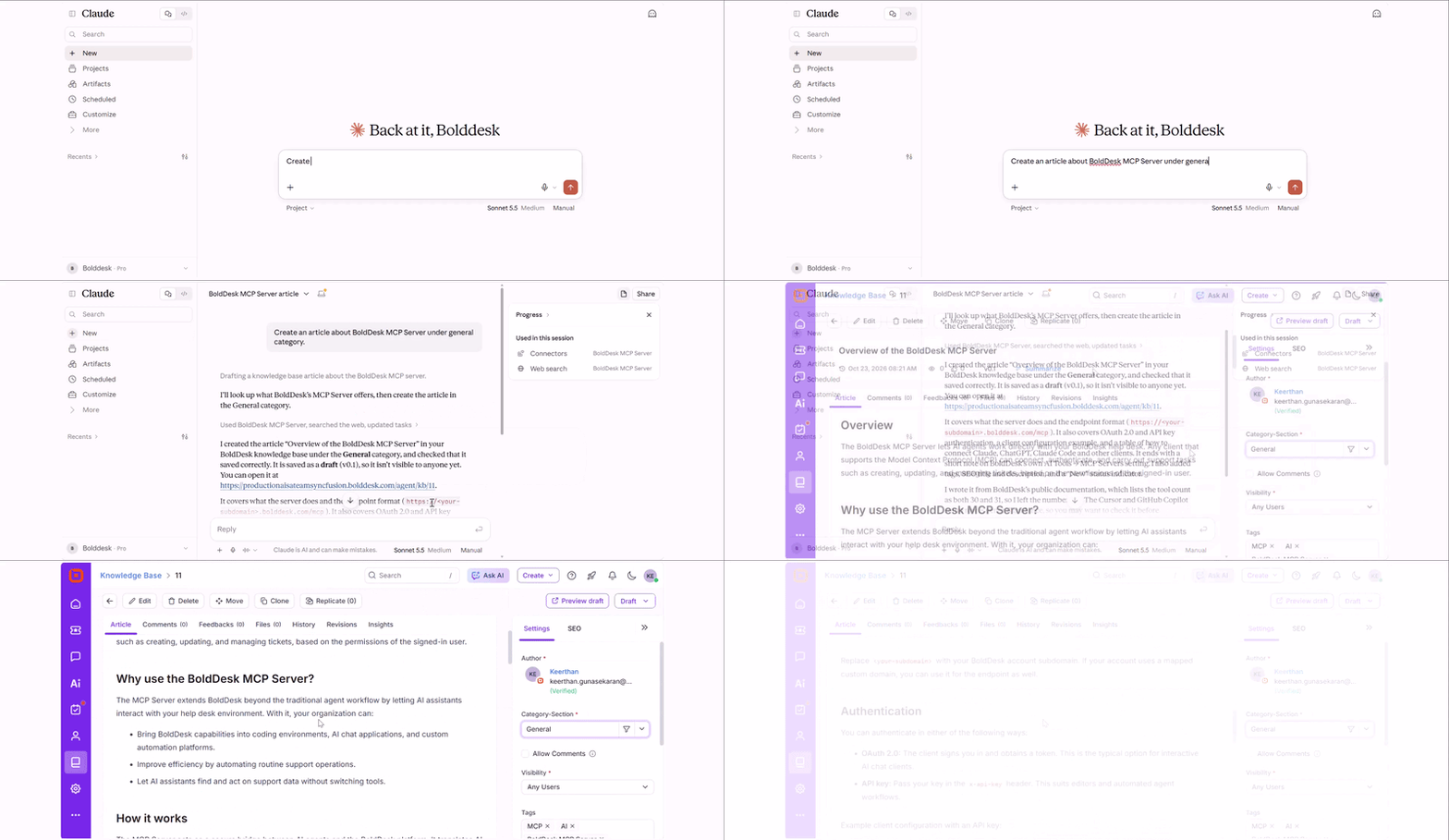
The BoldDesk MCP Server also supports category management. AI agents can create categories, update existing categories, and retrieve category details through MCP-compatible clients.
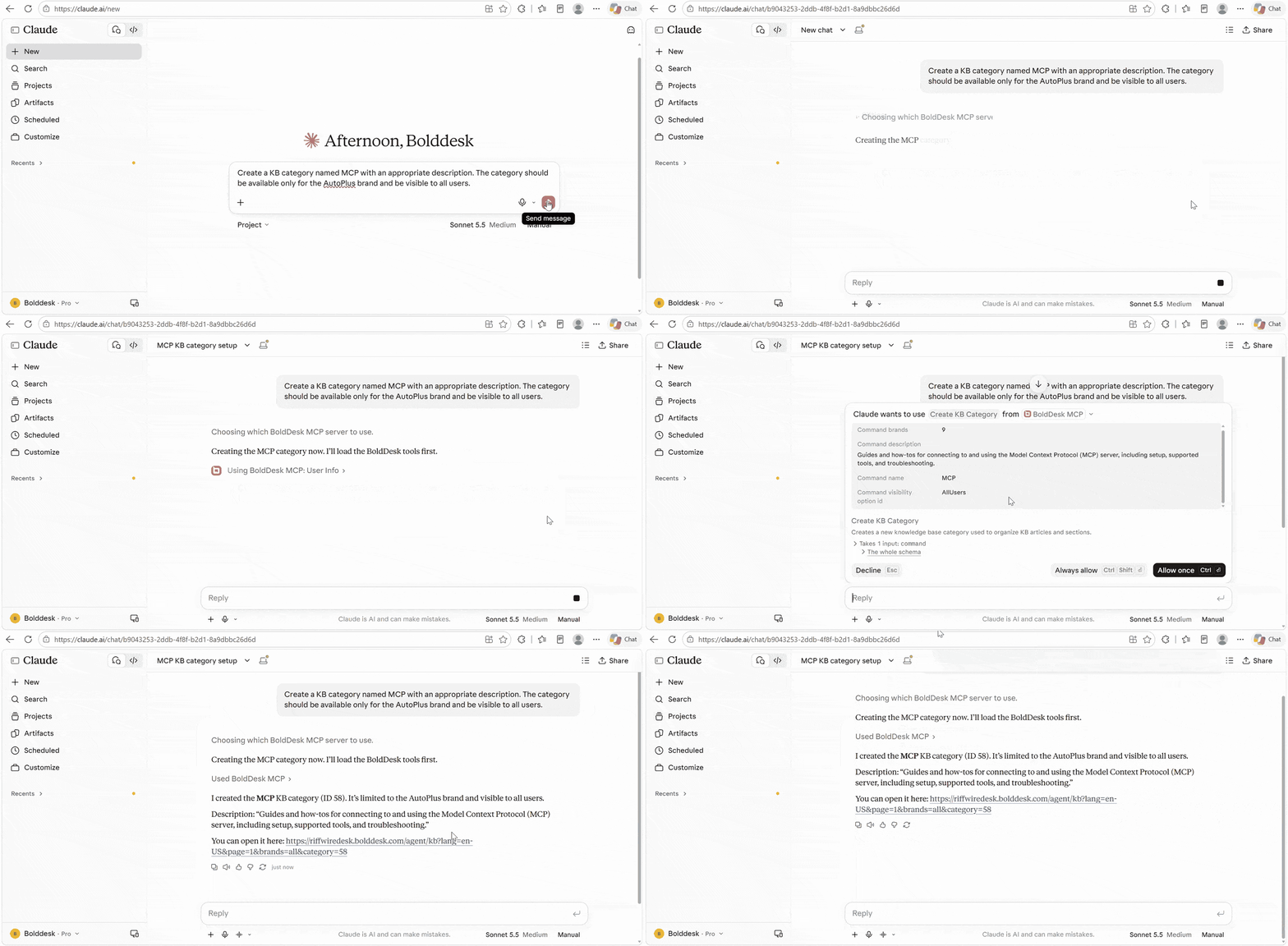
This helps teams automate routine knowledge base work and keep content well organized as it grows.
Real-world scenario: Publish release-day help content faster
Challenge: A software company releases monthly updates, and its support lead spends hours turning release notes into knowledge base articles and sorting them into categories.
BoldDesk solution: The lead asks Claude to create a “November release” category and draft an article for each new feature. Claude uses the BoldDesk MCP Server to create the category and articles directly in the knowledge base.
Impact: The help content is ready on release day, and customers can find answers before they open a ticket.
Ticketing system enhancements for real-time collaboration
Support teams work best when everyone has access to the latest ticket information. The latest ticketing enhancements help teams stay synchronized by ensuring updates are reflected instantly across support workflows.
Keep tickets synchronized with dynamic ticket refresh
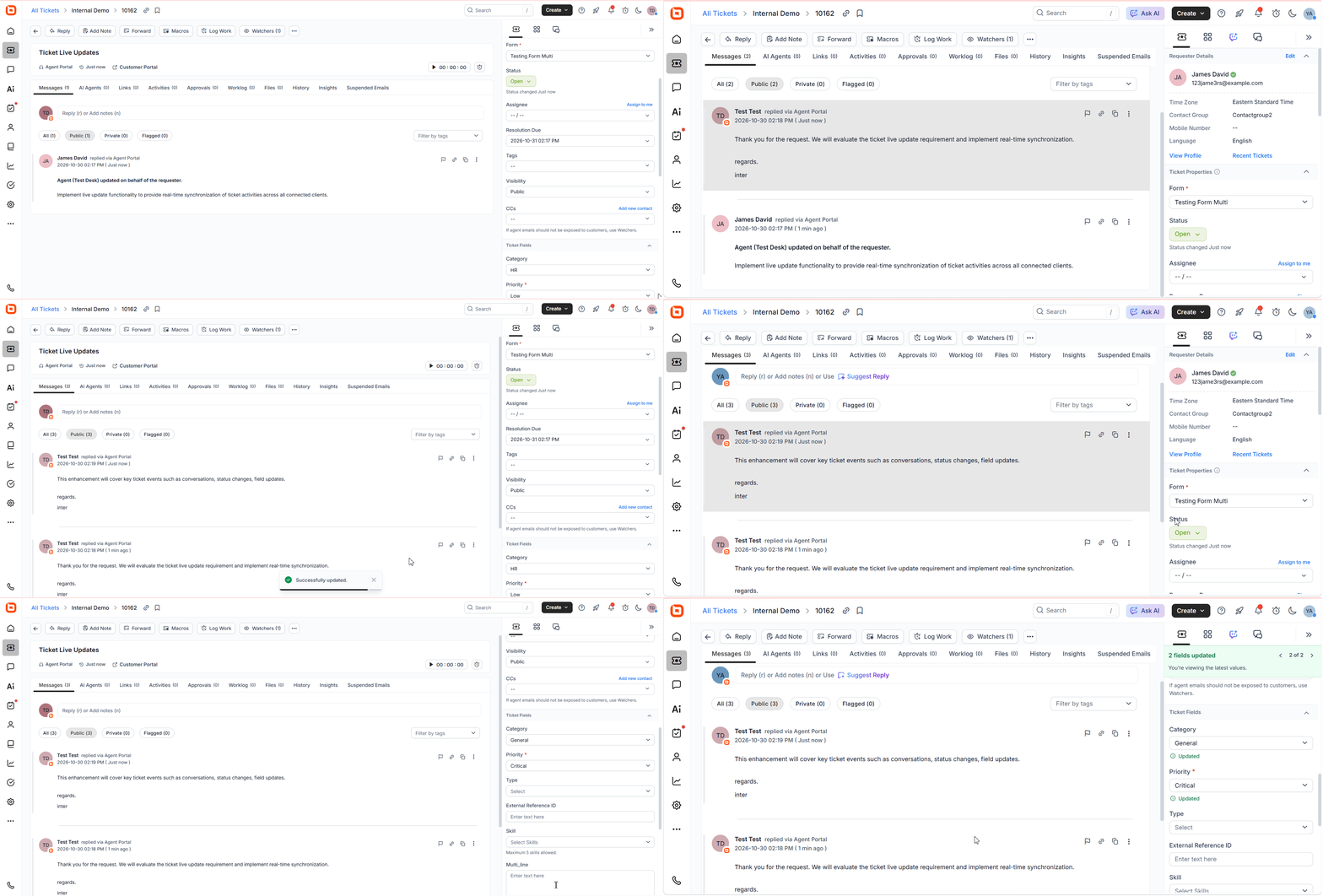
New replies, notes, and changes to status, assignee, priority, and custom fields now appear without a manual page refresh.
The latest ticket information is reflected across the agent portal, customer portal, ticket automations, AI agents, and background agents. When one agent adds a note to an escalated ticket, a colleague viewing it sees the note right away. AI agents and automations also act on the latest details.
Simplify ticket reporting with a single Resolved On field
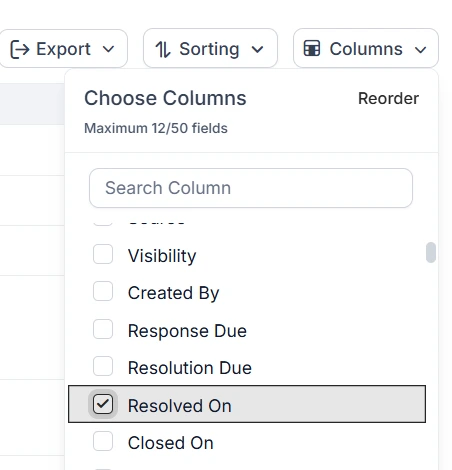
The Solved/Closed On field has been removed from the underlying ticket data because it overlapped with the existing Resolved On field. Resolved On is now the single source for tracking when tickets are resolved.
If you use saved views, filters, reports, dashboards, or automations that reference the previous field, review and update them to use Resolved On.
Live chat updates for more engaging conversations
Customers expect quick and convenient ways to communicate with support teams. The latest live chat enhancements make it easier for customers to reach your team and for agents to respond with full context.
Send messages faster with voice dictation support in live chat
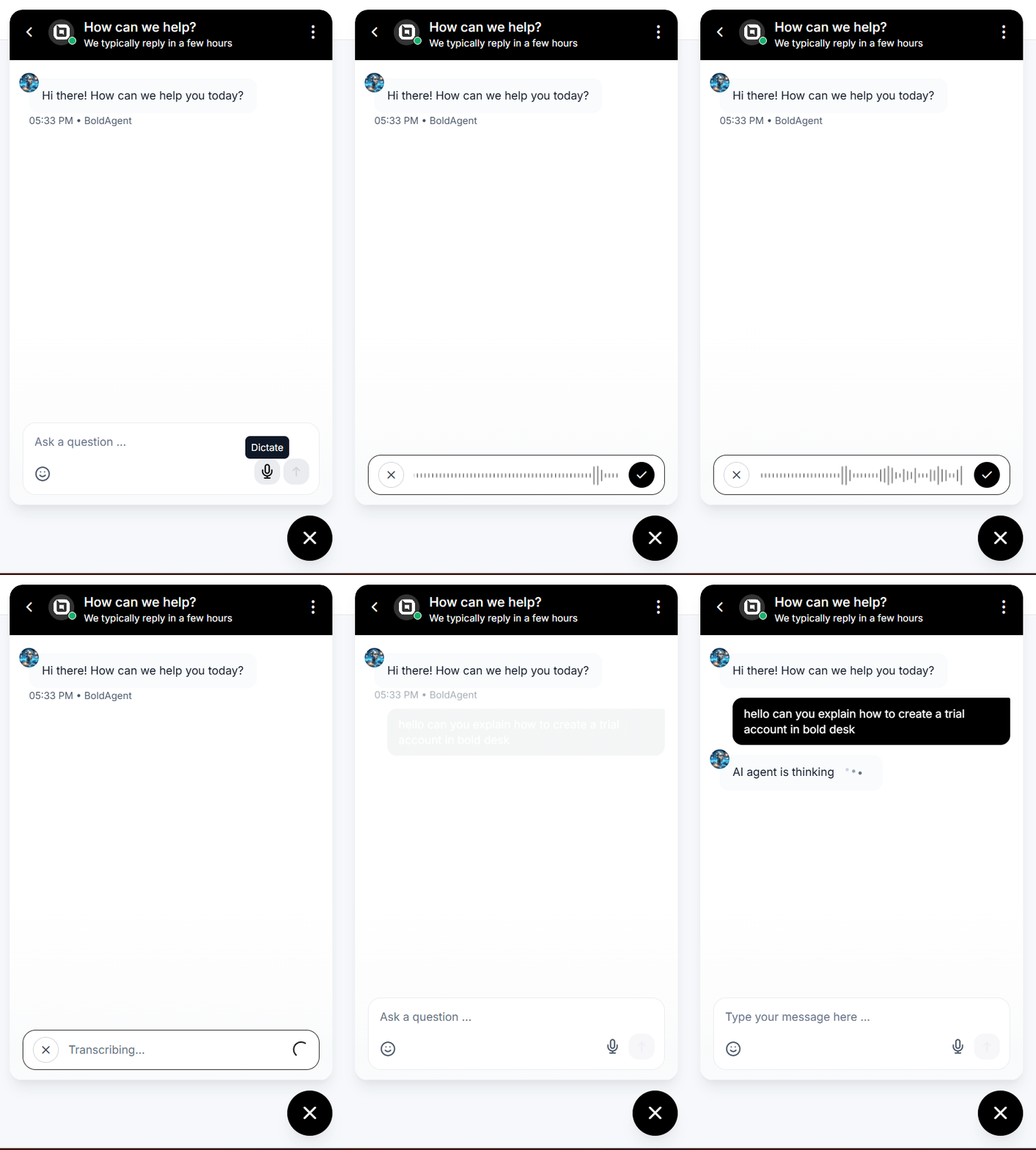
With voice dictation, users can compose messages using speech-to-text directly within the live chat widget.
It is especially useful on mobile devices and in situations where typing is slower or less convenient.
This helps customers send messages more quickly and creates a smoother support experience across devices.
Gauge customer feedback at a glance with message reactions
Not every chat message needs a full reply. Message reactions allow agents and customers to react to messages using emojis.
This provides a quick way to acknowledge information, confirm updates, and keep conversations engaging without adding extra messages. Agents can also see at a glance how customers react to their answers.
View requester interaction history in one timeline
Understanding previous interactions helps agents provide more informed responses.
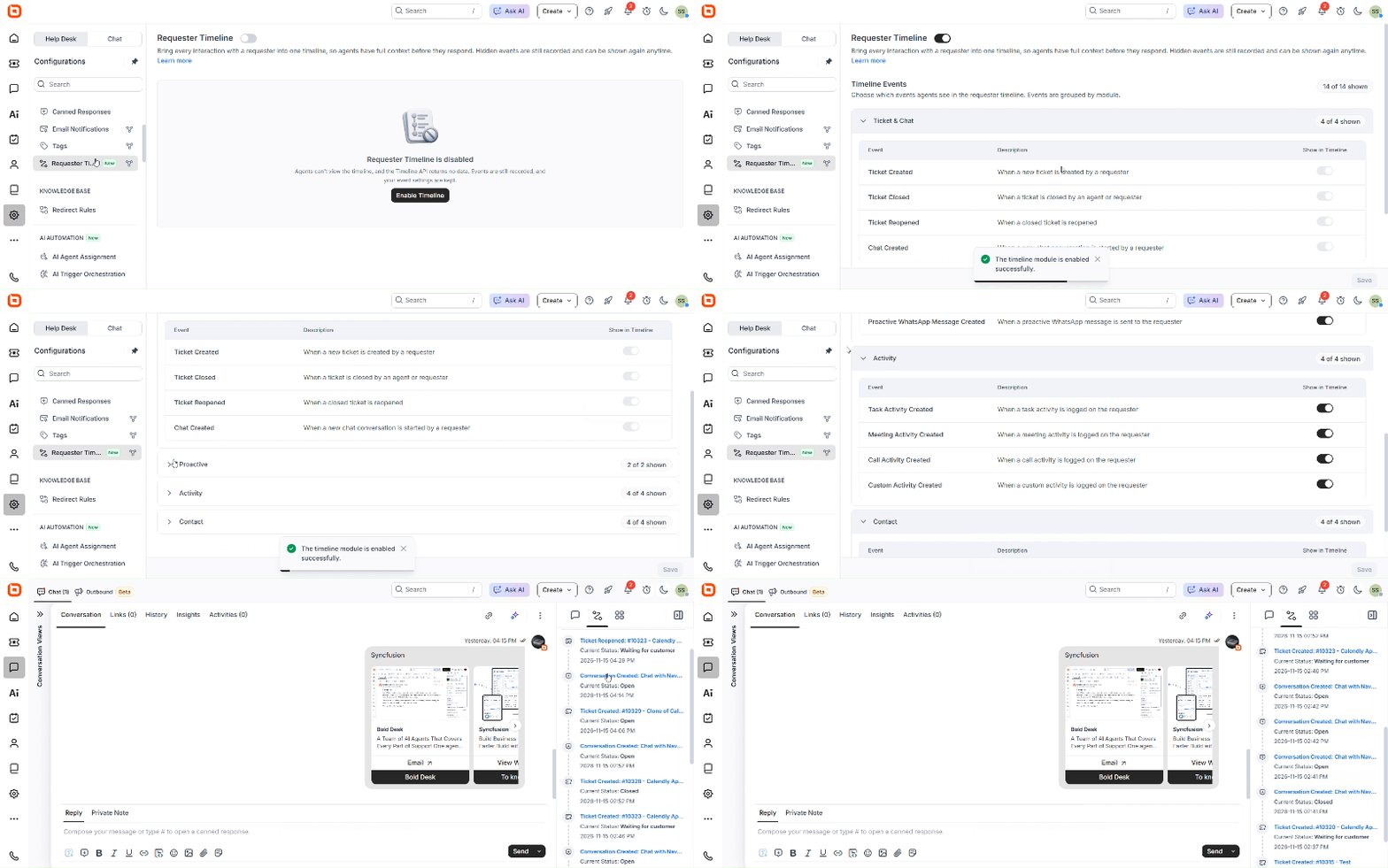
With requester interaction history, agents can now see a chronological view of a requester’s past tickets, chats, and activities in one place.
This makes it easier to review previous conversations, find related issues and past resolutions, and reduce repetitive questions during support interactions.
Guide offline visitors with custom CTA buttons
Support requests do not stop when agents leave for the day.
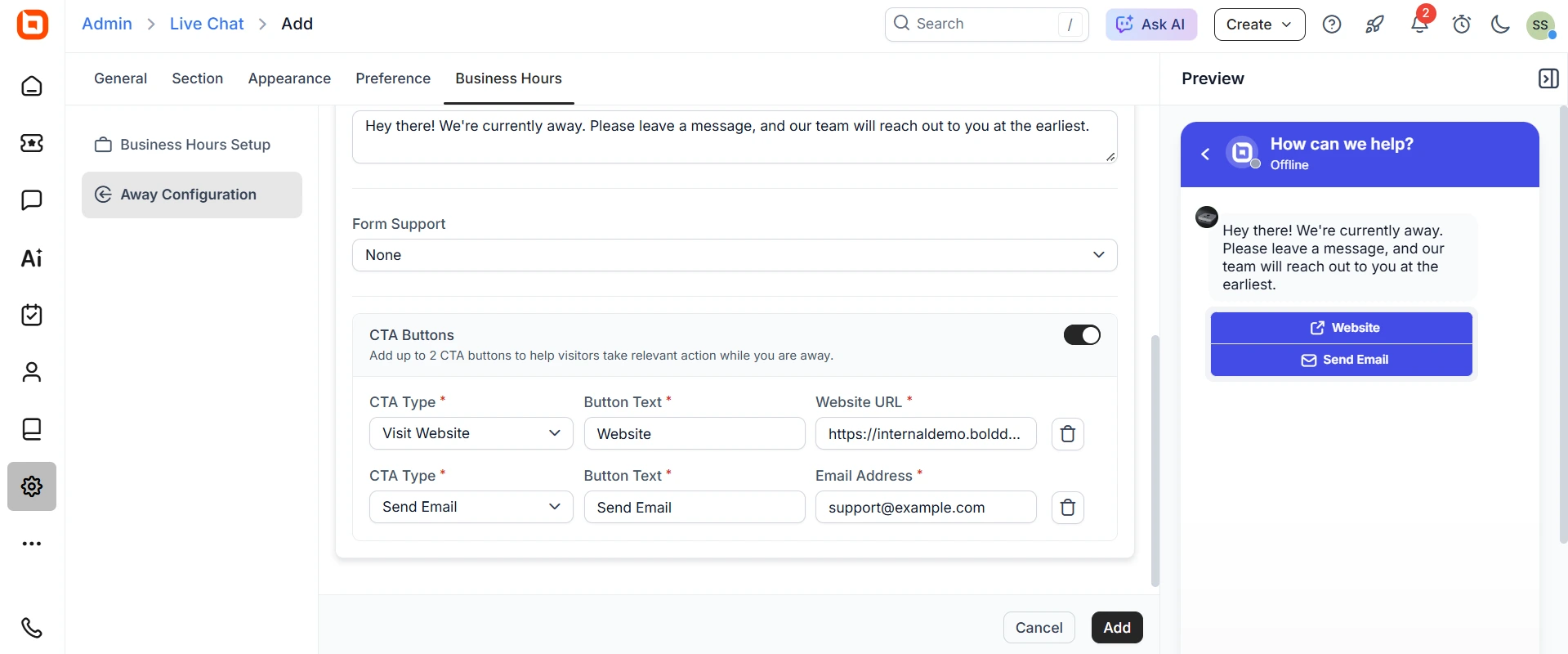
When no agents are available, the chat widget can display up to two call-to-action (CTA) buttons. Each button can open a website, start an email, call a phone number, or send an SMS.
This gives visitors a clear next step and another way to reach your team.
Real-world scenario: Give after-hours shoppers a next step
Challenge: An online store’s chat goes quiet overnight, and shoppers who visit late in the evening leave without help.
BoldDesk solution: When no agents are online, the chat widget shows two buttons. One opens the order-tracking page, and the other starts an email to the support team.
Impact: Visitors get a clear next step instead of an unanswered chat, and the team picks up email requests first thing in the morning.
Dashboard updates for deeper AI insights
Understanding how AI contributes to support operations requires more than activity data alone.
These dashboard enhancements help teams measure AI effectiveness, monitor performance trends, and evaluate the impact of automation across support workflows.
See what your AI agents are doing with two new dashboards
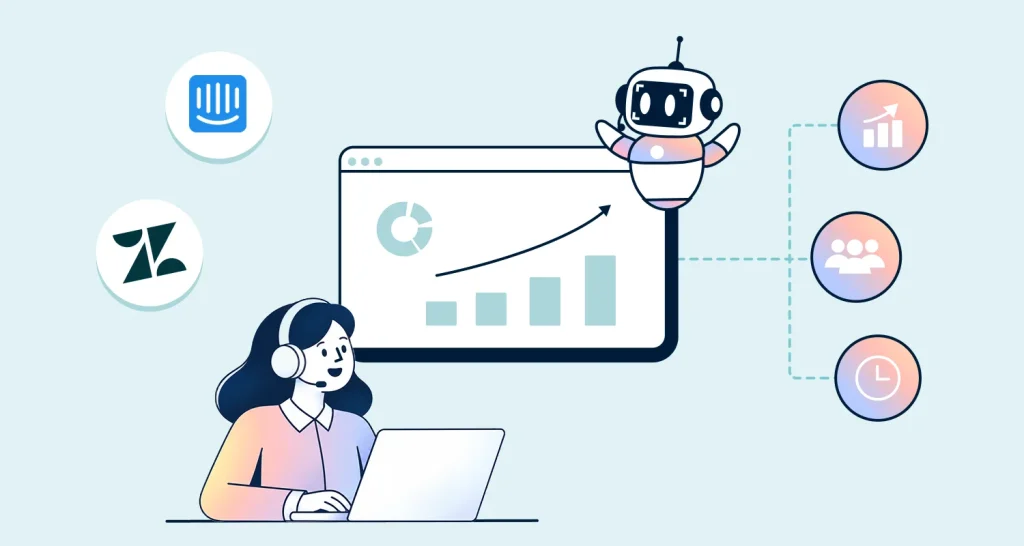
Support leaders can now see how many tickets AI resolved on its own, how often customers reopened them, and which AI agent needs tuning. Two new dashboards cover this from different angles.
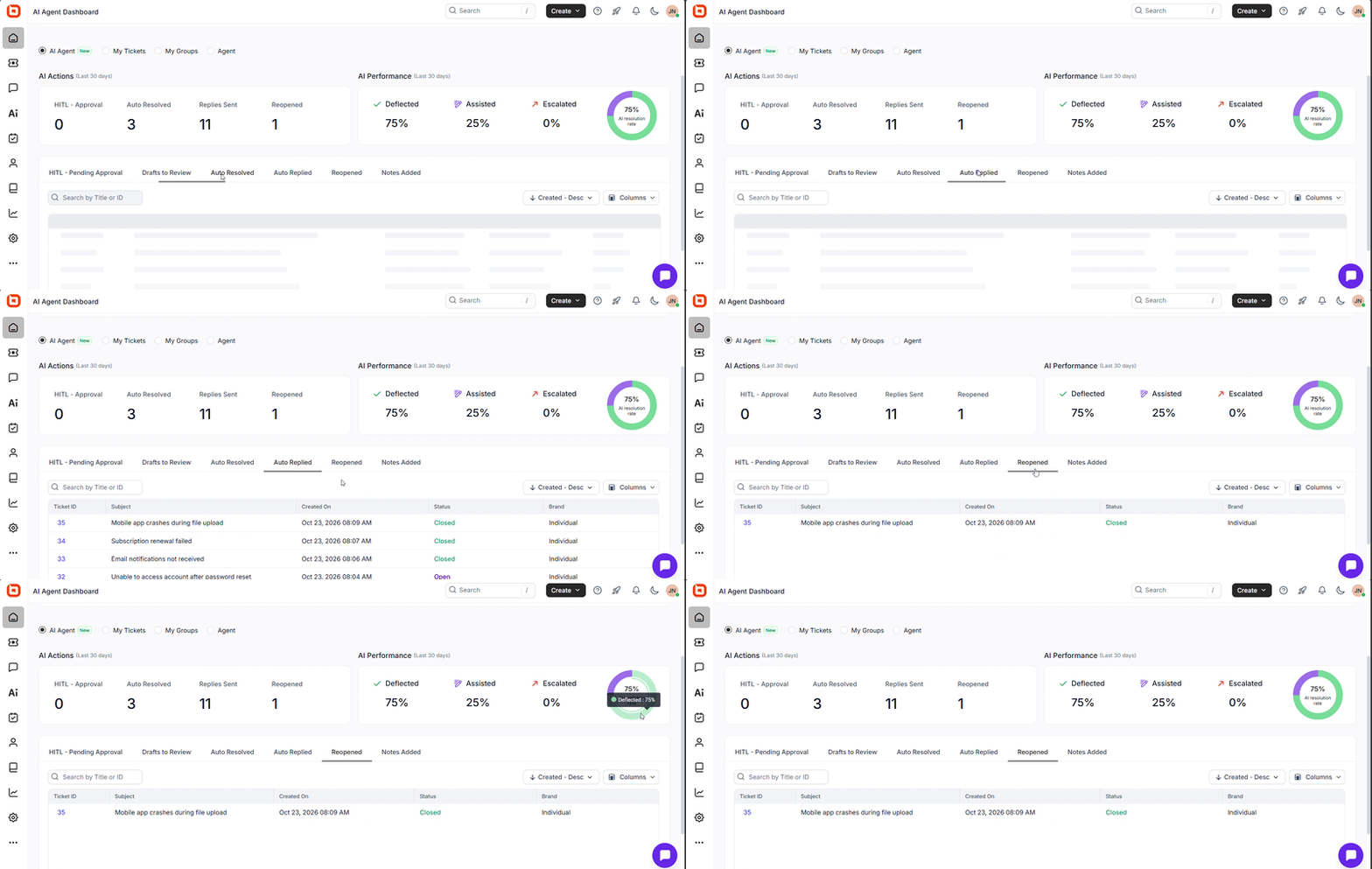
The AI agent dashboard home provides a centralized view of AI activity and outcomes. Teams can:
- Track HITL approvals, replies sent, auto-resolved tickets, and reopened tickets
- See how many tickets AI deflected, assisted, or escalated
- Measure the AI resolution rate
- Open a detailed ticket list from each metric for a closer look
The ticket AI agent performance dashboard offers deeper operational insights. Teams can:
- Monitor AI handling, deflection, and escalation rates
- Analyze ticket activity trends
- Review statistics for each AI agent, including handled tickets, replies, notes, drafts, and HITL activity
- Filter and export dashboard data for deeper analysis and reporting
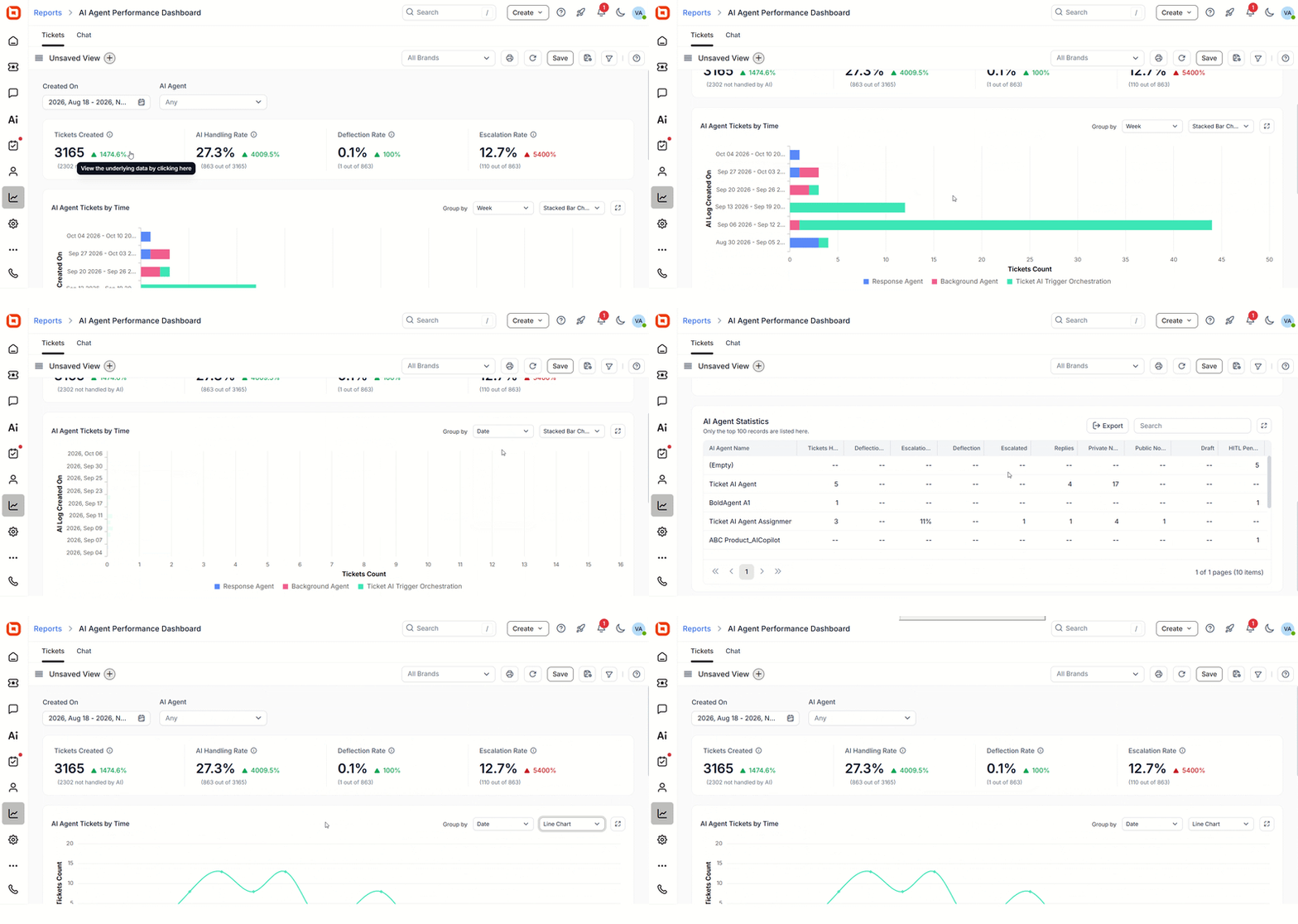
Together, these dashboards help teams make more informed decisions about AI adoption and continuous improvement.
Real-world scenario: Measure the impact of AI automation
Challenge: After turning on response AI agents, the support director needs to know whether AI is actually closing tickets or just delaying problems.
BoldDesk solution: The AI agent dashboard home shows auto resolved and reopened tickets side by side. The ticket AI agent performance dashboard shows which AI agent escalates most often.
Impact: The director can see which AI agent needs better instructions, using real data rather than guesses.
Integrations that keep customers connected
Customers prefer receiving support through the collaboration tools they already use every day.
These integration updates bring support closer to customers by enabling direct interaction through Slack and Microsoft Teams, reducing context switching and making support more accessible.
Deliver seamless support with Slack for customers
Customers can create tickets directly from Slack Connect channels and continue conversations without leaving Slack.
They can receive real-time notifications and reply to tickets directly from Slack threads. Administrators can also configure ticket creation based on all messages or specific trigger keywords.
Conversations stay synchronized between Slack and BoldDesk, helping customers and support teams collaborate from one place.
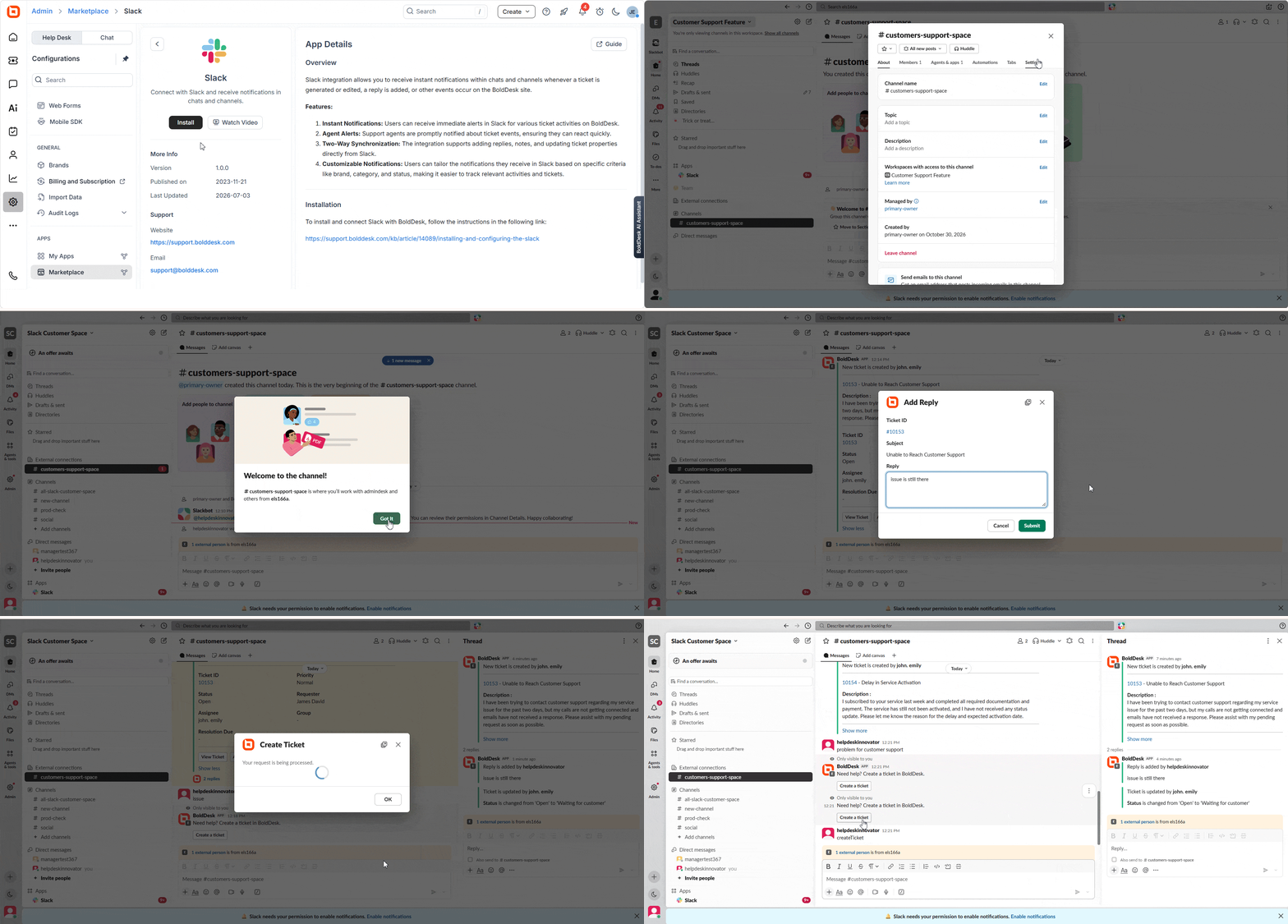
Real-world scenario: Track every request in shared customer channels
Challenge: A B2B software company supports its largest accounts in shared Slack channels, and requests get lost in the conversation.
BoldDesk solution: The team sets up Slack for customers so that any message containing the keyword “support” becomes a BoldDesk ticket. Agent replies sync back to the Slack thread.
Impact: Customers keep working in Slack, and the support team tracks every request in BoldDesk.
Create and track tickets inside Microsoft Teams
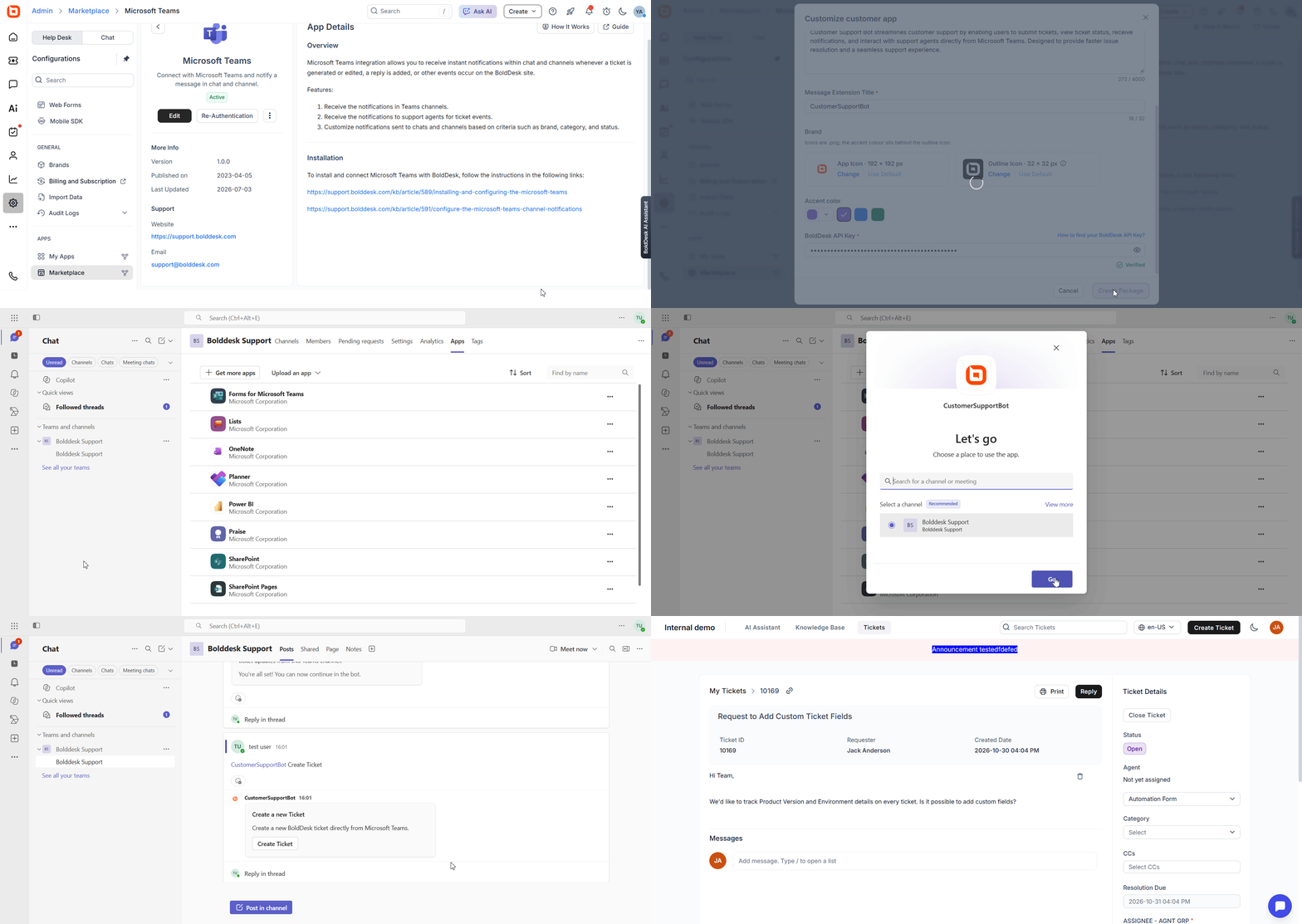
Customers can create support tickets directly within Microsoft Teams and receive notifications when tickets are updated or receive replies.
Ticket activity stays visible inside Teams, helping customers stay informed and respond more quickly.
Mobile app updates that keep approvals moving
Support decisions don’t always happen at a desk. These updates help teams review and act on AI-generated responses from anywhere.
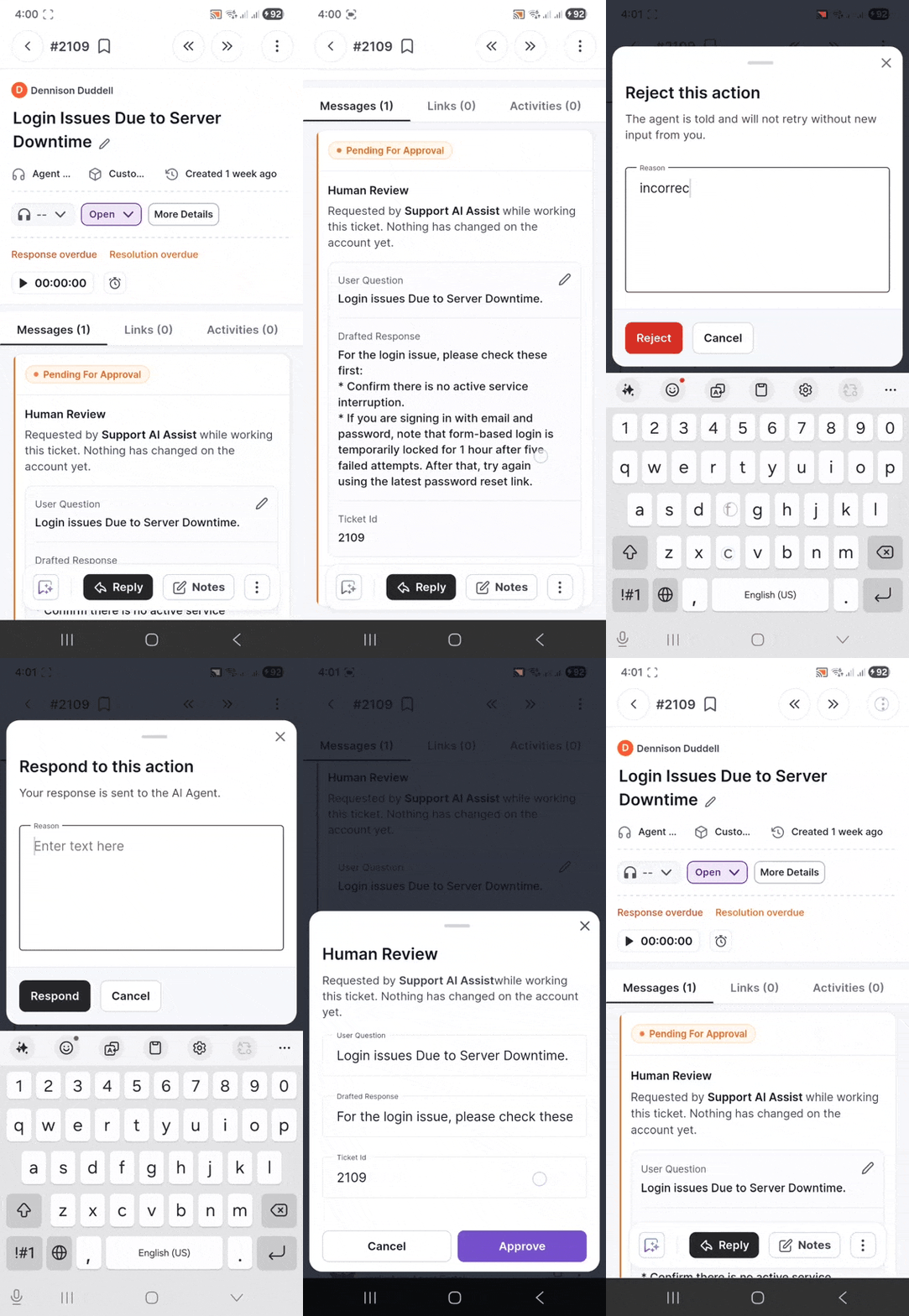
Manage HITL approvals from the mobile app
HITL approvals are now available in the mobile app. Reviewers can view pending approval requests and approve, reject, respond to, or edit AI-generated responses directly from their phones.
This helps teams keep approval workflows moving when away from their desks.
See what’s coming next for BoldDesk
We’re building new features to help support teams work more efficiently, stay connected, and deliver great support experiences.
Upcoming enhancements include:
- Real-time agent collision detection
- Hide system fields in ticket forms
- NetSuite integration
- Bulk edit custom fields and categories
Explore our product roadmap to see what’s coming next.
Deliver more connected support with BoldDesk’s November updates
The BoldDesk November 2026 release expands how teams monitor AI performance, review AI-generated responses, create and organize knowledge, and support customers across channels.
Ready to explore what’s new? Try BoldDesk or start your 15-day free trial today. No credit card is required.
Related articles
ABOUT THE AUTHOR

Cherine Apondi Okumu 
Cherine is a content strategist at Syncfusion, combining her writing expertise with a passion for technology to produce clear and engaging content. Always eager to learn, she embraces new challenges and stays updated on trends that enhance customer support.
Read more articles by this author Connect with the author on LinkedIn.
Be the first to get updates