



- Blogs Explore Blogs Blogs
Automate Tier-1 Customer Support with AI: A Practical Guide
-
by Gibson Amisi Kashi
- Updated on: November 27, 2026
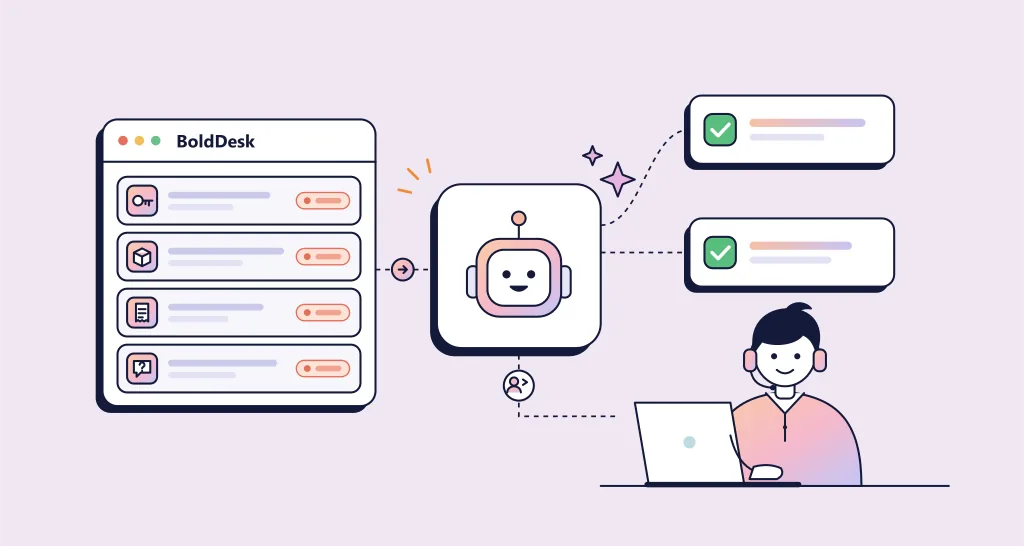
TL;DR: Automate Tier-1 customer support by selecting repetitive requests, preparing reliable knowledge sources, defining resolution procedures, and connecting AI agents to business systems. Set human handoff rules, test workflows before deployment, and expand automation based on successful resolutions rather than ticket deflection alone.
It’s Monday morning, and your support queue has filled up over the weekend. The first page shows several password reset requests, two order tracking inquiries, and a question about exporting a report.
Meanwhile, an enterprise customer whose integration stopped working on Friday is still waiting for help.
That’s the challenge with Tier-1 support. The requests are often straightforward, but their volume leaves agents with less time for issues that require expertise.
AI is increasingly helping teams manage this workload.
According to Salesforce’s 2025 State of Service report, service teams estimated that AI handled 30% of service cases in 2025 and expected that share to reach 50% by 2027.
This guide explains how to automate Tier-1 customer support with AI, from selecting your first use case to testing workflows and measuring results.
What counts as Tier-1 support (and what doesn’t)
Tier-1 customer support is the first level of assisted support, handling common inquiries and basic troubleshooting that follow established answers or procedures.
If a newly hired agent can resolve a request using your help center and a checklist, it is likely suitable for Tier-1 support.
| Support level | What it handles | Examples |
|---|---|---|
| Tier 0 | Customer self-service | Help center articles, FAQs, forums |
| Tier 1 | Routine inquiries and basic troubleshooting | Password resets, order tracking, billing questions |
| Tier 2 | Issues requiring deeper product or technical knowledge | Configuration errors, integration problems |
| Tier 3 | Specialist or engineering-level issues | Software defects, infrastructure incidents |
Traditional self-service requires customers to find the information they need.
A 2024 Gartner survey found that customers fully resolved just 14% of service issues through self-service, rising to 36% for issues they considered “very simple.”
AI agents for Tier-1 support can answer routine questions in context and retrieve account-specific information through connected systems.
For a full breakdown of each level, read our guide to tiered customer support.
Why automate Tier-1 customer support with AI?
AI customer support automation takes the most repetitive work off your agents’ queue. Customers get answers outside business hours instead of waiting for the next shift.
Backlogs shrink because routine requests no longer sit behind complex ones, and agents spend more of their day on issues that need judgment.
The time savings are measurable.
Salesforce’s State of Service research found that service reps using AI spend 20% less time on routine cases. This frees an estimated four hours a week for more complex work.
Which Tier-1 support requests should you automate first?
Start with frequent, predictable requests. Keep higher-risk decisions with your team until safeguards are tested.
| Request type | Starting approach | Requirements |
|---|---|---|
| Product and policy questions | Automated answers | Approved content |
| Basic troubleshooting | Guided assistance | Tested instructions |
| Order status and invoices | Automated lookup | Authorized system access |
| Password resets | Controlled automation | Secure verification and reset process |
| Refunds and plan changes | Human-approved actions | Policy and approval controls |
| Billing disputes and complaints | Human-led support | Context and escalation rules |
The distinction is simple: Questions need reliable answers, actions need system access, and requests involving judgment need human expertise. Use these criteria to determine where automation makes sense.
Automating repetitive support tasks with AI ticket triage
Not every Tier-1 task involves replying to a customer. AI can also help teams categorize, prioritize, and route incoming requests based on their content and configured rules.
| Task | What AI does |
|---|---|
| Ticket categorization | Classifies each new ticket by type and topic. |
| Priority detection | Suggests or sets a priority based on the request and configured criteria. |
| Tagging | Adds relevant tags for reporting and automation. |
| Routing | Uses ticket details and configured rules to help assign the request to the right team or AI agent. |
| Sentiment detection | Flags signs of frustration for an agent to review. |
| Ticket summaries | Condenses long threads before a person picks up the ticket. |
For example, an AI system could identify an invoice request, tag it as billing, and route it to the billing queue. A human agent can then review the request and respond.
Internal tasks can be a practical starting point if your team is not ready for customer-facing AI. Review classifications and routing decisions before expanding automation.
For more on setting priorities, ownership, and routing rules, read our ticket triage guide.
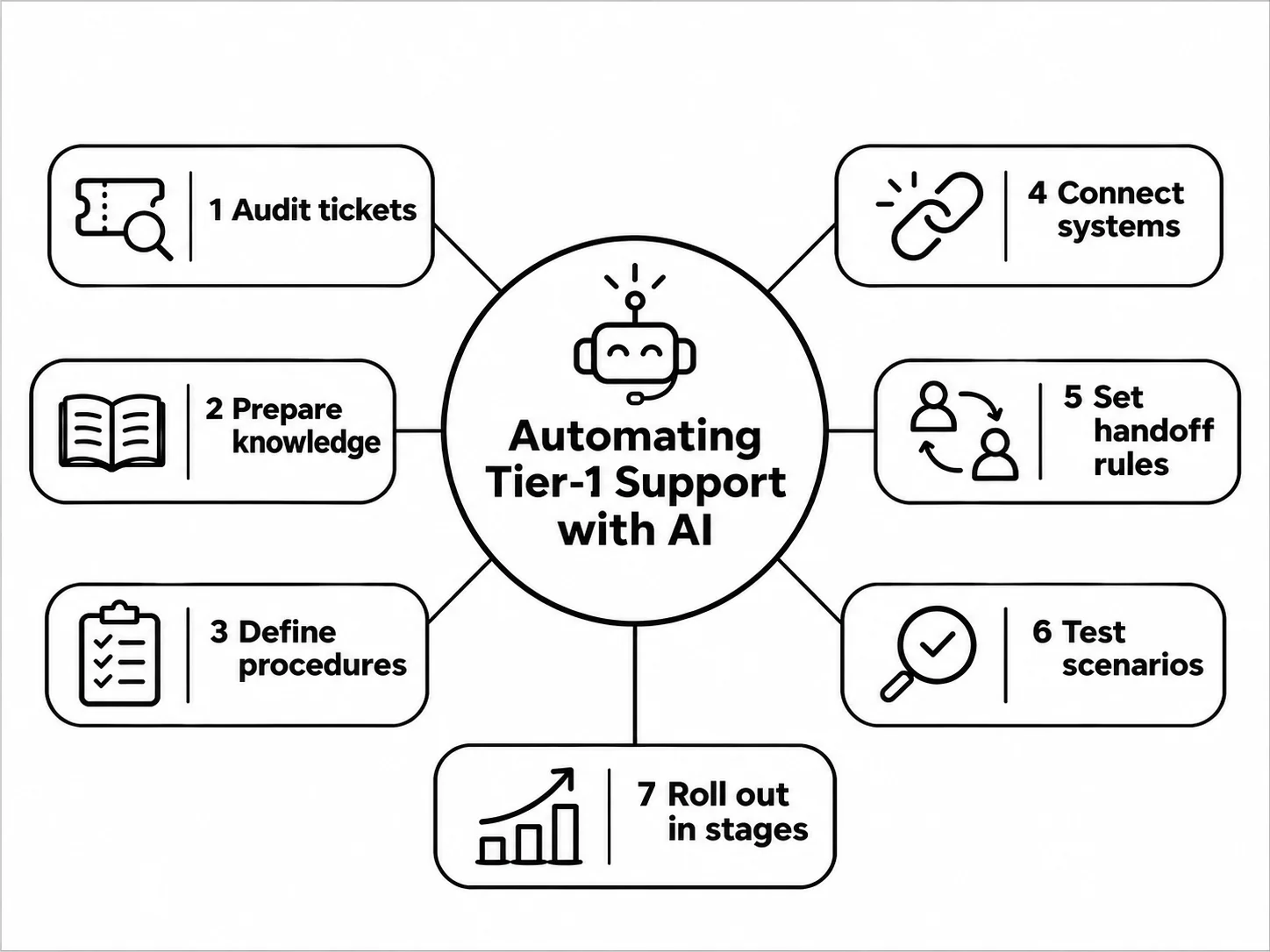
How to automate Tier-1 customer support with AI in 7 steps
Follow these seven steps to prepare, test, and gradually expand first-level support automation.
1. Audit support tickets and identify automation opportunities
Review four weeks of tickets across your channels. Group them by intent, separating invoice requests, payment failures, refunds, and disputed charges rather than grouping all under billing.
For each request type, record:
- Request frequency and average handling time.
- Availability of documented answers or procedures.
- Required systems and permissions.
- Risks of an incorrect resolution.
Suppose your team handles 1,500 tickets monthly, including 450 product questions and 300 invoice requests.
Product questions represent 30% of the queue, making them a potential starting point. Invoice requests could follow once the necessary billing integration is ready.
Use our AI readiness assessment for customer support to identify gaps before deployment.
2. Prepare your knowledge base for AI
Once you have chosen a request type, check that each common question has an accurate, current knowledge base answer.
Remove conflicting information, split lengthy articles into focused sections, and separate customer-facing content from restricted information.
Previously resolved tickets can also reveal solutions that your experienced agents know but have never documented. Turn those solutions into approved knowledge articles.
For detailed guidance, read our blog on building an AI knowledge base.
3. Define how AI should resolve each request
With your knowledge in place, define what the agent should do when a request requires action. Answering “What is your return policy?” is different from processing a return.
For a return request, the AI agent may need to check the purchase date, confirm product eligibility, and determine whether approval is necessary.
Document these decisions in a repeatable procedure. Specify when it applies, which steps to follow, and what a successful resolution looks like.
Use your existing standard operating procedures (SOPs) as a starting point. Set boundaries for sensitive actions and exceptions.
For more guidance, read our guide to AI agent guardrails for customer support.
4. Connect the business systems AI needs
Some customer requests require information that your knowledge base cannot provide.
For instance, retrieving a customer’s latest invoice requires access to your billing system.
| Business system | What AI can use it for |
|---|---|
| Order management | Check shipment and delivery details. |
| Billing software | Retrieve invoices and subscription information. |
| CRM | Retrieve relevant customer and account records. |
| Identity management | Support approved account-access procedures. |
Using configured API actions and MCP tools, AI agents can retrieve information and perform approved actions in connected systems.
Start with read-only operations before introducing actions that modify customer records or affect payments. Enforce authorization and access limits in the connected systems, not just in the AI agent’s instructions.
5. Establish human handoff and approval rules
Design the AI-to-human handoff before deploying the automated workflow. Decide how the AI agent should handle requests based on three levels of human involvement.
- AI resolution: The agent completes a routine request within its permissions, such as retrieving an order status after verification.
- Human approval: The agent prepares an action but waits for authorization before proceeding, such as processing an eligible refund.
- Human escalation: The agent transfers requests that require further investigation, fall outside policy, or cannot be resolved with available information.
Customers should be able to request human assistance at any point. Pass along conversation history, relevant customer details, and actions already attempted so customers do not have to repeat themselves.
For more guidance on approval workflows, read our blog on human-in-the-loop AI for customer service.
6. Test the AI agent using real support scenarios
Use representative questions from your support queue to evaluate the AI agent before deployment. Test straightforward requests alongside situations where the correct outcome is human escalation.
| Test scenario | Expected behavior |
|---|---|
| Standard product question | Provide an accurate, relevant answer. |
| Incomplete customer information | Request clarification. |
| Unauthorized account request | Block access to restricted data. |
| Connected system is unavailable | Follow the fallback procedure. |
| Customer requests a person | Initiate human handoff. |
If a test fails, determine whether the problem comes from the knowledge source, instructions, or integration. Correct the issue and test again.
7. Roll out automation in stages
Start with one channel and one or two request categories. A gradual rollout gives your team time to identify problems before they affect more customers.
- Draft responses: AI generates replies that human agents review before sending.
- Limited automation: Allow AI to respond independently within approved categories that consistently produce reliable results.
- Wider deployment: Extend automation to more request categories, workflows, and communication channels.
Review customer feedback, response accuracy, and failed actions before moving to the next stage.
For detailed configuration instructions, read our guide on building AI agents without code.
Example of an automated Tier-1 customer support workflow
Imagine a customer contacts an online store through live chat and asks, “Where is my order?”
Here’s how a configured AI agent could handle the request:
- Identify the customer’s intent as an order tracking inquiry.
- Complete the required customer verification.
- Retrieve shipment information from the connected order management system.
- Share the current delivery status and tracking link.
- Check whether the information addresses the request.
If verification fails, the order cannot be located, or shipment details are inconsistent, the AI agent stops and follows the escalation procedure.
Instead of directing the customer to a generic tracking page, AI provides information specific to their order. Human agents remain available for delivery exceptions requiring further investigation.
Common challenges of automating Tier-1 support with AI
Even well-tested AI workflows can encounter problems after deployment. Knowing what to look for helps your team address issues before they affect more customers.
| Challenge | How to overcome it |
|---|---|
| Inaccurate AI responses | Trace incorrect answers to outdated content or unclear instructions. |
| Integration failures | Monitor failed tool calls and check whether fallback procedures work. |
| Data privacy and security risks | Audit access permissions and investigate unauthorized requests. |
| Customer frustration | Review abandoned conversations, repeated replies, and unsuccessful handoffs. |
| Changing business policies | Assign owners to update affected knowledge sources and workflows. |
| Rising automation costs | Identify unnecessary tool calls, excessive retries, and low-resolution workflows. |
Encourage frontline agents to flag recurring AI errors. Their feedback can help your team identify which workflows need improvement and which should remain with human agents.
For more guidance, read our blog on common AI support implementation mistakes and how to fix them.
How to measure Tier-1 support automation success
A closed ticket does not always mean the issue is resolved. Measure AI-powered ticket resolution alongside customer satisfaction, repeat contacts, and cost.
| Metric | What it measures | Warning sign |
|---|---|---|
| AI handling rate | Share of Tier-1 requests handled by AI | Low coverage of eligible requests |
| Verified AI resolution rate | Share of AI-handled requests resolved without human intervention | High reported resolution but frequent repeat contacts |
| Repeat contact rate | Customers returning with the same issue | More repeat requests after automation |
| Escalation rate | Share of AI-handled requests transferred to humans | High escalations for routine topics |
| Customer satisfaction (CSAT) | Customer feedback on AI interactions | Lower CSAT than comparable human-handled requests |
| Handoff quality | Whether agents receive sufficient context | Customers repeating information |
| Cost per resolution | Cost of successfully resolving a request | Rising costs without better outcomes |
Suppose your team receives 1,000 Tier-1 requests monthly. AI handles 600, of which 480 are verified as resolved without human intervention.
- AI handling rate: 600 ÷ 1,000 = 60%.
- Verified AI resolution rate: 480 ÷ 600 = 80%.
- Overall AI resolution rate: 480 ÷ 1,000 = 48%.
Although AI handled 60% of requests, it successfully resolved 48% of the total Tier-1 workload.
Review customer confirmations, completed actions, and repeat contacts within a consistent follow-up window to validate resolutions. Do not count a customer leaving a conversation as proof that their issue was solved.
For more on measuring reductions in human-handled requests, read our guide on ticket deflection.
How BoldDesk helps teams automate Tier-1 customer support
BoldDesk combines AI agents, ticket management, knowledge management, and omnichannel support in one platform.
From answering common product questions to completing approved actions in connected systems, BoldDesk helps you automate first-level support while keeping your team in control.
In G2’s independent AI agent evaluation, BoldDesk scored 96% for response accuracy and 89% for policy compliance across 50 simulated customer support tasks.
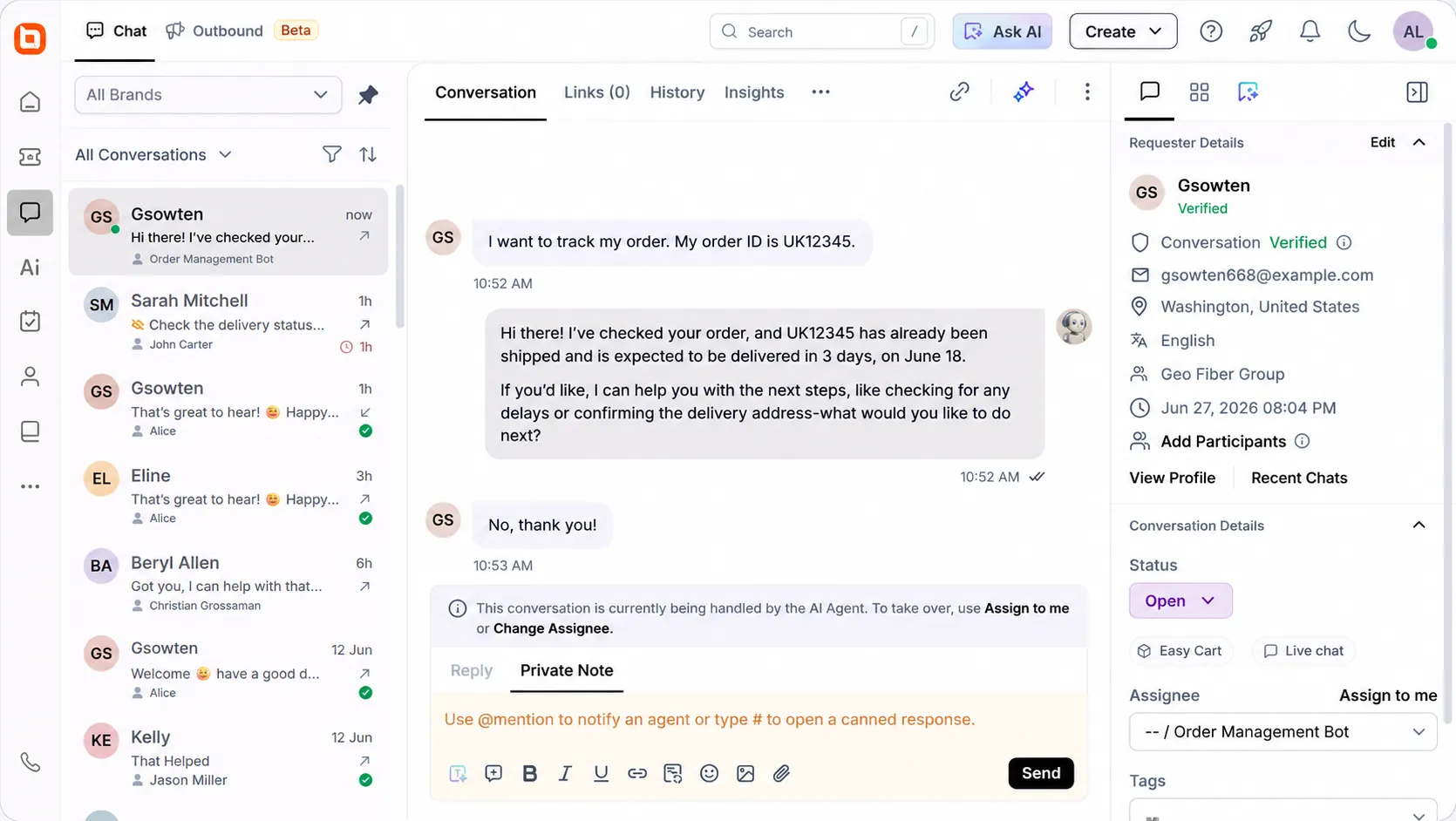
With BoldDesk, you can:
- Answer routine questions across channels: The Support Agent responds to repetitive inquiries across supported channels. It draws on connected help articles, files, web pages, Q&A pairs, and past tickets.
- Triage every new ticket: Configure AI workflows to update ticket fields such as category, priority, and tags when a ticket is created. Assignment rules can then assign matching tickets to the appropriate AI agent.
- Resolve requests beyond FAQs: AI agents can combine reusable Skills with API actions and MCP tools to retrieve invoices, check order statuses, and perform approved actions.
- Reduce manual ticket investigation: The Background Agent investigates assigned tickets and adds private notes. These notes include findings, customer sentiment, and recommended next steps that give agents a head start.
- Keep humans in control: Require approval for sensitive actions and transfer complex requests to human agents with relevant conversation context and details of previous AI actions.
- Speed up human-led resolutions: The Assist Agent helps frontline agents summarize tickets, find relevant answers, and draft replies without switching between multiple tools.
- Deploy and refine AI workflows: Configure agents without coding using the AI Agent Builder. Test workflows in the Playground before deployment. Then use AI Views, trace logs, and AI analytics to review resolutions, handoffs, and credit usage.
BoldDesk’s AI pricing plans include unlimited human agents, subject to the terms of use, and meter AI usage through credits instead of per-resolution fees.
Explore BoldDesk AI use cases to see how AI agents handle routine inquiries and support tasks across different workflows.
Resolve routine requests with less manual work
Start with one repetitive request that takes up your team’s time. Choose 20 representative tickets and test whether an AI agent can resolve them accurately.
The results can help you identify where automation adds value and where your team still needs to be involved.
BoldDesk helps you turn existing support knowledge and procedures into AI-powered workflows, giving your agents more time for customers who need their expertise.
Start a 15-day free trial and test your first Tier-1 support automation workflow using your own support content. No credit card required.
Book a demo for a guided walkthrough of how BoldDesk AI agents would handle your Tier-1 requests.
Related articles
- AI Agent for Customer Service: How It Works and What It Resolves
- AI Ticketing System: A Practical Guide for Modern Support Teams
- Customer Self-Service: Definition, Benefits, Tips, and Examples
FAQs about Tier-1 customer support automation
Can AI replace Tier-1 support agents?
AI can handle repetitive frontline tasks, but human agents remain necessary for sensitive requests, complex issues, policy exceptions, and AI quality review.
What percentage of Tier-1 support tickets can AI automate?
Automation potential depends on your ticket mix, complexity, knowledge quality, and integrations. Measure actual resolution rates before setting targets.
What is the difference between Tier-0 and Tier-1 support?
Tier 0 enables customers to resolve issues independently through self-service resources. Tier 1 provides first-level assistance for common questions and routine troubleshooting through human or AI agents.
What is the difference between ticket deflection and AI resolution?
Deflection measures requests that do not reach human-assisted support. AI resolution measures requests successfully solved by AI. Depending on the platform’s definition, an abandoned conversation may count as deflected without being resolved.
How long does it take to automate Tier-1 support?
Workflows using documented answers typically require less preparation than those involving integrations or sensitive actions. Allow time for testing and verifying permissions.
How much does Tier-1 AI support automation cost?
Costs depend on support volume, workflow complexity, and the provider’s pricing model. Common models include per-resolution fees, per-agent subscriptions, and usage-based AI credits.
Do you need to replace your help desk to automate Tier-1 support?
Not necessarily. If your current help desk supports AI agents, relevant integrations, and human escalation, you may be able to automate support without switching platforms. Otherwise, evaluate platforms that combine these capabilities.
ABOUT THE AUTHOR

Gibson Amisi Kashi 
Gibson specializes in customer service and customer experience topics at Syncfusion, where he examines trends, tools, and strategies that help teams deliver faster, more connected support.
Read more articles by this author Connect with the author on LinkedIn.
Be the first to get updates