


- Blogs Explore Blogs Blogs
AI Agent Use Cases for SaaS Support with Practical Examples
-
by Flavian Atieno Odongo
- Updated on: November 20, 2026
TL;DR: AI agent use cases for SaaS support include ticket routing, feature questions, onboarding, integration troubleshooting, multilingual support, billing changes, and incident handling. This article explains how each one works, which systems the agent needs, and the handoff rules that send high-risk requests to a human.
A customer can’t access their account after enabling multi-factor authentication. Another needs to upgrade their subscription before a product launch. Meanwhile, support teams are handling a growing stream of configuration questions and routine requests.
In SaaS customer support, this is a daily reality.
Ticket volumes keep growing, and customers expect fast, accurate answers around the clock. AI agents help SaaS teams handle growing support demand without increasing staffing at the same pace.
AI agents are increasingly being used to automate repetitive support workflows while keeping human teams focused on high-value interactions. The examples below show where they deliver the most value in SaaS environments.
Why are SaaS support teams turning to AI agents?
SaaS teams use AI agents to automate repetitive support tasks, improve response times, and provide assistance outside business hours without increasing support headcount.
Customers sign up and explore on their own, often outside your business hours and across time zones. Every new feature also creates a fresh wave of questions and support requests.
As demand increases, many teams are turning to SaaS customer service automation to scale support without sacrificing service quality.
Gartner predicts that by 2029, agentic AI will autonomously resolve 80% of common customer service issues while reducing operational costs by 30%.
AI agents for SaaS support create the most value when they automate routine work while giving agents more time to focus on complex customer issues.
For a broader look at how AI is transforming customer support operations in B2B software companies, see our guide to AI support for B2B SaaS.
How does an AI agent handle SaaS support requests?
An AI agent for SaaS support interprets customer requests, retrieves information from approved knowledge sources and connected systems, and performs authorized support tasks.
For example, it can explain an invoice, check an integration’s status, answer a product question, or initiate a password reset through an approved workflow. When a request requires human approval or specialist expertise, the agent transfers the conversation with the relevant context.
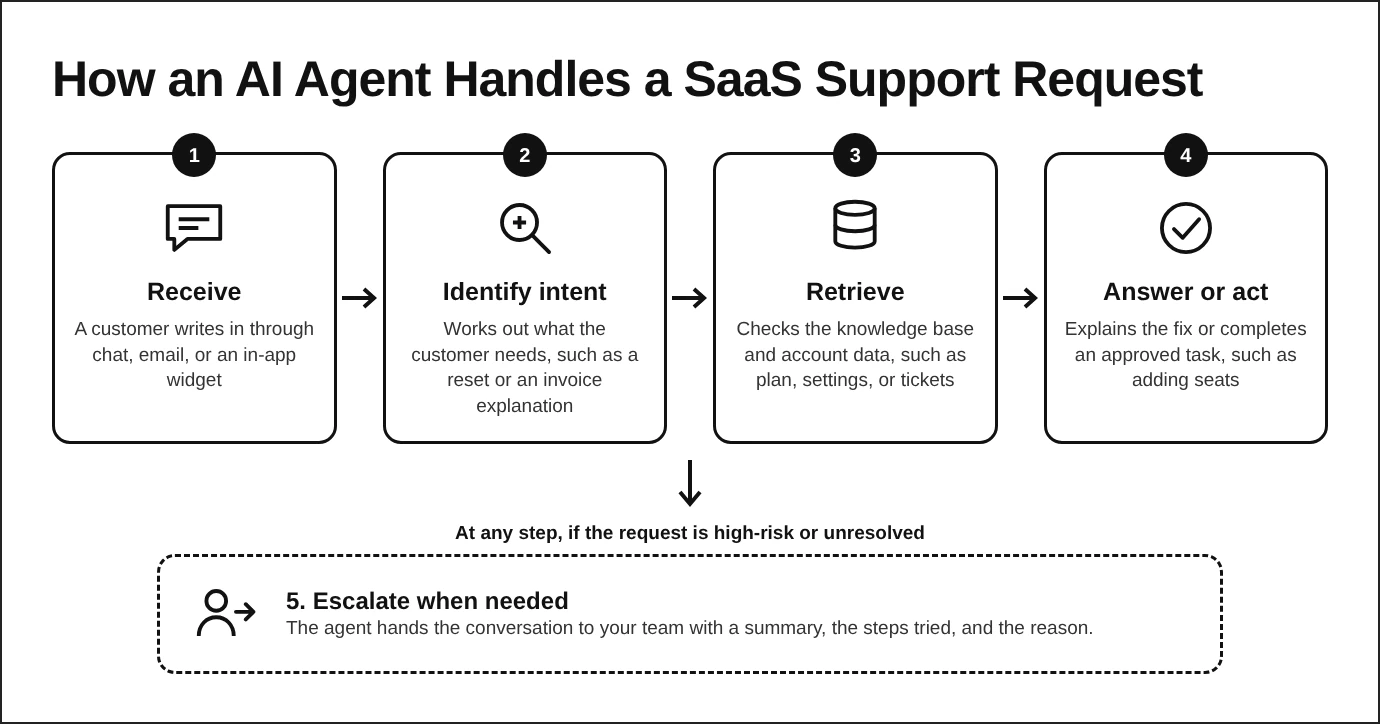
Most AI agents follow a simple workflow:
- Receive the request: A customer contacts support through chat, email, a help center, or an in-app support widget.
- Identify the intent: The agent determines what the customer needs, such as account access, billing help, onboarding guidance, or troubleshooting assistance.
- Retrieve information: It checks approved knowledge sources and connected systems, such as subscription details, account settings, ticket history, or product data.
- Answer or take action: It provides guidance or performs an approved task, such as checking usage limits or retrieving invoice details, within predefined permissions and approval rules.
- Escalate when needed: If the request is high-risk, falls outside the agent’s permissions, or cannot be resolved confidently, the conversation is transferred to a human agent with a summary of the issue and the work already completed.
Taking action is what separates an AI agent from a chatbot. Through integrations with your product, billing platform, identity provider, or CRM, the agent can check a subscription tier, add seats after authorization, or invite a guest user to a workspace. What it can do depends on the tools you connect, the permissions you grant, and the approval rules you set.
What are the most common AI agent use cases in SaaS support?
The most common AI agent use cases in SaaS support are ticket routing, product and feature questions, onboarding guidance, integration and API troubleshooting, multilingual and after-hours support, account and billing changes, and bug and incident handling. Each works best when the agent can reach the right systems and follows clear handoff rules.
SaaS support teams handle the same types of requests every day: setup questions, product issues, access changes, billing requests, and feature inquiries. Most follow predictable workflows and require information from your documentation, product, or business systems.
That makes them well suited to AI agents that can search approved knowledge sources, check account details, and take authorized actions in connected systems.
The examples below show how these SaaS AI support workflows run, what the AI agent handles on its own, and where human oversight is still required.
Note: The examples in this article are illustrative and represent common SaaS support scenarios. Actual workflows, integrations, and results vary by implementation.
The table below summarizes the systems an AI agent typically needs access to for each SaaS support use case.
| Use case | Systems the agent needs |
|---|---|
| Sort and route new tickets automatically | Support platform, ticketing system, knowledge base |
| Help customers find and use product features | Knowledge base, product documentation, feature catalog, subscription data |
| Guide new customers through onboarding | Product usage data, account settings, onboarding checklist |
| Troubleshoot integration and API problems | Product APIs, integration data, monitoring tools, support platform |
| Support customers across languages and time zones | Knowledge base, translation capabilities, support platform |
| Manage account, billing, and subscription changes | Identity provider, user directory, billing platform, subscription management system |
| Handle bugs, product issues, and service incidents | Issue tracker, status page, monitoring platform, support desk |
1. Sort and route new tickets automatically
When tickets arrive faster than your team can review them, urgent issues can get buried behind routine requests. Routing mistakes also slow down resolution and create unnecessary back-and-forth between teams.
An AI agent can analyze each incoming request, identify the topic, urgency, and customer sentiment, group related tickets, and route the conversation to the right queue.
Example: A customer on an Enterprise plan writes, “We were charged twice this month and our finance team needs a corrected invoice before Friday.” The AI agent categorizes the ticket as a billing issue, raises its priority based on the plan tier and deadline, and routes it to the billing queue with the invoice IDs attached.
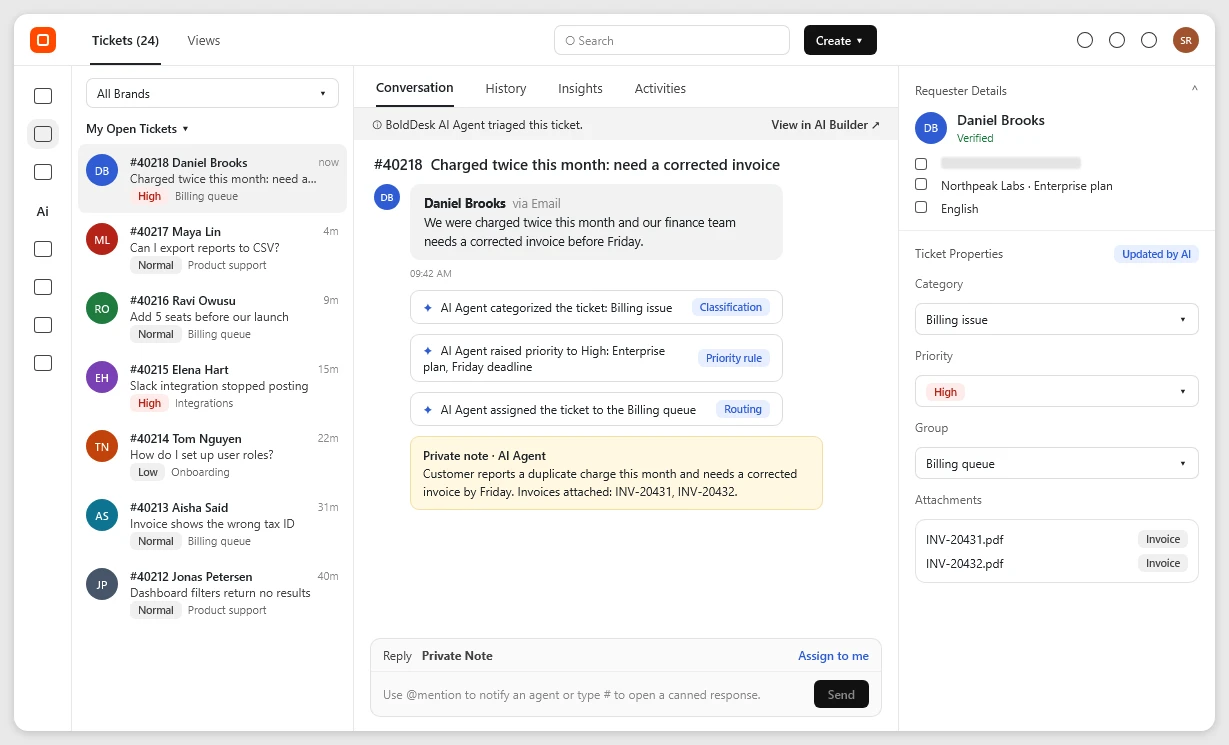
Human handoff: Tickets the agent can’t classify with confidence, and messages from high-value accounts that signal cancellation intent, go to a human triage queue instead of being auto-assigned.
2. Help customers find and use product features
Customers frequently contact support with questions that already have answers in your documentation. They often need information quickly and don’t want to search through multiple help articles.
An AI agent can provide omnichannel support across chat, email, messaging apps, and self-service portals, using approved knowledge base content and account-specific information. Resolving these questions in the channel the customer already uses is the most common form of ticket deflection.
Example: A customer asks whether guest users are available on their current plan. The AI agent explains the feature limits of the customer’s subscription and suggests upgrade options when applicable.
Human handoff: If the customer wants to discuss pricing, the agent passes the conversation to sales. If the feature isn’t documented, it hands off to support and logs the question as product feedback.
3. Guide new customers through onboarding
Many customers sign up successfully but stop progressing because they are unsure what to do next. Early confusion often leads to lower adoption and higher churn.
When connected to your product, an AI agent can track onboarding progress, identify incomplete tasks, and recommend the next steps for each workspace. It can also offer proactive in-app guidance when a user stalls on a setup step.
Example: A customer asks, “What should I set up first?” The AI agent sees that the workspace setup is partially complete and recommends inviting teammates and configuring user roles before connecting a CRM.
Human handoff: Enterprise rollouts, data migrations, and custom configurations go to the customer success manager with a summary of the setup steps already completed.
4. Troubleshoot integration and API problems
Broken integrations and API errors can interrupt critical workflows and generate high-priority support requests.
An AI agent can review connected-system data, identify common failures, and guide customers through approved troubleshooting steps before escalation is required.
Example: A customer reports that webhook deliveries started failing after a deployment. The AI agent checks the delivery logs and finds 401 signature verification errors that began when the customer rotated their signing secret. It explains how to update the secret on their endpoint. Once the customer confirms the fix, it offers to replay the failed events.
Human handoff: If the logs point to a platform-side error, or the failure affects multiple customers, the agent escalates to engineering with the request IDs, timestamps, and error responses attached.
5. Support customers across languages and time zones
SaaS companies serve customers across many countries and time zones. Requests often arrive in languages your team doesn’t speak, or at hours when nobody is online, and slow replies hurt satisfaction and adoption.
An AI agent can resolve these requests in the customer’s language 24/7, using the same approved documentation and policies. When a human needs to step in, it translates the conversation so your team can work in its own language.
Example: A customer in Tokyo writes in Japanese at 2 a.m. your headquarters’ time, reporting a SAML error while setting up single sign-on (SSO). The AI agent replies in Japanese, walks them through checking the identity provider’s certificate and entity ID, and resolves the issue before your team comes online.
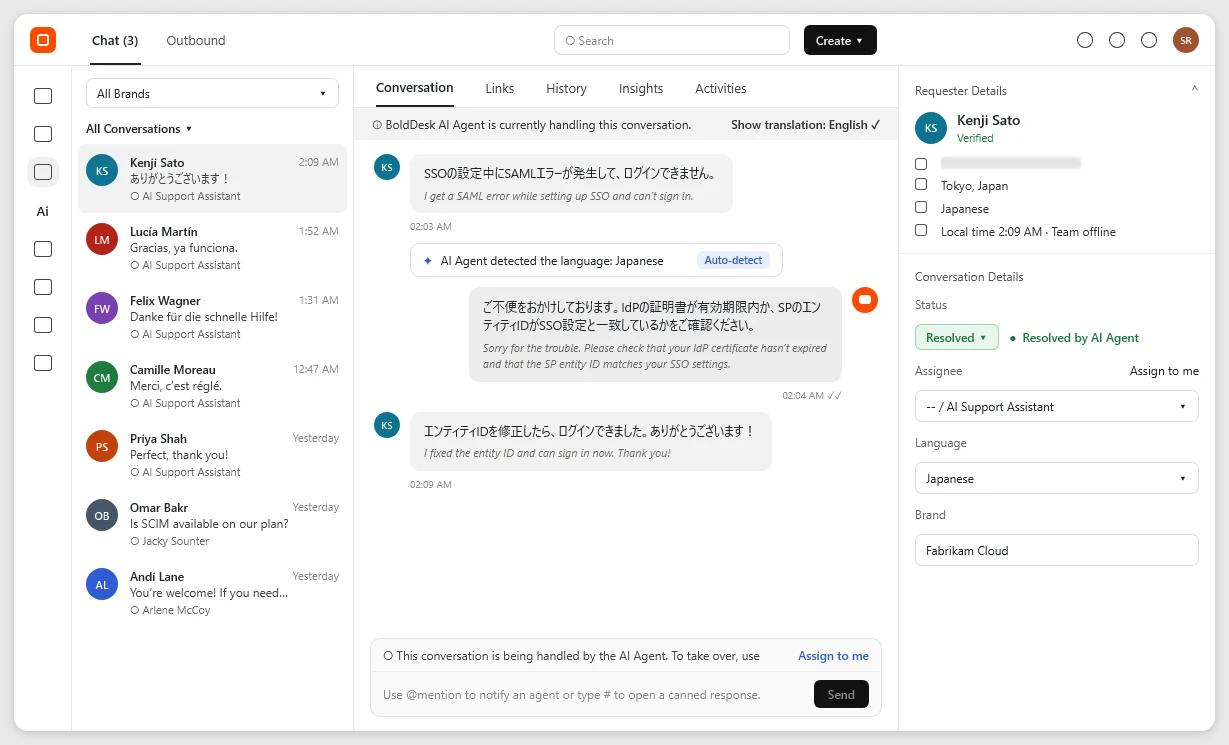
Human handoff: If the error persists, the agent opens a ticket for the next shift with an English summary and the full translated transcript. The human agent’s reply is then translated back into Japanese.
6. Manage account, billing, and subscription changes
Account updates, billing questions, seat changes, invoices, and access requests are among the most common support interactions. Most follow repeatable workflows and require access to connected systems.
An AI agent can review account information, explain billing details, process approved changes, and escalate actions that require authorization.
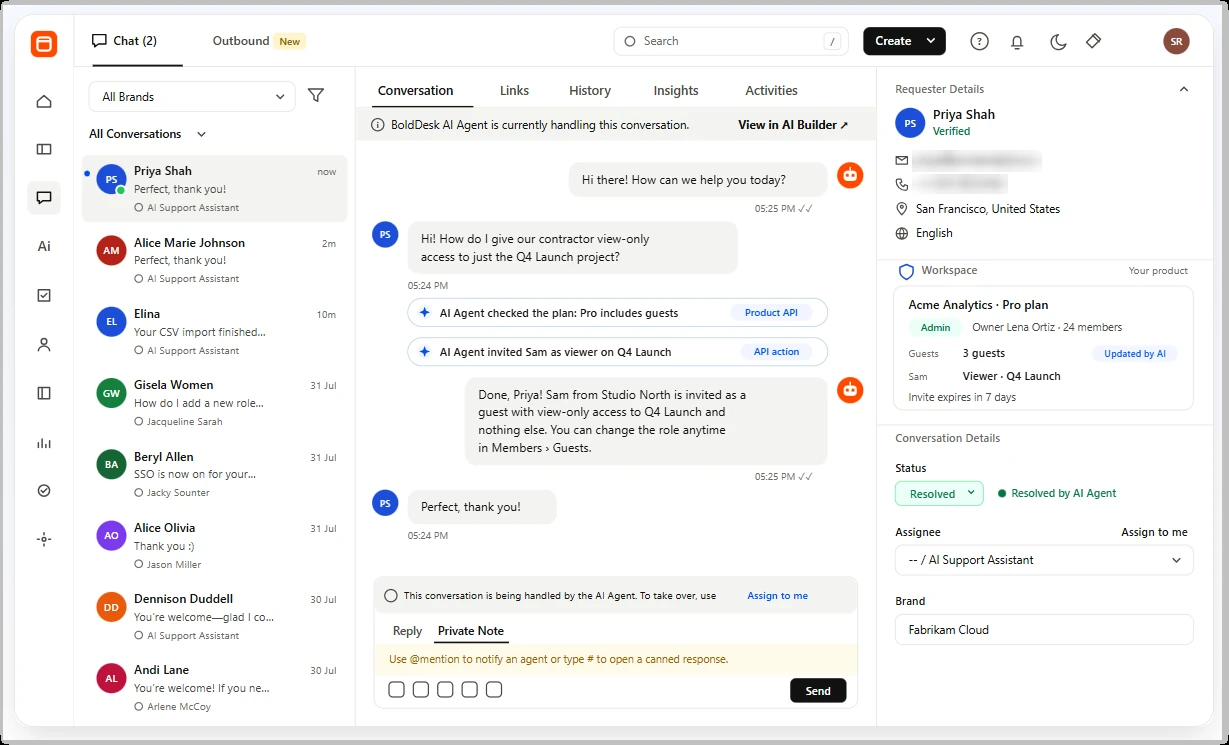
Example: A customer asks what happens when they exceed their monthly automation quota. The AI agent reviews current usage, explains overage charges, and recommends subscription options that better match the customer’s needs.
Human handoff: If the request involves a refund, a billing dispute, an ownership change, or a failed identity check, the agent hands the conversation to a human with the relevant account details.
7. Handle bugs, product issues, and service incidents
Support teams are often the first to learn about product defects, service interruptions, and release-related issues. Collecting information and keeping customers updated can consume significant time during these events.
An AI agent can gather technical details, identify known issues, communicate approved incident updates, and create engineering-ready reports when escalation is necessary.
Example: A customer reports that dashboards are no longer loading. The AI agent checks the status page, confirms an active incident, provides approved status updates, and proactively notifies the customer when service is restored.
Example: A customer reports that a filter on the tickets view returns no results. No incident is active. The AI agent collects the browser version, steps to reproduce, workspace ID, and a screenshot, then creates an issue in your tracker linked to the customer’s ticket.
Human handoff: The agent doesn’t promise fix dates or workarounds that engineering hasn’t approved. Those updates come from the product team.
What should AI agents never automate?
Some SaaS support workflows require human-in-the-loop review regardless of model accuracy because they carry legal, financial, privacy, or security risks.
Avoid fully automating:
- Ownership transfers
- High-value refunds
- Contract negotiations
- Security incident response
- Data deletion, export, or access requests governed by privacy regulations such as GDPR, CCPA, and similar laws
These requests should require human approval before any action is taken.
Which SaaS support requests are safe to automate?
The table below shows which support workflows are commonly automated, which typically require review, and which should remain human-owned.
| Easy to automate | Requires review | Human-owned |
|---|---|---|
| Password resets | Plan upgrades involving pricing discussions | Contract negotiations |
| Invoice explanations | Low-value refund requests | Legal and compliance reviews |
| Feature how-to questions | Account recovery edge cases | Security incidents |
| Integration troubleshooting | Billing disputes | Ownership transfers |
| Status and outage updates | Sensitive account changes | Privacy-law requests |
As confidence grows, SaaS teams can expand automation to more advanced workflows while keeping human approval in place for high-risk decisions.
How do you roll out an AI agent for SaaS support?
Successful AI deployments start with a single, repeatable workflow and expand gradually as results improve.
Gartner predicts that over 40% of agentic AI projects will be canceled by the end of 2027, making a phased approach essential.
1. Start with a low-risk, high-volume use case
Begin with workflows such as password resets, onboarding questions, billing inquiries, or ticket routing. Leave security reviews, disputes, and contract-related requests for later.
To see how teams in other industries choose their first workflows, read our guide to AI customer service by industry.
2. Connect reliable knowledge and systems
Keep your AI knowledge base, product documentation, and support processes up to date. Connect the systems required for each workflow, such as your CRM, billing platform, product APIs, issue tracker, or status page.
3. Set AI agent handoff rules and approvals
Set clear escalation paths for situations such as failed verification, billing disputes, ownership changes, and product defects. The AI should answer only when it has approved information and sufficient confidence.
Customers still want access to a human when needed.
A 2026 Gartner survey found that 87% of customers expect companies using generative AI for customer service to provide access to a human agent.
When escalation occurs, transfer:
- A summary of the issue
- Completed troubleshooting steps
- Relevant account details
- The reason for escalation
For a broader framework beyond SaaS-specific scenarios, see our guide on AI vs human customer service.
4. Test before launch
Validate the AI against historical tickets to confirm it follows approved workflows, uses the correct knowledge sources, and escalates appropriately.
5. Measure results and expand gradually
Track these metrics to measure accuracy and ROI:
- Resolution rate
- Answer accuracy
- Escalation rate
- First response time
- Cost per resolution
- CSAT for AI conversations
To set targets for these metrics, see our guide to SLAs for AI agents.
When comparing vendors, ask how they define a resolution. Some count any conversation that ends without escalation, even if the customer left without an answer. Once results are consistent, expand into more advanced workflows such as account changes, bug triage, and proactive onboarding recommendations.
Read our guide on AI support implementation mistakes before expanding SaaS support automation programs.
Scale SaaS support with AI and human expertise
SaaS teams use AI agents to automate repeatable support workflows while keeping people involved in high-risk decisions. Ticket routing, how-to questions, and password resets are the best places to start, followed by onboarding, troubleshooting, billing, and bug triage as confidence grows.
BoldDesk’s Support Agent can answer questions in 40+ languages, take actions through your APIs, and transfer conversations with complete context.
To see these SaaS AI agent use cases running in a live workspace, explore AI agents for SaaS teams.
See how these use cases work in your own environment. Start your 15-day free trial and explore how AI-powered support can help your team scale efficiently.
Related articles
- AI Agent Examples: 21 Real-World Use Cases Across Industries (2026)
- 12 Best AI Agents for Customer Support in 2026
- SaaS Customer Success: Key Roles, Strategies, and Tools
FAQs
How does an AI agent hand off a conversation to a human agent?
The AI agent hands off when a request is high-risk, falls outside its permissions, or can’t be resolved with confidence. It transfers the conversation with a summary of the issue, the troubleshooting steps already completed, relevant account details, and the reason for escalation, so the customer doesn’t have to repeat themselves.
What systems does an AI agent need access to in SaaS support?
It depends on the use case. Most need a knowledge base and your support platform. Account and billing tasks also need the identity provider and billing platform, integration troubleshooting needs product APIs and monitoring tools, and incident handling needs the issue tracker and status page.
How much of our support volume can an AI agent handle?
It depends on how many of your tickets are repeatable and how complete your knowledge base is. Run the agent on a sample of past tickets to see what it would resolve before you set targets.
What’s the difference between an AI agent and a chatbot?
A traditional chatbot typically follows predefined scripts and directs customers to help content. An AI agent can understand intent, retrieve information from connected systems, and perform approved actions such as checking account details, updating subscriptions, or routing requests to the appropriate team. This ability to take action across connected tools is what makes it agentic AI.
For a deeper breakdown, see our guide on AI agent vs chatbot.
How do you stop an AI agent from guessing or hallucinating?
AI agents should answer only when they find information in approved sources and meet predefined confidence thresholds. When confidence is low, conflicting information exists, or approvals are required, the agent should hand the conversation to a human instead of guessing.
Are AI agents secure enough for account-related requests?
AI agents can securely assist with account-related workflows when they follow approved verification procedures and operate within defined permissions. Actions such as password resets, MFA recovery, and access requests should always follow established security controls.
High-risk requests, including ownership transfers and privileged access changes, should require additional verification or human review.
ABOUT THE AUTHOR

Flavian Atieno Odongo 
Flavian is a passionate content strategist at Syncfusion, dedicated to creating resources that empower customers and deliver exceptional experiences. She specializes in crafting clear, user-friendly content and developing strategies that simplify complex concepts, enabling users to achieve their goals with confidence and ease.
Read more articles by this author Connect with the author on LinkedIn.
Be the first to get updates