



 In this page

BoldDesk AI 2.0
BoldDesk introduces AI 2.0, the latest generation of AI-powered support with improved performance, reliability, and intelligence.
Key highlights include:
- Virtual Agent for Tickets – Build and deploy intelligent AI agents to automate customer support.
- Email AI Agent – Automatically understand, classify, and respond to every incoming support email.
- Deploy Across Channels – Create and deploy AI agents across email, chat, social media, WhatsApp, and SMS.
- AI Tools & MCP – Connect APIs, MCP servers, and enterprise tools to automate real-world actions.
- Works with Leading AI Models – Use MCP to securely interact with Claude, ChatGPT, Gemini, and other LLMs.
- Connected Knowledge – Launch AI agents using your existing knowledge base, documentation, and company policies from day one.
AI Agent
Virtual Agent for Tickets
BoldDesk now includes a Virtual Agent for Tickets that automates customer support with AI-powered ticket assignment and intelligent response generation.
Each ticket Virtual Agent can be assigned through the auto-assignment process. Create context-specific Virtual Agents for different business scenarios. Control how your Virtual Agents respond, such as replies, public notes, private notes, or drafts. Human agents can review, edit, and approve every response before it is sent.
This helps organizations reduce manual work, improve response times, deliver consistent support, and increase agent productivity while keeping human agents in full control of customer interactions.
AI Copilot
Thank You Detector
The new Thank You Detector automatically identifies customer replies that express appreciation, such as “Thank you,” “Helpful,” or similar messages in ticket conversations.
This helps agents quickly recognize positive customer responses, reduce unnecessary follow-ups, and keep resolved ticket conversations cleaner.

Field Prediction Enhancement
AI Copilot’s Field Prediction is now more flexible and accurate.
Admins can limit field predictions by brand and source, such as Customer Portal, Email, Chat, API, and other supported channels. This helps avoid irrelevant field updates and keeps predictions more aligned with the ticket context.
A new Select All option also makes rule setup easier by allowing admins to quickly include all field values when configuring prediction rules.

Sentiment Enhancement
Sentiment Detection in AI Copilot is now more accurate and context-aware.
Admins can limit sentiment detection by brand and source, such as Customer Portal, Email, Chat, API, and other supported channels. A new option also allows sentiment to be updated on reply events using the latest customer comment.
With improved AI processing, sentiment scoring is now more consistent and better aligned with the latest customer response.

MCP Server
AI-Powered Ticket Management Using MCP
The BoldDesk MCP Server enables AI tools and agents to create, update, and manage support tickets in BoldDesk using the Model Context Protocol.
It supports integration with MCP-compatible clients such as Claude, ChatGPT, GitHub Copilot, and autonomous AI agent workflows.
The MCP Server acts as a secure bridge between AI agents and BoldDesk APIs, allowing AI tools to perform structured support actions in BoldDesk.
Key capabilities include:
- Create, update, and manage support tickets
- Reply to ticket conversations
- Retrieve ticket details and message history
- Search contacts, groups, and agents
- Handle approval workflows
- Access real-time support information from AI tools
BoldDesk provides a hosted MCP Server, so teams do not need to set up or maintain a local MCP server.

Security & Compliance
Advanced Data Redaction with Custom Regex
BoldDesk now includes support for custom rule creation in Data Redaction, enabling administrators to define regex patterns tailored to their business needs. This flexibility ensures that identifiers outside system‑defined defaults can be masked, delivering adaptable protection across tickets, activities, and chats.

Ticketing System
Snooze Ticket
The new Snooze Ticket feature allows agents to temporarily pause tickets that do not need immediate action.
Agents can snooze a ticket for a selected duration. Once the snooze time ends, the ticket is automatically reactivated and resumes normal processing, including SLA rules and automations.
This is useful for follow-ups, pending customer confirmations, scheduled callbacks, or tickets waiting on external updates.

Workflow Automation
Skill Based Assignment
BoldDesk now supports Skill-Based Auto Assignment to route tickets to the most qualified agents based on their skills and proficiency levels.
Skills can be mapped to agents and tickets, helping teams improve assignment accuracy and reduce reassignment. When multiple agents are equally qualified, built-in load balancing helps distribute tickets evenly.
The enhancement also supports role-based access control for skill management, backlog re-evaluation, SLA updates, notifications, webhook triggers, and up to five skills per ticket.

Omnichannel Enhancements
WhatsApp Rich Message Templates in Chat Conversations
BoldDesk now supports SPM, MPM, Carousel templates, and additional WhatsApp message types in chat conversations.
These message formats can be enabled through Admin Configuration and are rendered directly within the chat interface.
This helps agents deliver richer, more structured, and more interactive WhatsApp conversations.

Interactive CSAT Survey Messages on Telegram
Telegram now supports interactive CSAT survey messages.
Businesses can collect customer feedback directly within Telegram chat conversations using structured survey messages and call-to-action buttons.
This makes feedback collection easier for customers and helps teams gather more actionable insights.

Live Chat Enhancement
Home View Support in Live Chat Widget
The Live Chat widget now supports Home View.
Admins can configure what users see when they first open the chat widget, including articles, external links, announcements, and the “Chat with us” option.
Home View helps businesses guide users to self-service resources before they start a live chat conversation.
Key capabilities include:
- Persistent “Chat with us” option
- Drag-and-drop content ordering
- Up to five Knowledge Base articles
- Up to five external link containers
- Up to five announcements

Transcript Download in Live Chat Widget
Customers can now download a copy of their chat conversation directly from the Live Chat widget.
The downloaded transcript includes the complete conversation history, helping customers retain important information and refer to it later.
Call-to-Action Support in Live Chat Using Workflow
Live Chat workflows now support clickable call-to-action buttons inside chat messages.
These buttons can help users open links, make phone calls, send emails, send SMS messages, or take other supported actions directly from the chat.
This reduces manual typing and helps customers complete actions faster.

Interactive Input Layouts in Live Chat Workflow
Live Chat workflows now support interactive card-based and list-based input layouts.
Card-Based Selection
Card-based selection allows users to choose from horizontally scrollable cards. This is useful for showing products, services, or featured choices.

List-Based Selection
List-based selection allows users to choose from a clean vertical list. It supports single and multiple selections and is useful for categories, departments, issue types, or structured options.

These layouts make chat workflows more interactive and easier for customers to use.
Knowlegde Base
Homepage Customization
Knowledge Base homepage customization gives admins more control over the appearance and layout of the customer-facing support portal.
Admins can select predefined themes and configure how banners, search bars, categories, and articles are displayed. This helps align the Knowledge Base with the brand and makes help content easier for customers to discover.

Featured Articles
Featured Articles allow admins to highlight selected Knowledge Base articles on the Customer Portal homepage.
This is useful for promoting onboarding guides, frequently used help articles, important announcements, troubleshooting steps, or high-priority support content.
If the featured article section is disabled, the Customer Portal will not display featured articles even if articles are already added to the list.

Dashboard & Reports
Data Labels in Chart Widgets
Chart widgets now support Data Labels, allowing agents to view values directly on charts without hovering over each data point.
This improves dashboard readability and helps teams quickly compare values across grouped data and multiple series during reviews and presentations.

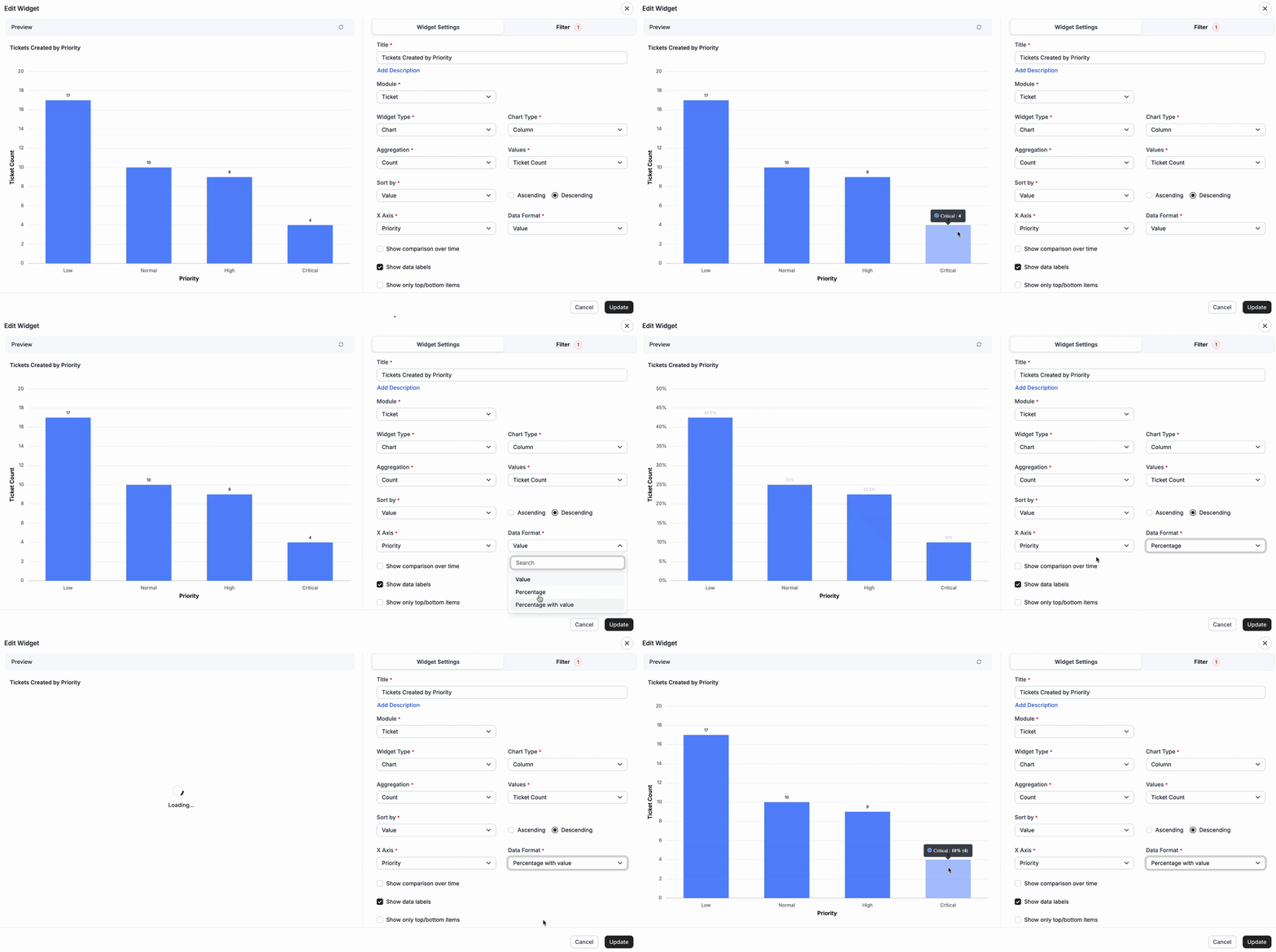
View Dashboard Data as Values, Percentages, or Both
Custom Dashboards now allow agents to display data as values, percentages, or both.
This gives teams more flexibility to analyze actual numbers, percentage distribution, or a combined view based on their reporting needs. The enhancement is supported across chart and pivot widgets.
Note: This is not supported for Stacked Bar, Stacked Column, 100% Stacked Bar, and 100% Stacked Column chart types.
Compare KPI Data by Grouping in Chart Widgets
Chart widgets now support KPI comparison using grouped fields.
When grouping is applied, the chart compares data across selected time periods and displays the results as separate series. This helps teams analyze trends across categories, status groups, agents, and date-based periods.
Compare Ticket Volume by Grouping Category Across Time Periods
Compare ticket volumes across different time periods using grouping fields such as Category, Priority, Status, Status Category, Agent, and more.

Compare Ticket Volume Trends Year-over-Year
Compare ticket volume trends across equivalent monthly or yearly periods to identify year-over-year performance patterns.

Save Views in Custom Dashboards
Agents can now save dashboard views in Custom Dashboards.
Dashboards configured with Global Filters can be saved as reusable private views. This helps agents quickly access frequently used filter combinations without manually applying the same filters every time.
Saved views are private and can only be accessed and managed by the creator.

Knowledge Base Module in Scheduled Reports
Scheduled Reports now support the Knowledge Base module.
Agents can automatically generate and receive reports with Knowledge Base data using selected filters and columns. This helps teams track KB-related performance and review self-service content more easily.

Advanced Filtering and Grouping in Custom Dashboards
Custom Dashboards now support additional fields in Advanced Filtering, giving teams more control over dashboard data.
Newly supported fields include:
- Ticket Module: Last Status Changed On
- SLA Module: SLA Ticket Status
- Chat Module: AI Involved and Assigned to AI
- Worklog Module: All Activity fields
- Knowledge Base Module: Article ID and Language
- All Modules: “Last” and “Next” operators for date and date-time fields
These enhancements help teams create more precise dashboards and gain better visibility into ticket activity, AI involvement, agent effort, SLA status, and Knowledge Base data.
Integration
AWS CloudWatch Integration
BoldDesk now supports Amazon CloudWatch integration.
CloudWatch alarms and monitoring events can be automatically converted into BoldDesk tickets. This helps support, IT, and operations teams centralize incident tracking and manage alerts from one place.
Key capabilities include:
- Automatic ticket creation from CloudWatch alarms and events
- Centralized AWS incident tracking
- Alarm details, resource identifiers, and timestamps inside tickets
- Faster triage, escalation, and resolution
- Automatic ticket closure when CloudWatch alarms return to OK

Slack Integration Enhancement
Slack integration now supports SLA reminders, escalation notifications, and ticket form fields in workflow conditions.
Agents can receive real-time SLA alerts directly in Slack, helping teams take timely action on approaching or breached SLAs.
Ticket form fields can also be used as workflow conditions for more targeted Slack automation.

Microsoft Teams Integration Enhancement
Microsoft Teams integration now supports SLA reminders, escalation notifications, and ticket form fields in workflow conditions.
Agents can receive SLA alerts directly in Teams, helping teams stay informed about time-sensitive tickets.
Ticket form fields can also be used in Teams workflow conditions for more customized notifications and actions.

Twilio – Voice Mail support
Twilio Voice integration now supports voicemail.
Callers can leave a voicemail when agents are unavailable, helping support teams capture missed inquiries and follow up later.

Make Integration
BoldDesk now integrates with Make, a web-based automation platform.
This integration helps users connect BoldDesk with other applications and automate repetitive workflows across tools.
Key capabilities include:
- Automate tasks between BoldDesk and other applications
- Create multi-step workflows using triggers
- Trigger actions from ticket creation, updates, or closure
- Sync data between BoldDesk and external systems
- Connect BoldDesk with hundreds of apps supported by Make

Google Calendar Integration
BoldDesk now integrates with Google Calendar, helping you keep your tasks and schedule in sync.
This integration enables seamless alignment between your BoldDesk tasks and calendar events, ensuring better planning and time management.
Key capabilities include:
- Automatically sync BoldDesk tasks with Google Calendar
- Create, update, or cancel calendar events from BoldDesk
- Receive reminders 15 minutes before scheduled events
- Keep tasks and meetings aligned in one place
- Stay organized with real-time updates across platforms

Google Meet Integration
BoldDesk now integrates with Google Meet, making it easy to schedule and manage meetings directly from your workspace.
This integration helps streamline meeting coordination by connecting scheduling, calendar events, and quick access in one place.
Key capabilities include:
- Schedule Google Meet sessions directly from BoldDesk
- Join meetings instantly with one-click access
- Automatically sync meeting events with Google Calendar
- Receive timely reminders for upcoming meetings
- Keep meetings and tasks seamlessly aligned

Mobile App
AI Summary in Tickets and Chats
AI Summary is now available in the BoldDesk mobile app for tickets and chats.
Agents can quickly understand conversation context, customer intent, and sentiment without reading the full thread.
Supported summaries include:
- Full ticket conversation summaries
- Individual ticket response summaries
- Complete chat conversation summaries

Asana Integration
Asana integration is now available in the BoldDesk mobile app.
Agents can create new Asana tasks, link tickets to existing tasks, and sync task details such as comments, status, and priority.
Agents can also view key Asana task information, including title, description, and assignee, directly from the ticket page.

HubSpot CRM Integration
HubSpot CRM integration is now available in the BoldDesk mobile app.
Support teams can view HubSpot contacts, companies, and deals from mobile devices. Agents can also add new contacts, companies, and deals to HubSpot.
Ticket details can be sent as HubSpot activities when tickets are created, solved, or closed.

Stripe Integration
Stripe integration is now available in the BoldDesk mobile app.
Agents can access customer details, subscriptions, invoices, and payments directly from mobile devices. They can also handle subscription updates, cancellations, and refunds from the app.
This helps support teams resolve billing and subscription-related requests more efficiently.
