


- Blogs Explore Blogs Blogs
AI Email Reply Generator for Customer Service: A Buyer’s Guide
-
by Gibson Amisi Kashi
- Updated on: November 24, 2026
TL;DR: An AI email reply generator for customer service drafts the answer to a customer’s email from your knowledge base and the ticket itself. Choose one that is grounded in your own content and lets agents review every draft before it is sent. It should also keep customer data inside your support platform and charge in a way you can predict.
An AI email reply generator writes the first draft of a reply to a customer email so your agent can check it, adjust it, and send it. In a support team, that draft has to be correct before it is fluent: the right refund policy, the right order status, the right next step.
That is where most tools differ. A general AI writer produces polished text from whatever it was trained on. A reply generator built into your customer service software reads the ticket, looks up your knowledge base, and drafts an answer your agent can stand behind.
This guide explains what to look for when you compare tools, with a checklist you can use in a trial, and shows how BoldDesk handles it with AI Assist.
What an AI email reply generator does in customer service
In a support context, the generator works inside the ticket. It reads the customer’s message and the rest of the conversation, finds the relevant answer in your knowledge sources, and proposes a reply in the editor.
The agent then decides what happens next. They can use the draft as it is, edit it, ask for a shorter or longer version, translate it, or discard it and write their own.
The value is in the repetitive work it removes: scrolling through long threads, searching for the right article, and rewriting the same explanation for the tenth time that day. The agent’s judgment stays in the loop.
How a support reply generator differs from a general AI writer
Pasting a customer email into a general chatbot will get you a fluent answer. It will not know your return window, the customer’s order history, or what your team promised in the last reply. The table shows the practical differences.
| What you need | General AI writing tool | Reply generator in customer service software |
|---|---|---|
| Source of the answer | General training data and what you paste in | Your knowledge base, the ticket, and the tools you connect |
| Context | Only the text in the prompt | The full conversation and its attachments |
| Tone | Set by each person’s prompt | Set once for the brand by an admin |
| Review | Copy and paste into the email client | Draft appears in the reply editor for the agent to edit and send |
| Customer data | Leaves your support platform | Stays inside the platform under its access controls |
| Feedback loop | None | Unanswered questions show where your knowledge is missing |
What to evaluate before you choose an AI email reply generator
Run any tool you consider against real tickets from your own queue, not the vendor’s demo data. These are the areas that separate a useful generator from one your agents stop using after a week.
Grounding in your knowledge and ticket history
Ask where each draft gets its facts. A good answer names the knowledge sources and connected systems the AI may use, and nothing else. If a tool cannot tell you, expect drafts that sound right and state the wrong policy. Our guide to preventing AI hallucinations in customer service covers the warning signs.
Tone and brand voice
Check whether tone is configured once for the brand or left to each agent’s prompt. Then check the quick edits agents will use all day: rephrase, shorten, expand, and fix grammar without retyping the request.
Translation for customers in other languages
If you support customers in several languages, see whether the generator can read an incoming message in one language and draft the reply in it, while your team works from a single knowledge base.
A review step before anything is sent
A draft should never reach a customer without a person reading it. Look for a check that tells the agent what the draft leaves out, such as a missing date or an unanswered second question, before they press send.
Data privacy and access control
Ask which compliance reports the vendor can share, whether the AI works within each agent’s role-based access, and who decides which agents can use it.
Pricing model
Some tools charge per seat, some per use. Work out what a month of your ticket volume costs, and whether you pay when nobody uses the feature.
| Checklist item | Question to ask in a trial |
|---|---|
| Grounding | Which sources can it draw on, and can I limit them per brand? |
| Tone | Where is the brand tone set, and can agents rephrase in one click? |
| Languages | Can it translate a reply into the customer’s language? |
| Review | Does anything get sent without an agent’s approval? |
| Privacy | Which reports and access controls apply to the AI? |
| Cost | Am I billed per seat or per use, and what happens past my allowance? |
Example: a reply after a service failure
Apology emails show the difference clearly. A customer writes that their order shipped to the wrong address. A generic tool produces “We’re sorry for the inconvenience” and a promise to look into it.
A grounded generator has more to work with. It can read the order details in the ticket and find your reshipping policy in the knowledge base. The draft names the problem, says what you are doing about it, and gives a time. The agent confirms the details, adjusts the wording, and sends.
If the customer is upset, sentiment analysis flags the ticket as Negative so a person answers it first. If the customer wrote in another language, the agent can translate the reply before sending it.
How BoldDesk does it with AI Assist
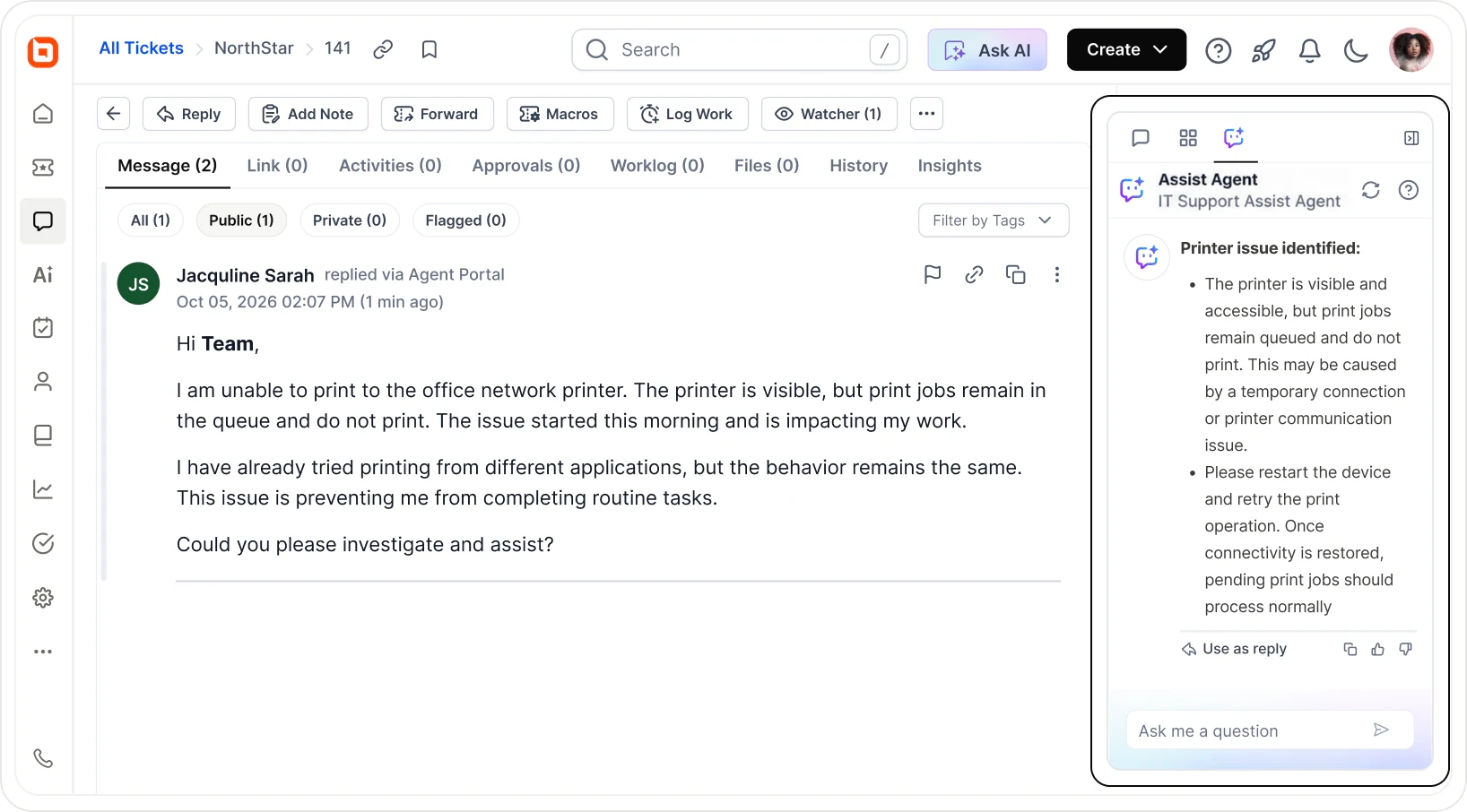
BoldDesk builds reply drafting into the ticket and chat editor through AI Assist. An admin sets up an AI Assist agent for each brand in Agent Builder, with the knowledge sources, MCP tools, and API actions it may use and its tone. Admins then choose which agents get access.
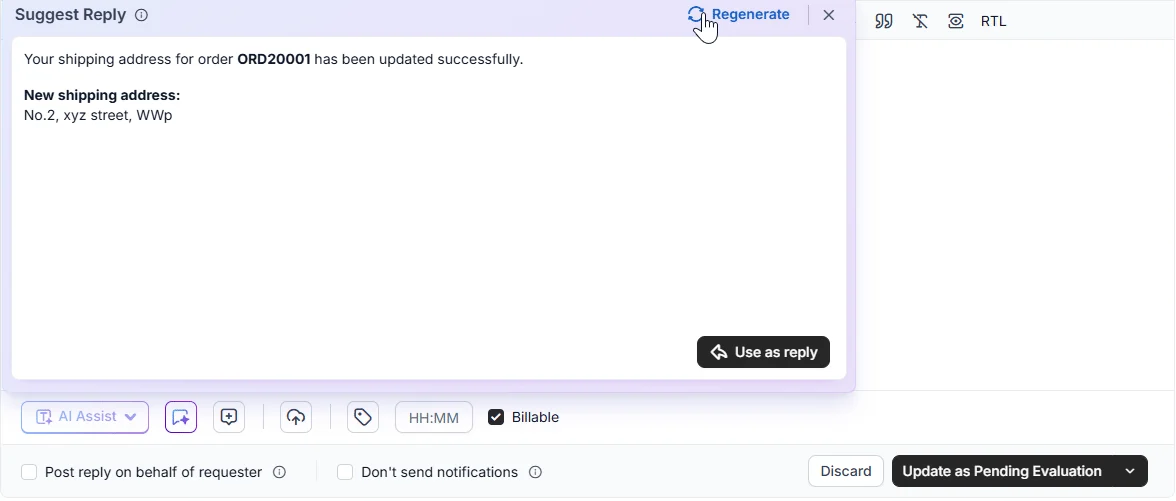
- Suggest Reply: Drafts a reply from your knowledge. The agent can regenerate it, or select Use as reply, edit, and send.
- AI Assist menu: Rephrase, Elaborate, Shorten, Correct Grammar, Review Response, and Translate, applied to the reply in the editor.
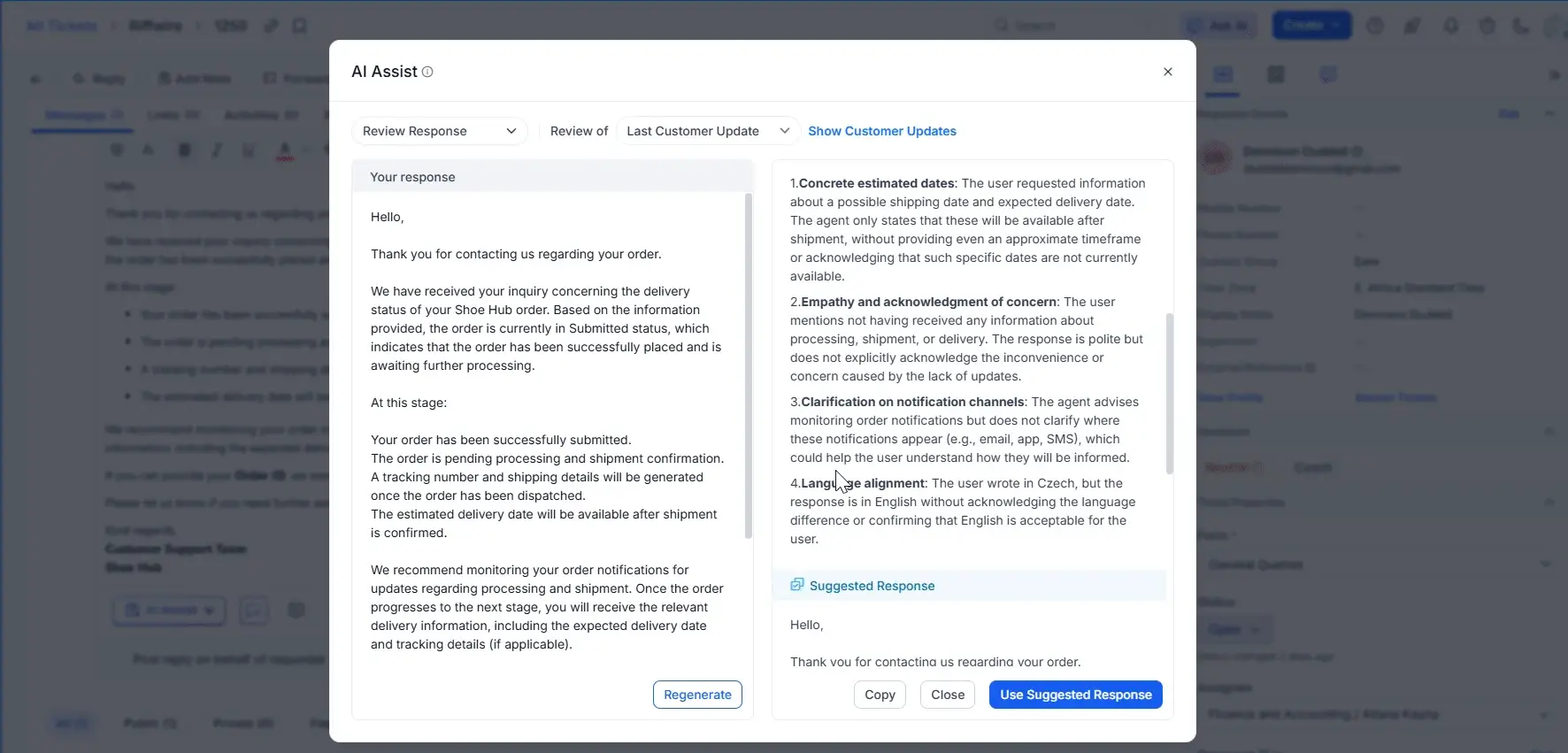
- Review Response: Lists the points a draft addresses and the ones it misses, such as estimated dates or the customer’s language.
- Translate: Turns the reply into the customer’s language. AI Assist works in more than 30 languages from one primary knowledge base.
- Ask AI: Lets the agent ask questions about the ticket and its attachments in private, or get a summary of a long thread.
- Sentiment Analysis: Marks each ticket Positive, Neutral, or Negative, with the detected language, so upset customers reach a person first.
Before sending, Review Response checks the draft against the customer’s message.
Drafts never reach a customer until a person reviews and sends them. Agents can like or dislike an answer with a reason, and Unanswered Questions lists what the AI could not answer, so your team knows which articles to write next.
On security, AI Assist runs inside the same platform as the rest of BoldDesk. BoldDesk has a SOC 2 Type 2 report, is GDPR compliant, and supports HIPAA compliance under a signed Business Associate Agreement. See the SOC 2 overview for details.
On cost, AI Assist is included in every BoldDesk AI plan, from $99 per month billed annually with unlimited human agents. It runs on AI credits and uses them only when an agent runs it. Plans include 500, 1,000, or 2,500 AI credits, and extra credits cost $40 per 1,000. Compare plans on the pricing page.
Where a reply generator fits with other AI support tools
A reply generator is one part of agent assistance. It helps a person write a better answer faster. Other AI tools work differently:
- Agent assist covers the wider set of in-ticket help, from summaries to next-step suggestions. Our guide to agent assist explains the category.
- Email automation handles routing, tagging, and replies that follow rules without an agent. See AI email automation for that side.
- An AI agent answers customers on its own and hands off to your team when it should. BoldDesk’s Support Agent does that job, and AI Assist takes over once a person is involved.
Saved replies still have a place for answers that never change. Canned responses cover those, and the reply generator covers everything that needs the ticket’s details.
Try AI reply drafting on your own tickets
The quickest way to judge a reply generator is to connect your knowledge base and run it on last week’s tickets. BoldDesk offers a 15-day free trial with no credit card required.
Start a free trial to test AI Assist with your own content, or request a demo to see it on your use cases with our team.
Frequently Asked Questions
What is an AI email reply generator for customer service?
It is a tool that drafts the reply to a customer email from your knowledge base and the ticket conversation. An agent reviews the draft, edits it if needed, and sends it.
Can an AI email reply generator send replies on its own?
A reply generator should not. Its drafts wait for an agent. Tools that answer customers without a person are AI agents, which work alongside a reply generator rather than replacing it.
How do I stop AI-drafted replies from stating the wrong information?
Limit the AI to your own knowledge sources and connected systems, keep those sources current, and have agents check each draft before it is sent. A review check that lists missed points helps catch gaps.
Can an AI reply generator write in the customer’s language?
Many can. BoldDesk AI Assist translates replies into the customer’s language and works in more than 30 languages from one primary knowledge base.
How is BoldDesk AI Assist priced?
AI Assist is included in every BoldDesk AI plan, from $99 per month billed annually with unlimited human agents. It uses AI credits only when an agent runs it. Extra credits cost $40 per 1,000.
Is customer data safe when AI drafts replies in BoldDesk?
AI Assist works inside BoldDesk under each agent’s role-based access. BoldDesk has a SOC 2 Type 2 report, is GDPR compliant, and supports HIPAA compliance under a signed Business Associate Agreement.
ABOUT THE AUTHOR

Gibson Amisi Kashi 
Gibson specializes in customer service and customer experience topics at Syncfusion, where he examines trends, tools, and strategies that help teams deliver faster, more connected support.
Read more articles by this author Connect with the author on LinkedIn.
Be the first to get updates