



- Blogs Explore Blogs Blogs
Zendesk Macros: How They Work, Their Limits, and Alternatives
-
by Lavenda Morin Atieno
- Updated on: November 24, 2026
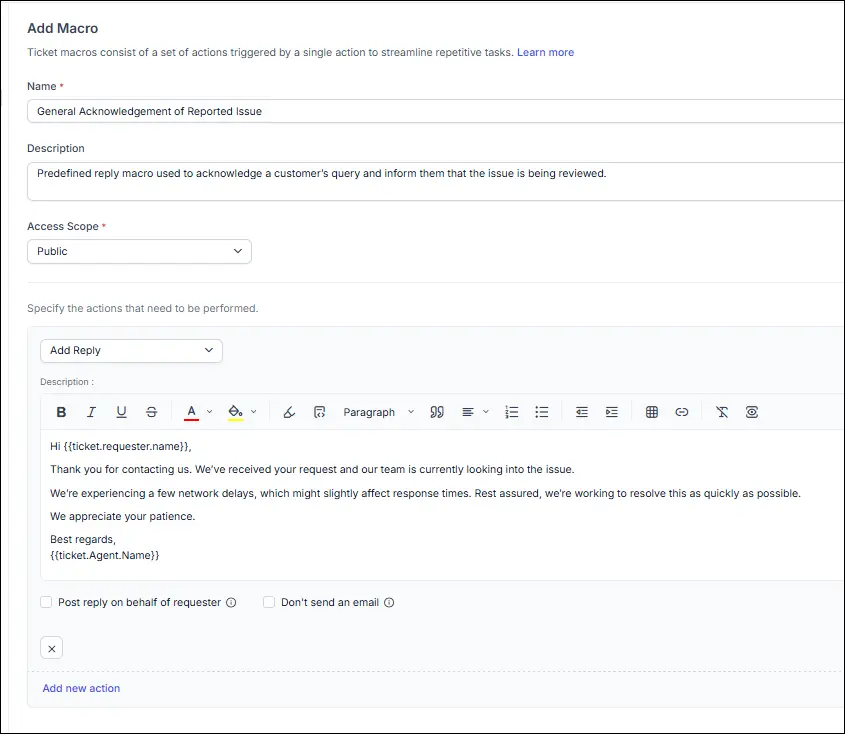
TL;DR: Zendesk macros save agents from retyping the same replies and ticket updates. They work well until the library grows: duplicates pile up, policy text goes stale, and nobody owns the cleanup. Audit your macros before you decide to stay or switch, and rebuild only the ones agents use. In BoldDesk, the same job is split between Ticket Macros for ticket actions, canned responses for reply text, and AI Assist for tailoring a saved reply to each customer.
Zendesk macros are saved sets of actions that agents apply to a ticket in one click: a reply, a status change, a tag, an assignment. For a small team, they remove a lot of retyping. For a growing team, the macro library becomes something to manage in its own right.
This guide explains how Zendesk macros work, where macro libraries usually break down, and how to audit yours. If you’re comparing platforms, it also shows how BoldDesk handles the same work and what moving your macros involves.
How Zendesk macros work
A macro bundles the steps an agent would otherwise do by hand on a common ticket. Instead of writing a password reset reply, setting the status, and adding a tag, the agent applies one macro and reviews the result before submitting the update.
Personal and shared macros
Zendesk macros can be personal, available only to the agent who created them, or shared with the team. Personal macros help one agent work faster. Shared macros are where consistency comes from, because every agent sends the same approved wording.
The split also explains a common problem. Personal macros often hold the wording agents use day to day, while the shared library holds the wording someone approved a year ago.
What a macro changes on a ticket
A typical macro does two things at once:
- Adds a comment: The reply text, sent publicly or saved as an internal note.
- Updates ticket properties: Fields such as status, tags, priority, group, or assignee.
Because a macro can change ticket properties, a wrong macro does more damage than a wrong reply. It can close a ticket that still needs follow-up, or route it to a group that can’t act on it.
Where macro libraries start to break down
Macros rarely fail on day one. They fail slowly, as products, policies, and teams change faster than the library does.
Duplicates and near-duplicates
Agents create their own version of a macro when they can’t find the shared one, or when the shared one doesn’t quite fit. A year later, there are four refund macros with slightly different wording, and nobody knows which one is current.
Outdated policy and product text
Macros copy facts into replies: return windows, plan names, and links to articles. When the policy or the product changes, every macro that quotes it stays wrong until someone updates it. Customers often notice before the team does.
No owner for cleanup
Creating a macro takes a minute. Retiring one takes a decision. Without a named owner and a review schedule, the library only grows.
Replies that sound scripted
A macro written for every customer fits no customer exactly. Agents either send it as is and sound scripted, or rewrite it each time and lose the time the macro was meant to save.
How to audit your Zendesk macros
An audit tells you which macros earn their place. It’s worth doing whether you stay on Zendesk or move, because carrying an untidy library into a new tool only moves the problem.
| Check | What to look for | What to do |
|---|---|---|
| Usage | Macros no agent has applied in the last 90 days | Retire them, or merge them into a close match |
| Duplicates | Several macros for the same request | Keep the clearest version and delete the rest |
| Facts | Prices, policy windows, plan names, and links | Check each against current policy, then fix or remove |
| Actions | Status, priority, group, and assignee changes | Confirm each action still matches how tickets should route |
| Ownership | Macros with no clear owner | Assign an owner per category, such as billing or shipping |
| Personal macros | Personal macros that agents use often | Promote the good ones to shared macros |
Then group what’s left into categories that match your ticket types, and name macros so agents can find them by search. “Billing - Refund approved” is easier to find than “Refund 2.” Our guide to macro best practices covers naming and governance in more detail. To decide which tickets need a macro at all, see this comparison of macros, knowledge base links, and custom replies.
How BoldDesk handles macros and saved replies
BoldDesk is customer service software that splits the work of a single Zendesk macro across three tools, so each one stays simple to maintain.
Ticket Macros for ticket actions
In BoldDesk, Ticket Macros are preconfigured action templates that can add replies or notes and update ticket fields such as status, tags, assignee, and priority. Admins keep them in one library, and access scope options limit sensitive macros to specific agents or groups. Agents can also apply Ticket Macros from the BoldDesk mobile app.
Canned responses for reply text
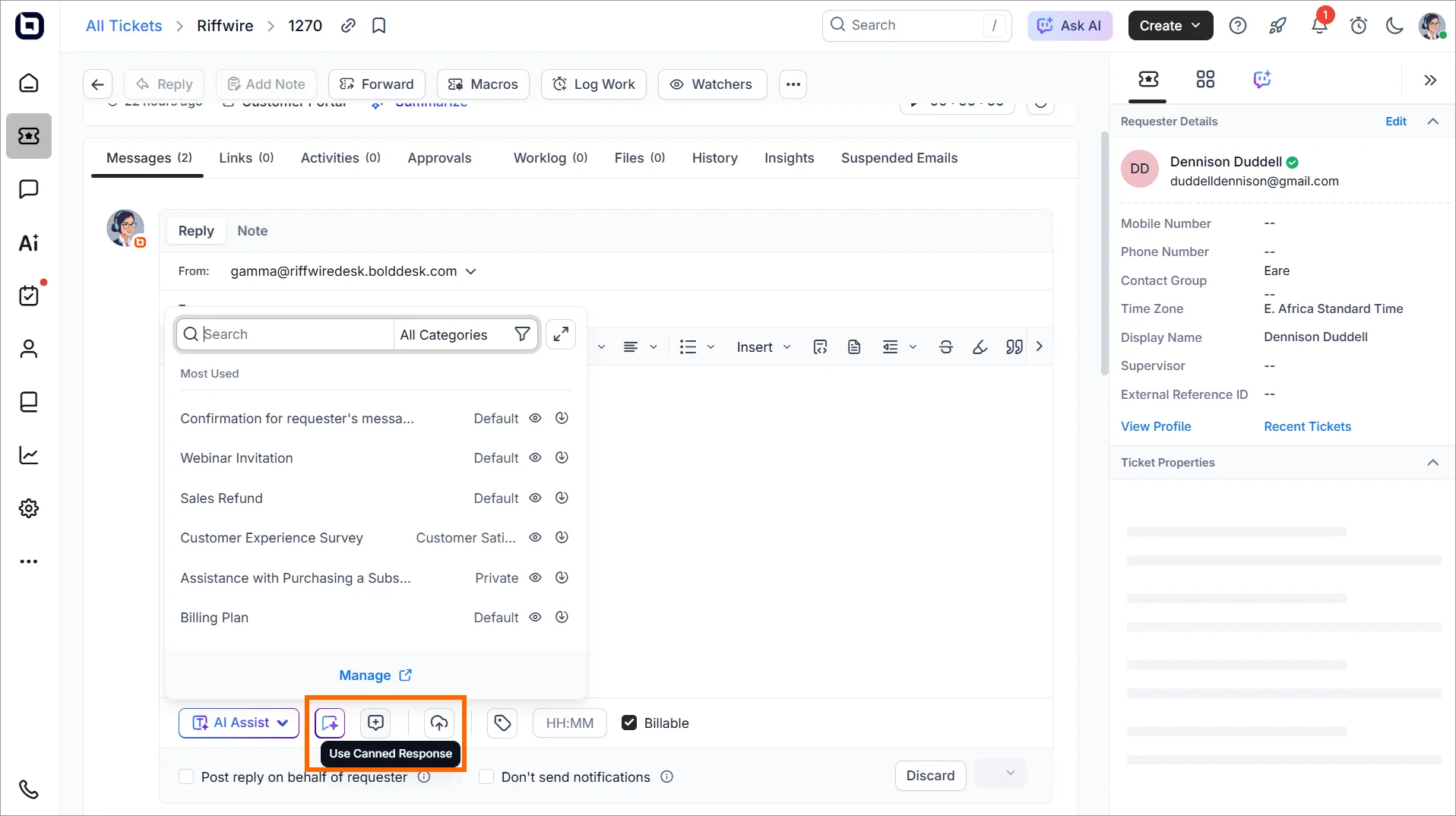
Canned responses hold approved reply wording. They support placeholders for names, email addresses, and other details, so an agent sends a personalized reply without editing it by hand. Role-based access controls decide who can create, edit, or use them. See our guide to canned responses for customer support for examples.
AI Assist to tailor a saved reply
When a saved reply needs adjusting, AI Assist works inside the reply editor. Agents can rephrase, elaborate, shorten, correct grammar, review a response, or translate it, and Suggest Reply drafts a response the agent can regenerate or use as the reply. Agents review and edit every draft before it sends. BoldDesk AI plans include monthly AI credits. On the per-agent Help Desk plan, AI credits are an optional add-on. AI Assist uses credits only when an agent uses it.
Zendesk and BoldDesk side by side
| Job | Zendesk | BoldDesk |
|---|---|---|
| Saved ticket actions | Macros, personal or shared | Ticket Macros, with access scope by agent or group |
| Saved reply text | The comment inside a macro | Canned responses with placeholders |
| AI help on replies | Zendesk Professional and higher plans include limited Copilot writing tools. The full Copilot add-on costs $50 per agent per month, billed annually. | AI Assist. BoldDesk AI plans include monthly AI credits. On the per-agent Help Desk plan, AI credits are an optional add-on. |
For a wider comparison of pricing, AI, channels, and reporting, see BoldDesk vs Zendesk.
Moving your macros from Zendesk to BoldDesk
Eligible BoldDesk customers get free migration and onboarding, and the migration team confirms eligibility for your plan. On the Zendesk side, JSON, CSV, and XML exports work on Growth plans and up and must be switched on by Zendesk support; Team plans export through the REST API.
Tickets, public replies, private notes, articles, tags, contacts, and companies move with their original dates, and BoldDesk recreates your automations, SLA policies, ticket forms, groups, and roles. Treat macros as a rebuild rather than a copy:
- Audit the library with the checklist above, so only macros agents use come across.
- Sort what survives: macros that change ticket fields become Ticket Macros, and text-only macros become canned responses.
- Replace hard-coded names and details with placeholders.
- Set an owner and an access scope for each macro before go-live.
- Check usage after the first month and retire the macros agents skip.
To get started, request a free Zendesk migration.
Try BoldDesk macros on your own tickets
The quickest way to judge a macro setup is to rebuild your 10 most-used Zendesk macros in a trial account and run real tickets through them. Start a free trial to build them yourself, or request a demo to see Ticket Macros, canned responses, and AI Assist on a workflow like yours.
Frequently Asked Questions
What are Zendesk macros?
Zendesk macros are saved sets of actions that agents apply to a ticket in one click. A macro can add a public reply or an internal note and update ticket properties such as status, tags, priority, group, or assignee.
What is the difference between personal and shared macros in Zendesk?
Personal macros are available only to the agent who created them. Shared macros are available to the team, which makes them the main tool for consistent wording across agents.
How often should you review your macros?
Review the affected macros whenever a policy, price, or product changes, and audit the full library on a fixed schedule, such as once a quarter. Retire macros that no agent has used since the last review.
Can I move my Zendesk macros to BoldDesk?
Audit them first, then rebuild the ones agents use as Ticket Macros or canned responses. Eligible customers get free migration, and BoldDesk recreates automations, SLA policies, ticket forms, groups, and roles during onboarding.
Does BoldDesk have an equivalent to Zendesk macros?
Yes. BoldDesk Ticket Macros are preconfigured action templates that can add replies or notes and update status, tags, assignee, and priority. Canned responses with placeholders cover reply text, and AI Assist helps agents adjust a saved reply for each customer.
ABOUT THE AUTHOR

Lavenda Morin Atieno 
Lavenda is a customer service content specialist at Syncfusion, crafting documentation and resources that improve customer experience through clear communication and thoughtful research.
Read more articles by this author Connect with the author on LinkedIn.
Be the first to get updates