


- Blogs Explore Blogs Blogs
MCP for Customer Support: Connect AI Agents to Your Help Desk
-
by Sarah Adhiambo Ogada
- Updated on: November 24, 2026
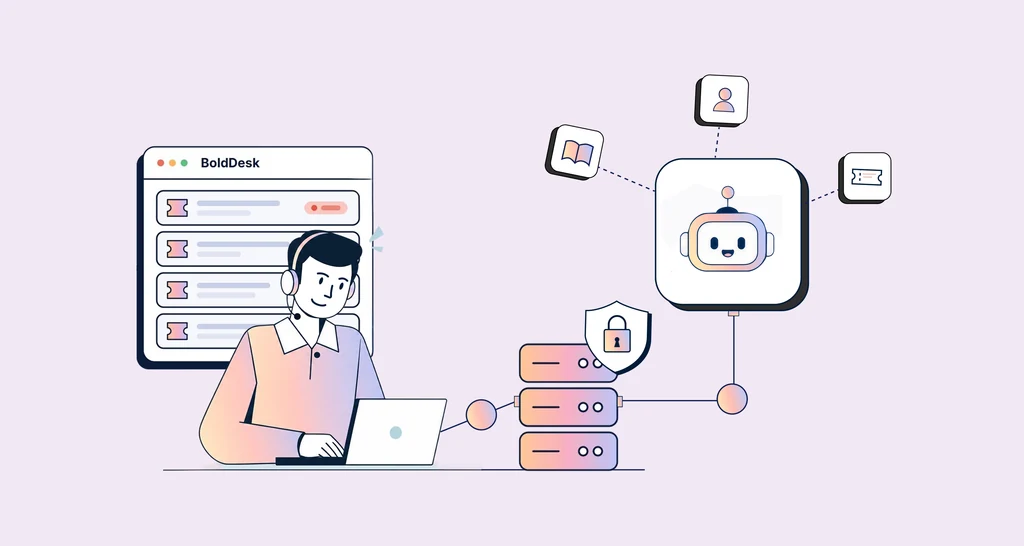
TL;DR: With MCP (Model Context Protocol) for customer support, AI agents connect to your help desk and check live orders, billing, and ticket history. They can then resolve requests, not just reply. Expect more accurate answers, fewer routine escalations, and smoother handoffs. Compare platforms on system coverage, actions, and security controls.
Your help desk holds the ticket, but the answer often lives somewhere else. A refund status sits in billing. A delivery update sits in the order system.
A human agent opens each tool to piece the answer together. An AI agent in your help desk can't, unless something connects it to those systems.
That connection is what MCP for customer support provides. It gives AI agents one standard way to reach your help desk and the billing, order, and product tools your team relies on.
This guide explains how MCP connects AI agents to your help desk, with real examples. It also covers data security, what to look for in a platform, and how BoldDesk supports MCP.
What is MCP for customer support?
Model Context Protocol (MCP) is an open standard that allows AI assistants and AI agents to connect to external systems, APIs, databases, and knowledge sources.
With MCP for customer support, AI agents can work with tickets in your help desk and look up customer data in other connected systems. They can also find out what each system offers and use it, without a custom integration for every tool.
Anthropic introduced MCP in 2024. In December 2025, it donated MCP to the Agentic AI Foundation, part of the Linux Foundation, so no single company controls it.
Anthropic reports more than 10,000 active public MCP servers and over 97 million monthly SDK downloads.
For technical details, see the official Model Context Protocol documentation.
How does MCP work in customer support?
In customer support, MCP links an AI agent to your help desk and your other business tools. The agent's MCP client asks a system's MCP server for data or an action. The server checks permissions, runs the request, and returns the result.
Key MCP components
Four terms cover how MCP works. You don't need a technical background to follow them:
- MCP client: The part of an AI application that asks for information or actions.
- MCP server: The part of a system, such as your help desk or billing tool, that offers its data and actions to approved AI agents.
- Resources: Information the AI can read, such as help articles, customer records, or ticket history.
- Tools: Actions the AI can take, such as creating a ticket, checking an order, or looking up a subscription.
Here's how these parts work together when a customer asks, “Where's my refund?”
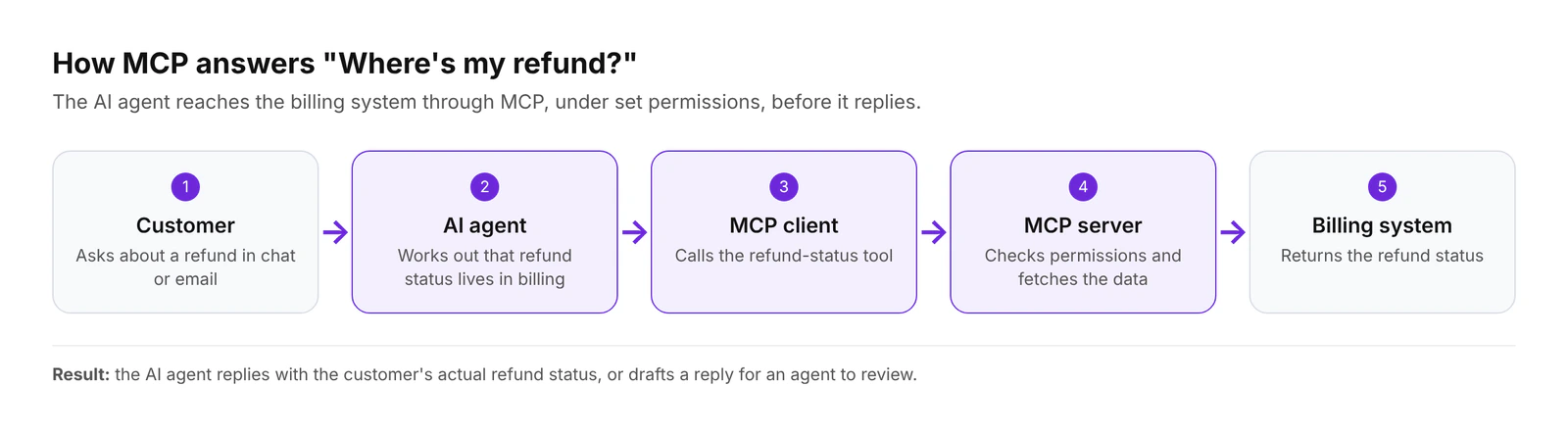
Every request runs under set permissions. Depending on the platform, AI tools sign in with OAuth (using a person's own account) or an API key (a password for software). Admins decide which systems, data, and tools AI can use, and they can switch access off at any time.
MCP server vs. MCP client: Two ways to connect AI agents to your help desk
Your help desk can play either MCP role, and some help desks play both.
As an MCP server, your help desk lets AI tools such as ChatGPT or Claude work with its tickets, conversations, contacts, and articles.
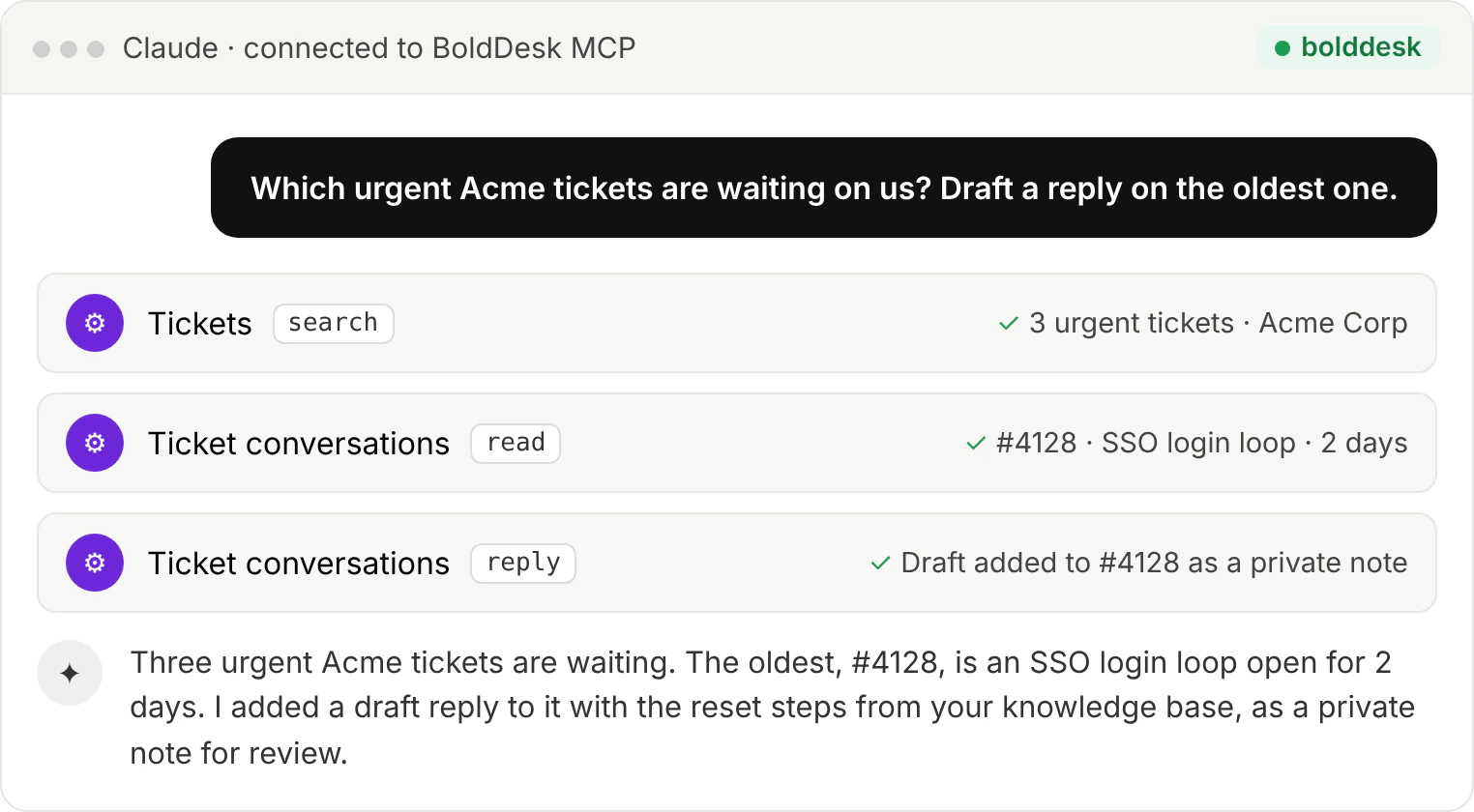
As an MCP client, your help desk's own AI agents can reach other systems, such as your billing platform, CRM, or bug tracker. Admins register each external MCP server once, and the agent can use the tools that server offers.
Common MCP tools in customer support
The tools available depend on the systems you connect, such as your help desk, CRM, billing platform, order management system, and knowledge base. Together, these tools let an AI agent pull customer context from several systems in one conversation.
The table shows common support tasks, example MCP tools, and the system each one usually connects to:
| Support task | Example MCP tools | Typical system |
|---|---|---|
| Customer identification | Customer lookup, account lookup, subscription lookup | CRM |
| Ticket management | Ticket search, ticket creation, field updates, internal notes, assignment | Help desk |
| Case investigation | Conversation retrieval, ticket history lookup | Help desk |
| Billing support | Invoice lookup, payment-status check, refund lookup | Billing platform |
| Self-service support | Knowledge base search, article retrieval, policy lookup | Knowledge base |
| Order assistance | Order lookup, shipping-status check, return-status lookup | Order management system |
| Product troubleshooting | Bug lookup, incident search, known-issue lookup | Product tracking system |
For example, a ticket history lookup shows the AI which fixes the customer already tried.
MCP vs. APIs vs. A2A: When to use each
Use APIs for single, tightly scoped tasks, MCP to connect AI agents to whole systems, and A2A when several AI agents need to share work.
An API (application programming interface) is a set of rules that lets one software system request data or actions from another. For example, an order system's API lets other software look up an order's status.
APIs are still the foundation of most integrations, and MCP doesn't replace them. Most MCP servers use APIs behind the scenes.
A2A (Agent2Agent) is a separate open protocol that lets AI agents communicate and coordinate with each other. The table shows how the three compare.
| Category | API | MCP | A2A |
|---|---|---|---|
| What it is | Rules that let one system request data or actions from another | A standard way for AI applications to find and use tools and data | A standard way for AI agents to talk to each other and share tasks |
| What it connects | Software to software | AI agents to systems, data, and tools | AI agents to other AI agents |
| Who uses it | Developers writing integrations | AI applications and AI agents | AI agents working together |
| Reuse across AI tools | Often a separate integration for each AI tool | One MCP server works with many MCP-compatible AI tools | Agents from different vendors can work together |
| How capabilities are found | A developer programs them in | The AI discovers available tools when it connects | Agents describe their skills to each other |
| Support example | An order system shares tracking status with your store | An AI agent checks a customer's billing record | A triage agent hands a case to a billing agent |
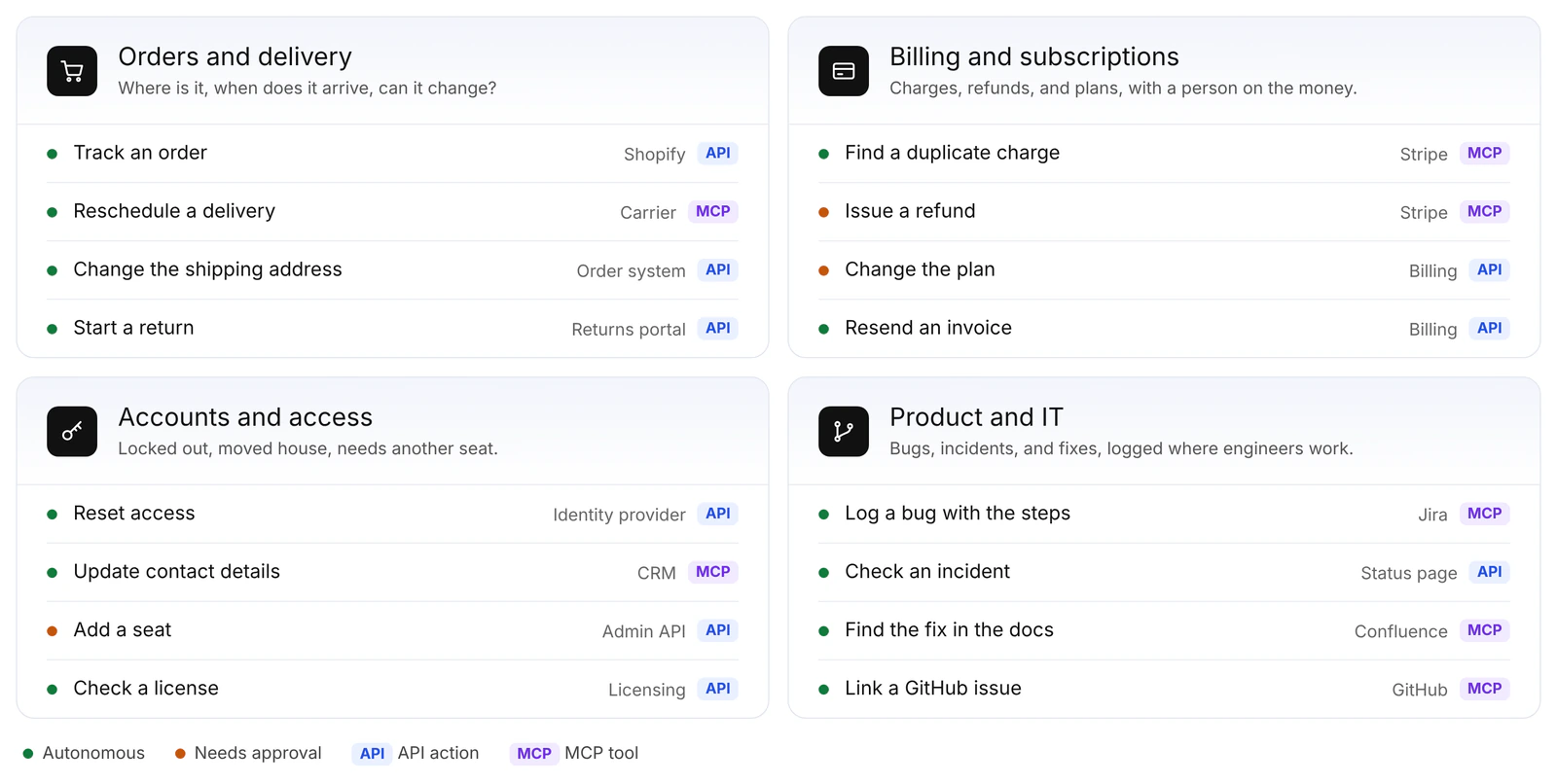
Many teams use APIs and MCP together. A single API action suits one tightly scoped job, such as tracking an order. MCP suits connecting a whole system, such as billing or a bug tracker, where you want every action it offers.
MCP and A2A also work together. MCP connects each agent to the systems it needs, while A2A lets agents pass work between them.
What changes when AI agents connect to your help desk through MCP?
Once your help desk is connected through MCP, four things change for customers and your support team.
Answers based on real account data
AI agents check the ticket and the customer's records in connected systems before they reply. Answers reflect what actually happened, not general policy.
Fewer escalations for routine requests
Tickets that only need data from connected systems can be resolved in the help desk, without waiting in a queue for a person.
That frees your team for issues that need human judgment. Learn more about how autonomous agents in customer support handle this work.
AI that takes action, not just answers
Traditional chatbots stop at answering questions. With MCP and the right permissions, AI agents can also update ticket fields, add internal notes, and trigger approved actions in other systems. See how AI actions turn conversations into resolutions.
Smoother handoffs to human agents
Some issues will always need a person. When that happens, the AI can add a summary, the customer's history, and related tickets to the ticket as an internal note. Customers don't have to repeat themselves, and agents start with the full picture.
Real customer support workflows powered by MCP
These three workflows show what a customer-facing AI agent does when MCP connects your help desk to your other tools.
AI agent checks order status
A customer asks, “Where is my package?” The AI agent finds the order number on the ticket and pulls shipping details from the order management system. It also checks for delivery exceptions, so the customer gets an up-to-date status, not a tracking link.
AI agent investigates a billing issue
A customer asks, “Why was I charged twice?” The AI agent reviews payment history, invoices, and recent subscription changes to find the duplicate charge. It then explains what happened, or escalates the ticket with its findings added as an internal note.
AI agent helps troubleshoot technical issues
A customer reports, “The integration stopped working.” The AI agent searches related incidents, past tickets in your help desk, and troubleshooting guides in your knowledge base. It finds the likely cause and suggests the next action.
How MCP keeps customer data secure for AI agents
Your help desk holds sensitive customer data, and MCP can open it to AI tools and agents. MCP doesn't give AI unrestricted access, though. You decide:
- Which systems are connected
- What information AI can see
- Which actions it can take
- Which actions need a person's approval, such as refunds
- How activity is monitored
Sign-in and permissions
AI agents should only reach systems they're authorized to use. Sign-in confirms who is asking, and permissions decide what they can see and do. The strongest setups let AI act only with the help desk role and permissions of a named user.
Limit access to sensitive data
Not every task needs a full customer record. Give each AI agent only the data and tools its job requires. For example, an agent that checks order status doesn't need payment details.
Keep an audit trail
Support leaders should be able to see what the AI accessed, what it changed, and when. Audit logs keep your team accountable and make reviews easier.
Connect only trusted MCP servers
Customer messages, help articles, or a third-party MCP server can contain hidden instructions that try to steer the AI. This is called prompt injection. Connect only MCP servers you trust, review the tools each one offers, and require approval for sensitive actions.
For a deeper look, see our guides to AI agent security and AI agent guardrails for customer support.
What MCP doesn't do in customer support
MCP is a connection standard. Knowing its limits helps you set the right expectations:
- It isn't an AI agent. MCP connects AI to systems. The AI agent still decides what to do.
- It doesn't fix poor data. If help articles or customer records are outdated, AI will use outdated information.
- It doesn't set permissions. Access rules come from your platform and how admins configure it.
- It doesn't replace your help desk. You still need ticketing, channels, SLAs, and reporting.
- It doesn't make actions safe on its own. Changes still need approvals, testing, and monitoring.
- It doesn't connect older systems on its own. Legacy tools without an MCP server may need a custom connector.
- It doesn't pick the right tools for you. A help desk server can expose dozens of tools, so you decide which ones each AI agent gets.
Evaluating MCP support in help desks
When comparing help desks, don't just ask whether they support MCP. Ask:
- Does the platform provide an MCP server, an MCP client, or both?
- Which help desk actions does its MCP server expose, such as reading tickets, updating fields, or adding notes?
- Can AI agents be limited to read-only access?
- Which sign-in methods does it support, such as OAuth or API keys?
- Are all AI actions logged?
- Can administrators revoke access instantly?
- Are approval workflows available for high-risk actions?
- Can AI agents work with external billing, CRM, and order-management systems?
These capabilities often have a bigger impact on security and usability than MCP support alone.
Which help desks support MCP?
As of November 2026, these help desks have announced MCP support:
| Platform | MCP support (as of November 2026) |
|---|---|
| BoldDesk | Hosted MCP server, plus MCP tools its AI agents can use |
| Zendesk | MCP client generally available; MCP server in early access |
| Salesforce | Hosted MCP servers for Enterprise Edition and above |
| Microsoft Dynamics 365 Customer Service | MCP server for Customer Service data |
| Freshdesk | MCP server with API key sign-in |
| Intercom | Hosted MCP server in the US and EU |
| HubSpot | Remote MCP server that includes tickets |
| Amazon Connect | MCP tools for AI agents, plus flows that work as MCP tools |
Capabilities change quickly, so check each vendor's documentation before you decide.
How BoldDesk supports MCP for customer support
BoldDesk, AI customer service software, supports both sides of MCP through its AI actions and MCP tools. You don't need custom development to get started.
- Connect Claude, ChatGPT, or GitHub Copilot to BoldDesk through a hosted MCP server. Your team can work with tickets, conversations, contacts, and articles from the AI tools they already use. There's nothing to install or maintain.
- Let BoldDesk AI agents use your billing, order, and CRM systems. Connect each system once. The agent can then check an order, find a charge, or update a record while it helps the customer.
- Choose which AI actions run on their own and which need approval. Sensitive actions, such as refunds, can wait for a person. AI can only do what the connected user is already allowed to do.
- Track every AI action on the ticket and in AI trace logs. You see which tool the agent used, what it sent, and what came back. If an action can't finish, a person takes over with the full context.
- Test AI actions in the Playground before they go live. Tests run on a draft version, away from live conversations. AI actions and the MCP server are included in every BoldDesk AI plan.
Already using ChatGPT or Claude? See how to connect ChatGPT or Claude to BoldDesk.
Making MCP work for your customer support platform
MCP turns AI agents from assistants that only reply into agents that resolve. Once connected through MCP, they work from real customer records. They complete approved actions and pass harder cases to people with the context already gathered.
The results depend on the platform behind them. Look for support for the systems your team already relies on. Then check for the controls that keep customer data safe: scoped permissions, approval steps, and a full record of every action.
Start a 15-day free trial to connect BoldDesk AI agents to your support systems.
Related articles
- What Is an AI-First Help Desk and Why Help Desk with AI Is Different
- AI Agents in Customer Service
- Human-in-the-Loop AI for Customer Service: When to Use It
FAQs about MCP customer service
Can MCP replace human support agents?
No. MCP helps AI handle routine requests and gather context. Complex, sensitive, or emotional issues still need people. MCP makes handoffs smoother, so agents start with the full picture.
Do customer support teams need a developer to use MCP?
Not always. Many platforms offer hosted MCP servers and setup guides, so admins can connect common tools without code. In BoldDesk, you add your account's server URL and API key to your AI tool. Connecting an in-house system may need technical help.
Does MCP for customer support cost extra?
Not by itself. MCP is a free, open standard. Costs come from the platforms you connect and the AI tool you use. In BoldDesk, AI actions and the MCP server are included in every BoldDesk AI plan. Plans include 500 to 2,500 AI credits a month, and extra credits cost $40 per 1,000. If credits run out, AI features pause until you add more, unless you turn on automatic credit purchase. See BoldDesk pricing for current details.
What happens if a connected system is unavailable?
The AI can't fetch data from a system that's down. A good setup falls back to escalation or a clear message to the customer, instead of guessing.
When should you build your own MCP server?
Build one when AI needs to reach an in-house or specialized system that has no prebuilt connector. For common tools, a prebuilt or hosted server is usually faster to set up and easier to maintain.
How should a support team get started with MCP?
Pick one common request, such as order tracking, and give AI read-only access first. Test it with real scenarios before you allow actions like updates or refunds. Then monitor errors, permission issues, and answer accuracy as you expand.
ABOUT THE AUTHOR

Sarah Adhiambo Ogada 
Sarah Adhiambo Ogada is a content strategist at Syncfusion with a strong interest in writing blogs that explain customer support topics in a simple, practical way, so teams can improve response times, stay organized, and deliver a better customer experience. She focuses on clear writing, real examples, and step-by-step tips readers can use right away.
Read more articles by this author Be the first to get updates