



- Blogs Explore Blogs Blogs
Customer Service Email Management Software: What to Look For
-
by Lavenda Morin Atieno
- Updated on: November 24, 2026
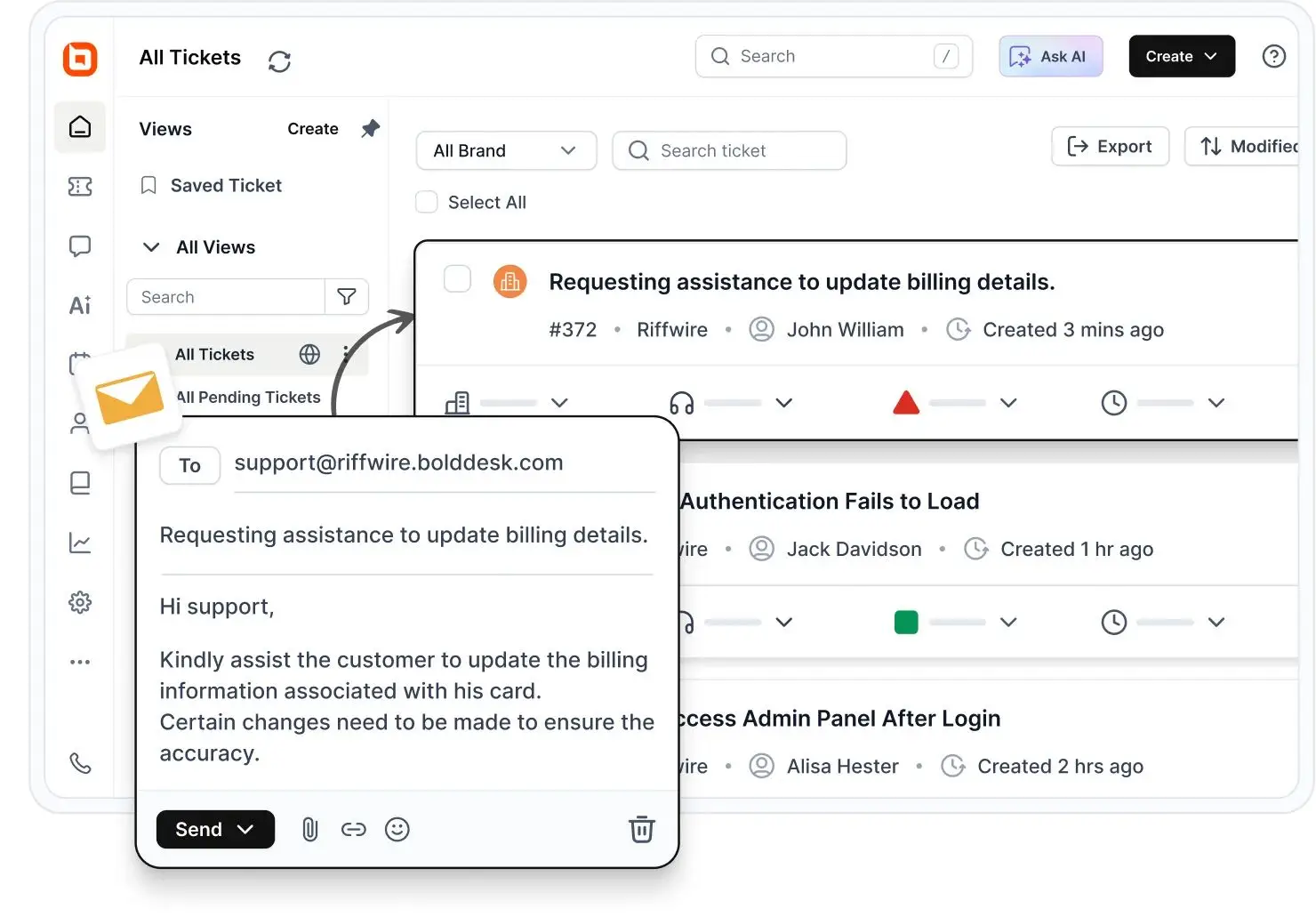
TL;DR: Customer service email management software turns every message sent to your support addresses into a ticket with an owner, a status, and a deadline. When you shortlist tools, check email-to-ticket conversion, routing, SLA escalations, collision detection, reply templates, AI that drafts or resolves routine email, reporting, and compliance, then compare how each vendor prices AI usage.
Customer service email management software gives a support team one place to receive, assign, answer, and track customer email. It replaces the shared mailbox that most teams start with, where several people read the same inbox and nobody is sure who owns which message.
This guide is for support and operations leads who are shortlisting tools. It covers the signs your team has outgrown a shared mailbox, the capabilities worth paying for, a checklist you can use in vendor demos, and the questions that expose pricing and migration surprises before you sign.
Signs your team has outgrown a shared mailbox
A shared Gmail or Outlook mailbox works while two or three people answer a manageable volume. It starts to fail in predictable ways as the team or the volume grows:
- Two agents answer the same customer: Nobody can see that a colleague is already writing a reply, so the customer receives two answers that don't always agree.
- Emails go unanswered: A message that someone opened and marked as read looks handled, even when no one replied.
- You can't measure response time: A mailbox has no first response or resolution deadline, so you only learn about slow replies when a customer complains.
- Context lives in forwards: Bringing in billing or engineering means forwarding the thread, and the answer comes back outside the customer's history.
- The same questions take the same time: Order status, password resets, and invoice copies are typed out again and again because nothing answers them for you.
If three or more of these sound familiar, the cost of staying in the mailbox is already showing up in missed replies and agent time. Our guide to high-volume email management covers process fixes you can apply while you evaluate software.
Capabilities that matter when you compare tools
Most products in this category list similar features. The differences show up in how each capability works on a busy day, so test them with your own email during a trial.
Email-to-ticket conversion
Every message to your support address should become a ticket with an ID, a status, and the full thread. Customer replies must join the ticket they belong to instead of opening a new one, and spam should be filtered before it reaches the queue. Check that customers can keep writing to your existing address and that replies leave from it with your signature.
Multiple support addresses and brands
Teams often run support@, billing@, and sales@ side by side, sometimes for more than one brand. The software should connect each mailbox you already use, keep the address visible on the ticket, and let you route by address. If you support several brands, confirm that each one can keep its own addresses, knowledge base, and tone, and on which plan that is available.
Assignment and routing
Routing rules decide who owns a ticket the moment it arrives, by mailbox, topic, skill, or workload. Without them, a lead spends the first hour of every shift dragging emails to people. Ask to see a rule that balances load across agents, not only one that sends a keyword to a fixed team. Our article on automated ticket routing explains the common approaches.
SLAs and escalations
Service level agreements (SLAs) set first response and resolution targets by priority or customer. A useful SLA feature warns the owner before a breach and escalates to a lead if nothing happens, rather than only recording that a deadline passed. See our guide to SLA setup for targets that teams typically start with.
Collision detection
Collision detection shows when another agent is viewing or replying to the same ticket, so two people don't send different answers. Some tools also lock the ticket while someone replies or merge duplicate tickets from the same customer.
Reply templates and AI drafting
Saved replies, often called canned responses, keep answers to common questions consistent. AI drafting goes further: it writes a reply from your knowledge base and the thread, and the agent edits it before sending. Check whether drafts use only the sources you choose and whether agents can rephrase, shorten, or translate a reply in the editor.
AI triage and resolution
The newest tools read incoming email, set fields such as category and priority, and answer routine requests on their own. Look at what the AI can do: suggest a reply, or look up an order and finish the job. Then check the controls, such as which actions need a person's approval and whether AI replies can wait as drafts for review. Our article on AI email triage covers how this sorting works.
Reporting
At a minimum you need response time, resolution time, and volume by agent and by mailbox. If you use AI, you also need to see how many emails it resolved and how many it passed to your team, so you can fix the answers where it falls short.
Security and compliance
Customer email contains personal data, invoices, and sometimes health or financial details. Ask for the vendor's audit reports and certifications, how roles limit who sees each mailbox, and whether the vendor signs the agreements your industry requires, such as a business associate agreement (BAA) for HIPAA.
Evaluation checklist for vendor demos
Use this table during demos and trials. Ask the vendor to show each item with real email, not slides.
| Capability | What to ask the vendor to show |
|---|---|
| Email-to-ticket | A reply from the customer threading into the existing ticket, and spam kept out of the queue |
| Your mailboxes | Gmail, Outlook, Microsoft 365, or IMAP connected, with replies sent from your address and signature |
| Routing | A rule that assigns by workload or skill, not only by keyword |
| SLAs | A reminder before a breach and an escalation after one |
| Collision detection | Two agents opening the same ticket at the same time |
| Templates | A saved reply inserted and personalized in under a minute |
| AI drafting | A draft built from your knowledge base, then rephrased or translated |
| AI resolution | A routine email resolved end to end, and a sensitive action held for approval |
| Reporting | Response and resolution time by mailbox, plus AI resolved versus escalated |
| Compliance | Current audit reports and the agreements your industry needs |
Questions to ask before you sign
Feature lists rarely show the full cost or the effort to switch. These questions usually do:
- How is AI usage priced? Some vendors include AI in the plan, some charge per resolution, and some sell credits. Ask what happens when you exceed the allowance and what a typical month costs at your volume.
- Is pricing per agent? Per-agent pricing grows with headcount. Check whether occasional users, such as finance or engineering, need a paid seat to reply on a ticket.
- Which features need a higher plan? Multiple brands, advanced routing, and extra channels often sit in upper tiers.
- Who handles migration? Ask whether historical tickets move over, who does the work, and what it costs.
- What are the sending limits? Confirm outbound limits during the trial and on paid plans, and whether you can send through your own mail server.
How BoldDesk handles customer service email
BoldDesk is AI-native customer service software. Email to your support addresses becomes a ticket with an ID, a status, and the full thread. Spam is filtered first, and customer replies join the ticket they belong to.
- Your addresses stay the same: Connect Gmail, Outlook, Microsoft 365, or any IMAP mailbox. Replies leave from your support address with your signatures, DKIM signed or through your own mail server.
- Routing and SLAs: Rules assign by workload, skill, brand, or topic, and SLA reminders and escalations warn owners before a breach.
- No duplicate replies: Collision detection and ticket locking keep two agents off the same reply, and the optional Auto-Merge app combines duplicate tickets.
- AI that drafts and resolves: AI Assist suggests replies and can rephrase, shorten, review, or translate them in the editor. Background Agent reads each email and adds its findings in a private note, and Support Agent can look up orders, payments, and accounts through REST APIs and MCP tools. Sensitive actions, such as refunds, wait for a person to approve.
- Reporting: Dashboards cover AI agents, SLAs, agents, and CSAT.
- Compliance: BoldDesk is SOC 2 Type 2, GDPR, and HIPAA compliant, with a signed BAA for HIPAA. See the SOC 2 overview.
- Pricing: Plans start with Scale AI at $99 per month billed annually, including 500 AI credits and unlimited human agents. Extra credits cost $40 per 1,000. Multiple brands are available on Enterprise AI. See pricing for details.
Migration and onboarding are free. For a product overview, see the email ticketing system and shared inbox software pages. If you're still building a shortlist, our roundup of the best email ticketing systems compares vendors side by side.
Try it with your own support email
The fastest way to judge any tool in this category is to connect a real support address and work a week of email through it. Start a free trial of BoldDesk for 15 days with no credit card, or request a demo to see your use case with our team.
Frequently Asked Questions
What is customer service email management software?
It is software that turns customer email into tickets your team can assign, track, and answer. It replaces a shared mailbox with ownership, deadlines, reply templates, and reporting.
How is it different from a shared inbox in Gmail or Outlook?
A shared mailbox shows the same messages to everyone but has no owner, status, or deadline per email. Email management software adds assignment, SLAs, collision detection, and reports on every message.
Can I keep my existing support email address?
With most tools, yes. In BoldDesk you connect Gmail, Outlook, Microsoft 365, or any IMAP mailbox, and customers keep writing to the same address.
Does AI replace agents in email support?
No. AI can answer routine requests and draft replies, but sensitive actions and complex issues still go to a person. In BoldDesk you choose which actions need approval and which tickets get drafts instead of sent replies.
How much does customer service email management software cost?
Pricing varies by vendor and usually depends on agents, plan tier, and AI usage. BoldDesk plans start at $99 per month billed annually with 500 AI credits and unlimited human agents.
What should I test during a free trial?
Connect a real support address and check threading, routing, SLA reminders, collision detection, reply templates, AI drafts, and the reports you would use every week.
ABOUT THE AUTHOR

Lavenda Morin Atieno 
Lavenda is a customer service content specialist at Syncfusion, crafting documentation and resources that improve customer experience through clear communication and thoughtful research.
Read more articles by this author Connect with the author on LinkedIn.
Be the first to get updates