

Microsoft Entra ID Integration That Keeps Every User in Sync
For IT teams that manage identity in Microsoft Entra ID: create agents and contacts automatically, and remove access the moment it ends.
- 15-day free trial
- No credit card required


Your Directory Knows Who Works Here. BoldDesk Should Too.
When accounts are managed by hand, new hires wait for access and leavers keep it. Connected, BoldDesk access follows your directory automatically.
-
Before:
Adding every new hire by handReady on Day One
New team members can work from their first day.
-
Before:
Leavers keeping their accessAccess Ends on Time
People who leave lose access the moment IT removes them.
-
Before:
Profiles drifting apartProfiles You Can Trust
Names, titles and details are always current.
Manage BoldDesk Users From Microsoft Entra ID
Provision, update and deactivate agents and contacts from the directory your IT team already runs.
-
Provisioning
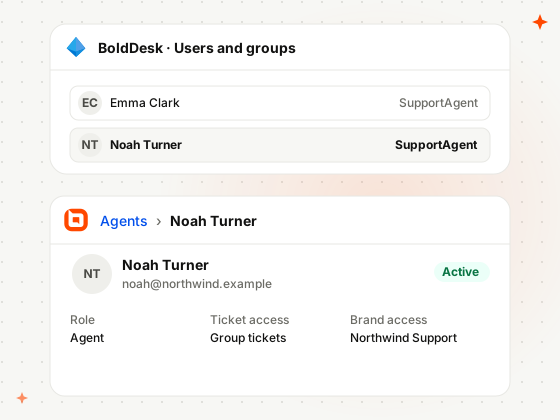
Create Agents and Contacts Automatically
New Entra ID users arrive in BoldDesk as agents or contacts automatically, with no manual setup or invites.
-
Role Scope
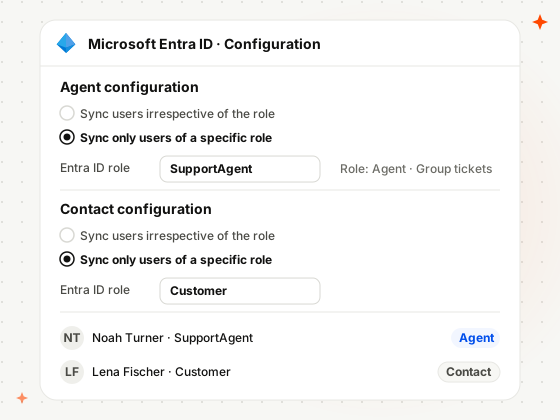
Sync Only the Users of a Specific Role
Sync the users of one Entra ID role as agents and another role as contacts, and leave everyone else out.
-
Deprovisioning
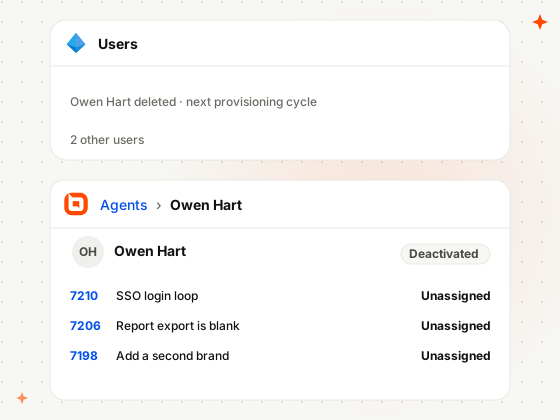
Remove Access When People Leave
Deleting a user in Entra ID deactivates their BoldDesk account and unassigns any tickets they owned.
-
Attribute Sync
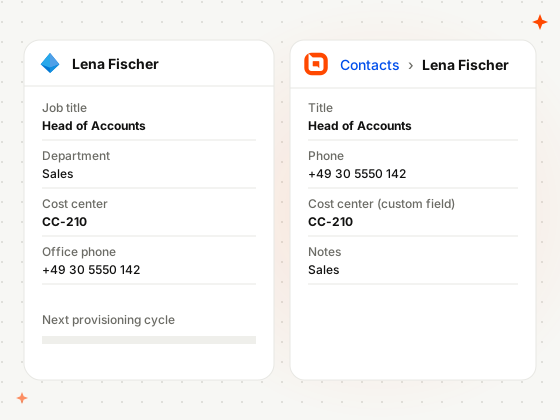
Keep Profiles and Custom Fields Current
Job titles, phone numbers and custom fields changed in Entra ID update the matching BoldDesk profile.
How IT and Support Teams Use BoldDesk and Microsoft Entra ID
Real situations from companies that manage their people in Microsoft Entra ID.
-
Growing companies
Staff a New Support Shift Without IT Tickets
Ten new hires start on Monday, and their BoldDesk accounts are ready.
- IT adds the hires to the support role in Entra ID
- Provisioning creates their BoldDesk agent accounts
- They log in on day one with preset access
-
Financial services
Remove Access the Day Someone Leaves
A regulated team can’t let a leaver keep access to customer data.
- HR offboards an agent in Entra ID
- Provisioning deactivates their BoldDesk account
- Their open tickets move to unassigned
-
Universities
Keep Student and Staff Contacts Current
Students sync as contacts by role, and their profile changes follow.
- The university gives students the Customer role
- They sync to BoldDesk as contacts
- Profile changes in Entra ID follow each cycle
Related Integrations
Connect BoldDesk to the other Microsoft tools your teams work in.


Security & Compliance
Enterprise-Grade Security and Compliance
Protect customer data with secure infrastructure and enterprise-grade access controls.
- SOC 2 Type 2 report & GDPR compliant
- AES-256 encrypted infrastructure
- SSO and IP restrictions
- HIPAA compliance with a signed BAA
- Secure cloud architecture
Customers
Backed by Syncfusion, Trusted by 41K+ Companies
4.5/5 on G2 · Fall 2026 Leader, Momentum Leader, Best Est. ROI, Fastest Implementation
Recognized by Customers on G2
4.5/5 average rating on G2

-
Reelo Technologies Raj Khichi, Customer Support Executive, Reelo Technologies Pvt. Ltd.
Up to 24x
faster at solving customer queries, with 2.4x more tickets closed per day
Read the Reelo story -
GeoVerra One of Canada’s largest geomatics firms
25%+
improvement in service desk efficiency, with single sign-on via Entra ID
Read the GeoVerra story -
Eurotel Hospitality Hospitality software, Greece
~67%
more issues handled each week, from about 600 to about 1,000
Read the Eurotel story
-
"The overall application functionality is good, UI/UX and the configurations including automations all the other services are constantly working fine."
 Harsha R Support Team Lead
LTIMindtree -
"BoldDesk has everything you could imagine in a customer service platform, including many features like APIs that we are yet to explore fully."
Carlos R VP of Operations
Movisis Tecnologia Limited -
"BoldDesk provided an all-in-one solution that saves time and reduces redundancy, improving the user experience and shortening ticketing time by 50%."
 Amy Syncfusion
Frequently Asked Questions
What does the BoldDesk Microsoft Entra ID integration do?
It provisions users from Microsoft Entra ID into BoldDesk automatically: it creates agents and contacts, keeps their attributes in sync, and removes their access when they leave.
What happens when a user is removed in Microsoft Entra ID?
An agent’s BoldDesk account is deactivated and their unresolved tickets move to unassigned. A contact is soft-deleted and moved to deleted contacts, and their current tickets are marked as spam.
How often does Microsoft Entra ID sync users to BoldDesk?
Provisioning runs every 40 minutes by default, from Microsoft Entra ID to BoldDesk only. You can start, stop and restart it at any time, and restart it after changing the scope.
Which BoldDesk plans include the Microsoft Entra ID integration?
The Momentum AI and Enterprise AI plans include the Microsoft Entra ID integration. Compare plans and pricing
How do I set up the BoldDesk Microsoft Entra ID integration?
Install Microsoft Entra ID from Admin › Marketplace and choose how agents and contacts sync. In Microsoft Entra ID, add a non-gallery enterprise app with automatic provisioning, your BoldDesk tenant URL and a secret token. Read the setup guide
Let Your Directory
Run BoldDesk Access
Install Microsoft Entra ID from Admin › Marketplace, connect provisioning with your tenant URL, and sync your first users.