
AI agents for IT services
AI-Native IT Service Desk Support with Unlimited Human Agents
AI agents unlock accounts, handle hardware requests, link outage tickets to incidents and report SLAs for every client you serve, 24/7 on every channel. No per-seat fees and no per-resolution fees.
- No credit card required
- Free onboarding
- 15-day free trial

- of service desk requests resolved by AI
- Up to 90%
- accuracy in G2’s AI agent test
- 96%
- languages, around the clock
- 40+
Trusted by companies of all sizes

What it resolves
From Password Resets to SLA Reports, Every Client Served Inside Its Own Rules
Connected to each client’s identity provider, your asset records and your monitoring tools, the AI agent resolves the request the way that client’s runbook says. Paid software and anything you mark wait for the client’s approver.
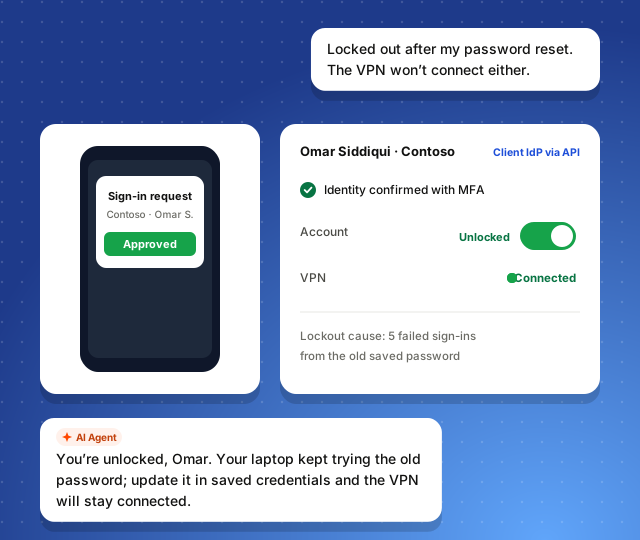
Access, passwords and VPN
Confirms the employee with MFA through the client’s identity provider, unlocks the account and explains why it locked, so the VPN reconnects.
- Client identity provider via API action
- Microsoft Teams
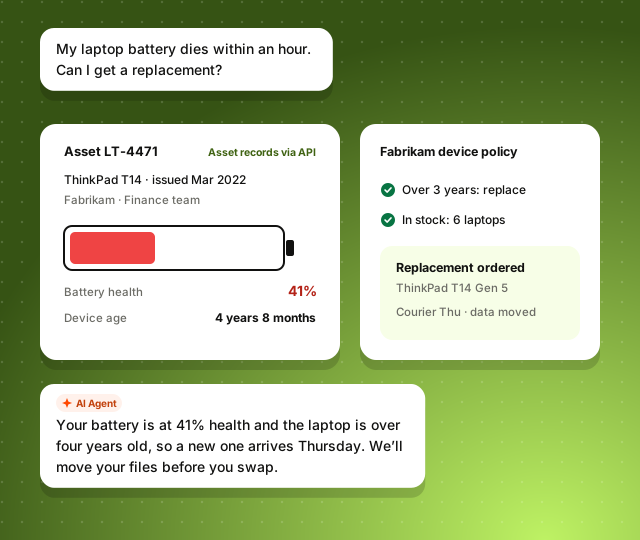
Hardware and software requests
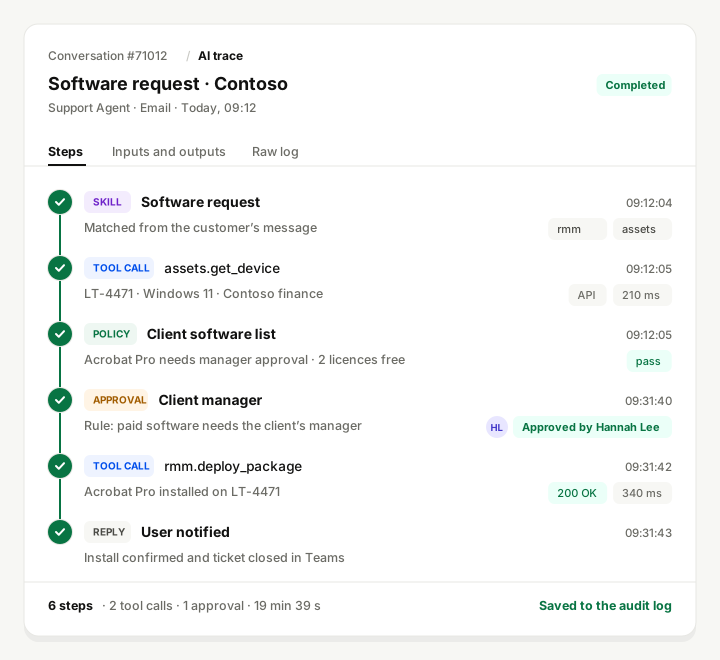
Reads the device record, checks the client’s policy and stock, and orders the replacement or installs the software once the client’s manager approves.
- Asset records via API action
- Approval step
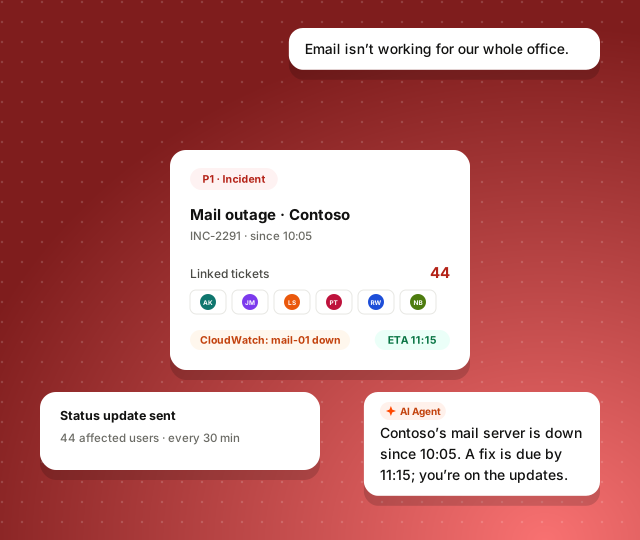
Incidents and outages
Links every ticket about the same outage to one incident, gives each user the expected fix time and sends updates until it is resolved.
- PagerDuty
- Monitoring alerts
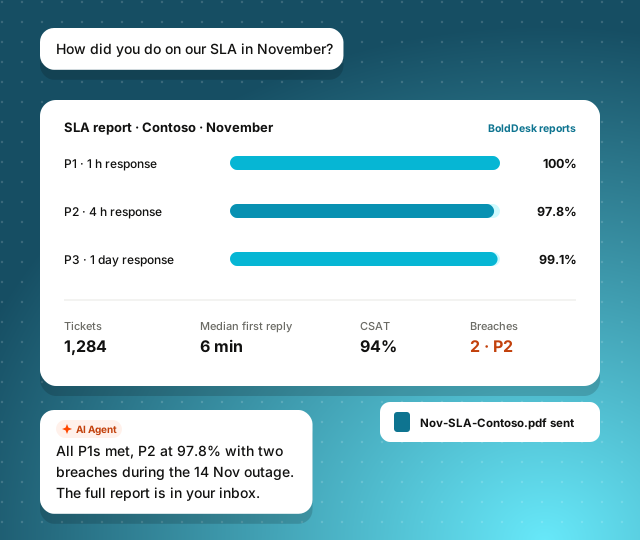
Per-client SLA reports
Answers a client’s account manager with that client’s SLA attainment, ticket volumes and breaches for the month, and sends the report.
- BoldDesk reports
Clients, users, devices and figures in the scenes are illustrative. Actions in your clients’ systems run through the integration, API action or MCP server you connect.
Tested by G2 on 50 Real Support Tasks. Tied for the Highest Accuracy
G2 ran nine customer experience AI agents through the same verified dataset: grounded answers, account actions, troubleshooting, and escalation by policy. BoldDesk was scored independently, like every other vendor.

Source: G2 AI CX Agent Evaluations, General CX leaderboard. Scores reflect G2’s evaluation on the date shown and may change as agents are re-tested.
One AI team
AI Agents for Client Employees, AI Help for Your L1 and L2 Engineers
Three agents share each client’s runbooks, SLAs and one credit balance. Engineers, service desk leads and account managers join as human agents at no seat cost.
-
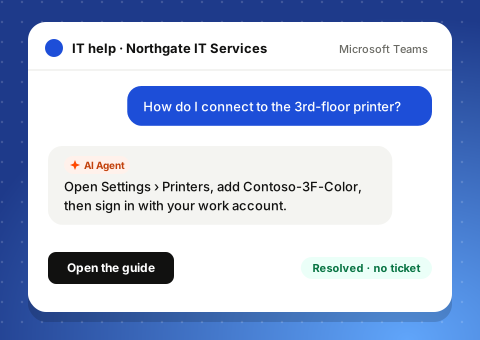
For client employees
Support Agent
Answers in Microsoft Teams, Slack, chat and email from each client’s runbook: printers, access, software and how-to questions.
Explore Support Agent -
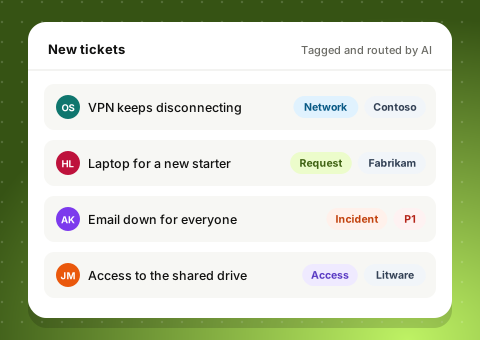
For every ticket
Background Agent
Tags each new ticket with its client and type and raises outages to P1, so every client lands in the right queue.
Explore Background Agent -
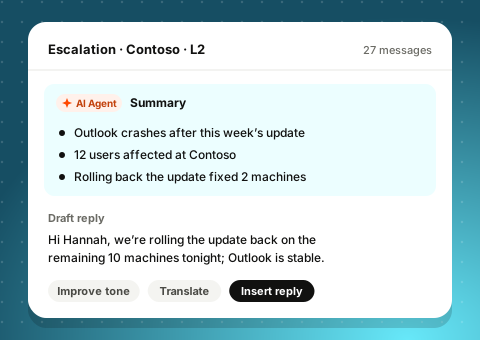
For your team
Assist Agent
Summarizes an escalation for the L2 engineer who takes it and drafts the client update from the ticket history.
Explore Assist Agent
Connect Your Service Desk and Engineering Tools in Minutes
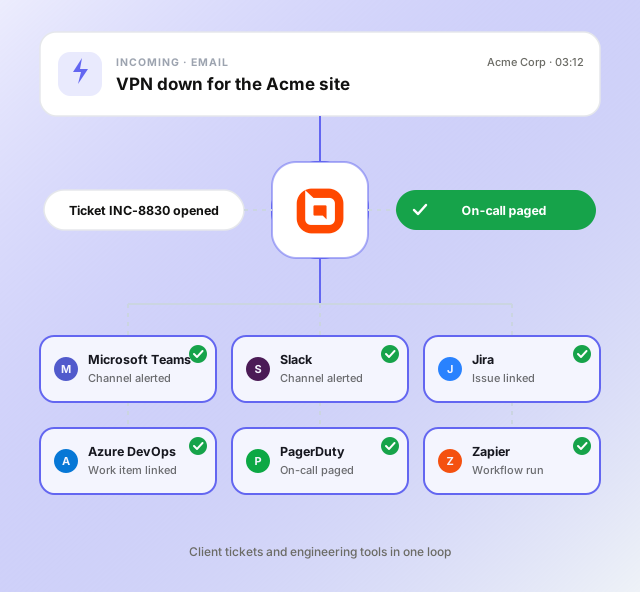
Native Microsoft Teams, Slack, Jira, Azure DevOps, PagerDuty and Zapier integrations. Your clients’ identity providers, asset records and RMM tools connect over API or MCP.
-
 Microsoft Teams Client channels alerted when an incident opens
-
 Slack Engineers alerted with the full ticket attached
-
 Jira Engineering issues linked to every affected client ticket
-
 Azure DevOps Work items opened and linked from the ticket
-
 PagerDuty On-call engineers paged when an incident is severe
-
 Zapier Monitoring and other apps connected with a workflow
Connect your RMM, PSA and clients’ identity providers over API or MCP
Guardrails
Every Client’s Rules, Applied to Every Request
The AI agent works inside each client’s policy. Paid software, admin access and anything you mark wait for that client’s approver, and every step is on record for the client’s review.
-
Approval before sensitive actions
Paid software, admin rights, new accounts and device replacements you mark wait for the client’s manager or your service desk lead.
-
A trace log of every step
Each identity check, device lookup, install and approval is recorded with its result and time, ready for a client’s audit.
-
Role-based access to records
Roles and brands keep each client’s tickets, assets and reports visible only to the team that serves it.
-
Policy-bound skills
Each client’s runbook decides what the AI agent may do, from password resets to the software it may install.
96% accuracy in G2’s independent AI agent test, +10 pts vs. average
Enterprise-Grade Security for Every Client You Serve
Independently audited and encrypted end to end, with each client’s data kept to the engineers who serve it.
-
SOC 2 Type 2
Independently audited for security, availability and confidentiality.
-

GDPR
Compliant with EU data protection rules, with a data processing agreement.
-
HIPAA
HIPAA compliance with a signed BAA, for providers that support healthcare clients.
-
Your data stays yours
Your data is only accessible to your AI agent and not used to train models.
-
AES-256 encryption
Tickets, device records and attachments encrypted on a secure cloud architecture.
-
SSO and role-based access
SSO, IP restrictions and roles decide which engineers see each client.
-
PII redaction
Passwords, keys and personal data pasted into a chat are masked in tickets and reports.
Do’s and Don’ts for ITES Customer Support
Serve every client on its own terms. Review best practices, common mistakes and the impact each has on SLAs, client data and escalations.
Explore Guidelines-
Best Practices
-
Common Mistakes
-
Impact
Frequently Asked Questions
What is an AI agent for IT services and managed service providers?
An AI agent for IT services and managed service providers is software that resolves your clients’ employees’ requests, such as a locked account, a hardware request or an outage report, instead of only logging them. In BoldDesk it works in each client’s identity provider, your asset records and your monitoring tools through API actions or MCP, following that client’s runbook.
Can BoldDesk’s AI agent reset passwords and handle hardware or software requests for our clients?
Yes. Through API actions to the client’s identity provider and your asset or RMM tools, the AI agent can confirm the employee with MFA, unlock the account, check a device against the client’s policy and order a replacement or install approved software. Paid software, admin rights and anything you mark wait for the client’s manager before they run.
Does BoldDesk work with NinjaOne, ConnectWise or Datto?
BoldDesk has no native NinjaOne, ConnectWise or Datto integration. These, clients’ identity providers and asset databases connect to the AI agent as API actions, or as an MCP server that exposes their tools, limited to the clients and actions you allow. Microsoft Teams, Slack, Jira, Azure DevOps, PagerDuty and Zapier are native integrations.
How does BoldDesk protect and separate each client’s data?
Brands and roles keep each client’s tickets, assets and reports visible only to the engineers who serve that client. BoldDesk has a SOC 2 Type 2 report, is GDPR compliant with a data processing agreement, offers HIPAA compliance with a signed BAA, encrypts data with AES-256 and supports SSO and IP restrictions. AI services are turned off in HIPAA mode, so use the AI agent for requests that don’t involve protected health information.
How do I stop the AI agent from installing software or granting admin access without the client’s approval?
Mark paid software, admin rights, new accounts and device replacements as approval-required, and name each client’s approver. The AI agent checks the client’s policy, prepares the action, waits for that approver, then runs it, and each step is saved in its trace log for the client’s review.
When does the AI agent hand a ticket to an engineer?
When it sees a P1 outage it cannot match to an incident, a possible security event such as phishing or a compromised account, a VIP user, a request outside the client’s runbook, low confidence, or when your rules say so, the AI agent passes the ticket to your L1 or L2 engineers with what it checked. Engineers can take over any AI conversation in one click.
How is BoldDesk priced for an IT service provider with many clients?
Plans start at $99 a month, billed yearly, with 500 AI credits and unlimited human agents, so every engineer, service desk lead and account manager works in BoldDesk at no seat cost as you add clients. There are no per-resolution fees, and extra AI credits are $40 per 1,000.
Which channels and languages can client employees use?
Client employees can reach the AI agent in Microsoft Teams, Slack, live chat and email, and through each client’s own portal, and it replies in 40+ languages, translating each exchange for your engineers.
Get started
Let AI Agents Run Your Clients’ Service Desks
Connect your clients’ identity providers and your monitoring tools, and watch the AI agent clear its first tickets today.
- No credit card required
- Free onboarding and migration
- Unlimited human agents