



- Blogs Explore Blogs Blogs
Shared Email Templates for Support Teams: A Buyer’s Guide
-
by Lavenda Morin Atieno
- Updated on: November 24, 2026
TL;DR: Gmail saves templates to each person’s account, so a support team ends up with as many versions of a reply as it has agents. In Outlook on the web, teammates with access to a shared mailbox can view and edit My Templates created there when each person opens it in a separate tab or window using Open another mailbox. Shared email templates solve the wider problem only when they live in one library the whole team uses. That library needs owners, permissions, fields filled from the ticket, and a way to see which replies get used.
Most support teams start with shared email templates the informal way: a document of approved replies, copied into Gmail or Outlook one paste at a time. It works for two or three people. Past that, the copies drift, nobody knows which version is current, and customers get different answers to the same question.
This guide is for the team lead who has reached that point. It covers why personal templates stop working for a team, what a shared template tool needs to do, and how the three common setups compare. Use it to judge a tool in a demo rather than on its feature list.
If you are looking for reply wording itself, our guides to canned responses and customer service email templates, and the canned response examples library, cover that. This article is about where those replies live and who controls them.
Why personal templates break down for support teams
Personal templates are built for one person who reuses their own words. A support team needs the opposite: many people sending the same approved answer. Four problems show up as the team grows.
Every agent keeps a different version
When a refund policy changes, someone updates the shared document. Each agent then has to update the copy in their own mail account, and some never do. Two weeks later, customers are still being quoted the old terms, and the only way to find out is a complaint.
Nobody owns a template
In a personal setup, anyone can edit their copy and nobody is responsible for the original. Legal, billing, and product wording ends up rewritten by whoever was in a hurry. A team needs a named owner for each sensitive reply and a rule for who may change it.
Templates can’t read the ticket
A mail template is static text. The agent still types the customer’s name, the order number, and the plan by hand, which is where most errors come from. Templates tied to ticket data fill those fields for the agent.
You can’t see which replies get used
Personal templates leave no record. You can’t tell which answers your team sends most, which ones agents rewrite every time, or which ones lead to a reopened ticket. Without that, the library never improves.
What Gmail and Outlook templates give a team
Gmail and Outlook both let a user save a message as a template and insert it into a new email. For an individual, that is enough. For a team, the limits come from where the templates are stored: Gmail templates sit in each person’s account, and Outlook templates sit in a mailbox. In Outlook on the web, teammates with access to a shared mailbox can view and edit My Templates created there when each person opens it in a separate tab or window using Open another mailbox. That gives a shared mailbox one set of templates, but the templates still live in a mailbox rather than in a team library with owners, permissions, and ticket fields.
- Sharing is manual: A template reaches a colleague by email, chat, or a shared document, and becomes a separate copy on arrival.
- There is no central edit: Updating a reply means asking every agent to update theirs.
- There is no access control: You can’t limit who edits the refund template, because everyone edits their own.
- There is no ticket context: The template doesn’t know who the customer is or what they asked.
A shared mailbox or Google collaborative inbox gives several people one address, but it doesn’t change how templates work. Our guide to the Gmail shared inbox explains that setup and where it stops.
What to look for in a shared email templates tool
Use this checklist when you compare tools. The third column is the question that separates a real shared library from a renamed personal one.
| Requirement | Why it matters | Question to ask in a demo |
|---|---|---|
| One shared library | Every agent inserts the same current version. | If I edit a template, does every agent get the change at once? |
| Folders or categories | Agents find the right reply in seconds, not minutes. | How do agents search and browse a library of 200 replies? |
| Roles and permissions | Only owners change policy, billing, or legal wording. | Can I let agents use a template but not edit it? |
| Fields filled from the ticket | Names, numbers, and plans are inserted, not retyped. | Which customer and ticket fields can a template pull in? |
| Insert inside the reply editor | The template sits where the agent works. | How many clicks from an open ticket to an inserted reply? |
| More than one language | Global customers get the same answer in their language. | Can one template have versions in several languages? |
| AI help with the last mile | Agents adjust tone and length without rewriting. | Can AI rephrase or translate a template before it sends? |
| Works on every channel | Email, chat, and messaging answers stay consistent. | Are the same templates available in live chat? |
Personal templates vs. shared inbox vs. customer service software
Most teams move through three setups. The table shows what each one changes for shared email templates.
| Capability | Personal Gmail or Outlook templates | Shared mailbox | Customer service software |
|---|---|---|---|
| Where templates live | Each user’s account | The shared mailbox, opened by each person in a separate tab or window (Outlook on the web) | One team library |
| Update once for everyone | No | Yes, in Outlook on the web | Yes |
| Control who edits | No | No | Yes, with roles |
| Ticket fields in templates | No | No | Yes |
| Stops two agents replying at once | No | No | Yes, with collision detection |
| Ownership and status per email | No | No | Yes, as tickets |
A shared mailbox solves access to one address, and in Outlook on the web it also lets teammates work from the same My Templates. Customer service software adds a team library with owners, roles, and ticket fields, because the templates, the ticket, and the reply editor are in one place. Our comparison of shared inbox tools lists options at each price point.
How to move your team’s templates into one shared library
Switching tools is the easy part. The value comes from cleaning up the library on the way in.
- Collect what agents send today: Ask each agent to export or paste their templates. Expect duplicates with small differences; those differences are what you are fixing.
- Pick one version of each reply: Choose the best wording from resolved tickets that ended well, not from the oldest document.
- Assign an owner to sensitive replies: Billing, refunds, security, and legal answers get an owner, and only owners can edit them.
- Replace hand-typed details with fields: Swap names, ticket numbers, and plan names for placeholders the tool fills in.
- Group replies the way agents look for them: Use folders that match your ticket categories, so the reply sits next to the problem.
- Review the library every quarter: Remove replies nobody uses and rewrite the ones agents always edit before sending.
How BoldDesk handles shared email templates
BoldDesk is customer service software with a shared inbox built in. Support email addresses, including Gmail and Microsoft 365 or Outlook mailboxes, connect to it, and every email arrives as a ticket with an owner and a status.
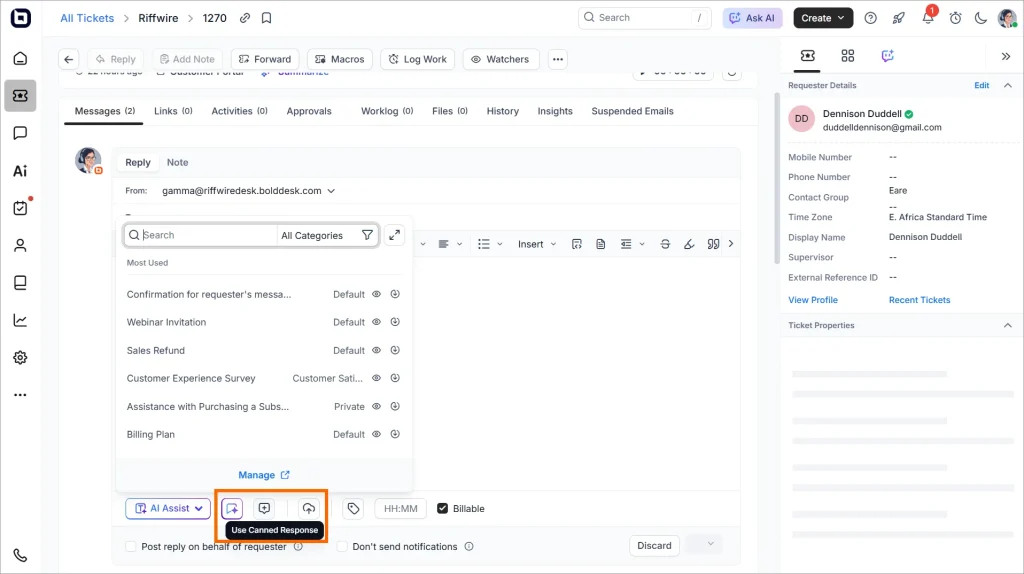
- Canned responses for the whole team: Agents insert approved replies from the reply editor, and role-based access lets admins decide who can create, edit, or use each canned response.
- Templates in more than one language: You can keep prewritten responses in multiple languages, so global customers get the same answer in their own language.
- Placeholders and chat access: In live chat, canned responses support placeholders and open from the agent portal in one step.
- Signatures and templates on email tickets: With BoldDesk email ticketing, canned responses, signatures, and templates keep replies on brand.
- No duplicate replies: Collision detection shows who is viewing or replying, and private notes and @mentions keep internal discussion off the customer’s thread.
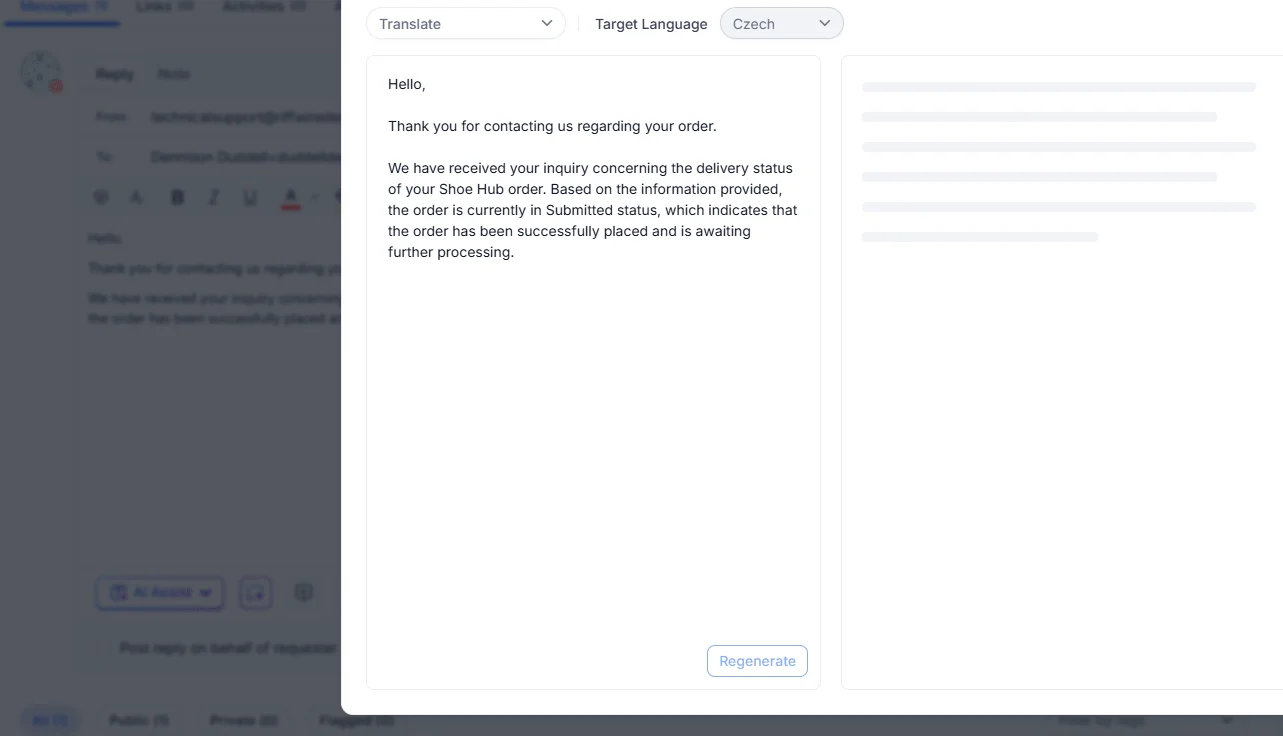
For the last mile, agents use the AI Assist menu in the reply editor, part of Assist Agent. It can rephrase, elaborate, shorten, or correct a reply, review it for what it misses, and translate it into the customer’s language. The agent reviews the result before it sends.
Plans start at $99 a month for Scale AI, billed annually. BoldDesk AI plans include monthly AI credits. On the per-agent Help Desk plan, AI credits are an optional add-on. The pricing page lists what each plan includes.
Start with the templates your team already sends
You don’t need to write a new library before you switch. Bring the replies your agents already use, merge the duplicates, and put an owner on the ones that carry risk. From then on, an edit made once reaches every agent.
Start a free trial and set up a shared library with the replies you already send. Or request a demo to see canned responses, the shared inbox, and AI Assist on your own email.
Frequently Asked Questions
What are shared email templates?
Shared email templates are prewritten replies stored in one library that a whole team uses. When someone updates a template, every user gets the new version, unlike personal templates saved to each person’s mail account.
Can you share email templates in Gmail?
Gmail saves templates to each user’s account. Teams usually share them by sending copies or keeping them in a shared document, which means each person keeps a separate version that has to be updated by hand.
Can you share templates in Outlook?
In Outlook on the web, teammates with access to a shared mailbox can view and edit My Templates created there when each person opens it in a separate tab or window using Open another mailbox. That shares templates through the mailbox, but it doesn’t give a team one central library with access control.
What is the difference between shared email templates and canned responses?
They are the same idea under two names. Customer service software usually calls them canned responses and adds roles, ticket fields, and use across email and chat.
Who should be allowed to edit shared templates?
Give each sensitive reply an owner, such as billing, refunds, or security answers, and let only owners edit it. Other agents can use the template and suggest changes.
Does BoldDesk support shared email templates?
Yes. BoldDesk canned responses work as a shared library, with role-based access that controls who can create, edit, or use each reply, and support for templates in multiple languages.
ABOUT THE AUTHOR

Lavenda Morin Atieno 
Lavenda is a customer service content specialist at Syncfusion, crafting documentation and resources that improve customer experience through clear communication and thoughtful research.
Read more articles by this author Connect with the author on LinkedIn.
Be the first to get updates