



- Blogs Explore Blogs Blogs
After-Hours Support: How to Cover Nights, Weekends, and Holidays
-
by Maxwel Odhiambo
- Updated on: November 24, 2026
TL;DR: After-hours support is how you answer customers when your team is offline. Most teams combine five tools: business hours on SLAs, an honest auto-reply, an AI agent for routine requests, a knowledge base, and on-call routing for urgent issues. A follow-the-sun team only makes sense when urgent volume is high around the clock.
After-hours support decides what happens to a customer who writes in at 11:00 p.m. on a Friday. Without a plan, that message waits until Monday while the SLA clock keeps running. The first thing an agent reads after the weekend is a follow-up asking why nobody answered.
Hiring a night shift is one answer, and for most teams it is the most expensive one. This guide covers the options for covering nights, weekends, and holidays with the team you already have. It also compares them and shows how to choose by ticket volume and urgency.
What after-hours support needs to do
Customers who contact you outside business hours don't all need the same thing. Before choosing tools, sort your after-hours tickets into three groups:
- Routine questions: Order status, password resets, how-to questions, and billing lookups. These can be answered without a person.
- Requests that can wait: Feature questions, account changes, and feedback. These need a clear expectation of when someone will reply.
- Urgent issues: Outages, security concerns, and problems that stop a customer’s business. These need a person, fast.
Pull a month of tickets created outside your working hours and count each group. The split tells you which of the options below will carry most of the load.
Six ways to cover after-hours support
1. Business hours and holiday calendars on your SLAs
Start with the clock. If your service level agreement counts every hour of the weekend, a ticket that arrives on Friday night breaches before anyone is due back.
Define your working hours and public holidays per team or region, and tie your SLA policies to them. Response and resolution targets then pause outside those hours, and your reports show real performance instead of breaches nobody could have prevented.
2. After-hours auto-replies that set expectations
An out-of-office message is the simplest piece of after-hours support, and it still matters. A good one confirms the request arrived, says when the team is back, and points to the fastest way to get help in the meantime.
In a customer service platform, this is a rule rather than a personal mailbox setting. It fires only when a ticket or chat arrives outside business hours, includes the ticket number, and sends urgent cases to a different path. For wording and templates, see our guide to auto-reply emails.
3. An AI agent that resolves common requests
An auto-reply tells customers to wait. An AI agent answers them. It reads the message and finds the answer in your knowledge base and past tickets. It can also complete tasks, such as checking an order or issuing a refund, through the systems you connect.
This is the option that changes after-hours support most, because routine questions are usually the largest group. The safeguards matter as much as the answers. Decide which topics it may handle and which actions need a person’s approval. Then decide how it hands a conversation to your team, with a summary, when it can’t help. Our guide on AI-to-human handoff covers those rules.
4. A self-service knowledge base
Many customers would rather find the answer themselves than wait for one. A searchable help center with current articles resolves part of the after-hours queue before a ticket exists.
The knowledge base also feeds the AI agent. Articles you write once answer customers directly in the help center and through the agent in chat or email, so keeping them current improves both.
5. On-call routing for urgent issues
Some problems can’t wait for Monday. For those, set up a narrow path to a person. Use a priority or category that marks the ticket as urgent and a rule that assigns it to the on-call agent. Add an escalation if nobody picks it up within a set time.
Keep the definition of urgent tight and published. If every customer can mark a ticket urgent, the on-call agent ends up working the regular queue.
6. Follow-the-sun teams
Teams in several time zones can hand the queue from one region to the next, so a person is always working. This gives full human coverage without night shifts, but it needs enough staff in each region, shared processes, and clean handovers. It suits larger teams whose customers are spread across regions. For a broader look at round-the-clock models, see 24/7 customer service.
After-hours support options compared
| Option | Covers | Running cost | Setup effort |
|---|---|---|---|
| Business hours and holiday calendars | Fair SLA tracking for all tickets | None beyond your platform | Low |
| After-hours auto-reply | Expectations for every ticket | None beyond your platform | Low |
| AI agent | Routine questions and tasks, around the clock | AI credits per conversation | Medium: knowledge, rules, and actions |
| Self-service knowledge base | Customers who prefer to find answers | Time to write and update articles | Medium |
| On-call routing | Urgent issues only | On-call pay for a small rotation | Medium: rules and a clear definition of urgent |
| Follow-the-sun team | Everything, with a person | Staff in several regions | High |
How to choose your after-hours support model
Use the ticket split from the first section:
- Low after-hours volume: Business hours on your SLAs, an auto-reply, and a knowledge base. Most teams start here.
- Mostly routine questions: Add an AI agent. It answers the largest group without a person, and your team starts the day with a shorter queue.
- Some urgent issues: Add on-call routing with a strict definition of urgent, so a person is reached only when it matters.
- High urgent volume in every time zone: Consider follow-the-sun coverage, with the AI agent still handling routine requests in each region.
Review the split every quarter. As the AI agent and knowledge base take more routine questions, the case for adding people at night usually gets weaker, not stronger.
How BoldDesk handles after-hours support
BoldDesk is customer service software that brings these options together in one place:
- Business hours and holiday lists: SLA policies with reminders and escalations run on the working hours and holidays you define.
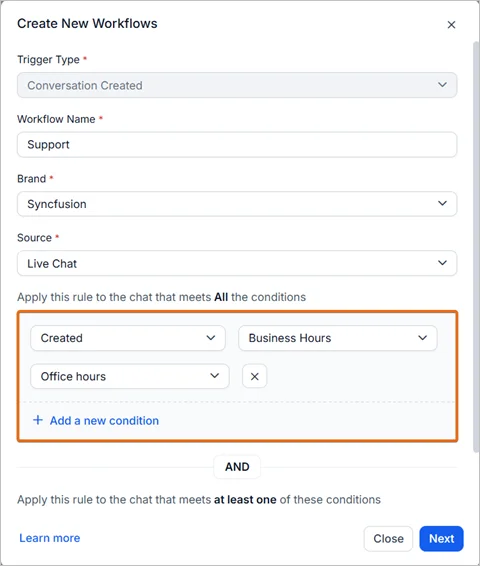
- After-hours automation: Workflows can include a business hours condition, so tickets follow one path during working hours and another after hours. Auto-replies can be triggered by ticket creation, status changes, SLA conditions, or after-hours submissions, with placeholders such as the ticket ID and requester name.
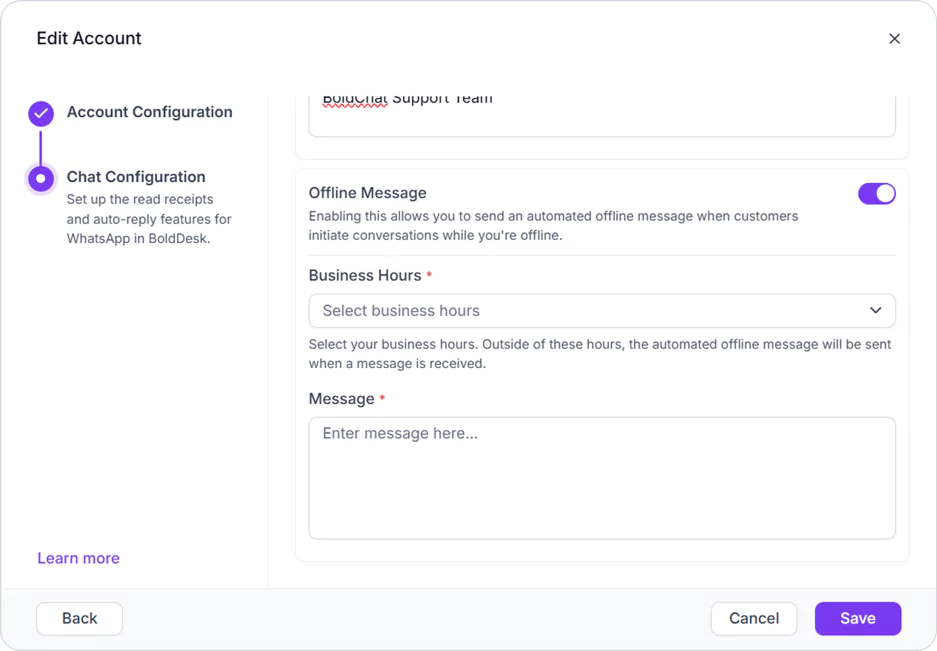
- Offline messages on every channel: Customers who reach out when agents are unavailable receive an automated offline message, configured during channel setup.
- An AI agent around the clock: The BoldDesk AI agent answers from your knowledge base, files, and past tickets, takes actions in connected systems, and hands the conversation to your team with a summary when a person is needed. Sensitive steps, such as refunds over a limit, can wait for approval.
- Knowledge base and live chat: One set of articles powers the knowledge base and the AI agent, and the AI agent also works in live chat.
Plans that include the AI agent start with Scale AI at $99 a month billed annually with 500 AI credits, and all BoldDesk AI plans include unlimited human agents. See pricing for what each plan includes.
Cover nights and weekends without a night shift
Start with the clock and the auto-reply, then let an AI agent and your knowledge base take the routine questions. Keep people for the urgent issues that need them.
Start a free trial to set up business hours, after-hours rules, and the AI agent on your own tickets, or request a demo to see the setup with our team.
Frequently Asked Questions
What is after-hours support?
After-hours support is how a business answers customers outside its working hours, including nights, weekends, and public holidays. It usually combines automated replies, self-service, an AI agent for routine questions, and a person on call for urgent issues.
Do I need a night shift to offer after-hours support?
Usually not. An AI agent and a knowledge base can answer routine questions at any hour, and on-call routing can reach a person for the few issues that are urgent. A night shift or follow-the-sun team is worth it only when urgent volume is high around the clock.
Should SLAs count time outside business hours?
For most teams, no. Tie SLA targets to your business hours and holiday calendar, so tickets that arrive at night or on a holiday are measured from the time your team is due back. Offer round-the-clock targets only for urgent tickets you can staff.
What should an after-hours auto-reply say?
Confirm the request arrived, give the ticket number, say when the team is back, and point to the fastest help in the meantime, such as the help center or the AI agent. If you offer an urgent path, say exactly what counts as urgent.
How does an AI agent handle requests it can’t resolve after hours?
It hands the conversation to your team with a summary of what the customer asked and what it already checked. The ticket waits in the queue, or goes to the on-call agent if your rules mark it as urgent.
Which after-hours support option should I set up first?
Set business hours and holidays on your SLAs and add an after-hours auto-reply first. Both take little effort and fix the most visible problems. Then add an AI agent and a knowledge base for routine questions.
ABOUT THE AUTHOR

Maxwel Odhiambo 
Maxwel Odhiambo is a customer service specialist who enhances client experiences through clear, effective documentation. Combining strong communication skills with a passion for service excellence, he empowers organizations to build trust and improve customer satisfaction.
Read more articles by this author Connect with the author on LinkedIn.
Be the first to get updates