

Ozonetel Integration That Tracks Every Call as a Ticket
For contact centers on Ozonetel: take and make campaign calls in BoldDesk, and ticket every call automatically.
- 15-day free trial
- No credit card required


Your Contact Center Runs Campaigns. Your Help Desk Should See Them.
When agents juggle a contact center screen and a help desk, calls go untracked and callers repeat themselves. Connected, it all happens in one place.
-
Before:
Two screens for every agentOne Workspace
Agents handle calls and tickets in a single screen.
-
Before:
Voicemails left unheardEvery Voicemail Answered
Messages left after hours become callbacks.
-
Before:
Untracked missed callsEvery Call Accounted For
No inbound, outbound or missed call goes untracked.
Run Ozonetel Campaigns From the Help Desk
Dial, ticket and record Ozonetel calls in the same place your agents resolve tickets.
-
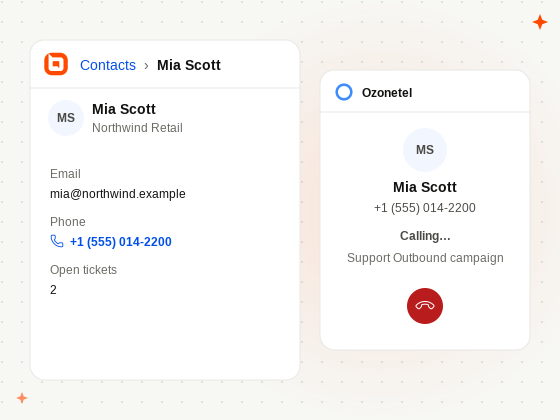
Click to Call
Call Customers With One Click
Click a customer’s phone number in BoldDesk, and the Ozonetel widget dials it from your campaign.
-
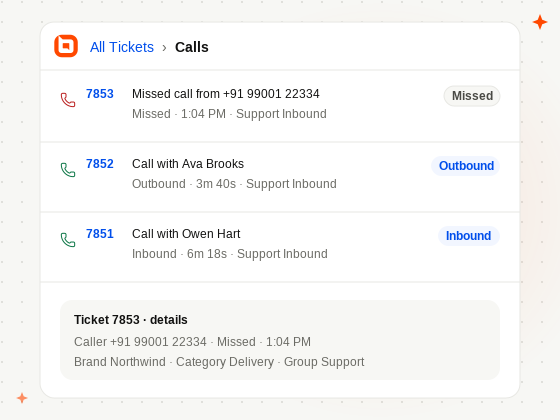
Ticket Creation
Ticket Inbound, Outbound and Missed Calls
A campaign webhook turns inbound, outbound and missed calls into BoldDesk tickets with recordings.
-
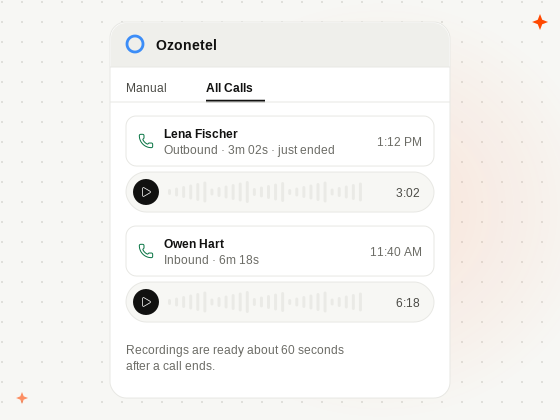
Call Recording
Play Call Recordings in BoldDesk
The All Calls tab lists every Ozonetel call with its recording, so you can play any call from inside BoldDesk.
-
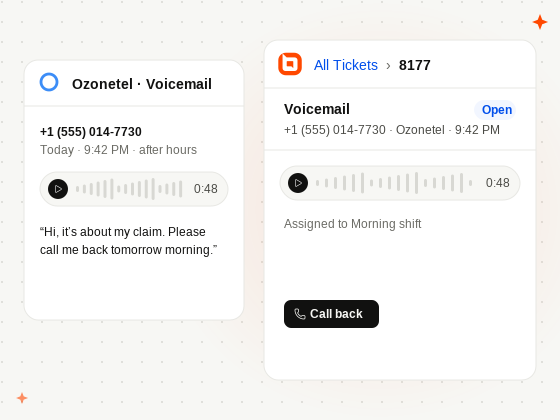
Voicemail
Turn Voicemails Into Tickets
Voicemails on your Ozonetel numbers become BoldDesk tickets with the recording, ready for a callback.
How Contact Center Teams Use BoldDesk and Ozonetel
Real situations from contact centers that run on Ozonetel.
-
Courier companies
Rebook Failed Deliveries by Phone
Agents call customers whose deliveries failed, straight from the campaign.
- A delivery fails twice
- The agent dials from the outbound campaign
- The call’s details land on a ticket
-
Insurance
Call Back a Claimant Who Left a Voicemail
An after-hours voicemail is waiting as a ticket in the morning.
- A claimant leaves a voicemail at night
- It arrives as a ticket with the recording
- The morning team calls back from BoldDesk
-
Retail contact centers
Coach Agents With Real Call Recordings
Supervisors review escalated calls from the call history.
- A supervisor opens yesterday’s calls
- Each call lists its recording
- They review the escalations with the team
Related Integrations
Connect BoldDesk to the other phone tools your team uses.


Security & Compliance
Enterprise-Grade Security and Compliance
Protect customer data with secure infrastructure and enterprise-grade access controls.
- SOC 2 Type 2 report & GDPR compliant
- AES-256 encrypted infrastructure
- SSO and IP restrictions
- HIPAA compliance with a signed BAA
- Secure cloud architecture
Customers
Backed by Syncfusion, Trusted by 41K+ Companies
4.5/5 on G2 · Fall 2026 Leader, Momentum Leader, Best Est. ROI, Fastest Implementation
Recognized by Customers on G2
4.5/5 average rating on G2

-
Reelo Technologies Raj Khichi, Customer Support Executive, Reelo Technologies Pvt. Ltd.
Up to 24x
faster at solving customer queries, with 2.4x more tickets closed per day
Read the Reelo story -
GeoVerra One of Canada’s largest geomatics firms
25%+
improvement in service desk efficiency, with single sign-on via Entra ID
Read the GeoVerra story -
Eurotel Hospitality Hospitality software, Greece
~67%
more issues handled each week, from about 600 to about 1,000
Read the Eurotel story
-
"The overall application functionality is good, UI/UX and the configurations including automations all the other services are constantly working fine."
 Harsha R Support Team Lead
LTIMindtree -
"BoldDesk has everything you could imagine in a customer service platform, including many features like APIs that we are yet to explore fully."
Carlos R VP of Operations
Movisis Tecnologia Limited -
"BoldDesk provided an all-in-one solution that saves time and reduces redundancy, improving the user experience and shortening ticketing time by 50%."
 Amy Syncfusion
Frequently Asked Questions
What does the BoldDesk Ozonetel integration do?
It lets agents make and take Ozonetel calls inside BoldDesk, and creates a ticket with the call details and recording for every inbound, outbound and missed call.
How are Ozonetel calls turned into tickets?
An inbound campaign in Ozonetel pushes each call to the webhook URL the BoldDesk app gives you, and BoldDesk creates the ticket with the brand, category and group of the number.
Why isn’t a call recording available right away?
Ozonetel finishes the recording after the call’s wrap-up time, so allow at least 60 seconds. Allow Manual Dialing and recording must be on in the inbound campaign.
Which BoldDesk plans include the Ozonetel integration?
The Momentum AI and Enterprise AI plans include the Ozonetel integration. Compare plans and pricing
How do I set up the BoldDesk Ozonetel integration?
Install Ozonetel from Admin › Marketplace with your Ozonetel username and API key and a BoldDesk API key, add the webhook URL to an inbound campaign, then map your numbers. Read the setup guide
Bring Your Ozonetel Campaigns
Into BoldDesk
Install Ozonetel from Admin › Marketplace, add the webhook to your inbound campaign, and ticket your first call.