

Make Integration That Puts BoldDesk in Every Scenario
For teams building no-code workflows: start Make scenarios the moment tickets change, and create, update or search BoldDesk records.
- 15-day free trial
- No credit card required


Build the Workflow You Need. Make Runs It Every Time.
When work moves between tools by hand, steps get skipped and records fall out of date. With Make, BoldDesk and your tools follow one workflow.
-
Before:
Waiting on scheduled checksWork Starts Right Away
Workflows run the moment a ticket changes, not on a schedule.
-
Before:
Manual steps between toolsNo Developers Needed
Your team builds its own automations visually.
-
Before:
Matching IDs across systemsSystems That Line Up
Records match across tools by the IDs you already use.
Put BoldDesk Into Every Make Scenario
Trigger, create, update and search BoldDesk records from the scenarios your team builds.
-
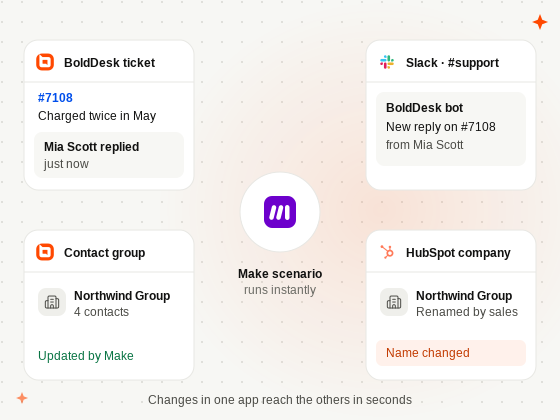
Instant Triggers
Start Scenarios the Moment Tickets Change
BoldDesk webhooks start Make scenarios as soon as tickets or contacts change, like a new reply.
-
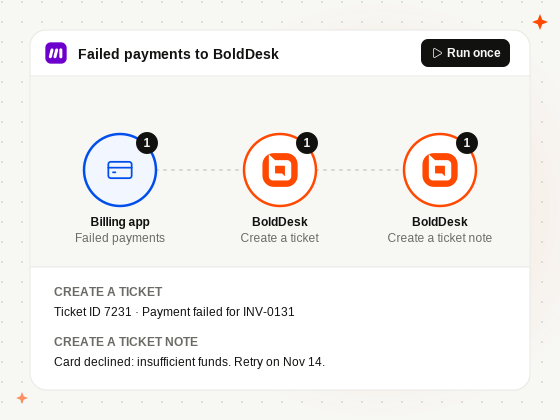
Ticket Actions
Create Tickets and Notes From Any Scenario
Scenarios create BoldDesk tickets and add notes to them from events in any of the 3,000+ tools Make connects.
-
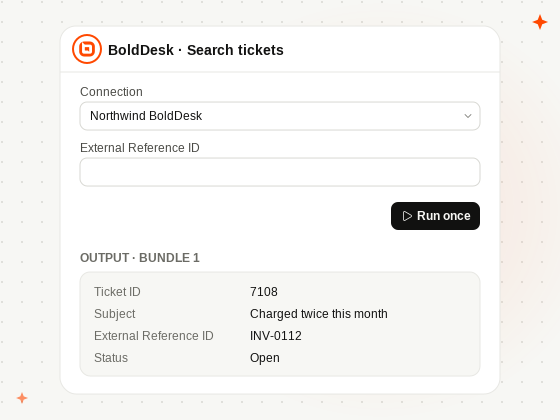
Find Records
Find Tickets, Contacts and Contact Groups
Get a ticket by ID, a contact by email or a group by name, or search by your external reference ID.
-
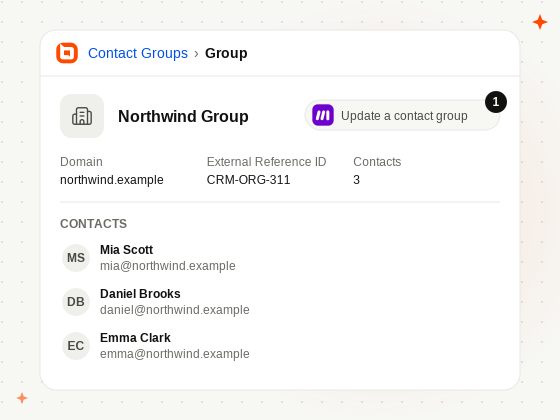
Contacts & Groups
Keep Contacts and Contact Groups in Step
Scenarios create and update contacts and contact groups in BoldDesk to match changes in your other tools.
How Operations Teams Use BoldDesk and Make
Real scenarios teams build between BoldDesk and their other tools.
-
Subscriptions
Reach Out Before a Failed Payment Becomes Churn
Failed renewals open tickets, so support can help customers fix them.
- A customer’s renewal payment fails
- A scenario opens a ticket with the decline reason
- The agent helps them update their card
-
Insurance
Update the Right Claim Ticket From Your Claims System
Claim updates find their ticket by the claim number, not a ticket ID.
- The claims system updates claim CL-2041
- Search tickets finds the ticket by that reference
- The scenario updates the ticket’s status
-
Property management
Send a Contractor the Moment a Tenant Replies
A tenant’s reply with photos starts the repair workflow right away.
- A tenant replies with photos of a leak
- The reply trigger starts the scenario at once
- The scenario notifies the contractor in your other app
Related Integrations
Connect BoldDesk to more tools with no-code automation or your own code.


Security & Compliance
Enterprise-Grade Security and Compliance
Protect customer data with secure infrastructure and enterprise-grade access controls.
- SOC 2 Type 2 report & GDPR compliant
- AES-256 encrypted infrastructure
- SSO and IP restrictions
- HIPAA compliance with a signed BAA
- Secure cloud architecture
Customers
Backed by Syncfusion, Trusted by 41K+ Companies
4.5/5 on G2 · Fall 2026 Leader, Momentum Leader, Best Est. ROI, Fastest Implementation
Recognized by Customers on G2
4.5/5 average rating on G2

-
Reelo Technologies Raj Khichi, Customer Support Executive, Reelo Technologies Pvt. Ltd.
Up to 24x
faster at solving customer queries, with 2.4x more tickets closed per day
Read the Reelo story -
GeoVerra One of Canada’s largest geomatics firms
25%+
improvement in service desk efficiency, with single sign-on via Entra ID
Read the GeoVerra story -
Eurotel Hospitality Hospitality software, Greece
~67%
more issues handled each week, from about 600 to about 1,000
Read the Eurotel story
-
"The overall application functionality is good, UI/UX and the configurations including automations all the other services are constantly working fine."
 Harsha R Support Team Lead
LTIMindtree -
"BoldDesk has everything you could imagine in a customer service platform, including many features like APIs that we are yet to explore fully."
Carlos R VP of Operations
Movisis Tecnologia Limited -
"BoldDesk provided an all-in-one solution that saves time and reduces redundancy, improving the user experience and shortening ticketing time by 50%."
 Amy Syncfusion
Frequently Asked Questions
What does the BoldDesk Make integration do?
It adds BoldDesk modules to Make scenarios: instant triggers watch tickets, replies, notes, contacts and contact groups, and actions create, update, get or search those records.
How do the instant triggers work?
Each BoldDesk trigger in Make uses a webhook. Make gives you the webhook address, you register it in BoldDesk, and the scenario runs when the event happens.
Can a scenario find records by our own IDs?
Yes. Search tickets, Search contacts and Search contact groups find records by External Reference ID. Get a ticket, Get a contact and Get a contact group find them by ticket ID, email or name.
Which BoldDesk plans work with Make?
Make connects with a BoldDesk API key and webhooks, and every BoldDesk plan includes the REST API and webhooks. Compare plans and pricing
How do I set up the BoldDesk Make integration?
In Make, create a scenario, add a BoldDesk module, and connect it with your BoldDesk domain and API key. For triggers, register the webhook address in BoldDesk. Read the setup guide
Automate BoldDesk
With Make Scenarios
Add a BoldDesk module in Make, connect your domain and API key, and register the webhook for instant triggers.